AZ1510 - Chaîne Hi-Fi PHILIPS - Notice d'utilisation et mode d'emploi gratuit
Retrouvez gratuitement la notice de l'appareil AZ1510 PHILIPS au format PDF.

| Marque | Philips |
| Modèle | AZ1510 / AZ1515 |
| Type de produit | Chaîne Hi-Fi portable avec lecteur CD, tuner radio et platine cassette |
| Dimensions (approx.) | Environ 380 x 250 x 180 mm |
| Poids (approx.) | Environ 2,5 kg (sans piles) |
| Alimentation | Secteur AC 110-220 V (sélecteur de tension sur certains modèles) ou 6 piles R14/UM2/C (non fournies) |
| Consommation électrique | Non spécifiée mais typique < 30 W |
| Formats audio supportés | CD audio, CD-R, CD-RW |
| Radio | FM (avec antenne télescopique) et MW/AM (antenne intégrée) |
| Mémoire stations | 40 présélections (manuelles ou autostore) |
| Cassette | Platine cassette stéréo, enregistrement depuis CD ou radio, type IEC I (Normal) |
| Fonctions audio | Dynamic Bass Boost (DBB), réglage du volume |
| Lecteur CD | Programmation (20 plages), lecture aléatoire (shuffle), répétition (plage/disque/programme) |
| Télécommande | Fournie uniquement avec le modèle AZ1515 |
| Sorties | Prise casque stéréo 3,5 mm (coupe les haut-parleurs) |
| Entretien et nettoyage | Nettoyer le boîtier avec un chiffon sec ; nettoyer les têtes de cassette avec un coton-tige et de l’alcool ; utiliser un CD de nettoyage pour la lentille |
| Sécurité | Produit laser de classe 1 ; ne pas ouvrir l’appareil, risque de choc électrique |
| Pièces détachées et réparabilité | Pièces non fournies ; contacter un centre de service agréé Philips |
| Informations générales | Garantie 12 mois (conditions selon pays) ; éliminer les piles usagées selon la réglementation locale |
FOIRE AUX QUESTIONS - AZ1510 PHILIPS
Questions des utilisateurs sur AZ1510 PHILIPS
0 question sur cet appareil. Repondez a celles que vous connaissez ou posez la votre.
Poser une nouvelle question sur cet appareil
Téléchargez la notice de votre Chaîne Hi-Fi au format PDF gratuitement ! Retrouvez votre notice AZ1510 - PHILIPS et reprennez votre appareil électronique en main. Sur cette page sont publiés tous les documents nécessaires à l'utilisation de votre appareil AZ1510 de la marque PHILIPS.
MODE D'EMPLOI AZ1510 PHILIPS
AZ1510
AZ1515
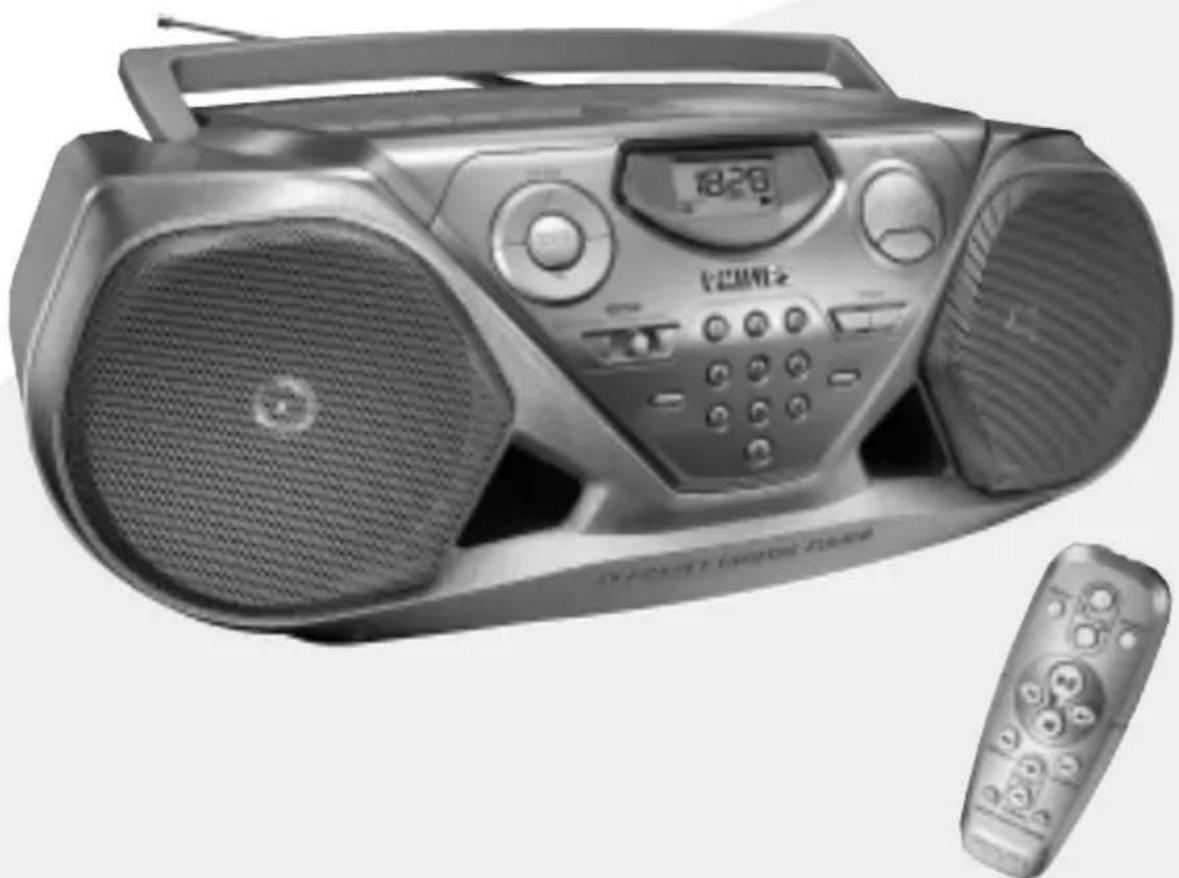
Remote Control for AZ1515 model only
1

Remote Control for AZ1515 model only
2
3
4
5
6
7
8

9
AUSTRALIA
Philips product warranty for Australia only
Warranty conditions valid for Colour Television, Video Cassette Recorders, CD Recordable, DVD Players, Audio Systems, and Portable Audio.
The benefits given to the purchaser by this warranty are in addition to all other rights and remedies which the purchaser has in respect of the product under the Trade Practices Act or other Commonwealth or State Law.
Philips Consumer Electronics warrants it's products to the purchaser as follows and subject to the stated conditions.
12 months free service
Conditions of warranty
- All claims for warranty service should be made to your nearest Philips Authorised Service Centre. Reasonable evidence of date of purchase must be provided.
- This warranty extends only to defects occurring under normal use of the product when operated in accordance with the instructions.
- Home service within the normal service area of our Philips Authorised Service Centres will be provided for television receivers with screen size 48cm and above. All other products are to be brought or sent to your nearest Philips Authorised Service Centre.
- This warranty does not cover:
a) Mileage or traveling time, pickup or delivery, cost of insurance.
b) Service costs arising from failure to correctly adjust the controls of the product or to observe the instructions, or inspections that reveal that the product is in normal working order.
c) Product failures caused by misuse, neglect, normal wear and tear, accidental breakage, transit damage, inexpert repairs or modification by unauthorized persons, lightning strikes, vermin infestation or liquid spillage.
d) Cleaning of video or audio heads.
e) Inadequate receiving antennae.
f) Replacement of worn or used batteries, styli or other consumables.
The conditions contained in this warranty card replace and override the provisions of the World-Wide Guarantee for Products sold in Australia.
Philips Service Branches
To contact your nearest Philips Authorised Service Centre call 1300 36 1392 from anywhere in Australia.
| Sydney | Adelaide |
| Newcastle | Hobart |
| Perth | Wollongie |
| Melbourne | Canberra |
| Brisbane |
Service is provided through 350 accredited service dealers throughout Australia. To find out about your nearest centre, call 1300 36 1392.
Please record the following information for your records and keep in a safe place.
Model No:
Serial No:
Please retain your purchase receipt which is required to claim service under warranty.
Philips Consumer Electronics Australia Limited
ACN 008 445 743, 3 Figtree Drive Homebush NSW 2140
NEW ZEALAND
Guarantee and Service for New Zealand
Thank-you for purchasing this quality Philips product.
Philips New Zealand Ltd guarantees this product against defective components and faulty workmanship for a period of 12 months. Any defect in materials or workmanship occurring within 12 months from the date of purchase subject to the following conditions will be rectified free of charge by the retailer from whom this product was purchased.
Conditions
- The product must have been purchased in New Zealand. As proof of purchase, retain the original sales docket indicating the date of purchase.
- The guarantee applies only to faults caused by defective components, or faulty workmanship on the part of the manufacturer.
- The guarantee does not cover failures caused by misuse, neglect, normal wear and tear, accidental breakage, use on the incorrect voltage, use contrary to operating instructions, or unauthorised modification to the product or repair by an unauthorised technician.
- Reasonable evidence (in the form of a sales docket) must be supplied to indicate that the product was purchased no more than 12 months prior to the date of your claim.
- In the event of a failure, Philips shall be under no liability for any injury, or any loss or damage caused to property or products other than the product under guarantee.
This guarantee does not prejudice your rights under common law and statute, and is in addition to the normal responsibilities of the retailer and Philips.
How to claim
Should your Philips product fail within the guarantee period, please return it to the retailer from whom it was purchased. In most cases the retailer will be able to satisfactorily repair or replace the product.
However, should the retailer not be able to conclude the matter satisfactorily, or if you have other difficulties claiming under this guarantee, please contact
The Guarantee Controller Philips New Zealand Ltd.
P.O.Box 41.021
Auckland
(09) 84 94 160
fax (09) 84 97 858
English
CONTROL/POWER SUPPLY
ACCESSIONS
1 x AC mains lead
1 x Remote Control (for AZ1515 model only)
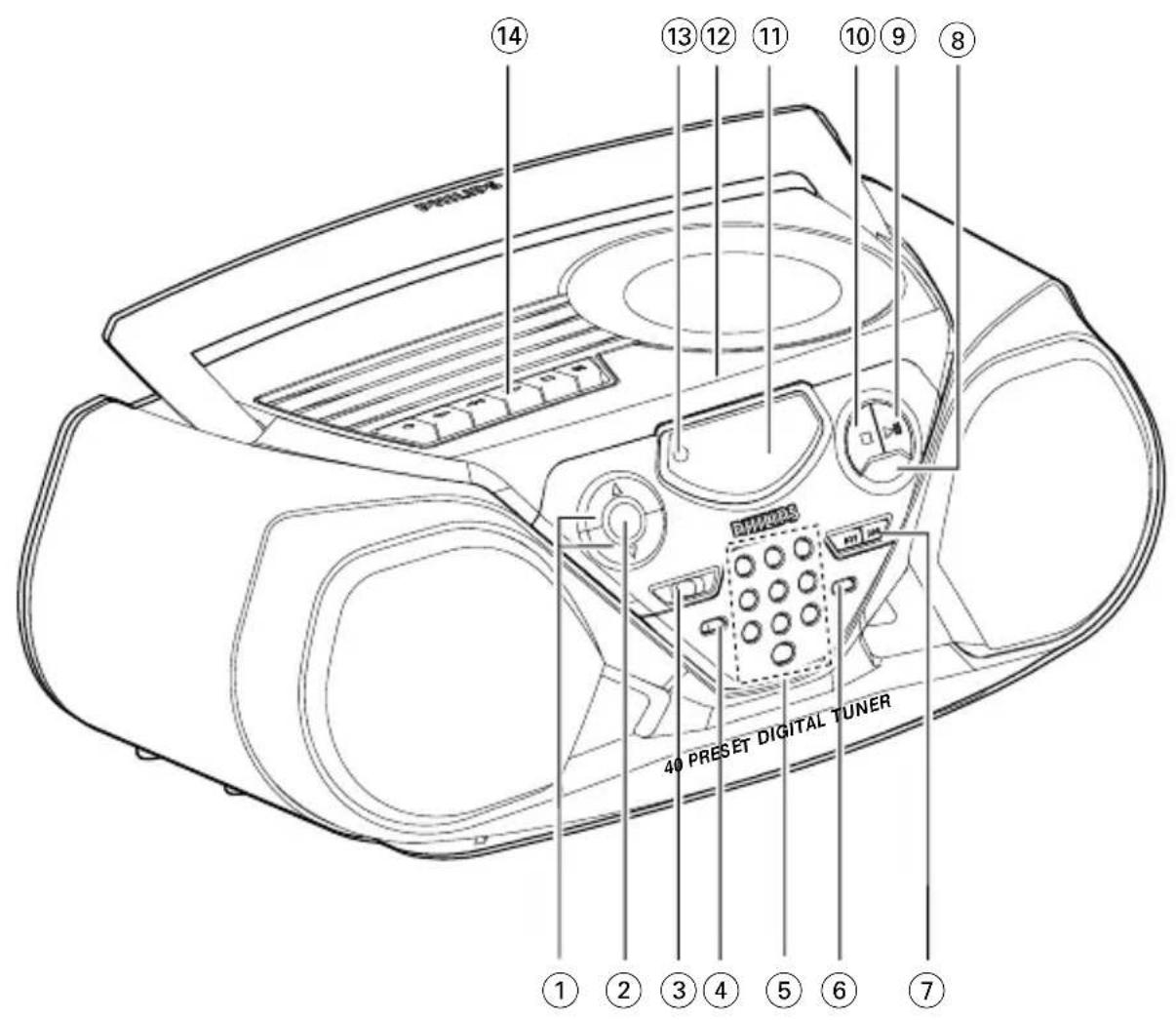
TOP AND FRONT PANEL (See 1)
VOLUME , -to adjust volume level.
DBB (Dynamic Bass Boost) - activates a more vivid bass response.
③ POWER slider - selects TAPE/RADIO / CD function and also the power off switch (TAPE/ OFF).
(4)BAND - selects waveband.
⑤0-9:-digit panel
CD: - track selection and direct playback:
RADIO: - selecting a preset station.
6PROGRAM
CD: - programs tracks and reviews the program;
Tuner: programs preset radio stations.
SEARCH
CD: - searches backward and forward within a track; - skips to the beginning of a current track' previous/ later track.
RADIO: - {down, up} tunes to radio stations.
MODE - selects different play modes: e.g. REPEAT or SHUFFLE (random) order.
- starts or pauses CD playback.
to stop playback;
- erases a CD program.
11Display -shows the status of the set.
12 OPEN•CLOSE - opens' closes the CD-tape door
REMOTE SENSOR - (for AZ1515 model only) Infrared sensor for remote control.
CASSETTE REORDER keys:
RECORD -to start recording.
PLAY - to start playback.
SEARCH / fast rewsds/winds tape.
STOP - stops tape.
PAUSE II - pauses playback or recording.
BACK PANEL
15 Telescopic aerial - improves FM reception.
16 3.5 mm stereo headphone socket
Note: The speakers will be muted when headphones
are connected to the set.
17AC MAINS - Inlet for mains lead.
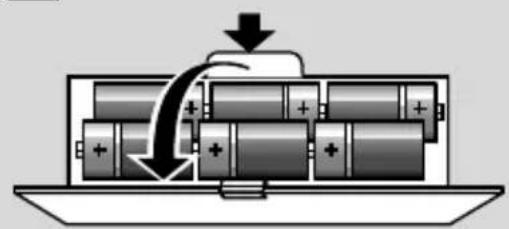
18 Battery compartment - for 6 batteries, type R-14, UM2 or C-cells.
Voltage selector (some versions only) - adjust to match the local voltage 110/220V before plugging in the set.
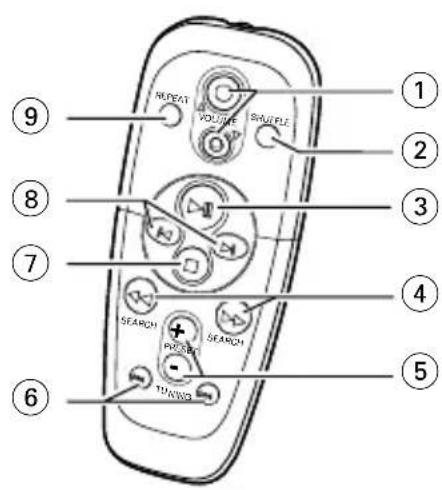
REMOTE CONTROL (for AZ1515 model only)
(1) VOLUME▲,▼-adjusts volume level.
SHUFFLE - plays all CD tracks in random order.
3-1- starts or pauses CD playback.
SEARCH searches backwards/
forwards within a track.
5 PRESET +, {up, down}; selects a preset radio station.
TUNING 心 down,up-tunes to tuned stations.
- to stop playback;
- erases a CD program.
8 - skips to the beginning of a current track previous/ subsequent track.
REPEAT - repeats a track /program/ entire CD.
CAUTION
Use of controls or adjustments or performance of procedures other than herein may result in hazardous radiation exposure or other unsafe operation.
POWER SUPPLY
Whenever convenient, use the AC power supply to conserve battery life. Make sure you remove the power plug from the set and wall outlet before inserting batteries.
Batteries (not included)
- Insert 6 batteries, type R-14, UM-2 or C-cells, (preferably alkaline) with the correct polarity. (See [7].
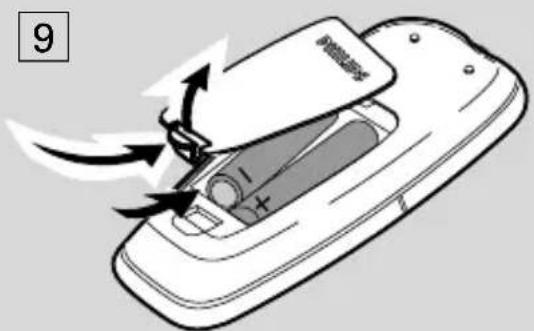
Remote control (AZ1515 model only) Insert 2 batteries, type AAA, R03 or UM4 (preferably alkaline). [See 9]
POWER SUPPLY
IMPORTANT!
- Incorrect use of batteries can cause electrolyte leakage and will corrode the compartment or cause the batteries to burst.
- Do not mix battery types: e.g. alkaline with carbon zinc. Only use batteries of the same type for the set.
- When inserting new batteries, do not try to mix old batteries with the new ones.
- Batteries contain chemical substances, so they should be disposed of properly.
Using AC Power
- Check if the AC power supply, as shown on the type plate located on the bottom of the set, corresponds to your local power supply. If it does not, consult your dealer or service centre.
- If your set is equipped with a voltage selector, adjust the selector so that it matches with the local mains.
- Connect the mains lead to the wall socket.
- To disconnect the mains supply, unplug the set from the wall socket.
The type plate is located on the bottom of the set.
BASIC FUNCTIONS
Switching on and off and selecting function
- To switch on, adjust the POWER slider to select: CD, RADIO or TAPE function, and operate the respective function controls.
- To switch off, adjust the POWER slider to select TAPE/OFF and make sure all the cassette keys are released.
Note : The DBB setting, tuner presets and the volume will be retained in the set's memory.
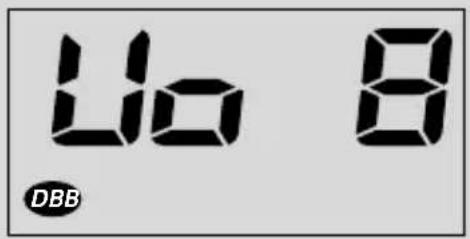
Adjusting volume and sound (See 2]
- Press the VOLUME or controls to adjust the volume.
- Press DBB once or more to select dynamic bass boost on or off.
DIGITAL TUNER
DIGITAL TUNER
Tuning to radio stations
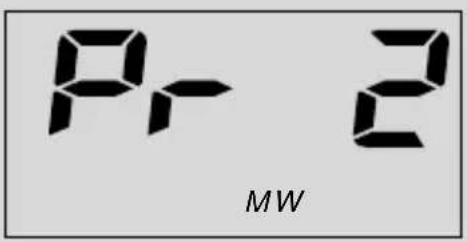
- Adjust the POWER slider to RADIO.
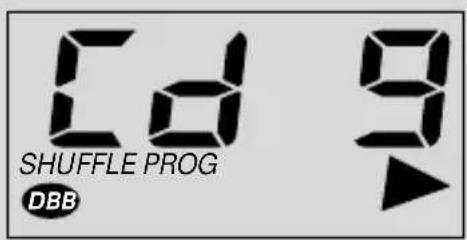
is displayed briefly and then the radio
station frequency, waveband and, if pro
grammed, a preset number are shown. (See 3) - Press BAND once or more to select your waveband.
- Press and hold SEARCH until the frequency in the display starts running.
The radio automatically tunes to a station of sufficient reception. Display shows S c h during automatic tuning. - Repeat step 3 if necessary until you find the desired station.
To tune to a weak station, press or briefly and repeatedly until you have found optimal reception.
To Improve radio reception:
- For FM, extend, incline and turn the telescopic aerial. Reduce its length if the signal is too strong.
For MW (AM), the set uses a built-in aerial. Direct this aerial by turning the whole set.
Programming radio stations
You can store up to a total of 40 radio stations in the memory, manually or automatically (Autostore).
Manual programming
- Tune to your desired station (see Tuning to radio stations).
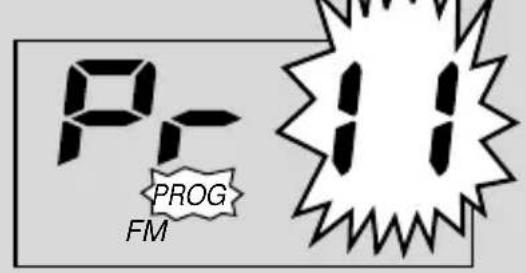
- Press PROGRAM to activate programming. Display: F_r -- and PROG flashes.
- Use the digit panel on the set to key in a number, 1-40, to select a preset station. E.g. press 1,1 if you want to store your station as preset 11. (See
Remote control (AZ1515 models only): Press PRESET + / - once or more to select a preset station. - Press PROGRAM to confirm
- Repeat steps 1-4 to store other stations.
Note: You can erase a preset station by storing another frequency in its place.
DIGITAL TUNER
CD PLAYER
Autostore
Autostore automatically starts programming radio stations from preset 1. Available stations are programmed in order of waveband reception strength: FM, followed by MW (AM). Any previous presets e.g. manually programmed will be erased.
Press PROGRAM for 4 seconds or more to activate autostore programming.
The display shows RUC, PROG blinks, followed by the radio station details when stored.
After all stations are stored, the first preset station will then automatically play.
To listen to a preset station
- Direct Easy Access: use the digit panel on the set to key in a number, 1-40, to select a preset station.
Remote control (AZ1515 models only): optionally, press PRESET + to select your preset station.
Changing tuning grid (some versions only)
In North and South America the frequency step between adjacent channels in the MW (AM) and FM band are 10 KHz and 100 KHz respectively. In the rest of the world this step is 9 KHz and 50 KHz. Usually the frequency step has been preset in the factory for your area.
- Check that the set is completely switched off.
- To select 9kHz : Simultaneously, press BAND and SEARCH on the set.
-
Switch the set on to RADIO and then release the controls.
To select t0KHz:Repeat steps 1-3 but in step 2, simultaneously, press BAND and SEARCH on the set. -
When you tune to radio stations, the display shows tuning in either steps of 9 or 10 KHz.
All preset stations will be affected and you may need to reprogramme stations.
CD PLAYER
Playing a CD
This CD player plays Audio Discs including CD-Recordables and CD-Rewritables.
1. Adjust the POWER slider to CD.
2. Insert a CD with the printed side facing up and close the door.
if no CD inserted/ CD dirty, incorrectly inserted or damaged.
_ ^ if you have inserted a non-finalized CDR(W).
-
Press to start playback.
if your CD contains non-audio i.e. data files. -
To pause playback press Press again to resume play.
→Display: flashes during pause. -
To stop CD playback, press the button.
Note : CD play will also stop when -
the CD-tape door is opened
the CD has reached the end - you select TAPE or RADIO function.
Selecting a different track
There are 2 ways:
Direct Easy Access
SEARCHor
Key in the number of the track using the digit panel on the set.
Press SEARCH or once or repeatedly to select your track.
Finding a passage within a track
- Press and hold SEARCH or . The CD is played at high speed and low volume.
- When you recognize the passage you want, release or to resume normal playback.
Note: During a CD program or if SHUFFLE/ REPEAT active, searching is only possible within a track.
Different play modes: SHUFFLE and REPEAT
You can select and change the various play modes before or during playback, and combine the modes with PROGRAM. (See [5])
SHUFFLE - tracks of the entire CD/ program are
CD PLAYER
played in random order
SHUFFLE REPEAT ALL - to repeat the entire CD/ program continuously in random order
REPEAT ALL - repeats the entire CD/ program
REPEAT - plays the current track continuously
- To select play mode, press MODE once or more.
- Press to start playback if in the stop position.
- To select normal playback, press MODE repeatedly until the various modes are no longer displayed. - You can also press the button to cancel your play mode.
Programming track numbers
In the stop position, select and store your CD tracks in the desired sequence. Up to 20 tracks can be stored in the memory.
- Press SEARCH on the set to select your desired track number.
-
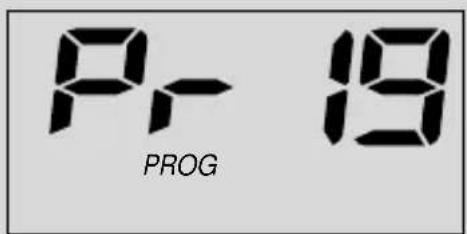
Press PROGRAM
-
Display: PROG, and your selected track number. (See 6)
-If you attempt to program without first selecting a track number, S is shown. -
Repeat steps 1-2 to select and store all desired tracks.
Display:FUUL if you try to program more than 20 tracks.
Reviewing the program
In the stop position, press and hold PROGRAM until the display shows all your stored track numbers in sequence.
Erasing a program
You can erase the program by:
- pressing twice
- is displayed briefly and PROG disappears.
- You select TAPE or RADIO function.
CASSETTE REORDER
Cassette playback
- Adjust the POWER slider to TAPE.
- Insert a cassette as shown and close the door.
CASSETTE RECORDER
- Press to start playback.
Display: shows _RPE throughout tape operation.
- To pause playback press PAUSE II Press again to resume.
- Press SEARCH or to fast wind the tape.
- To stop the tape, press STOP.
The keys are automatically released at the end of a tape and the set switched off, except if PAUSE II has been activated.
General information on recording
- Recording is permissible insofar as copyright or other rights of third parties are not infringed.
- For recording, use only NORMAL type cassettes (IEC type I) on which the tabs have not yet been broken. This deck is not suited for recording on CHROME (IEC II) or METAL (IEC IV) type cassettes.
- The best recording level is set automatically. Altering the VOLUME or DBB controls will not affect the recording.
- To protect a tape from accidental erasure, break out the tabs. If you wish to record again, cover the tabs with a piece of adhesive tape.
CD Synchro Start Recording
- Adjust the POWER slider to CD.
- Insert a CD and if desired, program track numbers.
- Insert a suitable tape into the cassette deck and close the door.
-
Press RECORD to start recording.
-
Playing of the CD program starts automatically from the beginning of the program. You don't need to start the CD player separately.
To select and record a particular passage within a CD track:
Press SEARCH or Release the control when you recognize the passage you want.
To pause CD playback, press
- Recording starts from this exact point in the track when you press RECORD.
5. To pause recording, press PAUSE II. Press PAUSE II again to resume recording.
6. To stop recording, press STOP
CASSETTE RECORDER
Recording from the Radio
- Tune to the desired radio station (see Tuning to radio stations).
- Follow steps 3-6, under CD Synchro Start Recording.
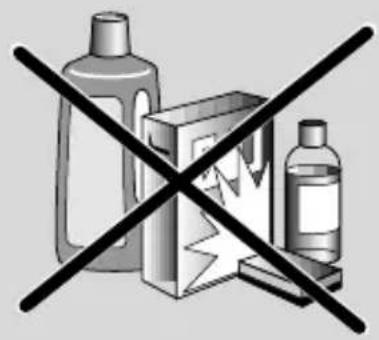
SAFETY & MAINTENANCE INFORMATION (See 8)
- Don't expose the set, batteries, CDs or cassettes to humidity, rain, sand or excessive heat.
- Clean the set with a dry cloth. Don't use any cleaning agents containing alcohol, ammonia, benzene or abrasives as these may harm the set.
- Place the set on a hard and flat surface so that the system does not tilt. Make sure there is good ventilation to prevent the set overheating.
- The mechanical parts of the set contain self-lubricating bearings and must not be oilied or lubricated.
CD player and CD handling
- If the CD player cannot read CDs correctly, use a cleaning CD to clean the lens before taking the set to repair.
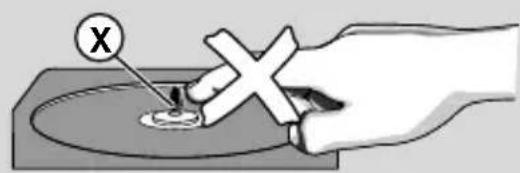
The lens of the CD player should never be touched! - Sudden changes in the surrounding temperature can cause condensation on the lens of your CD player. Playing a CD is then not possible. Do not attempt to clean the lens but leave the set in a warm environment until the moisture evaporates.
- Always close the CD-tape door to avoid dust on the lens.
SAFETY AND MAINTENANCE
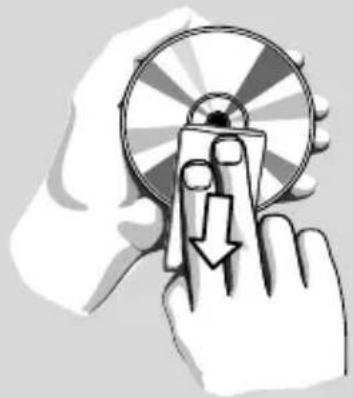
To clean the CD, wipe in a straight line from the centre towards the edge using a soft, lint-free cloth. Do not use cleaning agents as they may damage the disc.
- Never write on a CD or attach any stickers to it.
Tape deck maintenance
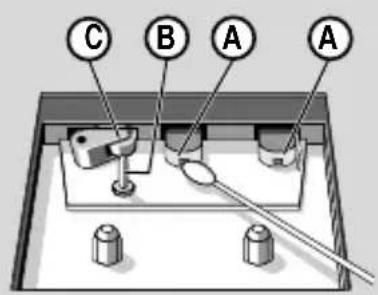
To ensure quality recording and playback of the tape deck, clean parts A, B and C as shown, once a month. Use a cotton bud slightly moistened with alcohol or a special head cleaning fluid to clean the deck.
- Open the CD-tape door.
- Press PLAY and clean the roller (C).
- Press PAUSE II and clean the heads (A), and the capstan (B).
- After cleaning, press STOP
Note:
Cleaning of the heads can also be done by playing a cleaning cassette through once.
Environmental information
We have done our best to reduce the packaging and make it easy to separate into 3 materials: cardboard, expandable polystyrene, polyethylene.
Your set consists of materials which can be recycled if disassembled by a specialized company. Please observe the local regulations regarding the disposal of packaging, exhausted batteries and old equipment.
TROUBLESHOOTING
If a fault occurs, first check the points listed below before taking the set for repair. If you are unable to remedy a problem by following these hints, consult your dealer or service centre.
WARNING: Do not open the set as there is a risk of electric shock. Under no circumstances should you try to repair the set yourself, as this will invalidate the guarantee.
No sound /power
Volume not adjusted
- Adjust the VOLUME
- Mains lead not securely connected
- Connect the AC mains lead properly
Batteries exhausted/incorrectly inserted
- Insert (fresh) batteries correctly
- Headphones connected to the set
- Disconnect headphones
Severe radio hum or noise
- Electrical interference: set too close to TV, VCR or computer
- Move the set to increase the distance
Poor radio reception
- Weak radio signal
FM: Adjust the FM telescopic aerial
indication
During programming radio preset stations, you have keyed in a preset number that exceeds the maximum preset number i.e. 40
Key in a preset number from 1-40
noCd indication
- CD badly scratched or dirty
- Replace/ clean CD, see Maintenance
Laser lens steamed up - Wait until lens has cleared
nFcD indication
-CD-R(W) is blank/not finalized
Use a finalized CD-R(W)
BBA indication
- CD contains non-audio files
Press SEARCH or once or more to skip to a CD audio track, instead of the data file
The CD skips tracks
- CD damaged or dirty
- Replace or clean CD
SHUFFLE or PROGRAM is active. - Switch off SHUFFLE / PROGRAM
Poor cassette sound of
Dust and dirt on the heads, etc.
Clean deck parts. see Maintenance
- Use of incompatible cassette types (METAL or CHROME)
Only use NORMAL (IEC 1) for recording
Recording does not work
Cassette tab(s) may be broken
- Apply adhesive tape over the missing tab space
Remote control does not function properly (for AZ1515 model only)
Batteries exhausted/incorrectly inserted
- Insert (fresh) batteries correctly
Distance/ angle between the set too large
- Reduce the distance/ angle

Meet Philips at the Internet http://www.audio.philips.com
AZ 1510
AZ 1515
CLASS 1 LASER PRODUCT
3140 115 3026.2
- AUSTRALIA
- Philips product warranty for Australia only
- months free service
- Conditions of warranty
- Philips Service Branches
- NEW ZEALAND
- Guarantee and Service for New Zealand
- Conditions
- How to claim
- English
- CONTROL/POWER SUPPLY
- ACCESSIONS
- TOP AND FRONT PANEL (See 1)
- BACK PANEL
- REMOTE CONTROL (for AZ1515 model only)
- CAUTION
- POWER SUPPLY
- Batteries (not included)
- IMPORTANT!
- Using AC Power
- BASIC FUNCTIONS
- Switching on and off and selecting function
- Adjusting volume and sound (See 2]
- DIGITAL TUNER
- Tuning to radio stations
- To Improve radio reception:
- Programming radio stations
- Manual programming
- CD PLAYER
- Autostore
- To listen to a preset station
- Changing tuning grid (some versions only)
- Playing a CD
- Selecting a different track
- Direct Easy Access
- SEARCHor
- Finding a passage within a track
- Different play modes: SHUFFLE and REPEAT
- Programming track numbers
- Reviewing the program
- Erasing a program
- CASSETTE REORDER
- Cassette playback
- CASSETTE RECORDER
- General information on recording
- CD Synchro Start Recording
- Recording from the Radio
- SAFETY & MAINTENANCE INFORMATION (See 8)
- CD player and CD handling
- SAFETY AND MAINTENANCE
- Tape deck maintenance
- Note:
- Environmental information
- TROUBLESHOOTING
- No sound /power
- Severe radio hum or noise
- Poor radio reception
- indication
- noCd indication
- nFcD indication
- BBA indication
- The CD skips tracks
- Poor cassette sound of
- Recording does not work
- Remote control does not function properly (for AZ1515 model only)
- Meet Philips at the Internet http://www.audio.philips.com
- CLASS 1 LASER PRODUCT
Marque : PHILIPS
Modèle : AZ1510
Catégorie : Chaîne Hi-Fi