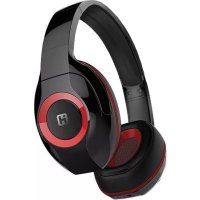
iB87 - Casque audio IHOME - Notice d'utilisation et mode d'emploi gratuit
Retrouvez gratuitement la notice de l'appareil iB87 IHOME au format PDF.

| Type de produit | Casque audio sans fil Bluetooth |
| Marque | iHome |
| Modèle | iB87 |
| Dimensions (approx.) | 18 x 16 x 8 cm (une fois plié) |
| Poids (approx.) | 200 g |
| Alimentation | Batterie lithium-ion rechargeable intégrée |
| Temps de charge | Environ 2,5 heures |
| Autonomie en communication | Jusqu'à 16 heures |
| Autonomie en écoute musicale | Jusqu'à 12 heures |
| Autonomie en veille | Jusqu'à 90 jours |
| Portée Bluetooth | Jusqu'à 10 mètres (33 pieds) |
| Version Bluetooth | 4.0+EDR avec profils A2DP, HSP, HFP, AVRCP |
| Fonctions principales | Commande de lecture/pause, saut de piste, volume, appel mains libres, rejet/transfert d'appel, recomposition, entrée auxiliaire 3,5 mm |
| Microphone | Intégré, avec réduction de bruit |
| Indicateur LED | Rouge (charge), bleu/rouge clignotant (appairage), bleu (connecté) |
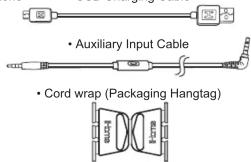
| Accessoires inclus | Câble USB, câble audio auxiliaire 3,5 mm, étui de transport, étiquette de rangement du câble |
| Entretien et nettoyage | Nettoyer avec un chiffon doux et sec. Éviter l'humidité, les températures extrêmes et la lumière directe du soleil. |
| Sécurité | Protection auditive : ne pas utiliser à volume élevé pendant des périodes prolongées. Ne pas utiliser en conduisant un véhicule. |
| Pièces détachées et réparabilité | Aucune pièce réparable par l'utilisateur. Contacter le service client pour réparation ou remplacement sous garantie. |
| Garantie | 1 an limitée (États-Unis uniquement) |
| Certifications | FCC, IC, RoHS, BQB |
FOIRE AUX QUESTIONS - iB87 IHOME
Questions des utilisateurs sur iB87 IHOME
0 question sur cet appareil. Repondez a celles que vous connaissez ou posez la votre.
Poser une nouvelle question sur cet appareil
Téléchargez la notice de votre Casque audio au format PDF gratuitement ! Retrouvez votre notice iB87 - IHOME et reprennez votre appareil électronique en main. Sur cette page sont publiés tous les documents nécessaires à l'utilisation de votre appareil iB87 de la marque IHOME.
MODE D'EMPLOI iB87 IHOME
Model: iB87
Freedom+
Wireless over-ear headphones with mic+remote and pouch
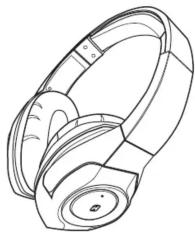
natural_image
Line drawing of a pair of black-and-white headphones (no text or symbols)Introduction
Your new iHome Bluetooth stereo headphones are designed to link with your Bluetooth enabled smartphone or music player to allow you to wirelessly listen to music and answer phone calls within the normal 10 meter (33 feet) Bluetooth operating range.
What's Included
- Bluetooth Stereo Headphone
- USB Charging Cable
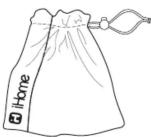
- Drawstring Travel Pouch
Specifications
| Bluetooth specification: profile 1.2 (Class II) and Standby time (unpaired): Talk time: up to 16 hours Music Playing time: up to 12 hours of with fully charged battery) Operating Distance: up to 10 meters / 33 feet Certifications: FCC, RohS, BQB | Supports V4.0+ EDR with Handsfree Profile 1.5, Headset Profile 1.1 and A2DP Audio/Video Remote Control Profile AVRP up to 90 days (with fully charged battery) (with fully charged battery) |
PREPARATION FOR USE
1. Controls and Indicators
Right side

Bottom side
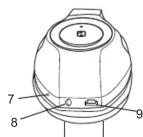
- Multi-function button: Power On/Off,
Answer/End, Pair and Play/Pause. 2. Power/Rairing/Charging LED Indic - Power/Airing/Charging LED Indicator
- Volume Up (+) Button
- Skip Track Forward Br
- Volume Down Button (-)
- Skip Track Reverse Button (<<)
- Microphone
- Microphone
- Auxiliary Inp
- Micro USB Charging
2. Charging Your Headphone
IMPORTANT: Your headphone operates on a built-in rechargeable lithium-ion battery. Although the battery was fully charged when it left our factory, like all rechargeable batteries it can begin to discharge during periods of non-use. We recommend that you charge the battery for at least 2.5 hours before first time use.
-
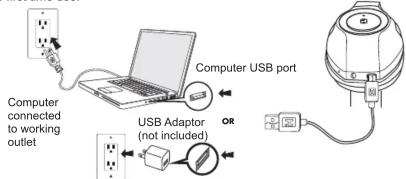
Connect the micro USB plug on the charging cable to the micro USB port on the headphone.
-
Connect the standard USB plug on the charging cable to any standard USB power port such as found on a notebook computer, or the charging adapter for an iPod, iPhone, etc.
The Power/Charging/Pairing indicator will glow RED while the headphone is charging. The indicator will turn off when the battery is fully charged.
Reminder: Allow the battery to charge for 2.5 hours before first time use. Normal recharge time after first use should take about 2.5 hours. When fully charged the battery provides up to 16 hours of working time, or 90 days of standby time.
Because your iB87 headphones use Bluetooth version 4.0 the battery level indicator of the headphones may also appear on your smartphone home screen, usually adjacent to the phone's own battery level indicator, if your specific phone supports this display function.
3. Multi-Function Button (MFB)
Pressing the button turns the headphones "On", initiates pairing, answers/ends phone calls, controls Play/Pause function and turns the headphones "Off".
4. Switching the Power On and Off
-
Press and hold the Multi-function button for approximately 3 seconds. The voice prompt will say "Power On" and the LED indicator turns BLUE and flashes two times per second.
-
When the power is "On" press and hold the Multi-function button for approximately 3 seconds. The voice prompt will say "Power Off". The LED indicator remains on briefly and then shuts off. This indicates that the power is "Off".
5. Manually Pairing With a Bluetooth Enabled Smartphone or Music Player For The First Time
If your smartphone or music player is Bluetooth compatible (supports the A2DP Bluetooth Profile) you may pair these iHome headphones with your phone or music player to listen to music and make or receive calls as long as the two devices are within the Bluetooth operating range of approximately 33-feet of each other.
Note: Your iHome headphones must be in the Power "Off" mode to begin the manual pairing process.
-
Make sure that your iHome iB87 headphones are switched "Off". Make sure that your smartphone or music player is "On".
-
Press and hold the Multi-function button on your iB87 headphones for about 6 seconds until you hear the "Power On" and "Pairing" voice prompts. The LED indicator begins alternately flashing blue and red to indicate it is trying to pair with a compatible device.
-
If necessary, turn on the Bluetooth function of your phone or music player so that it begins searching for a compatible device.
-
"iHome iB87" should appear on your phone or music player's compatible devices list. You may also see a message such as "Not Paired". Tap on that message to complete the pairing process. If your phone or music player asks for a "password" to complete the pairing process, enter '0000' on the keypad of your phone or music player.
-
When pairing is successful the screen on your phone should show "iHome iB87 Connected" or similar message and you will hear the voice prompt say "Your device is connected". The LED indicator on the iB87 headphones will begin flashing blue two times per second. Your headphones are now ready for use.
NOTE: If your iB87 headphones are not able to find a Bluetooth device that is in range and "discoverable" after 3 minutes, the headphones will automatically power "Off" to preserve the battery
6. Auto-Linking With A Previously Paired Device
If your iB87 headphones were previously paired with a Bluetooth enabled smartphone or music player they will attempt to auto-link with that device again whenever that device is within the Bluetooth operating range.
Press and hold the Multi-function button on your iB87 headphones for about 3 seconds until you hear the "Power On" voice prompt. If a previously paired device is found to be within range and turned 'On' the iB87 will re-link with it automatically. You will hear a beep tone and the voice prompt will say "Your device is connected."
Note: If no previously paired device is found after 3 minutes the auto-linking function stops and your iB87 headphones shut off automatically to preserve the battery life.
7. Wearing Your Headphones
Your iHome iB87 Bluetooth headphones are supplied with padded ear cushions for long wearing comfort. The headband can be extended to accommodate almost any head size. There are 'L' and 'R' markings on the inside of the headband, When the headphones are worn properly the controls will be on your right side.
8. Using Your Headphones
Note: Some of the functions described below may not be supported on your specific smartphone. Check with your smartphone owner's manual to confirm the features supported by your phone.
| Function | Action Required |
| Turn headphones “On” | When headphones are “Off” Press and Hold the MFB inward for 3 seconds until you hear the “Power On” voice prompt. |
| Enter the Pairing Mode | When headphones are “Off” Press and Hold the MFB inward for 6 seconds until you hear the “Pairing” voice prompt. The LED indicator flashes blue and red rapidly. |
| Pairing | Make sure your Bluetooth device is “On” and in the Pairing Model. When iHome iB87 appears on your devices menu, select it to complete pairing. |
| Play / Pause | Short press the MFB inward to start playback. Short press to pause playback. Short press to resume playback. |
| Skip to next track | Press the >> button during playback |
| Skip to beginning of current track or go to the previous track. | Press the << button playback |
| Increase volume | Press and hold the "+" button during playback |
| Decrease volume | Press and hold the "-" button during playback |
| Answer an incoming phone call | Short press the MFB when you hear the incoming ring sound. NOTE: Music will automatically pause when you are answering a calf and resume when you end the call. |
| Decline an incoming phone call | Press and hold the MFB for 1 - 2 seconds to decline the incoming call. |
| End a call | Short press the MFB to end the call and “hang up”. |
| Transfer a call between the phone and the headphones | While the call is in progress press & hold the MFB 2 seconds to transfer the call between the phone and the headphone. |
| Last number redial | When phone is paired with headphone but no call is in progress double press the MFB to redial the last number. |
| Answer second call/call waiting | Double press the MFB to place current call on hold and answer an incoming 2nd call. Double press again as needed to switch between calls. |
| Turn headphones “Off” | Press and hold the MFB for 3 seconds until your hear the “Power Off” prompt and LED indicator shuts off |
9. Auxiliary Input Jack and Cable
The auxiliary input jack allows you to use your iB87 Bluetooth headphones as normal headphones so that you can listen to music on any non-Bluetooth device that is equipped with a 3.5mm headphone jack.
Connect the included cable to the auxiliary input jack on the bottom of the "R" earpiece of your iB87 headphones, and to the headphone jack of your auxiliary music source.
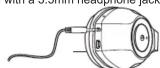
Your iB87 headphones should be in the Power "Off" mode. Use the volume and track navigation controls on your music player as your would with any normal headphones.
You may also use the one button controller and microphone on the Auxiliary Input Cable to perform some or all of the following operations, depending on your specific smartphone or music player.
Answer / End Calls
When an incoming call is received briefly press the controller button once to answer the call and speak into the microphone. To end the call, briefly press the controller button again.
Music Playback Control
If your phone or music player provides for this feature through its headphone jack press the controller button once to begin playback and once again to pause playback. Press the controller button twice to skip to the next track, or three times to restart the current track or go to the previous track.
Voice Commands
If your phone or music player provides for this feature through its headphone jack, press and hold the controller button to activate your device's voice commands menu. Once your device has launched the voice command menu you may then speak your instructions into the microphone, accessing features such as hands-free messaging, navigation, voice memo recording, and more. For the specific commands and operations accessible through your device's headphone jack, please refer to the user manual of your device.
NOTE: Not all of the hands free functions are available on all phones. You may find that some functions may work with your phone while others do not. This is due to the design of your specific phone and is not an indication of any problem with the iB87 headphone.
Use of the Hangtag Cord Wrap
1 Remove hangtag
② Unfold hangtag
③ Insert cable at plug end
into one of the slots on
one end of the hangtag.


) Wrap cable around middle
of hangtag as desired and
insert remainder through
slot on other end of
hangtag.
TROUBLESHOOTING
- Reception is noisy or intermittent
Make sure that the headphones and the paired device are within the Bluetooth operating range of approximately 33-feet.
- No Sound
Make sure that your headphones are properly paired and connected with your Bluetooth enabled smartphone or music player. Refer to the "Pairing" instructions in this manual and in the manual supplied with your phone or music player if necessary.
The rechargeable battery in your headphones may be exhausted and need to be recharged. Refer to the "Charging Your Headphones" instructions in this manual.
- Unable to Pair/Connect
The pairing settings between the headphones and your smartphone or music player may have been erased or deleted. Follow the "Pairing" instructions in this manual to re-pair and reconnect the devices.
Turn off any other Bluetooth devices that are not being used to reduce external interference.
- Some Functions Do Not Work
Your specific model of smartphone may not support some of the functions described in this manual. Refer to the manual supplied with your phone for further information.
CARE AND MAINTENANCE
Always remember to turn your headphones off if they will not be used for a long period of time. Do not expose your headphones to extremely hot or cold temperatures for extended periods. Do not expose them to direct sunlight or leave them in places such as the dashboard of your car on a hot day. Prevent water or any other liquids from entering the cabinets of your headphones.
Protect Your Hearing
Using these, or any headphones at high volume levels for long periods can result in permanent hearing damage. Always start listening with volume controls on your headphones and your paired smartphone or music player at a low level and then gradually increase the volume controls to a comfortable listening level.
Important Notes
- It is dangerous and illegal (in some jurisdictions) to use headphones when you are driving a car, riding a bike or motorcycle, or operating a watercraft. Be aware of local laws and regulations.
- Do not use these headphones in situations where they might cause distractions or prevent you from hearing warning sounds.
- There are no user serviceable parts in these headphones. Do not attempt any service or repairs on your own. Refer to the warranty for service, repair or replacement information.
FCC Information
This equipment complies with FCC radiation exposure limits set forth for an uncontrolled environment.
This device complies with Industry Canada licence-exempt RSS standard(s). Operation is subject to the following two conditions: (1) this device may not cause interference and
(2) this device must accept any interference, including interference that may cause undesired operation of the device.
This device complies with Part 15 of the FCC Rules, operation is subject to the following two conditions: (1) This device may not cause harmful interference, and (2) this device must accept any interference received, including interference that may cause undesired operation.
- Warning: Changes or modifications to this unit not expressly approved by the party responsible for compliance could void the user's authority to operate the equipment.
NOTE: This equipment has been tested and found to comply with the limits for a Class B digital device, pursuant to Part 15 of the FCC Rules. These limits are designed to provide reasonable protection against harmful interference in a residential installation. This equipment generates uses and can radiate radio frequency energy and, if not installed and used in accordance with the instructions, may cause harmful interference to radio communications.
However, there is no guarantee that interference will not occur in a particular installation. If this equipment does cause harmful interference to radio or television reception, which can be determined by turning the equipment off and on, the user is encouraged to try to correct the interference by one or more of the following measures:
• Reorient or relocate the receiving antenna.
- Increase the separation between the equipment and receiver. - Connect the equipment into an outlet on a circuit different from
- Consult the dealer or an experienced radio/TV technician for help.
CAN ICES-3 (B)/NMB-3(B)
FCC ID: EMOIB87
IC: 986B-IB87
LIMITED 1 YEAR WARRANTY
iHome Products, a division of SDI Technologies Inc. (hereafter referred to as SDI), warrants this product to be free from defects in workmanship and materials, under normal use and conditions, for a period of one (1) year from the date of original purchase.
Should this product fail to function in a satisfactory manner, it is best to first return it to the store where it was originally purchased. Should this fail to resolve the matter and service still be required by reason of any defect or malfunction during the warranty period, SDI will repair or, at its discretion, replace this product without charge. This decision is subject to verification of the defect or malfunction upon delivery of this product to the Factory Service Center authorized by Customer Service.
If service is required, please call Customer Service at 1-800-288-2792 to obtain a Return Authorization Number and shipping instructions.
Disclaimer of Warranty
NOTE: This warranty is valid only if the product is used for the purpose for which it was designed. It does not cover (i) products which have been damaged by negligence or willful actions, misuse or accident, or which have been modified or repaired by unauthorized persons; (ii) cracked or broken cabinets, or units damaged by excessive heat; (iii) damage to digital media players, CD's or tape cassettes (if applicable); (iv) the cost of shipping this product to the Factory Service Center and its return to the owner.
This warranty is valid only in the United States of America and does not extend to owners of the product other than to the original purchaser. In no event will SDI or any of its affiliates, contractors, resellers, their officers, directors, shareholders, members or agents be liable to you or any third party for any consequential or incidental damages, any lost profits, actual, exemplary or punitive damages. (Some states do not allow limitations on implied warranties or exclusion of consequential damages, so these restrictions may not apply to you.) This warranty gives you specific legal rights, and you may also have other rights which vary from state to state.
Your acknowledgment and agreement to fully and completely abide by the above mentioned disclaimer of warranty is contractually binding to you upon your transfer of currency (money order, cashier's check, or credit card) for purchase of your SDI product.
© 2015 SDI Technologies, Inc. All rights reserved.
Questions? Visit www.ihome.com
all 1-800-288-2792 Toll Free gistered trademark of Bluetooth SIG Inc
Bluetooth technology is incorporated under license from Bluetooth SIG Inc.

- Freedom+
- Introduction
- PREPARATION FOR USE
- Controls and Indicators
- Charging Your Headphone
- Multi-Function Button (MFB)
- Switching the Power On and Off
- Manually Pairing With a Bluetooth Enabled Smartphone or Music Player For The First Time
- Auto-Linking With A Previously Paired Device
- Wearing Your Headphones
- Using Your Headphones
- Auxiliary Input Jack and Cable
- Answer / End Calls
- Music Playback Control
- Voice Commands
- Use of the Hangtag Cord Wrap
- TROUBLESHOOTING
- CARE AND MAINTENANCE
- Protect Your Hearing
- Important Notes
- FCC Information
- LIMITED 1 YEAR WARRANTY
Marque : IHOME
Modèle : iB87
Catégorie : Casque audio