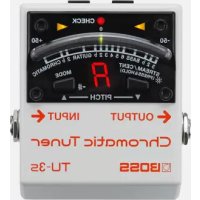
TU3S - Accordeur chromatique BOSS - Notice d'utilisation et mode d'emploi gratuit
Retrouvez gratuitement la notice de l'appareil TU3S BOSS au format PDF.

| Type de produit | Accordeur chromatique |
| Marque | Boss |
| Modèle | TU3S |
| Dimensions (L x P x H) | 73 x 84 x 56 mm |
| Poids | 220 g |
| Alimentation | Adaptateur secteur PSA série (vendu séparément), 9 V DC, 35 mA (95 mA en mode haute luminosité) |
| Tension d'alimentation | 9 V DC |
| Consommation électrique | 35 mA (95 mA en mode haute luminosité) |
| Plage d'accord | Do0 (16,35 Hz) – Do8 (4 186 Hz) |
| Fréquence de référence | La4 = 436–445 Hz (par pas de 1 Hz) |
| Précision d'accord | ±1 cent |
| Niveau d'entrée nominal | -20 dBu |
| Impédance d'entrée | 1 MΩ |
| Niveau de sortie nominal | -20 dBu |
| Impédance de sortie | 1 kΩ |
| Impédance de charge recommandée | 10 kΩ ou plus |
| Modes d'accord | Chromatique, Chromatique bémol, Guitare, Guitare bémol, Basse, Basse bémol |
| Fonctions spéciales | Accu-Pitch Sign, mode Haute luminosité, accordage par corde (guitare 7 cordes, basse 6 cordes), Flat tuning jusqu'à 6 demi-tons |
| Affichage | Mètre lumineux (mode CENT ou STREAM), indicateur de note/corde, voyant CHECK |
| Connecteurs | Entrée INPUT (Jack 6,35 mm), Sortie OUTPUT (Jack 6,35 mm), DC IN, DC OUT (pour alimenter d'autres pédales) |
| Accessoires inclus | Manuel d'utilisation, feuille « USING THE UNIT SAFELY » et « IMPORTANT NOTES », cordon DC parallèle, patin caoutchouc |
| Entretien et nettoyage | Nettoyer avec un chiffon sec et doux. Ne pas utiliser de solvants. |
| Sécurité | Lire attentivement les feuilles « USING THE UNIT SAFELY » et « IMPORTANT NOTES » avant utilisation. |
| Origine | Fabriqué au Japon |
FOIRE AUX QUESTIONS - TU3S BOSS
Questions des utilisateurs sur TU3S BOSS
0 question sur cet appareil. Repondez a celles que vous connaissez ou posez la votre.
Poser une nouvelle question sur cet appareil
Téléchargez la notice de votre Accordeur chromatique au format PDF gratuitement ! Retrouvez votre notice TU3S - BOSS et reprennez votre appareil électronique en main. Sur cette page sont publiés tous les documents nécessaires à l'utilisation de votre appareil TU3S de la marque BOSS.
MODE D'EMPLOI TU3S BOSS
Before using this unit, carefully read the sections entitled: "USING THE UNIT SAFELY" and "IMPORTANT NOTES" (supplied on a separate sheet). These sections provide important information concerning the proper operation of the unit.
Additionally, in order to feel assured that you have gained a good grasp of every feature provided by your new unit, this manual should be read in its entirety. The manual should be saved and kept on hand as a convenient reference.

Main Features
- High Brightness mode enhances meter visibility outdoors.
- Accu-Pitch Sign function uses the motion of the meter's lights to show when tuning is completed.
- Guitar/Bass mode lets you tune by string number, with support for 7-string guitars and 6-string basses.
- Flat tuning is supported with Guitar Flat mode, which allows for "down" tunings up to six semitones below standard pitch.
How to Use the Tuner
- Connect the AC adaptor (sold separately). This switch on the sensor of the FUSEC indicators
- Connect the guitar or bass you want to tune to the INPUT jack.
- Play a single note on your guitar or bass, and tune it.
The note name or string number closest to the tone being played appears in the display. Tune the instrument so that both Tuning Guide indicators are lit and the center of the meter is lit green. (Cent display)
The meter will light farther toward the left as the pitch gets flatter, or farther toward the right as the pitch gets sharper.
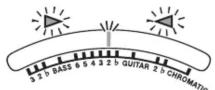
- When the Accu-Pitch Sign function is on, the meter lights stream toward the center of the display when stable tuning at the correct pitch is reached.
- The meter behavior described here is when the CENT display is selected (the factory setting). The behavior is different when you've selected the STREAM display.
Convenient Functions
Having the Meter Indicate Completion of Tuning (Accu-Pitch Sign function)
When the Accu-Pitch Sign function is on, the meter lights stream toward the center of the display when stable tuning at the correct pitch is reached.
- While holding down the STREAM/CENT button, turn on the power (connect the AC adaptor).
- Press the STREAM/CENT button again to toggle the Accu-Pitch Sign function on/off.
On: The meter lights stream to the center from the left and right. Off: The meter lights up at the left and right.
*After making the setting, you will need to turn on the power again. * This setting remains stored even after the power is turned off.
Changing the Reference Pitch
You can adjust the reference pitch over a range of 436-445 Hz. (440 Hz is the factory default.)
1. Press the MODE button and STREAM/CENT button simultaneously.
The lowest digit of the current reference pitch (e.g., "0" when set to 440Hz ) blinks in the Note Name/Strinig indicator,
- Press the MODE button or STREAM/CENT button to change the reference pitch.
MODE button: Raises the reference pitch by 1 Hz.
STREAM/CENT button: Lowers the reference pitch by 1 Hz.
If you allow several seconds to elapse without pressing the MODE
button or STREAM/CENT button, the TU-3S will return to normal operation.
- When you turn on the power, the current reference pitch will be displayed for several seconds.
- This setting remains stored even after the power is turned off.
Changing the Meter's Brightness (High Brightness mode)
By switching the meter to High Brightness mode, you can increase its visibility when performing outdoors.
To switch to High Brightness mode, hold down the STREAM/CENT button for two seconds or longer. To return to normal brightness, hold down the STREAM/CENT for two seconds or longer once again.
* Normal brightness is automatically selected when you turn on the power.
Panel Descriptions
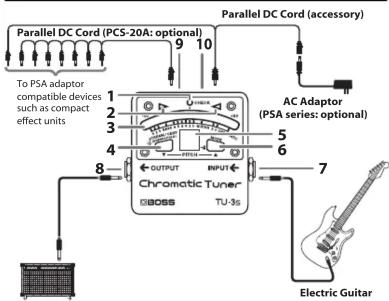
Guitar Amplifier
- If you connect other effect units, you must connect them after the TU-35. If the TU-35 is connected after other effect units, you won't be able to tune correctly.
- CHECK Indicator
This indicator lights when the TU-3S is active.
- Tuning Guide Indicator
Indicates when the proper tuning is reached.
| Pitch is flat Pitch is in tune Pitch is sharp | ||
3.Meter
Indicates the tuning of the input sound's pitch.
4 STREAM/CENT button
Switches the meter's display pattern.
This setting remains stored even after the power is turned off.
CENT display
The meter lights farther toward the left as the pitch gets flatter, or farther toward the right as the pitch gets sharper.
When the pitch is correct, the center of the meter lights green.
The center of the meter and the tuning guide indicator remain lit for several seconds after you've selected this setting.
STREAM display
The meter lights stream toward the left if the input pitch is flat, or toward the right if the input pitch is sharp.
The lights flow more slowly as the pitch discrepancy decreases, and stop flowing when the pitch is exact.
* The meter lights stream toward the left for several seconds after you've selected this setting.
- Note Name/String Number Indicator
Indicates the note name, string number, or reference pitch. Note indicator

- MODE Button
The tuning mode changes each time you press the MODE button. The meter lights at the position of the currently selected mode. - When you turn on the power, the current tuning mode will be displayed for several seconds.
- This setting remains stored even after the power is turned off. In this example, the Tuning mode is set to GUITAR.
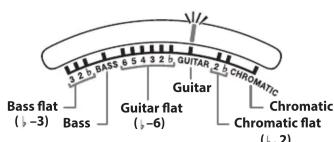
| Mode | Explanation | Indicator Status |
| Chromatic | Lets you tune all twelve chromatic steps of the octave. | The note name is displayed. |
| Chromatic flat | Lets you tune one semitone lower (b) or two semitones lower (2). | |
| Guitar | Lets you tune by guitar string numbers. | The guitar string number is displayed. (7th string is displayed as "7.") |
| Guitar flat | Lets you tune one semitone lower (b) or anywhere from two to six semitones lower (2-6). | |
| Bass | Lets you tune by bass string numbers. | The bass string number is displayed. (Hi-C string is displayed as "C", Lo-B string is displayed as "b.") |
| Bass flat | Lets you tune one semitone lower (b) two semitones lower (2), or three semitones lower (3). |
- INPUT Jack
Connect the guitar or bass guitar to be tuned here.
- OUTPUT Jack
Connect an effects processor, guitar amp, or other such device here.
* The tuner is always on while the AC adaptor is connected. The sound from the OUTPUT jack will not be muted.
9.DC OUT Jack
When an AC adapter is used, you can connect a PCS-20A parallel DC cord (optional) to supply power to effects processors and other PSA adaptor-compatible gear.
10.DC IN Jack
Accepts connection of an AC Adaptor (PSA series: optional).
* Use only the specified AC adaptor (PSA series), and connect it to an AC outlet of the correct voltage. Do not use any other AC adaptor, since this may cause malfunction.
Precautions When Connecting
-
To prevent malfunction and/or damage to speakers or other devices, always turn down the volume, and turn off the power on all devices before making any connections.
-
Some connection cables contain resistors. When connection cables with resistors are used, the sound level may be extremely low, or impossible to hear. For information on cable specifications, contact the manufacturer of the cable.
- Once the connections have been completed, turn on power to your devices in the order specified. By turning on devices in the wrong order, you risk causing malfunction and/or damage to speakers and other devices.
When powering up: Turn on the power to your guitar amp last.
When powering down: Turn off the power to your guitar amp first
- This unit is equipped with a protection circuit. A brief interval (a few seconds) after power up is required before the unit will operate normally.
Attaching the Rubber Foot
You can attach the rubber foot (included) if necessary.
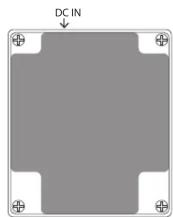
- When turning the unit over, be careful so as to protect the buttons and switches from damage.
Specifications
TU-3S:Chromatic Tuner
| Tuning Range | C0 (16.35 Hz)–C8 (4,186 Hz) |
| Reference Pitch | A4 = 436–445 Hz (1 Hz step) |
| Tuning Accuracy | ±1 cent |
| Nominal Input Level | -20 dBu |
| Input Impedance 1 MΩ | |
| Nominal Output Level -20 dBu | |
| Output Impedance | 1 kΩ |
| Recommended Load Impedance | 10 kΩ or greater |
| Power Supply | AC Adaptor (sold separately) |
| Current Draw | 35 mA (DC 9 V) 95 mA (DC 9 V, when High Brightness mode is on) |
| Dimensions | 73 (W) x 84 (D) x 56 (H) mm 2-7/8 (W) x 3-5/16 (D) x 2-1/4 (H) inches |
| Weight | 220 g 8 oz |
| Accessories | Owner's Manual, Leaflet ("USING THE UNIT SAFELY," "IMPORTANT NOTE," and "Information"), Parallel DC cord, Rubber foot |
| Options | AC adaptor: PSA series Parallel DC cord: PCS-20A |
2036-1 Nakagawa, Hosoe-cho,
Kita-ku, Hamamatsu, Shizuoka 431-1304, JAPAN
Marque : BOSS
Modèle : TU3S
Catégorie : Accordeur chromatique