CFDG555CPK - Enceinte SONY - Notice d'utilisation et mode d'emploi gratuit
Retrouvez gratuitement la notice de l'appareil CFDG555CPK SONY au format PDF.


| Type de produit | Chaîne stéréo portable avec lecteur CD, radio AM/FM et platine cassette |
| Marque | Sony |
| Modèle | CFDG555CPK |
| Dimensions (L × H × P) | 530 × 241 × 369 mm |
| Poids (avec piles) | 8,0 kg |
| Alimentation | Secteur 120 V CA, 60 Hz ou piles 12 V CC (8 piles R20, non fournies) |
| Consommation électrique | 50 W |
| Autonomie des piles (lecture CD, piles alcalines LR20) | Environ 4 h |
| Autonomie des piles (lecture cassette) | Environ 6 h |
| Autonomie des piles (radio FM) | Environ 18 h |
| Lecteur CD | Compatible CD audio, CD-R/RW (format CD-DA et MP3) |
| Radio | FM 87,5 - 108 MHz, AM 530 - 1710 kHz |
| Platine cassette | 4 pistes, 2 canaux stéréo, réponse 70 - 13 000 Hz (cassette normale) |
| Puissance de sortie | 4 W + 4 W (sous 3,2 Ω) ou 12 W (sous 4 Ω), distorsion 10 % |
| Haut-parleurs | Large bande 10 cm (3,2 Ω) + Woofer 10 cm (4 Ω) |
| Entrées | Prise microphone (mini-jack mono) |
| Sorties | Prise casque (mini-jack stéréo) |
| Accessoires inclus | Cordon d'alimentation secteur, télécommande |
| Fonctions spéciales | Karaoké, minuterie de sommeil, réglage de son, renfort de basses, lecture aléatoire/programmée/répétée |
| Entretien et nettoyage | Nettoyer le boîtier avec un chiffon doux et sec. Nettoyer les CD du centre vers l'extérieur. Ne pas utiliser de solvants. |
FOIRE AUX QUESTIONS - CFDG555CPK SONY
Questions des utilisateurs sur CFDG555CPK SONY
0 question sur cet appareil. Repondez a celles que vous connaissez ou posez la votre.
Poser une nouvelle question sur cet appareil
Téléchargez la notice de votre Enceinte au format PDF gratuitement ! Retrouvez votre notice CFDG555CPK - SONY et reprennez votre appareil électronique en main. Sur cette page sont publiés tous les documents nécessaires à l'utilisation de votre appareil CFDG555CPK de la marque SONY.
MODE D'EMPLOI CFDG555CPK SONY
CFD-G555CPK
© 2006 Sony Corporation Printed in China
http://www.sony.net/
WARNING
To reduce the risk of fire or electric shock, do not expose this apparatus to rain or moisture.
To avoid electrical shock, do not open the cabinet. Refer servicing to qualified personnel only.
To reduce the risk of fire, do not cover the ventilation of the apparatus with newspapers, tablecloths, curtains, etc. And do not place lighted candles on the apparatus. To reduce the risk of fire or electric shock, do not place objects filled with liquids, such as vases, on the apparatus.
Connect the apparatus to an easily accessible AC outlet. Should you notice an abnormality in the apparatus, disconnect the main plug from the AC outlet immediately.
Do not install the appliance in a confined space, such as a bookcase or built-in cabinet.

Printed on 100% recycled paper using VOC (Volatile Organic Compound)-free vegetable oil based ink.
[Non-Text]
CAUTION
The use of optical instruments with this product will increase eye hazard.
Notes on DualDiscs
A DualDisc is a two sided disc product which mates DVD recorded material on one side with digital audio material on the other side. However, since the audio material side does not conform to the Compact Disc (CD) standard, playback on this product is not guaranteed.
Music discs encoded with
copyright protection technologies
This product is designed to play the disc conform to the Compact Disc (CD) standard. Recently, various music discs encoded with copyright protection technologies are marketed by some record companies. Please be aware that among those discs, there are some that do not conform to the CD standard and may not be playable by this product.
MPEG Layer-3 audio coding technology and patents licensed from Euphafer JIS and Thomson
Specifications
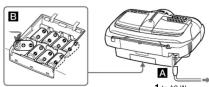
Connect the AC power cord A or insert eight R20 (size D) batteries (not supplied) into the battery compartment B Notes
- Replace the batteries when the OPR/BATT indicator dims or when the unit stops operating. - Replace all the batteries with new ones. Before you replace the batteries, be sure to take out the CD from the unit. - To use the unit on batteries, disconnect the AC power cord from the unit. - When you operate the unit on batteries, you cannot turn on the unit using the remote.
(1) And you expect us that we have been able to take place, if you want to do the best thing.
Preparing the remote
Insert two R03 (size AAA) batteries (not supplied)
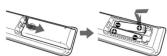
Replacing batteries With normal use, the batteries should last for about six months. When the remote no longer operates the unit, replace all the batteries with new ones.
CD player sectio
System Compact disc digital audio system
Laser deade properties Emission duration: Continuous
Laser spect: Less than 61.6 μW
(This output is the value measured at a distance of short 200 mps from the obstruction lens surface on the
optical pick-up block with 7 mm
Number of channels
Гидоветсу покротно
20 - 20 000 Hz +1/-2 dB
Below measurable limit
Radio station
Radio Section Frequency range
FM: 87.5 - 108 MHz
АМЕ 530-17/19 КН Ад锋ом
PM: Telescopic antenna
AM: Hadi-en ferde bar anterola
Cassette-corder section
Recording system 4-track 2 channel sturo
Fast winding time
Approx. 120 x (sec.) with Sony cassutto C-60
Frequency response TYPE 1 (normal): 70 - 13 000 H
General
Speaker
Full range: 10 cm (4 in.) dis., 3.2 Ω, cone type (2 W/6m: 10 cm (4 in.) dis., 4 Ω, cone type (1).
Wool: 10 Litter (4 Hz) mill, 4 Hz, close type (1) Input
MIC MIX (microphone) jack (monaval minijack): Sensitivity 2.5 mV, for
194 Impedance macrophobe Minimum input level 2.5 m³
Ostipeis
Headphones jack (reverse mix) For 16 - 68 Ω impedance be
Power output
4 W + 4 W (at 3.2 Lf, 10% harm
12 W (at 4 Ω, 10% harmonic distortion)
Реист подъяснить Еди СО и Еди науки, ауда
120 V AC, 40 Hz
12 V DC, 8 R20-(size D) batteries.
For remote control 3 V DC, 2 R03 (s)
Power consumption
AC 50 W Battery life
For CD radio cassette-order:
FM recording
Sony R20P: approx. 6 h
Sony alkaline LR20: approx. 18 h
Tape playback
Sony R20P: approx. 1.5 h
Sony alkaline LR20: approx. 6 h
CD playback
Sony R20P: appro. 1 h
Sony alkaline LR20: approx. 4 h
Dimensions
Approx. 530 × 241 × 369 mm (w/h/d) (20° A = 0°) × 14' (inches) (incl. evolving porta)
(2) > 0.01 x 14. Mato
Approx. 8.0 kg (17 lb. 10 oz) (incl. batteries)
Supplied accessories
AC power cord (1)
Benedo Comor (1)
Design and specifications are subject to change without notice.
Optional accessories
Sorry MDR headphones series Sorry: TINYAMC MICROBMC
Sily D'AOMIC MICROFIOZA CHEN
[Non-Text]
[Non-Text]
[Non-Text]
[Non-Text]
[Non-Text]
[Non-Text]
[Non-Text]
[Non-Text]
[Non-Text]
[Non-Text]
[Non-Text]
[Non-Text]
[Non-Text]
[Non-Text]
[Non-Text]
[Non-Text]
[Non-Text]
[Non-Text]
[Non-Text]
[Non-Text]
[Non-Text]
[Non-Text]
[Non-Text]
[Non-Text]
[Non-Text]
[Non-Text]
[Non-Text]
[Non-Text]
[Non-Text]
[Non-Text]
[Non-Text]
[Non-Text]
[Non-Text]
[Non-Text]
[Non-Text]
[Non-Text]
[Non-Text]
[Non-Text]
[Non-Text]
[Non-Text]
[Non-Text]
[Non-Text]
[Non-Text]
[Non-Text]
[Non-Text]
Basic Operations
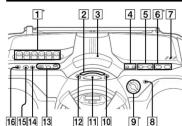
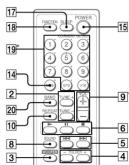
* VOL. + 9, ▶ II 6, ▶ 1 and 5 on the remote have a tactile dot
Before using the unit
To turn on/off the power
To adjust the volume
Press VOL +, -9.
To listen through headphones
To select the sound characteristics
Press SOUND ^8 repeatedly to select the audio
Shawson T. 201
Powerful, clean sounds, emphasizing
low and high range audio
Light, bright sound as emphasizing high and middle range audio.
Percussive sounds, emphasizing bass.
audio
The presence of vocals, stressing
- - - - - - - - - - - - - - - - - - - - - - - - - - - - - - - - - - - - - - - - - - - - - - - - - - - - - - - - - - - - - - - - - - - - - - - - - - -
The whole dynamic range for music such as classical music.
(No text)
To reinforce the bass sound
the remote) 3 to select 📄️ 🐃️ 🐃️ 🐃️ 🐃️
the display.MaTormAffective.When the
WOOFER function works, the ring on the front panel
To return to normal sound press the button repeatedly.
until the indication disappears from the display
Notes
- While the sleeping timer is on, the ring does not light, even if the HOODTER (e.g., 1000)
- When you use the headphones, the WOOFER function does not
NOTE:
Playing a CD/MP3 disc
1 Press ▲ PUSH OPEN/CLOSE 7 on the unit,
and place a disc with the label side up on the CD compartment
To close the CD compartment press ▲ PUSH OPEN(
CLOSE [7] on th
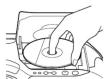
2 Press▶ on the unit (▶ on the remote) 6
The unit plays all the tracks/MP3 files once.
When you place MF3 uses, "MF3" appears in the following form: the unit and the file information
display with an
Audio CC
01 0008
图 1
Track Playing
number time
MP3 disc
MP3
图 1 图表基础
MP3 file After the file name is
number displayed, the playing
time will appear
Press
▶ on the unit (■ on the remote)
The Ground Truth image displays a single, solid horizontal line. According to Rule 2 (UNDERSCORE & LINE RULES), this is a stylistic or background line, not a placeholder underscore. Therefore, the OCR result must ignore it and output nothing or only meaningful text. The provided OCR content is "____", which consists of four underscores. This is an incorrect interpretation of the line as a placeholder, violating the rule that stylistic lines must be ignored. The OCR has hallucinated underscores where none should exist based on the GT's visual context. Hence, the OCR result is inconsistent with the Ground Truth.
- To resume play, press it again.
op playea
6.
o to the no
▶▶▶ [5].
ACOMI 51
116
previous tra
(1) 2023年1月1日
P3 file
[Non-Text]
elect a fok
n FOLDER + to go forward and
MP3 dist
FOLDER – to go backward [4].
scale a po while listen
- While playing and hold it until
e sound
you find the point.
onsate a po
▶▶ (forward) or ▶▶ (backward)
hile obser
⑤ in pause and hold it until you
e display
find the point.
scale a sp
The number button 19 of the track/
rectly
For the 1st of the following:
emove the
▲ PUSH OPEN/CLOSE [7].
12.3
The Ground Truth image displays a single, solid horizontal line. According to Rule 2 (UNDERSCORE & LINE RULES), this is a stylistic or background line, not a placeholder underscore. Therefore, the OCR result must ignore it and output nothing or only meaningful text. The provided OCR content is "____", which consists of four underscores. This is an incorrect interpretation of the line as a placeholder, violating the rule that stylistic lines must be ignored. The OCR has hallucinated underscores where none should exist based on the GT's visual context. Hence, the OCR result is inconsistent with the Ground Truth.
Playback star
on the track/MP3 file you last stopped playing
s displayed.
ing stop, the track/air 5 are number to be played
to cancel the
me play (to start play from the beginning of the
open the CD
partment or turn off the unit, the resume play is
Also cancelled When yes lo
a track/MP3 file numbered over 10 press >10 预
on the remok
, then the corresponding number buttons 提 on
Evonek: To
truck/MP3 file number 23, press >10 first, then
and 3.
483 File number: 100 or more, previous to 10 程
the remote ID
then the corresponding number buttons 📄 on the
(1)
[Non-Text]
ole su cannot lo
specific track(MR) file if "SHUE" or "PGME" is
in the displ
rn off the indication by pressing ■ 6.
example
older structure and playing
rder
[Non-Text]
ne playing
er of the folders and files is as follows:
CD-R
D
CD-RM
Folder
①
MPS life
1
B①
-
图 2
m = 311
√④
m = 311
□ □ □
m = 311
2
m = 311
|
m = 311
3
m = 311
| 4♪⑤
m = 311
|
m = 311
4 4♪⑥
m = 311
N②
m = 311
| □ √
m = 311
-
m = 311
□ □
m = 311
5
m = 311
□ □
•
5 10
[Non-Text]
[Non-Text]
otes on MP3 discs
When the disc is filtered, the unit reads all the files on that disc. During this time, "READING" is displayed. If there are more
olders or non-MP3 files on the disc, it may take a long time for play
We recommend that you do not save unnecessary folders or files
other than MP3 ones in the disc to be used for MP5 listening.
remote is only available for the MP3 files in the selected folder.
A folder that does not include an MP3 file is skipped.
Maximum number of loads: 2 Maximum number of files: 255
Other Operations
Using the display
You can check information about the CD using the display.
Checking the information of an audio CD
To check the total track number and playing time of the CD Press ■ [6] while the CD is stopped, and you can check them in the display.

To check the remaining time
Press DISPLAY•ENTER•MEMORY [12] on the while playing a CD. The display changes as follows: → The current track number and playing time ↓ The current track number and the remaining time of the current track
- The number of tracks left and the time remaining on the CD
Checking the information of an MP3 disc
To check the total folder number and total file number on the CD
Press ■ 6 while the CD is stopped, and you can check them in the display.

To check file information
Press DISPLAY•ENTER•MEMORY [12] on the unit while playing an MP3 disc. The display changes as follows:
- The current file number and playing time
The current file number and the file name
↓
The folder number and the folder name*
- The current file number and ID3: the son
title / the artist name / the album name**
* If the folder does not have a folder name, "ROOT" appears instead of a folder name. ** If the file does not have ID3 information, "NO TITLE", "NO ARTIST" or "NO ALBUM" appears in the display.
Playing tracks/MP3 files
Repeatedly (repeat Play) You can play tracks/MP3 files repeatedly in normal, Shuffle or Program play modes.
1 Press ■ 6
“CD” appears in the display
2 Proceed as follow
To repeat Do this
A single 1 Press REPEAT 10 until "REP 1"
file 2 Press ◀◀◀ or ▶▶▶[5] to select the track/
MP3 file that you want to repeat.
3 Press ▶ [6] on the unit. All tracks: A. P. B/STAT [7] (1) B/STAL L
Air tracks 1 Press F MP3 files appear
on the CD 2 Press ▶■ 6 on the unit
A selected 1 Press REPEAT [10] until "REP" and
(MP3 disc 2. Select the folder by pressing FOLDER +
only) or FOLDER - 4.
3 Press ▶■ 6 on the unit.
Tracks/1 Select Shuffle Play (see "Playing tracks/MP3 files MP3 files in random order")
in random 2 Press REPEAT 10 until "SHUF" and
order "REP" appear.
3 Press ▶ 6 on the unit.
Programmed "1 Program tracks/MP3 files (see 'Creating tracks/MP3 your own program").
files 2 Press REPEAT 10 until "REP" and
"PGM
5 Press ▶ [6] on the unit Programed 1. Program folders (see 2C)
Programed "1 Program folders (see "Creating your own folders program").
(MP3 disc 2 Press REPEAT 10 until "REP", "PGM"
only) and "FLDR" appear.
3 Press ▶ [6] on the unit
On the remote
- Use ▶ 6 instead of ▶II 6.
- After you have selected "REP 1", press the number buttons. The to select the truck/MP2 file.
buttons [18] to select the track/MP3 MP
To cancel Repeat Play
Press REPEAT[10] until "REP" disappears from the
display.
m = 311
Playing tracks/MP3 files in
random order (Shuffle Play)
You can play tracks/MP3 files in random order
- Price ■ €
"CD" appears in the display.
- Press MODE □ until "SHUE" appears in the
display.
3 Press ▶II 6 on the unit to start Shuffle Play.
On the remote
On the remote Use ▶ 6 instead of ▶11 6
[Non-Text]
To cancel Shunde Play
stop playing first. Then press MODE □ all √ error disappears from the display.
The
- During Shuffle Play, you cannot select the previous track/MP3 file
by pressing [b] • The resume function does not work during Shuffle Play
(1) AD = BD = 1
-
Creating your own program
(Program Play)
(Program Files)
MR3 files on a CD. When playing on MR3 disc, you can
also program up to 20 folders (Program Folder Play).
1 Press ■
"CD" appears in the display.
- Press MODE 14 until "PGM" flashes in the
display.
When you select Program Folder Play (MP3 di
only), press MODE [14] until "PGM" and "FLD"
- p. □ □ □ □
• 1.000 or 5) with press DISP EXT ENTER-MEMORY 12 on the unit for the tracks/
MP3 files you want to program in the order you
waHe.
Use FOLDER + of = 4 to select folders for Prograin Folder Play
-
Audio CD (Program Play)
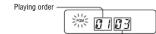
Programs track number
[Non-Text]
3 disc (Program Play)

M20. Use (Resources, Full Use Plan)

programmed holder name
4 Press ▶ 6 on the unit to start Program Play.
On the remote
- Use ▶ 6 instead of ▶11 6
- After you have selected "PGM", press the number
buttons 19 for the tracks/MP3 files you want to
program in the order you want
To cancel Program Plan
Stop playing first. Then press MODE 14 until "PGM"
disappears from the display.
To check the order of tracks/MP3 files
before play
Fress DISPLAY•ENTER•MEMORY [REDACTED] On the unit. Every time you press the button, the track number, MP3
file name or folder name appears in the programmed order
To change the current program
Press ■ [6] once if the CD is stopped and twice if the
CD is playing. The current program will be erased.
Then create a new program following the programming
四
• You can play the same program again, since the program is saved
until you open the CD compartment.
program, insert a blank tape and press ● [T] on the unit to start
recording. • The remote function does not work during Pressure Play
(1) 2017年1月1日,公司与上海浦东发展银行股份有限公司签订了《关于使用部分闲置募集资金进行现金管理的协议》。
Presetting radio stations
You can store radio stations into the unit's memory. You
can preset up to 30 radio stations, 20 for FM and 10 for
AM in any order.
1 Press RADIO BAND-AUTO PRESET [1] on the
drink to select the bands.
- Hold down RADIO BAND® AUTO PRESET [1] on the unit for 3 seconds until "AUTO" flashbar in the
display.
3 Press DISPLAY•ENTER•MEMORY 12 on the
unit.
The stations are stored in memory from the lower
frequencies to the higher ones.
If a station cannot be preset automatically
You need to preset a station with a weak signal manual
1 Press RADIO BAND-AU
Unit to select the band.
- Tune in a station you want.
3 Hold down DISPLAY•ENTER•MEMORY [12] on
the unit for 2 seconds until the preset number flashes in the display.
nathos in the display
4 Press PRESET + or = [5] on the unit until the
the display.
- Press DISPLAY•ENTER•MEMORY ^12 on the
unit.
The new station replaces the old one.
On the remote
- DRY BAND
in the display.
-
Tune in a station you want.
-
Hold down the number but
to preset the new station on for about 2 seconds
To select the preset number over 10, press >10 ^19
first, then the corresponding number buttons 15.
You need to hold a
(Example: To select 12, press >10 and 1 first, then
hold down 2 for about 2 seconds.
Tin
The preset radio stations remain in memory even if you unplug the
Acc. power
Playing preset radio stations
- Cross RADIO BAND-AUTO PRESENT [1] on the
unit to select the band.
- Press PRESET + or - [5] on the unit to tune in
the stored station
On the comets
On the remote
1 Press BAND 12:
- Press the number buttons to tune in the stored station
To type in a preset station over 10 press >10 first
then corresponding number buttons 19.
(Example: To tune in a preset station 12, press >10
and
m = 311
Falling asleep to music
Under the request for the payment
- The following
1 Play the music source you want.
2 Press St. "SLEEP
-
Plus OLEED 175 on the remote to select the
-
Press SLEE: On the remote to select this minutes until the unit goes off automatically.
Each time you press the button, the indication change
as follows:
“60”→“90”→“120”→“OFF”→“10”→“20”
16.4.1.1.2.3.4.5.6.7.8.9.10.11.12.13.14.15.16.17.18.19.20.21.22.23.24.25.26.27.28.29.30.31.32.33.34.35.36.37.38.39.40.41.42.43.44.45.46.47.48.49.50.51.52.53.54.55.56.57.58.59.60.61.62.63.64.65.66.67.68.69.70.71.72.73.74.75.76.77.78.79.80.81.82.83.84.85.86.87.88.89.90.91.92.93.94.95.96.97.98.99.100
the minutes in the display are entered.
When the preset time has passed, the unit goes off
automatically.
To cancel the sleep function
Press POWER 15 to turn off the power.
Note
When you are playing a tape using this function:
If the tape length of one side is longer than the set time, the unit will not go off until the tape reaches the end.
Using the Karaoke function
(KARADOKE PON)
This function is by
source so that you can enjoy Karaoke with your CDs.
Tapes, or radio programs.
Use buttons on the unit for the operation.
Connect a microphone (not supplied) to the Mio Mio (17 inch on the unit).
If the microphone has a power switch, cut the switch.
to ON.
-
Press POWER 35 to turn on the unit
-
Press KARACKE BON 12 on the unit
The indicator beside the KARAOKE PON button
lights up.
4 Play the sound source.
- Turn MIC LEVEL 13 on the unit to adjust the
microphone volume.
To cancel the Kernel function
Press KARAOKE PON [5] or press POWER [5] to turn
off the unit.
Notes
- Microphones with a built-in echo function can cause a bowling sound. Keep the volume of the microphones buy with the MIC
LEVEL control
- When the bowing occurs, turn the head of the microphone away from the observers
- When recording from CDs or radio programs with the Karaoke
function is on, only the original sound (with the vocal component will be revealed on the tree
• Last from a microphone connected to the MIC MIX 📄 jack.com
be recorded.
even that the natural situation is too, the total component only not be reduced or adequately reduced for some sound sources.
[Non-Text]
[Non-Text]
[Non-Text]
[Non-Text]
[Non-Text]
[Non-Text]
[Non-Text]
[Non-Text]
[Non-Text]
[Non-Text]
[Non-Text]
[Non-Text]
[Non-Text]
[Non-Text]
[Non-Text]
[Non-Text]
[Non-Text]
[Non-Text]
[Non-Text]
[Non-Text]
[Non-Text]
[Non-Text]
[Non-Text]
[Non-Text]
[Non-Text]
[Non-Text]
[Non-Text]
[Non-Text]
[Non-Text]
[Non-Text]
[Non-Text]
[Non-Text]
[Non-Text]
[Non-Text]
[Non-Text]
[Non-Text]
[Non-Text]
[Non-Text]
[Non-Text]
[Non-Text]
[Non-Text]
[Non-Text]
[Non-Text]
[Non-Text]
[Non-Text]
[Non-Text]
Precautions
Discs that this unit CAN play
- Aldo CD CD: P/CD: BIU (CD: D4+MP2)
* CD-DA is the abbreviation for Compact Di
recording standard used for Audio CDs.
Discs that this unit CANNOT play
• CD-R/CD-RW other than those recorded in music CD
format or MP3 fo
1CD P/CD RW of non-sample quality. CD P/CD RW
that has scratches or are dirty, or CD-R/CD-RW recorded
with an incompatible recording device
•CD-R/CD-RW which is finalized incorrectly
Notes on discs
• Before playing, clean the CD with a cleaning cloth.
Wipe the CD from the center out. If there is a scratch dirt on fingerprints on the CD, it may save tracking
error.
[Non-Text]
[Non-Text]
[Non-Text]
(1)
157
• Do not use solvus
commercially available cleaners or anti-static spray
intended for vinyl
- Do not expose the CD to direct sunlight or heat sources such as hot air ducts, nor known it in a car workshop in
direct sunlight as there can be a considerable rise in
temperature inside the car.
- Do not stick paper or sticker on the CD, nor scratch the surface of the CD.
• After playing, store the CD in its case.
• • •
On safety
- As the laser beam used in the CD player section is harmful to the gas, do not attempt to disassemble the
casing. Refer servicing to qualified personnel only.
• Should any solid object or liquid fall into the unit,
onping the unit, and have it checked by qualified personnel before operating it any further.
• Discs with non-standard shapes (e.g., heart, square,
star) cannot be played on this unit. Attempting to do so