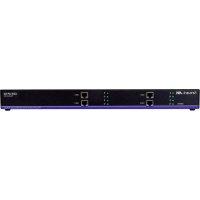
SDXRX4P - Commutateur Smart-AVI - Notice d'utilisation et mode d'emploi gratuit
Retrouvez gratuitement la notice de l'appareil SDXRX4P Smart-AVI au format PDF.

| Caractéristiques techniques | Commutateur HDMI 4 ports, supporte la résolution jusqu'à 4K à 60Hz, compatible HDCP 2.2 |
|---|---|
| Utilisation | Permet de connecter plusieurs sources HDMI à un seul écran, idéal pour les environnements de présentation et de divertissement |
| Maintenance et réparation | Vérifier régulièrement les connexions HDMI, nettoyer les ports avec un chiffon sec pour éviter l'accumulation de poussière |
| Sécurité | Éviter de surcharger les ports, ne pas exposer à l'humidité ou à des températures extrêmes |
| Informations générales | Dimensions : 20 x 10 x 3 cm, poids : 500 g, garantie de 2 ans |
FOIRE AUX QUESTIONS - SDXRX4P Smart-AVI
Questions des utilisateurs sur SDXRX4P Smart-AVI
0 question sur cet appareil. Repondez a celles que vous connaissez ou posez la votre.
Poser une nouvelle question sur cet appareil
Téléchargez la notice de votre Commutateur au format PDF gratuitement ! Retrouvez votre notice SDXRX4P - Smart-AVI et reprennez votre appareil électronique en main. Sur cette page sont publiés tous les documents nécessaires à l'utilisation de votre appareil SDXRX4P de la marque Smart-AVI.
MODE D'EMPLOI SDXRX4P Smart-AVI
TECHNICAL SPECIFICATIONS
| VIDEO | |
| Format (4) DVI-D Single Link | |
| Maximum Pixel Clock 165 MHz | |
| Input Interface (TX) (4) DVI-D 29-pin (Female) | |
| Output Interface (RX) (4) DVI-D 29-pin (Female) | |
| Resolution Up to 1920x1200 @60Hzand3840x2160 @30Hz | |
| DDC 5 volts p-p (TTL) | |
| Input Equalization Automatic | |
| DVI-D Cable Max Length Up to 20 ft. | |
| Output DVI-D Cable Length Up to 20 ft. | |
| RS232 | |
| Input Interface (2) DB9 (Female) | |
| Output Interface (2) DB9 (Male) | |
| Speed Up to 115 Kbps | |
| AUDIO | |
| Signal Type | Stereo Audio |
| Bandwidth 15MHz, 0dB | |
| Impedance | 100 Ohm |
| Connector | 3.5 mm jack, Female |
| USB | |
| Signal Type | USB 1.1 (Keyboard and Mouse Only) |
| Input Interface (TX) (1) USB Type B (Female) | |
| Output Interface (RX) (2) USB Type A (Female) | |
| OTHER | |
| Power Internal 100-240 VAC/5VDC4A@20W | |
| Dimensions 17 in W x 1.7 in H x 3.2 in D | |
| Weight | 4 lbs. |
| Operating Temp. | 0-55 °C (32-131°F) |
| Storage Temp. | -20-85 °C (-4-185 °F) |
| Humidity | Up to 95% |
RECEIVE ON DB9 MALE
| PIN # | NAME | DESCRIPTION |
| 2 | RxD | Receive Data on DB9 Male |
| 3 | TxD | Transmit Data on DB9 Male |
| 5 | SGND | Ground |
TRANSMIT ON DB9 FEMALE
| PIN # | NAME | DESCRIPTION |
| 2 | TxD | Transmit Data on DB9 Female |
| 3 | RxD | Receive Data on DB9 Female |
| 5 | SGND | Ground |
PREPARING AND CONNECTING SYSTEM CAT5 CABLE
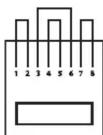
Following is the wiring standard for terminating CAT 5 cable using RJ-45 connector:
Pair 1 Pins 1 & 2
Pair 2 Pins 3 & 6
Pair 3 Pins 4 & 5
Pair 4 Pins 7 & 8
Connectors: RJ-45
Capacitance:
Conductor Gauge:
Impedance:
14 pf/ft (46.2 pf/m)
24 AWG
100 +/- 15 ohms

Designed and Manufactured in the USA
800.AVI.2131
Tel: (818) 503-6200 Fax: (818) 503-6208
11651 Vanowen St. North Hollywood, CA 91605
SmartAVI.com
Smart-AM
SMART AUDIO VIDEO INNOVATION
SDX-4P
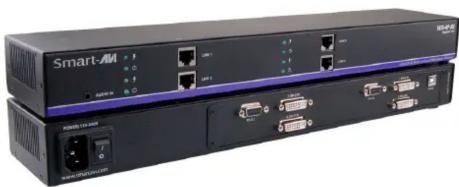
SUPER RANGE HDBaseT QUAD DVI-D, DUAL RS232, AUDIO, AND USB KEYBOARD AND MOUSE EXTENDER
natural_image
Exterior view of a black Smart-AM network device with ports and connectors (no visible text or symbols on main body)EXTEND QUAD DVI-D, QUAD RS232, USB KEYBOARD, MOUSE AND AUDIO UP TO 400 FEET OVER FOUR CAT5/5E/6 CABLE
USER MANUAL
INTRODUCTION
Using HDBaseT technology, the SDX-4P DVI extender is capable of sending quad DVI-D signals up to 400 feet over two conventional and inexpensive CAT5/5e/6 cable. HDBaseT technology is superior to older DVI extenders that require special CAT6 shielded cable to go a short distance.
The SDX-4P also has USB keyboard and mouse, audio and RS232 extension, giving you the ability to control your displays or devices remotely.
FEATURES
- Extends quad DVI-D up to 400 feet (120m) from the source
- HDCP Support
• Supports up to 1920x1200 resolution @ 60Hz.
• Supports 4k/2k (3840x2160) resolution @ 30Hz.
• Automatic EDID Learning - USB Keyboard and Mouse extension
- Uncompressed Video using HDBaseT
- RS-232 extension allows for remote control of displays
• Supports Stereo Sound - Compatible with Windows, Mac and Linux Operating Systems
WHAT'S IN THE BOX?
| PART NO. QTY DESCRIPTION | ||
| SDX-4P-RX | 1 SDX-4P Receiver. Quad DVI-D, Dual RS232, USB & Audio Receiver over CAT5/5e/6 | |
| SDX-4P-TX | 1 SDX-4P Transmitter. Quad DVI-D, Dual RS232, USB & Audio Transmitter over CAT5/5e/6 | |
| Power Supply | 2 PS5VDC4A | |
APPLICATION DIAGRAM
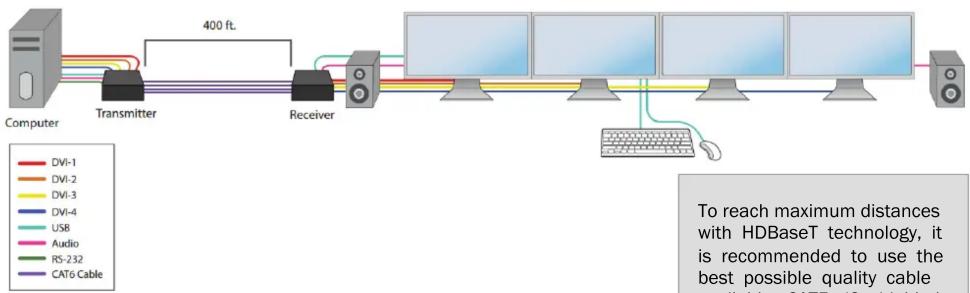
flowchart
graph LR
    A["Computer"] --> B["Transmitter"]
    B --> C["Receiver"]
    C --> D["ATMs 1-5"]
    D --> E["ATMs 5-10"]
    E --> F["ATMs 10-15"]
    F --> G["ATMs 15-20"]
    G --> H["ATMs 20-25"]
    H --> I["ATMs 25-30"]
    I --> J["ATMs 30-35"]
    J --> K["ATMs 35-40"]
    K --> L["ATMs 40-45"]
    L --> M["ATMs 45-50"]
    M --> N["ATMs 50-55"]
    N --> O["ATMs 55-60"]
    O --> P["ATMs 60-65"]
    P --> Q["ATMs 65-70"]
    Q --> R["ATMs 70-75"]
    R --> S["ATMs 75-80"]
    S --> T["ATMs 80-85"]
    T --> U["ATMs 85-90"]
    U --> V["ATMs 90-95"]
    V --> W["ATMs 95-100"]
    W --> X["ATMs 100-105"]
    X --> Y["ATMs 105-110"]
    Y --> Z["ATMs 110-115"]
    Z --> AA["ATMs 115-120"]
    AA --> AB["ATMs 120-125"]
    AB --> AC["ATMs 125-130"]
    AC --> AD["ATMs 130-135"]
    AD --> AE["ATMs 135-140"]
    AE --> AF["ATMs 140-145"]
    AF --> AG["ATMs 145-150"]
    AG --> AH["ATMs 150-155"]
    AH --> AI["ATMs 155-160"]
    AI --> AJ["ATMs 160-165"]
    AJ --> AK["ATMs 165-170"]
    AK --> AL["ATMs 170-175"]
    AL --> AM["ATMs 175-180"]
    AM --> AN["ATMs 180-185"]
    AN --> AO["ATMs 185-190"]
    AO --> AP["ATMs 190-195"]
    AP --> AQ["ATMs 195-200"]
SDX-4P-TX FRONT

SDX-4P-TX BACK

SDX-4P-RX FRONT

SDX-4P-RX BACK

CONNECTING THE SDX-4P
- Power off all devices.
- Connect four DVI-D sources from the computer to the four DVI-D input ports on the back of the SDX-4P-TX.
- Connect the computer's USB port to the USB port on the SDX-4P-TX using a USB male (A-to-B) cable.
- Connect the computer's stereo audio output to the audio input port of the SDX-4P-TX using a 3.5 mm (1/8 in) stereo audio cable.
- Optionally connect RS-232 from a computer for control functions.
- Connect Links 1 to 4 of the SDX-4P-TX to Links 1 to 4 of the SDX-4P-RX using four CAT5/5e/6 cables.
- Connect a DVI-D compatible display to each of the four DVI-D ports on the back of the SDX-4P-RX.
- Connect a USB keyboard and mouse to the USB ports on the SDX-4P-RX.
- Optionally connect RS-232 to an RS-232 enabled device for control functions.
- Connect power cables to the SDX-4P-RX and the SDX-4P-TX and turn both units on.
- Power on all the displays and then the computer.
The EDID of your displays will be learned automatically.