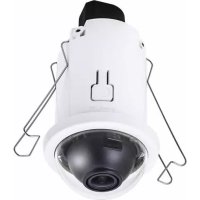
FD816CAHF2 - Caméra de surveillance Vivotek - Notice d'utilisation et mode d'emploi gratuit
Retrouvez gratuitement la notice de l'appareil FD816CAHF2 Vivotek au format PDF.


| Type de produit | Caméra de surveillance réseau |
| Marque | Vivotek |
| Modèle | FD816CAHF2 |
| Résolution vidéo | 1920 x 1080 pixels (Full HD) |
| Angle de vue | 90° (horizontal) |
| Vision nocturne | Oui, jusqu'à 30 mètres |
| Indice de protection | IP66/67 (résistant aux intempéries) |
| Alimentation | PoE (802.3af) ou 12 V CC |
| Consommation électrique | Max 6 W |
| Dimensions (L x l x H) | 70 x 70 x 150 mm |
| Poids | Environ 500 g |
| Connectivité | Ethernet 10/100 Base-T, RJ-45 |
| Protocoles pris en charge | IPv4, IPv6, TCP/IP, HTTP, HTTPS, RTSP, etc. |
| Fonctions intelligentes | Détection de mouvement, zone de confidentialité |
| Compression vidéo | H.264, MJPEG |
| Entretien et nettoyage | Nettoyer la lentille avec un chiffon doux et sec. Utiliser un souffleur pour poussière. |
| Sécurité | Cryptage HTTPS, protection par mot de passe |
| Pièces détachées et réparabilité | Remplacement des câbles et joints d'étanchéité par un professionnel |
| Garantie | 24 mois (matériel) |
| Informations générales | Caméra réseau fixe avec objectif fixe, idéale pour surveillance extérieure |
FOIRE AUX QUESTIONS - FD816CAHF2 Vivotek
Questions des utilisateurs sur FD816CAHF2 Vivotek
0 question sur cet appareil. Repondez a celles que vous connaissez ou posez la votre.
Poser une nouvelle question sur cet appareil
Téléchargez la notice de votre Caméra de surveillance au format PDF gratuitement ! Retrouvez votre notice FD816CAHF2 - Vivotek et reprennez votre appareil électronique en main. Sur cette page sont publiés tous les documents nécessaires à l'utilisation de votre appareil FD816CAHF2 de la marque Vivotek.
MODE D'EMPLOI FD816CAHF2 Vivotek

Warning Before Installation / Warnung vor der Installation / Waarschuwing voor installatie
Power off the Network Camera as soon as smoke or unusual odors are detected.
Netzwerkkamera bei Rauchentwicklung oder ungewöhnlichem Geruch sofort abschalten. Schakel de Netwerk Camera uit zodra u rook of ongebruikelijke geuren waarneemt.
Do not place the Network Camera on unsteady surfaces. Netzwerkkamera nur auf feste Unterlagen abstellen. Plaats de Netwerk Camera niet op een instabiel oppervlak
Do not insert sharp or tiny objects into the Network Camera.
Keine Fremdkörper, z. B. Nadeln, in die Netzwerkkamera einführen.
Steek geen scherpe of zeer kleine objecten in de Netwerk Camera.
Replacing or failing to properly install the waterproof components, e.g., cables or cable glands, will void our IP65/66/67 warranty. Ein Austausch oder die unsachgemäße Installation der wasserdichten Komponenten, z.B. Kabel oder Kabelverschraubungen, führt zum Verlust unserer IP65/66/67 Garantie.
Als de waterdichte componenten, zoals kabels of kabelwartels, niet correct worden geplaatst of vervangen, is de garantie van de IP65/66/67 ongeldig.

Zanim zaczniesz — zalecenia dotyczące bezpieczeństwa / Перед установкой / Upozornění před instalací
W razie zauważenia dymu lub dziwnego zapachu wydobywającego się z kamery sieciowej, natychmiast odłącz zasilanie.
Отключите питание сетевой видеокамеры, если появился дым или произошло сильное нагревание устройства.
Když bude ze síťové kamery vycházet kouř nebo neobvyklý zápach, okamžitě ji vypněte.
Nie ustawiaj kamery sieciowej na niestabilnych powierzchniach.
Запрещается устанавливать сетевую видеокамеру на неровных поверхностях.
Neumist'ujte sit'ovou kameru na nestabilní povrchy.
Nie wkładaj do wnętrza obudowy kamery sieciowej żadnych przedmiotów (np. igieł itp.). Запрещается вставлять в сетевую видеокамеру какие-либо объекты, например иголки.
Nevkládejte do sít'ové kamery żádné předměty, například jehly.
Zastępnienie lub nieprawidłowa instalacja wodoodpornych komponentów, np; kabli lub przepustów kablowych, unieważni twoją gwarancję IP65/66/67.
Замена или ненадлежащая установка компонентов влагозащиты, например кабелей или кабельных сальников, приведет к аннулированию нашей гарантии в отношении защиты по классу IP65/66/67.
Výměna nebo nezdařená instalace voděodolných komponentů, např. kabelů nebo kabelových spojek, zruší platnost naší záruky IP65/66/67.

Avvertenza prima dell'installazione / Kurulum Öncesi Uyarılar / Varning innan installation
Spegnere immediatamente la videocamera di rete se questa presenta fumo o un odore insolito.
Ağ Kamerasından duman çıktığı görülür veya normal olmayan bir koku duyulursa Ağ Kamerasının elektrik bağlantısını kesin.
Stäng av strömmen till nätverkskameran om det skulle ryka om den eller lukta konstigt.
Non collocare la videocamera di rete su superfici instabili. Ağ Kamerasını dengesiz yüzeylere koymayın. Placera inte nätverkskameran på ostadiga ytor.
Non inserire alcun oggetto nella videocamera di rete.
Ağ Kamerasına herhangi bir nesne (örneğin, iğne) sokmayın.
Sätt inte in några föremål i nätverkskameran såsom t.ex. nälar.
La sostituzione o l'installazione non corretta di componenti a tenuta stagna, ad esempio cavi o premistoppa, determineranno l'annullamento della garanzia IP65/66/67.
Kablo veya kablo rakoru gibi su geçirmez parçaların değiştirilmesi veya uygun şekilde monte edilmemesi IP65/66/67 garantimizi geçersiz kılacaktır.
Att byta eller felaktigt montera vattentäta komponenter såsom kablar eller kabelgenomföringar kommer att göra förverka vår IP65/66/67-garanti.

安装前應注意事項 / 安装警告 / インストール前の注意
如果登現準除撮影推出现燈霧或煙到异味時,計立即開伊觉湯。 如果网络摄像头冒燐或有異常气味,请立即关闭。 煙や異常なにおいに気が付いたら、置ちにネットワークカメラの電源を切ってください。
計力將半路攝影機振放在不穩定的物體上。 切勿将网络摄像头設置在不稳定的表面上。 不安定な場所にネットワークカメラを置かないでください。
請勿將任意扣住插入準路攝影機,例如細針。 切勿在网络摄像头中插入任何物体,如衝状物等。 ネットワークカメラにそのような物を差しはまないでください。
如果复插式是没有正确安装防水元件(例如宽缝或宽缝固定筋),将使本公司 IP65/66/67 的保到失效。 如果替换了防水部件,或者防水部件安装不正确,如电缆或电缆密封套等。相关 IP65/66/66 项质保将会失效。
ケーブルまたはケーブルグランドなどの融水部届を置き着えるか、または適切にインストールすることができない場合、当社のTP65が66所の保証は無駆的ななります。

Avertissement avant installation / Aviso antes da instalação / Advertencia antes de la instalación
Éteignez rapidement la caméra réseau si elle dégage de la fumée ou une odeur inhabituelle.
Desligue a Câmara de Rede se vir fumo ou sentir cheiros estranhos.
Apague la cámara de red si aparece humo o algún olor no habitual.
Ne disposez pas la caméra réseau sur des surfaces instable
Não coloque a Câmara de Rede em superfícies instáveis.
No coloque la cámara de red sobre superficies que no sean firmes.
N'insérez pas d'objet dans la caméra réseau (p. ex. des aiguilles).
Não introduza nenhum objecto dentro da Câmara de Rede, como agulhas.
No inserte ningún objeto en la cámara de red, como agujas.
Remplacer ou installer incorrectement les composants étanches, par exemple les câbles ou des presse-étoupes, annulera la garantie de votre IP65/66/67.
Subtituição ou falha ao instalar corretamente os componentes impermeáveis, por exemplo, cabos os receptáculos de cabos, anularão nossa garantia IP65/66/67.
La sustitución o la incorrecta instalación de los componentes impermeables, como los cables o los prensa-cables, invalidarán la garantía de su IP65/66/67.

Advarsel inden installation / Peringatan Sebelum Pemasangan
Slå strømmen fra kameraet så snart der kan lugtes røg eller usædvanlige lugte.
Segera matikan Network Camera jika keluar asap atau tercium bau yang aneh.
Placér ikke netværkskameraet på ustabile underlag.
Jangan meletakkan Network Camera pada permukaan yang tidak stabil.
Indfør ikke skarpe eller små objekter i netværkskameraet. Baca panduan pengguna untuk suhu pengoperasian.
Udskiftning eller fejlagtig installation af de vandtætte komponenter, fx kabler eller kabelpakninger, vil sætte garantien for din IP65/66/67 ud af kraft.
Penggantian atau kesalahan pemasangan komponen kedap air, misalnya kabel atau selubung kabel, akan membatalkan garansi IP65/66/67.
اتصل بالmozع膨胀 بك عند حدوات مثل هذه
•
الفريل
Network Camera لامع على الأرض. نسبط
Network فم ب parcel التيار الكهربي عن
Camera وURA بمجرد مهوز تحلى و ابكت رانحة غريبة منها.
لا تضع كميرا الشبكة على أسطح غير ثابتة.
Network لا تلتر ياسخال أية اgressام في
، على سيلة الع-total الإير. Camera
سي奨دي استيidal أو أخفق في تثikit المكونك
الكيل، في إيطال حل الضمان 67 IP65/66/67.
natural_image
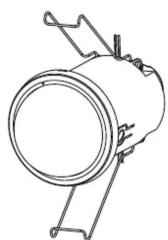
Technical line drawing of a cylindrical mechanical component with attached brackets (no text or symbols)


natural_image
Illustration of a hand holding a pen, writing on paper (no text or symbols present)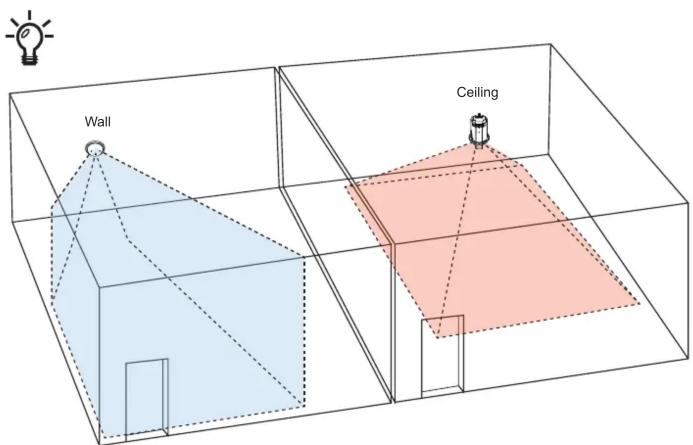
text_image
Wall Ceiling2
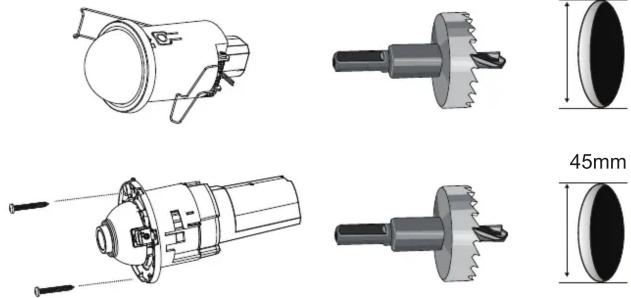
50mm
3
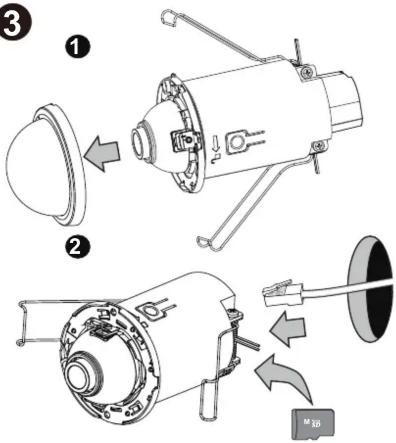
text_image
Technical diagram showing exploded and assembled views of a mechanical device with labeled parts and directional arrows indicating assembly or operation.
4
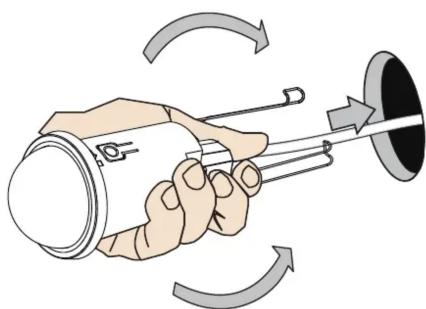
natural_image
Illustration of a hand holding a cylindrical device with a pointer, surrounded by curved arrows indicating rotation or motion (no text or symbols)
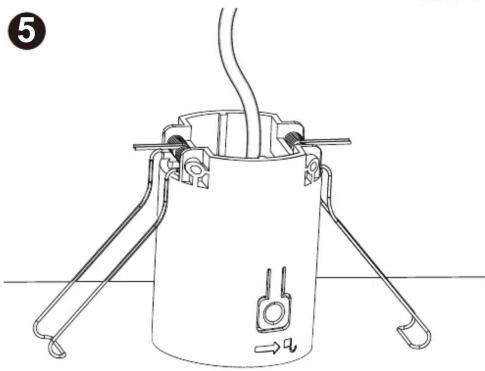
natural_image
Line drawing of a cylindrical device with attached metal brackets and a pipe, no text or symbols present6
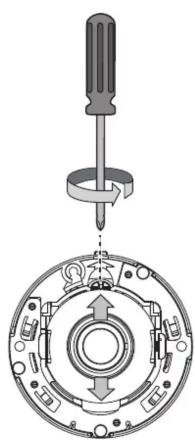
natural_image
Mechanical assembly diagram showing a screwdriver inserted into a circular mechanical component with internal components (no text or labels)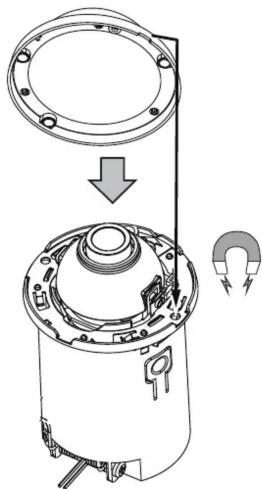
natural_image
Technical diagram of a mechanical assembly showing a circular component being inserted into a housing, with no visible text or symbols.7
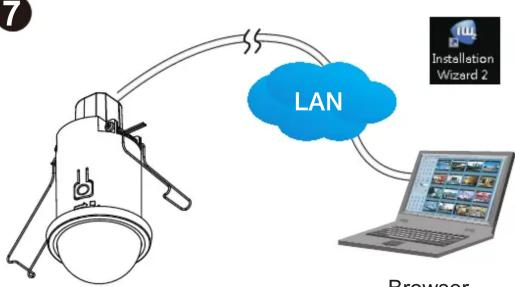
flowchart
graph TD
    A["Device"] -->|LAN| B["Laptop"]
    B --> C["Installation Wizard 2"]
    style A fill:#f9f,stroke:#333
    style B fill:#ccf,stroke:#333
    style C fill:#cfc,stroke:#333
    note right of A
        Browser
    end
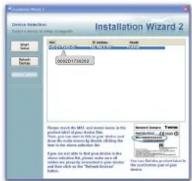
IW2
Browser
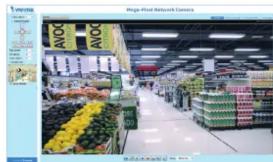
text_image
AVOC AVOC Bigg-Pilot Network CameraHARDWARE LIMITED WARRANTY
What Is Covered: This warranty covers any hardware defects in materials or workmanship, with the exceptions stated below.
How Long Coverage Lasts: This warranty lasts for TWENTY-FOUR MONTHS from the date of purchase by the original end-user customer.
What Is Not Covered: This warranty does not cover cosmetic damage or any other damage or defect caused by abuse, misuse, neglect, use in violation of instructions, repair by an unauthorized third party, or an act of God. Also, if serial numbers have been altered, defaced, or removed. Further, consequential and incidental damages are not recoverable under this warranty.
What VIVOTEK Will Do: VIVOTEK will, in our sole discretion, repair or replace any product that proves to be defective in material or workmanship. Any repair or replaced part of the product will receive a THREE-MONTH warranty extension.
How To Get Service: Contact our authorized distributors in your region. Please check our website (www.vivotek.com) for the information of an authorized distributor near you.
Your Rights: SOME STATES DO NOT ALLOW EXCLUSION OR LIMITATION OF CONSEQUENTIAL OR INCIDENTAL DAMAGES, SO THE ABOVE EXCLUSION OR LIMITATION MAY NOT APPLY TO YOU. THIS WARRANTY GIVES YOU SPECIFIC LEGAL RIGHTS, AND YOU MAY ALSO HAVE OTHER RIGHTS WHICH VARY FROM STATE TO STATE.
VIVOTEK INC.
6F, No. 192, Lien-Cheng Rd., Chung-Ho,
Taipei County, Taiwan
www.vivotek.com
-
Proof of the date of purchase is required. In the event you can not render such document, warranty will commence from the date of manufacture.
-
Cosmetic damage will only be covered by this warranty if such damage has been existed at the time of purchase.
All specifications are subject to change without noise Copyright © 2016 VIVOTEK INC. All rights reserved.
VIVOTEK INC.
6F, No.192, Lien-Cheng Rd., Chung-Ho, New Taipei City, 235, Taiwan, R.O.C. 2050 Ringwood Avenue, San Jose, CA 95131 | T: +886-2-82455282 | F: +886-2-82455532 | E: sales@ylyotek.com | T: 408-773-8686 | F: 408-773-8298 | E: salesusa@ylyotek.com
VIVOTEK Europe
Randstad 22-133, 1316BW Almere, The Netherlands T: +31/036-5298-434 F: saleseurope@vivatelj.com
- For [2] of the same, for 1-2, additional factors in the context of
VIVOTEK USA, INC
2050 Ringwood Avenue, San Jose, CA 95131 T: 408-773-9595 | E: 408-773-9298 | F: sales@bivobek.com
- 400-170-8355 | 1. 400-170-8255 | 2. salastas@wlotx.com