SPEAKERBOXX100 - Haut-parleur NIKKEI - Notice d'utilisation et mode d'emploi gratuit
Retrouvez gratuitement la notice de l'appareil SPEAKERBOXX100 NIKKEI au format PDF.

| Type de produit | Haut-parleur portable |
| Marque | Nikkei |
| Modèle | SPEAKERBOXX100 |
| Alimentation | DC 5V via adaptateur secteur (inclus) |
| Consommation électrique | 20W |
| Batterie | Lithium-ion rechargeable intégrée |
| Autonomie estimée | Environ 9 heures (selon volume) |
| Dimensions (L x l x H) | 275 x 39 x 15 mm |
| Poids | 2800 g |
| Connectivité sans fil | Bluetooth (portée max. 10 m) |
| Connectique filaire | Entrée USB, entrée ligne (LINE IN), prise micro |
| Radio FM | Plage 87,5-108 MHz |
| Fonctions de lecture | Lecture/Pause, piste précédente/suivante, sélection de source |
| Réglages | Volume maître, volume micro, fonctions basses (Bass) |
| Mémoire radio | Jusqu'à 30 stations préréglées |
| Microphone | Microphone filaire (adaptateur nécessaire) |
| Garantie | 24 mois |
| Entretien et nettoyage | Nettoyer avec un chiffon doux et sec. Ne pas utiliser de produits abrasifs. |
| Sécurité | Ne pas exposer à l'eau ou à une chaleur excessive. Utiliser uniquement l'adaptateur fourni. |
| Pièces détachées et réparabilité | Contactez le service après-vente Nikkei ou un centre agréé. |
| Informations générales | Consultez le site www.nikkei.eu pour plus d'informations. |
FOIRE AUX QUESTIONS - SPEAKERBOXX100 NIKKEI
Questions des utilisateurs sur SPEAKERBOXX100 NIKKEI
0 question sur cet appareil. Repondez a celles que vous connaissez ou posez la votre.
Poser une nouvelle question sur cet appareil
Téléchargez la notice de votre Haut-parleur au format PDF gratuitement ! Retrouvez votre notice SPEAKERBOXX100 - NIKKEI et reprennez votre appareil électronique en main. Sur cette page sont publiés tous les documents nécessaires à l'utilisation de votre appareil SPEAKERBOXX100 de la marque NIKKEI.
MODE D'EMPLOI SPEAKERBOXX100 NIKKEI
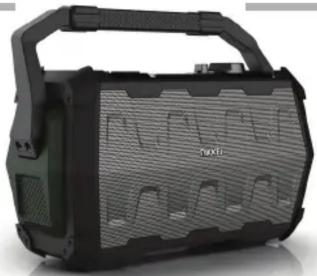
natural_image
Black and white photo of a portable electronic device with visible grille and handle (no text or symbols)EN For more information see www.nikkei.eu
NL Voor meer informatie zie www.nikkei.eu
DE Für weitere Informationen siehe www.nikkei.eu
FR Pour plus d'informations, veuillez consulter le site www.nikkei.eu
ES Para más información, visite www.nikkei.eu
DK For mere information besøg www.nikkei.eu
FI Lisätietoja löydät osoitteesta www.nikkei.eu

1
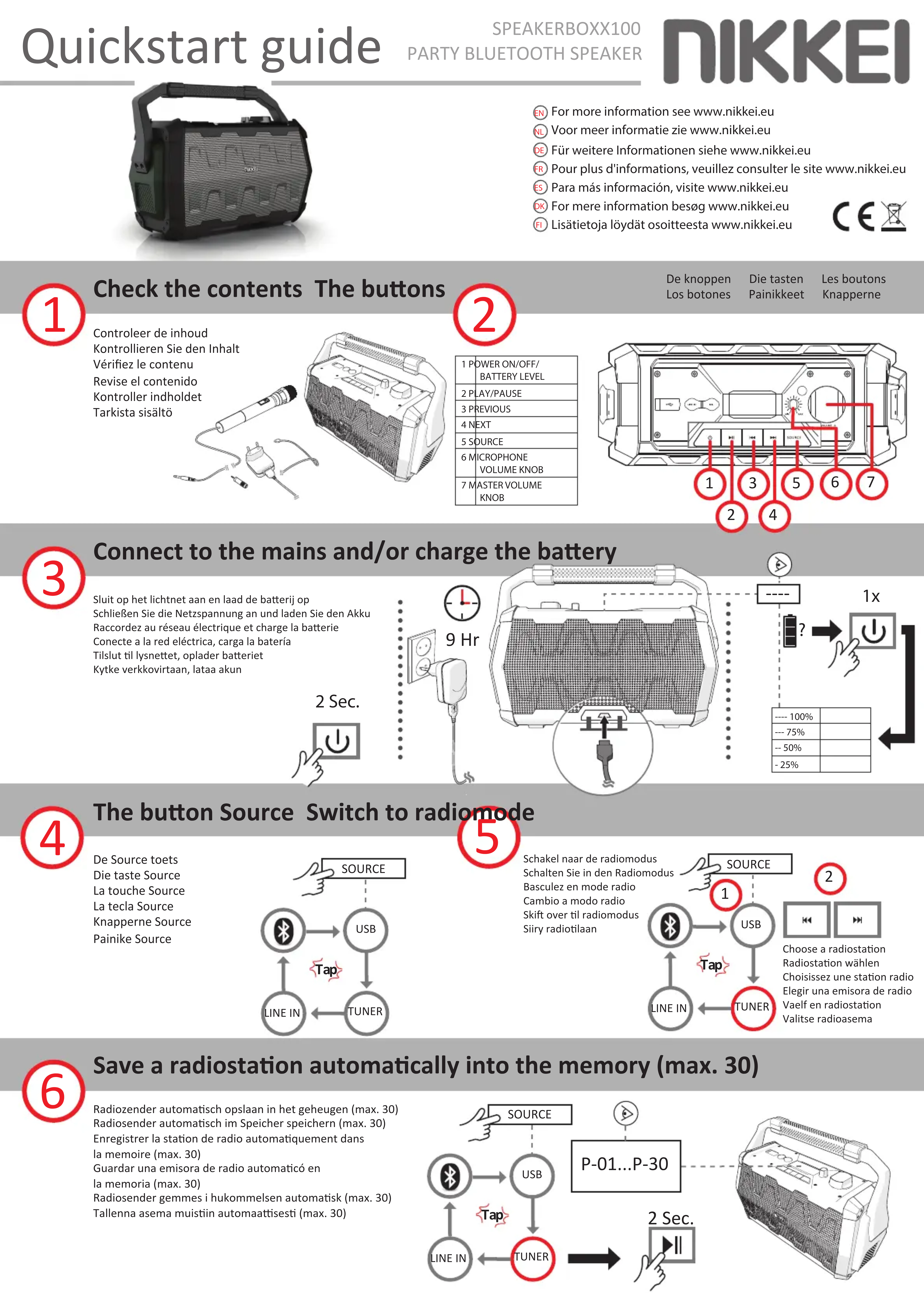
Check the contents The buttons
Controleer de inhoud Kontrollieren Sie den Inhalt Vérifiez le contenu Revise el contenido Kontroller indholdet Tarkista sisältö
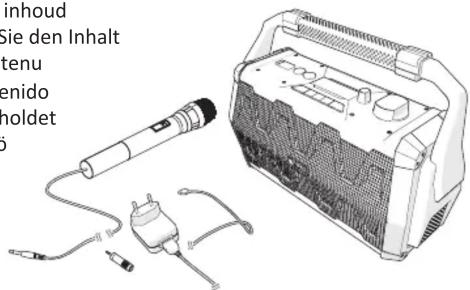
text_image
inhoud Sie den Inhalt tenu enido holdet 62
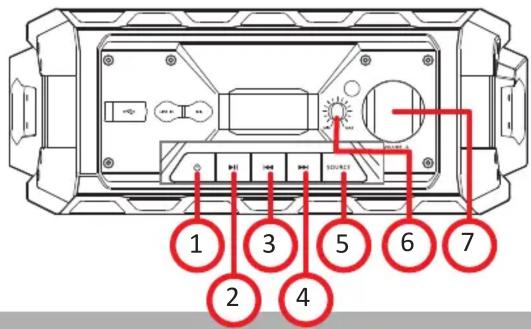
| 1 POWER ON/OFF/BATTERY LEVEL | |
| 2 PLAY/PAUSE | |
| 3 PREVIOUS | |
| 4 NEXT | |
| 5 SOURCE | |
| 6 MICROPHONEVOLUME KNOB | |
| 7 MASTER VOLUMEKNOB |
De knoppen
Los botones
Die tasten
Painikkeet
Les boutons
Knapperne
text_image
1 2 3 4 5 6 73
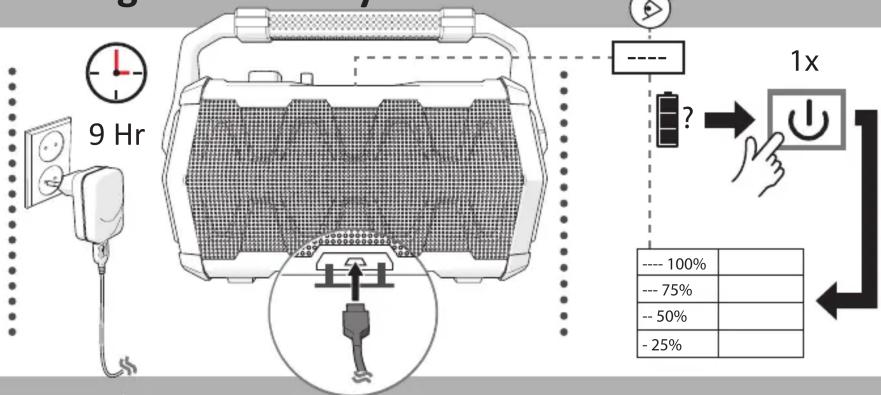
Connect to the mains and/or charge the battery
Sluit op het lichtnet aan en laad de batterij op Schließen Sie die Netzspannung an und laden Sie den Akku Raccordez au réseau électrique et charge la batterie Conecte a la red eléctrica, carga la batería Tilslut til lysnettet, oplader batteriet Kytke verkkovirtaan, lataa akun
text_image
9 Hr ---- 100% --- 75% --- 50% - 25%4
The button Source Switch to radiomode
De Source toets Die taste Source La touche Source La tecla Source Knapperne Source Painike Source
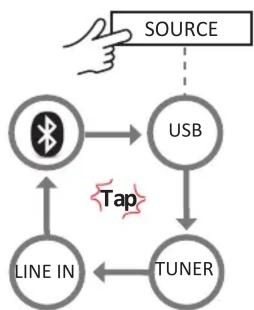
flowchart
graph TD
    A["SOURCE"] --> B["USB"]
    B --> C["TUNER"]
    C --> D["LINE IN"]
    D --> E["WiFi"]
    E --> F["USB"]
    F --> G["TAP"]
    G --> C
(5
Schakel naar de radiomodus Schalten Sie in den Radiomodus Basculez en mode radio Cambio a modo radio Skift over til radiomodus Siiry radiotilaan
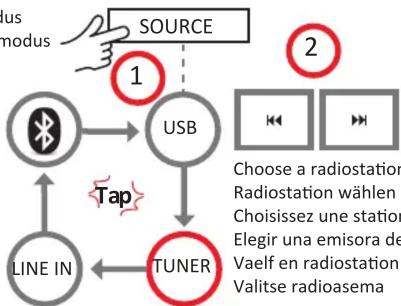
flowchart
graph TD
    A["1"] --> B["USB"]
    B --> C["TUNER"]
    C --> D["LINE IN"]
    D --> E["1"]
    F["SOURCE"] --> B
    G["2"] --> H["Choose a radiostation\nRadiostation wählen\nChoisissez une station\nElegir una emisora de\nVaelf en radiostation\nValitse radioasema"]
    style A fill:#f9f,stroke:#333
    style F fill:#f9f,stroke:#333
    style G fill:#f9f,stroke:#333
    style B fill:#ccf,stroke:#333
    style C fill:#ccf,stroke:#333
    style D fill:#cfc,stroke:#333
    style E fill:#fcc,stroke:#333
    style H fill:#ffc,stroke:#333
6
Save a radiostation automatically into the memory (max. 30)
Radiozender automatisch opslaan in het geheugen (max. 30) Radiosender automatisch im Speicher speichern (max. 30) Enregistrer la station de radio automatiquement dans la memoire (max. 30) Guardar una emisora de radio automaticó en la memoria (max. 30) Radiosender gemmes i hukommelsen automatisk (max. 30) Tallenna asema muistiin automaattisesti (max. 30)
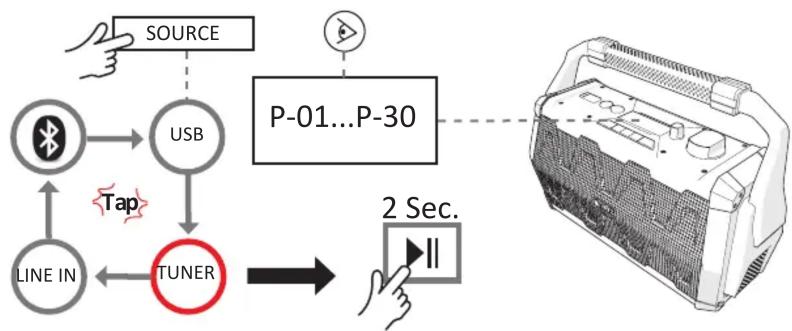
flowchart
graph TD
    A["SOURCE"] --> B["USB"]
    B --> C["TUNER"]
    C --> D["2 Sec."]
    D --> E["P-01...P-30"]
    F["LINE IN"] --> C
    G["Tap"] -.-> B

Recall station presets
Voorkeuzezenders oproepen Vorzugssender aufrufen Appeler les émetteurs pre-chosis Activar estaciones favoritas Kald forvalgte stationer Suosituimplein asemien valinta
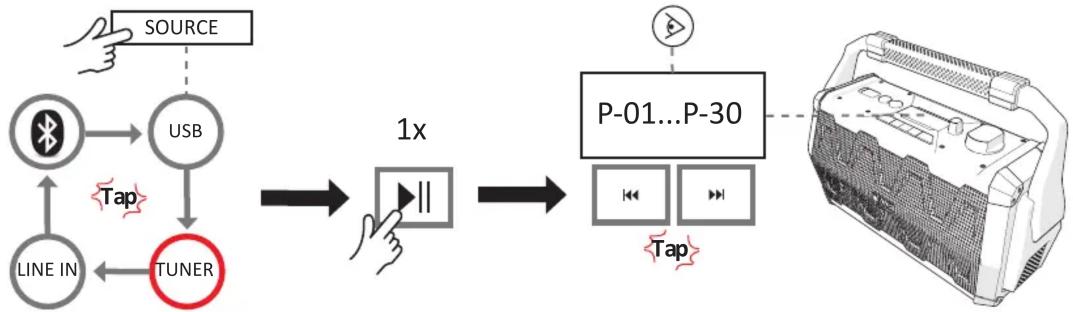
flowchart
graph TD
    A["SOURCE"] --> B["USB"]
    B --> C["TUNER"]
    C --> D["1x"]
    D --> E["P-01...P-30"]
    E --> F["Tap"]
    G["LINE IN"] --> C
    H["Hand"] --> A
    I["Tap"] --> B

USB Microphone
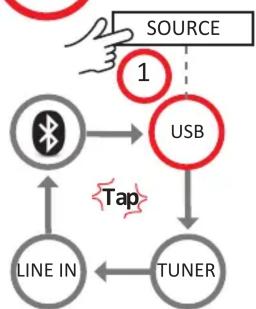
flowchart
graph TD
    A["SOURCE"] -->|1| B["USB"]
    B --> C["TUNER"]
    C --> D["LINE IN"]
    D --> E["Wireless Signal"]
    E --> F["USB"]
    F --> G["TUNER"]
    G --> H["Line IN"]
    H --> I["Wireless Signal"]
    I --> J["USB"]
    J --> K["TUNER"]
    K --> L["Line IN"]
    L --> M["Wireless Signal"]
    M --> N["TUNER"]
    N --> O["Line IN"]
    O --> P["Wireless Signal"]
    P --> Q["TUNER"]
    Q --> R["Line IN"]
    R --> S["Wireless Signal"]
    S --> T["TUNER"]
    T --> U["Line IN"]
    U --> V["Wireless Signal"]
    V --> W["TUNER"]
    W --> X["Line IN"]
    X --> Y["Wireless Signal"]
    Y --> Z["TUNER"]
    Z --> AA["Line IN"]
    AA --> AB["Wireless Signal"]
    AB --> AC["TUNER"]
    AC --> AD["Line IN"]
    AD --> AE["Wireless Signal"]
    AE --> AF["TUNER"]
    AF --> AG["Line IN"]
    AG --> AH["Wireless Signal"]
    AH --> AI["TUNER"]
    AI --> AJ["Line IN"]
    AJ --> AK["Wireless Signal"]
    AK --> AL["TUNER"]
    AL --> AM["Line IN"]
    AM --> AN["Wireless Signal"]
    AN --> AO["TUNER"]
    AO --> AP["Line IN"]
    AP --> AQ["Wireless Signal"]
    AQ --> AR["TUNER"]
    AR --> AS["Line IN"]
    AS --> AT["Wireless Signal"]
    AT --> AU["TUNER"]
    AU --> AV["Line IN"]
    AV --> AW["Wireless Signal"]
    AW --> AX["TUNER"]
    AX --> AY["Line IN"]
    AY --> AZ["Wireless Signal"]
    AZ --> BA["TUNER"]
    BA --> BB["Line IN"]
    BB --> BC["Wireless Signal"]
    BC --> BD["TUNER"]
    BD --> BE["Line IN"]
    BE --> BF["Wireless Signal"]
    BF --> BG["TUNER"]
    BG --> BH["Line IN"]
    BH --> BI["Wireless Signal"]
    BI --> BJ["TUNER"]
    BJ --> BK["Line IN"]
    BK --> BL["Wireless Signal"]
    BL --> BM["TUNER"]
    BM --> BN["Tune In"]
    BN --> BO["Tune In"]
    BO --> BP["Tune In"]
    BP --> BQ["Tune In"]
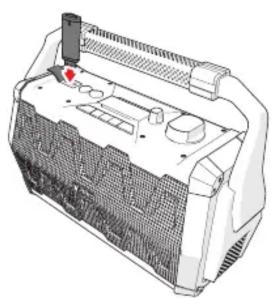
natural_image
3D technical illustration of a mechanical housing or enclosure with internal components and a red arrow indicating a specific part (no text or symbols present)
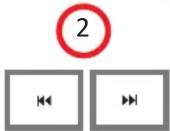
Select track Titel wählen Choisissez une piste Elegir una pistas Vaelf sporsekvensen Valitse kappalejärjestys

Microfoon Mikrofon Micro Micrófono Mikrofon Mikrofoni
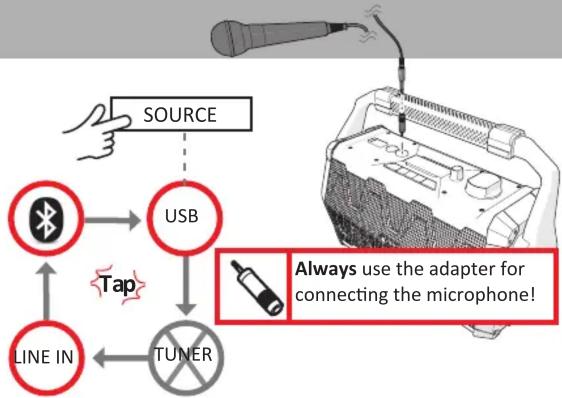
flowchart
graph TD
    A["SOURCE"] --> B["USB"]
    B --> C["TUNER"]
    C --> D["LINE IN"]
    D --> E["USB"]
    E --> F["TUNER"]
    style A fill:#f9f,stroke:#333
    style B fill:#ccf,stroke:#333
    style C fill:#cfc,stroke:#333
    style D fill:#fcc,stroke:#333
    style E fill:#ffc,stroke:#333
    style F fill:#cff,stroke:#333
    note right of B: Tap
        Always use the adapter for connecting the microphone!
    end

Line in Bass function
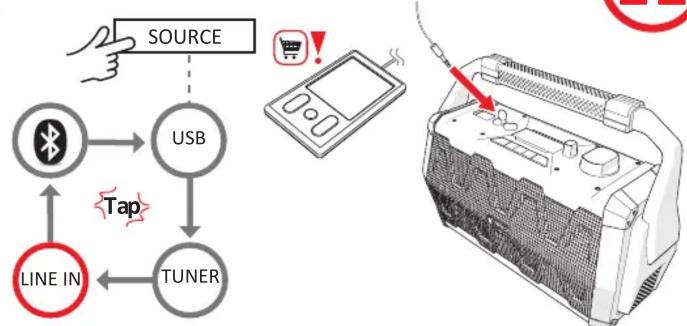
flowchart
graph TD
    A["SOURCE"] --> B["USB"]
    B --> C["TUNER"]
    C --> D["LINE IN"]
    D --> E["Bluetooth Icon"]
    E --> F["USB"]
    F --> G["TUNER"]
    G --> H["Computer with 'TUNER' icon"]
    style A fill:#f9f,stroke:#333
    style H fill:#ccf,stroke:#333

Bass functies Bass/Funktionen Fonctions Bass Funciones del Bass Bass/funktioner Bass/toiminnot
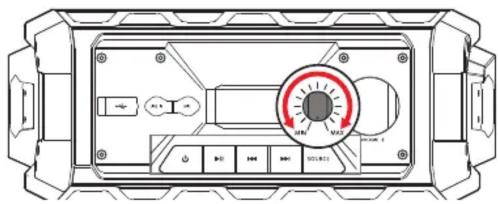
text_image
Technical diagram of an electronic device front panel with labeled buttons and a rotary dial indicator
Bluetooth connection
Bluetooth-verbinding Conexion- Bluetooth
Bluetooth-Verbindung Bluetooth tilslutning
Connexion Bluetooth Bluetooth-yhteys
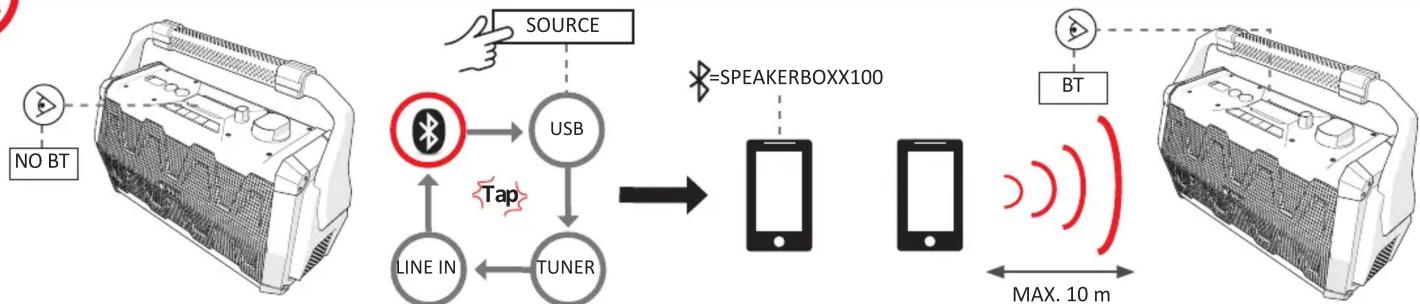
flowchart
graph LR
    A["NO BT"] --> B["Battery"]
    B --> C["USB"]
    C --> D["TUNER"]
    D --> E["Speakerbox100"]
    E --> F["Smartphone"]
    F --> G["BT"]
    G --> H["Speakerbox100"]
    H --> I["MAX. 10 m"]
    C --> J["Line IN"]
    J --> K["Tuner"]
    K --> L["Tip"]
    L --> C
    style A fill:#f9f,stroke:#333
    style H fill:#ccf,stroke:#333
Specifications Specificaties Technische Daten Spécifications Especificaciones Specifikationer Tekniset tiedot
Power supply: DC IN 5V Power consumption: 20W
Frequency range: FM 87,5-108 MHz FM Radio
Weight: 2800 g Dimensions: 275 x 39 x 15 mm Lithium-ion battery
Warranty: 24 months
Stroomvoeding: DC IN 5V Stroomverbruik: 20W
Frequentiebereik: FM 87,5-108 MHz FM Radio
Gewicht: 2800 g Afmetingen: 275 x 39 x 15 mm Lithium-ion batterij
Garantie: 24 maanden
Stromzufuhr: DC IN 5V Stromverbrauch: 20W
Frequenzbereich: FM 87,5-108 MHz FM Radio
Gewicht: 2800 g Abmessungen: 275 x 39 x15 mm Lithium-Ion Batterie
Garantie: 24 Monate
Distribution DC IN 5V Consommation de courant: 20W
Plage de fréquence: FM 87,5-108 MHz FM Radio
Poids: 2800 g Dimensions: 275 x 39 x 15 mm Lithium-ion batterie
Garantie: 24 mois
Fuente de alimentación: DC IN 5V Consumo de energía: 20W
Intervalo de frecuencia: FM 87,5-108 MHz FM Radio
Peso: 2800 g Dimensiones: 275 x 39 x 15 mm Lithium-ion batería
Garantía: 24 meses
Strømforsyning: DC IN 5V Strømforbrug: 20W
Frekvensområde FM 87,5-108 MHz FM Radio
Vægt: 2800 g Dimensioner: 275 x 39 x15 mm Lithium-ion bateri
Garanti: 24 Måneder
Virtalähde: DC IN 5V Virrankulutus: 20W
Taajuusalue: FM 87,5-108 MHz FM Radio
Paino: 2800 g Mitat: 275 x 39 x 15 mm Lithium-ion akku
Takuu: 24 kuukaudet