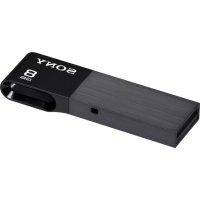
USM8W - Clé USB SONY - Notice d'utilisation et mode d'emploi gratuit
Retrouvez gratuitement la notice de l'appareil USM8W SONY au format PDF.


| Type de produit | Clé USB |
| Marque | Sony |
| Modèle | USM8W |
| Série | USM-SA |
| Capacité de stockage | 8 Go |
| Connectivité | USB 2.0 + micro USB (OTG) |
| Compatibilité | PC, Mac, Android 4.0.3 ou ultérieur |
| Systèmes d'exploitation supportés | Windows 8.1, 8, 7, Vista, Mac OS X 10.4 ou ultérieur |
| Dimensions (approx.) | 20 x 15 x 8 mm |
| Poids (approx.) | 5 g |
| Alimentation | Par port USB |
| Indicateur lumineux | Oui (indique le fonctionnement) |
| Fonctions principales | Stockage portable, transfert de données entre PC et smartphones/tablettes |
| Entretien et nettoyage | Nettoyer avec un chiffon doux et sec ; ne pas utiliser de solvants |
| Sécurité | Ne pas exposer à l'humidité ou aux chocs ; ne pas connecter à plusieurs appareils simultanément |
| Pièces détachées et réparabilité | Capuchon de protection amovible ; pas de pièces réparables par l'utilisateur |
| Informations générales | Conçu par Sony, fabriqué au Japon ; dispose de la certification FCC |
FOIRE AUX QUESTIONS - USM8W SONY
Questions des utilisateurs sur USM8W SONY
0 question sur cet appareil. Repondez a celles que vous connaissez ou posez la votre.
Poser une nouvelle question sur cet appareil
Téléchargez la notice de votre Clé USB au format PDF gratuitement ! Retrouvez votre notice USM8W - SONY et reprennez votre appareil électronique en main. Sur cette page sont publiés tous les documents nécessaires à l'utilisation de votre appareil USM8W de la marque SONY.
MODE D'EMPLOI USM8W SONY
SONY.
USB Flash Drive
Clé USB
Флэш-накопитель USB
USB флеш жетегі
The Ground Truth image displays a single, solid horizontal line, which is a stylistic or background element (like a rule line on paper). According to Rule 2, such lines must be ignored by the OCR result. The provided OCR content is "____", which consists of underscores. Underscores are not equivalent to a horizontal line in this context; they represent placeholder blanks, not stylistic lines. Since the OCR output incorrectly rendered a stylistic line as underscores (which should be ignored), this violates the rule. Therefore, the OCR result is inconsistent with the Ground Truth.
Operating Instructions/Mode d'emploi/ Bedieungsanleitung/Manual de instruc
Istruzioni per l'uso/Manual de instruções/
使用說明書/使用說明書nwijzing/Imstruktia obsiuni/Nivod k obsluge/
Használatí útmutató/Návod na obsluhu/
Кипанта клавизш'Посібник з експлуатації. Инструкция по эксплуатация/
Пайдалану нускауплыг/Обу
التعليمات انتغيل/Kasutusjuhend/ Eksnloataclos instrukcijos/Lietośanas instrukcijas/
Bruksamvisning/Betjeningsvejledning/Kiyttöahjeet,
Instructiuni de utilizare/Navodila za uporabo/ Вдесамісрієм/Инстрошни за експлохтація/
Upute za rad/Uputstvo za upotrebu/Унанство
заупотрева
FAC CE
USM-SA Series
USM-SA Séries
© 2018 Tammy Corporation
[Non-Text]
[Non-Text]
[Non-Text]
[Non-Text]
[Non-Text]
[Non-Text]
[Non-Text]
[Non-Text]
[Non-Text]
[Non-Text]
[Non-Text]
[Non-Text]
[Non-Text]
[Non-Text]
[Non-Text]
[Non-Text]
[Non-Text]
[Non-Text]
[Non-Text]
[Non-Text]
[Non-Text]
[Non-Text]
[Non-Text]
[Non-Text]
[Non-Text]
[Non-Text]
[Non-Text]
[Non-Text]
[Non-Text]
[Non-Text]
[Non-Text]
[Non-Text]
[Non-Text]
[Non-Text]
[Non-Text]
[Non-Text]
[Non-Text]
[Non-Text]
[Non-Text]
[Non-Text]
[Non-Text]
[Non-Text]
[Non-Text]
[Non-Text]
[Non-Text]
[Non-Text]
[Non-Text]
[Non-Text]
[Non-Text]
[Non-Text]
[Non-Text]
[Non-Text]
[Non-Text]
[Non-Text]
[Non-Text]
[Non-Text]
[Non-Text]
[Non-Text]
[Non-Text]
[Non-Text]
[Non-Text]
[Non-Text]
English Da
Dual-point storage device for your PC, smartphones, or the USB 2d connector connects to a PC, and the micro
smartphone or toilet. WARNING
Keep away from children, if unallowed, promptly. To reduce fire or shock hazard, do not expose the fire and electrical shock, do not open this cabinet.
personnel only. Do not connect the Hiare Vault Ed series to more tablet at the same time.
For Customers in the U.S.A.
Counter 1-030-942-0307(17689). The number below is for the
Regulatory Information Endecation
Trade Name : SOXY Model : U10A865A2, U10A865A2, U10A832B
Burgentecia (Farbe) : 1000 Klatzerlöse Intl. Address : 14056 Yix-EpwifBio.San D'Nago, CA 92327 U.S./ Telayhuana Nandpur : 858-942-2236
This device complex with past 10 of the FCC index. Oper two-conditions; [1] This device may not cause harmful or more potent use interference received, including ingestion
When already the following person, including one of the operation.
CLOLDA: They are cautioned that any changes or modifications are not a could and your authority to operate this equipment;
Note: This equipment has been tested and found to comply with
devices, pursuant to part 13 of the FCC Balos. There limits reasonable protection against harmful met敷iciency to a social environment, acoustics, men and co-collating radio transparency
and used in accordance with the instructions, may cause by communications. However, there is no guarantee that into speculative installation. Within requirements does not have been
pactitioner information to read up again to the case television reception, which can be determined by inserting the user to encourage ID+ID to conduct the interference by
Beverholt re vacuate the existing antenna. — Воссия: the orientation/between the equipment and/or
Connect the equipment into an dealer as a vessel-differt seeret is connected. Consult the dealer or an experienced radio/TV telecom
For Customers in CANAL CAD/CEB-O BOSOBB-J-B
Par Customers le Europe This product has been made
Monato Ka Tokayu, 100-0005 Japan. Inquisitos related to pro-European Union inflatione shall be addressed to the amilio Deutschland GmbH, Heidlpage Ingrase 41 - 2022 Journey
or guarantee matters, please guarantee documents.
Disposal of BID Electrical & Electronic Equipment (Ag- tions and other European countries with openata-0) This symbol on the product or on its p
product shall not be treated as homemade handed error to the applicable collection channel and discharge component.
disposed at correctly, you will help preconqueness for the environment and otherwise for your daily environment.
The recycling of materials will help to more detailed information about exp
- Contact your local Cite, Office. (our to or the shop where you purchased the product.
When using USB Flash Drive on a PC for installing the device driver!
[Weaving due to the line driver] Ordinarily, the dot(x)dot(x) is installed automatically when. However, with some USB 2.0 cache or boards, you may see
normally. Follow the instructions displayed on the screen to result it
When using USB Flash Drive on smartp first time
[manually installing [File Manager]; ch details on downloading]
The Micro Vault 64 series only supports devices that are used that support 100 storage functions. To enable the Micro Vault 644 OS, a file management verification process is
the certificate 10.4 and management application program and executs (all Pile Manager).
Basic Operation Niviru
- Please follow the procedure described in this manual to Vault SA sites properly from your PC, smartphones, or - brand injection and opening the LBR acquisition area
Micron Vault 3/s series, as this can lead to nasty merchant. Be careful not to subject the spread commutative to a long
■ The Micro Vault 10 series is designed with dual common one port at a time. Do not assume the Micro Vault 10 series
amorphous, or tablet at the Setup:
When running Windows 8.1, Windows 6. Window Does the Micro Vault is commented to the computer, the direct operating environment. (The Airless control Department)
Too can't own copy and save data on the Micro Vault Kit set on the interview, just as you would when copying data to
When running Mac OS X 10.4-or later Once the Micro-Vault SR surface is connected to the computer
You can new copy and save data on the Micro/Vault by dir dircs men, just as you would when copying data to a hard
When running Android 4.0.3 or later Perform the following before connecting the Micro Vault:
table. - Scan the QR code on the backbone of the package to download.
After connecting the Micro-Vault 5a series to the omertight branch (all File Manager). Visit the Micro-Vault website for data-to-operation.
Notes of the Indicay Light
When the Miao Fund is in use, the ind
DB Handley
Oral treatment is positive (while the indicator light to
Disconnection When running Windows 8.1, Windows 8, Windows
Double Jack (Barley Remore MacMoole) in the bank key for scores. In the window that appears, select the name of the climb the Inspiration. *When On Stop a Barbury Devizian
direct information to displayed, and then zich the OR for Handbew's message appears; you may remain the Micro's (The icon and messages that appear may vary depending on
When running Windows Vista, you can also see a "Snightly clicking the Mouse Vault-division in Explore-or My Coat
When running Mac OS X 18.4-or later Drag the Huawei Yardt icon to the Track. After confirming mode, discounted the Macro Yardt
When running Android 4.0.3 or later In the [Apple Manager] interface, give to the settings review to
the smartphones or tablet. A3 discommer the IA series.
Notes on Use
- Diner, split, place/binary export on, or subject the unit - Be centralized when handling the device after extended pass hot.
- The Micro Vault may not hamsterion accurately won it as an computer is exact up, created, or created from deep Micro Vault from the computer before preforming any
- Kent's that your host-device, smartphone, or tablet supp that the android 00 to women 4.0.3 or latex. Otherwise, and therefore
The Micro Vault St. serves may not function of (all [19]; Secondhand OS, always disconnect the Micro Vault St. serves in the first half of the year).
■ The Micro Vault SA series is designed with dual common more than one PC, smartphone, or tablet at the same time.
The Micro Vault SA scenes has a look for attaching a extra shaped metal object CoCh as a light (600bit) should be CoCh
may cause damage to the C ■ Do not place the Wrorclay —extremely, but as cold
- very heavy - exposed to corrosive gases. - refrigerated - exposed
■ The Micro Vanib SA series is made of metal and plastic in made of metal and will become size/bed alter norms
designed with a cap for production. Do not pull or cry open. Diring as may result in damage to the connecting artery. • Choose the wrist with a soft, dry cloth or a soft (both) light
Do not use any type of solvent, such as alcohol or tobacco. If the device is not recognized by the computer at least 1
devics.chandown is contact your computer on host devices.
It is strongly recommended that we periodically back up a Sony Corporation assumption is not liable for any damage on the
Presolutions for Transfer and Disposal If data stored on the Pfizer Vault is deleted or reformatted
data-only appears to be retrieved on is superficial event, and to retrieve and create the data by means of special software. The virtual information looks and other problems of this nor
commercially available software designed to completely use Cash. ■ MicroVault is a masterpark of Semi Corporation.
- Microsoft, Windows, and Windows/Vista are registered Corporation in the United States and other countries. - Myc and Lifecistroch are trademarks of Bookloc. own
■ Google, Google Play and Android are registered trade partners and users.
■ The Android robot is reproduced or modified from web and used according to terms described in the Creation
License. - Other system name and product names that appear in branding or trademarks of their respective owners.
are not used in this manu ■ Our product warranty is
normally in accordance with these operating instructions that were included with this unit in the specified or no environment. Details provided above: Company, as a
■ The Companies claimed quasi-utility for damage or its this unit, likely now given from a child party.
■ The Company cannot accept any liability for: problem hardware arising from the use of this product; the use
specific hardware, softwares, or peripherals; operating software data boxes, or other accidental or unavailable. The Company cannot accept any liability for financial loss from third quarter, no. 2019, unless from the use of this act
(1) 2014年1月1日
[Non-Text]
[Non-Text]
[Non-Text]
[Non-Text]
[Non-Text]
[Non-Text]
[Non-Text]
[Non-Text]
[Non-Text]
[Non-Text]
[Non-Text]
[Non-Text]
[Non-Text]
[Non-Text]
[Non-Text]
[Non-Text]
[Non-Text]
[Non-Text]
[Non-Text]
[Non-Text]
[Non-Text]
[Non-Text]
[Non-Text]
[Non-Text]
[Non-Text]
[Non-Text]
[Non-Text]
[Non-Text]
[Non-Text]
[Non-Text]
[Non-Text]
[Non-Text]
[Non-Text]
[Non-Text]
[Non-Text]
[Non-Text]
[Non-Text]
[Non-Text]
[Non-Text]
[Non-Text]
[Non-Text]
[Non-Text]
[Non-Text]
[Non-Text]
[Non-Text]
[Non-Text]
[Non-Text]
[Non-Text]
[Non-Text]
[Non-Text]
[Non-Text]
[Non-Text]
[Non-Text]
[Non-Text]
[Non-Text]
[Non-Text]
[Non-Text]
[Non-Text]
[Non-Text]
[Non-Text]
[Non-Text]
[Non-Text]
[Non-Text]
[Non-Text]
[Non-Text]
[Non-Text]
[Non-Text]
[Non-Text]
[Non-Text]
[Non-Text]
[Non-Text]
[Non-Text]
[Non-Text]
[Non-Text]
[Non-Text]
[Non-Text]
[Non-Text]
[Non-Text]
[Non-Text]
[Non-Text]
[Non-Text]
[Non-Text]
[Non-Text]
[Non-Text]
[Non-Text]
[Non-Text]
[Non-Text]
[Non-Text]
[Non-Text]
[Non-Text]
[Non-Text]
[Non-Text]
[Non-Text]
[Non-Text]
[Non-Text]
[Non-Text]
[Non-Text]
[Non-Text]
[Non-Text]
[Non-Text]
[Non-Text]
[Non-Text]
[Non-Text]
[Non-Text]
[Non-Text]
[Non-Text]
[Non-Text]
[Non-Text]
[Non-Text]
[Non-Text]
| Pakka | Nostiki daegh | Catsky | Oursi diaka media | Mappay | Adharodas | Slovensky | Media adlublanz adapy | Turkey | Vari doplana cattan | Vapashinna | Hocetn darapramana gues | Pyocine | Hocetn darapramana gues | Kasivitini | Hocetn darapramana gues |
| 1023286 | Babadhan and Babbadhan (Babadhan) | Festu | Festu | Festu | Festu | Festu | Festu | Festu | Festu | Festu | Festu | Festu | Festu | Festu | |
| 1023286 | Babadhan and Babbadhan (Babadhan) | Festu | Festu | Festu | Festu | Festu | Festu | Festu | Festu | Festu | Festu | Festu | Festu | Festu | |
| 1023286 | Babadhan and Babbadhan (Aegeg) | Festu | Festu | Festu | Festu | Festu | Festu | Festu | Festu | Festu | Festu | Festu | Festu | Festu | |
| 1023286 | Babadhan and Babbadhan (Aegeg) | Festu | Festu | Festu | Festu | Festu | |||||||||
| 1023286 | Babadhan and Babbadhan (Aegeg) | Festu | Festu | Festu | Festu | Festu | |||||||||
| 1023286 | Babadhan and Babbadhan (Aegeg) | Festu | Festu | Festu | Festu | Festus | |||||||||
| 1023286 | Babadhan and Babbadhan (Aegeg) | Festu | Festu | Festu | Festu | Festu | |||||||||
| 1023286 | Babadhan and Babbadhan (Aegeg) | Festu | Festu | Festus | Festu | Festu | |||||||||
| 1023286 | Babadhan and Babbadhan (Aegeg) | Festu | Festu | Festu | Festu | Festu | |||||||||
| 1023286 | Babadhan and Babbadhan (Aegeg) | Fest. | Festu | Festu | Festu | Festu | |||||||||
| 1023286 | Babadhan and Babbadhan (Aegeg) | Festu | Festu | Festu | Festu | Festu | |||||||||
| 1023286 | Babadhan and Babbadhan (Babadhan) | Festu | Festu | Festu | Festu | Festu | |||||||||
| 1023286 | Babadhan and Babbadhan (Babadhan) | Festu | Festu | Festu | Festu | Festu | |||||||||
| 1023286 | Babadhan and Aegeg | Festu | Festu | Festu | Festu | Festu | |||||||||
| 1023286 | Babadhan and Babbadhan (Aegeg) | Festu | Festu | Festu | Festu | Festu | |||||||||
| 1023286 | Babadhan and Baggadhan (Aegeg) | Festu | Festu | Festu | Festu | Festu | |||||||||
| 1023286 | Babadhan and Babbadhan (Aegeg) | Festu | Festu | Festu | Festu | Festu | |||||||||
| 1023287 | Babadhan and Babbadhan (Aegeg) | Festu | Festu | Festu | Festu | Festu | |||||||||
| 1023287 | Babadhan and Babbadhan (Aegeg) | Festu | Festu | Festu | Festu | Festu |
| E-mail: Andrenkandja | Ludetikilke: Sonsumu, casugimino kalakma | Latvaka: Data-plablanca medji | Svenska: Datalapregmediam | Denik: Datalapregmedie | Shima: Treditaellamensilone | Rumaha: Saupot de descara e daletor | Slovenskai: Sharajrahmi medji |
| Basilic (1) 2018-10-24 | |||||||
| Basilic (2) 2018-10-25 | |||||||
| Basilic (3) 2018-10-26 | |||||||
| Basilic (4) 2018-10-27 | |||||||
| Basilic (5) 2018-10-28 | |||||||
| Basilic (6) 2018-10-29 | |||||||
| Basilic (7) 2018-10-30 | |||||||
| Basilic (8) 2018-10-31 | |||||||
| Basilic (9) 2018-10-32 | |||||||
| Basilic (10) 2018-10-33 | |||||||
| Basilic (11) 2018-10-34 | |||||||
| Basilic (12) 2018-10-35 | |||||||
| Basilic (13) 2018-10-36 | |||||||
| Basilic (14) 2018-10-37 | |||||||
| Basilic (15) 2018-10-38 | |||||||
| Basilic (16) 2018-10-39 | |||||||
| Basilic (17) 2018-10-40 | |||||||
| Basilic (18) 2018-10-41 | |||||||
| Basilic (19) 2018-10-42 | |||||||
| Basilic (20) 2018-10-43 | |||||||
| Basilic (21) 2018-10-44 | |||||||
| Basilic (22) 2018-10-45 | |||||||
| Basilic (23) 2018-10-46 | |||||||
| Basilic (24) 2018-10-47 | |||||||
| Basilic (25) 2018-10-48 | |||||||
| Basilic (26) 2018-10-49 | |||||||
| Basilic (27) 2018-10-50 | |||||||
| Basilic (28) 2018-10-51 | |||||||
| Basilic (29) 2018-10-52 | |||||||
| Basilic (30) 2018-10-53 | |||||||
| Basilic (31) 2018-10-54 | |||||||
| Basilic (32) 2018-10-55 | |||||||
| Basilic (33) 2018-10-56 | |||||||
| Basilic (34) 2018-10-57 | |||||||
| Basilic (35) 2018-10-58 | |||||||
| Basilic (36) 2018-10-59 | |||||||
| Basilic (37) 2018-10-60 | |||||||
| Basilic (38) 2018-10-61 | |||||||
| Basilic (39) 2018-10-62 | |||||||
| Basilic (40) 2018-10-63 | |||||||
| Basilic (41) 2018-10-64 | |||||||
| Basilic (42) 2018-10-65 | |||||||
| Basilic (43) 2018-10-66 | |||||||
| Basilic (44) 2018-10-67 | |||||||
| Basilic (45) 2018-10-68 | |||||||
| Basilic (46) 2018-10-69 | |||||||
| Basilic (47) 2018-10-70 | |||||||
| Basilic (48) 2018-10-71 | |||||||
| Basilic (49) 2018-10-72 | |||||||
| Basilic (50) 2018-10-73 | |||||||
| Basilic (51) 2018-10-74 | |||||||
| Basilic (52) 2018-10-75 | |||||||
| Basilic (53) 2018-10-76 | |||||||
| Basilic (54) 2018-10-77 | |||||||
| Basilic (55) 2018-10-78 | |||||||
| Basilic (56) 2018-10-79 | |||||||
| Basilic (57) 2018-10-80 | |||||||
| Basilic (58) 2018-10-81 | |||||||
| Basilic (59) 2018-10-82 | |||||||
| Basilic (60) 2018-10-83 | |||||||
| Basilic (61) 2018-10-84 | |||||||
| Basilic (62) 2018-10-85 | |||||||
| Basilic (63) 2018-10-86 | |||||||
| Basilic (64) 2018-10-87 | |||||||
| Basilic (65) 2018-10-88 | |||||||
| Basilic (66) 2018-10-89 | |||||||
| Basilic (67) 2018-10-90 | |||||||
| Basilic (68) 2018-10-91 | |||||||
| Basilic (69) 2018-10-92 | |||||||
| Basilic (70) 2018-10-93 | |||||||
| Basilic (71) 2018-10-94 | |||||||
| Basilic (72) 2018-10-95 | |||||||
| Basilic (73) 2018-10-96 | |||||||
| Basilic (74) 2018-10-97 | |||||||
| Basilic (75) 2018-10-98 | |||||||
| Basilic (76) 2018-10-99 | |||||||
| Basilic (77) 2018-10-100 | |||||||
| Basilic (78) 2018-10-101 | |||||||
| Basilic (79) 2018-10-102 | |||||||
| Basilic (80) 2018-10-103 | |||||||
| Basilic (81) 2018-10-104 | |||||||
| Basilic (82) 2018-10-105 | |||||||
| Basilic (83) 2018-10-106 | |||||||
| Basilic (84) 2018-10-107 | |||||||
| Basilic (85) 2018-10-108 | |||||||
| Basilic (86) 2018-10-109 | |||||||
| Basilic (87) 2018-10-110 | |||||||
| Basilic (88) 2018-10-111 | |||||||
| Basilic (89) 2018-10-112 | |||||||
| Basilic (90) 2018-10-113 | |||||||
| Basilic (91) 2018-10-114 | |||||||
| Basilic (92) 2018-10-115 | |||||||
| Basilic (93) 2018-10-116 | |||||||
| Basilic (94) 2018-10-117 | |||||||
| Basilic (95) 2018-10-118 | |||||||
| Basilic (96) 2018-10-119 | |||||||
| Basilic (97) 2018-10-120 | |||||||
| Basilic (98) 2018-10-121 | |||||||
| Basilic (99) 2018-10-122 | |||||||
| Basilic (100) 2018-10-123 | |||||||
| Basilic (101) 2018-10-124 | |||||||
| Basilic (102) 2018-10-125 | |||||||
| Basilic (103) 2018-10-126 | |||||||
| Basilic (104) 2018-10-127 | |||||||
| Basilic (105) 2018-10-128 | |||||||
| Basilic (106) 2018-10-129 | |||||||
| Basilic (107) 2018-10-130 | |||||||
| Basilic (108) 2018-10-131 | |||||||
| Basilic (109) 2018-10-132 | |||||||
| Basilic (110) 2018-10-133 | |||||||
| Basilic (111) 2018-10-134 | |||||||
| Basilic (112) 2018-10-135 | |||||||
| Basilic (113) 2018-10-136 | |||||||
| Basilic (114) 2018-10-137 | |||||||
| Basilic (115) 2018-10-138 | |||||||
| Basilic (116) 2018-10-139 | |||||||
| Basilic (117) 2018-10-140 | |||||||
| Basilic (118) 2018-10-141 | |||||||
| Basilic (119) 2018-10-142 | |||||||
| Basilic (120) 2018-10-143 | |||||||
| Basilic (121) 2018-10-144 | |||||||
| Basilic (122) 2018-10-145 | |||||||
| Basilic (123) 2018-10-146 | |||||||
| Basilic (124) 2018-10-147 | |||||||
| Basilic (125) 2018-10-148 | |||||||
| Basilic (126) 2018-10-149 | |||||||
| Basilic (127) 2018-10-150 | |||||||
| Basilic (128) 2018-10-151 | |||||||
| Basilic (129) 2018-10-152 | |||||||
| Basilic (130) 2018-10-153 | |||||||
| Basilic (131) 2018-10-154 | |||||||
| Basilic (132) 2018-10-155 | |||||||
| Basilic (133) 2018-10-156 | |||||||
| Basilic (134) 2018-10-157 | |||||||
| Basilic (135) 2018-10-158 | |||||||
| Basilic (136) 2018-10-159 | |||||||
| Basilic (137) 2018-10-160 | |||||||
| Basilic (138) 2018-10-161 | |||||||
| Basilic (139) 2018-10-162 | |||||||
| Basilic (140) 2018-10-163 | |||||||
| Basilic (141) 2018-10-164 | |||||||
| Basilic (142) 2018-10-165 | |||||||
| Basilic (143) 2018-10-166 | |||||||
| Basilic (144) 2018-10-167 | |||||||
| Basilic (145) 2018-10-168 | |||||||
| Basilic (146) 2018-10-169 | |||||||
| Basilic (147) 2018-10-170 | |||||||
| Basilic (148) 2018-10-171 | |||||||
| Basilic (149) 2018-10-172 | |||||||
| Basilic (150) 2018-10-173 | |||||||
| Basilic (151) 2018-10-174 | |||||||
| Basilic (152) 2018-10-175 | |||||||
| Basilic (153) 2018-10-176 | |||||||
| Basilic (154) 2018-10-177 | |||||||
| Basilic (155) 2018-10-178 | |||||||
| Basilic (156) 2018-10-179 | |||||||
| Basilic (157) 2018-10-180 | |||||||
| Basilic (158) 2018-10-181 | |||||||
| Basilic (159) 2018-10-182 | |||||||
| Basilic (160) 2018-10-183 | |||||||
| Basilic (161) 2018-10-184 | |||||||
| Basilic (162) 2018-10-185 | |||||||
| Basilic (163) 2018-10-186 | |||||||
| Basilic (164) 2018-10-187 | |||||||
| Basilic (165) 2018-10-188 | |||||||
| Basilic (166) 2018-10-189 | |||||||
| Basilic (167) 2018-10-190 | |||||||
| Basilic (168) 2018-10-191 | |||||||
| Basilic (169) 2018-10-192 | |||||||
| Basilic (170) 2018-10-193 | |||||||
| Basilic (171) 2018-10-194 | |||||||
| Basilic (172) 2018-10-195 | |||||||
| Basilic (173) 2018-10-196 | |||||||
| Basilic (174) 2018-10-197 | |||||||
| Basilic (175) 2018-10-198 | |||||||
| Basilic (176) 2018-10-199 | |||||||
| Basilic (177) 2018-10-200 | |||||||
| Basilic (178) 2018-10-201 | |||||||