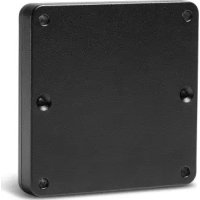
Power Over Ethernet - Carte réseau / adaptateur ELO - Notice d'utilisation et mode d'emploi gratuit
Retrouvez gratuitement la notice de l'appareil Power Over Ethernet ELO au format PDF.


| Type de produit | Adaptateur Power over Ethernet (PoE) |
| Marque | Elo |
| Modèle | Power Over Ethernet (Réf. E615169) |
| Compatibilité | I-Series 2.0 (10.1", 15.6", 21.5") |
| Alimentation | PoE+ (802.3at Type 2) |
| Certification requise de la source PoE | UL / CUL Listée |
| Fonction principale | Alimentation et données via un câble Ethernet |
| Installation | Fixation à l'arrière de l'I-Series 2.0 avec vis M3x16 incluses |
| Entretoise optionnelle | Pour montage VESA 100x100 mm |
| Fonctions disponibles avec PoE | Micro SD, Bluetooth, Touch, Audio (50%), Ethernet, USB limité |
| Fonctions indisponibles avec PoE | WiFi, Camera, HDMI Out, GPIO, USB 3.0 Type A |
| Débit Ethernet | 10/100/1000 Mbps (non spécifié, estimation) |
| Dimensions (approx.) | 80 x 50 x 20 mm (estimation) |
| Poids | Environ 50 g (estimation) |
| Matériau du boîtier | Plastique (estimation) |
| Température de fonctionnement | 0 °C à 40 °C (estimation) |
| Humidité de fonctionnement | 20 % à 80 % (estimation) |
| Entretien et nettoyage | Débrancher avant nettoyage ; utiliser un chiffon doux et sec |
| Sécurité | Ne pas connecter le câble Ethernet avant d'avoir installé le module PoE |
| Pièces détachées et réparabilité | Vis M3x16 fournies ; aucune pièce réparable par l'utilisateur |
FOIRE AUX QUESTIONS - Power Over Ethernet ELO
Questions des utilisateurs sur Power Over Ethernet ELO
0 question sur cet appareil. Repondez a celles que vous connaissez ou posez la votre.
Poser une nouvelle question sur cet appareil
Téléchargez la notice de votre Carte réseau / adaptateur au format PDF gratuitement ! Retrouvez votre notice Power Over Ethernet - ELO et reprennez votre appareil électronique en main. Sur cette page sont publiés tous les documents nécessaires à l'utilisation de votre appareil Power Over Ethernet de la marque ELO.
MODE D'EMPLOI Power Over Ethernet ELO
Installing the Elo Power over Ethernet module with the I-Series 2.0 (POE)
1 Unplug ALL ethernet and power cables from the device before installing the POE adaptor. Installing the adaptor with either of these cables connected will damage the device.
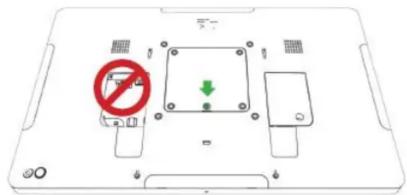
2 Remove screw, then lift cover.
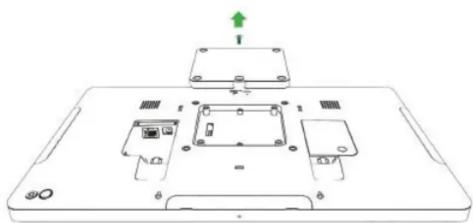
3 Plug Elo power-over-ethemet (POE) adaptor into recess, ensuring connector on bottom of adaptor lines up with connector on back of the I-Series 2.0.
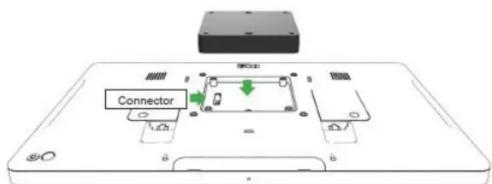
4 Secure adaptor to the I-Series 2.0 using 2m3× 16 screws (included)
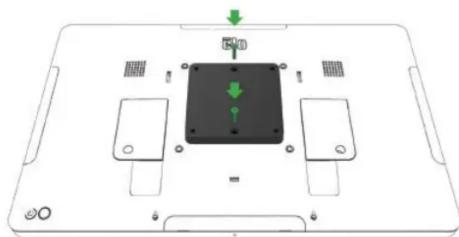
Installing the POE optional spacer
Install optional spacer included if using 100 × 100 ~mm VESA mount. Place it over the adaptor before adding VESA mounting bracket.
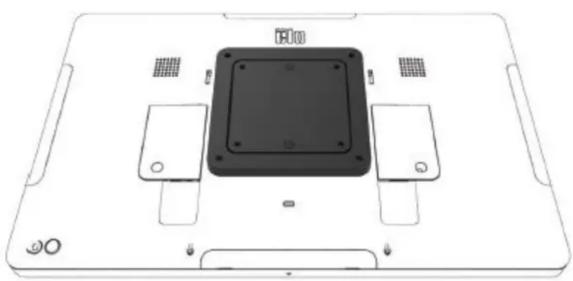
Attach VESA mounting bracket (not included) with screws long enough to pass through the adaptor and into the threaded holes of the I-Series 2.0 VESA mount. Elo recommends M4x16mm screws. Exact length of screws depends on thickness of VESA mount.
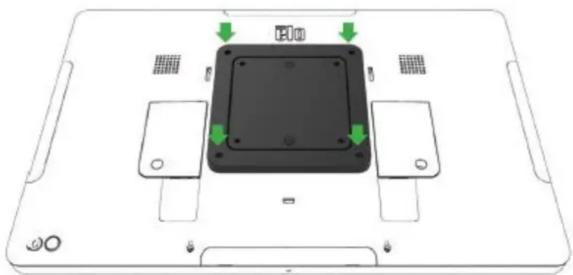
User Manual - I-series 2.0
POE source must be UL / CUL Listed and have the mark showing that it is an approved equipment. POE source must conform to standard POE+ (802.3at Type 2)
Warning: When using POE, do not connect the Ethernet cable before connecting the POE module.
Wallmounting Option: Use any standard VESA mount to wallmount the I-Series 2.0 when PoE is installed.
Power Over Ethernet (PoE, Elo Part Number: E615169)
The I-Series 2.0 devices support the Elo peripheral for power over Ethernet (PoE).
Note: when the PoE is connected, certain features are disabled to maximize available functions.
Refer to the table below for what will be available with POE:
10.1 Value w/POE 15.6 Value w/POE 10.1 Standard w/POE 15.6 Standard w/POE 21.5 Standard w/POE
| Micro SD Card | Available | Available | Available | Available | Not Available |
| WiFi | Not Available | Not Available | Not Available | Not Available | Not Available |
| Bluetooth | Available | Available | Available | Available | Available |
| Camera | Not Available | Not Available | Available | Available | Not Available |
| Touch | Available | Available | Available | Available | Available |
| Audio | Available | Available | 50% (user selectable)* | 50% (user selectable)* | 50% (user selectable)* |
| Ethernet | Available | Available | Available | Available | Available |
| USB Peripheral ports | 0 | 0 | 1 port user selectable** | 1 port user selectable** | 1 port user selectable** |
| USB 3.0 Type A | 0 | 0 | Not Available | Not Available | Not Available |
| HDMI Out | Not Available | Not Available | Not Available | Not Available | Not Available |
| GPIO | Not Available | Not Available | Not Available | Not Available | Not Available |
- Audio - if enabled, will be limited to 50% volume
** USB Peripheral Ports - 1 side peripheral port can be enabled