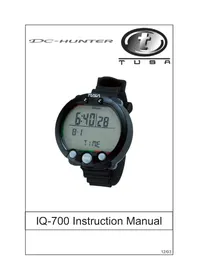
DCHunter IQ700 - Ordinateur de plongée Tusa - Notice d'utilisation et mode d'emploi gratuit
Retrouvez gratuitement la notice de l'appareil DCHunter IQ700 Tusa au format PDF.


| Caractéristiques techniques | Écran couleur TFT de 2,2 pouces, résolution 320 x 240 pixels |
|---|---|
| Modes de plongée | Plongée à l'air, plongée Nitrox, plongée en apnée |
| Profondeur maximale | 150 mètres |
| Autonomie de la batterie | Environ 40 heures en mode plongée |
| Fonctionnalités de sécurité | Alerte de profondeur, alerte de temps de plongée, alerte de décompression |
| Utilisation | Facile à utiliser avec des menus intuitifs et des boutons ergonomiques |
| Maintenance | Rincer à l'eau douce après chaque utilisation, vérifier l'étanchéité régulièrement |
| Poids | Environ 200 grammes |
| Dimensions | 130 mm x 70 mm x 30 mm |
| Accessoires inclus | Câble USB, manuel d'utilisation |
FOIRE AUX QUESTIONS - DCHunter IQ700 Tusa
Questions des utilisateurs sur DCHunter IQ700 Tusa
0 question sur cet appareil. Repondez a celles que vous connaissez ou posez la votre.
Poser une nouvelle question sur cet appareil
Téléchargez la notice de votre Ordinateur de plongée au format PDF gratuitement ! Retrouvez votre notice DCHunter IQ700 - Tusa et reprennez votre appareil électronique en main. Sur cette page sont publiés tous les documents nécessaires à l'utilisation de votre appareil DCHunter IQ700 de la marque Tusa.
MODE D'EMPLOI DCHunter IQ700 Tusa
DC-HUNTER

text_image
t T U S A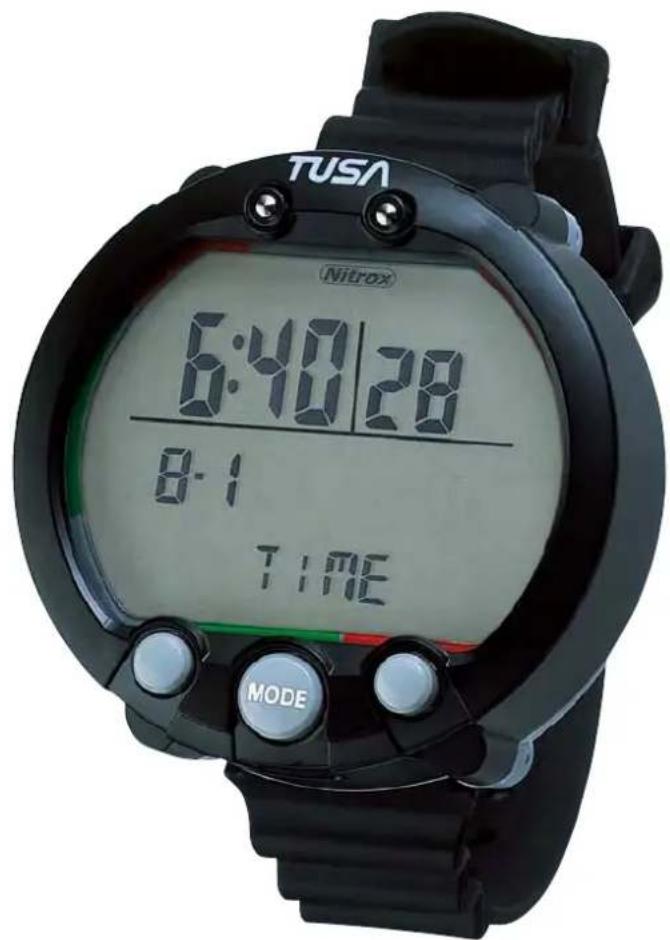
text_image
TUSA Nitrox 6:40/28 8:1 TIME MODEIQ-700 Instruction Manual
Contents
IQ-700 Flow Chart 2
- Introduction 4
- Key Features 4
- Common Sense Warnings 4
- Accessing Display Modes 7
- Time Mode 8
- Battery Indicator 9
- Altitude Setting 10
- Dive Set Mode and Gage Dive Set Mode 12
- Dive Plan Mode 15
- Dive Log Mode 17
- Dive Profile Mode 22
- PC Transfer Mode 24
- Date and Time Set Mode 25
- Dive Mode (Gage dive mode) 26
- Various Warnings 32
- Gage Mode 38
- IQ-700 Computer Reset 40
- Battery Replacement 40
- Units of Measurement 41
- General Handling 41
- Warranty 42
- Technical Specifications 44
IQ-700 Flow Chart
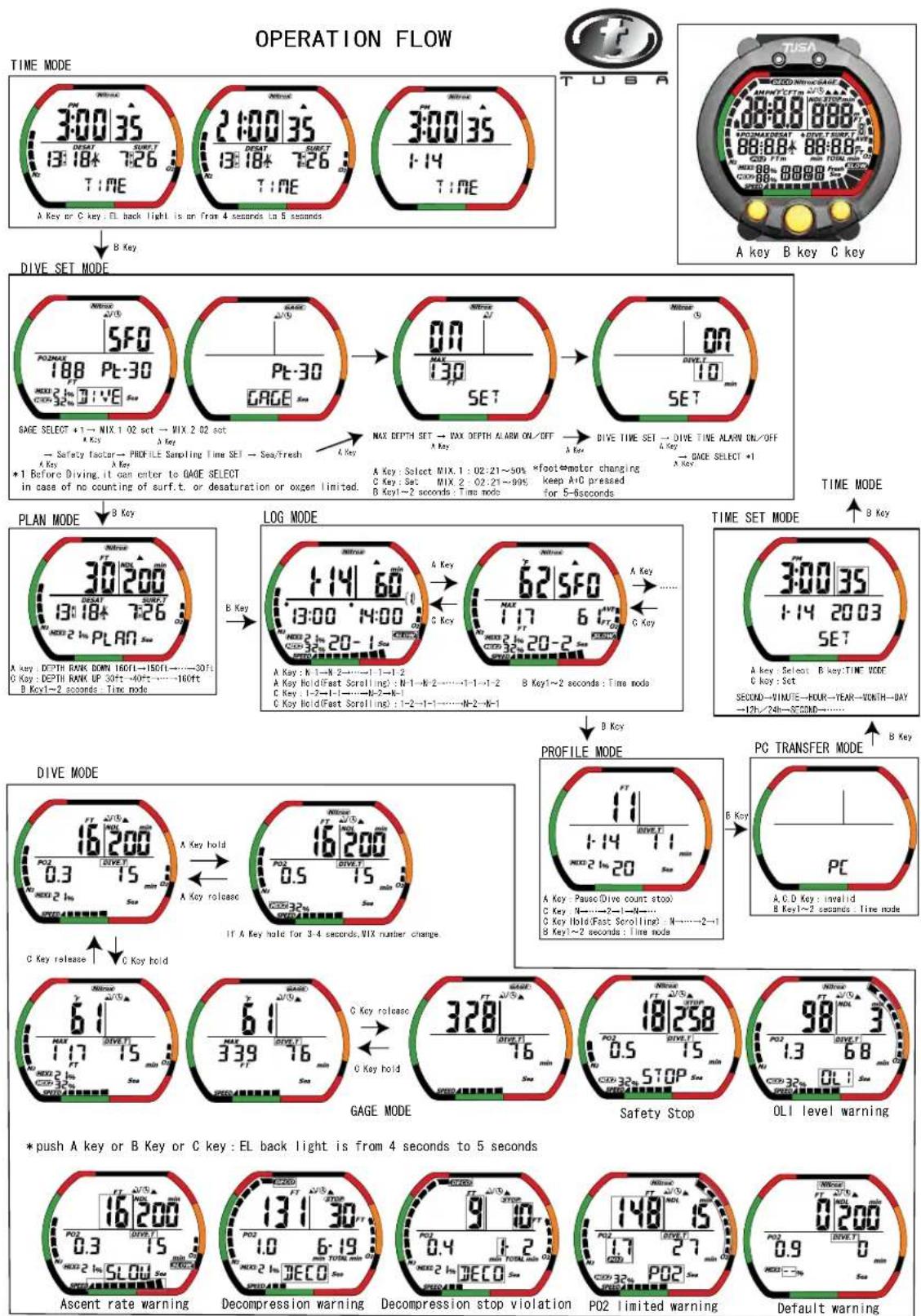
text_image
OPERATION FLOW TIME MODE 3:00 35 13:184 7:26 TIME A Key or C key : EL back light is on from 4 seconds to 5 seconds B Key T USA SFO POMAX 188 Pt-30 GAGE A Key Safety Iscale → PROFILE Sampling Time SET → Sea/fresh A Key +1 Before Diving. It can enter to GAGE SELECT in case of no counting of surf.t. or desaturation or oxygen limited. MAX DEPTH SET → VAX DEPTH ALARM ON/OFF A Key A Key : Select MIX.1 : 02:21~50% C Key : Sat MIX 2 : 02:21~99% B Key→2 seconds : Time node DIVE TIME SET → DIVE TIME ALAWN ON/OFF A Key → GAGE SELECT +1 A Key A Key : Select MIX.1 : 02:21~50% C Key : Sat MIX 2 : 02:21~99% B Key→2 seconds : Time node TIME MODE B Key LOG MODE 1:14 60 13:00 4:00 A Key : N 1—N 2——1 1—1 2 A Key Hold(Fast Scrolling) : N-1—K-2——1-1→1-2 C Key 1-2—1-1—N-2—K-1 C Key Hold(Fast Scrolling) : 1-2—1-1—N-2—K-1 62 SFO MAX 6 17 6 497 A Key A Key : Select B key:TIME VODE C Key : Set SECOND—MINUTE—HOUR—YEAR—MONTH—DAY —12h/24h—SECOND—…… TIME SET MODE 3:00 35 1:14 2003 SET A Key : Select B key:TIME VODE C Key : Set PC A C D Key : invalid B Key→2 seconds : Time node B Key DIVE MODE 16 200 POZ 0.3 15 min A Key hold A Key release 16 200 POZ 0.5 15 min C Key hold C Key hold IF A Key hold for 3-4 seconds, WIX nather change. PROFILES MODE FT 1:14 71 A Key : Pause(Dive count stop) C Key : N—…2—1—N—… C Key Ihold(Fast Scrolling) : N—…2—1 B Key→2 seconds : Time node B Key PC TRANSFER MODE A C D Key : invalid B Key→2 seconds : Time node GAGE MODE 6:1 MAX 1:17 5min A Key hold 6:1 MAX 3:39 76 min C Key release C Key hold 3:28" MINIUS STOP PSS Safety Stop 98 3 P0Z 1.3 68 min OLI level warning Ascent rate warning Decompression warning Decompression stop violation POZ limited warning Default warning2003.11.20
* The gray square shows a blinking part.
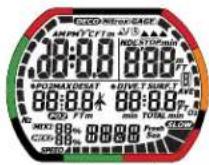
all segment
altitude rank
Out of measurement range
Time mode in gage
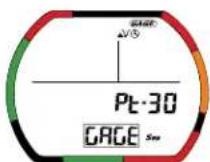
Dive set mode in gage
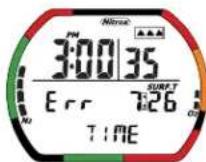
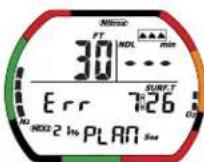
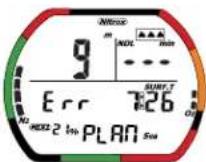
Altitude Err
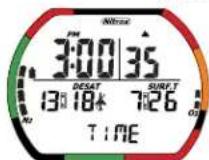
BLD2
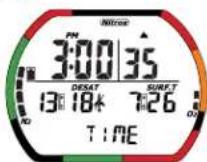
BLD1
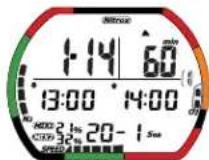
LOG Ascent rate warning
LOG_OLI level warning
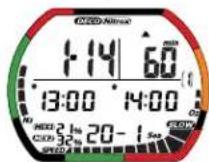
LOG_Decompression warning
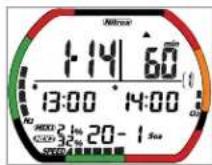
LOG_Out of range
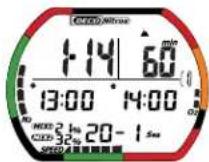
LOG Decompression stop violation
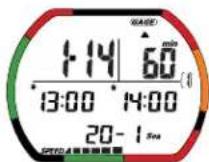
LOG_GAUGE
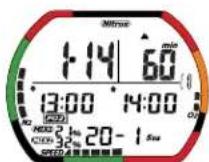
LOG_P02 limited warning
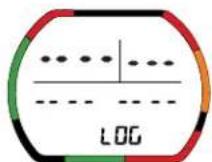
No data in profile mode and Log mode


1. Introduction
Congratulations on your choice of the TUSA IQ-700 Dive Computer. The IQ-700 is a compact and sophisticated dive instrument that will give you reliable, trouble free performance, dive after dive.
The information in this manual has been developed for your safety. Please read and understand this manual completely before using your new TUSA dive computer.
2. Key Features
Among the IQ-700's key features:
- Can handle both air and nitrox
- User changeable PO, setting
• Visual and Audible alarms - Safety stop function
- Decompression and non decompression dive information
- Gage mode
• Maximum depth alarm - Dive time alarm
- Display backlight
- User changeable battery
3. Common Sense Warnings
As is true of every piece of diving equipment, including all dive computers, the IQ-700's abilities are not limitless. There are certain limitations and restrictions of which you must be aware, and certain precautions you must take when using the IQ-700.
WARNINGS
Before using the IQ-700, it is extremely important you read the following points- as well as similar warning and caution notices that appear throughout this manual. Failure to do so could result in damage to or loss of equipment, serious personal injury, or death.
The IQ-700 is designed for use by certified, recreational divers who have maintained a sufficient level of knowledge and skill proficiency through a combination of formal training, ongoing study and experience. It is not intended for use by persons who lack the qualifications, and thus may not be able to identify, assess, and manage the risks scuba diving entails. Use of the IQ-700 in conjunction with Enriched Air Nitrox (EANx) further requires that the diver be trained and certified for Nitrox diving.
The IQ-700 is not intended for use by commercial, military or technical divers whose activities may take them beyond the commonly accepted depth limits for recreational diving.
The IQ-700 is designed for use by divers breathing either normal compressed air or Enriched Air Nitrox (EANx) mixtures whose fraction of Oxygen falls within a range of 22 to 50 percent for mix one, and 22-99% for mix two.
Although the IQ-700 is capable of calculating decompression stop requirements, this ability is provided as a safety feature only, should a diver accidentally exceed the No-Decompression Limits (NDLs). Dives requiring mandatory stage decompression carry substantially greater risk than dives made well within no-decompression limits.
Decompression diving is widely believed to entail substantially greater risk of decompression illness than dives made well within the No-Decompression Limits (NDL). The IQ-700 provides decompression stop information solely as a contingency in case divers accidentally exceed the No-Decompression Limits. It is not designed or intended for use as a tool to plan or execute dives that participants know will entail mandatory decompression.
WARNINGS
The IQ-700 is designed to be used by only one diver at a time. Divers should not share a single IQ-700, or any dive computer, on the same dive. Additionally, no diver should lend his or her IQ-700 to anyone else until it calculates that no measurable residual nitrogen remains after previous dives, and displays neither the “Desaturation Time” nor “No Fly” indicators while in Surface Mode. Further, no diver should use his or her IQ-700 for repetitive dives unless that same IQ-700 has accompanied him or her on all previous dives in the same repetitive dive series.
Neither the IQ-700, nor any other dive computer presently available, physically measures the amount of nitrogen present in body tissues, or the rate at which this nitrogen is being absorbed or released. Instead, the IQ-700 monitors depth and time, and uses this data to work a mathematical formula designed to emulate how individuals in good general health and whose physical characteristics do not place them among those at higher risk of decompression illness are assumed to absorb and release nitrogen from body tissues. Thus, the IQ-700 cannot compensate for factors such as age, obesity, dehydration, cold or exertion, which experts believe place divers at greater risk of DCI. If these, or similar factors apply to you, use the IQ-700, and any other dive computer or dive table, with even greater caution.
Experts still know surprisingly little regarding the exact nature and causes of decompression illness (also known as decompression sickness, DCI, or DCS). Susceptibility to DCI may vary substantially from person to person and from day to day. Neither the IQ-700, nor any dive computer or table, can guarantee that you will not suffer decompression illness. Even though you use these items correctly, you may still suffer DCI. Do not rely on the IQ-700 as your sole means of avoiding decompression sickness.
Experts recommend divers wait at least 24 hours following any dive before flying in an aircraft or driving to altitude. Failure to allow sufficient surface interval before doing so may substantially increase the risk of Decompression Illness (DCI).
Do not plan dives to depths deeper than those for which the IQ-700 is capable of displaying an available No-Decompression Limit. Doing so could cause you to exceed the No-Decompression Limits or limiting PO2 of 1.6 bar, which may in turn substantially increase your risk of decompression illness or CNS Oxygen Toxicity and can lead to serious personal injury or death.
4. Accessing Display Modes
text_image
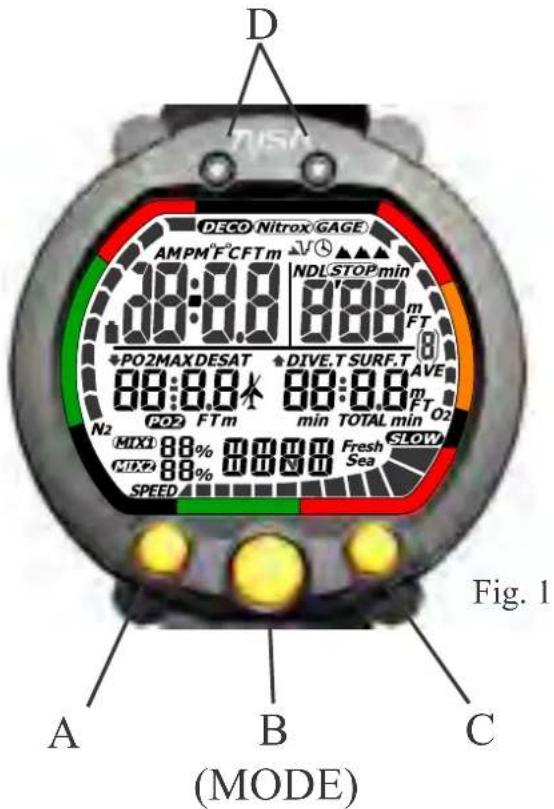
D DECO Nitrox GAGE AMPM°F°CFTm 18:00 NDL STOP min 88:00 88:00 m FT *PO2MAX DESAT *DIVE.T SURF.T AVE 88:00 88:00 m FT O2 N2 PO2 FTm min TOTAL min MIX1 88% 88% Fresh Sea MIX2 88% 88% Sea SPEED Fig. 1 A B C (MODE)There are some display modes that the IQ-700 enters and/or exits automatically. For example, by taking the IQ-700 underwater, you automatically activate its Dive Mode. Upon surfacing your IQ-700 will automatically enter Surface Mode.
To access other modes you may need to push one of the three large, grey buttons on the IQ-700's face. These are the A, B (mode), and C buttons. (Fig. 1)
You will find these buttons easy to use. In some instances you may need only press a button once and release it to achieve the desired result. In other instances, you may need to hold the button down until you get the result you wish. This manual will outline clearly which procedure to follow for each mode or task.
Throughout this manual display icons that blink are shown within a gray square.
5. Time Mode
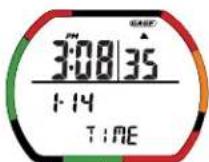
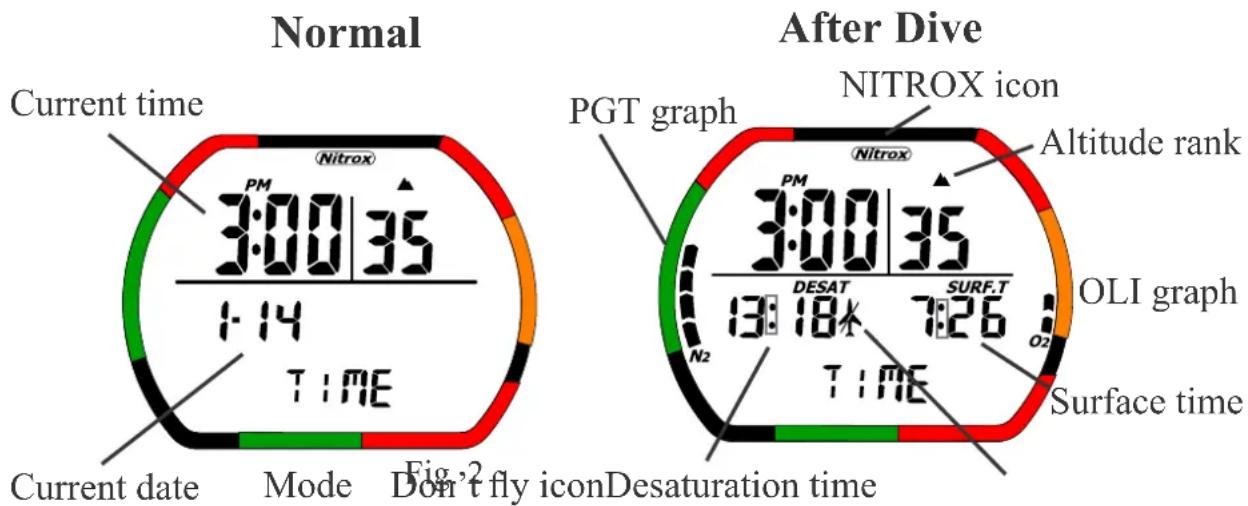
Time mode is the IQ-700's default mode. In this mode the screen displays a minimum of the current date and time of day. Within 24 hours of surfacing from a dive, the IQ-700 will display additional information while in Time Mode. A description of the screens is shown below.
text_image
Normal Current time Nitrox PM 3:00|35 1:14 TIME Current date Mode Fig.2 Don't fly icon Desaturation time After Dive PGT graph NITROX icon Altitude rank Nitrox PM 3:00|35 13:18 7:26 O2 SURF.T N2 TIME OLI graph Surface timeFig.3
Note: Blinking icons are shown in a square.
• Current time: This is the current time of day. (Fig. 2)
• Current date: This is the current date. (Fig. 2)
- Battery indicator Icon: This displays the current battery voltage shown)
- PGT (Pressure Gas in Tissue) graph: This indicates the level of Nitrogen with nine level indicators. (Fig. 3)
- OLI (Oxygen Limited Indicator) graph: This indicates the level of Oxygen limit with eight level indicators. (Fig. 3)
- Nitrox Icon: This Icon is ON when NITROX has been set MIX2. It blinks if the MIX1 and MIX2 setting is the default setting. (Fig. 3)
- Desaturation time (DESAT): This indicates the time remaining body's internal nitrogen is desaturated. (Fig. 3)
- Surface time (SURF.T): This is the surface interval time after a dive. The timer is started from when the depth shown in Dive mode reaches 5 feet (1.5m) or less. If the depth changes back to 5 feet (1.5m) or more in less than 10 minutes, the previous dive is continued. Surface time is continued for 48 hours. After that, surface time is turned off. (Fig. 3)
• Mode: This display shows the computer in Time mode. (Fig. 2) - Don't Fly Icon: While the computer calculates desaturation time this icon is displayed during Time Mode. When the computer has finished calculating desaturation time this Icon is turned off. (Fig. 3)
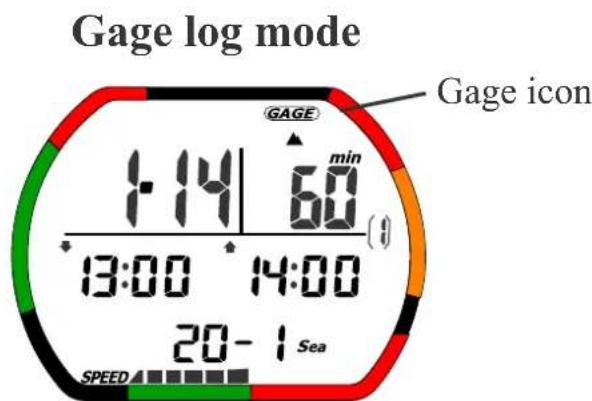
• Gage mode Icon: If the computer is in Gage mode this icon will appear.
6. Battery Indicator
Battery Indicator Icon: This displays the current battery voltage, follows.
When battery voltage is 2.8V or above the battery Icon is OFF.
When battery voltage is 2.6 to 2.7 V the battery Icon blinks.
When battery voltage is less than 2.6 V the battery Icon is ON.
You cannot go into dive mode while the battery indicator Icon is blinking or ON. The Icon can be displayed during all other modes. Battery voltage is automatically measured during all modes except PC transfer and dive mode.
Important!
Once the battery indicator is blinking or ON you must return the IQ-700 to your local authorized TUSA dealer for battery replacement, or replace the battery yourself following the procedure outlined later in this manual. Before replacing your IQ-700's battery, be sure to upload or copy all dive log data to your log book, as the battery replacement process erases all such data from the IQ-700's memory.
7. Altitude Setting
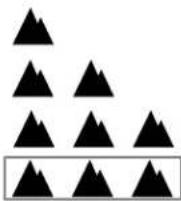
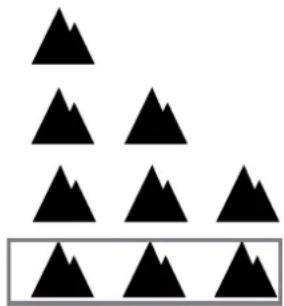
Altitude setting: The IQ-700 automatically measures and calculates current location's altitude and displays the corresponding altitude rank. The relation between altitude rank levels and altitudes are shown below. A new altitude measurement and calculation is made once every ten minutes.
| Altitude rank | Altitude range |
| 0 | 0-900m(0-2952ft) |
| 1 | 600-1800m(1968-5904ft) |
| 2 | 1500-2600m(4920-8528ft) |
| 3 | 2300-6000m(7544-19680ft) |
| Err | Over 6000m(over 19680ft) |
Fig. 4
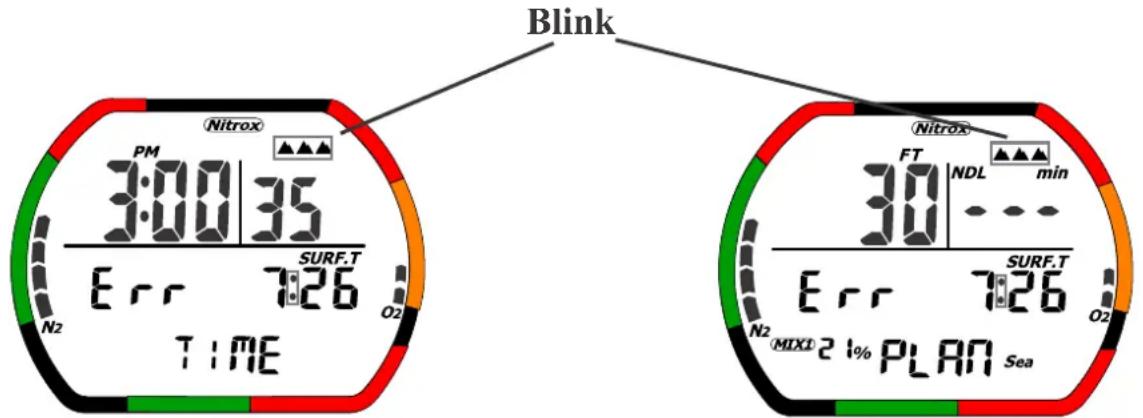
When the altitude is over 19680 feet (6000 meters), the display will blink while showing the altitude rank and ‘Err’ icons and the dive computer will not function until the altitude drops to a lower level (under 19680 feet (6000 meters)). The calculations of PGT, OLI and desaturation time are stopped when altitude is over 19680 feet (6000 meters), and ‘Err’ is displayed; however surface time continues to be counted. When the altitude is less than 19680 feet (6000 meters), the display shown before reaching that altitude is displayed again. The same displays and processing occur if the altitude cannot be measured for any reason.
Altitude measurements are made during all modes except Dive a transfer mode. The computer will display the current altitude setting in Time Mode and Plan Mode (In Dive Log mode the rank of the dive is displayed.)
Warning
The IQ-700 is not intended for use at altitudes above 19680 ft (6000 m). Diving at high altitudes carry an increased risk of decompressoin sickness.
Below are the Altitude Setting Icons for the rank of 0,1,2,3. If the altitude exceeds 19680 feet the icon will blink and the Err icon will be displayed. (Fig. 5)
natural_image
Abstract arrangement of black triangles above a rectangular frame (no text or symbols)altitude rank
Fig. 5
If the Altitude exceeds 19680 feet (6000 meters) the display show below will appear. (Fig. 6,7)
text_image
Blink Nitrox PM 3:00:35 SURF.T Err 7:26 TIME N2 O2 Nitrox FT NDL min 30 SURF.T Err 7:26 N2 MIX1 2 1% PLAN Sea O2Fig. 6 Fig. 7
Caution
- a change in the altitude rank will cause PGT graph to be displayed and desaturation time to be performed even if the PGT graph was not previously active.
- Never touch the water detection switch (D) or expose it to moisture when on an airplane or in any other environment where air pressure can change quickly.
- When the PGT graph is high (7 or 8 bars), a change in the altitude rank may cause the ninth level indicator to appear. To prevent this, never use the dive computer when going to high-altitude locations, since it will disable dive mode as a safety precaution. Normal function of the dive computer will be restored when PGT graph drops to 8 bars or less.
- A difference of one-minute may occur between when the PGT graph is turned off and when desaturation time is turned off.
Operation of Buttons During Time mode
Prior to a dive
The letters correspond to the buttons of the IQ-700 shown in figure 1.
• A: EL back light is on from 4-5 seconds.
• B: Press this button to move to dive set mode.
• C: EL back light is on from 4-5 seconds.
• D: When water is detected, the mode moves to dive mode
During a Surface Interval
• A: EL back light is on from 4-5 seconds.
- B: Press this button to move to dive set mode, but if surface time is less than 10 minutes, display moves to dive plan mode.
In gage mode press "B" to move to the gage dive set mode display. If surface time is less than 10 minutes the mode moves to dive log mode.
• C: EL back light is on from 4-5 seconds.
• D: When water is detected, the mode moves to dive mode.
8. Dive Set Mode and Gage Dive Set Mode
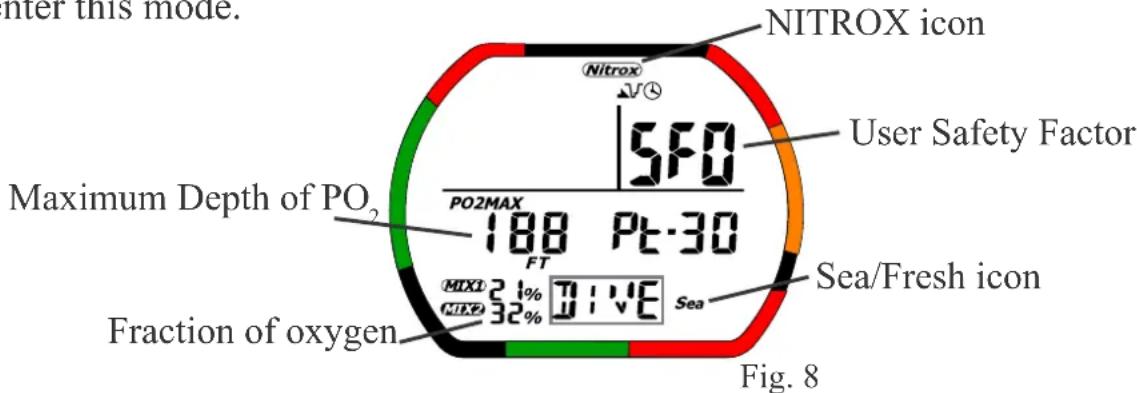
To enter Dive Set mode from Time mode press the B button once. Once in Dive Set mode press the C button to enter Gage mode.
Note: If the surface interval is less than 10 minutes the computer will not enter this mode.
text_image
Inter this mode. NITROX icon 5F0 User Safety Factor Maximum Depth of PO₂ 188 Pt-30 FT Fraction of oxygen MIX: 21% MIX: 32% Sea/Fresh icon Sea Fig. 8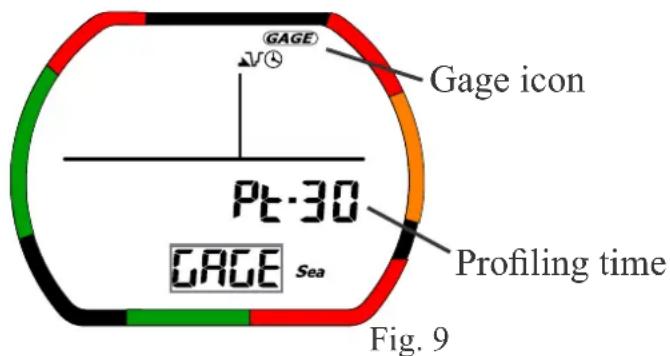
text_image
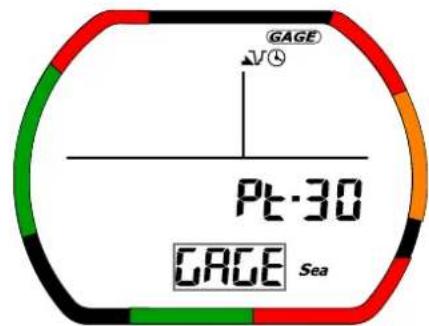
GAGE V④ Pt-30 GAGE Sea Gage icon Profiling time Fig. 9Maximum depth alarm Dive time alarm
text_image
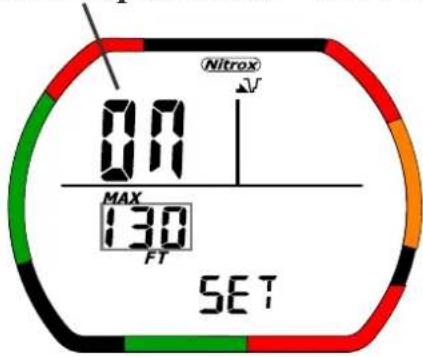
00 MAX 130 FT SET Nitrox √V SETFig. 10
text_image
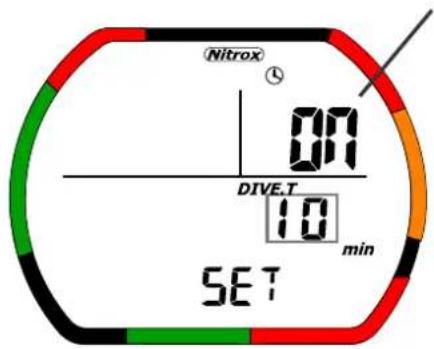
Nitrox 07 DIVE.T 10 min SETFig. 11
In Dive Set mode the following information is displayed.
• Fraction of oxygen (FQ) (Fig. 8)
MIX1 setting range: Fraction of oxygen 21-50% ’—’%.
MIX2 setting range: Fraction of oxygen 21-99% ’—’%.
- Maximum depth of P_2O Based on the fraction of oxygen, this indicates the water depth where the PO_2 (pressure of oxygen) reaches 1.4 (MIX1) or 1.6 (MIX2). (Fig. 8)
If the water depth rank exceeds the maximum water depth the node-compression limit displayed will show bars ('---').
- User Safety Factor (USF): If the level is "0" the usual algorithm is used for dive calculations. When the level is changed to "1" or "2" the next higher altitude setting is used. The default setting is "0". (Fig. 9)
- Profiling time: This setting is the sampling time used during the dive. (Fig. 9)
- Maximum Depth Alarm: This alarm will generate a sound when it reaches the set depth. The setting range is 9-99 meters (30-320 ft), and can be set in 10 feet increments. (Fig. 10)
- Dive time alarm: This alarm generates a sound when it reaches a diving time value set by the diver. (Fig. 11) The setting range is 10-590 minutes in increments of 10 minute.
- Nitrox Icon: This Icon is ON when NITROX has been set for MIX1 or MIX2. It blinks if the MIX1 and MIX2 settings are at the default value. (Fig. 8)
- Sea/Fresh Icon: This icon indicates if the water setting is sea water or fresh water. (Fig.8)
- Gage Mode Icon: This icon will be displayed if gage mode has been selected. (Fig. 9)
Caution
The “--” display: The setting changes to this display automatically at 24:00 on the day the MIX value was set except when the setting is Air ( FO_2 equals 21%). If the user forgets to set the FO_2 an audible and flashing alarm is generated when the computer moves to Dive mode.
If MIX 1 is set at Air (21%) and MIX 2 is set at 21% or “--%” the setting for MIX 1 will remain at 21%. The displayed setting for MIX 2 will always revert to “--%” at 24:00 on the day the value was originally set.
Operation of Buttons during Dive and Gage Set mode.
- A: Press the A button to select the function you would like to modify.
GAGE SELECT→MIX1 2 FOset→MIX2 2 FOset→User Safety Factor→Profile time→Sea/Fresh→MAX DEPTH SET→MAX DEPTH ALARM ON/OFF→DIVE TIME SET→DIVE TIME ALARM ON/OFF→GAGE SELECT→……
• B: Press this button to move to the dive plan mode.
(In gage mode, press this button to move to dive log mode.)
• C: Press this button to change the settings value.
- C: Press and hold this button to change setting the content scrolling.
• D: When water is detected the mode moves to dive mode.
- Auto return: The display automatically returns to time mode buttons are used for 2-3 minutes.
• B: Press and hold this button for 1-2 seconds to move to time mode.
Caution
If PGT, OLI, DESAT, and the SURF.T are active it isn't possible to switch to Gage select mode.
9. Dive Plan Mode
To enter Dive plan mode from Time mode press the B button twice.
Note: This mode cannot be entered while using Gage mode.
text_image
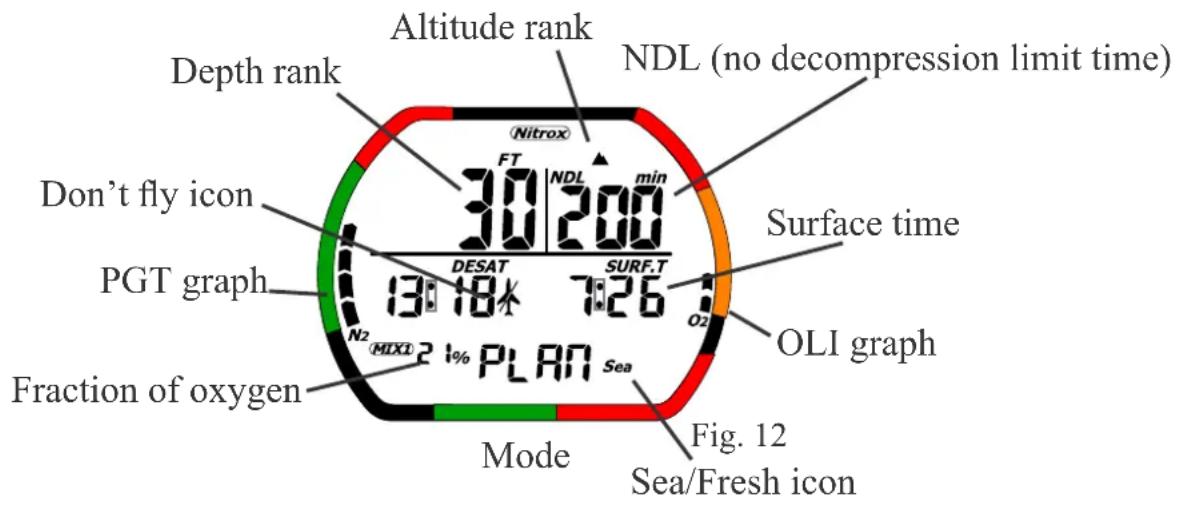
Altitude rank Depth rank NDL (no decompression limit time) Don't fly icon PGT graph Fraction of oxygen N2 MIXL 21% PLAN Sea Mode Fig. 12 Sea/Fresh icon Surface time O2 SURF.T 13:18% 12:26 DESAT 30/200 min 30/200 min 13:18% 7:26% OLI graphThe following functions are displayed in Dive plan mode. (Fig. 12)
- Depth rank and NDL (non-decompression limit): Use this function to set the planned dive depth and corresponding depth rank. There are 14 depth ranks, as shown below. The NDL corresponding to the current PGT graph is displayed. The displayed NDL is for when MIX1 is used. The maximum displayable NDL is 200 minutes.
| 30 ft. | 40 ft. | 50 ft. | 60 ft. | 70ft | 80 ft. | 90 ft. | ||
| 100 ft. | 110 ft. | 120 ft. | 130 ft. | 140 ft. | 150 ft. | 160 ft. |
- Battery indicator Icon: This icon shows the current battery voltage. - PGT (Pressure Gas in Tissue) graph: This bar graph shows the amount of Nitrogen using nine indicator segments.
- OLI (Oxygen Limited Indicator) graph: This bar graph shows the level of the Oxygen Limit with eight indicator segments.
• Fraction of oxygen: This displays only MIX1 as the current setting.
- Sea/Fresh Icon: This indicates the water setting (sea water/fresh water).
- Altitude rank : The computer automatically measures and calculates the current location's altitude and displays the corresponding altitude rank.
- Nitrox Icon: This Icon is ON when NITROX has been set MIX2. It blinks if the MIX1 and MIX2 setting are using the default setting. The FO, must be set prior to diving with the IQ-700.
- Don’t Fly Icon: While the computer calculates desaturation time, this icon is turned on in Time mode. When the computer has finished desaturation time and Time Mode is over 12 hours, this Icon is turned off.
- Desaturation time: This indicates the time remaining until the internal nitrogen is desaturated.
- Surface time: This is the surface interval time after a dive. Surface time is started from when the depth shown in Dive mode reaches 5 feet (1.5m) or less. If the depth changes back to 5 feet (1.5m) or more within 10 minutes the previous dive mode is continued. Surface time is displayed for 48 hours after the last dive.
Operation of buttons during dive plan mode
• A: Press this button to decrease the depth rank.
• B: Press this button to move to dive log mode.
• C: Press this button to add one to the depth rank.
• D: When water is detected computer moves to dive mode.
- Auto return: The display automatically returns to time mode buttons are used for 2-3 minutes.
• B: Press and hold this button for 1-2 seconds to move to time mode
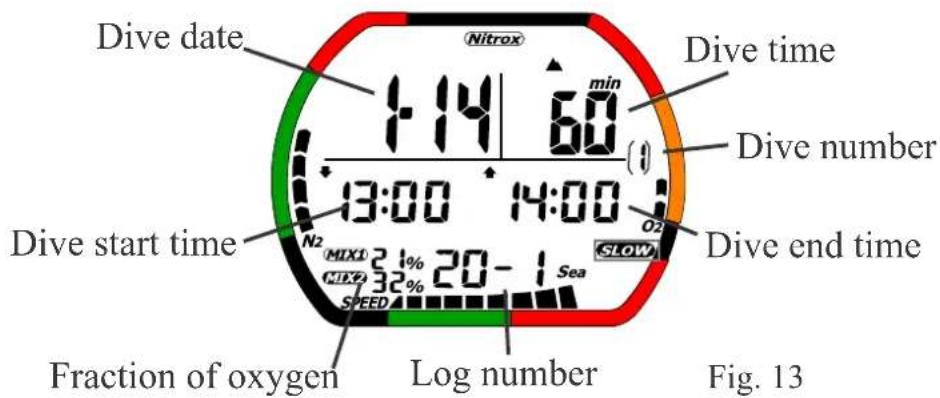
10. Dive Log Mode
To enter Dive log mode from Time mode press the B button three times.
Display 1
text_image
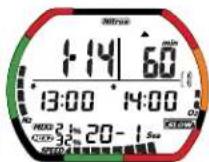
Dive date 1:14 60 min Dive time Dive number 13:00 14:00 Dive start time N2 MIX1 31% 20-1 Sea SPEED Fraction of oxygen Log number Dive end time SLOW Fig. 13Display 2
text_image
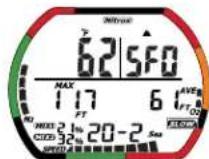
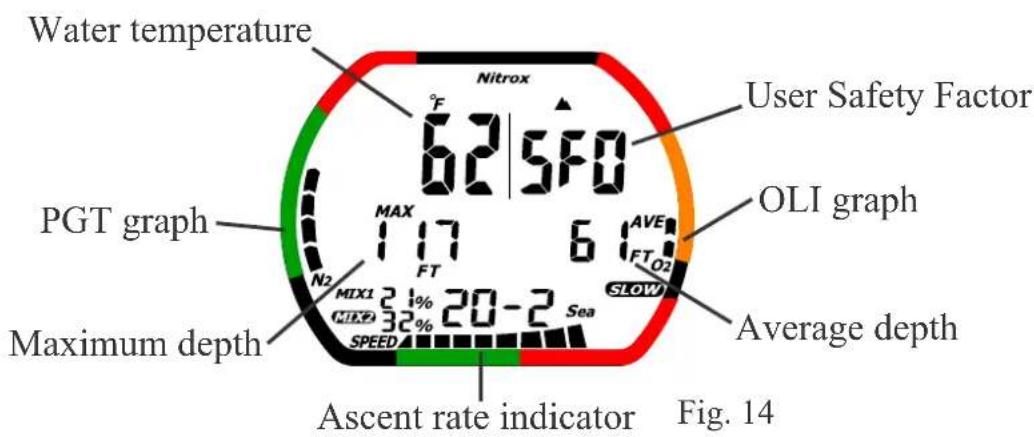
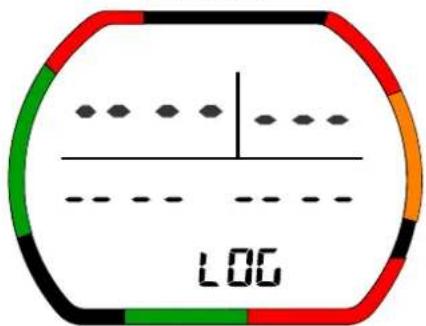
Water temperature Nitrox 62/5:00 User Safety Factor PGT graph MAX 117 6 AVE FTO2 OLI graph N2 FT SLOW Average depth Maximum depth MIX1 21% 20-2 Sea MIX2 32% SPEED Ascent rate indicator Fig. 14No data
text_image
LOGMode
Fig. 15
Description of the Dive Log functions
The Dive log mode records various data during a dive when the dive depth is at least 5 feet (1.5m) and the dive time is at least 3 minutes. Data is recorded during each successive dive, and the log data storage capacity hours of dive time, or up to 60 log data entries. If the I exceeds 30 hours or the number of log data entries exceeds 60, the oldest data is automatically deleted. (See the section describing profile mode for further description of log data and profile data.) The logged data is described below.
- Log number: This indicates the number of the log entry being recorded among the recorded logs. (Fig. 13)
- Dive date/Dive start time/ Dive end time: This is diving information. Dive date is the date of the dive. Dive start time is the time at the start of the dive. Dive end time is the time at the end of the dive. Both Dive start time and Dive end time are displayed in 24 hour format. (Fig. 13)
- PGT (Pressure Gas in Tissue) graph: This represents the level of Nitrogen with nine level indicators at the end of the dive. (Fig. 14)
- OLI (Oxygen Limited Indicator) graph: This represents the level of the Oxygen Limit with eight level indicators at the end of the dive. (Fig. 14)
- Altitude rank: This is the altitude setting used during the dive. (Fig. 13)
- Nitrox Icon: This Icon is ON when NITROX has been set for MIX1 or MIX2. It blinks if the MIX1 and MIX2 setting is the default setting. (Fig.13)
- Fraction of oxygen ( F_2O ). It displays the FO_2 which was used while diving. (Fig. 13)
• Dive time: This is the dive time. (Fig. 13) - Water temperature: water temperature at maximum depth. The measurement range is: 23-104° F (-5.0 to 40.0°C). It display ‘Lo’ when water temperature is under 23° F (-5°C). It displays ‘Hi’ when water temperature is over 104° F (40.0°C). (Fig. 14)
-
User Safety Factor (USF): When the level is "0" the usual algorithm is used for calculations. When the level is "1" or "2" the next higher altitude rank is used for the dive calculations. The default setting is "0". (Fig. 14)
-
Average depth: this is the average water depth during the dive. If the depth is over 328 ft (99.9m), the display is ‘---’. In Gage mode if depth is over 656 ft (199.9m), the display is ‘---’. (Fig. 14)
- Maximum depth: This is the maximum depth recorded during a dive. If the depth is over 328 ft (99m) the display is ‘---’. In Gage mode if the depth is over 656 ft (199.9m) the display is ‘---’. (Fig. 14)
- Ascent rate indicator: This is the maximum Ascent rate recorded during a dive. (Fig. 14)
- Sea/Fresh Icon: This indicates the water setting (sea water/fres (Fig. 14)
- Gage mode Icon: If the computer is in gage mode this icon is ON. (Fig. 14)
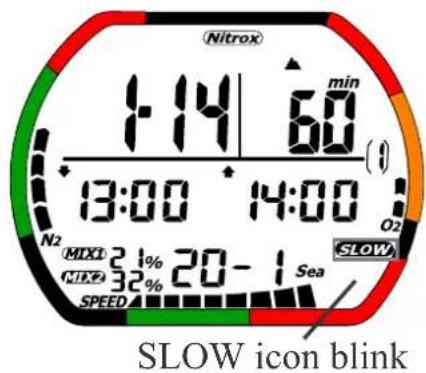
• Warning Displays: These are warnings that can occur during a dive.
Ascent rate warning
text_image
Nitrox 1:14 60 min 13:00 14:00 N2 MIXD 21% 20-1 Sea MIXE 32% SPEED SLOW icon blinkFig. 16
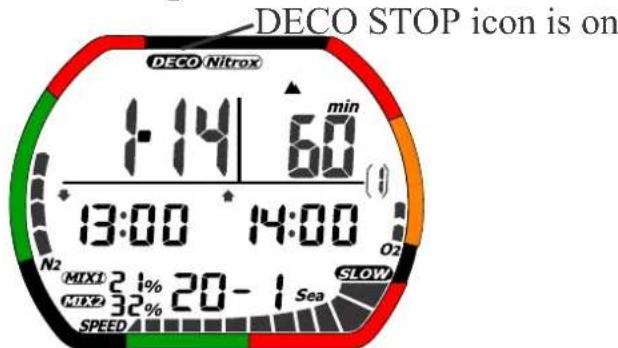
Decompression dive
text_image
DECO STOP icon is on DECO Nitrox 1:14 60 min 13:00 14:00 N2 MIX1 31% 20-1 Sea MIX2 32% SPEED SLOWFig. 17
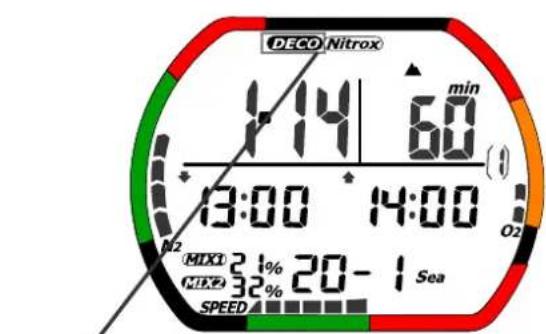
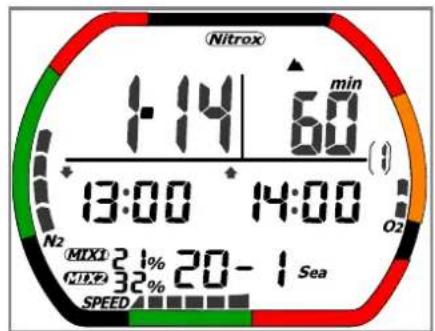
Decompression stop violation Out of measurement range warning
text_image
DECO Nitrox 1:14 60 min 13:00 14:00 MIXO 21% 20-1 Sea MIXE 32% SPEEDDeco stop icon blink
text_image
Nitrox 1:14 60 min 13:00 14:00 N2 MIX1 21% 20-1 Sea MIX2 32% SPEEDAll segments blink
Fig. 19
text_image
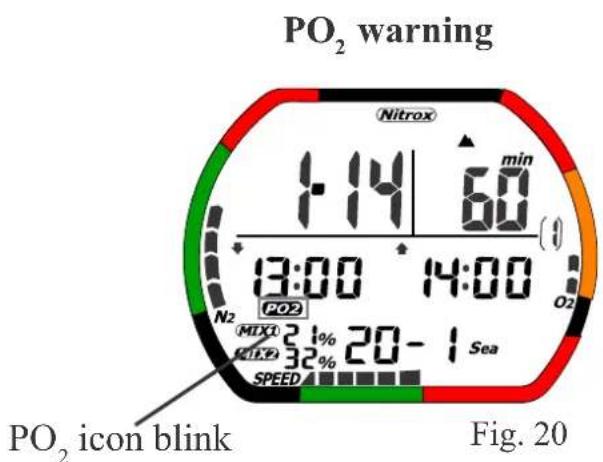
PO₂ warning Nitrox 1:14 60 min 13:00 14:00 N₂ PO₂ MIXO 21% 20-1 Sea SPEED PO₂ icon blink Fig. 20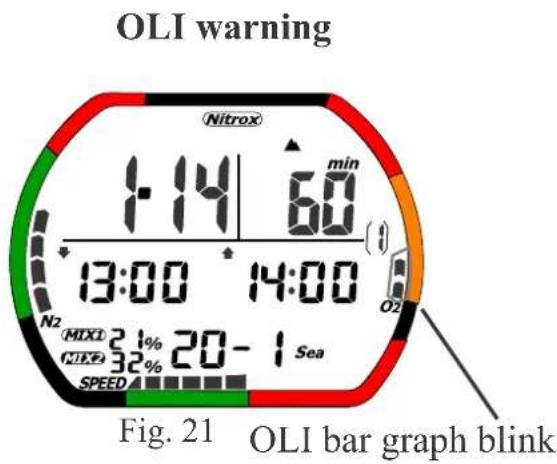
text_image
OLI warning 1:14 60 min 13:00 14:00 N2 MIXI 21% 20-1 Sea NIKE 32% SPEED Fig. 21 OLI bar graph blinkThe gage dive log mode provides functions for reviewing inform recorded during a dive. It functions the same as dive log mode when the dive depth is at least 5 feet (1.5m) and the dive time is at least 3 minutes. The gage icon will be displayed and it will show that the computer was used in gage mode. The logged data is described below. (Fig. 22)
text_image
Gage log mode GAGE min 1:14 60 ( ) 13:00 14:00 20-1 Sea SPEEDFig. 22
Operation of buttons during Log mode
• A: Press this button to change the log number.
$$ (6 0 - 1 \rightarrow 6 0 - 2 \rightarrow \dots \rightarrow 2 - 1 \rightarrow 2 - 2 \rightarrow 1 - 1 \rightarrow 1 - 2) $$
$$ (1 - 2 \rightarrow 1 - 1 \rightarrow 2 - 2 \rightarrow 2 - 1 \rightarrow \dots \rightarrow 6 0 - 2 \rightarrow 6 0 - 1) $$
• A: Press and hold this button to change log number using fast scrolling.
• B: Press this button to move to dive profile mode.
• C: Press this button to change log number.
• C: Press and hold this button to change log number using fast scrolling.
• D: When water is detected, the mode moves to dive mode.
- Auto return: The display automatically returns to time mode buttons are used for 2-3 minutes.
• B: Press and hold this button for 1-2 seconds to move to time mode.
11. Dive Profile Mode
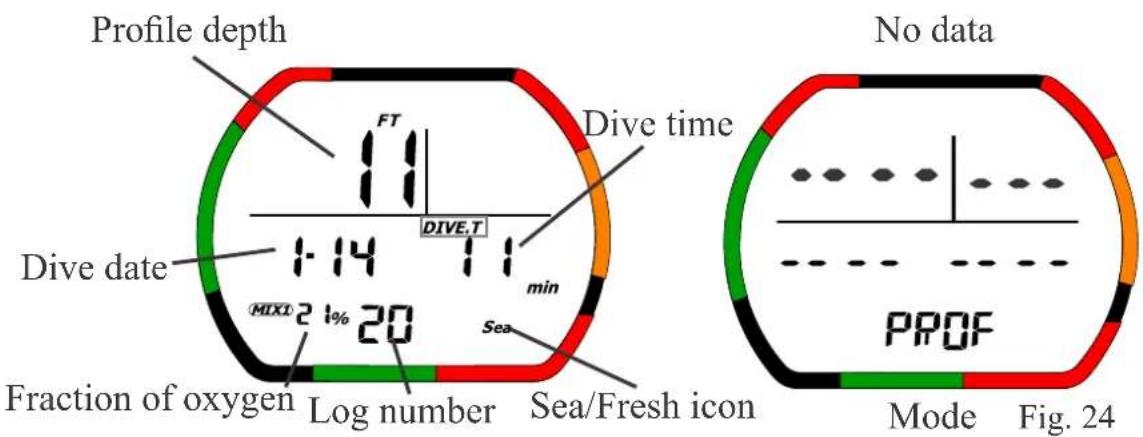
text_image
Profile depth Dive time FT DIVE.T Dive date 1:14 min MIX1 2 1% 20 Fraction of oxygen Log number Sea/Fresh icon No data PROF Mode Fig. 24Fig. 23
Description of the Dive Profile mode.
Dive log mode provides functions for recording various data and dive when the dive depth is at least 5 feet (1.5m) and the dive time is at least 3 minutes. Data is recorded during each successive dive, and the log data storage capacity is about 30 hours of dive time (when the profile's sampling time is set at 30 seconds), or up to 60 log data entries. If the logged dive time exceeds 30 hours or the number of log data entries exceeds 60, the oldest data is automatically deleted. (See the section describing profile mode for further description of log data and profile data.) The logged data is described below.
• Dive date: The date of the dive. (Fig. 23)
• Dive time: This is the dive time. (Fig. 23)
- Log number: This indicates the number of the currently displayed profile data among all of the currently recorded data entries. (Fig. 23)
• Fraction of oxygen: This shows the Mix value used while diving. (Fig. 23)
- Sea/Fresh Icon: This indicates the water setting (sea water/fresh water). (Fig. 23)
• Gage mode Icon: The icon is ON if used in Gage mode.
• Mode display: This shows Dive profile mode. (Fig. 24)
- Battery indicator Icon: This displays the current battery voltage. (fig
- Profile depth: This indicates a maximum water depth value every sampling time. If depth is over 328 ft (99.9m) this display is ‘---’. In Gage mode if depth is over 656 ft (199.9m) this display is ‘---’. (Fig. 23)
Operation of Buttons during Profile mode.
From TIME mode press the B button four times to enter Profile mode.
- Auto count up dive time: The display automatically increases the dive time.
- A: Press and hold this button to stop the auto rank increment function for profile data. The auto rank increment function will resume when you release Button A. This setting is invalid when the last profile data is being displayed.
- B: Press this button to move to PC transfer mode, when there is no log and profile data, it moves to time set mode. But if surface time is less than 10 minutes, the mode moves to time mode, not PC transfer mode.
• C: Press this button to change log number. (605958·s2160·s)
• C: Press and hold this button to change log number fast scrolling. (605958·s2160·s)
• D: When water is detected, the mode moves to dive mode. - Auto return: The display automatically returns to time mode when no buttons are used for 2-3 minutes.
• B: Press and hold this button for 1-2 seconds to move to time mode.
12. PC Transfer Mode
If surface time is less than 10 minutes after a dive, and there is no log and profile data, the computer will move to Time mode.
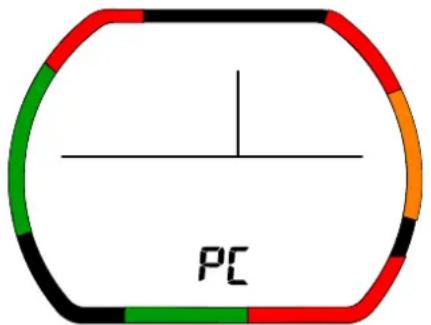
text_image
PCMode Fig. 25
Description of display during PC transfer mode
- Battery indicator Icon: This displays the current battery voltage.
• Mode display: This shows PC transfer mode. (Fig. 23)
Operation of buttons
A: No function
• B: Press this button to move to time set mode.
C: No function
• D: No function
- The transfer mode remains active for 14-15 minutes and then moves to time mode
- B: Press and hold this button for 1-2 seconds to move to time mode. The computer switches to time mode when the transmission ends.
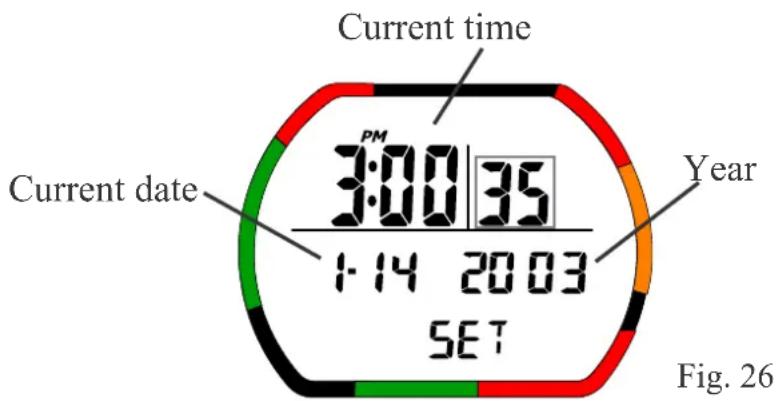
13. Date and Time Set Mode
Note: If surface interval time is less than 10 minutes after computer will not enter this mode.
text_image
Current time PM 3:00/35 1:14 2003 SET Current date Year Fig. 26Blinking icons are shown within a square
Description of Display during Date and Time set mode (Fig. 26)
• Current time: This is the current time of day.
• AM/PM Icon: This icon is shown in 12 hour format.
• Current date: This shows the current year, month, and day.
- Battery indicator Icon: This displays the current battery voltage.
• Mode display: This shows Time set mode.
Operation of buttons during Time set mode
From the TIME mode press and release the B button five times to enter SET mode.
• A: Press button to select mode.
second→minute→hour→year→month→day→12/24tense→seconds→…
• B: Press this button to move to time mode.
• C: Press this button to change setting the contents.
- C: Press and hold this button to change setting the content scrolling.
• D: When water is detected the mode moves to dive mode.
- Auto return: The display automatically returns to Time mode buttons are used for 2 to 3 minutes.
- B: Press and hold this button for 1-2 seconds to move to Time mode.
14. Dive Mode (Gage dive Mode)
The IQ-700 will automatically enter dive mode when the D buttons come in contact with water.
text_image
Non-Decompression Current depth 16 200 NDL FT V① min PO2 DIVE.T 0.3 15 N2 MIX1 21% OLI graph PGT graph Sea Dive time Ascent rate indicator Fraction of Oxygen (PO₂) Fig. 27 Safety Stop Safety Stop time 18 258 FT V① STOP PO2 DIVE.T 0.5 15 min N2 STOP Sea SPEED Fig. 28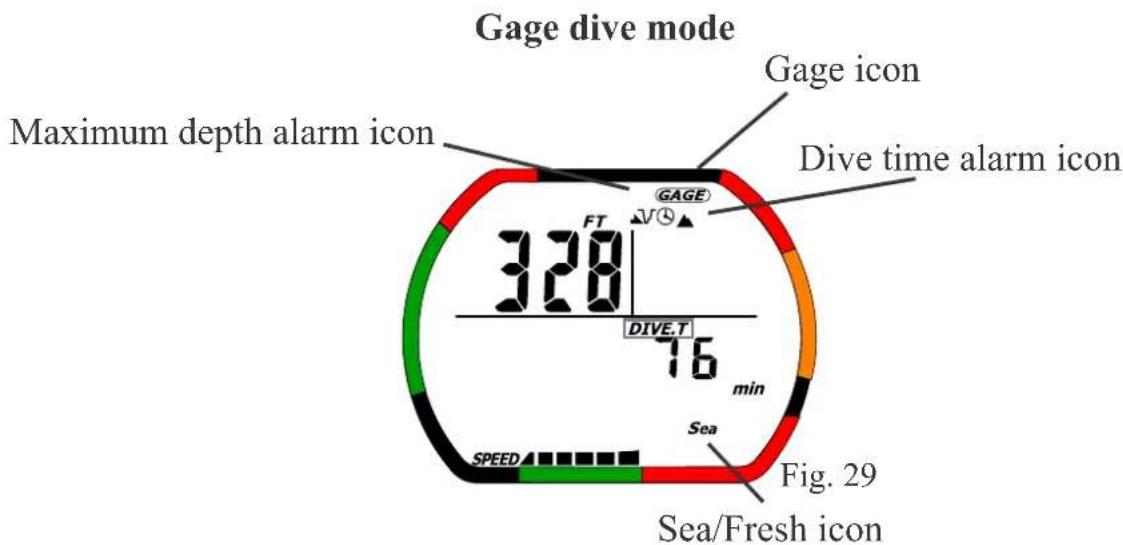
text_image
Gage dive mode Maximum depth alarm icon Gage icon Dive time alarm icon 328 FT DIVE.T 76 min Sea Speed Fig. 29 Sea/Fresh iconDecompression
text_image
DECO STOP icon Current depth 131 30 FT PGT graph PO2 1.0 6:19 min TOTAL min O2 N2 MK1 21% DECO Sea SPEED Pressure of Oxygen (PO₂) Total ascent time Fig. 30 Decompression stop depth Decompression stop time OLI graphProcedure to change the Nitrox mix during a dive.
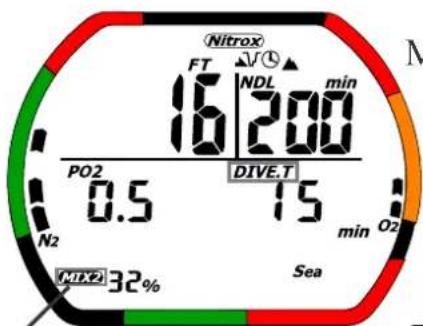
Press "A" button for 5 seconds Water temperature Hold button C
text_image
Nitrox FT NDL min 16 200 PO2 DIVE.T 0.5 15 min O2 N2 32% SeaMix icon blinks
Maximum depth
Fig. 32 Fraction of oxygen
text_image
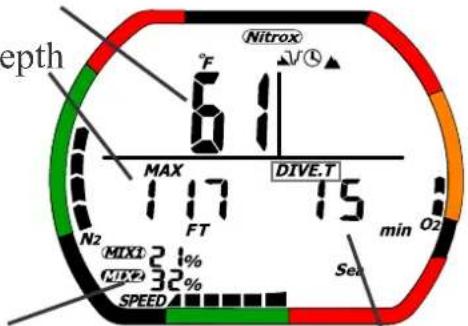
depth 61 Nitrox °F J/V MAX 117 DIVE.T FT 15 min O2 N2 MIXI 2.1% TIME 32% SPEED SeaDive time
Description of Functions during dive mode
The are several different displays and functions available in DIVE mode including: non-decompression dive mode, decompression dive mode, safety stop condition, gage dive mode, and out of measuremer condition. The functions of each mode are described below.
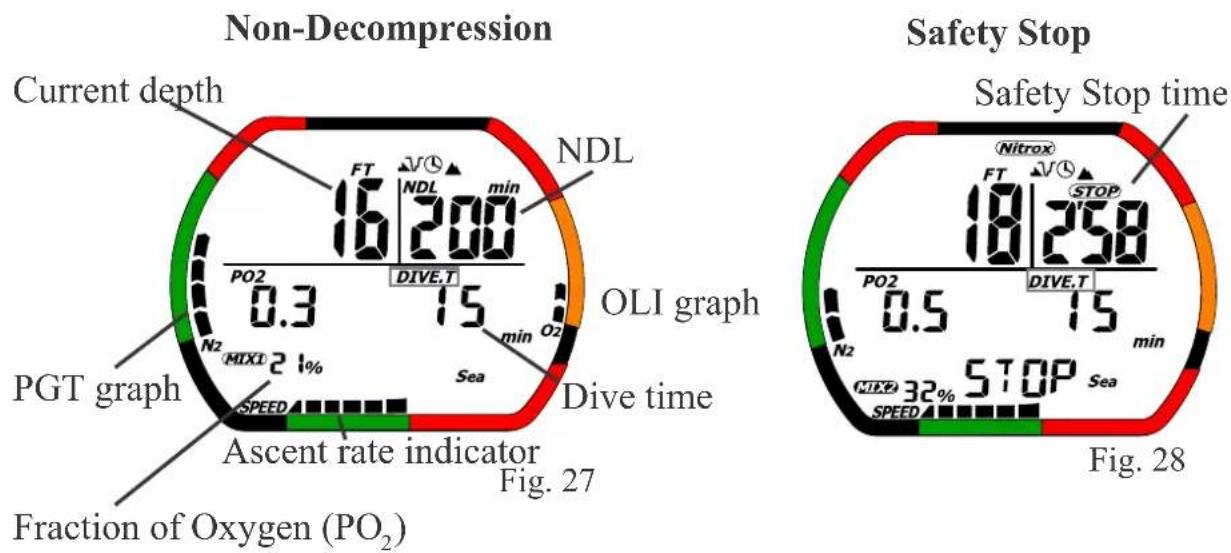
Non-decompression mode (Fig. 27)
This is for a non decompression (NDL) dive.
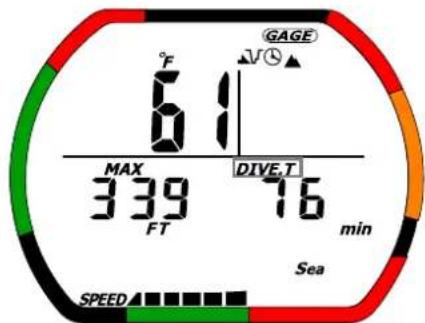
Gage mode (Fig. 29)
The only functions that can be performed in this mode are the calculation, water temperature measurement, and dive time measurement. If you use this mode when diving, the IQ-700 remains in GAGE mode until 48 hours have elapsed. When using gage mode the safety stop function is not available.
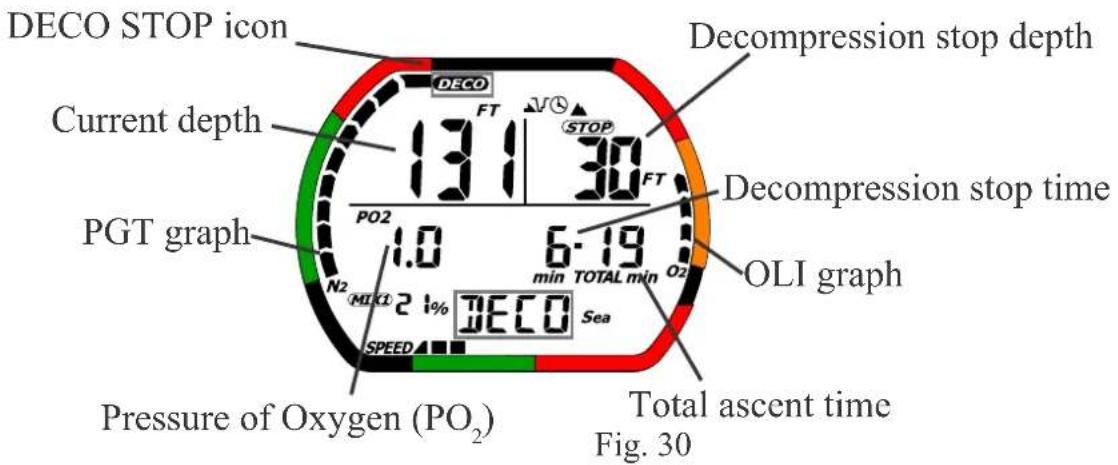
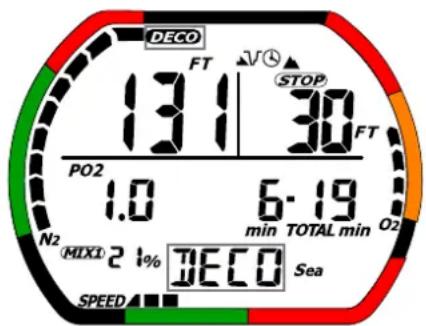
Decompression Mode (Fig. 30)
This is used for dives that last longer than the NDL's. The DECO icon warning will continue until the advised depths are reached. If you ignore the DECO warning and go straight to the surface for longer than 10 minutes the display will freeze and all calculations will stop. The IQ-700 will switch automatically to TIME mode after 48 hours have elapsed. This information is recorded in the dive log. The IQ-700 can only switch to log, profile, or PC transfer mode while the calculations have stopped.
Safety Stop Timer (Fig. 28)
This timer shows the recommended safety stop while in dive mode. If the diver descends over 32 feet (9.9m), then comes up to a depth of 20 feet (6m), this value appears instead of NDL. Safety stop time starts at 3 minutes and is counted down until the time is 0. The safety stop timer disappears and NDL appears in its place once the timer reaches zero.
The timer stops temporarily if the depth becomes equal to or more than 26.5 feet (8.1m) during which time the counter stops temporarily, and the NDL display appears again.
The timer is reset if the depth becomes equal to or more than 33 feet (10 m).
If the diver doesn't follow the safety stop information the IQ-700 doesn't impose any penalty.
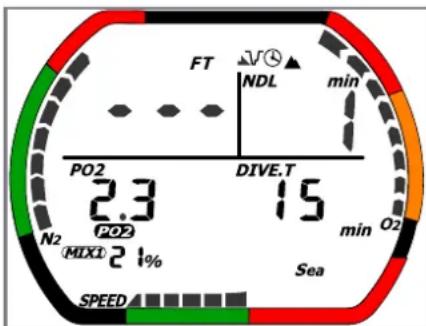
Out of measurement range condition (Fig. 33)
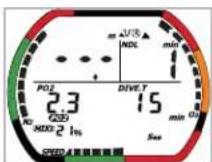
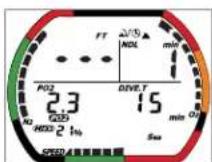
When exceeding a measurement range, the exceeded parameter becomes '---' display and all of the displays blink. The following situations will cause an Out of Measurement Range condition.
Case 1: the water depth exceeds 328 ft(99.9m).
Case 2: the dive time exceeds 599 minutes.
Case 3: decompression is required at a decompression stop depth greater than 30 meters (100 feet).
Case 4: decompression stop time has exceeded 99 minutes
Case 5: total ascent time has exceeded 99 minutes
Ex. water depth exceeded a measurement range
gauge
| Metric | Value | | :--- | :--- | | FT | 2.3 | | NDL | 15 | | min | 1 | | O2 | 0.2 | | PO2 | 2.3 | | DIVE.T | 15 | | PO2 (MIXI) | 2.1% | | SEA | - |The water depth exceeds the measurement range over 328 ft (99.9m)
Fig. 33
During an Out of Measurement condition the entire display blinks.
Changing the Nitrox mix during the dive (Fig. 31, 32)
By pushing and holding the A button the diver can switch the Nitrox mix that was set in the dive set mode.
How to switch the Nitrox mix during a dive:
When Button A is pressed the PO_2 display changes to the currently set oxygen ratio and blinks twice. When Button A is pressed and held for four or five seconds, the MIX setting is switched. Once this setting is changed, the back light goes on for 3-4 seconds and the modified oxygen ratio is displayed for 3-4 seconds. If the modified setting was for MIX1, then the display switches to MIX2, or if it was MIX2 the display switches to MIX1. If the PO_2 of the new mix is equal to or more than 1.6 the IQ-700 will not allow the mix to be changed. Also, if the MIX2 is ‘—’%, it will not change.
WARNING
Do not use your IQ-700 without confirming that its FO2 setting accurately matches that of your breathing media. Failure to do so may mean that your IQ-700 will be unable to accurately monitor your exposure to nitrogen and oxygen, and lead to decompression illness (DCI) or CNS Oxygen Toxicity, conditions that can cause serious person injury or death.
C button
When the user pushes and holds button C, it displays the temperature, the dive time, the maximum water depth and setting FO_2 value.
Display Description during Dive mode
- Current depth: This indicates the current water depth. The water depth is measured underwater every 1 second. If depth is over 328 feet (99.9m) the display is ‘---’. In Gage Mode, if the depth is over 656 feet (199.9m) the display is ‘---’. (Fig. 27)
• Dive time: This is the current dive time. (Fig. 27) - Maximum depth: This is the maximum depth recorded during a dive. If depth is over 328 feet (99.9m) this display is ‘---’. In Gage Mode, if depth is over 656 feet (199.9m) this display is ‘---’. (Fig. 32)
- Pressure of oxygen ( P_2O ). This indicates the PO_2 value at the current depth. This value is calculated based on fraction of oxygen and the current depth. (Fig. 27)
- PGT (Pressure Gas in Tissue) graph: This indicates the level of Nitrogen using up to nine level indicators. (Fig. 27)
- OLI (Oxygen Limited Indicator) graph: This indicates the level of Oxygen Limit using up to eight level indicators. (Fig. 27)
- Maximum depth Alarm Icon: This icon is on if a maximum depth alarm has been set. (Fig. 29)
-
Dive time alarm Icon: This icon appears if a maximum dive time has been set. (Fig. 29)
-
Nitrox Icon: This Icon is ON when NITROX has been used for MIX1 or MIX2. It blinks if the MIX1 and MIX2 setting is the default setting. (Fig. 31)
• Gage mode Icon: This icon is displayed during Gage mode. (Fig. 29) - Safety Stop time: It displays the countdown timer. The timer begins at 3 minutes. (Fig. 28)
- Decompression stop depth (Ceiling): The decompression stop depths are calculated according to the dive mode settings. (10-320 ft/3-99mt) (Fig. 30)
- Decompression stop time (DECO STOP TIME): This is the amount of time to be spent at a decompression stop depth. A countdown timer is shown during decompression. (Fig. 30)
- Total ascent time(TOTAL): This indicates the total amount of time required for ascent from the current depth to the surface, assuming that all decompression stops are made. (Fig. 30)
- DECO Icon: This icon appears if the diver must perform decompression prior to surfacing. (Fig. 30)
- Fraction of oxygen ( F_2O ). This icon displays the FO_2 which was set for the dive.
15. Various Warnings
While you are in DIVE mode you should be alert for the following warnings. Blinking icons are shown within a square.
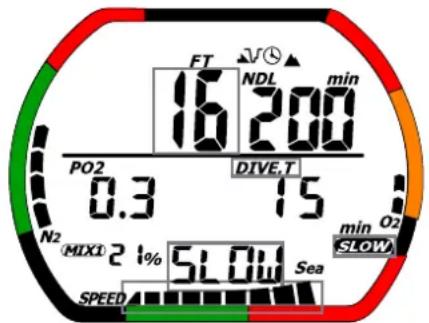
- Ascent rate warning: If a diver exceeds the recommended ascent rate according to the depth, the IQ-700 informs the diver with the display and the alarm. The warning will continue until you slow your ascent rate or until you reach a depth of 5 ft/1.5m. This information is recorded in the dive log. (Fig. 34)
Ascent rate warning
text_image
FT NDL min 16 200 PO2 DIVE.T 0.3 15 N2 MIX1 2 1% 5LOW Sea SPEED min O2 SLOWFig. 34
- Decompression dive warning: When the NDL is exceeded and the IQ-700 changes to Decompression mode this warning is displayed. information is recorded in the dive log. (Fig. 35)
Decompression dive warning
text_image
DECO FT STOP 131 30 FT PO2 1.0 6.19 min TOTAL min O2 N2 MIX1 2 % DECO Sea SPEEDFig. 35
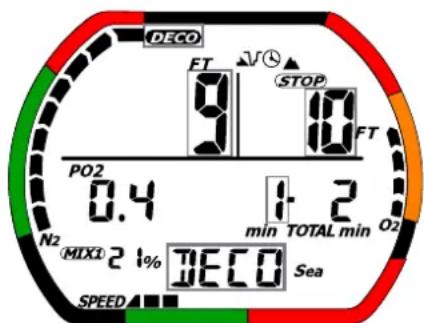
• Decompression stop violation warning:
When current depth is shallower than the indicated decompression stop depth, the IQ-700 will alert the diver with the display and the alarm. If the diver returns to the indicated water depth, the warning display stops blinking. This information is recorded in the dive log. (Fig. 36)
Decompression stop violation warning
text_image
DECO FT 9 STOP 10 FT PO2 0.4 1- 2 min TOTAL min O2 N2 MIX3 2 1% DECO Sea SPEEDFig. 36
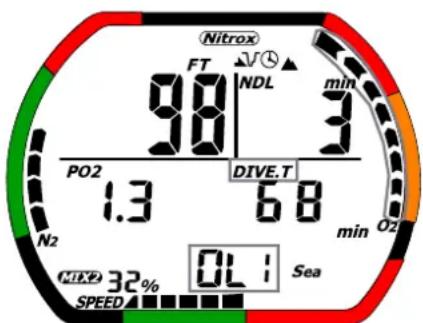
• Oxygen Limit Indicator warning:
When the OLI graph reaches 7 or 8 bars, the IQ-700 responds with a flashing display and the alarm. There are two types of warnings, as described below. (Fig. 37)
a. Graph value equals 7 bars: The computer informs the diver with the display and the alarm. This information is not recorded in the dive log.
b. Graph value equals 8 bars: the computer informs the diver with the display and the alarm. The blinking display continues until the graph value reaches 7 bars. This information is recorded in the dive log.
OLI warning
text_image
Nitrox FT 98 NDL min PO2 1.3 DIVE.T 68 min OZ N2 MIX 32% SPEED OL : SeaFig. 37
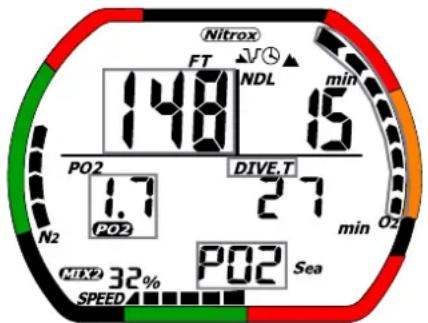
• P,Owarning: (Fig. 38)
The Pressure of oxygen ( PO_2 ) value is determined based on the set oxygen ratio and the current depth. When the PO_2 value exceeds a certain value, the information is recorded in the dive log when the PO_2 warning occurs once. The types of settings and warnings are described below.
a. When PO_2 equals 1.4: The warning display blinks and alarm is sounded. b. When PO_2 equals 1.6 or more: The warning display blinks and an alarm is sounded. The entire OLI graph blinks.
PO_2 warning
text_image
Nitrox FT NDL min 148 15 PO2 DIVE.T 1.7 27 PO2 min O2 N2 MILY 32% SPEED PO2 SeaFig. 38
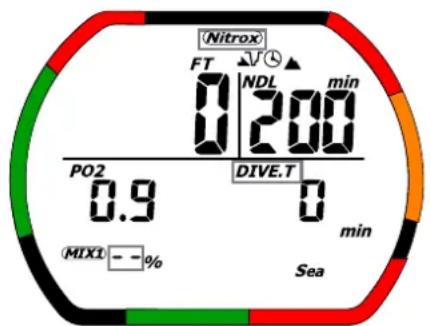
- Default warning: When the MIX1 is set at the default value, an alarm will sound when dive mode starts. The alarm will continue until the FO_2 for MIX one is set. (Fig. 39)
Default warning
text_image
Nitrox FT NDL min 0 200 PO2 0.9 DIVE.T 0 min MIX1 = - % SeaFig. 39
Operation of buttons during Dive mode
Non-decompression (Fig. 27)
- A: Press this button for 3-4 secondsto change to the next MIX. The EL back light will come on for 4-5 seconds.
• B: EL back light is on from 4-5 seconds. - C: When user pushes and holds button C, it displays the temperature, the dive time, the maximum water depth and setting FO _2 value. And EL back light is on from 4-5 seconds.
- In less than 5 feet (1.5 m) of water the IQ-700 moves to time mode.
Decompression/Decompression stop violation (Fig. 30,36)
- A: Press this button for 3-4 seconds to change the MIX. The EL back light is on from 4-5 seconds.
• B: EL back light is on from 4-5 seconds. - C: When user pushes and holds a button C, it displays the temperature, the dive time, the maximum water depth and setting FO _2 value. And EL back light is on from 4-5 seconds.
- Once the diver is less than a depth of 5 ft and after 10 minutes the IQ-700 moves to Decompression stop violation lock. The computer can't be use for 48 hours. The mode will be automatically switched to time mode after 48 hours have elapsed.
Decompression stop violation lock
In this mode the computer is locked until 48 hours have elapsed.
The IQ-700 won't move to dive plan mode.
- A: Press this button to select the place you want to change. During a Decompression stop violation lock display the EL back light will remain on for 4-5 seconds.
- B: This button is used to switch modes. Decompression stop violation lock→Dive log mode→Dive profile mode→PC transfer mode→decompression stop violation lock →……
- C: Press this button to change setting contents. During a decompression stop violation lock display the EL back light is on from 4-5 seconds.
• D: Water detection button: no function.
Out of measurement range condition (Fig. 33)
All display segments on the screen blink during this alarm.
- A: Press this button to for 3-4 seconds to change the Mix. The EL back light will be on for 4-5 seconds.
• B: Pushing this button turns on the EL back light for 4-5 seconds. - C: When the user pushes and holds the C button, the screen displays the temperature, the dive time, the maximum water depth and setting FO_2 value. The EL back light will come on for 4-5 seconds.
- At a depth less than 5 feet (1.5 m) the water detection button switches OFF and the IQ-700 moves to a lock condition.
Out of measurement range lock
In this mode the IQ-700 is locked until 48 hours have elapsed. All display segments blink during time mode.
The computer can't move to dive plan mode, dive set mode, time set mode.
- A: Press this button to select the place you want to change. In time mode, display, EL back light is on from 4-5 seconds.
- B: This button is the mode select button. Time mode→Dive log mode→Dive profile mode→PC transfer mode →Time mode →……
- C: Press this button to change setting the contents. In time mode, EL back light is on from 4-5 seconds.
• D: Water detection switch: no function.
WARNING
An IQ-700 displaying an “Out of Range” warning is incapable of displaying other critical information such as depth, time, Ascent Rate, PO_2 , OLI, and Deco Stop Violations, and required decompression stops. You should not under any circumstances use an IQ-700 in such a way that would cause the Out of Range Warning to be displayed. Under such conditions, the risk of serious personal injury or death would be substantial.
Gage dive mode (Fig. 29)
• A: The EL back light is on from 4-5 seconds.
• B: The EL back light is on from 4-5 seconds.
- C: When the user pushes and holds the C button, it displays the temperature, the dive time, and the maximum water depth. The EL back light will come on for 4-5 seconds.
- At a depth less than 5 feet (1.5 m) the water detection switch (D) is OFF: the IQ-700 moves to time mode.
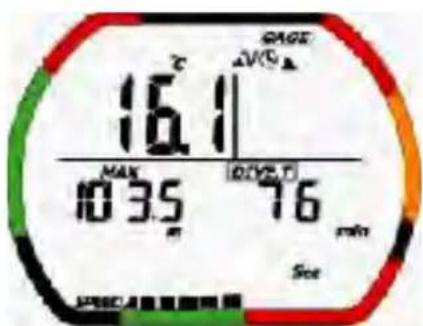
16. Gage Mode
The only functions that can be performed by the computer in are the depth calculation, water temperature measurement, and dive measurement functions. Calculation functions (such as calculation of OLI etc.) are not performed. If you dive in this mode for 3 minutes or longer, this information will be recorded in the dive log and profile mode.
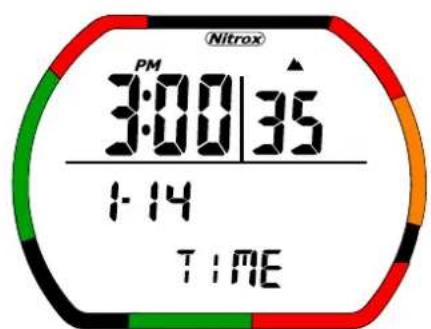
Time Mode Dive set Mode
text_image
PM 3:00 | 35 1:14 TIMEFig. 40
text_image
GAGE Pt-30 GAGE SeaFig. 41
Dive Mode
text_image
GAGE °F 61 MAX 339 FT DIVE.T 76 min Sea SPEEDFig. 42
Hold to push C button
text_image
16.1 MAX 103.5 min GAGE AVCA 16 76 min SeeFig. 43
When diving in the gage mode, the GAGE Icon is displayed while in dive log mode.
The PC transfer mode and time set mode operate normally.
Operation of Buttons during Gage mode
B: This button is used to select the mode.
Time mode→Dive set mode→Dive log mode→Dive profile mode→PC transfer mode→Time set mode→Time mode→……
The plan mode does not function while using gage mode.
The Gage set mode is slightly different from Dive mode.
GAGE SELECT→Profile time→Sea/Fresh→MAX DEPTH SET→MAX DEPTH ALARM ON/OFF→DIVE TIME SET→DIVE TIME ALARM ON/OFF→GAGE SELECT→……
17. IQ-700 Computer Reset
All settings can be set to manufacturer default values by using the computer reset button. This button is located on the back of the computer near the battery compartment door. To reset the computer simply press the button. All data regarding nitrogen absorption, desaturation, as well as the time and date are erased.
WARNING
Never reset the computer if you are planning repetitive dives. By resetting the computer you erase all calculations regarding desaturation. Failure to follow this warning could result in serious personal injury or death.
18. Battery Replacement
In order to replace the battery remove the clear cover with a coin by unscrewing it in the “open” direction indicated by an arrow on the cover. Remove the battery and inspect the compartment for signs of corrosion or water. If you find signs of corrosion return the computer to your authorized TUSA dealer.
Replace the old battery with a new one, taking care that the polarity is correct. Failure to do so may result in the computer losing its calibration. Inspect and lubricate the battery compartment cover O-ring with a thin film of silicone grease before replacing it.
Screw the cover back in place in the direction indicated on the cover. Do not over tighten.
Please note that the warranty does not cover damage to the computer due to improper battery replacement.
19. Units of Measurement
You can change the units of measurement for water depth and temperature of the IQ-700.
In Dive Set mode press and hold down both the A and C button for six or more seconds. The computer will beep once to tell you that the system has changed.
Always verify the units of measure are correct before starting to dive.
20. General Handling
Do not store the computer in hot and/or humid environments. The pressure transducer is sensitive to both heat and humidity. If impaired, it may cause display of incorrect altitude or depth data.
The IQ-700's liquid Crystal Display may darken if left in a hot environment (such as on a car's dashboard). It will return to normal once allowed to cool; however extensive exposure to heat may shorten LCD life.
Other than for battery replacement, following the procedures outlined in this manual, the IQ-700 is not to be disassembled by anyone other than TUSA or its authorized dealers. Unauthorized disassembly will violate the warranty.
If the IQ-700 does not appear to be functioning properly, in any manner, do not use it to dive. Return it to your authorized TUSA dealer for repair.
Rinse the IQ-700 thoroughly in fresh water following every dive.
Do not use cleansers, chemicals, or solvents to clean the IQ-700. Use a soft cloth to gently wipe dirt or water stains from the screen.
Store the IQ-700 in a clean, dry location. After diving, wipe the computer dry and store it in a location separate from other damp items.
21. Warranty
Two Year Limited Warranty
TUSA warrants that TUSA Scuba dive computers purchased from authorized TUSA Scuba dealers shall be free from defects in materials and workmanship under normal sport, skin and scuba diving use and with proper maintenance and care for a period of two (2) years from date of original purchase. Under this limited warranty, TUSA will either repair or replace, at its sole option, any original equipment or parts that fail to perform as intended. When this limited warranty is in force, it covers the cost of necessary replacement parts. Labor and shipping charges are not included and must be paid by you.
You must save the original purchase receipt as proof of purchase. This limited warranty applies only to the original purchaser and is not transferable. TUSA makes no warranty or representation regarding the performance of any products used in conjunction with TUSA's products. This Limited warranty applies only to dive computers sold through authorized TUSA Scuba dealers.
This limited warranty shall be void if the computer has been misused, abused, altered, neglected, lost, or changed. The warranty applies only to normal sport, skin, or scuba diving use.
This limited warranty shall be void if the product has been modified, or if repairs are performed by anyone other than an authorized TUSA dealer. Equipment in question should be returned, prepaid, to your authorized TUSA dealer, or TUSA, along with proof of purchase. This warranty gives you specific legal rights, and you may also have other rights which vary state to state.
If you have any questions concerning the Two (2) Year Limited Warranty please address them to:
Customer Relations
TUSA
2380 Mira Mar Ave
Long Beach, CA 90815
U.S.A.
www.tusa.com
Some states do not allow limitations on how long an implied warranty lasts or do not allow exclusion of incidental or consequential damages, so the following limitations may not apply to you.
Tusa expressly limits any and all dive computer warranties, expressed or implied, to the two year term as set forth above. All remedies are waived unless claim is made within the applicable twenty-four (24) month period.
Your remedies are limited to those contained therein and are in lieu of all other remedies, whether based on breach of warranty or contract, negligence, strict product liability or other tort. TUSA specifically disclaims liability for any consequential, special or indirect damages arising out of the use of your dive computer.
22. Technical Specifications
(1) Accuracy
• Time: average monthly variance ±30 seconds
• Depth: ±3%+2ft (±3%+0.5m)
• Temperature: ±4° F (±2.0°C)
(2) Measurement range
- Depth: 0.0-328ft (0.0-99.9m) /In gage mode, 0.0-656ft (0.0-199.9m) (Uses saltwater as standard)
• Dive time: 0-599 minutes
• Altitude: 0-19680ft (0-6000m)
• Measurement interval of 10 minutes (It excludes dive mode, time set mode, PC transfer mode.)
• Temperature: 23\~104° F (-5\~+40°C)
• Measurement interval of 1 minute (measures only in Dive mode)
(3) Operating temperature
- Operating temperature: 23 104^ F (-5~+40°C) (At cold temperature, the display will be somewhat dim)
(4) NITROX setting
• MIX1 F₂O21-50%, setting step: 1%
• MIX2 F _2 O 21-99%, setting step: 1%
(5) waterproof ability
• The waterproof ability: to 328ft (99.9m)
(6) Battery life
- Battery life: about 3 years (uses battery CR2032) under con follows: The computer is used for 50 one-hour dives in a year, with sounding for 10 seconds per a dive.
TUSA
TABATA US.A. INC.
2380 Mira Mar Ave. Long Beach, CA 90815, U.S.A.
TEL: 562-498-3708 / FAX 562-498-1390
TABATA AU STRALIA PTY. LTD
Unit 11A, 86 Falconer Street, West Ryde, N.S.W. 2114 Australia
TEL: 02-807-4117 / FAX 02-808-1638
T.E.C. (TABATA EUROPE CORPORATION) B.V.
NIEUW POORTSRAAT 84 A 1055 RZ AMSTERDAM HOLLAND
TEL 20-681-5955 / FAX: 20-682-4527
TABATA DEUTSCHLAND GMBH
Balser Strabe 1579639 Grenzach-Wyhlen F.R. GERMANY
TEL: 07621-669466 / FAX: 07621-669431
TABATA MFG. (TAIWAN) CO., LTD.
54-8 HSU TSO GANG, NENKANG VIL., TAO YUAN HSIEN, TAIWAN
R.O.C.
TEL: 03-386-5100 / FAX: 03-386-5103
TABATA JAPAN
1-3-17, Higashikomagata, Sumida-ku, Tokyo, Japan 130
TEL: 03-3624-2814 / FAX: 03-3829-0728 (0769)