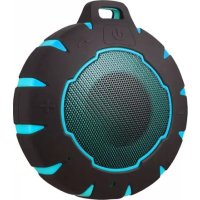
Sunstech SPBTAQUA - Station d'acceuil

SPBTAQUA - Station d'acceuil Sunstech - Notice d'utilisation et mode d'emploi gratuit

Retrouvez gratuitement la notice de l'appareil SPBTAQUA Sunstech au format PDF.

📄 2 pages Français FR Télécharger 💬 Question IA 10 questions ⚙️ Specs
Notice Sunstech SPBTAQUA - page 1
Choisissez votre langue et indiquez votre email : nous vous enverrons une version traduite specifiquement.
Type de produit Enceinte Bluetooth étanche
Marque Sunstech
Modèle SPBTAQUA
Technologie de connectivité Bluetooth
Portée Bluetooth Jusqu'à 10 mètres (32 ft)
Haut-parleur 40 mm
Puissance 3 W
Batterie Li-ion rechargeable 600 mAh
Temps de charge 1 à 2 heures
Autonomie Environ 4 à 6 heures (estimation)
Protection Étanche (Waterproof)
Poids 160 g
Dimensions Env. 10 x 7 x 5 cm (estimation)
Contenu du coffret 1 enceinte Bluetooth, 1 câble de charge USB, 1 manuel d'utilisation
Fonctions Mains-libres, contrôle du volume et des pistes, streaming audio
Compatibilité Smartphones, tablettes, ordinateurs avec Bluetooth
Alimentation Port USB (5 V)
Entretien Nettoyer avec un chiffon doux et sec. Ne pas utiliser de produits abrasifs.
Sécurité Ne pas exposer à une chaleur excessive. Ne pas démonter l'appareil.
Indicateur LED Rouge fixe (charge en cours), éteint (charge complète), bleu clignotant (appairage)

FOIRE AUX QUESTIONS - SPBTAQUA Sunstech

Comment charger l'enceinte SPBTAQUA ?
Connectez le câble USB fourni à l'enceinte, puis branchez l'autre extrémité sur un port USB d'ordinateur ou un adaptateur secteur. Le voyant rouge s'allume pendant la charge et s'éteint une fois la batterie pleine (environ 1 à 2 heures).
Comment connecter l'enceinte en Bluetooth ?
Allumez l'enceinte en maintenant le bouton power enfoncé. Le voyant bleu clignote. Sur votre appareil, activez le Bluetooth et recherchez les périphériques. Sélectionnez 'PNETAQUA' (ou 'SPBTAQUA') dans la liste. Une fois connecté, le voyant bleu devient fixe.
Comment répondre à un appel avec l'enceinte ?
Lorsque vous recevez un appel, appuyez sur le bouton multifonction (noté TM) pour décrocher. Pour raccrocher, appuyez à nouveau sur le même bouton. Pour rejeter un appel, maintenez le bouton enfoncé pendant quelques secondes.
L'enceinte SPBTAQUA est-elle étanche ?
Oui, l'enceinte est conçue pour résister à l'eau (Waterproof). Elle peut être utilisée en extérieur ou près de l'eau, mais ne doit pas être immergée complètement ou exposée à une pression d'eau élevée.
Quelle est l'autonomie de la batterie ?
L'autonomie n'est pas précisée dans la notice, mais avec une batterie de 600 mAh, elle est estimée à environ 4 à 6 heures d'écoute en continu selon le volume.
Que faire si l'enceinte ne s'allume pas ?
Vérifiez que la batterie est chargée. Branchez le câble USB et attendez quelques minutes. Si elle ne s'allume toujours pas, essayez de maintenir le bouton power enfoncé pendant 5 secondes. Si le problème persiste, contactez le support Sunstech.
Comment régler le volume sur l'enceinte ?
Utilisez les boutons de contrôle du volume situés sur l'enceinte. Appuyez sur '+' pour augmenter le volume et sur '-' pour le diminuer. Le volume peut également être réglé depuis votre appareil connecté.
Peut-on utiliser l'enceinte pendant qu'elle charge ?
Oui, il est possible d'utiliser l'enceinte pendant la charge. Branchez le câble USB et allumez l'appareil. Cependant, cela peut prolonger le temps de charge.
Comment nettoyer l'enceinte SPBTAQUA ?
Utilisez un chiffon doux et sec pour nettoyer l'extérieur de l'enceinte. N'utilisez pas de produits chimiques, d'alcool ou de nettoyants abrasifs. Assurez-vous que le port de charge est sec avant de brancher le câble.
Où puis-je télécharger la notice complète ?
La notice complète est disponible en téléchargement gratuit au format PDF sur le site notice-facile.com. Vous pouvez également demander une traduction dans votre langue en indiquant votre adresse email.

Questions des utilisateurs sur SPBTAQUA Sunstech

0 question sur cet appareil. Repondez a celles que vous connaissez ou posez la votre.

Poser une nouvelle question sur cet appareil

L'email reste privé : il sert seulement à vous prévenir si quelqu'un répond à votre question.

Aucune question pour l'instant. Soyez le premier à en poser une.

Téléchargez la notice de votre Station d'acceuil au format PDF gratuitement ! Retrouvez votre notice SPBTAQUA - Sunstech et reprennez votre appareil électronique en main. Sur cette page sont publiés tous les documents nécessaires à l'utilisation de votre appareil SPBTAQUA de la marque Sunstech.

MODE D'EMPLOI SPBTAQUA Sunstech
Sunstech SPBTAQUA - 1

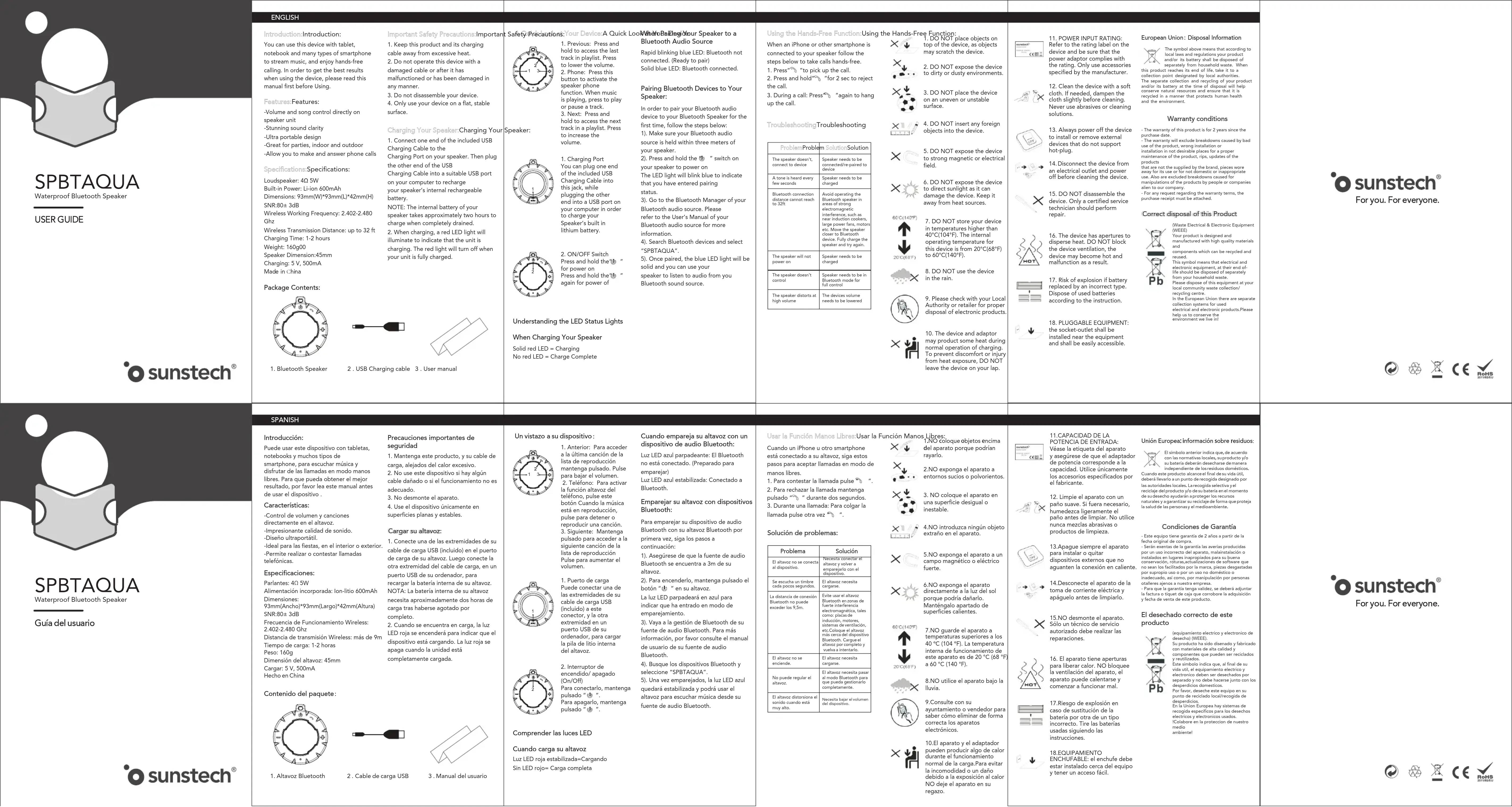
text_image SPBTAQUA Waterproof Bluetooth Speaker USER GUIDE • sunstech® SPBTAQUA Waterproof Bluetooth Speaker Gula del usuario • sunstech®

Sunstech SPBTAQUA - 2

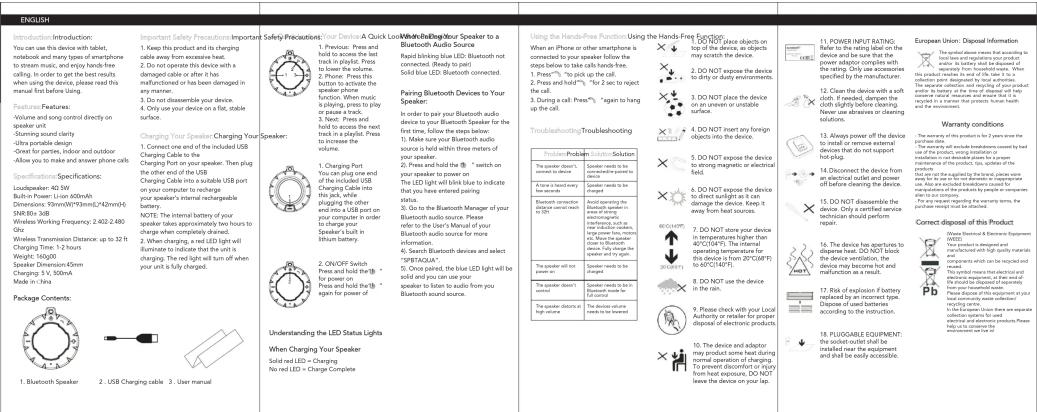
text_image ENGLISH Introduction: Introduction: You can use this device with tablet, wireless and many types of smartphone to stream music, and enjoy free-hand calling. In order to get the best results when the device is already read this manual first before using. Features: Features: Volume and song control directly on speaker unit. Stunning sound clarity Ultra portable design Wireless and outdoor Allow you to make and answer phone calls. Specifications: Specifications: Loudspeaker: 40 SW Bull-on Power: L-on 600mAh Power: 100W/100Hz/124MHz SNR-80 3GB Wireless Working Frequency: 2.402-2.480 GHz Wireless Transmission Distance: up to 32ft Charging Time: 1-2 hours Weight: 160g Speaker Dimension: 6mm Charging V: 50Hz Mode in China Package Contents: 1. Bluetooth Speaker 2. USB Charging cable 3. User manual Important Safety Prescriptions: Important Safety Prescriptions: Your Device & Quick Lock/Wind/BluOngd Your Speaker to a Bluetooth Audio Source 1. Keep this product and its charging cable away from excessive heat. 2. Do not operate this device with a damaged cable or other it has made some damage. You have been damaged in any manner. 3. Do disassemble your device. 4. On your device on a flat, cable surface. Charging Your Speaker-Charging Your Speaker: 1. Connect one end of the included USB Charging Cable to the speaker. 2. Check up your speaker. Then plug the other end of the USB Charging Cable into a suitable USB port on your computer to recharge your speaker's internal rechargeable battery. NOTE: The internal battery of your speaker takes approximately two hours to charge when completely dashed. 2. When charging, a red LED light will be illuminated to indicate that the unit is charging. The red light will turn off when your unit is fully charged. 2. ON/OFF Switch Press and hold the ball for power on press and hold the ball again for power of Understanding the LED Status Lights When Charging Your Speaker Solid red LED + Charging No red LED + Charge Complete Understanding Your Speaker Using Hands-Free Function Using the Hands Free Function When an Phone or other smartphone is connected to your speaker, Follow the steps below to take calls hands-free. 1. PressTM, "to pick up the call. 2. Press and holdTM, "to fix a lock to the call. 3. During a call: PressTM, again to hang up the call. 4. Use your Bluetooth audio source to your Bluetooth Speaker connected. Pairing Bluetooth Devices to Your Speaker: In order to pay your Bluetooth audio device to your Bluetooth Speaker for the first time, follow the steps below: 1. Make sure your Bluetooth audio source is held within three meters of your speaker. 2. Press and hold the ball "I switch on your speaker to power on the LED light will blow due to indicate that you have entered your position. 3. Go to the Bluetooth Manager of your Bluetooth audio source. Please refer to the User's Manual of your Bluetooth audio source for more information. 4. Sweep Bluetooth devices and select "PNETAQUA". 5. Once painted, the blue LED light will be solid and you can use your speaker to listen to audio from your Bluetooth sound source. Using the Hands-Free Function Using the Hands Free Function When an Phone or other smartphone is connected to your speaker, Follow the steps below to take calls hands-free. 1. PressTM, "to pick up the call. 2. Press and holdTM, "to fix a lock to the call. 3. During a call: PressTM, again to hang up the call. 4. Use your Bluetooth audio source is held within three meters of your speaker. 4. Use your Bluetooth Speaker connected. Pairing Bluetooth Devices to Your Speaker: In order to pay your Bluetooth audio device to your Bluetooth Speaker for the first time, follow the steps below: 1. Make sure your Bluetooth audio source is held within three meters of your speaker. 2. Press and hold the ball "I switch on your speaker to power on the LED light will blow due to indicate that you have entered your position. 3. Go to the Bluetooth Manager of your Bluetooth audio source. Please refer to your LED light to your Bluetooth speaker for more information. 4. Sweep Bluetooth devices and select "PNETAQUA". 5. Once painted, the blue LED light will be solid and you can use your speaker to listen to audio from your Bluetooth sound source. Using the Hands-Free Function Using the Hands Free Function When an Phone or other smartphone is connected to your speaker, Follow the steps below to take calls hands-free. 1. PressTM, "to pick up the call. 2. Press and holdTM, "for fix a lock to the call. 3. During a call: PressTM, again to hang up the call. 4. Use your Bluetooth audio source is held within three meters of your speaker. 4. Use your Bluetooth Speaker connected. Pairing Bluetooth Devices to Your Speaker: In order to pay your Bluetooth audio device to your Bluetooth Speaker for the first time, follow the steps below: 1. Make sure your Bluetooth audio source is held within three meters of your speaker. 2. Press and holdthe ball "I switch on your speaker to power on the LED light will blow due to indicate that you have entered your position. 3. Go to the Bluetooth Manager of your Bluetooth audio source. Please refer to the User's Manual of your Bluetooth speaker for more information. 4. Sweep Bluetooth devices and select "PNETAQUA". 5. Once painted, the blue LED light will be solid and you can use your speaker to listen to audio from your Bluetooth sound source. Using the Hands-Free Function Using the Hands Free Function When an Phone or other smartphone is connected to your speaker, Follow the steps below to take calls hands-free. 1. PressTM, "to pick up the call. 2. Press and hold™, "for fix a lock to the call. 3. During a call: PressTM, again to hang up the call. 4. Use your Bluetooth audio source is held within three meters of your speaker. 4. Use your Bluetooth Speaker connected. Pairing Bluetooth Devices to Your Speaker: In order to pay your Bluetooth audio device to your Bluetooth Speaker for the first time, follow the steps below: 1. Make sure your Bluetooth audio source is held within three meters of your speaker. 2.Press and holdthe ball "I switch on your speaker to power on the LED light will blow due to indicate that you have entered your position. 3. Go to the Bluetooth Manager of your Bluetooth audio source. Please refer to the User's Manual of your Bluetooth speaker for more information. 4. Sweep Bluetooth devices and select "PNETAQUA". 5. Once painted, the blue LED light will be solid and you can use your speaker to listen to audio from your Bluetooth sound source. Using this Hand-Free Function Using the Hands Free Function When an Phone or other smartphone is connected to your speaker, Follow the steps below to take calls hands-free. 1. PressTM, "to pick up the call. 2. Press and holdTM, "for fix a lock to the call. 3. During a call: PressTM, again to hang up the call. 4. Use your Bluetooth audio source is held within three meters of your speaker. 4. Use your Bluetooth Speaker connected. Pairings Bluetooth Devices to Your Speaker: In order to pay your Bluetooth audio device to your Bluetooth Speaker for the first time, follow the steps below: 1. Make sure your Bluetooth audio source is held within three meters of your speaker. 2. Press and holdthe ball "I switch on your speaker to power on the LED light will blow due to indicate that you have entered your position. 3. Go to the Bluetooth Manager of your Bluetooth audio source. Please refer to the User's Manual of your Bluetooth user for more information. 4. Sweep Bluetooth devices and select "PNETAQUA". 5. Once painted, the blue LED light will be solid and you can use your speaker to listen to audio from your Bluetooth sound source. Using this Hand-Free Function Using the Hands Free Function When an Phone or other smartphone is connected to your speaker, Follow the steps below to take calls hands-free. 1. PressTM, "to pick up the call. 2. Press and holdTM, "For fix a lock to the call. 3. During a call: PressTM, again to hang up the call. 4. Use your Bluetooth audio source is held within three meters of your speaker. 4. Use your Bluetooth Speaker connected. Pairings Bluetooth Devices to Your Speaker: In order to pay your Bluetooth audio device to your Bluetooth Speaker for the first time, follow the steps below: 1. PressTM, "to pick up the call. 2. Press and holdTM, "for fix a lock to the call. 3. During a call: PressTM, again to hang up the call. 4. Use your Bluetooth sensor or cleaning solution, 5. Use your Bluetooth device or cleaning solution, 6. Use your Bluetooth device or cleaning solution, 7. Use your Bluetooth device or cleaning solution, 8. Use your Bluetooth device or cleaning solution, 9. Use your Bluetooth device or cleaning solution, 10. Use your Bluetooth device or cleaning solution, 11. Power INPUT RATING: Refer to the rating level on the device and/or which the power adapter complies with the product required by making it necessary for each person's diagnosis specified by the manufacturer; 12. Conduction: The device with a soft glass above (or at least one hour) uses a soft glass above (or at least one hour) using a soft glass above (or at least one hour) uses a soft glass above (or at least one hour) uses a soft glass above (or at least one hour) uses a soft glass above (or at least one hour) uses a soft glass above (or at least one hour) uses a soft glass above (or at least one hour) 13. Always power off the device if install or remove external devices when it does not support hot plug. 14. Disconnect: The device from a low speed off before cleaning of this product, 15. DO NOT disassemble the device only with certified service technology should perform repair. 16. Use your Bluetooth device or cleaning solution, 17. Use your Bluetooth device or cleaning solution, 18. Use your Bluetooth device or cleaning solution, Correct disposal of this Product: The device has an Ethernet Equipment (6682) The device has an Ethernet designed and that it is used in terms of quantity and quantity of devices which are used in ratings and used in ratings The device has more than effective electrical protection from their own equipment Device includes this product or its equipment used in terms of quantity and quantity of devices that should be disposed separately from their own equipment. Device includes this product or its equipment used in terms of quantity and quantity of devices that should be disposed separately from their own equipment. Device includes this product or its equipment used in terms of quantity and quantity of devices that should be disposed separately from their own equipment. Device includes this product or its equipment used in terms of quantity and quantity of devices that should be disposed separately from their own equipment. Device includes this product or its equipment used in terms of quantity and quantity of devices that should be disposed separatelyfrom their own equipment. Device includes this product or its equipment used in terms of quantity and quantity of devices that should be disposed separately from their own equipment. Device includes this product or its equipment used in terms of quantity and quantity of devices that should be disposed separately from their own equipment. Device includes this product or its equipment used in terms of quantity and quantity of devices that should be disposed separately from their own equipment. Device includes this product or its equipment used in terms of quantity and quantity of devices that could be disposed separately from their own equipment. Device includes this product or its equipment used in terms of quantity and quantity of devices that could be disposed separately from their own equipment. Device includes this product or its equipment used in terms of quantity and quantity of devices that could be disposed separately from their own equipment. Device includes this product or its equipment used in terms of quantity and quantity of devices that could be disposed separately from their own equipment. Device includes this product or its equipment used in terms of quantity and quality of devices that could be disposed separately from their own equipment. Device includes this product or its equipment used in terms of quantity and quantity of devices that could be disposed separately from their own equipment. Device includes this product or its equipment used in terms of quantity and quantity of devices that could be disposed separately from their own equipment. Device includes this product or its equipment used in terms of quantity and quantity of devices that could be disposed separately from their own equipment. Device includes this product or its equipment used in term of quantity and quantity of devices that could be disposed separately from their own equipment. Device includes this product or its equipment used in terms of quantity and quantity of devices that could be disposed separately from their own equipment. Device includes this product or its equipment used in terms of quantity and quantity of devices that could be disposed separately from their own equipment. Device includes this product or its equipment used in terms of quantity and quantity of devices that could be disposed separately from their own equipment. Device includes this product or his equipment used in terms of quantity and quantity of devices that could be disposed separately from their own equipment. Device includes this product or his equipment used in terms of quantity and quantity of devices that could be disposed separately from their own equipment. Device includes this product or his equipment used in terms of quantity and quantity of devices that could be disposed separately from their own equipment. Device includes this product or his equipment used in terms of quantity and quantity of devices that could be disposed separately from their own equipment. Device including this product or his equipment used in terms of quantity and quantity of devices that could be disposed separately from their own equipment. Device includes this product or his equipment used in terms of quantity and quantity of devices that could be disposed separately from their own equipment. Device includes this product or his equipment used in terms of quantity and quantity of devices that could be disposed separately from their own equipment. Device includes this product or his equipment used in terms of quantity and quantity of devices that could be disposed separately from their original equipment。 Device includes this product or his equipment used in terms of quantity and quantity of devices that could be disposed separately from their original equipment。 Device includes this product or his equipment used in terms of quantity and quantity of devices that could be disposed separately from their original equipment。 Device includes this product or his equipment used in terms of quantity and quantity of devices that could be disposed separately from their original equipment。 Device includes this product or his equipment used in terms of quantity and quantity of devices that could be disposed separatelyfrom their original equipment。 Device includes this product or his equipment used in terms of quantity and quantity of devices that could be disposed separately from their original equipment。 Device includes this product or his equipment used in terms of quantity and quantity of devices that could be disposed separately from their original equipment。 Device includes this product or his equipment used in terms of quantity and quantity of devices that could be disposed separately from their original equipment。 Device includes this product or his equipment used in terms of quantity and quantity of devices thatcould be disposed separately from their original equipment。 Device includes this product or his equipment used in terms of quantity and quantity of devices thatcould be disposed separately from their original equipment。 Device includes this product or his equipment used in terms of quantity and quantity of devices thatcould be disposed separately from their original equipment。 Device includes this product or his equipment used in terms of quantity and quantity of devices thatcould be disposed separately from their original equipment。 Device includes this product or his equipment used in terms of quantity and number

Sunstech SPBTAQUA - 3

text_image sunstech® For you. For everyone.

Sunstech SPBTAQUA - 4

Sunstech SPBTAQUA - 5

text_image sunstech® For you. For everyone.

Sunstech SPBTAQUA - 6

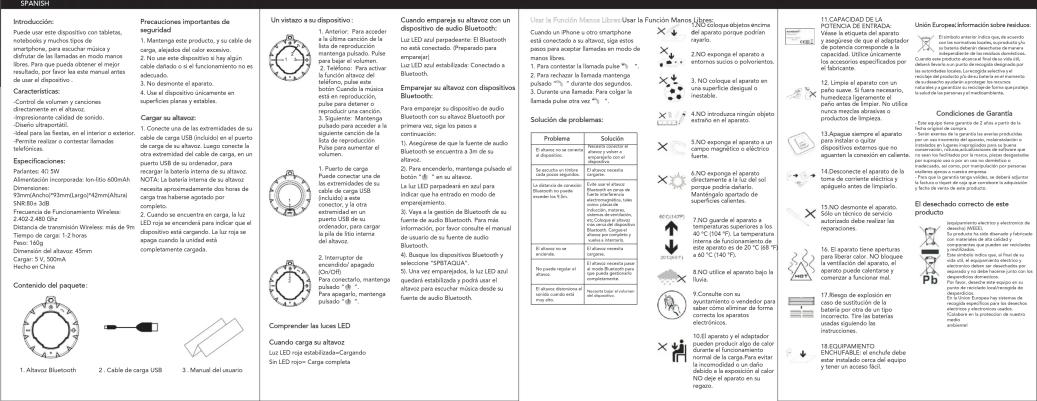
text_image SPBTAQUA Waterproof Bluetooth Speaker Guide d'utilisation • sunstech® SPBTAQUA Waterproof Bluetooth Speaker Guia de usuario • sunstech®

Sunstech SPBTAQUA - 7

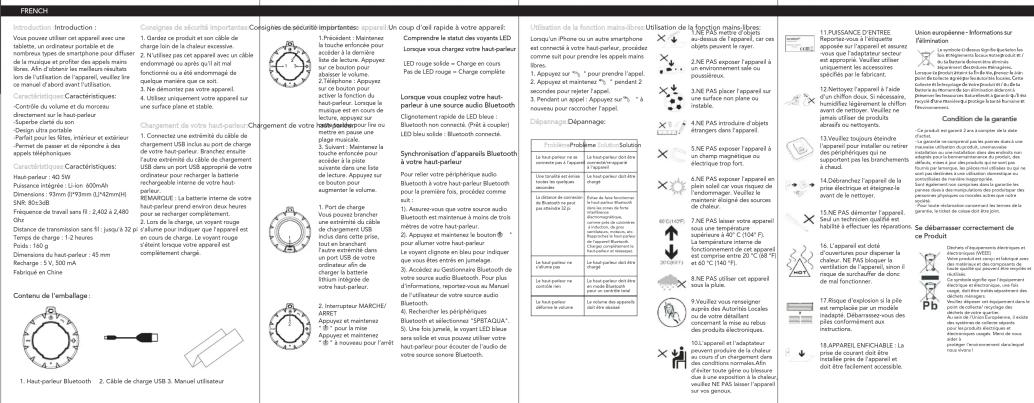
text_image French menu and product description for a restaurant booking service, including restaurant options, pricing, usage, and customer satisfaction.

Sunstech SPBTAQUA - 8

text_image sunstech® For you. For everyone.

Sunstech SPBTAQUA - 9

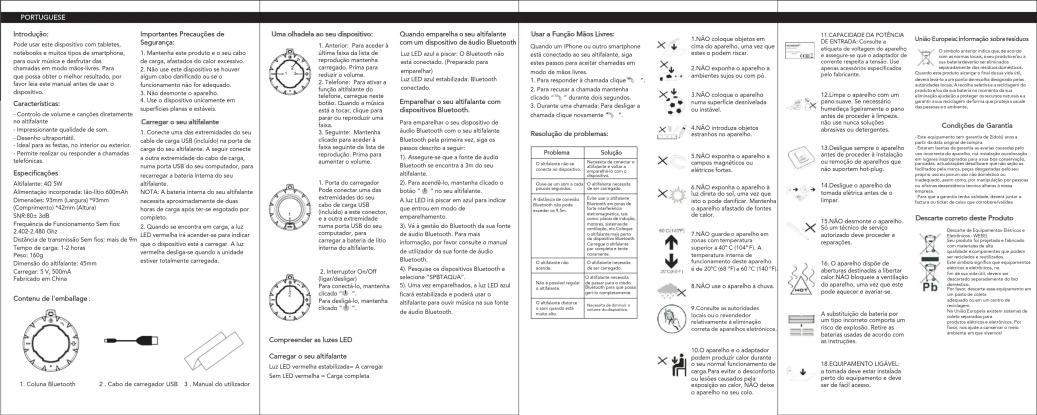
text_image Promotional text for Portugal's automotive diagnostic and operational guidelines, including product specifications, availability, and technical requirements.

Sunstech SPBTAQUA - 10

text_image sunstech® For you. For everyone.
Assistant notice
Powered by Anthropic
En attente de votre message
Informations produit

Marque : Sunstech

Modèle : SPBTAQUA

Catégorie : Station d'acceuil