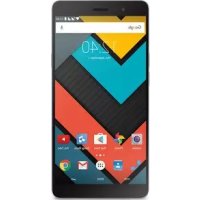
Phone Max 2+ - Smartphone ENERGY SISTEM - Notice d'utilisation et mode d'emploi gratuit
Retrouvez gratuitement la notice de l'appareil Phone Max 2+ ENERGY SISTEM au format PDF.

| Type de produit | Smartphone |
| Marque | Energy Sistem |
| Modèle | Phone Max 2+ |
| Écran | 5,5 pouces IPS HD (1280x720 pixels) avec revêtement anti-traces |
| Processeur | Quad Core ARM Cortex A53 1,3 GHz |
| GPU | Mali-T720MP2 |
| Système d'exploitation | Android 6.0 Marshmallow |
| Mémoire vive (RAM) | 2 Go DDR3 |
| Stockage interne | 16 Go |
| Stockage extensible | Jusqu'à 128 Go via microSD-HC/XC |
| Appareil photo arrière | 13 MP avec autofocus et flash LED double ton |
| Appareil photo avant | 5 MP |
| Batterie | 3500 mAh lithium polymère (non amovible) |
| Autonomie en veille | Jusqu'à 177 heures |
| Autonomie en conversation | Jusqu'à 17 heures |
| Connectivité 4G | FDD-LTE : 800/900/1800/2100/2600 MHz |
| Connectivité 3G | WCDMA : 900/2100 MHz |
| Connectivité 2G | GSM : 850/900/1800/1900 MHz |
| Wi-Fi | 802.11 b/g/n |
| Bluetooth | 4.0 |
| GPS | A-GPS |
| Radio FM | 87,5 à 108 MHz |
| Capteurs | Accéléromètre, proximité, luminosité, notification LED |
| Haut-parleur | Xtreme Sound intégré |
| Microphone | Omnidirectionnel intégré |
| Connecteurs | MicroUSB 2.0, prise audio 3,5 mm CTIA, dual microSIM, microSD |
| DAS tête | 0,558 W/kg |
| DAS corps | 1,267 W/kg (à 5 mm) |
| Alimentation | Adaptateur AC/DC 100-240V, sortie 5V 1A |
| Garantie | 36 mois (24 mois pour la batterie) |
FOIRE AUX QUESTIONS - Phone Max 2+ ENERGY SISTEM
Questions des utilisateurs sur Phone Max 2+ ENERGY SISTEM
0 question sur cet appareil. Repondez a celles que vous connaissez ou posez la votre.
Poser une nouvelle question sur cet appareil
Téléchargez la notice de votre Smartphone au format PDF gratuitement ! Retrouvez votre notice Phone Max 2+ - ENERGY SISTEM et reprennez votre appareil électronique en main. Sur cette page sont publiés tous les documents nécessaires à l'utilisation de votre appareil Phone Max 2+ de la marque ENERGY SISTEM.
MODE D'EMPLOI Phone Max 2+ ENERGY SISTEM
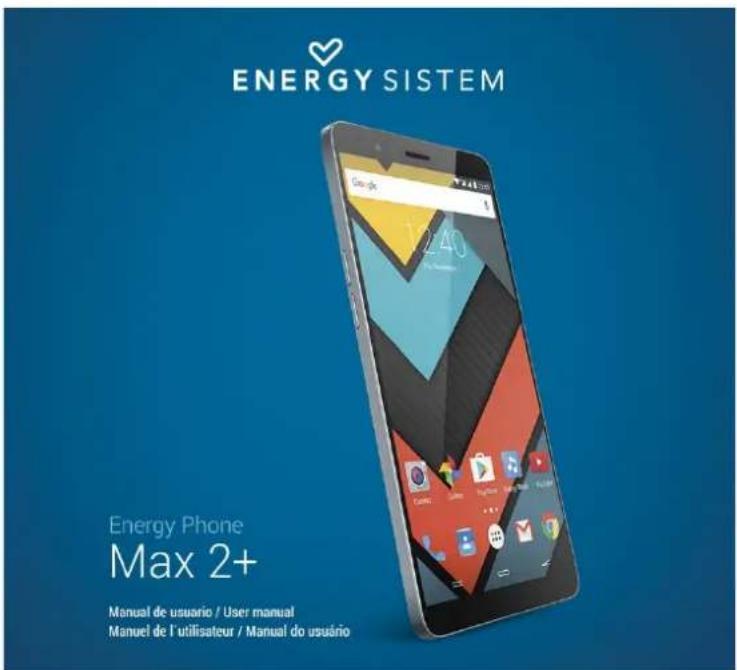
(https://carno.githubusercontent.com/a417072029ef8a7b70e58c3c16b21f5a7277db8/68747403a2f2f7374617469632e656e657267797369737465d2e636f6d2f696d616765732f6d616e75616c732f34323638392f35373662
Intrusductio
Thank you for your trust in us and for buying the new Energy Phone Max 2+. We hope you enjoy it. Your new phone has a 5.5' IPS HD (1280x720 pixels) touch display with anti-fingerprint coating, Quad Core ARM Cortex A53 1.3 GHz processor, Bluetooth 4.0, Wi-Fi, GPS, 4G/3G connectivity, microSD slot to expand memory capacity by a further 128 GB via microSD cards, 5 MP front camera, 13 MP rear camera with dual tone flash, 3500 mAh high capacity battery and powerful Xtreme Sound speaker.
Before you start using your smartphone, we recommend you to read this manual and familiarize yourself with it. It will only take a few minutes and will help you enjoy your device with maximum performance.
3C
- Do not expose your Energy Phone Max 2+ to impacts, dust, direct sunlight, humidity or high temperatures for long periods of time.
- Do not use neither corrosive nor abrasive cleaning products.
- Keep the device clean and free of dust using a soft and dry cloth.
- Charge the battery when the display shows the low battery icon.
- Please do not dismantle the device. All reparation works should be carried out exclusively by qualified staff of Energy Sistem Technology, S.A.
Ma i m fF
DISPLAY
- 5.5' touch screen with anti-fingerprint coating
IPS technology
HD Resolution (1280x720 pixels)
PROCESSOR
- Quad Core ARM Cortex A53 1.3 GHz processor
Integrated Mali-T720MP2 GPU
OPERATING SYSTEM
AndroidTM 6.0 Marshmallow
CAMERAS
- 13 MP rear camera with autofocus and dual tone LED flash
- 5 MP front camera
MEMORY
2GBRAMDDR3
16 GB internal memory expandable by a further 128 GB via microSD-HC/XC cards
CONNECTIVITY
4G:800/900/1800/2100/2600 MHz (FDD-LTE1 / III / VII / VIII / XX BANDS)
- 3G: 900/2100 MHz (WCDMA VIII / I BANDS)
- 2G:850/900/1800/1900 MHz (GSM BANDS)
- Bluetooth® 4.0
WI-FI 802.11 b/g/n
A-GPS
CONNECTIONS
- Dual microSIM slots
- MicroUSB 2.0 connection
3.5 mm audio jack with CTIA standard
BATTERY
- Battery capacity: 3500 mAh lithium polymer battery (non-removable battery)
- AC/DC (Europlug) power adapter. Input: 100-240 VAC 50-60 Hz. Output: 5V 1A
- Battery life: up to 177 hours on standby and 17 hours conversation time.
OTHER FEATURES
- Integrated Xtreme Sound Speaker
- Notification LED
- Motion sensor (accelerometer)
- Proximity sensor
Luminosity sensor - Integrated speaker
- Integrated omnidirectional microphone
87.5 to 108 MHz FM radio with preset - SAR rate: 0.558 (W/Kg) at the head and 1.267 (W/Kg) at the body (5 mm distance)
rP
- Energy Phone Max 2+.
Quick guide. - Screen protector.
USB cable. - AC/DC (Europlug) power adapter. Input: 100-240 VAC 50-60 Hz. Output: 5V 1A.
3G
(https://carmo.githubusercontent.com

/94aa0656be5b361acdb99ed4a283943b7bc05bcf
/687474703a2f2f7374617469632e656e6572677973697374656d2e636f6d2f696d616765732f6d61e75616c732f34323638392f35373734
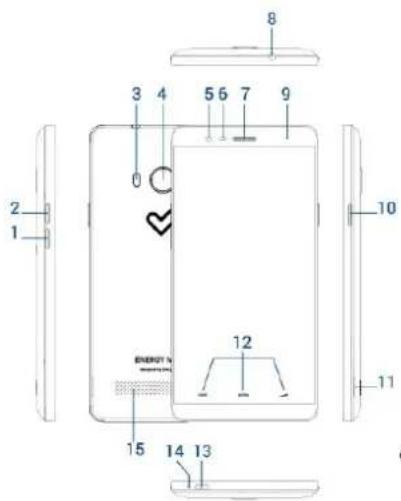
- Volume button
- Volume button +
- Dual tone flash
- Rear camera
- Front camera
- Proximity and luminosity sensors
- Receiver
- Earphones output
- Notification LED
- On/Off button
- Slot to remove rear case
- Touch buttons: Recent Apps, Home, Back
- MicroUSB port
14.Microphone - Xtreme Sound speaker
- MicroSIM card slot 2
- MicroSD card slot
- MicroSIM card slot 1
- IMEI and serial numbers
C
Your Energy Phone Max 2+ has a 3500 mAh Lithium Polymer battery that cannot be removed. The charging time ranges from 3 to 4 hours, depending on whether the device is on or off. Always charge your phone through the USB cable and the power adapter that come with the product to comply with the battery charging times.
Swiittchiing on and offff ttt
Make sure that the microSIM card or both microSIM cards are inserted in their corresponding slots before turning on your Energy Phone Max 2+. Press the On/ Off button (10) located on the right side of your device for one second. Once the operating system has loaded completely, please unlock the device to start using it. Proceed to enter the PIN number of your microSIM card and then drag the padlock upwards.
You will have to restart your device each time that you insert a microSIM card in order for the device to detect it.
To turn off the device, press and hold the On / Off button (10) until the power off menu appears on screen and then select "Switch off".
Briefly press the On / Off button (10) to lock/unlock the device thus, turning the screen on/off.
M
图
- Tap
Touch the screen briefly

(https://camo.githubusercontent.com
/8a1a605385ab4126116678757bd133fca34ea6c9
/687474703a2f2f7374617469632e656e6572677973697374656d2e636f6d2f696d616765732f6d616e75616c732f33393533302f35333535
Double tap
Touch the screen twice quickly

https://camo.githubusercontent.com/db80dcaa04fdc677428bbf32f6e0e7e654a6f07
/687474703a2f2f7374617469632e656e6572677973697374656d2e636f6d2f696d16765732f6d616e75616c732f33393533302f35333535
Drag
Move your finger over the screen while maintaining continuous contact

(https://camo.githubusercontent.com
/8b1d8c3b7c185b5d06538ec662397fd55d11853c
/687474703a2f2f7374617469632e656e6572677973697374656d2e636f6d2f696d617675732f6d61e7561c732f33393533302f35333535
- Slide
Slide your finger quickly over the screen

(https://camo.githubusercontent.com
/19a82089a6bd24bb4557d05e1b706dc68d6865b
768747403a2f2f7374617469632e656e6572677973697374656d2e636f6d2f696d616765732f6d61e75616c732f33393533302f35333535
- Press
Touch the screen for an extended period of time

https://camo.githubusercontent.com/a773834656455845bf8b52066e8397a3957324ba
/687474703a2f2f7374617469632e656e6572677973697374656d2e636f6d2f696d16765732f6d616e75616c732f33393533302f35333535
- Zoom
Zoom in and out the image on screen

https://camo.githubusercontent.com
/123d08d94943648cf48946d49af9f88b12d17de1
/687474703a2f2f7374617469632e656e6572677973697374656d2e636f6d2f696d616765732f6d616e75616c732f33393533302f35333535
M
(https://camo.githubusercontent.com
/62047cc76f7ced7da350933501290d0c5f4d02b0
/687474703a2f2f7374617469632e656e6572677973697374656d2e636f6d2f696d616765732f6d616e75616c732f34323638392f35376633
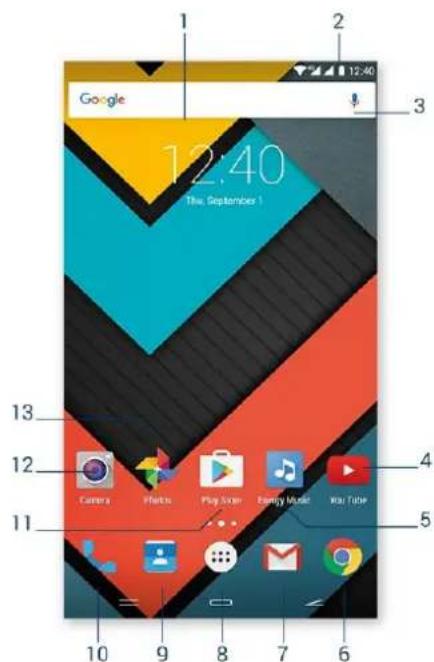
1 direct access to Google's ONLINE search engine.
21 S displays information about the signal status, battery and clock. If you slide down your finger over this area twice, you will access the basic settings menu that manages notifications as well as the main settings menu.
3iW access to Google's voice search and much more.
4 allows you to watch videos online.
-
music player.
-
lntteenneweb browser.
7e e-mail service.
8.dMl access to application and widget menus.
9n Contact management.
10 calls and call log
- download the best and most popular apps for your Android™ system.
12 access to the built-in camera.
13 displays images.
Wi dgg

(https://camo.githubusercontent.com/ea6fe69b985e2b704ae95b4b9a89936ff13b1f8/6874740703a2f7374617469632e656e657267797369737465d2e636f6d2f696d16765732f6d616e75616c732f34323638392f35376633
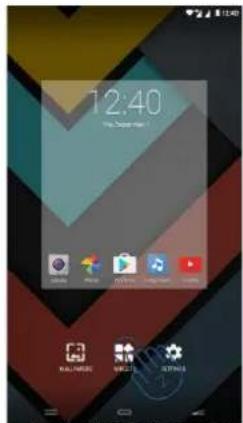
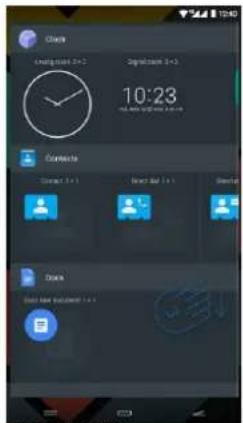
In order to add a Widget to one of your desktops, tap the centre of the desktop, hold the position for a few seconds (1) and then select "WIGGETS" at the bottom of the screen (2). You can slide your finger to the left/right (3) to see all installed widgets. Select the one you want to add to your desktop by keeping it pressed and then release it on the desktop.
Widgets can be easily removed or relocated to other screen areas. To relocate a widget, select it by pressing it for a few seconds. Once the app has been highlighted, you can move it to another desktop position.
To remove the widget, keep it pressed for a few seconds without releasing it until the X icon appears on top of the screen. Then, drag the widget to that icon and release it.
ISS
(https://camogithubusercontent.com/8374532819b11f2cb192b2cd49b70e3041dcf8d9
/687474703a2f2f7374617469632e656e6572677973697374656d2e636f6d2f696d616765732f6d616e75616c732f34323638392f35376633
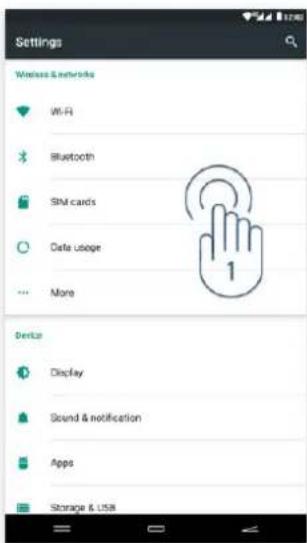
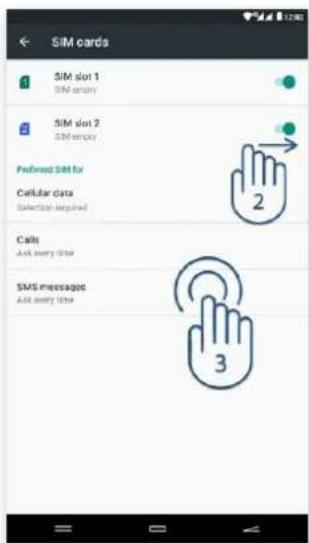
Your Energy Phone Max 2+ allows you to use two microSIM cards. In Settings > SIM Management, you can manage the use of both cards.
In this section you can set the default card to make or receive calls, send and receive text messages and set the data connection.
1B
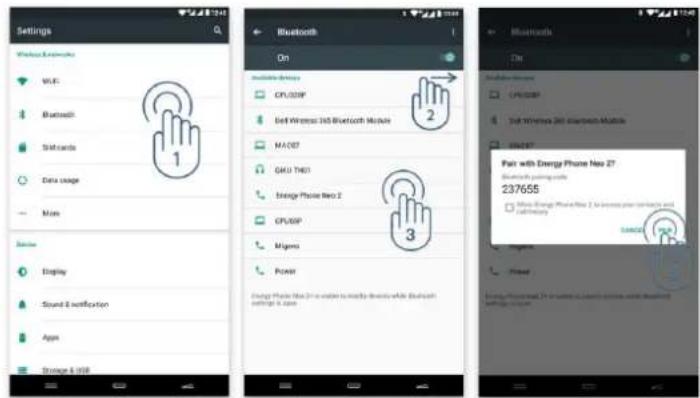
Your Energy Phone Max 2+ has Bluetooth 4.0 to connect your device to headphones, computers, tablets or any device that supports such communication protocol. You just need to go to Settings > Bluetooth and turn the switch ON. The device will start then a search of all available devices and once it has finished, you will only have to select one of them to establish the connection.
(https://camo.githubusercontent.com/65f959c6cdf7d9c04015d3521ea5846242ed1820/68747403a2f7374617469632e656e657267797369737465d2e636f6d2f696d16765732f6d616e75616c732f34323638392f35376633
- Settings > Bluetooth.
- Enable the Bluetooth option.
- Select the device you want to connect to.
- Accept the pairing request.
W
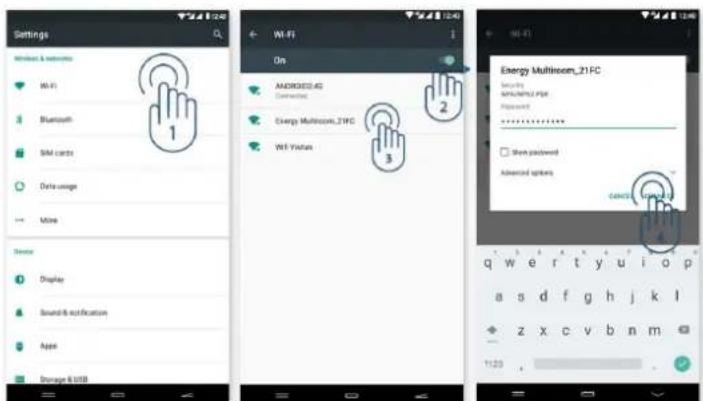
Your Energy Phone Max 2+ has Wi-Fi 802.11 b/g/n connectivity. To connect your device to any wireless network, please go to Settings > Wi-Fi and turn the switch ON. The device will start then a search of all available networks and you will only have to select one of them to connect it.
(https://camo.githubusercontent.com/42ead4c4ba6d0a2b13ac5b4efcb085874c628800 /687474703a2f2f7374617469632e656e657267797369737465d2e636f6d2f696d616765732f6d616e75616c732f34323638392f35376633
- Settings > Wi-Fi.
- Enable the Wi-Fi option.
- Select your Wi-Fi network.
- Connect.
Your Energy Phone Max 2+ is compatible with the following security and encryption standards: WEP, WPA, WPA2, TKIP and AES. Once you have completed the authentication process successfully, your Energy Phone will save the Wi-Fi access data and your device will be ready to access the Internet. The device will remember the network and will automatically connect to it whenever is available.
Inntteemneett bboow
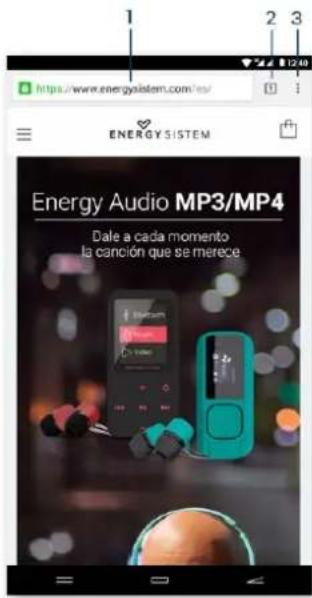
Your new Energy Phone Max 2+ has a powerful web browser among the list of installed default applications. With it you will be able to surf the Internet smoothly and easily.
Once the device is connected to a Wi-Fi or mobile network, press the browser icon on the desktop or in the application menu to run the programme. The system will load and display the home page set by default.
(https://camo.githubusercontent.com
/c2ffe7f4c86896340edb97f7eeccb68f3c86c87d
/687474703a2f2f7374617469632e656e6572677973697374656d2e636f6d2f696d616765732f6d616e75616c732f34323638392f35376633
- URL address.
- Tab management.
- Browser menu.
in order to get to know your account settings, please ask your e-mail service provider.

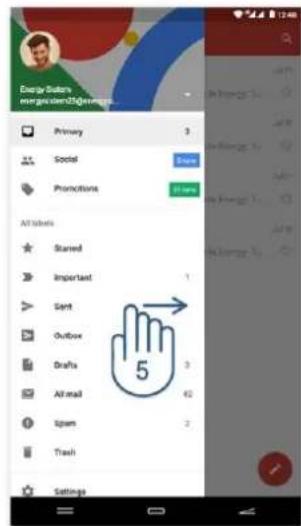
https://carno.githubusercontent.com/1953b34ce71dc87c95a0b1f33b698a1ff46fc2b8
/687474703a2f2f7374617469632e656e6572677973697374656d2e636f6d2f696d616765732f6d616e75616c732f34323638392f35376633
- E-mail management/Select folder.
- Search
- E-mails
- New e-mail.
- Folders.
U
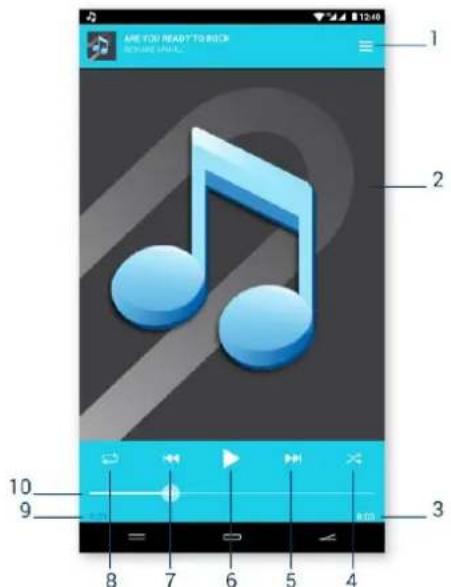
(https://camo.githubusercontent.com
/c6eb0483c6df59d104c6d54c1debaa1512308a03
/687474703a2f2f7374617469632e656e6572677973697374656d2e636f6d2f696d616765732f6d616e75616c732f34323638392f35376633
- Playlist.
- Display:
- Length.
- Random playback
- Next song.
- Play / Pause.
- Previous song.
- Repeat.
- Elapsed time.
- Progress bar.
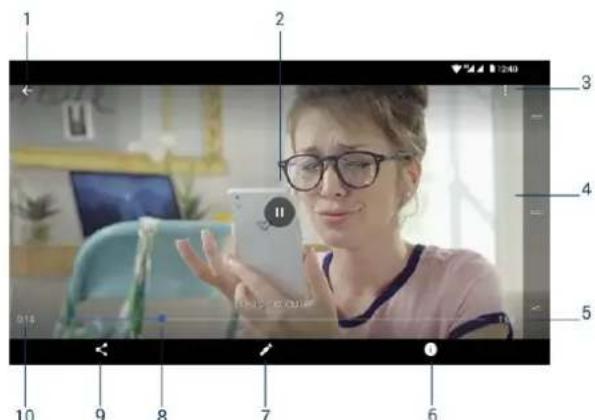
W
(https://camo.githubusercontent.com/72614439224eff45db3c241cb1231dc321885aae
/687474703a2f2f7374617469632e656e6572677973697374656d2e636f6d2f696d616765732f6d616e75616c732f34323638392f35376633
- Back to video list.
- Play / Pause.
- Options
- Now playing.
- Length.
- Video details.
- Video editor.
- Progress bar.
- Share options
- Elapsed time.
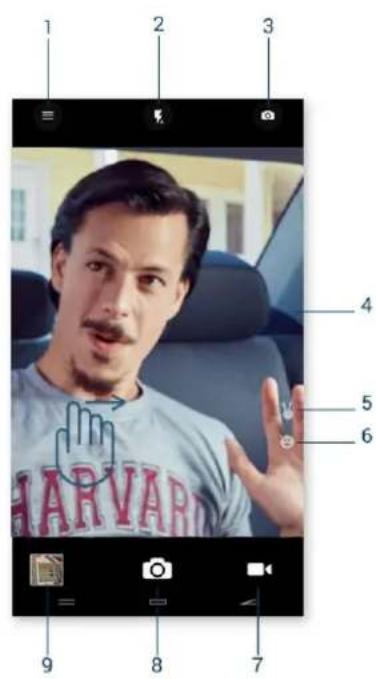
C
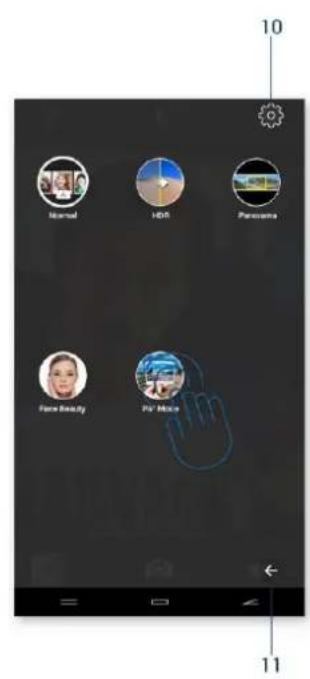
(https://camo.githubusercontent.com/74f859832782c72b1287bf21e870d1113626a343
/687474703a2f2f7374617469632e656e6572677973697374656d2e636f6d2f696d616765732f6d616e75616c732f34323638392f35376633
- Settings.
- Flash
- Switch cameras.
- Camera preview.
- Automatic gesture recognition.
6.Smile capture. - Video mode
8.Shutter button. - Access to gallery.
- Settings.
- Return.
G
You will be able to view the pictures and videos stored on the device internal memory and your Google account.
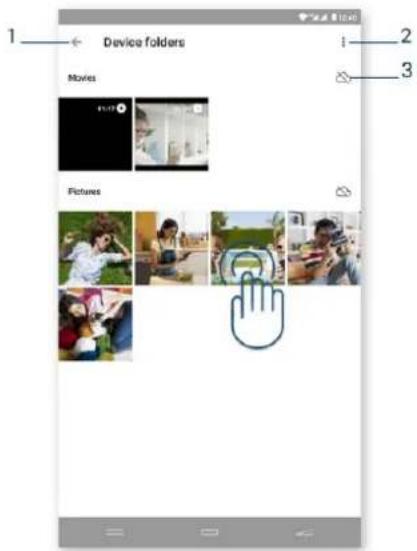
(https://cmo.githubusercontent.com
/a5e6350564fa8ebad6d8559b91ba8fe73daed4fd
/68747403a2f2f7374617469632e656e6572677973697374656d2e636f6d2f696d616765732f6d616e75616c732f34323638392f35376633
- Return.
- Options.
- Backup and synchronization
To view the previous/next image or album, slide your finger horizontally.
To return to the main desktop, press the Back or Home button.
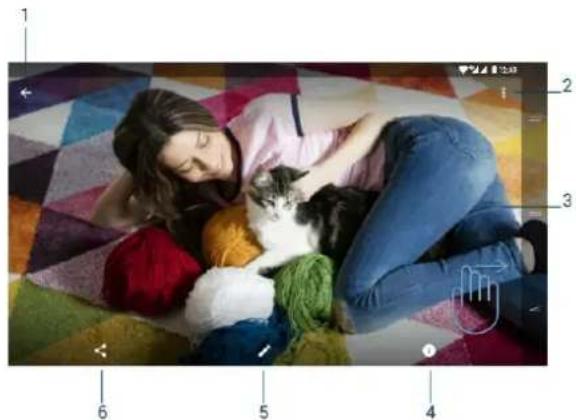
(https://camo.githubusercontent.com/39a27ebdb72b60f875c244e4eb0cb474927646b5
/687474703a2f2f7374617469632e656e6572677973697374656d2e636f6d2f696d616765732f6d61e75616c732f34323638392f35376633
- Return to picture list.
- Options.
- Image
- Image details
- Image editor.
- Share.
M
Your Energy Phone Max 2+ has a slot for microSD cards to expand your device memory. To use it, turn off your device before inserting/extracting the card in order to avoid accidental data loss. It supports High Capacity (microSD-HC) and Extended Capacity (microSD-XC) card formats.
Your Energy Phone has also a microUSB port to connect USB cables and interact with your PC in different ways. You only need to connect the cable that comes with the product to the PC to establish the connection and enjoy all mode functions.
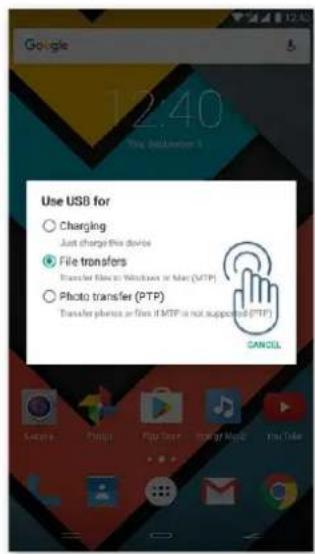
(https://camo.githubusercontent.com
/1533e5ac0f4b2a7b2f4fe5f4d8a45ea174b3f4eb
/687474703a2f2f7374617469632e656e6572677973697374656d2e636f6d2f696d61765732f6d61e75616c732f34323638392f35376633
#
Your Energy Phone Max 2+ has an Android™ operating system that can be reinstalled or updated if necessary. Updates will be carried out via OTA (Over-The-Air) by default, so your Energy Phone will automatically connect to our servers, will download the file and will install the new software as soon as an update is released.
You can also update your Energy Phone Max 2+ using your computer. The process is simple but has to be done carefully and only when is really necessary. If the device does not respond, restarts unexpectedly or you experience problems accessing the content stored on the internal storage memory, you should reinstall or update the operating system to the latest compatible version available.
Please follow these steps to install it:
-
Make sure that the battery of your Energy Phone Max 2+ is fully charged. If this is not the case, plug it to the external power source using the provided AC/DC power adapter and wait until it is fully charged.
-
Access the www.energysystem.com (http://www.energysystem.com) website from your computer.
-
Access the 'Support' section and choose "Smartphone" in type of product.
-
Choose your Energy Phone model from the dropdown list that will appear and download the latest Android™ operating system version available in the Download/Firmware section.
Important: Please make sure the operating system version you are downloading is intended for your device model and serial number because otherwise the device could be damaged. -
Unzip the file on your computer.
-
Open the downloaded text file and follow the instructions to install the new operating system on your Energy Phone Max 2+.
rT
-
Why is not possible to play some MP3 files? MP3 files must follow the Layer 3 Standard for MPEG-1, MPEG-2 or MPEG 2.5 formats. Otherwise, they have to be converted using specific software.
-
My Energy Phone does not start, what can I do?
Make sure that the battery has enough charge when trying to turn it on. If the problem continues
after charging the device for at least 30 minutes, there may be a problem with the installed operating system. Please refer to the "Updates" section of this manual.
- Why is not possible to play some WMA files?
Make sure you are not trying to play DRM-protected WMA files. - Why is not possible to play video files, display images or text while using the music player? In general, applications only display the files that are compatible and that the programme is able to read. Therefore, you will only be able to display the files with the format that is compatible with that programme (songs with the music player, videos with the video player, etc...) while you browse the folders from that specific application. In order to see all files stored on the internal memory at the same time, run the file explorer application from the application menu.
- Which video formats are compatible with my Energy Phone?
Your Energy Phone can play several video formats like MP4, 3GP or MOV among others without needing to recode.
- Why is not possible to display my jpg images?
Many digital cameras and image editing software add hidden data to jpg files. This can prevent your Energy Phone from loading the images. Try deleting them and save the images with other name.
- Sometimes the screen turns black and the device does not respond.
It is always better to restart the device through one of the available system options but if this is not possible, please restart it by pressing the power button for about 10 seconds.
- My Energy Phone Max 2+ has a 16 GB built-in memory but the available memory capacity is lower than that. Why?
The Android™ operating system and the preinstalled applications need approximately 6 GB of internal memory to work properly. Therefore, the internal storage capacity available is less than 16 GB.
- What do I have to do to install an application that is not to be found in Play Store?
First of all, make sure that the file has the AndroidTM application extension (.APK). AndroidTM will ask you then to activate the app installation from "Unknown sources", which has been disabled for security reasons. To enable the installation of apps, you only have to follow the instructions on screen the first time you try to install an application: Settings / Security / Unknown sources (activate). This action may compromise the device security. Therefore, we strongly recommend to install applications from reliable sources only.
- How long does the battery last?
It depends largely on how you use the device, that is, how high you set the level of screen
brightness, the use of headphones or speakers, the Wi-Fi connection and the use of GSM and
4G/3G networks. Your Energy Phone Max 2+ battery life lasts up to 177 hours on standby and 17
hours in conversation mode.
- Which are the bands that my device needs to work in 4G and 3G modes?
Your Energy Phone Max 2+ is prepared for FDD-LTE 800/900/1800/2600 MHz bands to work in
4G mode and for WCDMA 900/2100 MHz bands to work in 3G mode.
6
f6
It is prohibited to use the phone in certain places such as airplanes, hospitals and service stations.
To reduce the amount of radiation use a hands-free kit, enable speaker mode, use a Bluetooth
headset and do not make calls in places where the signal is weak, in the car, train or subway. Keep the phone away from sensitive areas like the belly of pregnant women, especially when making a phone call. If you have an electronic implant (pacemakers, insulin pumps, neurostimulators...) place the phone at least 15 cm away from the body and on the opposite side to the implant when making a phone call.
The power socket that you intend to use to charge the device battery should be easily accessible. You must place the device close to it.
E
This device complies with the guidelines developed by the ICNIRP for exposure to radio waves. The unit does not exceed the SAR radio wave exposure limits. This unit measures the amount of radio frequency energy absorbed by the body when using a device. The SAR limit adopted by Europe is 2.0 W/kg averaged over 10 grams of tissue. The test performed showed that the highest SAR value for this device when using it near the ear/head is 0.558 W/Kg.
W
Energy Sistem Technology, S.A. is liable for any lack of conformity that exists at the time the goods are purchased during a period of 36 months. Batteries are excluded from the 36-month warranty, having a warranty period of 24 months.
This warranty covers all defects in workmanship or materials. It does not cover product failures due to accidents, misuse or alteration made by an unauthorized person.
The special 36-month warranty is valid for the European Union. For other countries please refer to the specific legislation or your local distributor.
W
Visit the Support section at http://www.energysystem.com/en/support (http://www.energysystem.com/en/support) and select your product to view the FAQ (Frequently Asked Questions), user manuals, drivers and updates available. You will also have the possibility to submit a query to the Technical Service or manage the warranty.
- You can check the availability of the user manual in your language at: http://www.energysystem.com/guide/42689(http://www.energysystem.com/guide/42689
- Alternatively, you may prefer to contact the distributor that sold the product and present the purchase receipt or invoice.
Imppoantaafthis warranty does not cover any damage or loss of data stored on warranty products. Therefore, Energy Sistem's Technical Service will not assume any loss of the above mentioned information. It is recommended to make a backup of your data and remove this information from the device internal memory before sending the product, or send it only with the original data.
Specifications are subject to change without notice.
#
All company, brand and product names are trademarks or registered trademarks of their respective companies.
© 2016 by Energy Sistem Technology, S.A. All rights reserved.
The present device could contain links to other sites or websites operated by third parties not related to Energy Sistem Technology, S.A. These links are provided for your information or convenience; Energy Sistem is not responsible for their availability, content, update, adequacy or accuracy. These external web sites might contain link references to trademarks, patents, registered information, technologies, products, processes or rights property of other companies or individuals. All rights reserved are property of their respective owners.
Declll arrattion off co
C∈0700
(https://camo.githubusercontent.com
/550ad72a787b20a95f4e6b33e0e623eff3708a0d
/687474703a2f2f7374617469632e656e6572677973697374656d2e636f6d2f696d616765732f6d616e75616c732f34323638392f35373661
Issuer's name: Energy Sistem Technology, S.A. - CIF: A53107488
Address: C/ Calpe, 1-03509 Finestrat - Alicante (Spain)
Tel: +34 902 388 388 / +34 966 813 257
We declare under our own exclusive responsibility that the product
Description: Smartphone Brand: Energy Sistem Model:Energy Phone Max 2+
Manufacturer: Energy Sistem Technology, S.A.
Manufacturing Country: China
referred to in this declaration is in compliance with the essential norms and standards
1999/5/EC-R&TTE
EN 60950-1:2006+A11:2009+A1:2010+A12:2011+A2:2013
EN 50332-2:2013
EN 50360:2001+A1:2012; EN 62209-1: 2006; IEC 62209-1: 2005
IEC 62209-2:2010; EN 62209-2:2010; EN 50566:2013; EN 62479:2010
EN301489-1V1.9.2;EN301489-3V1.6.1
EN301489-7V1.3.1;EN301489-17V2.2.1
EN301489-24V1.5.1
EN 55022:2010/AC:2011; EN 61000-3-2:2014
EN 61000-3-3:2013; EN 55024:2010
EN301511V9.0.2
EN300328V1.9.1
EN301908-1V7.1.1;EN301908-2V6.2.1
EN300440-1V1.6.1;EN300440-2V1.4.1
in conformity with the essential norms and standards of the Directive 99/05/CE of the European
Parliament and of the Council of March 09th 1999.
Finestral, 1st October 2016

(https://camo.githubusercontent.com
/c655eb0de68a45e4bafd0f5c534e8dd8fe308761
/687474703a2f2f7374617469632e656e6572677973697374656d2e636f6d2f696d61765732f6d616e75616c732f34323137382f35373463
Daniel Havillio
Product Management Director


Marque : ENERGY SISTEM
Modèle : Phone Max 2+
Catégorie : Smartphone