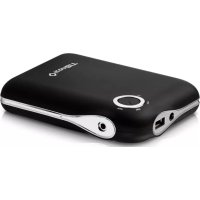
FTB13000DUO - Batterie portable iconBIT - Notice d'utilisation et mode d'emploi gratuit
Retrouvez gratuitement la notice de l'appareil FTB13000DUO iconBIT au format PDF.

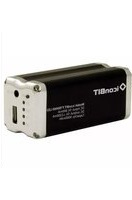
| Type de produit | Batterie portable / chargeur externe |
| Marque | iconBIT |
| Modèle | FTB13000DUO |
| Capacité de la batterie | 13000 mAh |
| Entrée de charge | Port INPUT (adaptateur secteur fourni) |
| Sortie | Port USB pour charger des appareils mobiles |
| Temps de charge (de vide à plein) | Environ 5 heures |
| Indicateurs de capacité | 3 LED (Low, Mid, Full) |
| Protections intégrées | Surintensité, surtension, court-circuit, surchauffe, sous-tension |
| Arrêt automatique | Oui, lorsque l'appareil est complètement chargé ou déconnecté |
| Température de fonctionnement | -10°C à 45°C |
| Compatibilité | iPad, iPhone, smartphones, Bluetooth, DV, lecteurs DVD portables, etc. |
| Alimentation | Batterie lithium-ion rechargeable intégrée |
| Entretien et nettoyage | Essuyer avec un chiffon sec ; ne pas utiliser de liquides |
| Précautions de sécurité | Ne pas exposer à l'eau, au feu ou à une humidité élevée ; ne pas démonter |
| Stockage | Recharger à moitié, puis stocker dans un endroit frais et sec |
| Fréquence de recharge recommandée | Tous les 3 mois |
| Informations générales | Fabriqué par ICONBIT LIMITED, Hong Kong |
FOIRE AUX QUESTIONS - FTB13000DUO iconBIT
Questions des utilisateurs sur FTB13000DUO iconBIT
0 question sur cet appareil. Repondez a celles que vous connaissez ou posez la votre.
Poser une nouvelle question sur cet appareil
Téléchargez la notice de votre Batterie portable au format PDF gratuitement ! Retrouvez votre notice FTB13000DUO - iconBIT et reprennez votre appareil électronique en main. Sur cette page sont publiés tous les documents nécessaires à l'utilisation de votre appareil FTB13000DUO de la marque iconBIT.
MODE D'EMPLOI FTB13000DUO iconBIT
iconBIT
FTB13000DUO Portable intelligent battery charger
User Manual
www.ionbit.com
1
Quick Start
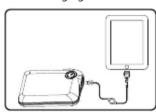
- Use iconBIT FTB13000DUO to Charge your mobile devices STEP A: Link iconBIT FTB13000DUO with cable and definite connector to your mobile device STEP B: Press the button to switch on iconBIT FTB13000DUQ then the device will be charged
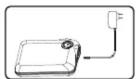
- Use AC charger to Charge iconBIT FTB13000DUO STEP A: Plug the attached AC charger to the wall plug and connect iconBIT FTB13000DUTo the AC charger, then iconBIT FTB13000DUO will be charged
2
B. Check remained capacity of iconBIT FTB13000DUFT
Check the amount of power remaining in iconBIT FTB13000DUFT
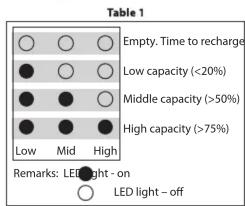
Open the button, you can see Low, Mid and Full from the capacity LEDs.
Table 1 describes how to check the capacity remaining in the power-pack.
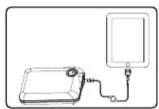
Use iconlet F1B13000DUO to charge iPad, iPhone & mobile devices
6
000Duging mobile devices by iconBTT
STEP 1: Check the remained capacity of iconBIT first. We suggest to charge iconBIT FTB13000DUO before using, in order to charge your device fully.
STEP 2: Link iconBIT FTB13000DUo the mobile device via cable and connectors, please ensure that correct tips has been chosen to avoid damage your devices. STEP 3: Press the button of iconBIT FTB13000DUo start charging. The "USE" LED will be lit, and the device will be charged. If the device has been fully charged, iconBIT FTB13000DUo will be turned off automatically to save energy.
D. Protection and alarm
There will be 5LEDs blinking if iconBIT FTB13000DU being incorrectly used, meanwhile, it will turn off to prevent the damage. Table 2 lists the protection function and alarm condition. (Press the button after removed the alarming condition to reset iconBIT FTB13000DU
Table 2
| Condition | Alarm | Protection |
| Mobile device has been fully charged | No | Yes |
| Mobile device has been disconnected more than 30s | No | Yes |
| Overcurrent discharge | Yes | Yes |
| Over voltage discharge | Yes | Yes |
| Short-circuit | Yes | Yes |
| Overheat | No | Yes |
| Low voltage discharge | Yes | Yes |
7
Thanks
Thank you for purchasing iconBIT FBT13000DUO external battery pack, a super high capacity rechargeable battery capable of providing power to iPad, iPhone4, 3Gs, 3G and 2G iPhone, and 1st, 2nd and 3rd GEN iTouch, Smart phone, Bluetooth, DV, Portable DVD. Please read the following carefully before using the product and be sure to keep this manual in a safe place for future reference.
Safety Notice
- Do not expose the product to water, fire and other places with high temperature or humidity. The best using temperature is between -10^ and 45^ .
- Do not disassemble and damage the product.
- Stop using if electrolytic liquid leakage, overheating, color change, or any other peculiar occurrence is detected.
- Do not use the unauthorized AC charger to recharge iconBITFTB13000DUO.
3
Storage
If your iconBOT FBT13000DUwill not be used for an extended period of time, please take the following steps once a year to ensure proper functioning:
- Fully charge the icon8FFITB13000DUO;
- Use a device for export by using it to supply power to mobile devices;
-
Recharge the power-pac to nearly half capacity; 4. Store the power-pack in a cool and dry place to avoid short-circuiting and battery damage.
-
To ensure the optimal performance, discharge and recharge this product every three months.
-
Do not expose the power-pack to extreme temperatures or humidity in order to avoid short-circuiting an battery damage.
- Should the battery pack need disposal, it must be disposed of properly.
8
Specifications
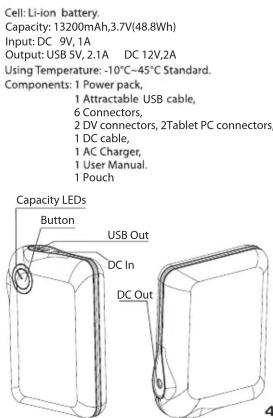
Troubleshooting
If you are experiencing difficulties with your battery pack:
1. Check the following items in the table to find a possible cause and solution.
2. If you are still unable to solve the problem, consult your battery pack dealer or service station.
| Problems | Possible Causes | Solutions |
| FTB13000CQUE8AEB400 fully charged even after being recharged for a longer time. | NIO or the attached charge is failed. 2. The charging time is too short. | 1. Contact your dealer. 2. Recharge FTB13000U00 for about 5 hours. |
| The power remaining in FTB13000U00 cannot be used to supply power to devices. | 1. FTB13000U00 failed. 2. The power has been used out of stock. | 1. Contact your dealer. 2. Recharge FTB13000U00 for about 5 hours. |
| FTB13000U00 fails to supply power to devices. | 1. FTB13000U00 failed. 2. The power is used up from FTB13000U00. 3. Recharge or replace the support to charge this device. 4. Inverter connection problem. | 1. Contact your dealer. 2. Recharge FTB13000U00 for about 5 hours. 3. Recharge or replace the connector and cable. |
| A device cannot be fully charged by FTB13000U00. | The power is used up | Recharge FTB13000U00 for about 5 hours. |
Operating Guidance
A. Charging iconBIT FTB13000DUO
You must use the attached AC charger to charge iconBIT FTB13000Duo.
1. Plug AC charger to wall plug.
2. Plug the cable tips of the AC Charger into the INPUT port of iconBIT FBT13000DUO.
3. 3 capacity LEDs on iconBIT FBT13000DU start to blink in low to high sequence iconBIT FBT13000DU being charged. It will take 5 hours to charge iconBIT FBT13000DU from empty to full.
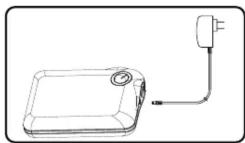
Recharge iconBit-FTB13000DUO by charger
5
Contact info
ICONBIT LIMITED
Suite 1604-5, Wilson House, 19-27 Wyndham Street,
Central, Hong Kong. Tel: (853) 2023-2167
Erl: (852) 2523 2167 Fax: (852) 2810 1957
Service and Support:
If you have problems installing or using the product, please e-mail us at support@iconbit.com
10



Marque : iconBIT
Modèle : FTB13000DUO
Catégorie : Batterie portable