
DGIPOD1505 - Chargeur téléphone portable DREAMGEAR - Notice d'utilisation et mode d'emploi gratuit
Retrouvez gratuitement la notice de l'appareil DGIPOD1505 DREAMGEAR au format PDF.


| Type de produit | Adaptateur de voyage universel avec port USB |
| Marque | DreamGEAR |
| Modèle | DGIPOD1505 |
| Catégorie | Chargeur téléphone portable |
| Dimensions approximatives | 8 x 5 x 3 cm |
| Poids approximatif | 100 g |
| Alimentation secteur | 100-240 V, 50/60 Hz |
| Port USB | USB 3.0, 5 V, jusqu'à 2.4 A |
| Prise secteur | Prise AC universelle (EU, UK, US/AU) |
| Fonctions principales | Conversion de prises, charge simultanée AC et USB, indicateurs LED |
| Indicateurs LED | LED AC POWER et LED USB POWER |
| Protection | Fusible de protection remplaçable |
| Conformité tension | Compatible 100-125 V et 220-250 V |
| Entretien et nettoyage | Nettoyer avec un chiffon sec et doux, ne pas utiliser de liquides |
| Sécurité | Ne pas dépasser la charge maximale, utiliser dans un endroit sec |
| Pièces détachées et réparabilité | Fusible de protection remplaçable (modèle standard) |
| Contenu de l'emballage | Adaptateur universel, notice d'utilisation |
| Garantie | Garantie limitée du fabricant (consulter la notice) |
| Utilisation prévue | Charge d'appareils mobiles en voyage |
FOIRE AUX QUESTIONS - DGIPOD1505 DREAMGEAR
Questions des utilisateurs sur DGIPOD1505 DREAMGEAR
0 question sur cet appareil. Repondez a celles que vous connaissez ou posez la votre.
Poser une nouvelle question sur cet appareil
Téléchargez la notice de votre Chargeur téléphone portable au format PDF gratuitement ! Retrouvez votre notice DGIPOD1505 - DREAMGEAR et reprennez votre appareil électronique en main. Sur cette page sont publiés tous les documents nécessaires à l'utilisation de votre appareil DGIPOD1505 de la marque DREAMGEAR.
MODE D'EMPLOI DGIPOD1505 DREAMGEAR

ENGLISH
Instructions for the Universal Travel Adapter
PLUG-EU

PLUG-UK

PLUG-US

Notice: No conversion is required when your mobile electronics power plug is the same as the wall outlet.
Universal Travel Adapter - Socket conversions and basic operating instructions:
UK
Plug-UK fits UK sockets.

To release Plug-UK,
move the Balance
buttons located on both sides of the


US/AL
Plug-US fits US and AU sockets. Please adjust pins as shown.

To release Plug-EU,
simply slide Plug-EU upward as shown from
Plug-UK.

EU
Plug-EU fits EU sockets: Please see Figure 2. Plug-EU is connected.
ensure Plug-LO is properly inserted to Plug-US as shown.

Reassemble the Adapter / Plug in
shown below for
convenience

Universal Travel Adapter - USB Power Port

图图
To charge your mobile electronics with the Universal Travel Adapter USB 3.0, you can use a USB 3.0 device with 120 kΩ to
USB Power Port (designed to handle both 110 V to 240 V);

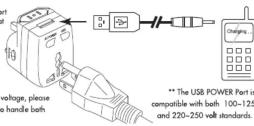
Universal Travel Adapter - Power up your gear through the AC power port and USB Power port simultaneously
Step 1: Connect the USB charging cable to the Universal Travel Adapter USB Power Port as shown above. Step 2: Connect the USB charging cable to the mobile electronic as shown above.
Step 2. Connect the USB port to the Microphone.
Step 3: Connect the Universal Travel Adapter to the wall button. Step 4: USB status LED light turns on indicating charging in progress
Step 5: Ensure your mobile electronic is in charging mode.
*USB charging cable is not included, make sure compatible USB charging cable is being used.
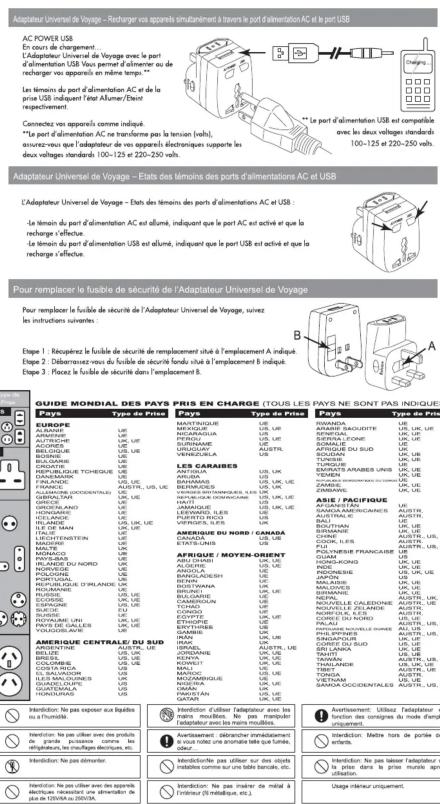
The Universal Travel Adapter with USB power port
ollows you to power up / charge up your gear of the same time.**
The AC POWER and USB Status LED lights indicate ON/OFF status respectively.
Please connect your devices as shown.
** The AC POWER Port does not convert power voltage, please.
ensure your mobile electronics adaptor is rated to handle both
100-125 and 220-250 volt standards
Universal Travel Adapter - AC POWER and USB POWER Status LED
The Universal Travel Adapter - AC POWER and USB POWER Status indicators:
- AC POWER LED light is ON indicating AC POWER is active and power is being transmitted
through the AC POWER port
- USB POWER LED light is ON indicating USB POWER is active and power is being transmitted
through the USB POWER port

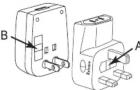
To replace the Universal Travel Adapter's power protection fuse
To replace the Universal Travel Adapter's power protection fuse, please follow
instructions below
Step 1: Obtain replacement power protection fuse located at location A as shown.
Step 2: Dispose defected power protection fuse located at the end of the fault.
Step 3: Replace power protection fuse to location B.
Outn Shy






Marque : DREAMGEAR
Modèle : DGIPOD1505
Catégorie : Chargeur téléphone portable