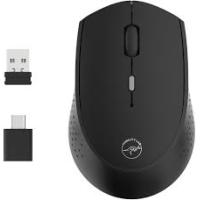
mt300795 - Souris d'ordinateur MOBILITY - Notice d'utilisation et mode d'emploi gratuit
Retrouvez gratuitement la notice de l'appareil mt300795 MOBILITY au format PDF.


| Type d'appareil | Souris sans fil |
| Alimentation | 2 piles AAA alcalines |
| Durée de vie des piles | Jusqu'à 5 millions de clics |
| Dimensions | 95 x 58 x 34 mm |
| Poids | 55 g |
| Récepteur | Nano récepteur USB |
| Connexion | Sans fil |
| Surface d'utilisation | Surfaces lisses et brillantes exclues |
| Fonctionnalités spéciales | Design élégant, indicateur de batterie faible, bouton marche/arrêt |
| Résolution | 800 DPI |
| Distance de fonctionnement | 10 mètres |
| Accélération | 8G |
| Système compatible | Windows 98/98SE/ME/2000/XP/Vista/Win7/Win8/Win10/Mac OS |
| Interrupteur ON/OFF | Oui |
| Couleur | Non précisé |
| Nombre de boutons | 3 |
FOIRE AUX QUESTIONS - mt300795 MOBILITY
Questions des utilisateurs sur mt300795 MOBILITY
0 question sur cet appareil. Repondez a celles que vous connaissez ou posez la votre.
Poser une nouvelle question sur cet appareil
Téléchargez la notice de votre Souris d'ordinateur au format PDF gratuitement ! Retrouvez votre notice mt300795 - MOBILITY et reprennez votre appareil électronique en main. Sur cette page sont publiés tous les documents nécessaires à l'utilisation de votre appareil mt300795 de la marque MOBILITY.
MODE D'EMPLOI mt300795 MOBILITY
User Manual
Package contents
Wireless Laser Mouse
Nano receiver
2 AAA alkaline batteries
User manual
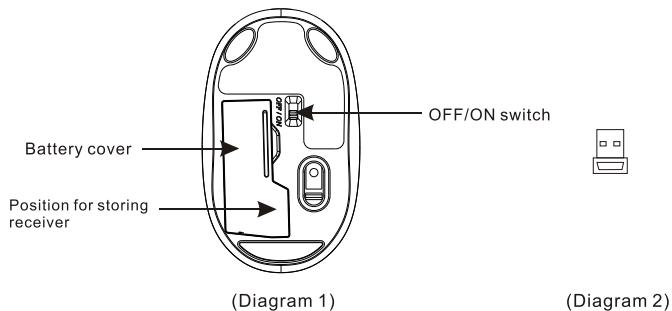
Installing the battery (Diagram 1)
Whenever new batteries are installed, make sure that they are fresh 1.5V AAA batteries.
A)Remove the battery cover.
B) Insert two AAA batteries into the battery compartment, make sure to properly orient the positive (+) and negative (-) ends as specified by the marks in the battery compartment. Replace the battery cover and make sure it is locked.
C)Turn on the mouse by OFF/ON switch
Installing the receiver (Diagram 2)
The codes of receiver and mouse were successfully connected in factory. User can directly use the complete set of products, no worry about the code connecting.
A)Insert receiver into USB port of PC, the computer system will automatically detect it and prepare it for full operation.
B) The mouse may use then.
If the user wrongly operates, please redo the above operating procedures.
"OFF/ON" switch (Diagram 1)
Without using the mouse, user may turn off it by "OFF/ON" switch for saving battery power.
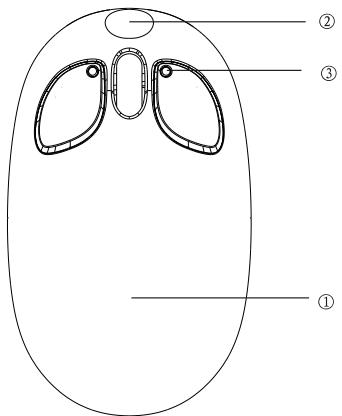
Mouse features
① Sleek and fashionable external layer
② Nice and lovely design, perfect combination of personality and fashion
③ The mouse ear that will flash blue when moving, together with the cute small round nose make people like it at first glance.
④ Storable nano receiver, easy to take.
⑤ The mouse ear will flash green when battery power is low.
⑥ With laser engine, the mouse can work on most normal operating surfaces.
| Mouse Specification | |||
| Dimension | 96*58*36mm | Operating distance | 7m |
| Weight | 55g | Acceleration | 8G |
| Button life | 3million times | Resolution | 800DPI |
| Operating surface | excluding glass & glossy surface | Speed | 28 inches/sec |
| System requirements:Win98/98SE/Win Me/Win 2000/Win XP/Vista/Win NET/WinNT4.0/Win 7 | |||