C160 - Téléphone mobile TELME - Notice d'utilisation et mode d'emploi gratuit
Retrouvez gratuitement la notice de l'appareil C160 TELME au format PDF.


| Type d'appareil | Téléphone mobile |
| Écran | Écran monochrome |
| Touches | Touches physiques avec pavé numérique |
| Fonctionnalités des touches | Appels, SMS, menu, raccourcis |
| Gestion des appels | Appel, réponse, liste d'appels |
| SMS | Envoi de SMS avec caractères spéciaux |
| Mode silencieux | Activation/désactivation par pression longue |
| Verrouillage du clavier | Verrouillage/déverrouillage par combinaison de touches |
| Langues supportées | Non précisé |
| Alimentation | Batterie rechargeable |
| Contenu de la livraison | Téléphone, chargeur, batterie, notice |
| Dimensions | Non précisées |
| Poids | Non précisé |
| Connectivité | Non précisée |
| Fonctions supplémentaires | Liste de contacts, favoris |
| Affichage de l'heure | Oui |
| Menu | Navigation par touches |
FOIRE AUX QUESTIONS - C160 TELME
Questions des utilisateurs sur C160 TELME
0 question sur cet appareil. Repondez a celles que vous connaissez ou posez la votre.
Poser une nouvelle question sur cet appareil
Téléchargez la notice de votre Téléphone mobile au format PDF gratuitement ! Retrouvez votre notice C160 - TELME et reprennez votre appareil électronique en main. Sur cette page sont publiés tous les documents nécessaires à l'utilisation de votre appareil C160 de la marque TELME.
MODE D'EMPLOI C160 TELME
Dear Customer!
Congratulations on buying this TELME mobile telephone!
You have made the right decision.
Content of delivery: Mobile telephone, charging device, battery, instructions
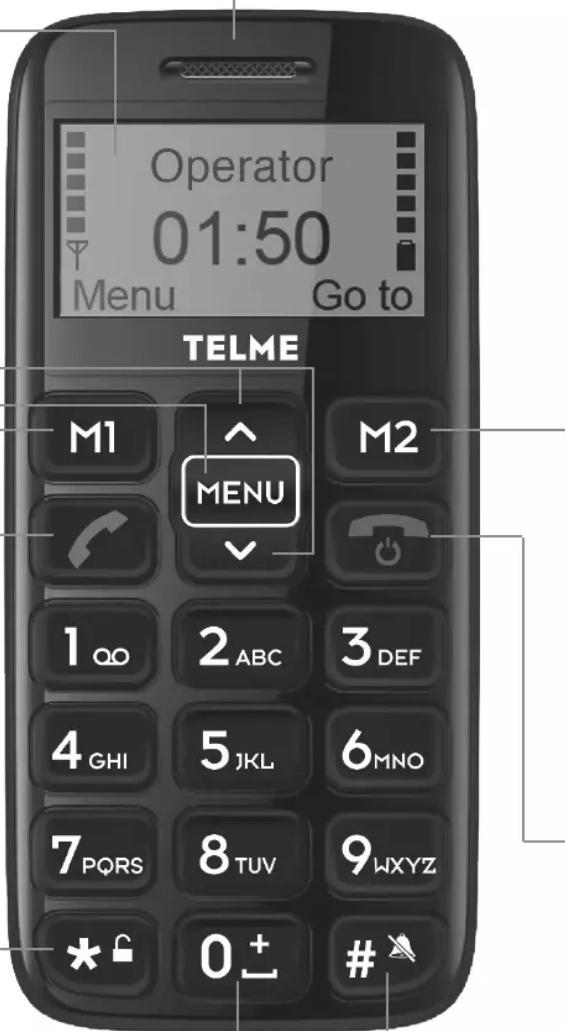
1 Controls
Speaker
Display (= Screen)
Arrow Keys
- On standby:
Favorites (pre-set: Incoming Calls)
Enter phone book contact list
- In menu and phonebook: scrolling

Key
-
press to enter phone menu
-
Can be used for con rm and select

quick dial button
-
in menu: con rm selection
-
long press or short press + for calling
Pick-up/Call list-Key
-
Calling: Enter the number, then press
-
Answering an incoming call: Press
-
On standby: Enter outgoing call list (dialed, received, missed)

Key
- In standby:
- Press twice: + (for international pre x, e.g +44 for UK)
- For SMS: Special characters: ( , .‘ ‘ ? ; : !‘ ’ @ _ ~ & + - ( ) < > {} [ ] % = / # * $ § ...
- long press to lock/unlock keyboard: press the key for 2 seconds and the keyboard is locked. Press Menu key and key to unlock again
0 - Key
-
For SMS: Space
-
Key
-
Long press: activate/deactivate silent mode
- SMS: switch between capital, small letters & numbers

Switch o devices. between

Do not dr your hand

you are in Switch o Switch o areas with
Never did humans of
The power sup The desktop ch accessible.
SAR-value: Th W/kg. This mo
14 INTEND
This mobile teleprotect it from not expose to p. Other use as defurthermore car and so on.Do r The power ap
outlets to public (10/16A) voltage
15 TECHNI Dual band GSM Dimensions: 105 Weight: 74g
warranty period:

-quick di
-in menu: one
-long press or

End/Back
- During a call
- In the Menu to Idle mode
- On/o Key: