
ZIAN644K - Plaque de cuisson ZANUSSI - Notice d'utilisation et mode d'emploi gratuit
Retrouvez gratuitement la notice de l'appareil ZIAN644K ZANUSSI au format PDF.


| Type de produit | Plaque de cuisson à induction |
| Marque | ZANUSSI |
| Modèle | ZIAN644K |
| Nombre de zones de cuisson | 4 |
| Technologie de chauffage | Induction |
| Diamètre des zones de cuisson | Avant gauche : 21,0 cm, Arrière gauche : 18,0 cm, Avant droit : 14,5 cm, Arrière droit : 18,0 cm |
| Puissance totale | 7,35 kW |
| Tension d'alimentation | 220-240 V / 400 V 2N, 50-60 Hz |
| Fonctions principales | PowerBoost, BoilAssist, Automatic Heat Up, Pause, Verrouillage, Sécurité enfants, Minuteur, Hob²Hood |
| Contrôle | Tactile par capteurs |
| Indicateur de chaleur résiduelle | OptiHeat Control (3 niveaux : poursuite de la cuisson, maintien au chaud, chaleur résiduelle) |
| Sécurité enfants | Oui, verrouillage du panneau |
| Arrêt automatique de sécurité | Oui |
| Puissance par zone (max / PowerBoost) | Avant gauche : 2300 W / 3700 W, Arrière gauche : 1800 W / 2800 W, Avant droit : 1400 W / 2500 W, Arrière droit : 1800 W / 2800 W |
| Efficacité énergétique | 182,0 Wh/kg |
| Entretien et nettoyage | Nettoyage avec chiffon humide et détergent doux ; utiliser un grattoir spécial pour les résidus tenaces |
| Matériau de la surface | Vitrocéramique |
| Installation | Encastrée |
| Pièces détachées et réparabilité | Contacter le Service Après-Vente agréé ; utiliser des pièces d'origine |
| Informations générales | Plaque de cuisson à induction avec connectivité hotte (Hob²Hood), 4 zones, puissance élevée |
FOIRE AUX QUESTIONS - ZIAN644K ZANUSSI
Questions des utilisateurs sur ZIAN644K ZANUSSI
0 question sur cet appareil. Repondez a celles que vous connaissez ou posez la votre.
Poser une nouvelle question sur cet appareil
Téléchargez la notice de votre Plaque de cuisson au format PDF gratuitement ! Retrouvez votre notice ZIAN644K - ZANUSSI et reprennez votre appareil électronique en main. Sur cette page sont publiés tous les documents nécessaires à l'utilisation de votre appareil ZIAN644K de la marque ZANUSSI.
MODE D'EMPLOI ZIAN644K ZANUSSI

Manuel d'utilisation
POUR COMMENCER ?
FACILE.
ZIAN644K
FR Manuel d'utilisation Table de cuisson
ZANUSSI
Sous réserve de modifications.
SOMMAIRE
- INFORMATIONS DE SÉCURITÉ......2
- CONSIGNES DE SÉCURITÉ......4
- INSTALLATION....6
- DESCRIPTION DU PRODUIT....8
- UTILISATION QUOTIDIENNE....10
- CONSEILS....14
- ENTRETIEN ET NETTOYAGE.... 16
- DÉPANNAGE....16
- DONNÉES TECHNIQUES....18
- EFFICACITÉ ÉNERGÉTIQUE....19
- PRÉOCCUPATIONS ENVIRONNEMENTALES....20
1. ⚠️ INFORMATIONS DE SÉCURITÉ
Avant l'installation et l'utilisation de l'appareil, lisez attentivement les instructions fournies. Le fabricant n'est pas responsable des blessures ou des dommages résultant d'une installation ou d'une utilisation incorrecte. Conservez toujours les instructions dans un endroit sûr et accessible pour référence future.
1.1 Sécurité des enfants et des personnes vulnérables
- Cet appareil peut être utilisé par des enfants âgés de 8 ans et plus et par des personnes ayant des capacités physiques, sensorielles ou mentales réduites ou manquant d'expérience et de connaissances, si elles ont été supervisées ou instruites sur l'utilisation de l'appareil en toute sécurité et comprennent les dangers encourus. Les enfants de moins de 8 ans et les personnes ayant des handicaps très étendus et complexes doivent être tenus à l'écart de l'appareil, sauf s'ils sont sous surveillance continue.
- Les enfants doivent être surveillés pour s'assurer qu'ils ne jouent pas avec l'appareil.
- Gardez tous les emballages hors de portée des enfants et éliminez-les de manière appropriée.
- AVERTISSEMENT : L'appareil et ses parties accessibles deviennent chauds pendant l'utilisation. Tenez les enfants et les animaux domestiques à l'écart de l'appareil lorsqu'il est en cours d'utilisation et pendant le refroidissement.
- Si l'appareil est équipé d'un dispositif de sécurité enfants, il doit être activé.
- Les enfants ne doivent pas effectuer le nettoyage et l'entretien de l'appareil sans surveillance.
1.2 Sécurité générale
• Cet appareil est destiné uniquement à la cuisson. - Cet appareil est conçu pour un usage domestique dans un environnement intérieur. - Cet appareil peut être utilisé dans les bureaux, les chambres d'hôtel, les chambres d'hôtes, les fermes auberges et autres hébergements similaires où une telle utilisation ne dépasse pas les niveaux d'utilisation domestique (moyenne). - AVERTISSEMENT : L'appareil et ses parties accessibles deviennent chauds pendant l'utilisation. Il faut faire attention à ne pas toucher les éléments chauffants. - AVERTISSEMENT : Une cuisson sans surveillance sur une table de cuisson avec de la graisse ou de l'huile peut être dangereuse et peut provoquer un incendie. - N'utilisez jamais d'eau pour éteindre un feu de cuisson. Éteignez l'appareil et couvrez les flammes avec, par exemple, une couverture anti-feu ou un couvercle. - AVERTISSEMENT : L'appareil ne doit pas être alimenté par un dispositif de commutation externe, tel qu'une minuterie, ni connecté à un circuit qui est régulièrement allumé et éteint par un fournisseur d'électricité. - ATTENTION : Le processus de cuisson doit être supervisé. Un processus de cuisson de courte durée doit être supervisé en continu. - AVERTISSEMENT : Danger d'incendie : Ne stockez pas d'objets sur les surfaces de cuisson. - Les objets métalliques tels que les couteaux, fourchettes, cuillères et couvercles ne doivent pas être placés sur la surface de la table de cuisson car ils peuvent devenir chauds.
- N'utilisez pas l'appareil avant de l'avoir installé dans la structure encastrée.
- N'utilisez pas de nettoyeur vapeur pour nettoyer l'appareil.
- Après utilisation, éteignez la zone de cuisson à l'aide de sa commande et ne vous fiez pas au détecteur de casserole.
- Si la surface en vitrocéramique / la surface en verre est fissurée, éteignez l'appareil et débranchez-le de la prise secteur. Si l'appareil est connecté directement au secteur via une boîte de jonction, retirez le fusible pour le déconnecter de l'alimentation électrique. Dans les deux cas, contactez le service après-vente agréé.
- Si le câble d'alimentation est endommagé, il doit être remplacé par le fabricant, un service agréé ou une personne qualifiée afin d'éviter tout danger.
- AVERTISSEMENT : Utilisez uniquement des protections de table de cuisson conçues par le fabricant de l'appareil de cuisson ou indiquées par le fabricant dans les instructions d'utilisation comme étant adaptées, ou des protections de table de cuisson intégrées à l'appareil. L'utilisation de protections inappropriées peut provoquer des accidents.
2. CONSIGNES DE SÉCURITÉ
2.1 Installation

AVERTISSEMENT !
Seule une personne qualifiée doit installer cet appareil.

AVERTISSEMENT !
Risque de blessure ou de dommage à l'appareil.
- Retirez tout l'emballage.
- N'installez pas et n'utilisez pas un appareil endommagé.
- Suivez les instructions d'installation fournies avec l'appareil.
- Respectez la distance minimale par rapport aux autres appareils et unités.
- Soyez toujours prudent lors du déplacement de l'appareil, car il est lourd. Portez toujours des gants de sécurité et des chaussures fermées.
- Scellez les surfaces coupées avec un produit d'étanchéité pour empêcher l'humidité de provoquer un gonflement.
- Protégez le bas de l'appareil de la vapeur et de l'humidité.
- N'installez pas l'appareil à côté d'une porte ou sous une fenêtre. Cela évite que des ustensiles de cuisine chauds ne tombent de l'appareil lorsque la porte ou la fenêtre est ouverte. • Chaque appareil est équipé de ventilateurs de refroidissement en bas.
- Si l'appareil est installé au-dessus d'un tiroir :
- Ne rangez pas de petits morceaux ou feuilles de papier qui pourraient être aspirés, car ils peuvent endommager les ventilateurs de refroidissement ou nuire au système de refroidissement.
- Maintenez une distance minimale de 2 cm entre le bas de l'appareil et les objets rangés dans le tiroir.
- Retirez tout panneau séparateur installé dans le meuble sous l'appareil.
2.2 Raccordement électrique

AVERTISSEMENT !
Risque d'incendie et de choc électrique.
- Toutes les connexions électriques doivent être effectuées par un électricien qualifié. • L'appareil doit être mis à la terre.
- Avant d'effectuer toute opération, assurez-vous que l'appareil est débranché de l'alimentation électrique.
- Assurez-vous que les paramètres indiqués sur la plaque signalétique sont compatibles avec les caractéristiques électriques du réseau d'alimentation.
- Assurez-vous que l'appareil est installé correctement. Un câble d'alimentation ou une fiche (si applicable) mal fixé ou incorrect peut faire surchauffer la borne.
- Utilisez le câble d'alimentation électrique approprié.
- Ne laissez pas le câble d'alimentation s'emmêler.
- Assurez-vous qu'une protection contre les chocs électriques est installée.
- Utilisez le serre-câble sur le câble.
- Assurez-vous que le câble d'alimentation ou la fiche (si applicable) ne touche pas l'appareil chaud ou les ustensiles de cuisson chauds lorsque vous branchez l'appareil sur une prise.
- N'utilisez pas d'adaptateurs multiprises ni de rallonges.
- Veillez à ne pas endommager la fiche (si applicable) ou le câble d'alimentation. Contactez notre service après-vente agréé ou un électricien pour remplacer un câble d'alimentation endommagé.
- La protection contre les chocs électriques des parties sous tension et isolées doit être fixée de manière à ne pas pouvoir être retirée sans outil.
- Branchez la fiche sur la prise de courant uniquement à la fin de l'installation. Assurez-vous que la fiche est accessible après l'installation.
- Si la prise de courant est desserrée, ne branchez pas la fiche.
- Ne tirez pas sur le câble d'alimentation pour débrancher l'appareil. Tirez toujours sur la fiche.
- Utilisez uniquement des dispositifs d'isolation corrects : disjoncteurs, fusibles (fusibles à vis retirés du porte-fusible), disjoncteurs différentiels et contacteurs.
- L'installation électrique doit être munie d'un dispositif d'isolement permettant de débrancher
l'appareil du réseau à tous les pôles. Le dispositif d'isolement doit avoir une ouverture des contacts d'au moins 3 mm.
2.3 Utilisation

AVERTISSEMENT !
Risque de blessures, de brûlures et de choc électrique.
- Ne modifiez pas les spécifications de cet appareil.
- Retirez tous les emballages, étiquettes et films de protection (le cas échéant) avant la première utilisation.
- Assurez-vous que les ouvertures de ventilation ne sont pas obstruées.
- Ne laissez pas l'appareil sans surveillance pendant son fonctionnement.
- Mettez la zone de cuisson sur "arrêt" après chaque utilisation.
- Ne posez pas de couverts ni de couvercles de casseroles sur les zones de cuisson. Ils peuvent devenir chauds.
- N'utilisez pas l'appareil avec les mains mouillées ou lorsqu'il est en contact avec de l'eau.
- N'utilisez pas l'appareil comme plan de travail ou comme surface de rangement.
- Si la surface de l'appareil est fissurée, débranchez immédiatement l'appareil de l'alimentation électrique. Ceci pour éviter un choc électrique.
- Les porteurs de stimulateur cardiaque doivent maintenir une distance d'au moins 30 cm des zones de cuisson à induction lorsque l'appareil est en fonctionnement.
- Lorsque vous placez des aliments dans de l'huile chaude, cela peut éclabousser.

AVERTISSEMENT !
Risque d'incendie et d'explosion
- Les graisses et les huiles, lorsqu'elles sont chauffées, peuvent dégager des vapeurs inflammables. Tenez les flammes ou les objets chauffés à l'écart des graisses et des huiles lorsque vous cuisinez avec.
- Les vapeurs dégagées par l'huile très chaude peuvent provoquer une combustion spontanée.
- L'huile usagée, qui peut contenir des résidus alimentaires, peut provoquer un incendie à une température plus basse que l'huile utilisée pour la première fois.
- Ne placez pas de produits inflammables ou d'articles imbibés de produits inflammables dans, près ou sur l'appareil.

AVERTISSEMENT !
Risque de dommages à l'appareil.
- Ne conservez pas de récipients de cuisson chauds sur le bandeau de commande.
- Ne posez pas de couvercle de casserole chaud sur la surface en verre de la table de cuisson.
- Ne laissez pas les récipients de cuisson bouillir à sec.
- Veillez à ne pas laisser tomber d'objets ou de récipients de cuisson sur l'appareil. La surface peut être endommagée.
- N'activez pas les zones de cuisson avec des récipients vides ou sans récipient.
- Ne placez pas de papier d'aluminium sur l'appareil.
- Les ustensiles de cuisine en fonte ou avec un fond endommagé peuvent rayer la surface en verre / vitrocéramique. Soulevez toujours ces objets lorsque vous devez les déplacer sur la surface de cuisson.
2.4 Entretien et nettoyage
- Nettoyez régulièrement l'appareil pour éviter la détérioration de la surface.
- Éteignez l'appareil et laissez-le refroidir avant de le nettoyer.
- N'utilisez pas de jet d'eau ni de vapeur pour nettoyer l'appareil.
- Nettoyez l'appareil avec un chiffon doux humide. Utilisez uniquement des détergents neutres. N'utilisez pas de produits abrasifs, de tampons à récurer abrasifs, de solvants ou d'objets métalliques.
2.5 Service après-vente
- Pour réparer l'appareil, contactez le service après-vente agréé. Utilisez uniquement des pièces de rechange d'origine.
- En ce qui concerne les lampes à l'intérieur de ce produit et les lampes de rechange vendues séparément : ces lampes sont conçues pour résister à des conditions physiques extrêmes dans les appareils électroménagers, telles que la température, les vibrations, l'humidité, ou sont destinées à signaler des informations sur l'état de fonctionnement de l'appareil. Elles ne sont pas destinées à être utilisées dans d'autres applications et ne conviennent pas à l'éclairage de pièces.
2.6 Mise au rebut

AVERTISSEMENT !
Risque de blessure ou d'étouffement.
- Contactez votre municipalité pour obtenir des informations sur la manière de vous débarrasser de l'appareil.
- Débranchez l'appareil de l'alimentation électrique.
- Coupez le câble d'alimentation près de l'appareil et jetez-le.
3. INSTALLATION

AVERTISSEMENT !
Reportez-vous aux chapitres concernant la sécurité.
3.1 Avant l'installation
Avant d'installer la table de cuisson, notez les informations ci-dessous figurant sur la plaque signalétique. La plaque signalétique se trouve sous la table de cuisson.
Numéro de série ....
3.2 Tables de cuisson encastrables
N'utilisez les tables de cuisson encastrables qu'après avoir assemblé la table dans des éléments encastrables et des plans de travail conformes aux normes.
Câble de connexion
- Pour une connexion monophasée ou biphasée, utilisez un câble de type : H03V2V2-F ou H05BB-F résistant à une température de 90 °C ou plus.
- Pour remplacer le câble d'alimentation endommagé, utilisez un câble : H03V2V2-F ou H05BB-F résistant à une température de 90 °C ou plus. Contactez un centre de service agréé. Le câble de connexion ne peut être remplacé que par un électricien qualifié.
3.4 Assemblage
Si vous installez la table de cuisson sous une hotte, consultez les instructions d'installation de la hotte
pour connaître la distance minimale entre les appareils.
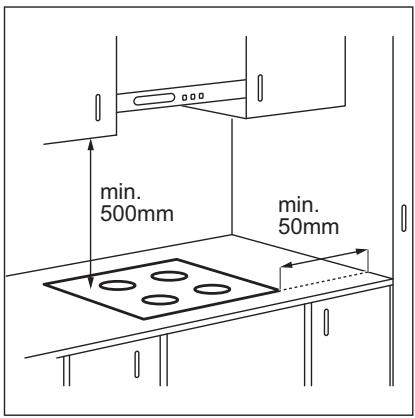
Si l'appareil est installé au-dessus d'un tiroir, la ventilation de la table de cuisson peut réchauffer les articles stockés dans le tiroir pendant la cuisson.
Combinaison avec four standard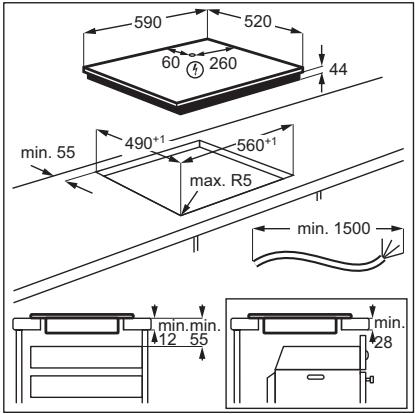
Combinaison avec double four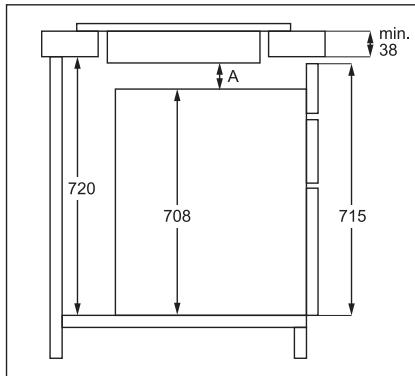
A = min. 6 mm, pour les doubles fours de marques AEG, Electrolux et Zanussi.
A = min. 12 mm, pour les doubles fours d'autres marques.
4. DESCRIPTION DU PRODUIT
4.1 Disposition des zones de cuisson
![graph TD A["1"] --> B["+"] C["1"] --> D["+"] E["1"] --> F["+"] G["1"] --> H["+"] I["2"] --> J["+"] K["2"] --> L["+"]](/content/2024/11/215975/images/79500b94a9cbb26d2bd55c48d4cc963f12a7d8d1fa6b1753fe04f1b36fbad701.jpg)
1 Zone de cuisson à induction 2 Bandeau de commande

Pour des informations détaillées sur les dimensions des zones de cuisson, reportez-vous aux « Données techniques ».
4.2 Disposition du bandeau de commande
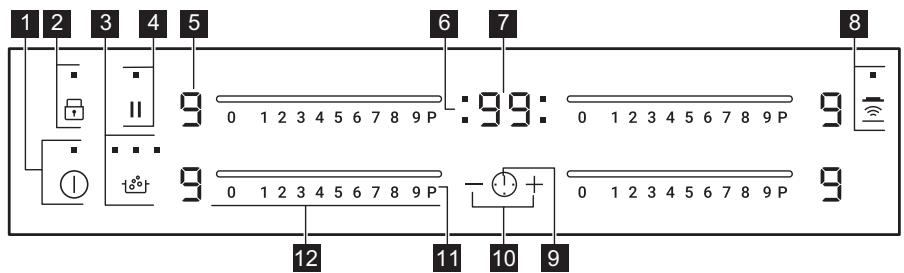
Utilisez les touches sensitives pour faire fonctionner l'appareil. Les affichages, les indicateurs et les signaux sonores indiquent quelles fonctions sont activées.
| Sensor field | Function | Comment | |
| 1 | ! | ON / OFF | To activate and deactivate the hob. |
| 2 | Lock / Child Safety Device | To lock / unlock the control panel. | |
| 3 | BoilAssist | To activate and deactivate the function.The indicators above the symbol show the progress of the function. | |
| 4 | || | Pause | To activate and deactivate the function. |
| 5 | - | Heat setting display | To show the heat setting. |
| 6 | - | Timer indicators of cooking zones | To show for which zone you set the time. |
| 7 | - | Timer display | To show the time in minutes. |
| 8 | Hob 2 Hood | To activate and deactivate the manual mode of the function. | |
| 9 | 1 | - | To select the cooking zone. |
| 10 | +/- | - | To increase or decrease the time. |
| 11 | P | PowerBoost | To activate the function. |
| 12 | - | Control bar | To set a heat setting. |
4.3 Affichages du niveau de chauffe
| Display | Description |
| The cooking zone is deactivated. | |
| The cooking zone operates. | |
| Pause operates. | |
| BoilAssist operates. | |
| Automatic Heat Up operates. | |
| PowerBoost operates. | |
| There is a malfunction. | |
| OptiHeat Control (3 step Residual heat indicator): continue cooking / keep warm / residual heat. | |
| Lock / Child Safety Device operates. | |
| Incorrect or too small cookware or no cookware on the cooking zone. | |
| Automatic Switch Off operates. |
4.4 OptiHeat Control (indicateur de chaleur résiduelle à 3 niveaux)

AVERTISSEMENT !
☐ / ☐ / ☐ Tant que l'indicateur est allumé, il y a un risque de brûlure dû à la chaleur résiduelle.
Les zones de cuisson à induction produisent la chaleur nécessaire au processus de cuisson directement dans le fond du récipient. Le
La vitrocéramique est chauffée par la chaleur des récipients de cuisson.
Les indicateurs ☐ / ☐ / ☐ apparaissent lorsqu'une zone de cuisson est chaude. Ils indiquent le niveau de chaleur résiduelle des zones de cuisson que vous utilisez actuellement.
L'indicateur peut également apparaître :
- pour les zones de cuisson voisines, même si vous ne les utilisez pas,
- lorsqu'un récipient chaud est placé sur une zone de cuisson froide,
- lorsque la table de cuisson est désactivée mais que la zone de cuisson est encore chaude.
L'indicateur disparaît lorsque la zone de cuisson a refroidi.
5. UTILISATION QUOTIDIENNE

AVERTISSEMENT !
Reportez-vous aux chapitres sur la sécurité.
5.1 Activation et désactivation
Touchez ① pendant 1 seconde pour activer ou désactiver la table de cuisson.
5.2 Arrêt automatique
La fonction désactive la table de cuisson automatiquement si :
• toutes les zones de cuisson sont désactivées, - vous ne réglez pas le niveau de chaleur après avoir activé la table de cuisson, - vous renversez quelque chose ou posez un objet sur le panneau de commande pendant plus de 10 secondes (une casserole, un chiffon, etc.). Un signal sonore retentit et la table de cuisson se désactive. Retirez l'objet ou nettoyez le panneau de commande. - la table de cuisson devient trop chaude (par exemple, lorsqu'une casserole bout à sec). Laissez la zone de cuisson refroidir avant de réutiliser la table de cuisson. - vous utilisez un récipient inadapté. Le symbole F s'allume et la zone de cuisson se désactive automatiquement après 2 minutes - vous ne désactivez pas une zone de cuisson ou ne modifiez pas le niveau de chaleur. Après un certain temps, le symbole s'allume et la table de cuisson se désactive.
La relation entre le réglage de chauffe et le temps après lequel la table de cuisson se désactive :
| Heat setting | The hob deactivates after |
| 11, 1 - 2 | 6 hours |
| 3 - 4 | 5 hours |
| 5 | 4 hours |
| 6 - 9 | 1.5 hour |
5.3 Le réglage de chauffe
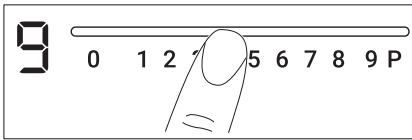
Pour régler ou modifier le réglage de chauffe :
Touchez la barre de commande au niveau du réglage de chauffe souhaité ou déplacez votre doigt le long de la barre de commande jusqu'à atteindre le réglage de chauffe correct.
5.4 BoilAssist
Cette fonction ajuste automatiquement la température de l'eau afin qu'elle ne déborde pas une fois le point d'ébullition atteint.

S'il y a de la chaleur résiduelle (☐/☐/☐) sur la zone de cuisson que vous souhaitez utiliser, un signal acoustique est émis et la fonction ne démarre pas.
- Touchez Ⓘ pour activer la table de cuisson.
- Touchez 📋 pour activer la fonction. Un 📁 clignotant apparaît sur les zones de cuisson où vous pouvez utiliser la fonction.
- Touchez la barre de commande de toute zone de cuisson disponible pour laquelle vous souhaitez démarrer la fonction (entre les réglages de chauffe 1 et 9).
La fonction démarre.
Si vous ne choisissez aucune zone de cuisson dans les 5 secondes, la fonction ne s'active pas.

Une fois la fonction démarrée, les indicateurs au-dessus du symbole 🔊 s'allument les uns après les autres jusqu'à ce que l'eau atteigne le point d'ébullition.
Lorsque la fonction détecte le point d'ébullition, la table de cuisson émet un signal acoustique et le niveau de chauffe passe automatiquement à 5.

Si toutes les zones de cuisson sont déjà utilisées ou s'il y a de la chaleur résiduelle sur toutes, la table de cuisson émet un bip, les indicateurs au-dessus de tââââââââââââââââââââââââââââââââââââââââââââââââââââââââââââââââââââââââââââââââââââââââââââââââââââô
Pour désactiver la fonction, touchez ### (la fonction se désactive et le niveau de chaleur revient à 0) ou touchez la barre de contrôle et réglez manuellement le niveau de chaleur.

La fonction Pause et le retrait de la casserole désactivent BoilAssist.
5.5 Chauffage automatique
Activez cette fonction pour atteindre un niveau de chaleur souhaité en moins de temps. Lorsqu'elle est activée, la zone fonctionne d'abord au niveau le plus élevé, puis continue à cuire au niveau de chaleur souhaité.

Pour activer la fonction, la zone de cuisson doit être froide.
Pour activer la fonction pour une zone de cuisson :
touchez P (P s'allume). Touchez immédiatement un niveau de chaleur souhaité. Après 3 secondes, R s'allume.
Pour désactiver la fonction : modifiez le niveau de chaleur.
5.6 PowerBoost
Cette fonction fournit plus de puissance aux zones de cuisson à induction. La fonction ne peut être activée pour la zone de cuisson à induction que pendant une durée limitée. Passé ce délai, la zone de cuisson à induction revient automatiquement au niveau de chaleur le plus élevé.

Reportez-vous au chapitre « Caractéristiques techniques ».
Pour activer la fonction pour une zone de cuisson : touchez P. s'allume.
Pour désactiver la fonction : modifiez le niveau de chaleur.
5.7 Minuteur
- Minuteur à compte à rebours
Vous pouvez utiliser cette fonction pour régler la durée d'une session de cuisson.
Réglez d'abord le niveau de chaleur de la zone de cuisson, puis réglez la fonction.
Pour régler la zone de cuisson : touchez ⏻ à plusieurs reprises jusqu'à ce que l'indicateur d'une zone de cuisson apparaisse.
Pour activer la fonction ou modifier la durée : touchez + ou — de la minuterie pour régler le temps (00 à 99 minutes). Lorsque l'indicateur de la zone de cuisson commence à clignoter, le temps décompte.
Pour voir le temps restant : touchez ⚠️ pour régler la zone de cuisson. L'indicateur de la zone de cuisson commence à clignoter. L'affichage montre le temps restant.
Pour désactiver la fonction : touchez ⚠ pour régler la zone de cuisson, puis touchez —. Le temps restant décompte jusqu'à 00. L'indicateur de la zone de cuisson disparaît.

Lorsque le décompte se termine, un signal sonore retentit et 00 clignote. La zone de cuisson se désactive.
Pour arrêter le son : touchez ⏻.
- Minuteur
Vous pouvez utiliser cette fonction lorsque la table de cuisson est activée et que les zones de cuisson ne fonctionnent pas. L'affichage du niveau de chaleur montre ☐.
Pour activer la fonction : touchez ⏻ puis touchez + ou — de la minuterie pour régler le temps. Lorsque le temps est écoulé, un signal sonore retentit et 00 clignote.
Pour arrêter le son : touchez ⚠️.

Cette fonction n'a aucun effet sur le fonctionnement des zones de cuisson.
5.8 Pause
Cette fonction met toutes les zones de cuisson en fonctionnement au niveau de chaleur le plus bas.
Lorsque la fonction est en marche, tous les autres symboles sur les panneaux de commande sont verrouillés.
La fonction n'arrête pas les fonctions de minuterie.
Touchez || pour activer la fonction.
11 s'allume. Le niveau de chaleur est réduit à 1.
Pour désactiver la fonction, touchez ||. Le niveau de chaleur précédent s'allume.
5.9 Verrouillage
Vous pouvez verrouiller le panneau de commande pendant que les zones de cuisson fonctionnent. Cela évite un changement accidentel du niveau de chaleur.
Réglez d'abord le niveau de chaleur.
Pour activer la fonction : touchez 🔒. L s'allume pendant 4 secondes. La minuterie reste allumée.
Pour désactiver la fonction : touchez 🔒. Le niveau de chaleur précédent s'allume.

Lorsque vous désactivez la table de cuisson, vous désactivez également cette fonction.
5.10 Dispositif de sécurité enfants
Cette fonction empêche une utilisation accidentelle de la table de cuisson.
Pour activer la fonction : activez la table de cuisson avec ①. Ne réglez aucun niveau de chaleur. Touchez ☐ pendant 4 secondes. ☐ s'allume. Désactivez la table de cuisson avec ①.
Pour désactiver la fonction : activez la table de cuisson avec ①. Ne réglez aucun niveau de chaleur. Touchez ☐ pendant 4 secondes. ☐ s'allume. Désactivez la table de cuisson avec ①.
Pour remplacer la fonction pour un seul temps de cuisson : activez la table avec ①. Le voyant s'allume. Touchez ⏻ pendant 4 secondes. Réglez le niveau de chaleur dans les 10 secondes. Vous pouvez utiliser la table. Lorsque vous désactivez la table avec ①, la fonction fonctionne à nouveau.
5.11 Gestion de l'alimentation
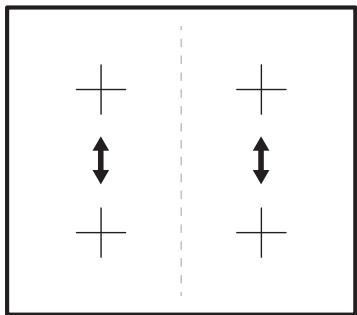
Si plusieurs zones sont actives et que la puissance consommée dépasse la limite de l'alimentation électrique, cette fonction répartit la puissance disponible entre toutes les zones de cuisson. La table contrôle les niveaux de chaleur pour protéger les fusibles de l'installation domestique.
- Les zones de cuisson sont regroupées en fonction de l'emplacement et du nombre de phases de la table. Chaque phase a une charge électrique maximale (3700 W). Si la table atteint la limite de puissance maximale disponible dans une phase, la puissance des zones de cuisson est automatiquement réduite.
- Le niveau de chaleur de la zone de cuisson sélectionnée en dernier est toujours prioritaire. La puissance restante est répartie entre les zones de cuisson précédemment activées dans l'ordre inverse de leur sélection.
- L'affichage du niveau de chaleur des zones réduites alterne entre le niveau de chaleur initialement sélectionné et le niveau de chaleur réduit.
- Attendez que l'affichage cesse de clignoter ou réduisez le niveau de chaleur de la zone de cuisson sélectionnée en dernier. Les zones de cuisson continueront de fonctionner avec le niveau de chaleur réduit. Modifiez manuellement les niveaux de chaleur des zones de cuisson si nécessaire.
Reportez-vous à l'illustration pour connaître les combinaisons possibles de répartition de la puissance entre les zones de cuisson.
5.12 Hotte connectée à la table
Il s'agit d'une fonction automatique avancée qui connecte la table à une hotte spéciale. La table et la hotte disposent toutes deux d'un communicateur à signal infrarouge. La vitesse du ventilateur est définie
automatiquement en fonction du mode et de la température de l'ustensile le plus chaud sur la table. Vous pouvez également faire fonctionner le ventilateur manuellement depuis la table.

Pour la plupart des hottes, le système à distance est désactivé à l'origine. Activez-le avant d'utiliser la fonction. Pour plus d'informations, reportez-vous au manuel d'utilisation de la hotte.
Fonctionnement automatique de la fonction
Pour faire fonctionner la fonction automatiquement, réglez le mode automatique sur H1 – H6. La table est réglée à l'origine sur H5. La hotte réagit chaque fois que vous utilisez la table. La table reconnaît automatiquement la température des ustensiles et ajuste la vitesse du ventilateur.
Modes automatiques
| Automatic light | Boiling1) | Frying2) | |
| Mode H0 | Off | Off | Off |
| Mode H1 | On | Off | Off |
| Mode H23) | On | Fan speed 1 | Fan speed 1 |
| Mode H3 | On | Off | Fan speed 1 |
| Mode H4 | On | Fan speed 1 | Fan speed 1 |
| Mode H5 | On | Fan speed 1 | Fan speed 2 |
| Mode H6 | On | Fan speed 2 | Fan speed 3 |
1) La table de cuisson détecte le processus d'ébullition et active la vitesse du ventilateur conformément au mode automatique.
2) La table de cuisson détecte le processus de friture et active la vitesse du ventilateur conformément au mode automatique.
3) Ce mode active le ventilateur et l'éclairage et ne dépend pas de la température.
Changement du mode automatique
- Désactivez l'appareil.
- Touchez Ⓐ pendant 3 secondes. L'affichage s'allume puis s'éteint.
- Touchez 🔒 pendant 3 secondes.
- Touchez ⚠ plusieurs fois jusqu'à ce que Ⓗ s'affiche.
- Touchez + de la minuterie pour sélectionner un mode automatique.

Pour utiliser la hotte directement sur le panneau de la hotte, désactivez le mode automatique de la fonction.

Lorsque vous avez fini de cuisiner et désactivez la table de cuisson, le ventilateur de la hotte peut continuer à fonctionner pendant un certain temps. Après ce délai, le système désactive automatiquement le ventilateur et empêche toute activation accidentelle du ventilateur pendant les 30 secondes suivantes.
Réglage manuel de la vitesse du ventilateur
Vous pouvez également utiliser la fonction manuellement. Pour cela, touchez 📋 lorsque la table de cuisson est active. Cela désactive le fonctionnement automatique de la fonction et vous permet de modifier manuellement la vitesse du ventilateur. Lorsque vous appuyez sur 📋, vous augmentez la vitesse du ventilateur d'un cran. Lorsque vous atteignez un niveau intensif et appuyez à nouveau sur 📋, vous réglez la vitesse du ventilateur sur 0, ce qui désactive le ventilateur de la hotte. Pour redémarrer le ventilateur à la vitesse 1, touchez 📋.

Pour activer le fonctionnement automatique de la fonction, désactivez la table de cuisson puis réactivez-la.
Activation de l'éclairage
Vous pouvez régler la table de cuisson pour que l'éclairage s'active automatiquement dès que vous allumez la table. Pour cela, réglez le mode automatique sur H1 – H6.

L'éclairage de la hotte s'éteint 2 minutes après l'arrêt de la table de cuisson.

AVERTISSEMENT !
Reportez-vous aux chapitres concernant la sécurité.
6.1 Récipients de cuisson

Pour les zones de cuisson à induction, un champ électromagnétique puissant génère la chaleur dans les récipients très rapidement.
Utilisez les zones de cuisson à induction avec des récipients adaptés.
- Le fond du récipient doit être aussi épais et plat que possible.
- Assurez-vous que les fonds des casseroles sont propres et secs avant de les poser sur la surface de cuisson.
- Pour éviter les rayures, ne faites pas glisser ou frotter la casserole sur la vitrocéramique.
Matériau des récipients
- correct : fonte, acier, acier émaillé, acier inoxydable, fond multicouche (avec un marquage correct du fabricant).
- incorrect : aluminium, cuivre, laiton, verre, céramique, porcelaine.
Un récipient est adapté à une table à induction si :
• l'eau bout très rapidement sur une zone réglée à la puissance maximale. - un aimant adhère au fond du récipient.
Dimensions des ustensiles de cuisine
- Les zones de cuisson à induction s'adaptent automatiquement aux dimensions du fond des ustensiles de cuisine.
- L'efficacité de la zone de cuisson est liée au diamètre de l'ustensile. Un ustensile dont le diamètre est inférieur au minimum ne reçoit qu'une partie de la puissance générée par la zone de cuisson.
- Pour des raisons de sécurité et pour des résultats de cuisson optimaux, n'utilisez pas d'ustensiles plus grands que ceux indiqués dans « Spécifications des zones de cuisson ». Évitez de garder des ustensiles près du panneau de commande pendant la cuisson. Cela pourrait affecter le fonctionnement du panneau de commande ou activer accidentellement des fonctions de la table de cuisson.

Reportez-vous aux « Données techniques ».
6.2 Bruits pendant le fonctionnement
Si vous entendez :
- craquements : l'ustensile est fabriqué avec différents matériaux (construction sandwich).
- sifflement : vous utilisez une zone de cuisson à puissance élevée et l'ustensile est fabriqué avec différents matériaux (construction sandwich). • bourdonnement : vous utilisez un niveau de puissance élevé.
- cliquetis : des commutations électriques se produisent. • sifflement, bourdonnement : le ventilateur fonctionne.
Ces bruits sont normaux et n'indiquent aucun dysfonctionnement.
6.3 Conseils pour BoilAssist
Cette fonction fonctionne mieux pour faire bouillir de l'eau et préparer des pommes de terre.

Elle ne fonctionne pas avec la fonte et les ustensiles antiadhésifs, par exemple avec un revêtement céramique. Les casseroles en acier émaillé sont recommandées pour obtenir les meilleurs résultats lors de la cuisson des pommes de terre.
Vérifiez si la casserole que vous avez choisie convient à BoilAssist en surveillant la première session de cuisson.
Pour utiliser BoilAssist efficacement, suivez les conseils ci-dessous :
- Remplissez la casserole entre la moitié et les trois quarts avec de l'eau froide du robinet, en laissant 4 cm du bord de la casserole vide. N'utilisez pas moins d'1 litre ni plus de 5 litres d'eau. Assurez-vous que le poids total de l'eau (ou de l'eau et des pommes de terre) se situe entre 1 et 5 kg.
- Si vous voulez cuire des pommes de terre, assurez-vous qu'elles sont complètement recouvertes d'eau, mais n'oubliez pas de laisser au moins un quart de la casserole vide.
- Pour obtenir les meilleurs résultats, faites cuire uniquement des pommes de terre entières, non pelées et de taille moyenne.
- Assurez-vous de ne pas trop serrer les pommes de terre.
- Évitez de produire des vibrations externes (par exemple, en utilisant un mixeur ou en plaçant un téléphone portable à côté de l'appareil) lorsque la fonction est en cours.
- Si vous voulez utiliser du sel, ajoutez-le après que l'eau atteint le point d'ébullition.
- La fonction peut ne pas fonctionner correctement pour les bouilloires et les cafetières à expresso.
6.4 Exemples d'applications de cuisson
La corrélation entre le réglage de chaleur d'une zone et sa consommation d'énergie n'est pas
linéaire. Lorsque vous augmentez le réglage de chaleur, cela n'est pas proportionnel à l'augmentation de la consommation d'énergie. Cela signifie qu'une zone de cuisson avec le réglage de chaleur moyen utilise moins de la moitié de sa puissance.

Les données du tableau sont fournies à titre indicatif uniquement.
| Heat setting | Use to: | Time (min) | Hints |
| || - 1 | Keep cooked food warm. | as necessary | Put a lid on the cookware. |
| 1 - 2 | Hollandaise sauce, melt: butter, chocolate, gelatine. | 5 - 25 | Mix from time to time. |
| 1 - 2 | Solidify: fluffy omelettes, baked eggs. | 10 - 40 | Cook with a lid on. |
| 2 - 3 | Simmer rice and milkbased dishes, heat up ready-cooked meals. | 25 - 50 | Add at least twice as much liquid as rice, mix milk dishes halfway through the procedure. |
| 3 - 4 | Steam vegetables, fish, meat. | 20 - 45 | Add a couple of tablespoons of liquid. |
| 4 - 5 | Steam potatoes. | 20 - 60 | Use max. 1/4 l of water for 750 g of potatoes. |
| 4 - 5 | Cook larger quantities of food, stews and soups. | 60 - 150 | Up to 3 l of liquid plus ingredients. |
| 6 - 7 | Gentle fry: escalope, veal cordon bleu, cutlets, rissoles, sausages, liver, roux, eggs, pancakes, doughnuts. | as necessary | Turn halfway through. |
| 7 - 8 | Heavy fry, hash browns, loin steaks, steaks. | 5 - 15 | Turn halfway through. |
| 9 | Boil water, cook pasta, sear meat (goulash, pot roast), deep-fry chips. | ||
| P | Boil large quantities of water. PowerBoost is activated. | ||
6.5 Conseils et astuces pour la hotte de la table de cuisson
Lorsque vous utilisez la table de cuisson avec la fonction :
- Protégez le panneau de la hotte de la lumière directe du soleil.
- Ne dirigez pas de lumière halogène sur le panneau de la hotte.
- Ne couvrez pas le panneau de commande de la table de cuisson.
- N'interrompez pas le signal entre la table de cuisson et la hotte (par exemple avec la main, une poignée de récipient ou une casserole haute). Voir l'image. La hotte sur l'image est seulement un exemple.
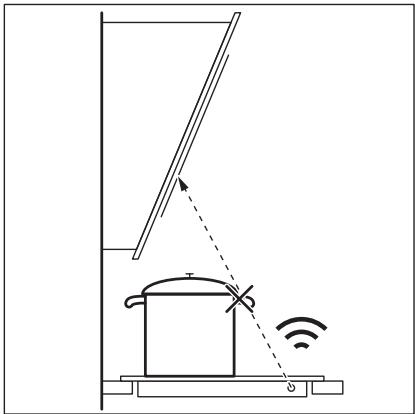
D'autres appareils télécommandés peuvent bloquer le signal. N'utilisez pas de tels appareils à proximité de la table de cuisson pendant que Hob 2 Hood est activé.
Hottes avec la fonction Hob 2 Hood Pour trouver la gamme complète de hottes compatibles avec cette fonction, consultez notre site web grand public.
7. ENTRETIEN ET NETTOYAGE

AVERTISSEMENT !
Reportez-vous aux chapitres sur la sécurité.
7.1 Informations générales
- Nettoyez la table de cuisson après chaque utilisation. • Utilisez toujours des récipients avec une base propre.
- Les rayures ou les taches sombres sur la surface n'affectent pas le fonctionnement de la table de cuisson.
- Utilisez un nettoyant spécial adapté à la surface de la table de cuisson. • Utilisez un grattoir spécial pour le verre.
7.2 Nettoyage de la table de cuisson
- Retirez immédiatement : plastique fondu, film plastique, sucre et aliments contenant du sucre,
sinon, la saleté peut endommager la table de cuisson. Prenez soin d'éviter les brûlures. Utilisez un grattoir spécial pour table de cuisson sur la surface en verre à un angle aigu et déplacez la lame sur la surface.
- Retirez lorsque la table de cuisson est suffisamment refroidie : anneaux de calcaire, traces d'eau, taches de graisse, décoloration métallique brillante. Nettoyez la table de cuisson avec un chiffon humide et un détergent non abrasif. Après le nettoyage, essuyez la table de cuisson avec un chiffon doux.
- Retirez la décoloration métallique brillante : utilisez une solution d'eau avec du vinaigre et nettoyez la surface en verre avec un chiffon.
8. DÉPANNAGE

AVERTISSEMENT !
Reportez-vous aux chapitres sur la sécurité.
8.1 Que faire si...
| Problem | Possible cause | Remedy |
| You cannot activate or operate the hob. | The hob is not connected to an electrical supply or it is connected incorrectly.The fuse is blown. | Check if the hob is correctly connected to the electrical supply.Make sure that the fuse is the cause of the malfunction. If the fuse is blown again and again, contact a qualified electrician. |
| You do not set the heat setting for 10 seconds. | Activate the hob again and set the heat setting in less than 10 seconds. | |
| You touched 2 or more sensor fields at the same time. | Touch only one sensor field. | |
| Pause operates. | Refer to "Daily use". | |
| There is water or fat stains on the control panel. | Clean the control panel. | |
| An acoustic signal sounds and the hob deactivates.An acoustic signal sounds when the hob is deactivated. | You put something on one or more sensor fields. | Remove the object from the sensor fields. |
| The hob deactivates. | You put something on the sensor field ➊. | Remove the object from the sensor field. |
| Residual heat indicator does not come on. | The zone is not hot because it operated only for a short time or the sensor is damaged. | If the zone operated sufficiently long to be hot, speak to an Authorised Service Centre. |
| Hob 2 Hood does not work. | You covered the control panel. | Remove the object from the control panel. |
| You use a very tall pot which blocks the signal. | Use a smaller pot, change the cooking zone or operate the hood manually. | |
| Automatic Heat Up does not operate. | The zone is hot. | Let the zone become sufficiently cool. |
| The highest heat setting is set. | The highest heat setting has the same power as the function. | |
| The heat setting changes between two levels. | Power management operates. | Refer to "Daily use". |
| The sensor fields become hot. | The cookware is too large or you put it too near to the controls. | Put large cookware on the rear zones, if possible. |
| L comes on. | Child Safety Device or Lock operates. | Refer to "Daily use". |
| F comes on. | There is no cookware on the zone. | Put cookware on the zone. |
| The cookware does not cover the cross / square. | Cover the cross / square fully. | |
| The cookware is unsuitable. | Use suitable cookware. Refer to "Hints and tips". | |
| The diameter of the bottom of the cookware is too small for the zone. | Use cookware with correct dimensions. Refer to "Technical data". | |
| and appear alternately. | The power is too low due to unsuitable cookware or an empty pot. | Use the appropriate type of cookware. Refer to "Hints and Tips" and "Technical Data". Do not activate any zone with an empty pot on it. |
| and 2 appear alternately. | The pot is empty or contains some liquid other than water, e.g. oil. | Avoid using the function with liquids other than water. |
| and 3 appear alternately. | There is too much or too little water in the pot.You boiled some food other than water and potatoes. The boiling point was moved in time and BoilAssist could not work properly. | Only boil water and potatoes with the use of BoilAssist. Refer to "Hints and Tips". |
| You hear a beep sound, the indicators above ts* blink and Boil-Assist does not start. | None of the cooking zones is ready to be used with BoilAssist. There is some residual heat on the cooking zones you want to choose or they are still in use. | Finish your previous cooking activities and choose a free cooking zone without any residual heat. |
| and a number come on. | There is an error in the hob. | Deactivate the hob and activate it again after 30 seconds. If comes on again, disconnect the hob from the electrical supply. After 30 seconds, connect the hob again. If the problem continues, speak to an Authorised Service Centre. |
| You can hear a constant beep noise. | The electrical connection is incorrect. | Disconnect the hob from the electrical supply. Ask a qualified electrician to check the installation. |
8.2 Si vous ne trouvez pas de solution...
Si vous ne trouvez pas de solution au problème vous-même, contactez votre revendeur ou un centre de service agréé. Donnez les données de la plaque signalétique. Donnez également le code à trois lettres pour la vitrocéramique (il se trouve dans le coin de la surface en verre) et un message d'erreur
qui s'affiche. Assurez-vous d'avoir utilisé la table de cuisson correctement. Sinon, l'intervention d'un technicien ou du revendeur ne sera pas gratuite, même pendant la période de garantie. Les informations sur la période de garantie et les centres de service agréés se trouvent dans le livret de garantie.
9. DONNÉES TECHNIQUES
9.1 Plaque signalétique
Modèle ZIAN644K
Type 61 B4A 00 AA
Induction 7,35 kW
N° de série ....
ZANUSSI
PNC 949 595 698 01
220 - 240 V / 400 V 2N 50 - 60 Hz
Fabriqué en : Allemagne
7,35 kW

9.2 Spécifications des zones de cuisson
| Cooking zone | Nominal power (maximum heat setting) [W] | PowerBoost [W] | PowerBoost maximum dura-tion [min] | Cookware diameter [mm] |
| Left front | 2300 | 3700 | 10 | 125 - 210 |
| Left rear | 1800 | 2800 | 10 | 145 - 180 |
| Right front | 1400 | 2500 | 4 | 125 - 145 |
| Right rear | 1800 | 2800 | 10 | 145 - 180 |
La puissance des zones de cuisson peut varier légèrement par rapport aux données du tableau. Elle change selon le matériau et les dimensions des récipients de cuisson.
Pour des résultats de cuisson optimaux, utilisez des récipients dont le diamètre ne dépasse pas celui indiqué dans le tableau.
10. EFFICACITÉ ÉNERGÉTIQUE
10.1 Fiche d'information produit selon le règlement britannique sur l'écoconception
| Model identification | ZIAN644K | |
| Type of hob | Built-In Hob | |
| Number of cooking zones | 4 | |
| Heating technology | Induction | |
| Diameter of circular cooking zones (∅) | Left front | 21.0 cm |
| Left rear | 18.0 cm | |
| Right front | 14.5 cm | |
| Right rear | 18.0 cm | |
| Energy consumption per cooking zone (EC electric cooking) | Left front | 188.9 Wh / kg |
| Left rear | 176.9 Wh / kg | |
| Right front | 183.4 Wh / kg | |
| Right rear | 178.8 Wh / kg | |
| Energy consumption of the hob (EC electric hob) | 182.0 Wh / kg | |
BS EN 60350-2 - Appareils électroménagers de cuisson électriques - Partie 2 : Plaques de cuisson - Méthodes de mesure des performances.
Les mesures d'énergie relatives à la zone de cuisson sont identifiées par les marquages des zones de cuisson respectives.
10.2 Économie d'énergie
Vous pouvez économiser de l'énergie lors de la cuisson quotidienne en suivant les conseils ci-dessous.
Lorsque vous chauffez de l'eau, utilisez uniquement la quantité nécessaire.
- Si possible, mettez toujours les couvercles sur les ustensiles de cuisson.
- Avant d'activer la zone de cuisson, placez les ustensiles de cuisson dessus.
- Placez les petits ustensiles de cuisson sur les petites zones de cuisson.
- Placez les ustensiles de cuisson directement au centre de la zone de cuisson.
- Utilisez la chaleur résiduelle pour garder les aliments au chaud ou pour les faire fondre.
11. PRÉOCCUPATIONS ENVIRONNEMENTALES
Recyclez les matériaux portant le symbole 📊. Déposez les emballages dans les conteneurs appropriés pour les recycler. Aidez à protéger l'environnement et la santé humaine en recyclant les déchets d'appareils électriques et électroniques. Ne jetez pas les
appareils marqués du symbole 📄 avec les déchets ménagers. Rapportez le produit à votre installation de recyclage locale ou contactez votre bureau municipal.
WWW.ZANUSSI.COM/SHOP




- POUR COMMENCER
- FACILE
- SOMMAIRE
- ⚠️ INFORMATIONS DE SÉCURITÉ
- SÉCURITÉ DES ENFANTS ET DES PERSONNES VULNÉRABLES
- SÉCURITÉ GÉNÉRALE
- CONSIGNES DE SÉCURITÉ
- INSTALLATION
- AVERTISSEMENT
- RACCORDEMENT ÉLECTRIQUE
- UTILISATION
- ENTRETIEN ET NETTOYAGE
- SERVICE APRÈS-VENTE
- MISE AU REBUT
- AVANT L'INSTALLATION
- TABLES DE CUISSON ENCASTRABLES
- CÂBLE DE CONNEXION
- ASSEMBLAGE
- DESCRIPTION DU PRODUIT
- DISPOSITION DES ZONES DE CUISSON
- DISPOSITION DU BANDEAU DE COMMANDE
- AFFICHAGES DU NIVEAU DE CHAUFFE
- OPTIHEAT CONTROL (INDICATEUR DE CHALEUR RÉSIDUELLE À 3 NIVEAUX)
- UTILISATION QUOTIDIENNE
- ACTIVATION ET DÉSACTIVATION
- ARRÊT AUTOMATIQUE
- LA FONCTION DÉSACTIVE LA TABLE DE CUISSON AUTOMATIQUEMENT SI
- LA RELATION ENTRE LE RÉGLAGE DE CHAUFFE ET LE TEMPS APRÈS LEQUEL LA TABLE DE CUISSON SE DÉSACTIVE
- LE RÉGLAGE DE CHAUFFE
- BOILASSIST
- CHAUFFAGE AUTOMATIQUE
- POUR ACTIVER LA FONCTION POUR UNE ZONE DE CUISSON
- POWERBOOST
- MINUTEUR
- MINUTEUR À COMPTE À REBOURS
- PAUSE
- VERROUILLAGE
- RÉGLEZ D'ABORD LE NIVEAU DE CHALEUR
- DISPOSITIF DE SÉCURITÉ ENFANTS
- GESTION DE L'ALIMENTATION
- HOTTE CONNECTÉE À LA TABLE
- FONCTIONNEMENT AUTOMATIQUE DE LA FONCTION
- CHANGEMENT DU MODE AUTOMATIQUE
- RÉGLAGE MANUEL DE LA VITESSE DU VENTILATEUR
- ACTIVATION DE L'ÉCLAIRAGE
- RÉCIPIENTS DE CUISSON
- MATÉRIAU DES RÉCIPIENTS
- UN RÉCIPIENT EST ADAPTÉ À UNE TABLE À INDUCTION SI
- DIMENSIONS DES USTENSILES DE CUISINE
- BRUITS PENDANT LE FONCTIONNEMENT
- SI VOUS ENTENDEZ
- CONSEILS POUR BOILASSIST
- EXEMPLES D'APPLICATIONS DE CUISSON
- CONSEILS ET ASTUCES POUR LA HOTTE DE LA TABLE DE CUISSON
- INFORMATIONS GÉNÉRALES
- NETTOYAGE DE LA TABLE DE CUISSON
- DÉPANNAGE
- QUE FAIRE SI
- SI VOUS NE TROUVEZ PAS DE SOLUTION
- DONNÉES TECHNIQUES
- PLAQUE SIGNALÉTIQUE
- SPÉCIFICATIONS DES ZONES DE CUISSON
- EFFICACITÉ ÉNERGÉTIQUE
- FICHE D'INFORMATION PRODUIT SELON LE RÈGLEMENT BRITANNIQUE SUR L'ÉCOCONCEPTION
- ÉCONOMIE D'ÉNERGIE
- PRÉOCCUPATIONS ENVIRONNEMENTALES
Marque : ZANUSSI
Modèle : ZIAN644K
Catégorie : Plaque de cuisson