
PD-480 - Imprimante photo portable KODAK - Notice d'utilisation et mode d'emploi gratuit
Retrouvez gratuitement la notice de l'appareil PD-480 KODAK au format PDF.

| Type de produit | Imprimante photo portable |
| Marque | KODAK |
| Modèle | PD-480 |
| Dimensions (approx.) | 12 x 8 x 2 cm |
| Poids (approx.) | 250 g |
| Alimentation | Batterie intégrée rechargeable via USB |
| Technologie d'impression | Sublimation thermique (YMCO) |
| Résolution recommandée | 1280 x 2448 pixels ou plus |
| Connectivité | Wi-Fi (AP et Direct), NFC |
| Application mobile | Kodak printermini (iOS et Android) |
| Bouton de réinitialisation | Oui (avec outil pointu) |
| Voyants LED | Blanc (marche/imprimante prête), rouge (charge/erreur), vert (batterie pleine) |
| Température de fonctionnement | 0 à 40 °C |
| Cartouche | Cartouche couleur combinée (insertion par flèche) |
| Papier photo | Papier spécifique pour sublimation (taille non précisée) |
| Entretien | Nettoyer avec un chiffon doux et sec ; éviter l'humidité |
| Sécurité | Ne pas démonter, éviter les températures extrêmes, utiliser une source d'alimentation appropriée |
| Pièces détachées / réparabilité | Cartouches et papier disponibles ; réparation par service client |
| Conformité FCC | Partie 15, SAR |
FOIRE AUX QUESTIONS - PD-480 KODAK
Questions des utilisateurs sur PD-480 KODAK
0 question sur cet appareil. Repondez a celles que vous connaissez ou posez la votre.
Poser une nouvelle question sur cet appareil
Téléchargez la notice de votre Imprimante photo portable au format PDF gratuitement ! Retrouvez votre notice PD-480 - KODAK et reprennez votre appareil électronique en main. Sur cette page sont publiés tous les documents nécessaires à l'utilisation de votre appareil PD-480 de la marque KODAK.
MODE D'EMPLOI PD-480 KODAK

KODAK
PHOTO PRINTER Mini
Quick Start Guide
www.kodakphotoprinter.com

Download on the
App Store

NDROID APP ON
Google play
Step 1 Before Start
- This Printer has Built-in Battery. Charge the printer before using.
2, How to Change Cartridge
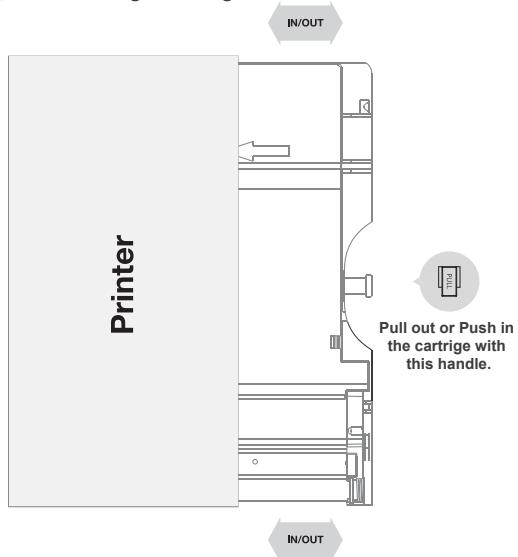
Follow the arrow to insert the cartridge
Step 2 App Installation
- Android Device
A TYPE * NFC Support Android Device ONLY
1) Turn NFC on in your smart phone.
2) Turn Printer on by pressing power button 2-3 seconds.
3) Tap the phone on the top of printer. Google Play Store app installation page will show up.
4) Install the app into your smartphone from the store.
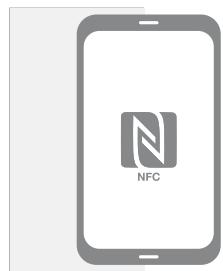
A TYPE
Step 2 App Installation
B TYPE
1) Go to Google Play Store in your smartphone.
2) Search "Kodak printermini"
3) Install "Kodak printermini" into your smartphone.
2. Apple Device
1) Go to Appstore in your iPhone, iPod touch or iPad.
2) Search "Kodak printermini"
3) Install "Kodak printer mini" Application into your device.
Step 3 Connecting to the Printer
- WiFi Access Point (AP) *Apple and Android Devices.
1) Turn WiFi on in your smartphone.
2) Go to WiFi setting and find "Direct-Kodak-XXXX". * Printer names are vary and 4 digits. The 4 digits are combination of number and alphabet.
3) Password is "12345678".
4) Select the WiFi network to connect the printer. - NFC and WiFi Direct * NFC, WiFi Direct support devices ONLY
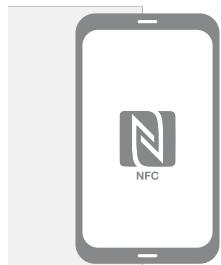
1) Turn NFC and WiFi on in your smartphone. * Set the NFC setting as P2P mode.
2) Tap your device on the printer where K is.
3) Within 20 seconds, the app will automatically connect to WiFi Direct.
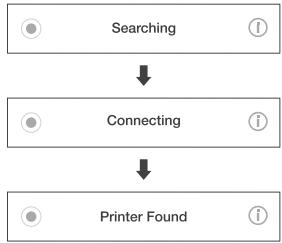
Step 4 Printing in the App
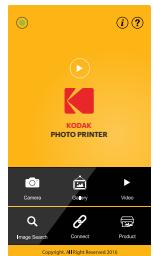
App Launch
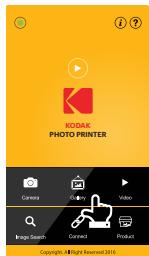
Select Choose Photo
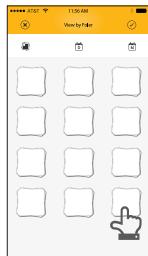
Choose Photo
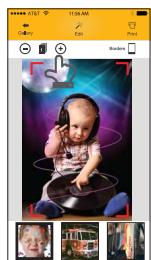
Select
Print Number
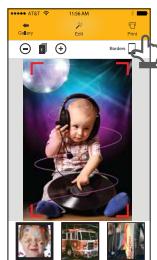
Select Printer
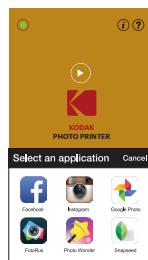
** Select SNS if you want to print the photo from it.
Step 5 LED Indicator
Power and Active Status
| Status | ○ 1 □ |
| Power ON | White |
| Power OFF (2Sec) | Off |
| Printing | White Flickering |
| F/W Upgrade | Pink Flickering |
| No Cartridge | Red Flickering |
| Error (Paper Jam, etc) | Red Flickering |
| Waiting / Cooling | White |
Battery Status
| Status | 。 |
| Charging | Red |
| Charging Complete | Green |
Troubleshooting
| Symptom | Cause / Solution |
| Paper Jam | Power off and Power On again. Paper will be automatically ejectedIf not, please contact customer service. |
| Image qualityis not good. | Print quality could be less if your photo source has low resolution. |
| Over 1280 x 2448 pixel is recommended for best image quality. | |
| Printer isnot responding | Press Reset button with sharp tool like pin. |
Step 6 Note & FCC
NOTE
* Photo Paper will go in and out 4 times (YMCO, Yellow, Magenta, Cyan, Overcoating). Do NOT touch the paper during printing process for best image quality.
* Do not pull paper out by force during printing.
* Do not place an object in front of the paper exit slot.
* Use the latest Pickit application for best print quality. Check the latest app version from Google Play Store and Apple Appstore.
* Printer has Built-in Battery. Charge the printer before using.
* Handle with care during charging to prevent electric shock.
* Do not disassemble or deform.
* Avoid too high or low temperature or humidity.
* If NFC tag is not read, check its position on the printer and smartphone.
Then try again.
* The higher resolution the image has, the higher quality the printed
photo has. Recommended image size is 1280 * 2448 pixel.
* Operating Temperature : 0 \~ 40°C
FCC (Federal Communications Commission)

This device complies with part 15 of the FCC Rules.
Operation is subject to the following two conditions:
(1) This device may not cause harmful interference, and
(2) This device must accept any interference received,
including interference that may cause undesired operation.
Caution: Any changes or modifications to the equipment not expressly approved by the party responsible for compliance could void user's authority to operate the equipment.
This device (FCCID: PO5M1) complies with FCC SAR requirement.
The Kodak trademark, logo and trade dress are used under license from Kodak.
www.kodakphotoprinter.com Copyright © 2016. Prinics Co., Ltd

Marque : KODAK
Modèle : PD-480
Catégorie : Imprimante photo portable