
XPERIA TABLET 16GO - Tablette SONY - Notice d'utilisation et mode d'emploi gratuit
Retrouvez gratuitement la notice de l'appareil XPERIA TABLET 16GO SONY au format PDF.


| Type de produit | Tablette tactile |
| Marque | Sony |
| Modèle | Xperia Tablet 16 Go (SGPT21) |
| Capacité de stockage | 16 Go (extensible via microSD) |
| Écran | 9,4 pouces (environ) tactile capacitif |
| Système d'exploitation | Android (version selon mise à jour) |
| Processeur | NVIDIA Tegra 2 (double cœur) ou similaire |
| Mémoire vive (RAM) | 1 Go (estimation) |
| Connectivité | Wi-Fi 802.11 b/g/n, Bluetooth |
| Capteurs | Accéléromètre, gyroscope, boussole |
| Appareil photo | Avant : 0,3 Mpx, Arrière : 5 Mpx (estimation) |
| Batterie | Lithium-ion rechargeable, environ 6 000 mAh |
| Autonomie | Jusqu'à 10 heures en navigation Wi-Fi |
| Dimensions (L x H x P) | 241,2 x 174,3 x 9,1 mm (estimation) |
| Poids | Environ 570 g (avec batterie) |
| Entretien et nettoyage | Essuyer avec un chiffon doux légèrement humide. Ne pas utiliser de produits abrasifs. |
| Sécurité | Ne pas exposer à l'humidité ou à des températures extrêmes. Utiliser uniquement l'adaptateur fourni. |
| Pièces détachées et réparabilité | Batterie amovible. Carte SIM et microSD accessibles. Pour réparation, contacter un service agréé Sony. |
FOIRE AUX QUESTIONS - XPERIA TABLET 16GO SONY
Questions des utilisateurs sur XPERIA TABLET 16GO SONY
0 question sur cet appareil. Repondez a celles que vous connaissez ou posez la votre.
Poser une nouvelle question sur cet appareil
Téléchargez la notice de votre Tablette au format PDF gratuitement ! Retrouvez votre notice XPERIA TABLET 16GO - SONY et reprennez votre appareil électronique en main. Sur cette page sont publiés tous les documents nécessaires à l'utilisation de votre appareil XPERIA TABLET 16GO de la marque SONY.
MODE D'EMPLOI XPERIA TABLET 16GO SONY
Quick Start Guide
Tablet Device SGPT21 Series
Getting Started
Make sure to turn off your tablet device.
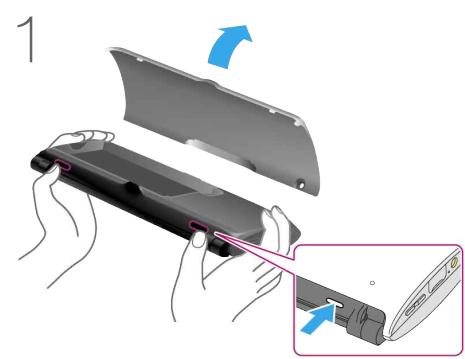
Remove the protection film covering the sides of your tablet device, and then press the two buttons to open the bottom cover.
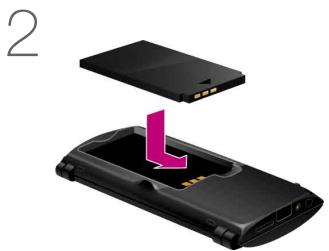
Orient the contacts as shown, and then insert the battery pack.
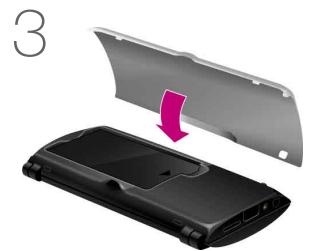
Close the bottom cover.
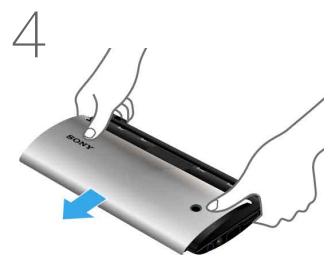
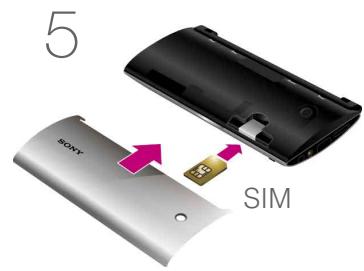
Slide off the upper cover.
Insert a SIM card (not supplied), and then slide the upper cover back in.
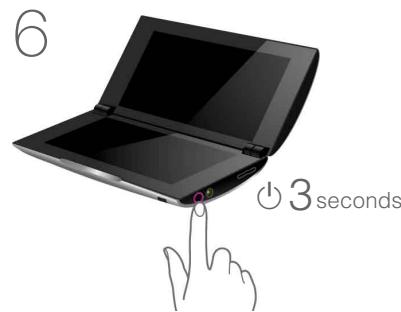
Press and hold the (power) button for three seconds. When the tablet device turns on, perform the initial settings according to the displayed instructions.

In the box
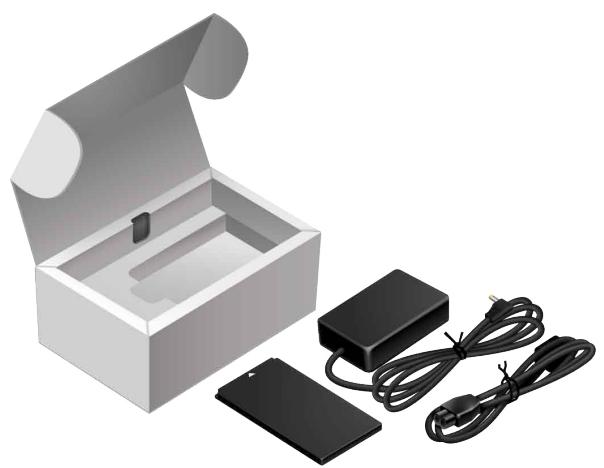
- AC adapter
- AC power cord (mains lead)
- microSD memory card* (2GB) (trial sample)
- Rechargeable lithium-ion battery pack
- Quick Start Guide (this document)
- Important Information
- microSD memory card is inserted in the tablet device.
Charging the Battery
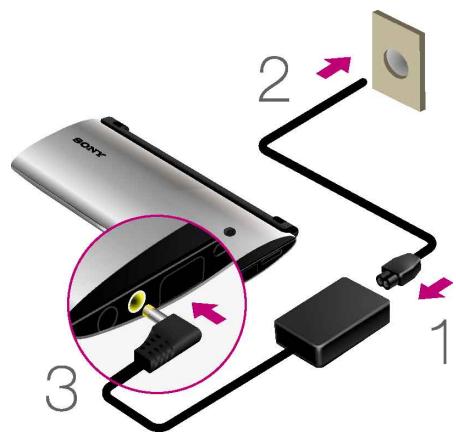
Connect the AC power cord (mains lead), AC adapter, AC outlet (wall socket) and your tablet device in the order shown by the numbers in above figure.
Accessing the Help guide
- From your tablet device: Tap [Apps] - [Help guide].
- From a PC browser: http://support.sony-europe.com/computing/tablet/manuals/helpguide_sgpt2/GB
Support Website
For more information about your tablet device, see http://support.sony-europe.com/computing/tablet/