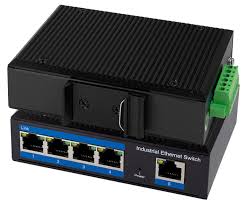
NS 0001 B ( 5-PORT SWITCH ) - Switch réseau LOGILINK - Notice d'utilisation et mode d'emploi gratuit
Retrouvez gratuitement la notice de l'appareil NS 0001 B ( 5-PORT SWITCH ) LOGILINK au format PDF.


| Type de produit | Switch réseau 5 ports 10/100 Mbps |
| Marque | LOGILINK |
| Modèle | NS 0001 B |
| Nombre de ports | 5 ports Ethernet 10/100BASE-T |
| Auto-négociation | Oui, sur chaque port |
| Auto-MDI/MDIX | Oui, sur chaque port |
| Mode de transfert | Full/Half duplex |
| Normes supportées | IEEE 802.3, IEEE 802.3u, IEEE 802.3x |
| Méthode de commutation | Store-and-Forward |
| Mémoire tampon | SRAM haute efficacité, table de lookup 1K entrées |
| Taille maxi des paquets | 1536 octets |
| Filtrage de tempête de diffusion | Oui |
| Alimentation | Adaptateur secteur inclus (DC 5V, estimation) |
| Température de fonctionnement | 0°C à 40°C |
| Température de stockage | -40°C à 70°C |
| Humidité de fonctionnement | 10% à 90% HR (sans condensation) |
| Humidité de stockage | 5% à 90% HR (sans condensation) |
| Indicateurs LED | Power (rouge), Link/Act (rouge), 10/100M (rouge) |
| Dimensions (approx.) | 10 x 6 x 2 cm |
| Poids (approx.) | 200 g |
| Sécurité | Ne pas exposer à l'eau, à la chaleur ou à l'humidité |
| Entretien | Nettoyer avec un chiffon sec, ne pas utiliser de liquides |
FOIRE AUX QUESTIONS - NS 0001 B ( 5-PORT SWITCH ) LOGILINK
Questions des utilisateurs sur NS 0001 B ( 5-PORT SWITCH ) LOGILINK
0 question sur cet appareil. Repondez a celles que vous connaissez ou posez la votre.
Poser une nouvelle question sur cet appareil
Téléchargez la notice de votre Switch réseau au format PDF gratuitement ! Retrouvez votre notice NS 0001 B ( 5-PORT SWITCH ) - LOGILINK et reprennez votre appareil électronique en main. Sur cette page sont publiés tous les documents nécessaires à l'utilisation de votre appareil NS 0001 B ( 5-PORT SWITCH ) de la marque LOGILINK.
MODE D'EMPLOI NS 0001 B ( 5-PORT SWITCH ) LOGILINK
LogiLink®
NS0001B
5-Port 10/100Mbps
Ethernet Switch
User Manual

1.0 Safety Instructions
Put the Device always on a stable and straight Surface. In case of falling it can be damaged.
Don't place the Device into direct Sunlight or in Places with high Temperature. This can damage the Device or shorten his average useful Life.
- Don't place it in the near of Heat Sources, like Radiators or other heat producing Devices.
Don't expose the Device to Rain, Water, Wetness or high Humidity. Don't place it in the Bathroom or the Kitchen in the near of a Sink. Avoid the direct Contact with Water.
Congratulations to the Purchase of NS0001B!
Please read the Manual and Safety Instructions before using the product for the first time. Otherwise damage can be the result.
2.0 Introduction
The 5-Port 10/100Mbps switch is the perfect way of integrating 10Mbps Ethernet and 100Mbps Fast Ethernet devices. All five ports are auto speed negotiating, and have automatic MDI/MDI-X crossover detection, so you don't have to worry about the cable type. Each port independently negotiates for best speed and half-or full-duplex mode, for up to 200Mbps of bandwidth per port. Fast store-and-forward switching prevents damaged packets from being passed on into the network.
2.1 Specification
- 5 x 10/100BASE-T Ethernet Ports
Supports Auto-Negotiation
Supports Auto-MDI/MDIX for each port
Supports Full/Half duplex transfer mode - Complies with IEEE 802.3、IEEE 802.3u
-
Perform forwarding and filtering at non-blocking, full-wire speed
-
Built-in high-efficiency SRAM for packet buffer and 1K-entry look-up table
Supports IEEE 802.3x for full-duplex flow control and back pressure for half-duplex flow control
Supports packet lengths up to 1536 bytes
Supports Store-and-Forward switching methods
Supports Broadcast Storm Filtering Control
2.2 Environments
Storage Temperature: -40°C 70°C
- Operating Temperature: 0°C 40°C
Storage Humidity: 5% 90% RH Non-condensing
- Operating Humidity: 10% 90% RH Non-condensing
2.3 Package Content
One 5-Port 10/100Mbps switch
One Manual
- One Power Adapter
3.0 Installation
3.1 Front Panel LEDs

Power LED
This red indicator illuminates when the Switch is receiving power.
Link/Act 1-5
This red indicator illuminates steadily when a port is connected to a station successfully. If this red indicator is blinking, it indicates that a port is transmitting or receiving data on the network.
10/100M 1-5
This red indicator illuminates steadily when a port is connected to a 100Mbps Fast Ethernet station. Otherwise, the indicator is off when a port is connected to a 10Mbps Ethernet Device.
3.2 Back Panel and Side Panel Features
This network ports are located on
the back panel of the switch. The Power port is located on the side of the switch.

1-5
These ports are connection points for PCs and other network devices, such as additional switches.
Power Jack
The DC power jack is where you will connect the included power adapter.
3.3 Connecting Network Devices
To connect network devices to the Switch, please follow these instructions.
- Make sure all the devices you will connect to the Switch are powered off.
- Connect a Category 5 Ethernet network cable to one of the numbered ports on the Switch.
- Connect the other end to a PC or other network devices.
- Repeat step 2 and 3 to connect additional devices.
- Connect the supplied power adapter to the power jack on the Switch's back panel.
Note: Make sure you use the power adapter included with the Switch. Using a different power adapter may result in damage to the Switch.
- Plug the other end of the power adapter into an electrical outlet.
- Power on the devices connected to the Switch. Each active port's corresponding LED will light up on the Switch.
C
The CE mark confirmed that this product meets the main requirements of the Directive 2004/108/EC and 2006/95/EC of the European Parliament and the Council of Europe concerning telecommunications and terminals regarding the Safety and health of users and of electro-magnetic interference compliance. The CE has been demonstrated. These statements are deposited by the manufacturer.
LogiLink®
NS0001B
5-Port 10/100Mbps Ethernet Switch
Bedienungsanleitung

1.0 Sicherheitschinweise
- Stellen Sie das Gerät immer auf eine stabile und fremde Fläche. Bei Stürzen kann es beschädigt werden.
Setzen Sie das Gerät nicht direktem Sonnenlicht oder hohen Temperaturen aus, da diese sonst bereits beschädigt werden, kann oder sich die Nutzungsdaeur verkürzt.
Stellen Sie das Produkt nicht in der Höhe von Wärmequellen wie Heizkörpern oder anderen Wärme erzeugenden Geräten auf.
Setzen Sie das Gerät nicht Regen, Wasser, Nasse oder hoher Luftfeuchtigkeit aus.
- Stellen Sie es nicht im Badezimmer oder in der Kuche sehen einem Wasch- oder Spülbecken auf.
Vermeiden Sie auf alle Fälle direkten Kontakt mit Wasser.
Herzlichen Glückwunsch zum Kauf des NS0001B!
Lesen Sie die Anweisungen und Warnhinweise in dieser Bedienungsanleitung sorgfältig durch, bevor Sie das Produkt zum ersten Mal verwenden. Bei Nichtbeachtung kann es zu Beschäftigungen des Gerätes kommt.
2.0 Einführung
Bitte lesen Sie sich diese Anleitung vor Gebrauch des Switches gründlich durch.
Der 10/100 Mbps Switch betiet Ihnen die Möglichkeit Ihr Netzwerk auf eifache Weise zu erweitern. Alle 5 Ports bieten Ihnen Auto Speed Negotiation und haben eine automatische MDI/MDIX crossover Erkennung, so dass Sie sich keine Gedanken um den benutzten Kabeltyp machen müssen. jeder Port erkennt und verwendet die optimale Geschwindigkeit bis zu 200 Mbps. Store-and-Forward Switzching sorgt damit, das keine beschädigten Datenpakete Ihr Netzwerk belasten.
2.1 Ausstattung
- 5 x 10/100 Base-T Ethernet Ports
- Unterstutz Auto-Negotiation
- Unterstützung Auto-MDI/MDIX für jeder Port
-
Unterstützung Full/Half Duplex Transfer Mode
-
Erfüllt den IEEE 802.3 und IEEE 802.3u Standard
- Unterstützung Wire-Speed und Non-blocking Performance
Eingebautes SRAM und 1K-entry look-up Table - Unterstutz IEEE 802.3x für reibungslosen Datenverkehr
- Unterstützung Paketgroßen bis zu 1536 Bytes
- Unterstützung Store-and-Forward Switching Method
- Unterstützung Broadcast und Multicast Storm Control
2.2 Hinweise zum Aufstellungssort
Lagertemperature: -40°C 70°C
- Betriebstemperatur: 0°C 40°C
Zugelassene Luftfeuchtigkeit: 5% 90%
- Luftfeuchtigkeit im Betrieb: 10% 90%
2.3 Packungsinhalt
- 5-Port 10/100 Mbps Switch
Bedienungsanleitung
-Netzteil
3.0 Installation
3.1 LED Anzeigen

Power LED
Leuchtet rod, sobald der Switch an eine Netzsteckdose angeschlossen wird.
LED 1-5
Leuchtet permanent rod, sobald der entsprchende Port fehlerfrei belegt wird. Blinkt rod, sobald Daten empfangen oder gesendet werden.
10/100M 1-5
Leuchtet permanent rod, sobald der entsprechende Port mit einem 100 Mbps Fast Ethernet Gerät verbunden wird. Ist der Port mit einem 10 Mbps Ethernet Gerät verbunden, leuchten die entsprechenden LED's nicht.
3.2 Anschlüsse
Die Ports befinden sich auf der Rückseite und der Stromanschluss an der Seite des Gerates.
1-5
Anschlüsse für Computer oder andere netzwerktaugliche Geräte, wie z.B. Printerserver, Switches, o.a.

Power
Anschluss fur den beiliegenden Adapter
3.3 Anschluss von Netzwerkgeräten
Beachten Sie folgende Instruktionen beim Anschluss von Netzwerkgeräten:
- Stellen Sie sicher, dass alle anzuschliebenden Geräte ausgeschaltet sind
- Verbinden Sie einen der nummerierten Ports mit einem CAT 5e Netzwerkkabel
- Verbinden Sie das Netzwerkkabel mit ihrem PC oder entsprechenden Netzwerkgeräten
- Wiederholen Sie Schritt 2 und 3 um weitere Geräte anzuschreiben
- Verbinden Sie beiliegenden Adapter für den Stromanschluss mit dem Switch
Hinweis: Verwenden Sieitte ausscheidlich den beiliegenden Adapter fur den Stromanschluss. Andere Adapter konnen zur Beschadigung des Switches führen.
- Schlieben Sie den Adapter an eine Netzsteckdose an
- Die Power LED beginnnt zu leuchten und die jeweiligen LED's 1-5, an die entsprechend ein Netzwerkgerät angeschlossen wurde.

Das CE-Zeichen bestätigt, dass这点 Produkt die Hauptanforderungen der Richtlinie 2004/108/EC und 2006/95/EC des Europäischen Parliaments und des Europarates über Telekommunikations- und Endgeräte bezüglich der Sicherheit und der Gesundheit der Benutzer und hinsichtlich elektron-g magnetischer Störungen einhalt. Die CE Konformität wurde nachgewiesen. Die entsprechenden Erkräuungen sind beim Hersteller hinterlegt.
LogiLink®
NS0001B
5-Port 10/100Mbps
Ethernet Switch
Manual del usuario

1.0 Instrucciones de seguridad
Cologne el dispositivo siempre sobre una superficie estable y recta.
En caso de caida que pueda ser danado.
No coloque el dispositivo en luz directa del sol o en lugares con alta temperatura. Esto puede dañar el dispositivo o acortar su vidautil media.
No lo coloque en la和地区 de fuentes de calor, como radiadores o el calor que producen los dispositivos.
No exponga el dispositivo a la lluvia, el agua, la humedad o alta humedad.
No lo coloque en el bazo o la cucina, cerca de un fregadero. Evite el contacto directo con el agua.
Felicitaciones a la compra de NS0001B!
Por favor, lea el Manual e instrucciones de seguridad antes de usar el producto por primera vez. De lo contrario el dano可以选择 ser el resultado.
2.0 Introduccion
El 5-Port Switch 10/100 es la lenguera perfecta de la integrazione de 10Mbps y 100Mbps Fast Ethernet dispositivos Ethernet. Los cinco puertos son velocidad auto negotiation, y han automatistica MDI / MDI-X de detectacion de cruze, por lo que noiene que preocuparse por el tipo de cable. Cada puerto negotia de forma independiente la mayor velocidad y media o modo full-duplex, de hasta 200 Mbps de ancho de banda por puerto. Almacenar rapiya y reenvio de conmutacion de paquetes dañados impide que se transmitan en la red.
2.1 Especficación
- 5 x Ethernet 10/100BASE-T Puertos
- Soporta auto-negociación para 10/100Mbps
- Soporta Auto-MDI/MDIX para cada puerto
- Soporta Full / Half Duplex en modo de transferencia de 10/100Mbps
Cumple con IEEE 802.3, IEEE 802.3u -
Realizar la expedicion y el filtrado a la no-bloqueo, a toda velocidad de alambre
-
Capacidad de la SRAM de alta eficiencia para el buffer de paquetes y 1K-buscar de entrada hasta la mesa.
- Soporta IEEE 802.3x para full-duplex de control de flujo y la presión trasera de medio de control de flujo duplex.
- Soporta longitudes de paquetes de hasta 1536 bytes
- Soporta Store-and-Forward cambio de método.
- Soporta Broadcast Storm Control de filtrado.
2.2 Ambientes
- Temperatura de almacenamento: -40°C 70°C
- Temperatura de funciona: 0°C 40°C
- Humedad de almacenamento: 5% 90% de humedad relativa sin condensacion
- Humedad: 10% 90% de humedad relativa sin condensacion
2.3 Contenso del paquete
- Uno de 5 puertos 10/100Mbps
Un manual - Un adaptor de corriente
3.0 Instalación
3.1 LED del panel frontal
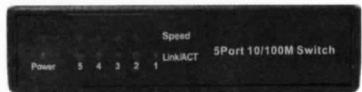
Power LED
Este indicator rojo se ilumina cuando el interruptor está recubiendo alimentacion.
Link/Act 1-5
Este indicator rojo se ilumina de manière constante, cuando un puerto está conectado a una estación de exito, si este indicator rojo parpadea, indica que el puerto está transmitiendo o recibiendo datos en la red.
10/100M 1-5
Este indicator rojo se ilumina deforma constante, cuando un puerto está connectado a una estación de 100 Mbps Fast Ethernet. De lo contrario, el indicator está apagado cuando el puerto está connectado a un dispositivo Ethernet de 10 Mbps.
3.2 Panel trasero y el panel lateral Caracteristicas
Este puertos de red estan situados en el panel posterior del switch. El puerto de alimentacion se encuentra en elazo del interruptor.
1-5
Estos puertos son+puntos de conexión para PC y除外dispositivos de red, tales como commutadores adscionales.

Jack de alimentación
La toma de alimentacion de CC es donde se conecta el adaptor de alimentacion incluido.
3.3 Conexión de los dispositivos de red
Para conectar dispositivos de red para el cambio, por favor, siga estas instrucciones.
- Asegürese de que todos los dispositivos que se conectan al commutador están apaquados.
- Conecte un cable Ethernet de CATEGORY 5 de la red a uno de los puertos numerados en el commutador.
- Conecte el除外 extremo a un PC oathers dispositivos de red.
- Repita los pasos 2 y 3 para conectar dispositivos adiconiales.
- Conectar el adaptor de corrente suministrado a la toma de poder en el panel posterior del interruptor.
Note: Asegürese de utiliser el adaptor de corriente incluido con el Switch. Uso de un adaptor de alimentación diferente para poder provocar días en el interruptor.
- Conecte el除外 extremo del adaptordo de corriente a una toma de corriente electrica.
- Encienda los dispositivos conectados al commutador. LED correspondiente Cada puerto activa se enciende en el interruptor.
Ce Lamarca CE confirma que este producto cumple los principales requisitos de la Directiva 2004/108/EC y 2006/95/EC del Parlamento Europeo y del Consejo de Europa en materia de telecomunicaciones y los terminalses sobre la calidad y la salute de los usarios y del complimiento de la interferencia electro-magnética. La CE ha sido demostrada. Estas declaraciones son depositados por el fabricante.
LogiLink®
NS0001B
5-portowy przy.§ćznik Fast Ethernet
Instrukcia obstugi

1.0 Bezpieczneistwo
Urzadzenie powinno zawsze stać na stabilnym i plaskim podłoż.
Upadek moze spowodować uszkodzenia urzadzenia.
Nie wystawiać urzadzenia na bezpos省教育nia dzialanie slona, ani nie wystawiać wjejmischac gdzie narazone byloby na dzialanie ywosikh temperatur. Wysoka temperatura要去 powodowa uzskodzenia urzadzenia lub znacznie skrocić okres jegu uzytkowanie.
Nie nalezy pozostawiac uradzenia w povlizu zrodel ciepla takich jak grzejnikiczy wydmuchy.
Nie nalezy wystawiać urzadzenia na danejanie deszczu, wody, wilgoci ani wilgotnégo powietra.
Nie nalezy pozostawiać urzadzenia w kuchni ani w laziance w poplizu kranu. Nalezy unikać bezpośredniago kontaktu z woda.
Gratulujemy zakupu urzadzenia NS0001B!
Przed uzyciem nalezy zapoznać sie z instrukcjārzazasadami bezpiecznego zorkorzystania z urzadzenia. Nieswiadome uzytkowanie sąMHzrodzi do uszkodzenia urzadzenia.
2.0 Informacja ogólne
5-portowy przyȩcznik 10/100 Mb/s doskonale sączy technologie 10 Mb/s Ethernet z urzadzeniami pracijacymi w standardzie 100 Mb/s Fast Ethernet. Wszystkie porty (piec) są wyposzone w fungcjce automatycznej negotcjuci predkosci i automatyczné krosOWANA MDI/MDI-X, co eliminije problem doboru odpowiedniego kabla. Kaźdy port niedzęnie negotcjuje nailepsza prędkosc i tryb pol-lub pelnoduplokswery, osiagajć przypepustowoc do 200Mbps na porcie. Metoda przyȩczania calch pakietów (store-and-forward switching) zapobiega przyȩczywniu uszkodzonych pakietów do sieci.
2.1 Specyfikacja
- 5-portowy przyȩcznik 10/100BASE Ethernet
- Automatyczna negotcjacia prędkosci transmisji
- Obsługa Auto-MDI/MDIX dla kazdego portu
-
Obluga transferu pelno-i poldupleksowego
Zgodnosc ze standardami IEEE 802.3, 802.3u -
Przekazywanie i filtrawanie danych bez blokowania, pełna prędkość przyzwodów
- Wbudowana pAMIc statyczna (SRAM) dla bufora pakietow i 1K-entry tablicy przyegladowej
- Obsluga protokolu IEEE 802.3x dla kontroli przyplywu trybu pelnoduplewosego i kontroli przyplywu nacisz wstecz (back pressure flow control) dla trybu póldupekswo
- Obługa pakietów wielkosci do 1536 bajtow
- Obluga przyeluczania store-and-forward
- Kontrola przypustowość (Broadcast Storm Filtering)
2.2 Srodowisko operocyjre
- Temperatura przechowywania: -40°C 70°C
- Temperatura pracy: 0°C 40°C
- Wilgotnosć przechowywnia: 5% ~90% RH, niekondensujacja
- Wilgotnosc pracy: 10% 90% RH, niekondensujaca
2.3 Zawartosc opakowania
- 5-portowy przyȩclazznik 10/100 Mb/s - 1 szt.
- Instrukcja obstugi
Zasilacz
3.0 Instalacja
3.1 Przedni panel z diodami

Dioda zasilania
Swiecenie diody na czerwono sygnalizuje aktywne podlaczenia do zrodla zasilania.
Diody polaczenia/ dzialanie (1-5)
Czerwona dioda swieci swathem ciaglym, gdy port jest prawidlowo podlaczony do staci. Miganie czerwonej diody oznaca wysylanie lub odberianie danych w sieci.
10/100M 1-5
Ciagle swiecenie diody na czerwono syngnalizuje podlaczenia urzadzenia do portu urzadzenia pracujucego z predkosciya 100 Mb/s (Fast Ethernet). Przeciwnie, dioda nie swieci sie, kiedy do portu podlaczone jest urzadzenia pracujuce z predkosciya 10 Mb/s (Ethernet).
3.2 Panel tylni i boczny
Forty sieciowe znajduja sie na tylnim panelu przyelacznika. Giazdo do podlaczenia zasilania zostalo umieszczona na bocznej science.
1-5
Widoczne porty to punktyspolaczenia dla komputerow PC oraz
innych urzadzen sieciowych, takich jak dodatkowe przelaczniki.
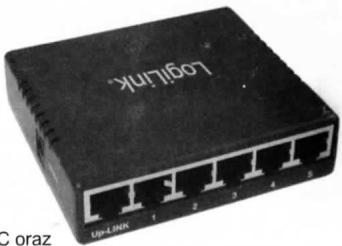
Gniazdo zasilania typu Jack
Zasilacz besteht y komplecie z urzadzeniem podlacza sie do gniazda zasilania.
3.3 Podłuczanie urzadzei sieciowych
Aby podlaczy urzadzenia sieciowe do przelacznika, nalezy postepowac zgodnie z podana instrukcja.
- Sprawdzićczy wzystkie urzadzenia podlaczone do przyȩacznika sa wylaczone.
- Podłaczyc kabel sieciowy Ethernet kat. 5 do jedem z ponumerowanych portów na przyȩczniku.
- Podłaczyc drugi koniec do komputera lub innych urzadzenia sieciowych.
- Powtorzyc kroki 2 i 3 by podlaczyc dodatkowe urzadzenia.
- Podlączycz zasilacz do gniażda zasilania tylnim panelu przyȩclacznika.
Uwaga: Nalezy sprawdzićczy podlączenia zasilacz to zasilacź kompletu dolączony do przelącznika. Użycie内在ego zasilacza要去 powodowej uszkodzenia przy.§
- Wlozyc drugi koniec zasilacza do gniażdka elektrycznégo.
- Właczyc do pradu urzadzenia podlaczone do przy.§cznika. Zapalę sie diwy odpowiadajce kaźdemu aktywnemu portowy.
Znak CE potwierda, ze ninijszy produkt spelnia glowne zalozenia dyrektwy 2004/108/EC i 2006/95/EC Parliamentu Europejskiego oraz Rady Europew w zakresie urzadzei i terminali telekomunikacynych zarrowno jesti chodzi o bezpieczeneistwo jak zdrowie uzytkownika oraz produktia wymogi zgodnosci interferencji elektromagnetycznej. Produkt posiada znak CE. Niniejsze oswiadczenie jest oswiadczeniem producenta.
- LOGILINK®
- NS0001B
- 5-PORT 10/100MBPS
- ETHERNET SWITCH
- USER MANUAL
- 1.0 SAFETY INSTRUCTIONS
- 2.0 INTRODUCTION
- 2.1 SPECIFICATION
- 2.2 ENVIRONMENTS
- 2.3 PACKAGE CONTENT
- 3.0 INSTALLATION
- 3.1 FRONT PANEL LEDS
- POWER LED
- LINK/ACT 1-5
- 10/100M 1-5
- 3.2 BACK PANEL AND SIDE PANEL FEATURES
- 1-5
- POWER JACK
- 3.3 CONNECTING NETWORK DEVICES
- 5-PORT 10/100MBPS ETHERNET SWITCH
- BEDIENUNGSANLEITUNG
- 1.0 SICHERHEITSCHINWEISE
- HERZLICHEN GLÜCKWUNSCH ZUM KAUF DES NS0001B
- 2.0 EINFÜHRUNG
- 2.1 AUSSTATTUNG
- 2.2 HINWEISE ZUM AUFSTELLUNGSSORT
- 2.3 PACKUNGSINHALT
- 3.1 LED ANZEIGEN
- LED 1-5
- 3.2 ANSCHLÜSSE
- POWER
- 3.3 ANSCHLUSS VON NETZWERKGERÄTEN
- MANUAL DEL USUARIO
- 1.0 INSTRUCCIONES DE SEGURIDAD
- FELICITACIONES A LA COMPRA DE NS0001B
- 2.0 INTRODUCCION
- 2.1 ESPECFICACIÓN
- 2.2 AMBIENTES
- 2.3 CONTENSO DEL PAQUETE
- 3.0 INSTALACIÓN
- 3.1 LED DEL PANEL FRONTAL
- 3.2 PANEL TRASERO Y EL PANEL LATERAL CARACTERISTICAS
- JACK DE ALIMENTACIÓN
- 3.3 CONEXIÓN DE LOS DISPOSITIVOS DE RED
- 5-PORTOWY PRZY.§ĆZNIK FAST ETHERNET
- INSTRUKCIA OBSTUGI
- 1.0 BEZPIECZNEISTWO
- GRATULUJEMY ZAKUPU URZADZENIA NS0001B
- 2.0 INFORMACJA OGÓLNE
- 2.1 SPECYFIKACJA
- 2.2 SRODOWISKO OPEROCYJRE
- 2.3 ZAWARTOSC OPAKOWANIA
- 3.0 INSTALACJA
- 3.1 PRZEDNI PANEL Z DIODAMI
- DIODA ZASILANIA
- DIODY POLACZENIA/ DZIALANIE (1-5)
- 3.2 PANEL TYLNI I BOCZNY
- GNIAZDO ZASILANIA TYPU JACK
- 3.3 PODŁUCZANIE URZADZEI SIECIOWYCH
Marque : LOGILINK
Modèle : NS 0001 B ( 5-PORT SWITCH )
Catégorie : Switch réseau