
SA HE 70 - Lecteur de cassette PANASONIC - Notice d'utilisation et mode d'emploi gratuit
Retrouvez gratuitement la notice de l'appareil SA HE 70 PANASONIC au format PDF.


| Type d'appareil | Amplificateur audio-vidéo |
| Fonction principale | Récepteur de contrôle AV |
| Nombre de canaux audio | Non précisé |
| Puissance de sortie | Non précisé |
| Entrées audio | Non précisé |
| Entrées vidéo | Non précisé |
| Sorties audio | Non précisé |
| Sorties vidéo | Non précisé |
| Contrôle à distance | Oui |
| Connectivité haut-parleurs | Oui |
| Fonctions spéciales | Enregistrement, réglages, utilisation antennes extérieures |
| Alimentation | Non précisé |
| Dimensions | Non précisé |
| Poids | Non précisé |
| Accessoires fournis | Télécommande |
| Consignes de sécurité | Inclues |
FOIRE AUX QUESTIONS - SA HE 70 PANASONIC
Questions des utilisateurs sur SA HE 70 PANASONIC
0 question sur cet appareil. Repondez a celles que vous connaissez ou posez la votre.
Poser une nouvelle question sur cet appareil
Téléchargez la notice de votre Lecteur de cassette au format PDF gratuitement ! Retrouvez votre notice SA HE 70 - PANASONIC et reprennez votre appareil électronique en main. Sur cette page sont publiés tous les documents nécessaires à l'utilisation de votre appareil SA HE 70 de la marque PANASONIC.
MODE D'EMPLOI SA HE 70 PANASONIC
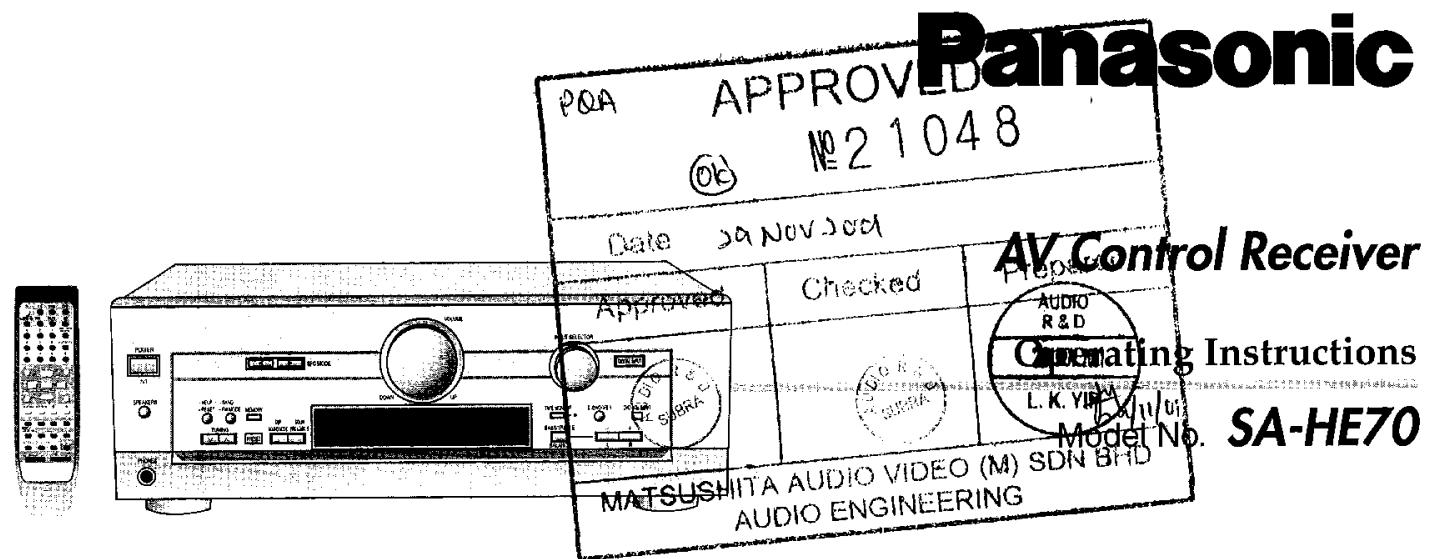
Table of contents
Dear customer
Thank you for purchasing this product.
Before connecting, operating or adjusting this product, please read these instructions completely.
Please keep this manual for future reference.
IMPORTANT SAFETY INSTRUCTIONS 2
Supplied accessories 3
The remote control 3
Speaker connections
4
Equipment connections
6
Settings
8
Basic operations
10
Control guide 12
Preseting 14
Other settings 14
Making a recording. 15
Using outdoor antennas 15
Troubleshooting guide 16
Specifications 17
Maintenance 17
Warranty (U.S.A.) 18
Product Service 18
Servicenter List (U.S.A.) 19
Listening caution. Back cover
Read these operating instructions carefully before using the unit. Follow the safety instructions on the unit and the safety precautions listed below. Keep these operating instructions handy for future reference.
Safety
- Power source—Connect the unit to a power source of the type described in these instructions or as marked on the unit.
- Polarization—The unit is equipped with a polarized power plug where one blade is wider than the other. This safety feature ensures that the plug fits into your household AC outlet only one way. If the plug doesn't fit one way, try reversing it. If the plug still doesn't fit, contact an electrician to replace the obsolete outlet. Do not attempt to defeat the safety purpose of the plug.
- Power cord protection—Route the AC power supply cord so that it will not be walked on or pinched by items placed on or against it. Never take hold of the plug or cord with wet hands. Always grasp the plug body firmly when connecting and disconnecting it.
- Overloading—When connecting the AC power supply cord, be careful not to overload the household AC outlet, extension cord, or outlet from any other device as this can result in fire or electric shock.
- Nonuse periods—Turn the unit off when it is not in use. Unplug the unit from the household AC outlet if it is not to be used for a long time. Unplug the unit during lightning storms.
- Attachments and accessories—Use only the attachments and accessories recommended in these operating instructions.
Installation
Placement
- Ventilation—Situate the unit so that it receives proper ventilation. Do not install in a confined space such as a bookcase or cabinet. Allow at least 10cm (4 inches) clearance from the rear of the unit. To prevent the risk of electric shock or fire due to overheating ensure curtains and other materials do not obstruct the unit's ventilation.
- Foreign material—Ensure objects and liquids do not get into the unit. Avoid exposing the unit to excessive smoke, dust, mechanical vibration, and shock.
- Magnetism—Situate the unit away from equipment and devices that generate strong magnetic fields.
- Stacking—Do not place heavy objects on top of this unit.
- Surface—Place the unit on a flat, level surface.
- Carts and stands—Use the unit only with carts and stands recommended by the manufacturer. Move carts with care. Sudden stops, excessive force, and uneven surfaces can cause carts to overturn.
- Wall and ceiling mounting—Do not mount the unit on walls or ceilings unless specified in the instructions.
Environment
- Water and moisture—Do not use the unit near water, such as near a bathtub or swimming pool. Avoid damp basements.
- Heat—Situate the unit away from heat sources, such as radiators. Do not situate where temperatures fall below 5^ (41^) or rise above 35^ (95^) .
-
Power lines—Take care when setting up an outdoor antenna that it is not near overhead power lines, electric lights, or electrical circuits, and that there is no danger of the antenna falling on power lines, electric lights, or electrical circuits. When installing an outdoor antenna, take extreme care not to touch such power lines or circuits, as contact with them can be fatal.
-
Outdoor antenna grounding—If you connect an outdoor antenna, ground the antenna system to protect against voltage surges and built-up static charges. Section 810 of the National Electrical Code, ANSI/NFPA No. 70-1990, provides information about grounding of the mast and supporting structure, grounding of the lead-in wire to an antenna discharge unit, size of grounding conductors, location of antenna-discharge unit, connection to grounding electrodes, and requirements for the grounding electrode. Refer to this diagram.
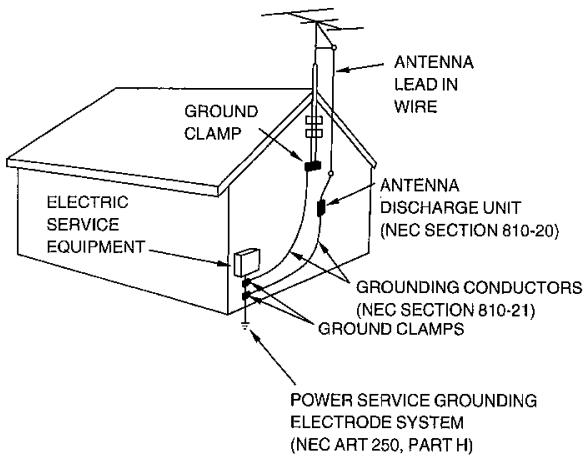
NEC—NATIONAL ELECTRICAL CODE
Maintenance
(See page 17 for details.)
Unplug the unit from the household AC outlet before cleaning. Clean with a damp cloth.
Do not use abrasive pads, scouring powders, or solvents.
Service
- Damage requiring service--The unit should be serviced by qualified service personnel if:
(a) The AC power supply cord or the plug has been damaged; or (b) Objects or liquids have gotten into the unit; or
(c) The unit has been exposed to rain; or
(d) The unit does not operate normally or exhibits a marked change in performance; or
(e) The unit has been dropped or the cabinet damaged.
- Servicing—Do not attempt to service the unit beyond that described in these operating instructions. Refer all other servicing to authorized servicing personnel.
- Replacement parts—When parts need replacing ensure the servicer uses parts specified by the manufacturer or parts that have the same characteristics as the original parts. Unauthorized substitutes may result in fire, electric shock, or other hazards.
- Safety check—After repairs or service, ask the servicer to perform safety checks to confirm that the unit is in proper working condition.
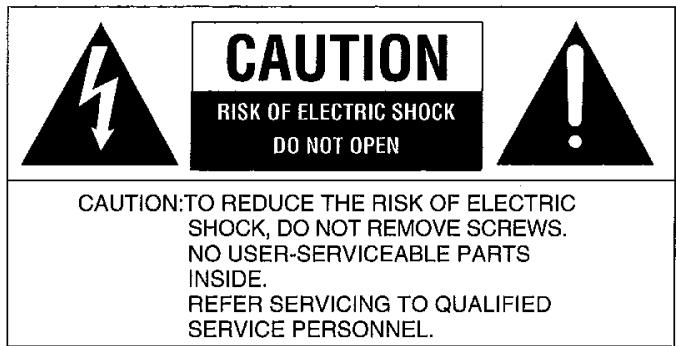
WARNING:
TO REDUCE THE RISK OF FIRE, ELECTRIC SHOCK OR PRODUCT DAMAGE, DO NOT EXPOSE THIS APPARATUS TO RAIN, MOISTURE, DRIPPING OR SPLASHING AND THAT NO OBJECTS FILLED WITH LIQUIDS, SUCH AS VASES, SHALL BE PLACED ON THE APPARATUS.
CAUTION
Do not place anything on top of this unit or block the heat radiation vents in any way. In particular, do not place tape decks or CD/DVD players on this unit as heat radiated from it can damage your software.
Supplied accessories
Please check and identify the supplied accessories.
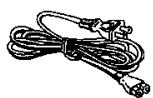
1 AC power supply cord (RJA0065-A)
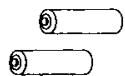
2 Batteries
1 FM indoor antenna (RSA0006-L)

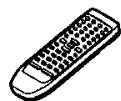
1 Remote control (EUR7702KE0)
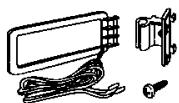
1 AM loop antenna set (RSA0012) (AM loop antenna, antenna holder, screw)
Refer to the separate booklet, "Remote Control Operation Guide", for remote control operation details.
Use the numbers indicated in parentheses when asking for replacement parts.
(Only for U.S.A.)
To order accessories contact 1-800-332-5368 or web site (http://www.panasonic.com).
The remote control
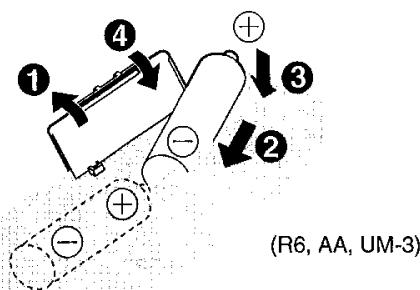
Batteries
- Insert so the poles (+ and -) match those in the remote control.
- Do not use rechargeable type batteries.
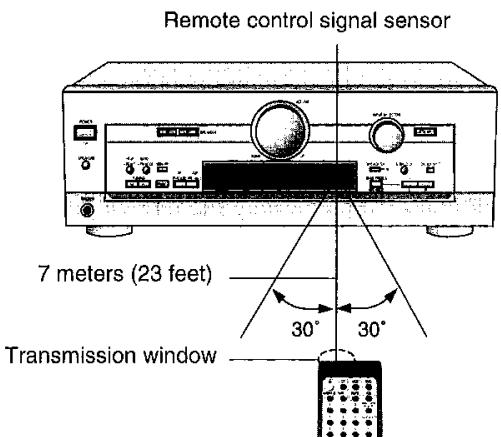
Use
- Keep the transmission window and the unit's sensor free from dust.
- Operation can be affected by strong light sources, such as direct sunlight, and the glass doors on cabinets.
Placement of speakers
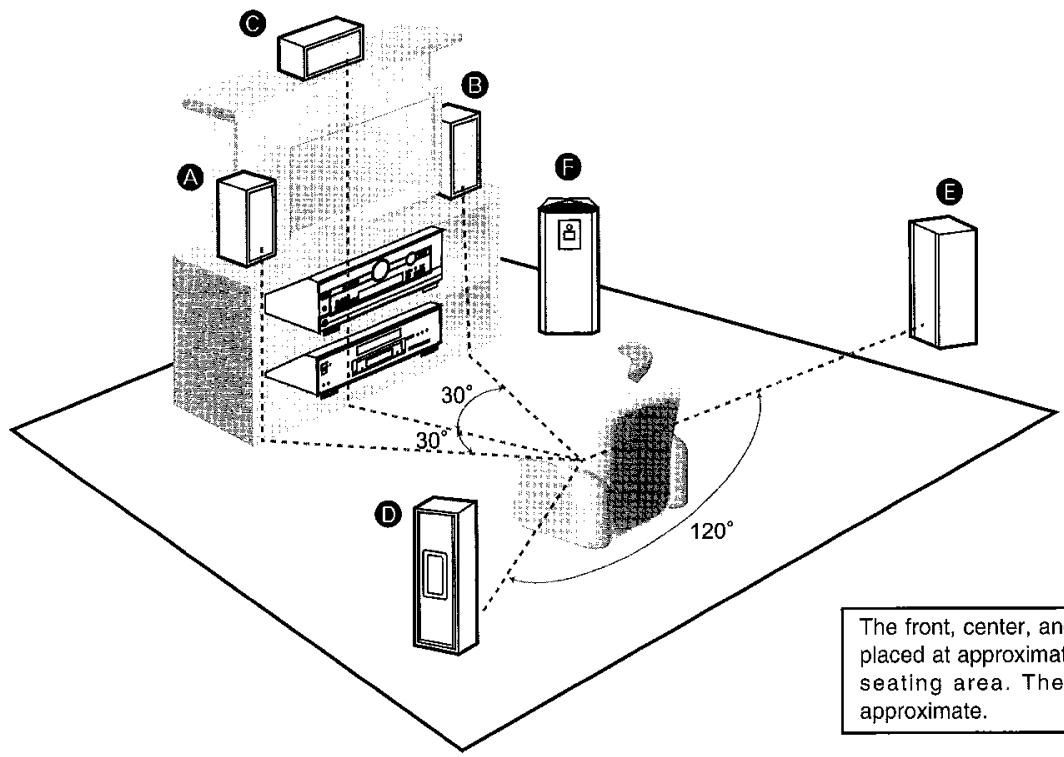
The front, center, and surround speakers should be placed at approximately the same distance from the seating area. The angles in the diagram are approximate.
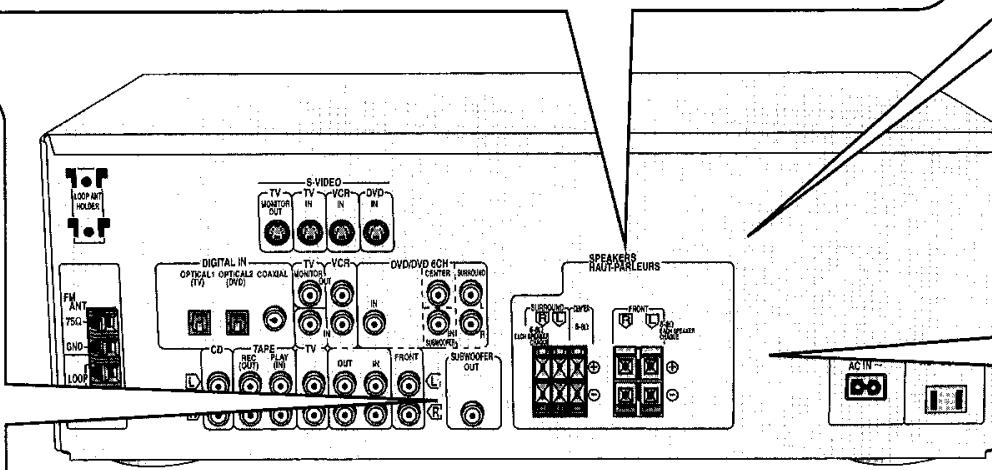
Connecting speakers
Other connections are possible depending on your speaker system.
See your speaker system's operating instructions for details.
Turn off the receiver before connecting the speakers.
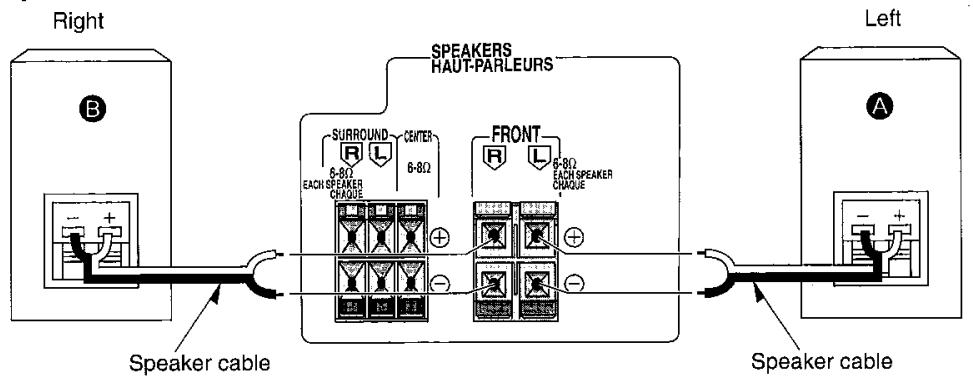
Front speakers - Impedance: 6-8 Ω
Subwoofer
Active subwoofer
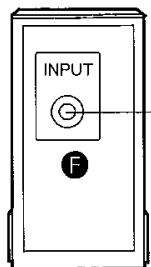
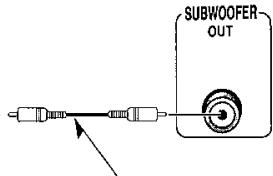
Monaural connection cable
Front speakers (A left B right)
Place on the left and right of the TV at seated ear height so that there is good coherency between the picture and sound.
Center speaker (C)
Place underneath or above the center of the TV. Aim the speaker at the seating area.
Surround speakers (D left B right)
Place slightly behind the seating area, about one meter (3 feet) higher than ear level.
Subwoofer (P)
The subwoofer can be placed in any position as long as it is at a reasonable distance from the TV.
Note that some experimentation can yield the smoothest low frequency performance. Placement near a corner can increase the apparent output level, but can result in unnatural bass.
Speaker cable
| Cable | Speaker terminals | Note |
| Twist the wire | Do not short circuit. |
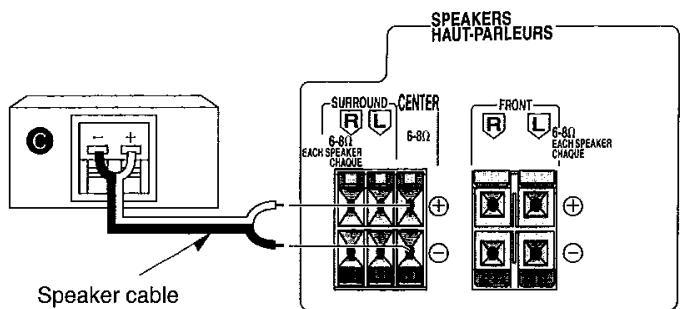
Center speaker - Impedance: 6-8 Ω
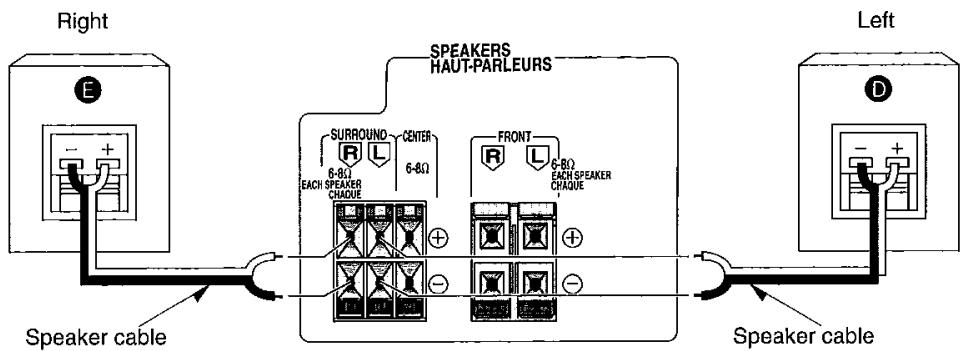
Surround speakers - Impedance: 6-8 Ω
Stereo connection cable
White
(L)

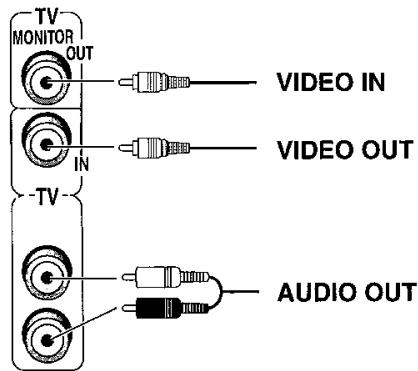
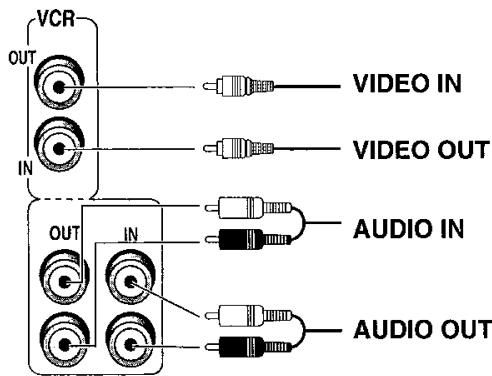
Video connection cable

To connect equipment, refer to the appropriate operating instructions.
Note
- Do not bend the optical fiber cable.
- Turn off all components before making any connections.
- Use digital connection to enjoy Dolby Digital or DTS (→ page 10).
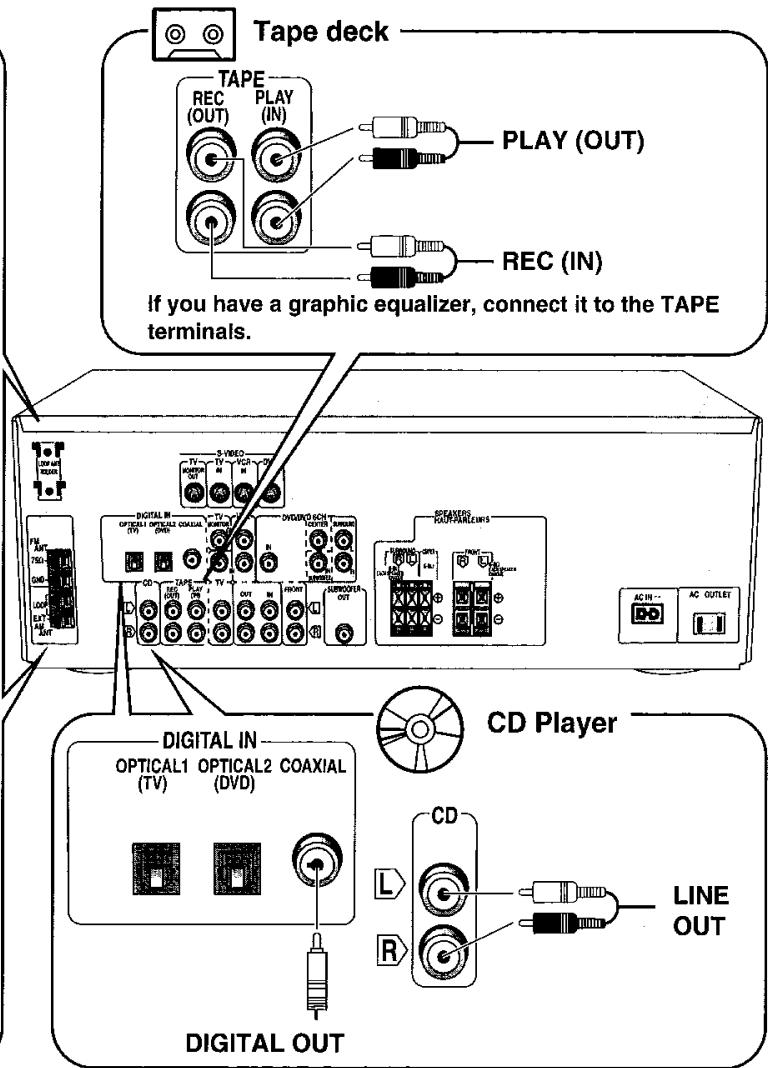
- Use analog connection to enjoy sources that cannot be decoded on this unit and to record a source (→ pages 10 and 15).
Changing the digital input settings
You can change the input settings for the digital terminals if necessary. Note the equipment you have connected to the terminals, then change the settings (→ pages 8 and 9).
TV, VCR and DVD player

DIGITAL IN
DVD player
OPTICAL1 OPTICAL2 COAXIAL (TV) (DVD)


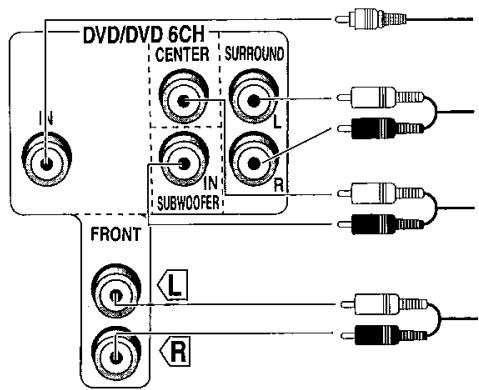
DIGITAL AUDIO OUT
VIDEO OUT
AUDIO OUT
(SURROUND L, R)
AUDIO OUT
(CENTER, SUBWOOFER)
Note
Connect to FRONT L, R if your DVD player does not have 6 channel output.
The S-VIDEO terminals
Connections through these terminals provide higher quality pictures than through the video terminal.
Video signals input into theVIDEO terminals cannot be output from S-VIDEO terminals or vice versa.
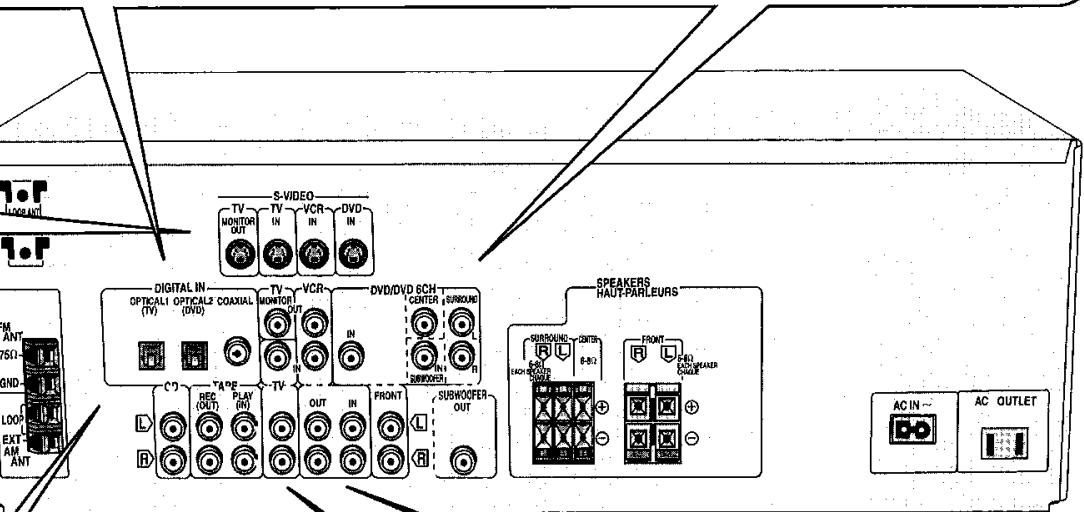
Note
Satellite receiver etc.
OPTICAL1 OPTICAL2 COAXIAL (TV) (DVD)

DIGITAL IN


DIGITAL OUT

- TV or monitor
VCR
Optical fiber cable
Coaxial cable


CD, Tape deck and antennas
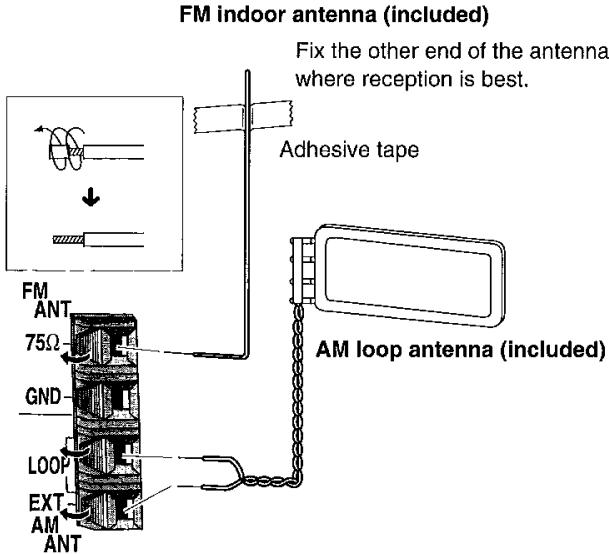
Antennas
Using the antenna holder
Fit the holder into the holes on the rear panel, then attach the antenna to it, facing it in the direction of best reception.
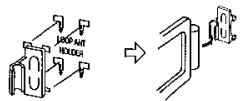
When attaching the
AM loop antenna to another surface
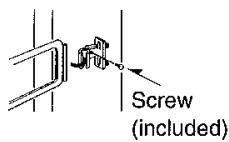
Keep the antenna cord away from tape decks, DVD players, and other cords.
Outdoor antennas page 15
Connecting the AC power supply cord and other information

CAUTION: TO PREVENT ELECTRIC SHOCK MATCH WIDE BLADE OF PLUG TO WIDE SLOT, FULLY INSERT.
"SWITCHED" AC outlet
Power to the outlet is controlled by the power switch of this unit. Audio equipment rated up to a maximum of 80W can be connected here. If equipment exceeding this rating is connected, the outlet may be rendered inoperable. Consult your dealer to replace the fuse.

Household AC outlet AC 120 V/60 Hz)
Note
The included AC power supply cord is for use with this unit only. Do not use it with other equipment.
Conserving power
The unit consumes 1 W even when it is turned off with [POWER, / I ]. To save power when the unit is not to be used for a long time, unplug it from the household AC outlet.
If the unit is left unplugged for longer than a few weeks, all settings will revert to the factory settings. Do the settings again if this occurs.
Change the settings to suit your speakers and units to the environment in which you are using them. Before making any changes, read the descriptions of the settings, note the factory settings and ranges, and refer to the equipment's instructions.

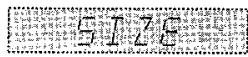
SIZE
Set the size to suit your speakers
LARGE: For speakers that can reproduce a full sound range, particularly the bass range below 100 Hz.
SMALL: For speakers that cannot adequately reproduce the bass range. This setting is sufficient for most speakers if you are using a subwoofer.
NONE: For speakers you haven't connected (center or surround).
The factory settings are: FRONT: LARGE
CENTER and SURROUND: SMALL
For the subwoofer (SUB-WFR), select YES if you have connected one (factory setting), or NO if you have not.

DISTANCE
Enter the distance of the front, center and surround speakers from the seating position
Change the distance so that the sound from all the speakers (except for the subwoofer) reaches you at the same time.
You can select distances between 3 and 30 feet at one-foot intervals.
The factory settings are: FRONT and CENTER: 10 FEET
SURROUND: 5FEET
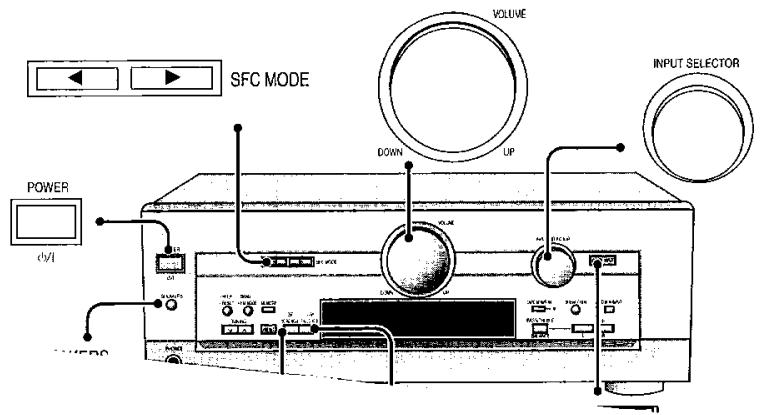
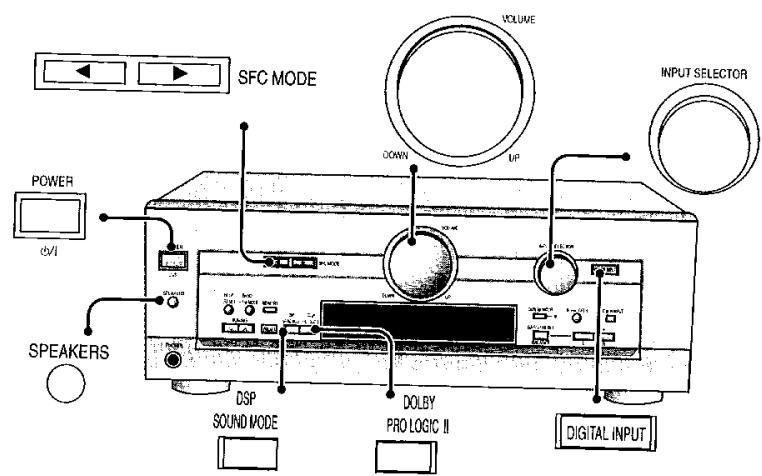
Press at the same time to enter the setting mode.

FILTER
Change the cut-off for bass output from the front speakers
If you set the front speakers to "SMALL", the filter is set to 100Hz . Raise the cut-off if the bass from the front speakers is unsatisfactory so that this bass is output through the subwoofer.
You can raise the cut-off from 100Hz to either 150Hz or 200Hz .

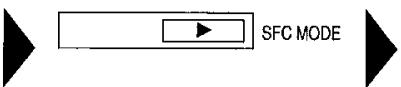
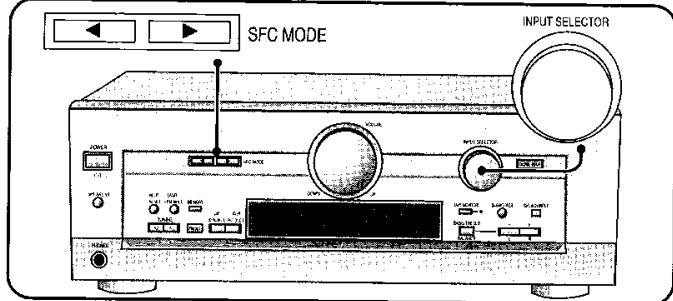
SFC MODE

D-INPUT
Digital input
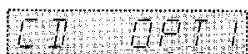
Change these settings to suit the connections you have made to the three digital input terminals, COAX, OPT1 and OPT2, so that the correct source is selected when you turn [INPUT SELECTOR].
The factory settings are: CD: COAX
DVD:OPT 2
TV: OPT 1

Adjusting speaker output level
Adjust the level of the other speakers based on the output of the front speakers. (Adjust the volume of the front speakers with [VOLUME].)
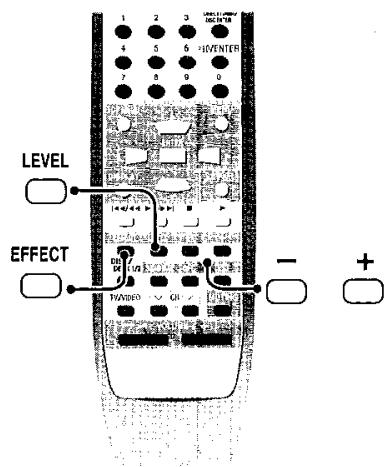
C (center), SR (surround right), and SL (surround left) can be adjusted between -10 dB and +10 dB, with 0 being the level of the front speakers. Adjust center and surround output to the same apparent level of the front speakers.
Turn SPEAKERS on.
SPEAKERS


Select "SIZE".

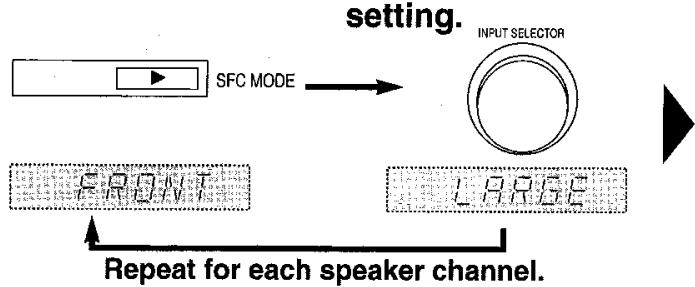
Select the speaker.
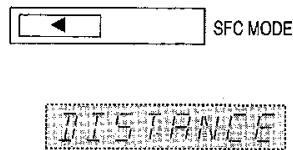
Select "DISTANCE".
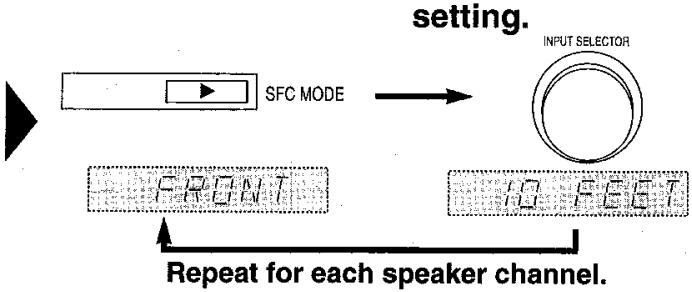
Select the speaker.
Select "FILTER".
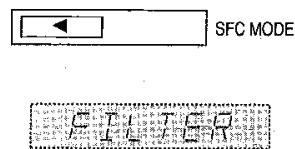

Change the setting.
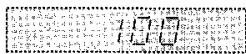

Press at the same time to exit the setting mode.

Select "D-INPUT".
Select the input position.
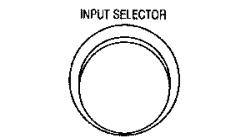
Change the setting.
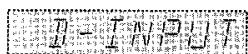
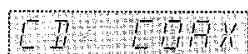
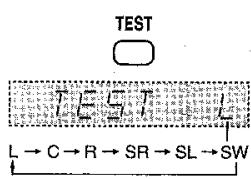
Output the signal.
The speakers output a signal in order for about two seconds each.
Speakers set as "NONE" or "NO" are skipped.
Adjust the main volume.
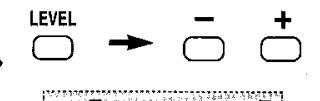
Adjust the level.
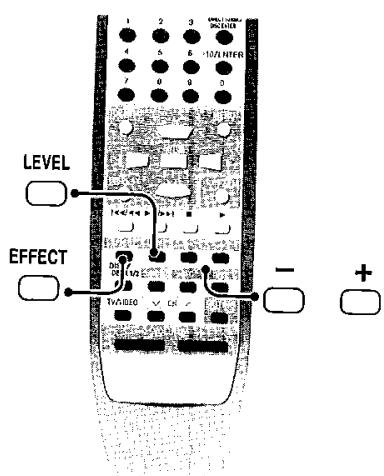
Press [LEVEL] to select the speaker channel, then press [-] or [+] .

Stop the test signal.


Repeat for each speaker channel.

TEST
1 SWITCH on.
2 SPEAKERS Turn SPEAKERS on.
3 INPUT SELECTOR TUNER CD DVD ↑ TAPE VCR TV
For CD, DVD, TV Select digital or analog input.
4 Select the DSP sound mode.
5 Start play of the source.
6 VOLUME Adjust the volume.
When you finish listening
Be sure to reduce the volume and press [ ] to switch the unit to standby.
For your reference
In rare cases, the unit may have trouble recognizing the digital signals on discs.
- With the PCM signals on CDs, this may cause the beginning of a track to be cut off. Engage the PCM FIX mode if this occurs.
- With DTS, the signals may not be recognized at all. Engage the DTS FIX mode if this occurs.
While the input source is selected and digital input is engaged:
Press and hold [ DIGITAL INPUT ].
The current mode is displayed. Press again to change the mode.
Each time you press the button:
AUTO PCM FIX DTS FIX
![PANASONIC SA HE 70 - Press and hold [ DIGITAL INPUT ]. - 1](/content/2025/01/187319/images/448227bab9c5dab9bf3666045bbd431795639996bdc3913d364d78336dca5a34.jpg)
When a FIX mode is on, the unit cannot process other signals. This may cause noise to be output. Select "AUTO" if this occurs.
The selected mode is stored for each input source even if the unit is turned off.
![PANASONIC SA HE 70 - Press and hold [ DIGITAL INPUT ]. - 2](/content/2025/01/187319/images/e3ada6bda5da3618cf32f36061f769bc5830e5635f4553bd1dde0fbc01fedc1a.jpg)
STEREO mode
Use this mode to play digital or analog stereo sources or to play surround sources through two speakers. When surround sources are played in this mode, the sounds intended for the other speaker channels are played through the front speakers.
![PANASONIC SA HE 70 - Press and hold [ DIGITAL INPUT ]. - 3](/content/2025/01/187319/images/7555f7625f33a0da54636472eccfe9a35c991a5d3995c27b684cd75921bcd005.jpg)
SURROUND mode
Select this mode when you are playing a digital surround source (Dolby Digital or DTS).
Also select this mode when playing analog or digital stereo sources. The Dolby Pro Logic II processor works not only on sources recorded with Dolby DOLBY Surround, but also on any stereo source. The following modes are available when using Dolby Pro Logic II.
![PANASONIC SA HE 70 - Press and hold [ DIGITAL INPUT ]. - 4](/content/2025/01/187319/images/31f392f76e587232da8dba7fa969d0d8292380b2ec46a6a18a4244873e51112d.jpg)
SFC modes
Enjoy an enhanced sound experience with greater presence and spread by using these SFC (sound field control) modes with PCM or analog stereo sources.
The SFC modes cannot be used if the input signal is Dolby Digital or DTS.
Choose from the following modes. SFC MODE
Notes on using the Digital Signal Processor
The digital signal processor (DSP) in this unit can decode Dolby Digital and DTS digital signals. It automatically determines the type of signal, PCM, Dolby Digital, or DTS, and processes it accordingly.
- This unit cannot process other digital signal formats, such as PCM signals with sampling frequencies of 96 kHz and 192 kHz and MPEG.
- This unit cannot decode Dolby Digital RF (radio frequency) signals from a laser disc player.
Dear customer
T
Before connecting this product.
These instructions completely adjust this product plan.
Please keep this manual for future reference.
Table of contents
IMPORTANT SAFETY INSTRUCTIONS 0
The remote control 3
Speaker connections
4
Step 2
Equipment connections
6
Step 3
Settings
8
Step 4
Basic operations
10
Control guide
Presetting
Other settings 12
Making a recording 14
Using outdoor clothing 14
15
Troubleshooting guide
Band select/FM mode select button [-BAND, -FM MODE]
For switching between AM and FM.
If reception is poor in FM, press and hold until "MONO" appears to switch to monaural mode.
Help-reset button [-HELP, -RESET]
Press if an error message appears. A message offering a possible solution scrolls across the display.
To reinitiate the unit's settings, press and hold until "RESET" appears.
Standby/on button [POWER, /1]
Press to switch the unit from on to standby mode or vice versa.
In standby mode, the unit is still consuming a small amount of power.
Speaker on/off button [SPEAKERS]
Turning the speakers off automatically engages the STEREO mode (when listening through headphones, for example).
Headphone jack [PHONES]
Plug type: 6.3 mm (1/4") stereo
Avoid listening for prolonged periods of time to prevent hearing damage.
Tuning buttons [TUNING, ,
For tuning the radio and selecting preset stations.
Press and hold until the frequency starts scrolling to start automatic tuning. Tuning stops when a station is found.
Tuning intervals: FM-0.2 MHz, AM-10 kHz
Preset channel button [PRESET]
Press to allow preset station selection with [TUNING, , ]
DSP sound mode select button [DSP SOUND MODE]
For selecting "STEREO", "SURROUND" or "SFC"
Dolby Pro Logic II mode select button [DOLBY PRO LOGIC II]
Use when "PRO LOGIC II" lights in the SURROUND mode.
![PANASONIC SA HE 70 - Dolby Pro Logic II mode select button [DOLBY PRO LOGIC II] - 1](/content/2025/01/187319/images/cfe2d15f108bece00622ecdc83b0a2a6ac3dde0305717654a8c3f8ad2d69644a.jpg)
The display
General display
Shows the input mode, radio frequency, and other general information.
kHz:AM, MHz:FM
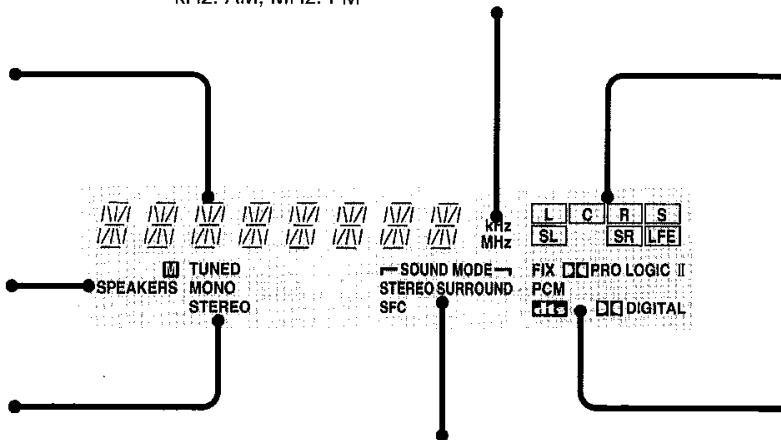
Frequency unit indicators [kHz, MHz]
Radio indicators [TUNED, MONO, STEREO, M]
TUNED: A station is tuned.
MONO: You have switched to monaural mode with [-BAND, -FM MODE] to improve reception.
STEREO: A stereo FM broadcast is tuned.
M: Lights during presetting.
DSP sound mode indicators
[Sound Mode,STEREO, SURROUND, SFC]
Show the current DSP sound mode.
![PANASONIC SA HE 70 - [Sound Mode,STEREO, SURROUND, SFC] - 1](/content/2025/01/187319/images/84022ee0b2310f52db5fc638fff8aa5020bf157698b279387eceefa8e9728bde.jpg)
Volume control [VOLUME]
Tape monitor button/indicator [TAPE MONITOR]
For monitoring sound when recording to a 3-head cassette deck. Also used when you have connected a graphic equalizer to the TAPE terminals.
Input selector [INPUT SELECTOR]
Digital/analog input select button/indicator [DIGITAL INPUT]
For switching between analog and digital input when you have selected TV, CD, or DVD. The button lights when digital is selected.
DVD 6ch/2ch input select button [DVD 6CH INPUT]
For switching between 6-channel and 2-channel DVD input.
Subwoofer level button [SUBWOOFER]
Adjust the level in 5 steps
SW MIN. SW 5, SW 10, SW 15, and SW MAX.
Select SW --- to stop output.
Tone/balance adjust buttons
[BASS/TREBLE, BALANCE, -, +, L, R]
For adjusting the tone and balance.
First select BASS, TREBLE, or BALANCE, then press [- , L] or [+, R] to adjust.
Program format indicators
[L, C, R, S, SL, SR, LFE]
Show the channels contained in the digital input signal. They do not light when input is analog.
L: Front channel (left)
C: Center channel
R: Front channel (right)
S: If the surround channel is monaural.
SL: Surround channel (left)
SR: Surround channel (right)
LFE (Low Frequency Effect): Deep-bass effect.
Signal format indicators
[FIX, PRO LOGIC II, PCM, DIGITAL]
Light depending on the source you are playing.
DIGITAL: Dolby Digital sources
DTS: DTS sources
PROLOGIC II: Analog sources in SURROUND mode
Digital sources with 2-channel signals in SURROUND mode
FIX:PCM FIX or DTS FIX mode
PCM: PCM FIX mode
For your reference
- When playing videotapes
The picture remains on the screen even if you select TAPE, CD, or TUNER.
- Once you have set a mode (DSP, digital/analog input, or 2-channel/6-channel input) for an input source
That mode is engaged whenever you reselect the input source.
- When DVD 6CH input is on
Speaker settings are ineffective. Change the settings on the DVD player if necessary.
- When input is DIGITAL
The tape monitor cannot be used.
- When using a graphic equalizer
Some distortion may occur, depending on the equalizer's settings.
- To adjust the tone
The STEREO DSP mode must be on and input must be either analog or PCM signals. You cannot adjust the tone while the DSP is defeated or if DVD 6CH INPUT is selected.
-
When using the subwoofer
-
You cannot adjust subwoofer level while the DSP is defeated or if DVD 6CH INPUT is selected.
Sound can be distorted if you raise the volume while subwoofer level is high. Reduce subwoofer level if this occurs.
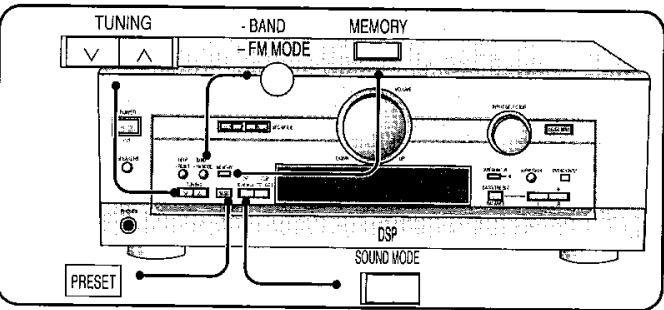
Automatic presetting
-BAND ^ 一 FM MODE] to select "FM".
② Press [TUNING] to tune to "FM 87.9 MHz".
③ Press and hold [MEOH].
The FM stations the unit can receive are preset in channels 1 to 30.
4 Press [FMMOE] to select "AM".
⑤ Press [TUNING] to tune to "AM 530 kHz".
⑥ Press and hold [VORY].
The AM stations the unit can receive are preset in channels 21 to 30.
(FM stations are replaced if any were preset in these channels.)
During automatic presetting, the memory indicator (M) flashes and the frequency scrolls. The memory indicator and channel numbers are displayed for a second when a station is preset.
The last station to be preset is displayed when presetting finishes.
Manual presetting
Preset the stations one at a time.
① Tune to the station.
② Press [MEMOR].
③ Press [TUNING] to select a channel.
④ Press [MEMORY].
Selecting channels
① Press [PRESK].
The channel number flashes for about 5 seconds.
② Press [TUNING]
Hold down the buttons to change channels faster.
For your reference
Even if the power supply cord is disconnected from the household AC outlet, the stations remain in memory for approximately one month.
Improving reception
DSPDEFEAT
Press and hold [SUNW] until "DEFEAT" appears.
Press and hold [SNDWDE] again to turn the DSP on.
Note
While the DSP is defeated, you cannot:
- Select DSP sound modes,
- Adjust the tone,
- Output a test signal,
- Adjust individual speaker output, or
- Use digital input.
For your reference
DVD players can interfere with radio reception. Turn the DVD player off or move it further away from the antennas if this occurs.
DR COMP -
Dynamic range compression
Change this setting to listen to software recorded with Dolby Digital at low volume (such as late at night) and maintain audio clarity. It reduces the peak level in loud scenes without affecting the sound field.
OFF: The software is played with the original dynamic range (factory setting).
STANDARD: The level recommended by the producer of the software for household viewing.
MAX: The maximum allowable compression (recommended for night viewing).
① Press [SFC MODE] at the same time to enter the setting mode.
② Press [SFC MODE] to select "DR-COMP".
③ Turn [ ] to select “OFF”, “STANDARD” or “MAX”.
④ Press [SFG MODE] at the same time to exit the setting mode.
DIMMER -
Dim the unit's display for better viewing in a darkened room
The factory setting is OFF (normal brightness).
① Press [SFC MODE] at the same time to enter the setting mode.
② Press [SFC MODE] to select "DIMMER".
③ Turn [ ] to select “OFF” or “ON”.
④ Press [SFC MODE] at the same time to exit the setting mode.
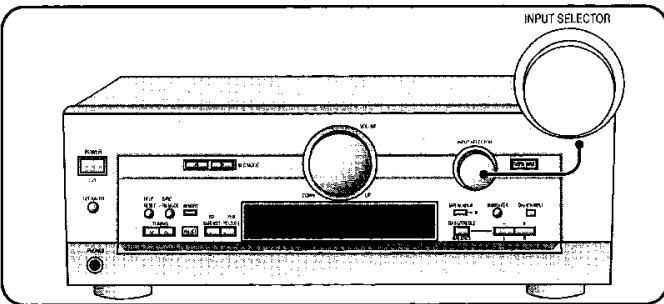
Recording on a tape deck or VCR
You can record to a tape deck connected to TAPE REC (OUT) or to a VCR connected to VCR OUT.
See the recording unit's operating instructions for details on how to prepare it for recording.
When recording with a tape deck, you can record any source except TAPE.
When recording with a VCR, you can record any source except TAPE or VCR.
① Turn [ ] to select the source to be recorded.
② Begin recording.
Follow your recording unit's operating instructions.
③ Start the source to be recorded.
Follow your equipment's operating instructions.
Note
- You cannot record a source connected through a digital terminal. When recording CD, DVD, or TV, ensure the source is connected through the corresponding analog terminals and "ANALOG" input is selected.
- When you select DVD 6CH INPUT mode, only sound from the front left and right channels is recorded.
FM outdoor antenna
- Disconnect the FM indoor antenna.
- The antenna should be installed by a competent technician.
- Twist the coaxial cable's shield braid firmly and connect it to the GND terminal.
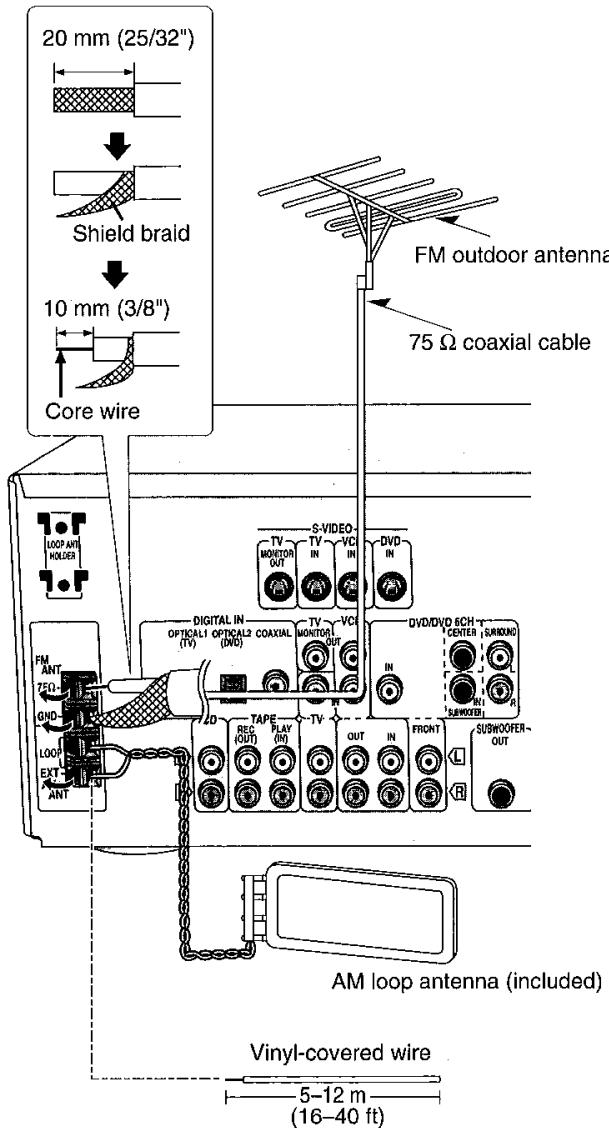
AM outdoor antenna
- Run a piece of vinyl wire horizontally across a window or other convenient location.
- Leave the loop antenna connected.
- Disconnect the antenna when the unit is not in use. Do not use the antenna during an electrical storm.
Before requesting service, make the below checks. If you are in doubt about some of the check points, or if the remedies indicated in the chart do not solve the problem:
In the U.S.A., contact the Panasonic Customer Call Center at 1-800-211-7262, or e-mail consumerproducts@panasonic.com, or web site (http://www.panasonic.com).
In Canada, contact Panasonic Canada Inc. Customer Care Centre at 905-624-5505, or web site (www.panasonic.ca), or an authorized Servicentre closest to you.
| Common problems | Pages | |
| No power. | Ensure the power cord is connected. | 7 |
| Turn the volume up. | 10 | |
| Check connections to speakers and other equipment. | 4-7 | |
| Turn on the speakers. | 10 | |
| No sound. | Turn off the tape monitor. | 13 |
| Select the correct source. | 10 | |
| Change the D-INPUT setting to suit the type of connection you have made. | 8-9 | |
| Check that the digital signals can be decoded by this unit. | 10 | |
| Turn PCM FIX or DTS FIX off. | 10 | |
| Cannot select “DIGITAL” input. | Cancel “DSP DEFEAAT”. | 14 |
| Switch off the unit, determine and correct the cause, then switch the unit on. Causes include: -Shorting (bare wires touching) of positive and negative speaker wires. | 5 | |
| -Using speakers with an impedance lower than that rated for this unit. | 4-5 | |
| -Straining of the speakers through excessive volume or power. | - | |
| -Using the unit in a hot environment without proper ventilation. | - | |
| Sound stops. “OVERLOAD” appears on the display. | Turn the unit off, disconnect the AC power supply cord, then reconnect and turn the unit on. Consult your dealer if “F 70” remains on the display. | - |
| “F 70” appears on the display. | ||
| DSP sound modes | Pages | |
| Sound is not heard from the center, surround, or subwoofer speakers. | ·Ensure the SIZE settings for your speakers are correct. ·Check the DSP sound mode. ·Cancel “DSP DEFEAT”. | |
| DSP sound modes cannot be selected. | ·Cancel “DSP DEFEAT”. ·Turn DVD 6CH INPUT off. | 14 13 |
| Radio | Pages |
| The radio cannot be tuned in or there is a lot of noise and interference. | ·Connect the appropriate antenna. (You may need an outdoor antenna or one with more elements.) ·Adjust the position of the FM or AM antenna. ·Reduce the treble. ·Select "DSP DEFEAT". ·Turn off nearby televisions, video decks, DVD players, and satellite receivers. ·Separate the antenna from other cables, leads, and appliances. |
AMPLIFIER SECTION
Rated minimum sine wave RMS power output 40 Hz-20 kHz both channels driven 0.9% total harmonic distortion 100 W per channel (6 Ω)
1 kHz continuous power output both channels driven
0.05 % total harmonic distortion 105 W per channel (6 Ω)
Total harmonic distortion
rated power at 40 Hz-20 kHz 0.9 % (6 Ω)
half power at 1 kHz 0.07 % (6 Ω)
Power output at 1kHz each channel driven
0.9% total harmonic distortion
Front 2 × 100 W (6 Ω)
Center 100 W (6 Ω)
Surround 2 × 100 W (6 Ω)
Low frequency damping factor 30 (6 Ω)
Load impedance Front 6-8Ω Center 6-8Ω Surround 6-8Ω Dynamic headroom 2 dB (6Ω) Frequency response CD, TAPE, DVD, TV, VCR 10 Hz-70 kHz, ±3 dB
Input sensitivity CD, TAPE, DVD, TV, VCR 27 mV (200 mV, IHF '66) S/N (IHFA) CD, TAPE, DVD, TV, VCR 75 dB (85 dB, IHF '66)
Input impedance CD, TAPE, DVD, TV, VCR 22 kΩ Tone controls BASS 50 Hz, +10 to -10 dB TREBLE 20 kHz, +10 to -10 dB Subwoofer frequency response (-6 dB) 7-200 Hz
| Digital input | |
| Optical | 2 |
| Coaxial | 1 |
| ■ FM TUNER SECTION | |
| Frequency range | 87.9-107.9 MHz |
| Sensitivity | 11.2 dBf (2 μV, IHF '58) |
| 50 dB quieting sensitivity | |
| MONO | 18.3 dBf (4.5 μV, IHF '58) |
| STEREO | 38.3 dBf (45 μV, IHF '58) |
| Total harmonic distortion | |
| MONO | 0.2 % |
| STEREO | 0.3 % |
| S/N | |
| MONO | 73 dB |
| STEREO | 67 dB |
| Frequency response | 20 Hz-15 kHz, +1 dB, -2 dB |
| Alternate channel selectivity | 65 dB |
| Capture ratio | 1.5 dB |
| Image rejection at 98 MHz | 40 dB |
| Spurious response rejection at 98 MHz | 75 dB |
| AM suppression | 50 dB |
| Stereo separation | |
| 1 kHz | 40 dB |
| 10 kHz | 30 dB |
| Antenna terminal | 75 Ω (unbalanced) |
AM TUNER SECTION
Frequency range 530-1710 kHz
Sensitivity 20 V, 330 V/m
Selectivity 55 dB
IF rejection at 1000 kHz 50 dB
VIDEO SECTION
Output voltage at 1 V input (unbalanced) 1 ± 0.1 Vp-p Maximum input voltage 1.5 Vp-p Input/output impedance 75Ω
GENERAL
Power supply AC 120 V,60 Hz
Power consumption 410 VA,320 W
Dimensions (W× H× D) 430× 158× 367mm (16-15/16" x 6-7/32" x 14-15/32")
Mass 9.1 kg (20.1 lb.)
Power consumption in standby mode: 1 W
Notes:
-
Specifications are subject to change without notice. Mass and dimensions are approximate.
-
Total harmonic distortion is measured by the digital spectrum analyzer.
Manufactured under license from Dolby Laboratories. "Dolby", "Pro Logic" and the double-D symbol are trademarks of Dolby Laboratories.
Manufactured under license from Digital Theater Systems, Inc. US Pat. No. 5,451,942, 5,956,674, 5,974,380, 5,978,762 and other world-wide patents issues and pending. "DTS" and "DTS Digital Surround" are registered trademarks of Digital Theater Systems, Inc. © 1996, 2000 Digital Theater Systems, Inc. All rights reserved.
Maintenance
If the surfaces are dirty
To clean this unit, wipe with a soft, dry cloth.
- Never use alcohol, paint thinner or benzine to clean this unit.
- Before using chemically treated cloth, read the instructions that came with the cloth carefully.
Panasonic Consumer Electronics Company,
Division of Matsushita Electric Corporation of America
One Panasonic Way Secaucus, New Jersey 07094
Panasonic Sales Company, Division of Matsushita Electric of Puerto Rico, Inc.
Ave. 65 de Infantería, Km. 9.5
San Gabriel Industrial Park, Carolina, Puerto Rico 00985
Panasonic/Technics Audio Products Limited Warranty
Panasonic Consumer Electronics Company or Panasonic Sales Company (collectively referred to as "the warrantor") will repair or replace this product with new or refurbished parts or equivalent product, free of charge in the U.S.A. or Puerto Rico, in the event of a defect in materials or workmanship as follows (all time periods commerce from the date of original purchase):
AUDIOPRODUCTS-labor and parts for one (1) year.
ALL AUDIO RACKS (cabinets)-parts only 30 days.
TECHNICS STAND ALONE SPEAKERS. SUBWOOFER SPEAKERS—labor and parts for three (3) years.
USB_READER-WRITER. PERSONAL COMPUTER CARD ADAPTERS- (when applicable)-exchange defective unit with a new or refurbished one for one (1) year.
ACCESSORIES-HEADPHONES, CARTRIDGES, MICROPHONES, ADAPTERS-labor and parts for ninety (90) days.
RECHARGEABLE BATTERY-(when applicable)-exchange defective item for new one for ten (10) days. Non-rechargeable batteries are not warranted.
SD MEMORY CARDS. RECHARGEABLE BATTERY PACK-(when applicable)-exchange defective item for new one for ninety (90) days. Nonrechargeable battery packs are not warranted.
Carry-in or mail-in service in the U.S.A. can be obtained during the warranty period by contacting a Panasonic Services Company (PASC) Factory Servicenter listed in the Servicenter Directory. Or call toll free, 1-800-211-7262 to locate a PASC authorized Servicenter. Carry-in or mail-in service in Puerto Rico can be obtained during the warranty period by calling the Panasonic Sales Company telephone number listed in the Servicenter Directory.
This warranty is extended only to the original purchaser. A purchase receipt or other proof of date of original purchase will be required before warranty service is rendered.
This warranty only covers failures due to defects in materials and workmanship which occur during normal use and does not cover normal wear to the stylus (when applicable) or a dealer installed cartridge or stylus. The warranty does not cover damages which occur in shipment or failures which are caused by products not supplied by the warrantor, or failures which result from accident, misuse, abuse, neglect, mishandling, faulty installation, misapplication, set-up adjustments, maladjustment of consumer controls, improper operation or maintenance, improper antenna, inadequate signal reception or pick-up, alteration, modification, power line surge, improper voltage supply, lightning damage, commercial use, such as; hotel, office, restaurant, or other business or rental use of the product, or service by anyone other than a PASC Factory Servicenter or a PASC authorized Servicenter, or damage that is attributable to acts of God.
LIMITS AND EXCLUSIONS
There are no express warranties except as listed above.
THE WARRANTYOR SHALL NOT BE LIABLE FOR INCIDENTAL OR CONSEQUENTIAL DAMAGES RESULTING FROM THE USE OF THIS PRODUCT, OR ASRISING OUT OF ANY BREACH OF THIS WARRANTY, INCLUDING WITHOUT LIMITATION, DAMAGE TO TAPES, RECORDS OR DISCS, ALL EXPRESS AND IMPLIED WARRANTYIES, INCLUDING THE WARRANTYES OF MERCHANTABILITY, AND FITNESS FOR A PARTICULAR PURPOSE, ARE LIMITED TO THE APPLICABLE WARRANTY PERIOD SET FORTH ABOVE. Some states do not allow the exclusion or limitation of incidental or consequential damages, or limitations on how long an implied warranty lasts, so the above exclusions or limitations may not apply to you.
This warranty gives you specific legal rights and you may also have other rights which vary from state to state.
If a problem with this product develops during or after the warranty period, you may contact your dealer or Servicenter. If the problem is not handled to your satisfaction, then write to the Consumer Affairs Department at the company address indicated above.
If you ship the product
Carefully pack and send it prepaid, adequately insured and preferably in the original carton.
Attach a postage-affixed letter, detailing the complaint, to the outside of the carton.
Do NOT send the product to the Executive or Regional Sales offices. They are NOT equipped to make repairs.
Product Service
- Damage requiring service - The unit should be serviced by qualified service personnel if:
(a) The AC power supply cord or the plug has been damaged; or
(b) Objects or liquids have gotten into the unit; or
(c) The unit has been exposed to rain; or
(d) The unit does not operate normally or exhibits a marked change in performance; or
(e) The unit has been dropped or the cabinet damaged.
- Servicing — Do not attempt to service the unit beyond that described in these operating instructions. Refer all other servicing to authorized servicing personnel.
- Replacement parts - When parts need replacing ensure the servicer uses parts specified by the manufacturer or parts that have the same characteristics as the original parts. Unauthorized substitutes may result in fire, electric shock, or other hazards.
- Safety check - After repairs or service, ask the servicer to perform safety checks to confirm that the unit is in proper working condition.
Product information
For product information or assistance with product operation: In the U.S.A., contact the Panasonic Customer Call Center at 1-800-211-7262, or e-mail consumerproducts@panasonic.com, or web site (http://www.panasonic.com).
In Canada, contact Panasonic Canada Inc. Customer Care Centre at 905-624-5505, or web site (www.panasonic.ca), or an authorized Servicentre closest to you.
Panasonic
Technics
Quasar
For Product Information, Operating Assistance, Literature Request, Dealer Locations, and all Customer Service inquiries please contact:
1-800-211-PANA (7262), Monday-Friday 9 am-9 pm; Saturday Sunday 9 am 7 pm, ESI.
Web Site: http://www.panasonic.com You can purchase parts, accessories or locate your nearest servicenter by visiting our Web Site.
Accessory Purchases:
1-800-332-5368 (Customer Orders Only)
Panasonic Services Company 20421 84th Avenue South, Kent, WA 98032
(6 am to 5 pm Monday-Friday; 6 am to 10:30 am Saturday; PST)
(Visa, MasterCard, Discover Card, American Express, Check)
MOVIE
Use this mode when playing movie software, especially videotapes, recorded in Dolby Surround.
MUSIC
Adds surro
* stereo sources.
PANORA
Sound is music.
You can adjust the effect of MUSIC and PANorama with the center width and dimension controls.
Center Width Control - C-WDTH
You can choose a level between 0 and 7 - the higher the level, the more the sound from the center channel is spread into the front speakers.
The default is level 0.
① Press [EFFECT] to select "C-WDTH".
nss[ ] or [ +] to adjust the effect.
Liher the level,
Selecting fine audio equipment such as the unit you've just purchased is only the start of your musical enjoyment. Now it's time to consider how you can maximize the fun and excitement your equipment offers. This manufacturer and the Electronic Industries Association's Consumer Electronics Group want you to get the most out of your equipment by playing it at a safe level. One that lets the sound come through loud and clear without annoying blaring or distortion—and, most importantly, without affecting your sensitive hearing.
We recommend you to avoid prolonged exposure to excessive noise.
Sound can be deceiving. Over time your hearing "comfort level" adapts to higher volumes of sound. So what sounds "normal" can actually be loud and harmful to your hearing.
Guard against this by setting your equipment at a safe level BEFORE your hearing adapts.
To establish a safe level:
- Start your volume control at a low setting.
- Slowly increase the sound until you can hear it comfortably and clearly, and without distortion.
Once you have established a comfortable sound level:
- Set the dial and leave it there.
Taking a minute to do this now will help to prevent hearing damage or loss in the future. After all, we want you listening for a lifetime.
CAUTION:
This equipment has been tested and found to comply with the limits for a Class B digital device, pursuant to Part 15 of the FCC Rules.
These limits are designed to provide reasonable protection against harmful interference in a residential installation. This equipment generates, uses and can radiate radio frequency energy and, if not installed and used in accordance with the instructions, may cause harmful interference to radio communications. However, there is no guarantee that interference will not occur in a particular installation. If this equipment does cause harmful interference to radio or television reception, which can be determined by turning the equipment off and on, the user is encouraged to try to correct the interference by one or more of the following measures:
- Reorient or relocate the receiving antenna.
- Increase the separation between the equipment and receiver.
- Connect the equipment into an outlet on a circuit different from that to which the receiver is connected.
- Consult the dealer or an experienced radio/TV technician for help.
Any unauthorized changes or modifications to this equipment would void the user's authority to operate this device.
This device complies with Part 15 of the FCC Rules. Operation is subject to the following two conditions: (1) This device may not cause harmful interference, and (2) this device must accept any interference received, including interference that may cause undesired operation.
CAUTION!
DO NOT INSTALL, OR PLACE THIS UNIT, IN A BOOKCASE, BUILT-IN CABINET OR IN ANOTHER CONFINED SPACE. ENSURE THE UNIT IS WELL VENTILATED. TO PREVENT RISK OF ELECTRIC SHOCK OR FIRE HAZARD DUE TO OVERHEATING, ENSURE THAT CURTAINS AND ANY OTHER MATERIALS DO NOT OBSTRUCT THE VENTILATION VENTS.

As an ENERGY STAR® Partner, Panasonic has determined that this product meets the ENERGY STAR® guidelines for energy efficiency.
User memo:
| DATE OF PURCHASE |
| DEALER NAME |
| DEALER ADDRESS |
| TELEPHONE NUMBER |
The model number and serial number of this product can be found on either the back or the bottom of the unit. Please note them in the space provided below and keep for future reference.
| MODEL NUMBER | SA-HE70 |
| SERIAL NUMBER |
Panasonic Consumer Electronics Company, Division of Matsushita Electric Corporation of America
One Panasonic Way Secaucus, New Jersey 07094
http://www.panasonic.com
© 2001 Matsushita Electric Industrial Co., Ltd.
Printed in Malaysia
Panasonic Sales Company, Division of Matsushita Electric of Puerto Rico, Inc. ("PSC")
Ave. 65 de Infantería, Km. 9.5
San Gabriel Industrial Park, Carolina, Puerto Rico 00985
Panasonic Canada Inc.
5770 Ambler Drive Mississauga, Ontario L4W 2T3
www.panasonic.ca
En
RQT6193-P
H1101HMO
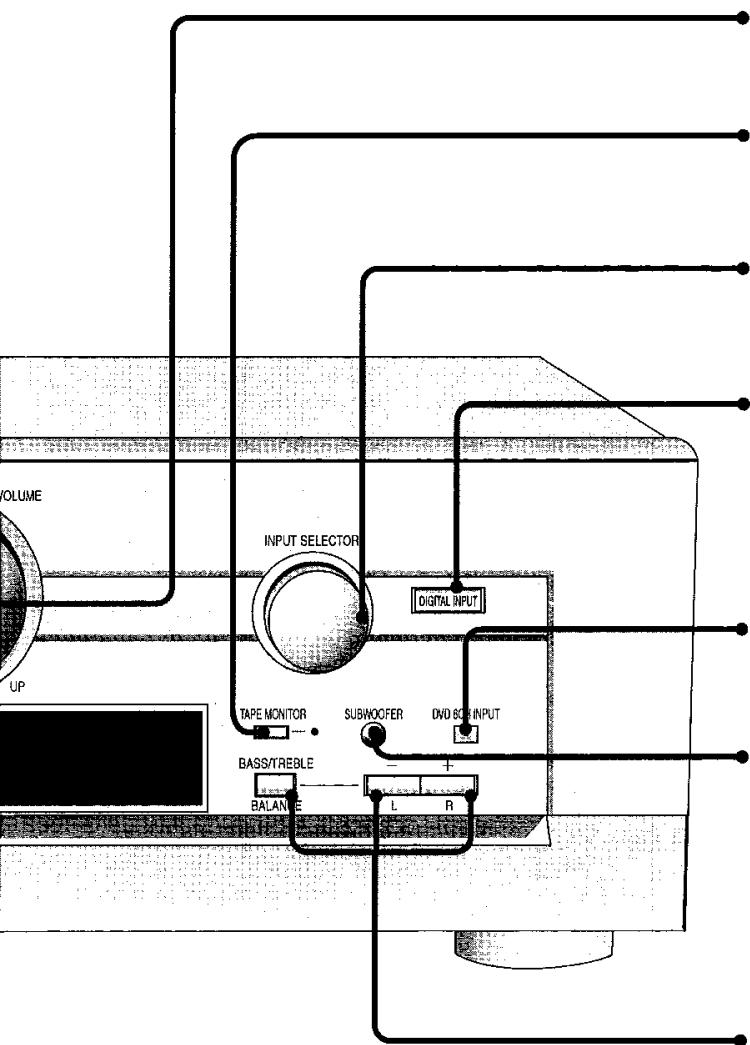
Volume control [VOLUME]
Tape monitor button/indicator [TAPE MONITOR]
For monitoring sound when recording to a 3-head cassette deck. Also used when you have connected a graphic equalizer to the TAPE terminals.
Input selector [INPUT SELECTOR]
Digital/analog input select button/indicator [DIGITAL INPUT]
For switching between analog and digital input when you have selected TV, CD, or DVD. The button lights when digital is selected.
DVD 6ch/2ch input select button [DVD 6CH INPUT]
For switching between 6-channel and 2-channel DVD input.
Subwoofer level button [SUBWOOFER]
Adjust the level in 5 steps
SW MIN, SW 5, SW 10, SW 15, and SW MAX.
Select SW --- to stop output.
Tone/balance adjust buttons
[BASS/TREBLE, BALANCE, -, +, L, R]
For adjusting the tone and balance.
First select BASS, TREBLE, or BALANCE, then press [-,-,L] or [+,R] to adjust.
Program format indicators
[L, C, R, S, SL, SR, LFE]
Show the channels contained in the digital input signal. They do not light when input is analog.
L: Front channel (left)
C: Center channel
R: Front channel (right)
S: If the surround channel is monaural.
SL: Surround channel (left)
SR: Surround channel (right)
LFE (Low Frequency Effect): Deep-bass effect.
Signal format indicators
[FIX, DIO PRO LOGIC II, PCM, dts, DIO DIGITAL]
Light depending on the source you are playing.
DIGITAL: Dolby Digital sources
dt: DTS sources
PRO LOGIC II: Analog sources in SURROUND mode
Digital sources with 2-channel signals in SURROUND mode
FIX: PCM FIX or DTS FIX mode
PCM: PCM FIX mode
For your reference
- When playing videotapes
The picture remains on the screen even if you select TAPE, CD, or TUNER.
- Once you have set a mode (DSP, digital/analog input, or 2-channel/6-channel input) for an input source
That mode is engaged whenever you reselect the input source.
- When DVD 6CH input is on
Speaker settings are ineffective. Change the settings on the DVD player if necessary.
- When input is DIGITAL
The tape monitor cannot be used.
- When using a graphic equalizer
Some distortion may occur, depending on the equalizer's settings.
- To adjust the tone
The STEREO DSP mode must be on and input must be either analog or PCM signals. You cannot adjust the tone while the DSP is defeated or if DVD 6CH INPUT is selected.
- When using the subwoofer
You cannot adjust subwoofer level while the DSP is defeated or if DVD 6CH INPUT is selected.
Sound can be distorted if you raise the volume while subwoofer level is high. Reduce subwoofer level if this occurs.
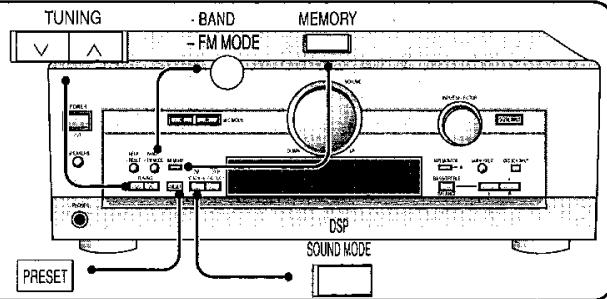
Automatic presetting
BAND FAMMOE 1 Press [O] to select "FM".
② Press [TUNNS] to tune to "FM 87.9 MHz".
③ Press and hold [B].
The FM stations the unit can receive are preset in channels 1 to 30.
4 Press [FAMODE] to select "AM".
⑤ Press [TUNING] to tune to "AM 530 kHz".
⑥ Press and hold [M E O R Y].
The AM stations the unit can receive are preset in channels 21 to 30.
(FM stations are replaced if any were preset in these channels.)
During automatic presetting, the memory indicator (M) flashes and the frequency scrolls. The memory indicator and channel numbers are displayed for a second when a station is preset.
The last station to be preset is displayed when presetting finishes.
Manual presetting
Preset the stations one at a time.
① Tune to the station.
② Press [MORY].
③ Press [TUNING] to select a channel.
④ Press [MEOHY].
Selecting channels
① Press [Preset].
The channel number flashes for about 5 seconds.
② Press [TUNING].
Hold down the buttons to change channels faster.
For your reference
Even if the power supply cord is disconnected from the household AC outlet, the stations remain in memory for approximately one month.
Improving reception
DSPDEFEAT Press and hold [ ] until "DEFEAT" appears. DSP Press and hold [ ] again to turn the DSP on.
Note
While the DSP is defeated, you cannot:
- Select DSP sound modes,
- Adjust the tone,
- Output a test signal,
- Adjust individual speaker output, or
- Use digital input.
For your reference
DVD players can interfere with radio reception. Turn the DVD player off or move it further away from the antennas if this occurs.
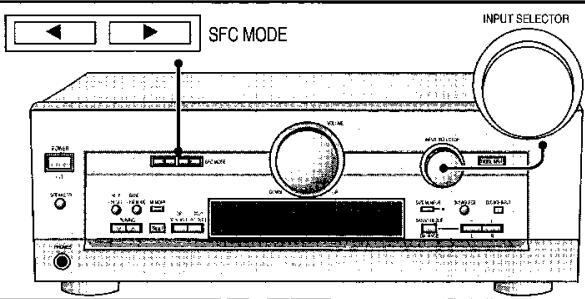
DR COMP -
Dynamic range compression
Change this setting to listen to software recorded with Dolby Digital at low volume (such as late at night) and maintain audio clarity. It reduces the peak level in loud scenes without affecting the sound field.
OFF: The software is played with the original dynamic range (factory setting).
STANDARD: The level recommended by the producer of the software for household viewing.
MAX: The maximum allowable compression (recommended for night viewing).
① Press [SFC MODE] at the same time to enter the setting mode.
② Press [SFC MODE] to select "DR-COMP".
③ Turn [ ] to select “OFF”, “STANDARD” or “MAX”.
④ Press [SFC MODE] at the same time to exit the setting mode.
DIMMER -
Dim the unit's display for better viewing in a darkened room
The factory setting is OFF (normal brightness).
① Press [SFC MODE] at the same time to enter the setting mode.
② Press [SPC MODE] to select "DIMMER".
③ Turn [ ] to select “OFF” or “ON”.
④ Press [SFG MODE] at the same time to exit the setting mode.