
AWM900S - Radio lecteur CD JENSEN - Notice d'utilisation et mode d'emploi gratuit
Retrouvez gratuitement la notice de l'appareil AWM900S JENSEN au format PDF.

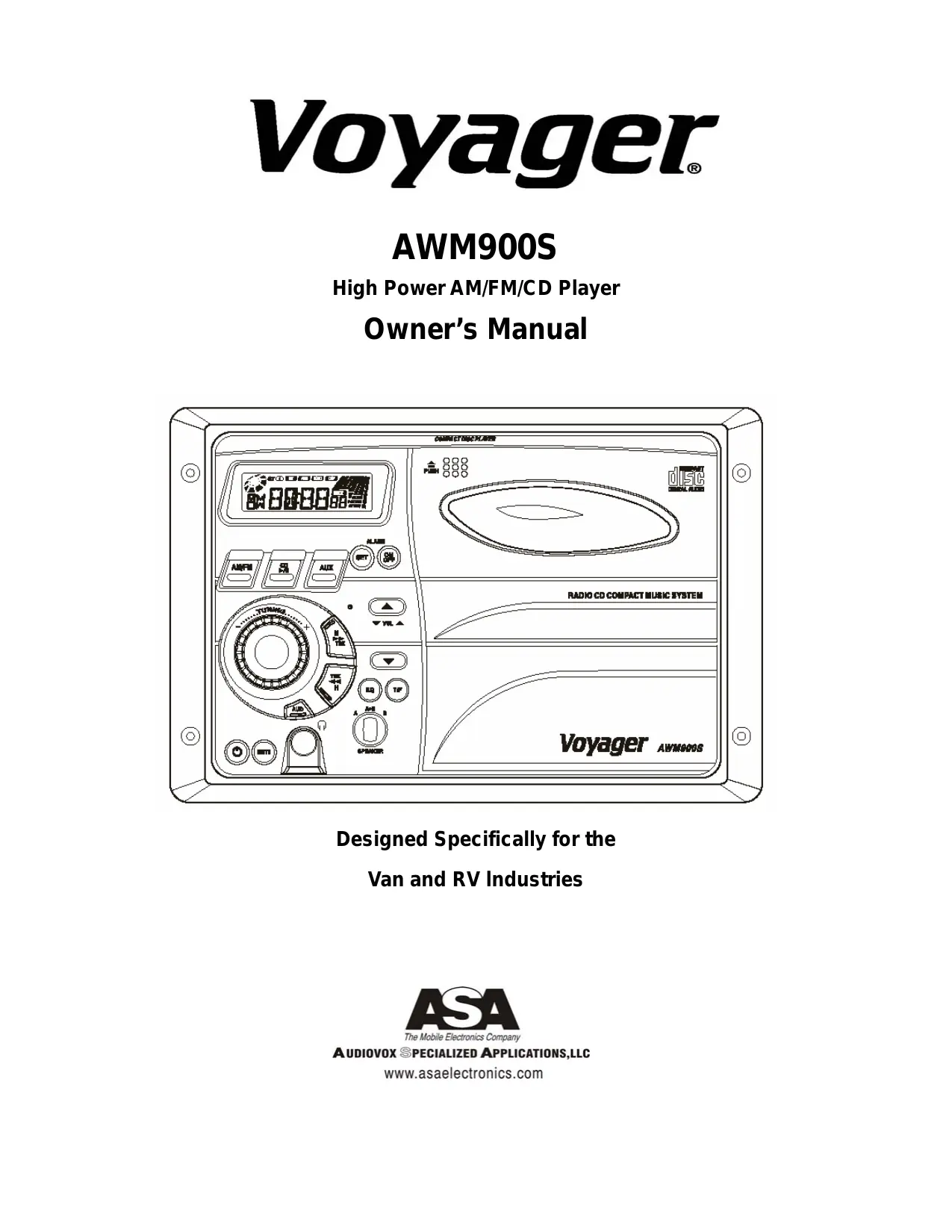
| Type de produit | Radio lecteur CD mural AM/FM |
| Marque | JENSEN |
| Modèle | AWM900S |
| Dimensions hors tout | 265 x 178 x 159 mm (L x H x P) |
| Dimensions de montage | 235 x 154 x 133 mm |
| Poids | 1,8 kg |
| Alimentation | 12 VCC (11-16 VCC) |
| Puissance de sortie | 50 W total (2 x 25 W) |
| Impédance des enceintes | 4 à 8 Ω (minimum 4 Ω) |
| Gamme de fréquences AM | 530 - 1720 kHz |
| Gamme de fréquences FM | 87,5 - 108 MHz |
| Sensibilité AM | Moins de 15 µV |
| Sensibilité FM | Moins de 2,5 µV |
| Séparation stéréo FM | Plus de 30 dB |
| Réponse en fréquence CD | 20 - 20 000 Hz |
| Rapport signal/bruit CD | 60 dB |
| Distorsion CD | 0,3 % |
| Fonctions principales | Lecteur CD, tuner AM/FM, entrée auxiliaire, horloge, alarme, égaliseur préréglé (Rock, Pop, Classique), réglages graves/aigus/balance, sorties A et B pour enceintes, prise casque |
| Affichage | Écran LCD rétroéclairé |
| Entrée auxiliaire | Prise RCA (gauche/droite) |
| Protection | Protection contre l'inversion de polarité, fusible externe |
| Entretien et nettoyage | Essuyer avec un chiffon doux et sec. Éviter l'humidité et les solvants. |
| Pièces détachées et réparabilité | Fusible remplaçable. Pour autres réparations, contacter un service agréé. |
| Garantie | 90 jours pièces et main-d'œuvre, 12 mois pièces (voir notice) |
FOIRE AUX QUESTIONS - AWM900S JENSEN
Questions des utilisateurs sur AWM900S JENSEN
0 question sur cet appareil. Repondez a celles que vous connaissez ou posez la votre.
Poser une nouvelle question sur cet appareil
Téléchargez la notice de votre Radio lecteur CD au format PDF gratuitement ! Retrouvez votre notice AWM900S - JENSEN et reprennez votre appareil électronique en main. Sur cette page sont publiés tous les documents nécessaires à l'utilisation de votre appareil AWM900S de la marque JENSEN.
MODE D'EMPLOI AWM900S JENSEN
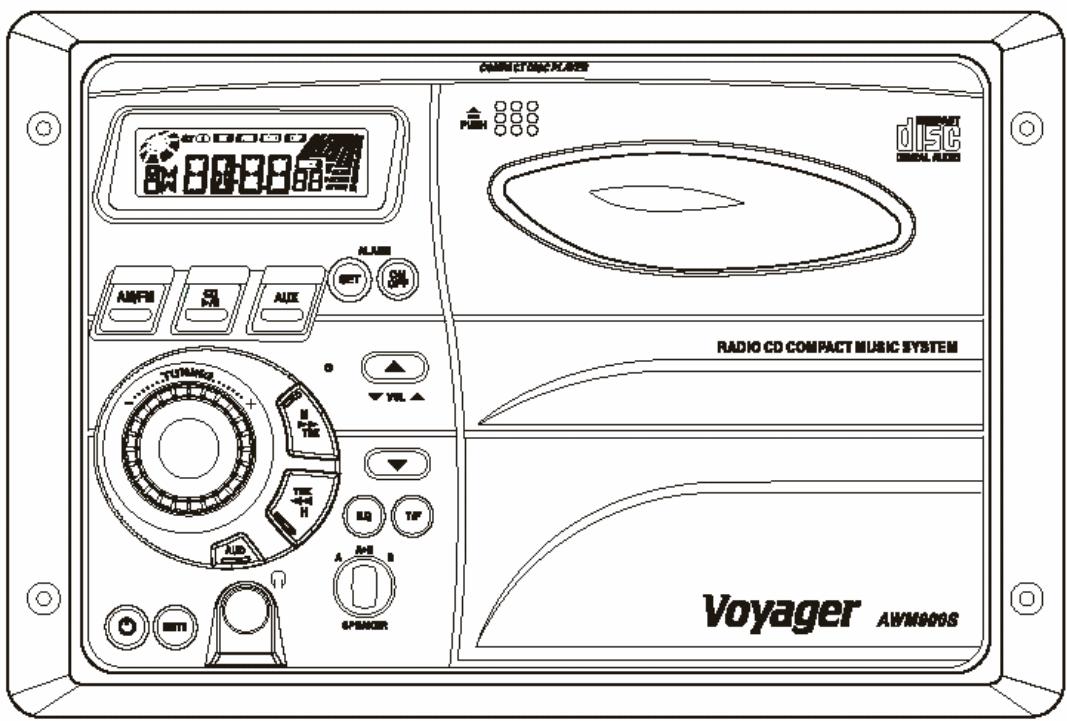
Voyager®
AWM900S
High Power AM/FM/CD Player
Owner's Manual
Designed Specifically for the
Van and RV Industries
Thank you for your purchase of the AWM900S. It is designed to give you good value and many hours of listening enjoyment. Please read this manual carefully, as it should be able to answer many of your questions about the operation and features of this product.
IMPORTANT NOTES
Avoid installing unit in locations described below:
-Places exposed to heat radiating appliances such as electric heaters
-On top of other stereo equipment that radiates too much heat
-Places lacking ventilation or dusty places
-Humid or moist places
Features:
-AM/FM Wallmount Stereo with CD Player
-Digital Display Type Tuner
- Locking Power/Speaker Connector
Clock/Alarm
-2-Channel (Left, Right with A/B Speaker Outputs)
-Auxiliary input Function
-Backlit Controls
-Reverse Polarity Protection
-50 Watts Power Output
-12VDC
-Bass/Treble
-Preset EQ (Rock, Pop, Classis)
-Alarm Defeat Switch
REAR PANEL FEATURES
-External Fuse Holder
-Main Wiring Pigtail with Locking Amp Connector (12-Pin)
-Auxiliary Input Phone Jacks (Left and Right)
Manual contents:
Page:
Features-Manual contents 2
Controls Identification 3
Operation Instructions 4-5
Hook Up Wiring Color Code 5
Installation 6
Specifications 6
Warranty Statement 7
Controls Identification:
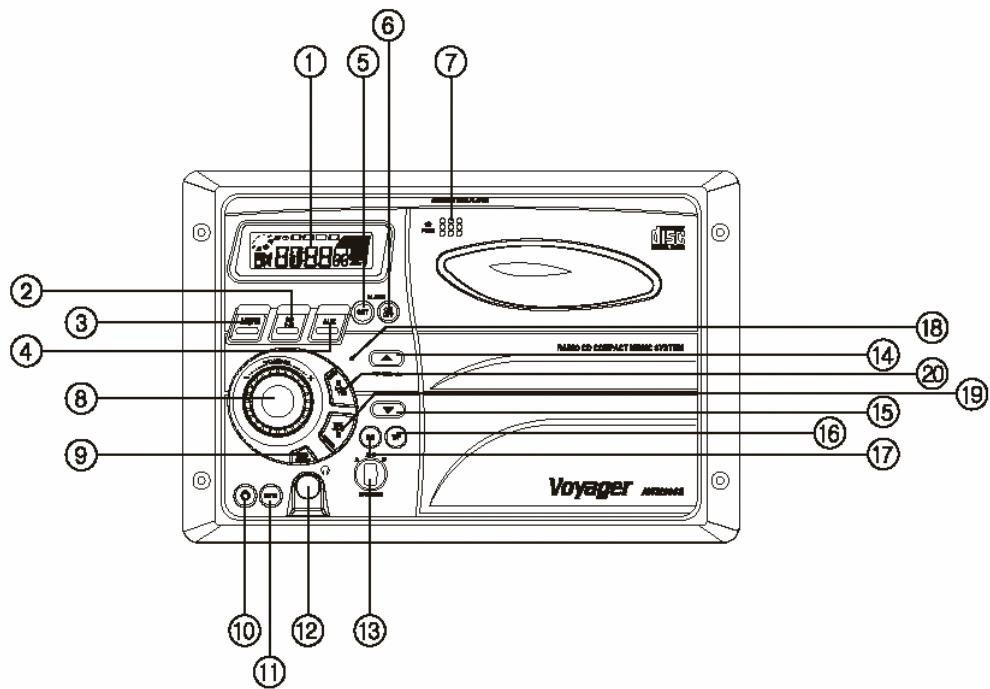
Controls Identification
1) Display Window
2) CD Play/Pause Button
3) Band(AM/FM) Button
4) AUX Selector Button
5) Alarm Set Button
6) Alarm On/Off Buttons
7) CD Eject Button
8) Radio Tuning Control
9) Audio Adjust Selector Button (Volume, Bass, Treble, Balance)
10) Power Switch
11) Mute Button
12) Stereo Headphone Jack
13) Speaker Selector
14) Volume Up Control Button
15) Volume Down Control Button
16) Time/Frequency Selector Button
17) Preset EQ Button (Rock, Pop, Classic)
18) Reset Button
19) Track Up / Minute Set Button
20) Track Down /Hour Set Button
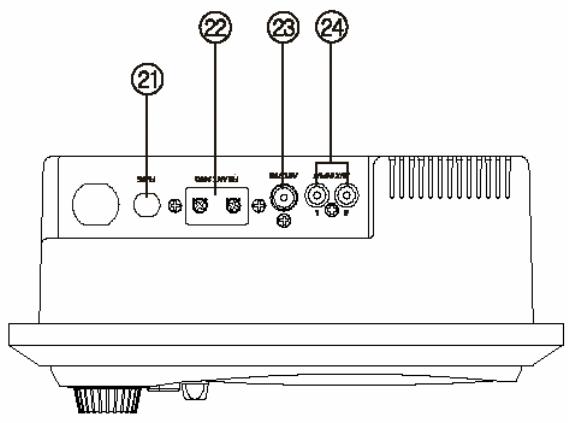
21) Fuse
22) FM Antenna Terminals
23) Car Antenna Jack- 75 Ohm
24) RCA Auxiliary Input Jacks
Operating Instructions:
NOTE: Number in parenthesis (#) corresponds with "Control Identification" on page 3.
LIQUID CRYSTAL DISPLAY PANEL
The liquid crystal display (LCD) panel displays the frequency, time and activated functions.
Note: It is characteristic of LCD panels that, if subjected to cold temperatures for an extended period of time, they will take longer to illuminate than under normal conditions. In addition, the visibility of the numbers on the LCD may slightly decrease. The LCD readout will return to normal when the temperature increases to a normal range.
TUNER
1) Turn power on by pushing the Power switch(10).
2) Use the Band Selector(3) to select either AM or FM
3) Use the Speaker Selector Switch(13) to choose speaker output
4) Use the Tuner Control(8) to select station
5) Adjust Volume Control(14 or 15) to suit taste
CD PLAYER
1) Use the Speaker Selector switch (13) to choose between speaker output, headphones or both.
2) Press the CD eject button (7) to eject any CD's that may already be in the player.
3) Press the CD Play/Pause button (the same as the CD Source Select button).
4) You may change tracks by using the Track Up or Track down buttons (19 or20).
5) To change to AM/FM or Aux. Inputs, press the corresponding button; to return to CD press the CD button.
6) To eject the CD, press the CD eject button(7).
7) CD Disc Insert Method
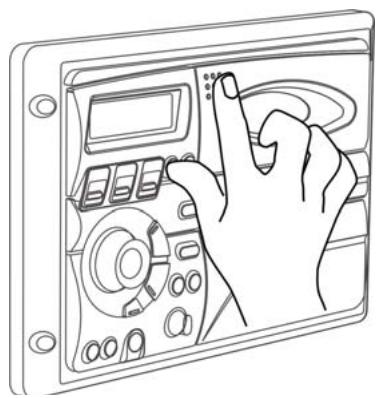
Door Open
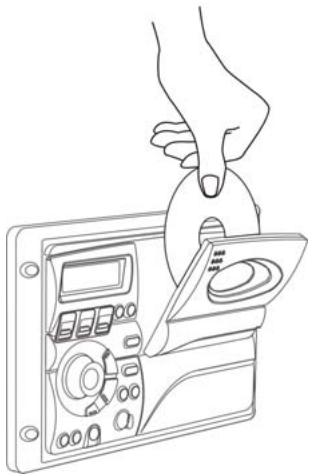
Disc Insert
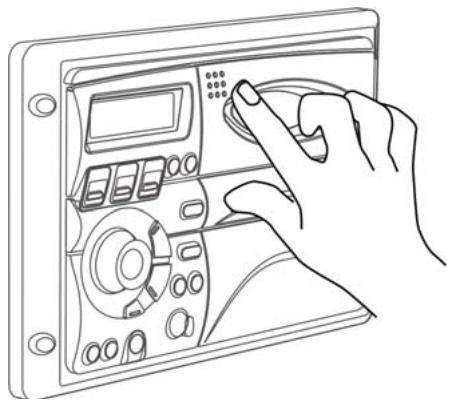
Door Close
AUXILIARY INPUT
1) Push Power Switch (10) "On".
2) Using the source Selectors (4), choose the button labeled "AUX".
3) If there is an external source (example: CD shuttle) connected to the Auxiliary Input Jacks (24) on the rear of the radio, then you can listen to your external source through the system.
SETTING THE CLOCK
1) Push Power Switch (10) "On".
2) Press the T/F button to display the clock
3) Hold the T/F button (16) and simultaneously use the H and M buttons
(19 and 20) to adjust hours and minutes.
Note: The T/F also toggles between time and radio frequency on the display.
USING THE AUDIO ADJUST BUTTON
1) You can toggle between volume, treble, bass and balance control by pressing the Audio Adjust button (9)
2) Once at the desired function, you can use the volume buttons to adjust.
SETTING THE ALARM
1) Hold the Alarm set button (5)
2) Use the H and M buttons (19 and 20) to adjust hours and minutes.
3) The alarm On/Off button (6) activates or deactivates the alarm.
BEEP FEATURE
1) Hold the Audio Adjust button to enable the beep feature (9). Lower right side of the display will display an audio symbol when this feature is turned on.
2) When this feature is on, turning different features on or off will produce two different tones, higher tone for ON and lower tone for OFF.
3) Completely removing power from the unit will turn the beep feature off.
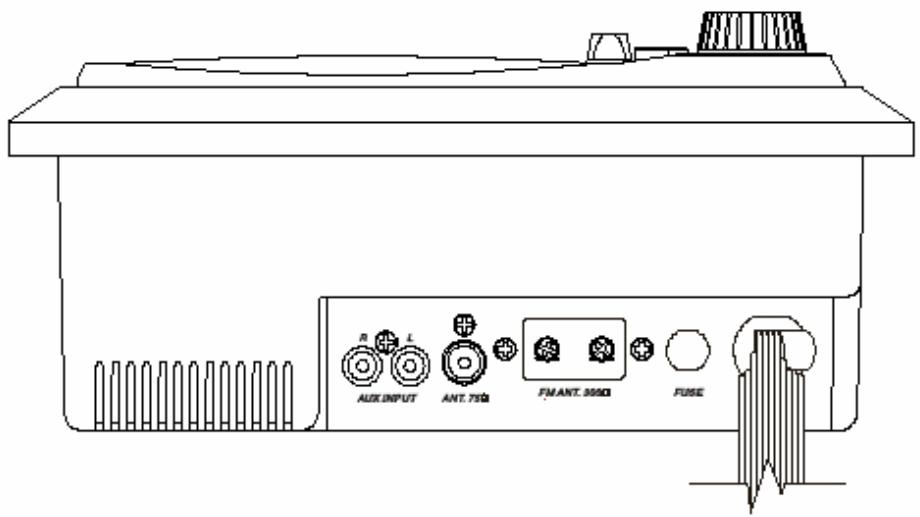
WIRING COLOR CODE
FOR AWM-900S
COLOR
ORANGE/WHITE STRIPE
GREEN/WHITE STRIPE
BLACK/WHITE STRIPE
WHITE
VIOLET
BLUE
LIGHT GREEN
RED
VIOLET/BLACK STRIPE
YELLOW
LT GREEN/BLACK STRIPE
FUNCTION
+12VDC IGNITION POWER
+12VDC BATTERY POWER
POWER GROUND (-12VDC)
LEFT (A) SPEAKER (+)
LEFT (A) SPEAKER (-)
RIGHT (A) SPEAKER (+)
RIGHT (A) SPEAKER (-)
LEFT (B) SPEAKER (+)
LEFT (B) SPEAKER (-)
RIGHT (B) SPEAKER (+)
RIGHT (B) SPEAKER (-)
Installation:
1) Cut a mounting hole in the desired location using mounting hole diagram (below) and use the four 3x20min self tapping screws provided to mount the unit.
2) Route power, speaker and antenna cables through hole and connect to unit as outlined in the Wiring Color Code diagram on the previous page.
3) After making sure connections are correct, test operation.
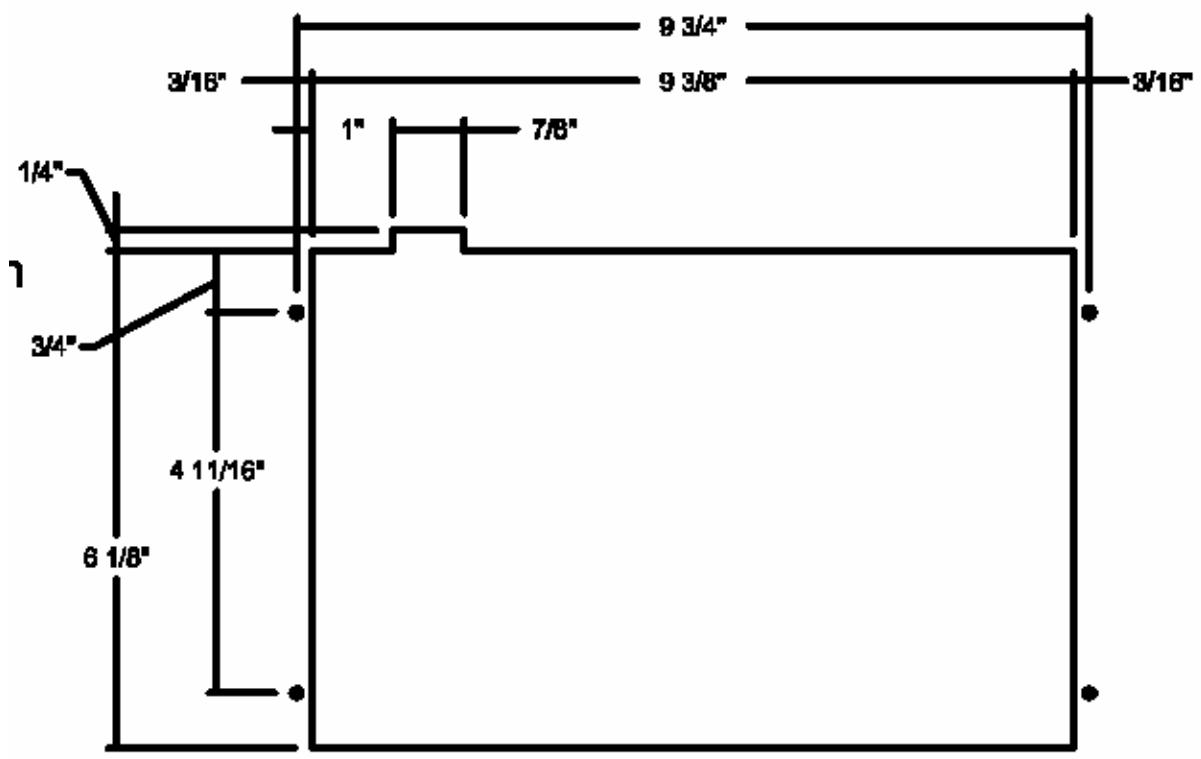
Specifications:
| Operating Voltage: | 11-16VDC |
| Output Power: | 50 Watts Total (25 Watts per Channel) |
| Output Wiring: | 2/4 speaker and Headphone System |
| Output Impedance: | Compatible with 4-8 Ohm Speakers, 4 Ohm Load Min. |
| Tuning Range: | (AM)530-1720 KHz (FM) 87.5-108 MHz |
| Sensitivity | (AM) less than 15uv (FM) less than 2.5uv |
| FM Stereo Separation: | More than 30dB |
| CD Frequency Response: | 20-20,000 Hz |
| CD Channel Separation: | 50dB |
| CD S/N Ratio: | 60dB |
| CD Distortion: | 0.3% |
| Size- | |
| Overall Size: | 10.43"(W)x7" (H)x6.26 (D) |
| 265mm(W)x178mm(H)x159mm(D) | |
| Mounting Size: | 9.25"(W)x6.05"(H)x5.25"(D) |
| 235mm(W)x154mm(H)x133mm(D) | |
| Weight: | 4 lbs.(1.8 Kg) |
WARRANTY
90 DAY / 12 MONTH LIMITED WARRANTY
AUDIOVOX SPECIALIZED APPLICATIONS, LLC (the Company) warrants to the original retail purchaser of this product that should this product or any part thereof, under normal use and conditions, be proven defective in material or workmanship within 90 days from the date of original purchase, such defect(s) will be repaired or replaced (at the Company's option) without charge for parts and repair labor. After the initial 90 day period and for a period of 12 months from the date of the original purchase, the Company will supply at no charge a replacement for any defective part(s).
To obtain repair or replacement within the terms of this warranty, the end user should contact the O.E.M. The product is to be delivered to the OEM or original place of purchase, with proof of warranty coverage (e.g. dated bill of sale, and serial number of the unit, and vin#), specification of defect(s), transportation prepaid, to an approved warranty station.
This warranty does not extend to the elimination of externally generated static or noise, to the correction of antenna problems, to costs incurred for removal or reinstallation of the product, or to damage to any tapes, cd's,DVD's, speakers, accessories, or electrical systems.
This warranty does not apply to any product or part thereof which, in the opinion of the Company, has been damaged through alteration, improper installation, mishandling, misuse, neglect, or accident. THE EXTENT OF THE COMPANY'S LIABILITY UNDER THIS WARRANTY IS LIMITED TO THE REPAIR OR REPLACEMENT PROVIDED ABOVE, AND, IN NO EVENT, SHALL THE COMPANY'S LIABILITY EXCEED THE PURCHASE PRICE PAID BY THE PURCHASER FOR THE PRODUCT.
This warranty is in lieu of all other express warranties or liabilities. ANY IMPLIED WARRANTY, INCLUDING ANY IMPLIED WARRANTY OF MERCHANTABILITY, SHALL BE LIMITED TO THE DURATION OF THIS WARRANTY. ANY ACTION FOR BREECH OF ANY WARRANTY HEREUNDER INCLUDING ANY IMPLIED WARRANTY OF MERCHANTABILITY MUST BE BROUGHT WITHIN A PERIOD OF 30 DAYS FROM THE DATE OF ORIGINAL PURCHASE. IN NO CASE SHALL THE COMPANY BE LIABLE FOR ANY CONSEQUENTIAL OR INCIDENTAL DAMAGES FOR BREECH OF THIS OR ANY OTHER WARRANTY, EXPRESS OR IMPLIED WHATSOEVER. No person or representative is authorized to assume for the Company any liability other that expressed herein in connection with the sale of this product.
Some states do not allow limitations on how long an implied warranty lasts or the exclusion or limitation of incidental or consequential damages so the above limitations or exclusions may not apply to you. This warranty gives you specific legal rights and you may also have other rights which vary from state to state.

The Mobile Electronics Company
AUDIOVox SPECIALIZED APPLICATIONS, LLC
Visit us at www.asaelectronics.com
- VOYAGER®
- IMPORTANT NOTES
- FEATURES
- REAR PANEL FEATURES
- MANUAL CONTENTS
- PAGE
- CONTROLS IDENTIFICATION
- OPERATING INSTRUCTIONS
- LIQUID CRYSTAL DISPLAY PANEL
- TUNER
- CD PLAYER
- AUXILIARY INPUT
- SETTING THE CLOCK
- USING THE AUDIO ADJUST BUTTON
- SETTING THE ALARM
- BEEP FEATURE
- WIRING COLOR CODE
- FOR AWM-900S
- INSTALLATION
- SPECIFICATIONS
- WARRANTY
- 90 DAY / 12 MONTH LIMITED WARRANTY
- AUDIOVOX SPECIALIZED APPLICATIONS, LLC
Marque : JENSEN
Modèle : AWM900S
Catégorie : Radio lecteur CD