
DGPS3-1384 - Accessoires de jeu vidéo DREAMGEAR - Notice d'utilisation et mode d'emploi gratuit
Retrouvez gratuitement la notice de l'appareil DGPS3-1384 DREAMGEAR au format PDF.


| Type de produit | Manette sans fil pour PlayStation 3 |
| Marque | DREAMGEAR |
| Modèle | DGPS3-1384 |
| Couleurs disponibles | Rouge métallique, bleu métallique, argent, noir |
| Dimensions (L x l x H) | 14.5 x 12.7 x 11.4 cm (5.7 x 5.0 x 4.5 pouces) |
| Poids (avec piles) | Environ 340 g (0.75 lb) |
| Alimentation | 3 piles AAA (non incluses) |
| Technologie sans fil | 2,4 GHz |
| Fonctions principales | Compatible Sixaxis™, double moteur de vibration, fonction turbo, bouton Menu |
| Contenu de l'emballage | Manette, récepteur USB, guide d'utilisation/carte de garantie, carte d'enregistrement |
| Pris en charge | PlayStation 3 |
| Mode veille | Automatique après 5 minutes d'inactivité ou 30 secondes sans signal |
| Indicateur de batterie faible | Voyant clignote 4 fois/seconde |
| Récepteur USB | Inclus, se branche sur un port USB de la console |
| Portée sans fil | Environ 10 mètres (sans obstacle) |
| Entretien et nettoyage | Essuyer avec un chiffon doux et sec. Ne pas utiliser de liquides ni de solvants. |
FOIRE AUX QUESTIONS - DGPS3-1384 DREAMGEAR
Questions des utilisateurs sur DGPS3-1384 DREAMGEAR
0 question sur cet appareil. Repondez a celles que vous connaissez ou posez la votre.
Poser une nouvelle question sur cet appareil
Téléchargez la notice de votre Accessoires de jeu vidéo au format PDF gratuitement ! Retrouvez votre notice DGPS3-1384 - DREAMGEAR et reprennez votre appareil électronique en main. Sur cette page sont publiés tous les documents nécessaires à l'utilisation de votre appareil DGPS3-1384 de la marque DREAMGEAR.
MODE D'EMPLOI DGPS3-1384 DREAMGEAR
Radium
Wireless
2.4 GHz wireless controller
ITEM No.- DGPS3-1384
UPC - 8 45620 01384 5
COLOR - Blue
PRODUCT DESCRIPTION
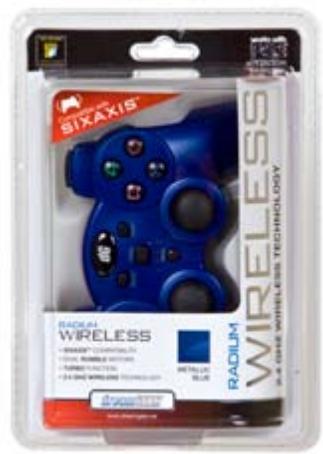
The Radium Wireless for PS3 is designed for the player who demands the best in wireless gaming. It utilizes the latest 2.4 GHZ wireless technology for latency free game play. Radium Wireless also features turbo function and ergonomic design for comfort.
PRODUCT FEATURES
- SIXAXIST™ compatibility
- Dual rumble motors
- Turbo function
2.4 GHz wireless technology
PRODUCT PACKAGING
TRANSLATIONS
| SPANISH | FRENCH | |
| PACKAGING | YES | YES |
| USER'S GUIDE | YES | YES |
| PRODUCT DIMENSIONS | ||
| HEIGHT:4.5" | WIDTH:5.7" | DEPTH:2.8" |


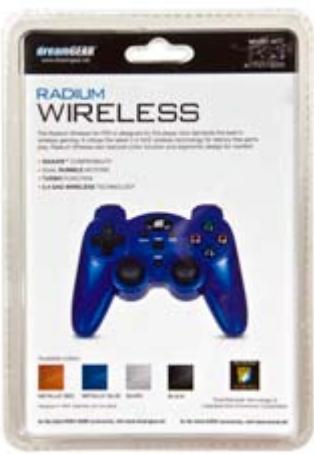
Available colors:
METALLIC RED

METALLIC BLUE

SILVER

BLACK
SHIPPING INFORMATION
| QUANTITY | WIDTH (in.) | HEIGHT (in.) | DEPTH (in.) | CUBE (ft3) | WEIGHT (lbs.) | UPC NUMBER | |
| SINGLE | 1 | 6 | 8.5 | 3.5 | 0.10 | 0.75 | 8 45620 01384 5 |
| INNER | 4 | 6.5 | 9.5 | 14 | 0.50 | 3.45 | 8 45620 01384 5 |
| MASTER | 16 | 14.25 | 19.25 | 15 | 2.38 | 15.60 | 8 45620 01384 5 |
User's Guide


PACKAGE CONTENTS:
- Radium Wireless Controller
- Radium USB Receiver
- User's Guide/Warranty Card
- Registration Card
SET-UP:
- Open the battery compartment located on the bottom side of the Radium Wireless Controller. Insert 3 "AAA" batteries. Replace battery compartment cover.
NOTE: "AA" batteries not included. Also, make sure that you use fresh batteries when playing with the Radium Wireless Controller.
- The Radium Wireless Controller features an ON/OFF switch located on the bottom side of the controller. Switch the controller to ON.
- With the PlayStation 3 console powered ON, plug the Radium USB Receiver into one of the USB ports located on the front of the PlayStation 3. The 4 channel indicator lights on the front of the Radium Wireless Controller will flash slowly.
- Press the Connect button on the Radium USB Receiver. The LED on the receiver will flash rapidly.
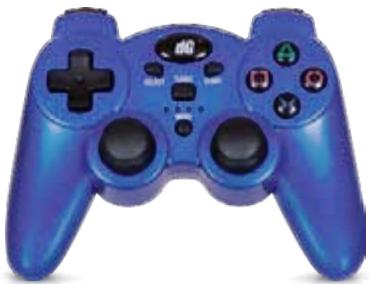
- Press the Menu button located on the front of the Radium Wireless Controller. The 4 channel indicators will flash rapidly. Press the Menu button again and the controller will be set to the appropriate channel. The solid LED will indicate which player position the controller is set to, Player 1, Player 2, etc.
- To connect multiple Radium Wireless Controllers, connect each controller separately. First, connect Player 1's controller and then connect the remaining controllers, one by one.
NOTE: During gameplay, you can access the PlayStation 3 menu by holding the Menu button for 3 seconds. Please refer to the PlayStation 3 console User's Guide to see what menu options are available.
TURBO FUNCTION:
- To activate Turbo, press any button and the Turbo button located above the 4 channel indicator lights) at the same time to set Turbo to that specific button.
- To cancel the Turbo function, repeat Step 1.
SLEEP MODE:
The Radium Wireless Controller features a Sleep Mode. The Radium Wireless Controller will enter Sleep Mode if one of the following occurs:
- If the controller loses contact with the receiver for more 30 seconds.
- 5 minutes of analog stick or button inactivity
To turn the controller on from being on Sleep Mode, simply move the analog stick or press a button on the controller.
LOW BATTERY INDICATOR:
When the batteries in the Radium Controller are lower than the standard amount needed, the LED on the 4 channel indicator lights will flash 4 times/second. If this occurs, please remove the old batteries and replace them with fresh batteries.
SIXAXISTM TECHNOLOGY:
The Radium Wireless Controller features Sixaxis™ technology, allowing it to detect natural, real-time movements, along with input via pressure sensitive buttons, analog sticks and triggers.
The Sixaxis function only works with Sixaxis compatible software. Sixaxis must be enabled in the "Options" menu of a compatible PlayStation 3 game.
NOTE: Please refer to the game's User's Guide for information on the how to use the Sixaxis technology with that specific game.

www.dreamgear.net
FOR TECHNICAL SUPPORT
PLEASE CONTACT: 1-877-999-DREAM or support@dreamgear.net