
PTV-331 DUALTV CARDBUS - Carte TV ADS TECH - Notice d'utilisation et mode d'emploi gratuit
Retrouvez gratuitement la notice de l'appareil PTV-331 DUALTV CARDBUS ADS TECH au format PDF.


| Type de produit | Carte TV PCMCIA pour réception de télévision numérique |
| Caractéristiques techniques principales | Supporte les formats DVB-T et DVB-T2, résolution jusqu'à 1080p |
| Alimentation électrique | Alimentation via le port PCMCIA, pas d'alimentation externe requise |
| Dimensions approximatives | Longueur : 12 cm, Largeur : 5 cm, Épaisseur : 1.5 cm |
| Poids | Environ 100 g |
| Compatibilités | Compatible avec Windows XP, Vista, 7, 8, 10 |
| Fonctions principales | Réception de chaînes de télévision, enregistrement vidéo, lecture de médias |
| Entretien et nettoyage | Nettoyer avec un chiffon doux, éviter l'humidité |
| Pièces détachées et réparabilité | Pas de pièces détachées disponibles, réparation non recommandée |
| Sécurité | Ne pas exposer à l'eau, utiliser dans un environnement sec |
| Informations générales utiles | Vérifier la compatibilité avec votre système avant l'achat |
FOIRE AUX QUESTIONS - PTV-331 DUALTV CARDBUS ADS TECH
Questions des utilisateurs sur PTV-331 DUALTV CARDBUS ADS TECH
0 question sur cet appareil. Repondez a celles que vous connaissez ou posez la votre.
Poser une nouvelle question sur cet appareil
Téléchargez la notice de votre Carte TV au format PDF gratuitement ! Retrouvez votre notice PTV-331 DUALTV CARDBUS - ADS TECH et reprennez votre appareil électronique en main. Sur cette page sont publiés tous les documents nécessaires à l'utilisation de votre appareil PTV-331 DUALTV CARDBUS de la marque ADS TECH.
MODE D'EMPLOI PTV-331 DUALTV CARDBUS ADS TECH
Central | Eastern | Northern Europe Office
ADS Tech GmbH
Frankfurter Straße 3b
38122 Braunschweig, Germany
WebSite: www.adstech.com/de/
Email: infogermany@adstech.com
Deutschland: 01802 000 532
UK and Ireland Office
ADS Tech
Unit 1b, Shannon Industrial Estate
Shannon, County Clare, Ireland
EUROPE: +353.61.702042

Hardware Installation
- Before plugging in the DualTV Cardbus into an open cardbus slot of your computer, make sure that the Instant TVCardbus CD is inserted into your CD ROM drive.
- Avant d'insérer la carte Dual TV Cardbus dans l'emplacement PCMCIA de votre ordinateur, assurez vous que le CD d'installation du produits est present dans votre lecteur.
- Bevor Sie die DualTV Cardbus in den freien PCMCIA Steckplatz stecken, stellen Sie sicher, daß die Instant TVCardbus CD in das CD ROM Laufwerk eingelegt ist.
- Antes de insertar la tarjeta "Dual TV Cardbus" en una de las ranuras libres de su computadora, asegúrese que el CD que contiene el software "Instant TV Cardbus" está inserto en la unidad lectora de CD.
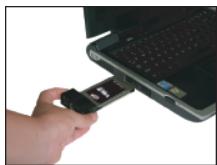
Step 1
- Locate your Notebook's open Cardbus port and insert the card into the slot.
- Repérez l'emplacement libre PCMCIA de votre ordinateur portable et insérez y la carte.
- Lokalisieren Sie ihren freien PCMCIA Steckplatz und schieben Sie die Karte in den Steckplatz.
- Localice en los laterales de su Notebook una ranura libreonde colocar su tarjeta Dual TV Cardbus e insertela con cuidado.
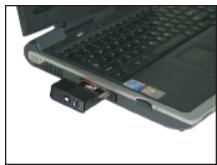
Step 2
- Push the card all the way into the slot until it is secure.
- Poussez la carte jusqu'au fond pour garantir neonne connexion.
- Schiebern Sie die Karte soweit in den Steckplatz, bis sie fest sitzt.
- Presione la tarjeta hasta que note que ha quedado asegurada.

DualTV Cardbus Drivers
- Windows will attempt to load drivers for the DualTV Cardbus automatically.
- The driver may install automatically. If the driver does not install, the Microsoft "Add New Hardware Wizard" will appear. Select "Install the Software Automatically (Recommended)" and the driver will install from the CD ROM.
-
Once the Drivers are installed, your PC will need to be restarted.
-
Windows va tenter de charger automatiquement les pilotes de la DUALTV Cardbus.
- Les pilotes peuvent s-installater automatique. Si cela ne se fait pas, l'assistant d'installation de nouveau périhérique va apparaitre. Sélectionné l'installation automatique (Recommende) et les pilotes s-installeront à partir du CD ROM.
-
Unes fais les pilotes installés, votre ordinaire doit être redémaré.
-
Windows wird versuchen die Treiber für die DualTV Cardbus automatisch zu installieren.
- Der Treiber sollte sich automatisch installieren. Falls sich der Treiber nicht automatisch installiert, erscheidt der Microsoft "Hardware Assistant". Wahlen Sie "Software automatisch installieren"(empfohlen) und der Treiber wird von der CD ROM installiert.
-
Ist der Treiber installment, muß der Computer neu gestartet werden.
-
Windows intentará cargar los Drivers para su "Dual TV Cardbus" automatístico.
- El driver deben instalarse automatistically. Si el driver no se instala, aparecerá el asistente de Windows para "Agregar Nuevo Hardware". Seleezione "Instalar el Software Automatically (Recomendado)" y el Driver sera instalado desde el CD ROM.
- Una vez que los Drivers estén instalados, su PC nécessitará ser reiniciada para que los CambiosURTAN efecto.