
DVD PACK - Lecteur dvd TRUSTMASTER - Notice d'utilisation et mode d'emploi gratuit
Retrouvez gratuitement la notice de l'appareil DVD PACK TRUSTMASTER au format PDF.


| Type de produit | Disque de dézonage DVD pour PlayStation 2 |
| Marque | TRUSTMASTER |
| Modèle | DVD PACK |
| Dimensions | Environ 13,5 x 19 x 1,5 cm (boîtier DVD standard) |
| Poids | Environ 100 g |
| Alimentation | Aucune (disque) |
| Type de support | DVD-ROM |
| Fonctions principales | Lecture de DVD de toutes zones, reconfiguration du lecteur PS2, correction de l'écran vert RGB, sélection manuelle de zone |
| Compatibilité | PlayStation 2 (tous modèles, y compris japonais) |
| Langues disponibles | Multilingue (français, anglais, allemand, espagnol, portugais) |
| Entretien et nettoyage | Essuyer avec un chiffon doux et sec. Éviter les rayures. |
| Sécurité | Conserver à l'abri de la chaleur et de l'humidité. Ne pas exposer au soleil. |
| Pièces détachées et réparabilité | Non applicable (disque non réparable) |
| Contenu de l'emballage | 1 disque DVD ZONE FREE, 1 notice d'utilisation |
| Informations générales | Ce disque permet de lire des DVD importés de toutes régions sur PS2. Configuration unique requise. |
FOIRE AUX QUESTIONS - DVD PACK TRUSTMASTER
Questions des utilisateurs sur DVD PACK TRUSTMASTER
0 question sur cet appareil. Repondez a celles que vous connaissez ou posez la votre.
Poser une nouvelle question sur cet appareil
Téléchargez la notice de votre Lecteur dvd au format PDF gratuitement ! Retrouvez votre notice DVD PACK - TRUSTMASTER et reprennez votre appareil électronique en main. Sur cette page sont publiés tous les documents nécessaires à l'utilisation de votre appareil DVD PACK de la marque TRUSTMASTER.
MODE D'EMPLOI DVD PACK TRUSTMASTER
DVD
ZONE FREE
US
DVD ZONE FREE enables you to play DVDs from all over the world and to increase the number of DVDs you are able to watch on your PS2.
Reconfiguring your system for DVD ZONE FREE DVD-playback
IMPORTANT: in order to reconfigure your PS2 DVD player so that it accepts multi-region DVDs, you will require a native zone DVD (i.e. a European zone 2 DVD) as well as a non native zone DVD (e.g. a US zone 1 DVD).
- Insert a DVD native to your console into your PS2 (i.e. a zone 2 DVD for a European console) and close the DVD-drive. The DVD will automatically begin to play.
- While the DVD is playing, press the Select button on your gamepad. The main menu screen will appear (see illustration).
- Use the D-Pad on your gamepad to highlight the Setup icon ( ) and press the X button to confirm. Language Setup will appear on your screen.
- Press Right once to highlight the Screen Setup page.
- Press Down three times to highlight Outline Sharpening. A value will be displayed alongside.
- Press the X button.
D
Mit DVD ZONE FREE konn Sie DVDs aus der ganzen Welt wiedergeben und so die Zahl der DVDs erhohen, die Sie über die PS2 anschauen konn.
Rekonfigurieren Sie Ihr System für die DVD-Wiedergabe mit DVD ZONE FREE
WHTIC: um ihren PS2 DVD-Player zu reconfiguierten, davon er multiregionale DVDs akzeptiert, benotigten Sie eine zoneneigne DVD (z.B.: eine DVD aus der Zone 2, Europa) sowie eine zonemeffrende DVD (z.B. eine DVD aus der Zone 1, den USA).
- Legen Sie die zoneneigene DVD in die PS2 ein (z.B. eine DVD aus der Zone 2 für eine europäische Konsole). Die DVD wird automatisch gestartet.
- Wrendie DvD wedergegeben wird, drucken Sie die Taste Select auf Imr Gamepad. Das Hauptmenu wird auf dem Bildschim angezeigt (siehe Abdilung).
- Wahlen Sie über das D-Pad das Symbol Einstellungen aus und drücken Sie die Taste X zur Bestätigung. Es erscheidt dann Spracheinstellungen auf dem Bildschrim.
- Drucken Sie einmal Rechts, um Bildschirmeinstellungen auszuwahlen.
- Drucken Sie Unten drei Mal, um Konturenschärfe auszuwahlen. Es wird ein Wert angezeigt.
- Drucken Sie die Taste X.
E
DVD ZONE FREE te permittedreproduir DVD de todo el mundo y augmentar el numero de DVD que puedes ver en tu PS2.
Reconfiguration de tu sistemas para la reproduccion de DVD con DVD ZONE FREE
IMPORTANTE: para reconfigurar turoducctor de DVD de PS2 para que aceite DVD multi-región, necessitaras un DVD de la zona nativa (es descriir, un DVD européico de la zona 2) asi como un DVD de la zona no nativa (es inclar, un DVD de USA de la zona 1).
- Inserta un DVD nativo de tu consola en tu PS2 (es descir, un DVD de la zona 2 para una consola europea) y cierra la unidad de DVD. El DVD comenizarà a reproducirse automatistically.
- Mentre s DVD se estreroduciendo, pulsa el boton Select en tu gamepad. Aparecerla la pantalla principal (mira la ilustracion).
- Utiliza el D-Pad en tu gamepad para marcar el icono Ajustar y pulsa el boton X para confirmar. Aparecerá SeLECTION de idioma en tu pantalla.
- Pulsa Derecha una vez para marcar la página Ajuste de la pantalla.
- Pulsa Abajo tres vezes para marcar Nitidez de contomos. Aparecerá un valor alazo.
- Pulsa el botón X.
P
DVD ZONE FREE permite-he reproduzir discos DVD de todo o mundo e aumento o numero de filmes DVD que consequence ver na sua PS2.
Reconfigurar o seuSYSTEMA para a reproducao de discos DVD pelo DVD ZONE FREE
IMPORTANT: de forma a reconfigurar o leitor de DVD da sua PS2 para que aceite discos DVD multiregios, ia precisar dum DVD da zona local (isto é, um DVD europeu da zona 2), bem como dum DVD zona não-local (por exemplo, um DVD americano da zona 1).
- Insira na sua PS2 um DVD proprio para a sua consola (isto é, um DVD da zona 2 para uma consola europeia) e fecha aunities de DVD. O DVDanagan automatamente a ser reproduzido.
- Enquanto o DVD estiver a ser reproduzido, prima o botao Select no seu gamepad. Aparecerao o eira do menu principal (ver ilustracao).
- Use a algofada digital no seu gamepad por para em evidencia o icono Configurar (1), e em seguida prima o botao X para confirmar. No seu esearapecer o menu SeLECTIONO Idiama.
- Prima uma vez o botão Direita para evidenciar a páginá Configurar Ecran.
- Prima tres vezes o botao Descer para evidenciar Avivar Contorno. Ao lado sera exibido um valor.
- Prima o botao X.
Main menu / Hauptmenu / Menu principal / Menu principal
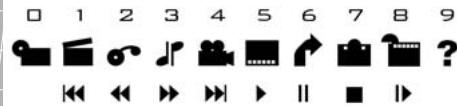

- Using the D-Pad, highlight the +2 symbol and press the X button to confirm. The value +2 should now be displayed alongside Outline Sharpening.
- Press the Select button to return to the main menu screen.
- Press the Select button again.
- Press the Eject button on your console and remove the DVD from the DVD-drive.
- Insert your DVD ZONE FREE disc into the DVD-drive.
- Press the RESET button on your PS2. DVD ZONE FREE will load.
- When the DVD ZONE FREE menu screen appears, press the Eject button on your console, and remove the DVD ZONE FREE disc.
N.B.: DO NOT ACTIVATE ANY OF THE DVD ZONE FREE FUNCTIONS AT THIS TIME!
- Insert the non-native zone DVD into your console (e.g. insert a zone 1 DVD).
- Press the X button on your gamepad to play your DVD.
N.B.: you only need to carry out this procedure once.

-
Wahlen Sie mit dem D-Pad den Wert +2 aus und drücken Sie die Taste X zur Bestätigung. Der Wert +2 wird jetzt bei Konturenscharfe angezeigt.
-
Drucken Sie die Taste Select, um zum Hauptmenu zurückzukehren.
- Drucken Sie erneut die Taste Select.
- Drucken Sie den Auswurf-Knopf auf der Konsole und behmen Sie die DVD hersa.
- Legen Sie die DVD ZONE FREE-DVD in das DVD-Laufwerk ein.
- Drucken Sie die Taste RESET auf ihre PS2, DVD ZONE FREE wird geladen.
- Drucken Sie den Auswurf-Knop auf der Konsole und denen Sie die DVD ZONE FREE-DVD Heraus, sobald das Hauptmenu von DVD ZONE FREE erscheidt.
Hinweis: AKTIVIEREN SIE JETZT NOCH KEINE DER DVD ZONE FREE-FUNKTIONEN!
- Legen Sie jetzt die zonenfremde DVD in die Konsole ein (z.B. eine DVD aus der Zone 1).
- Drucken Sie die Taste X auf dem Gamepad, um die DVD Wiedergabe zu starten.
Hinweis: Sie müssen diesen Vorgang nur einmal durchführren.

-
Utilizing el D-Pad,marca el simbolo +2 y pulsa el boton X para confirmar.Deberia mostrarse el valor +2 al lado de Nitidez de contornos.
-
Pulsa el botón Select para volver a la pantalla del menu principal.
-
Pulsa el botón Select de nuevo.
-
Pulsa el botón Eject en tu consola y quita el DVD de la unidad de DVD.
-
Inserta tu disco de DVD ZONE FREE en launidad de DVD.
-
Pulsa el botón RESET en tu PS2. Se cargará DVD ZONE FREE.
-
Cuado aprezca la pantalla del menu de DVD ZONE FREE, pulsa el boton Eject en tu consola, y quita el disco de DVD ZONE FREE.
Note: jNO ACTIVES NINGUNA DE LAS FUNCIONES DE DVD ZONE FREE EN Este MOMENTO!
- Inserta el DVD de zona no nativa en tu consola (p.e. inserta un DVD de la zona 1).
- Pulsa el botón X en tu gamepad para reproducir tu DVD.
Note: solo necessitas落户 a cabo este procedimento una vez.

-
Usando a algofa digital, evidencia o significo +2 e prima o botao X para confirmar. O valor +2 devar se agora apresentado ao lado de Aviver Contorno.
-
Prima o botão Select para regressar ao ecra do menu principal.
- Prima novamente o botão Select.
- Prima o botao Eject na sua consola e remove o DVD da respectiva unidade.
- Insira o disco de DVD ZONE FREE na sua unidade de DVD.
- Prima o botão RESET na sua PS2. DVD ZONE FREE sera carregado.
- Quando surgir o ecran do menu de DVD ZONE FREE, prima o botao Eject na sua consola, e remove o disco de DVD ZONE FREE.
Nota: NAO ACTIVE POR ENQUANTO NENHUMA DAS FUNÇOES DE DVD ZONE FREE!
- Insira na sua consola o DVD da zona não-local (por exemple, um DVD da zona 1).
- Prima o botão X no seu gamepad para reproducir o DVD.
Nota:apanas tem de efectuar este procedimento una vez.
Auto-playing your DVDs
- Insert your DVD ZONE FREE disc into your PS2.
- Press the RESET button to start the PS2.
(N.B.: if you are using a Japanese PS2 you will need to insert the memory card with your DVD player in before switching on).
- When the DVD ZONE FREE menu screen appears, remove the DVD ZONE FREE disc from the DVD-drive and insert your DVD.
- Use the D-Pad on your gamepad to select Play DVD from the menu and press the X button to confirm.
- The DVD should now start to play.
Manually resetting the disc region
If the DVD does not play using the auto-setting, you will need to manually specify the disc region.
- Use the D-Pad to move the cursor to Manual Region Select and press the X button.
- Highlight the zone of the DVD you want to play and press the X button to select.
- Return to the main menu screen and select Play DVD.
- Remove the DVD ZONE FREE disc from the DVD-drive and insert your DVD.
- Press the X button to confirm.

Auto-Wiedergabe von DVDs
- Legen Sie die DVD ZONE FREE-DVD in die Konsole ein.
- Drucken Sie die Taste RESET, um die PS2 zu starten.
(Hinweis: wenn Sie eine japanische PS2 haben, müssen Sie zuerst die Memory Card mit ihrem DVD-Player einlagen, bevor Sie die Konsole einschalten).
- Nehmen Sie die DVD ZONE FREE-DVD heraus und legen Sie ihre Video-DVD ein, wenn das Hauptmenu von DVD ZONE FREE erscheint.
- Wahlen Sie mit dem D-Pad Play DVD aus dem Menu aus und drücken Sie die Taste X zur Bestätigung.
- Die DVD wird jetzt abgespielt.
Zonen manuell einstellen
Wen die DVD mit den automatischen Einstellungen nicht abgespielt werden kann, mussen Sie die Zone manuell einstellen.
- Wahlen Sie mit dem D-Pad Manual Region Select aus und drücken Sie die Taste X.
- Wahlen Sie mit dem D-Pad die entsprechende Zone der DVD aus und drucken Sie erneut die Taste X.
- Kehren Sie zum Hauptmenu zurück und wahlen Sie mit dem D-Pad Play DVD aus.
- Nehmen Sie die DVD ZONE FREE-DVD Heraus und legen Sie ihre Video-DVD ein.
- Drücken Sie die Taste X zur Bestätigung.

Reproduccion automática de tus DVD
- Inserta tu disco de DVD ZONE FREE en tu PS2.
- Pulsa el botón RESET para arrancarla.
(Note: si estás utilizing una PS2 japonesa nécessitarás insertar la tarjeta de memoria con tu reproductor de DVD metido antes de encenderla).
- Cuado aprezca la pantalla del menu de DVD ZONE FREE, quita el disco de DVD ZONE FREE de la unidad de DVD e inserta tu DVD.
- Utiliza el D-Pad en tu gamepad para selectionar Play DVD en el menu y pulsa el botón X para confirmar.
- El DVD deveria comenzar a reproducirse.
Resetear manualmente la region del disco
Si el DVD no se reproduce utilizing el ajuste automatico, necessitaras especficar manualmente la region del disco.
- Utiliza el D-Pad para mover el cursor a Manual Region Select y pulsa el botón X.
- Utiliza el D-Pad para marcar la zona del DVD que querres reproducir y pulsa el botón X para selecciónarla.
- Vuela a la pantalla del menu principal y utilizes el D-Pad para seleccionar Play DVD.
- Quita el disco de DVD ZONE FREE de la unidad de DVD e inserta tu DVD.
- Pulsa el botón X para confirmar.

Reproduzir automaticamente os seuis discos DVD
- Insira o disco de DVD ZONE FREE na sua PS2.
- Prima o botão RESET para iniciar a PS2.
(Note: se estiver a usar una PS2 japonesa, tera de insertar o cartao de的记忆ia com o seu leitor de DVD antes de ligá-la).
3. Quando surgir o eira do menu de DVD ZONE FREE, remova o disco de DVD ZONE FREE da unidade de DVD e insira o seu DVD.
4. Use a almofada digital no seu gamepad para selecionar Play DVD a partir do menu e prima o botao X para confirmar.
5. O DVDdeferácomegar后果a ser reproduzido.
Redefinirmanualamentearegiao do disco
Se o DVD não for reproduzido using a definição automatica, tera de especificar manualmente a regiao do disco.
- Use a almofada digital para mover o cursor ate Manual Region Select e prima o botao X.
- Use a alfodada digital para evidenciar a zona do DVD que quer reproducir e prima o botao X para seleccionar.
- Regresse ao ecran do menu principal e use a almofada digital para seleccionar Play DVD.
- Remova o disco de DVD ZONE FREE da unidade de DVD e insira o seu DVD.
- Prima o botão X para confirmar.
Selecting the output cable type
Depending on the type of cable you have for your PS2, you may need to select a different output. For US, European and Australian consoles:
- Remove any discs from the DVD-drive.
- Use the D-Pad to select System Configuration and press the X button.
- Use the D-Pad to select Component Video Out and press the X button.
- If you have a Scart cable or an RCA cable (Sony cable), select RGB. If you have an S-Video cable, select Y Cb/Pb Cr/Pr. DVD ZONE FREE will use whatever settings you have set up on your PS2 to play your DVD. If you are watching your movies with an RGB Scart cable, you may have noticed a green screen, which spoils your enjoyment of your DVD. DVD ZONE FREE solves this problem and enables a high resolution picture quality. Keep your RGB cable plugged in and enjoy your movies thanks to DVD ZONE FREE!
DVD ZONE FREE FAQ
Q: The DVD ZONE FREE screen appears but when I try to start the DVD, the screen goes black or reverts back to the main Sony Screen. Why is this?
A: Make sure that you remember to swap your DVD ZONE FREE disc with your DVD. If the main Sony screen appears, DVD ZONE FREE should still be in the memory. Try putting your DVD straight into the DVD-drive.
Kabeltyp auswahlen
Je nachdem, welches Kabel Sie mit ihrer PS2 verwenden, müssen Sie eventuell einen anderen Ausgang auswahlen. Für Konsolen aus den USA, Europa und Australien:
- Entfernen Sie alle DVDs aus dem Laufwerk.
- Wahlen Sie mit dem D-Pad Systemkconfiguration aus und drücken Sie die Taste X.
- Wahlen Sie mit dem D-Pad Komponenten-Videoausgang aus und drucken Sie die Taste X.
- Wenn Sie ein Scart- oder ein RCA-Kabel (Sony-Kabel) verwendten, wahren Sie bereits RRGB. Verwendten Sie ein S-Video-Kabel, wahren Sie YCb/Ph Cr/Pr. DVD ZONE FREE蒸发 verwendet die von Ihn gewähnten Einstellungen zur Wiedergabe ihrer DVD. Wenn Sie bereits Films über ein RGB-Scart-Kabel angeschauß haben, ist ihren möglichrese aufgefallen, dass das Bild einen Grünbärstich hat. Mit DVD ZONE FREE wird dieysis Problem behoben und ein hochauflosendes Bild garantielt. Lassen Sie das RGB-Kabel grünestekt und geniellen Sie ihre DVD-Dvdsen dank DVD ZONE FREE!
FAQ ZU DVD ZONE FREE
F: Das Hauptmenu von DVD ZONE FREE erscheidt, aber wenn ich versuche, die DVD zu starten, wird der Bildschirm schwarz oder es erscheidt das Sony-Menu. Woran liegt das?
A: Vergewissen Sie sich, dass Sie die DVD ZONE FREE durch ihre DVD austauschen. Wenn das Sony-Menu erscheidt, befindet sich DVD ZONE FREE noch im Speicher. Legen Sie die Film-DVD direkt ins Laufwerk ein.
Seleccionar el tipo de cable de salute
Dependiendo del tipo de cable que tengas para tu PS2, puedeesarrearseconraruna salutedifferente Para lasconsolasdeUSAEuropa y Australia:
- Quitarialquier disco de la unidad de DVD.
- Utiliza el D-Pad para selectionar Configuracion del Sistema y pulsa el boton X.
- Utiliza el D-Pad para selectionar Salida de Componentes de Imagen y pulsa el botón X.
- Si tiene un cable Scart o RCA (cable Sony), selección RGB. Si tiene un cable S-Video, selección Y Cb/Pb Cr/Pr. DVD ZONE FREE utilizes los ajustes que hayas configurado en tu PS2 pararoducirre tu DVD. Si estás viendo tuspelillas con un cable RGB Scart, quías hayas observado una Pantalla verde, que estropea el disrute de tu DVD. DVD ZONE FREE RESUEVA este problema y actúa una calidad de imagen de alta resolution. Mantén connectado tu cable RGB y disruta de tuspelillas清爽as a DVD ZONE FREE!
FAQ DE DVD ZONE FREE
P: La pantalla de DVD ZONE FREE aparece, pero cuando intento arrancar el DVD, la pantalla se pone negra o vuelve a la pantalla de Sony. Por que ocurre this?
R: Comprueba que intercambiarias tu disco de DVD ZONE FREE con tu DVD. Si aparece la pantalla de Sony, DVD ZONE FREE dever泣 ester en memoria. Intenta poder tu DVD directamente en la unidad de DVD.
Selecciónaroodoede cabode saida
Dependendo do tipo de cabo que possui para sua PS2, poder ter de selecionar uma saida diferente. Para as consolas americanas, europeias e australianas:
- Remova quaisquer discos da unidade de DVD.
- Use a alcôfada digital para selecionar Configuração do Sistema e prima o botão X.
- Use a alnofada digital para seleccionar Componente Saia Video e prima o botao X.
- Se tem um cabo Scart ou um cabo RCA (cabo Sony), selecione RGB. Se possui um cabo S-Video, selecione Y Cb/Pb Cr/Pr: DVD ZONE FREE utilizes a quisaker definicao que tenajitado na sua PS2 para reproduir os discos DVD. Se estiver a ver os seu Films com um cabo Scart RGB, é posivel que tenha notado um eira verde, que estraga o prazer que os seu DVDs lhe proporcionam. DVD ZONE FREE resolves este problema e permite uma qualidade de imagem de alta resolution. Conserve o seu cabo RGB ligado e aprecise os seu Films gratas a DVD ZONE FREE!
PERGUNTAS MAIS FREQUENTES SOBRE DVD ZONE FREE
P: O ecra de DVD ZONE FREE aparece, mas, quando tento iniar o DVD, o ecra fica preto ou regressa ao ecra principal da Sony. Por que e que isto aconcece?
R: Asseguere- que no não esquece de trocar o disco de DVD ZONE FREE com o do seu DVR. Se aparecer o escrta principal da Sony, ento é porque DVD ZONE FREE ainda devar e na memoria. Tente colocar o seu DVR directamente na区内e de DVR.
Q: Why do I still get the message that this disc will not play due to regional differences when trying to use DVD ZONE FREE?
A: Ensure the initializaton process has been done first. See Reconfiguring your system for DVD ZONE FREE-DVD-playback.
Q: Can I play other imported items such as games as well as DVDs?
A: No, DVD ZONE FREE is intended for playing imported DVDs only.
Q: Does DVD ZONE FREE play with RCE protected movies?
A: DVD ZONE FREE plays all region movies released to date, including RCE titles.
Q: Can I play more than one movie?
A: DVD ZONE FREE should remain in the memory as long as you don't press the RESET button or turn off the power. You should be able to play as many movies as you like by simply changing the disc. Of course, if for some reason this fails, simply re-insert the DVD ZONE FREE disc and press RESET.
Q: Does DVD ZONE FREE solve the "Green Screen" problem with RGB Scart?
A: Yes, DVD ZONE FREE will solve this problem provided that your PS2 is set to RGB mode.
Q: Why does my PAL television roll when playing an American DVD?
A: This means that your TV is not capable of displaying a 60Hz signal. You need to use a 60Hz compatible TV. All US movies are 60Hz and this is not due to a fault with DVD ZONE FREE.
Gullernt 202. h t i t t t t t t t t t t t t t t t t t t t t t t t t t t t t t t t t t t t t t t t t t t t t t t t t t t t
Warum erhalte ich trotz DVD ZONE FREE immer noch die Meldung, dass die eingelegte DVD nicht abgeschweit werden kann, weil die DVD aus einer anderen Zone kommt?
A: Vergewissem Sie sich, dass Sie die Initialisierung durchgeführten haben.esen Sie dazu den entsprchenden Abschnitt Rekonfigurieren Sie Ihr System für die DvS-Wiedergabe mit DVD ZONE FREE.
F: Kann ich auch andere importierte Dinge außer DVDs abspielen, beispielsweise Sipele?
A: Nein, mit DVD ZONE FREE konnen nur importierte DVDs abgespielt werden.
F: Spielt DVD ZONE FREE auch durch RCE geschützte Filme ab?
A: DVD ZONE FREE spielt alle zonengebundenen Filme und durch RCE geschutzte Filme ab, die bis heute veroffentlicht werden.
F: Kann ich mehr als einen Film abspielen?
A: DVD ZONE FREE verblebt solange im Speicher der Konsole, bis Sie RESET drucken oder die Konsole aussalten. Sie können daher so many Freleme wedergeben, wie Sie mogen. Stolle das aus irgenendem Grund nicht möglich sein, dann lengen sie auch die DVD ZONE FREE-DVD ein und drucken SiE RESET.
F:Lost DVD ZONE FREE das Problem gruner Bildschim* mit RGB-Scart?
A:Ja, DVD ZONE FREE lost these Problem. Voraussetzung hierfur ist, dass ihre PS2 im RGB-Modus ist.
F: Warum fimmert das Bild auf meinem PAL-Fernseher, wenn ich eine DVD aus den USA abspiee?
A: Ihr Femschem kann kein 60 Hz-Signal darstellen. US-Filme sind in 60 Hz und konnen nur auf entsprechenden kompatiblen Femschem wedergegeben werden. Das Fimmern liegt nicht an DVD ZONE FREE.
Gumifertion Co 2002. 1
P: Por que sigo reciendo el mensaje de que es disco no puede reproducirse bajo a diferencias regionales cuando intento aplicar DVD ZONE FREE?
R: Comprueba que has hecho primer el proceso de initalizacion. Mira Reconfiguracion de tu systema para la reproduccion de DVD con DVD ZONE FREE.
P: Puedo reproducir 或s productos importados, como juegos, al igual que los DVD?
R: No, DVD ZONE FREE solo es para reproducir DVD importados
P: DVD ZONE FREE reproduce pelliculas protegidas con RCE?
R: DVD ZONE FREE reproduce todas laspelliculas de regiones publicadas hasta la fecha, incluyendo titulos RCE.
P: Puedo reproducir mas de una pellicula?
R: DVD ZONE FREE deberta permanecer en memoria hasta que pulsares el boton RESET o apagas la consola. Deberias poder reproducir todas las pelliculas que queras simplementar Cambiano el disco. Por supesso, si por una nintho这样的话 false, simplemente volver a insertar el disco de DVD ZONE FREE y pulsa RESET.
P: DVD ZONE FREE resuelve el problema de la "Pantalla Verde" con RGB Scart?
R: Si, DVD ZONE FREE resolvera este problema siempre que tu PS2 este puesta en modo RGB.
P: Por que mi television PAL se distorsiona cuando reproduce un DVD americano?
R: Esto significa que tu TV no es capaz de encontrar una SERIAL de 60Hz .Necetas aplicaruna TV compatible con 60Hz .Todas las plicables de USA son de 60Hz yesto no es debu a un fallo de DVD ZONE FREE.
Gullerton Corporation 2022. Thrustmaster® es una marca commercial regidte de Gullerton Corporation S.A. (PlayStation) 50 one and los symbios de PlayStation® enmarques comarcas e/pormarcs y enmarques con la prioridad de la totalidad de su totalidad.
P: Por que é que continua a receber a mensagem de que este disco não sera reproduzido devido a dificenças regionais quando tento usar DVD ZONE FREE?
R: Certifque-se de que o processo de iniciazao foi feito primeiro. Ver Reconfigurar o seu systema para a reproducao de discos DVD belo DVD ZONE FREE.
P: Posso reproducir outros itens importados,ais como jogos,da mesma forma que faço com os DVD?
R: Nao, DVD ZONE FREE destino-se unicamente a reproduzir discos DVD importados.
P: Sera que DVD ZONE FREE funciona com filmes protegidos com o Sistema RCE?
R: DVD ZONE FREE reproduz os filmes de todas as regoes lancaos ate a data, incluindo titulos protegidos com o systema RCE.
P: Posso reproducir mais do que um这部电影?
R: DVD ZONE FREE deter permane necar memoria en quinto no prem o bolo REDE or dgalar alalacion. Devera comer reproducir tantos filmes quantes quiser simplesmente mudado do disco. Oviblemente, se por algo rasa lofo istao falhar,esta voltar a insero o disco DEVDONE FREER e premir SETR2
P: Sera que DVD ZONE FREE resolve o problema do "ecra verde" com um cabo Scart RGB?
R: Sim, DVD ZONE FREE resolvera este problema desde que a sua PS2 esteja ajustada para o modo RGB.
P: Por que é que a imagem no meu televisor PAL rola quando reproduzoo um disco DVD americano?
R: Isto significa que a sua TV no é capaz de exibir um sinal de 60Hz .Precia de usar una TV competivel con sinal de 60Hz .Todos os filnes americanos sào a 60Hz por consecuente sono não se prende con una falha de DVD ZONE FREE.
Gulif 2002.
- DVD
- ZONE FREE
- US
- D
- E
- P
- Main menu / Hauptmenu / Menu principal / Menu principal
- N.B.: DO NOT ACTIVATE ANY OF THE DVD ZONE FREE FUNCTIONS AT THIS TIME!
- Hinweis: AKTIVIEREN SIE JETZT NOCH KEINE DER DVD ZONE FREE-FUNKTIONEN!
- Note: jNO ACTIVES NINGUNA DE LAS FUNCIONES DE DVD ZONE FREE EN Este MOMENTO!
- Nota: NAO ACTIVE POR ENQUANTO NENHUMA DAS FUNÇOES DE DVD ZONE FREE!
- Auto-playing your DVDs
- Manually resetting the disc region
- Auto-Wiedergabe von DVDs
- Zonen manuell einstellen
- Reproduccion automática de tus DVD
- Resetear manualmente la region del disco
- Reproduzir automaticamente os seuis discos DVD
- Redefinirmanualamentearegiao do disco
- Selecting the output cable type
- DVD ZONE FREE FAQ
- Kabeltyp auswahlen
- FAQ ZU DVD ZONE FREE
- Seleccionar el tipo de cable de salute
- FAQ DE DVD ZONE FREE
- Selecciónaroodoede cabode saida
- PERGUNTAS MAIS FREQUENTES SOBRE DVD ZONE FREE
Marque : TRUSTMASTER
Modèle : DVD PACK
Catégorie : Lecteur dvd