
BUNDLE 250 - Enceinte audio sans fil SONOS - Notice d'utilisation et mode d'emploi gratuit
Retrouvez gratuitement la notice de l'appareil BUNDLE 250 SONOS au format PDF.


| Type de produit | Enceinte audio sans fil (pack multiroom) |
| Modèle | Bundle 250 |
| Marque | Sonos |
| Composants inclus | ZonePlayer 90 (ZP90), ZonePlayer 120 (ZP120), Contrôleur 200 (CR200) avec socle de charge |
| Technologie sans fil | SonosNet 2.0 (réseau maillé) |
| Nombre de zones prises en charge | Jusqu'à 32 |
| Amplificateur intégré (ZP120) | 55 W par canal, classe D |
| Sorties audio (ZP90) | Numérique (optique), analogique RCA |
| Méthode de contrôle | Contrôleur tactile CR200, application iPhone/iPad, logiciel PC/Mac |
| Sources musicales prises en charge | Bibliothèque musicale locale, radio Internet (25 000+ stations), services de streaming en ligne |
| Compatibilité | iTunes, iPod, CD, services musicaux en ligne |
| Alimentation | 110-240 V CA, 50-60 Hz (adaptateur secteur fourni) |
| Batterie du contrôleur | Lithium-ion haute capacité, rechargeable via socle |
| Mises à jour logicielles | Automatiques et gratuites (via Internet) |
| Entretien et nettoyage | Essuyer avec un chiffon doux et sec. Ne pas utiliser de produits abrasifs ou de liquides. |
| Sécurité | Ne pas exposer à l’humidité, à la pluie ou à des températures extrêmes. Respecter les consignes de branchement. |
| Pièces détachées et réparabilité | Pièces détachées disponibles via le service client Sonos. Indice de réparabilité non communiqué. |
| Installation | Simple, sans câblage mural : brancher un ZonePlayer au routeur, les autres fonctionnent sans fil. |
| Extension possible | Ajout de ZonePlayers et contrôleurs supplémentaires sans fils. |
FOIRE AUX QUESTIONS - BUNDLE 250 SONOS
Questions des utilisateurs sur BUNDLE 250 SONOS
0 question sur cet appareil. Repondez a celles que vous connaissez ou posez la votre.
Poser une nouvelle question sur cet appareil
Téléchargez la notice de votre Enceinte audio sans fil au format PDF gratuitement ! Retrouvez votre notice BUNDLE 250 - SONOS et reprennez votre appareil électronique en main. Sur cette page sont publiés tous les documents nécessaires à l'utilisation de votre appareil BUNDLE 250 de la marque SONOS.
MODE D'EMPLOI BUNDLE 250 SONOS
Sonos Bundle 250
BU250
Everything you need to start playing music in every room...wirelessly.
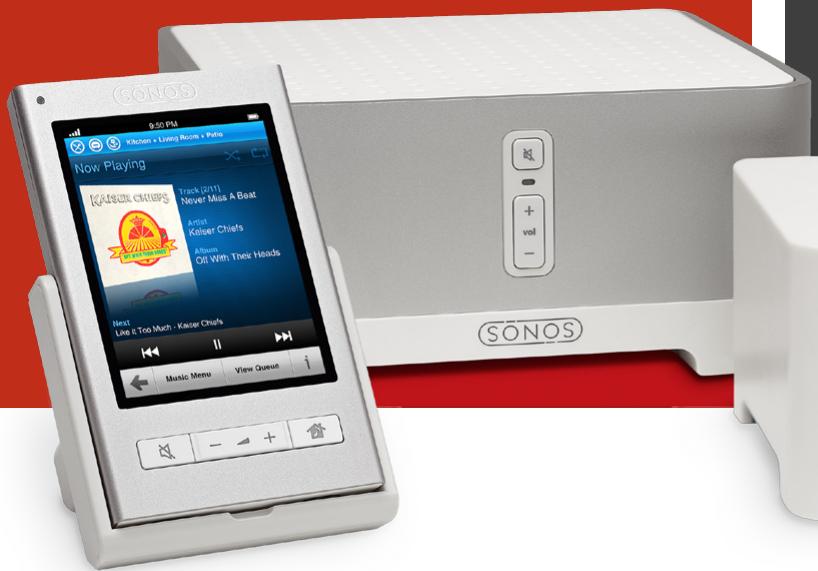
The Sonos® Bundle 250 is the best way to get started with Sonos. In one convenient and cost-effective package you'll have two ZonePlayers™ and a touch screen Controller so you can wirelessly find and play music in any two rooms of your house. And when you're ready to expand, you can add more ZonePlayers and Controllers without adding wires.
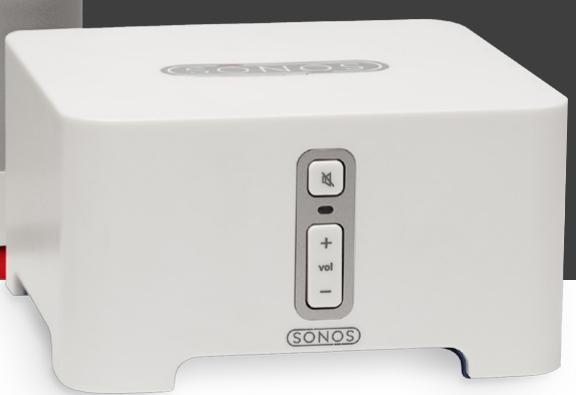
Setup couldn't be easier. Just connect the ZonePlayer 90 (ZP90) to your home theater or stereo and place the ZonePlayer 120 (ZP120) with built-in amplifier in any room where you want music. Connect one ZonePlayer or ZoneBridge™ (sold separately) to your network and all the rest work wirelessly. Now pick up the full-color wireless Controller and it's instantly on, ready to play music. You'll have access to your entire music library, including iTunes®, plus over 25,000 free Internet radio stations, and the most popular online music services to play all over the house. Simply pick a room, pick a song and touch play!
Key Features
- Convenient and cost-effective way to get started
- Best-in-class wireless technology for multi-room music
- Instant access to endless music
Control your music and rooms any way you want - Simple setup and expansion
- New features and music services with automatic updates

Convenient & cost-effective way to get started
The Sonos Bundle 250 gives you everything you need to play and control music in two rooms of your house. In addition to the Sonos Controller, complete with Charging Cradle, we included both of our ZonePlayers, one amplified and one not, so you can add music to rooms with and without existing audio equipment. And, as an added incentive, we've made the price of a bundle almost 17% less than the sum of the individual products.
Best-in-class wireless technology for multi-room music
SonosNet™ 2.0, our latest wireless mesh network technology, provides double the wireless range* for whole-house coverage, ensures synchronous music playback, and avoids sources of wireless interference. All without a massive wiring project.

Instant access to endless music
Find and play songs from your personal music library stored on your computer, plus thousands of free Internet radio stations. Sonos also works seamlessly with the most popular music services so you can stream millions of songs and stations from the Internet to the rooms of your choice. You can even connect ZonePlayers to your favorite audio source such as an iPod® or CD player and listen throughout your house.

Control your music and rooms any way you want
Sonos gives you the freedom to control your system however you want — with the dedicated Sonos Controller 200, the free Sonos Controller for iPhone™ app or the Sonos Controller for Mac or PC that's included with every Sonos system. Use one Controller for the entire house or mix and match Controllers for the ultimate in flexibility.
Simple setup and expansion
No technical or wiring expertise required. No need to break through walls or re-wire the house. A high-speed Internet connection and router are all you need. One ZonePlayer or ZoneBridge must be connected to the router and all the rest work wirelessly. Add more ZonePlayers and Controllers without adding wires.

New features and music services with automatic updates
With free automatic software updates you'll always have the newest features and music services to enjoy. Which means your system will keep getting better even after you buy.
*Based on a comparison between a site using only SonosNet 1.0 products versus a site using only SonosNet 2.0 products. Actual range will vary with site conditions.
THE SONOS BUNDLE 250 INCLUDES:
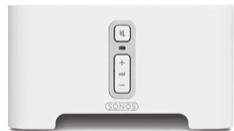
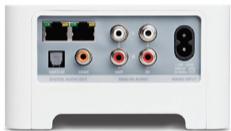
Sonos ZonePlayer 90 (ZP90)
- Connect to your home theater receiver, stereo system or any other amplified audio device
- Enjoy superior audio quality with digital output
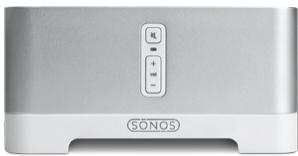
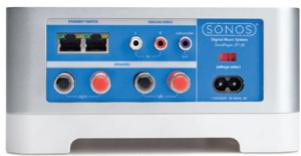
Sonos ZonePlayer 120 (ZP120)
- Connect to speakers and the high-performance, built-in 55W per channel amplifier does the rest
- Power large or small speakers with superior audio quality
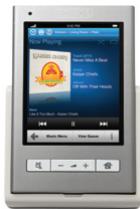
Sonos Controller 200 (CR 200)
- Wirelessly control all your music and ZonePlayers at the touch of a finger
- Pick it up or touch the screen and it's instantly on, ready to play your music
- Includes a Sonos Charging Cradle and high-capacity removable battery

All the music you want. All over your house.
- Sonos Bundle 250
- BU250
- Everything you need to start playing music in every room...wirelessly.
- Key Features
- Convenient & cost-effective way to get started
- Best-in-class wireless technology for multi-room music
- Instant access to endless music
- Control your music and rooms any way you want
- Simple setup and expansion
- New features and music services with automatic updates
- THE SONOS BUNDLE 250 INCLUDES:
- Sonos ZonePlayer 90 (ZP90)
- Sonos ZonePlayer 120 (ZP120)
- Sonos Controller 200 (CR 200)
Marque : SONOS
Modèle : BUNDLE 250
Catégorie : Enceinte audio sans fil