
JK-18 - Réveil numérique IROX - Notice d'utilisation et mode d'emploi gratuit
Retrouvez gratuitement la notice de l'appareil JK-18 IROX au format PDF.

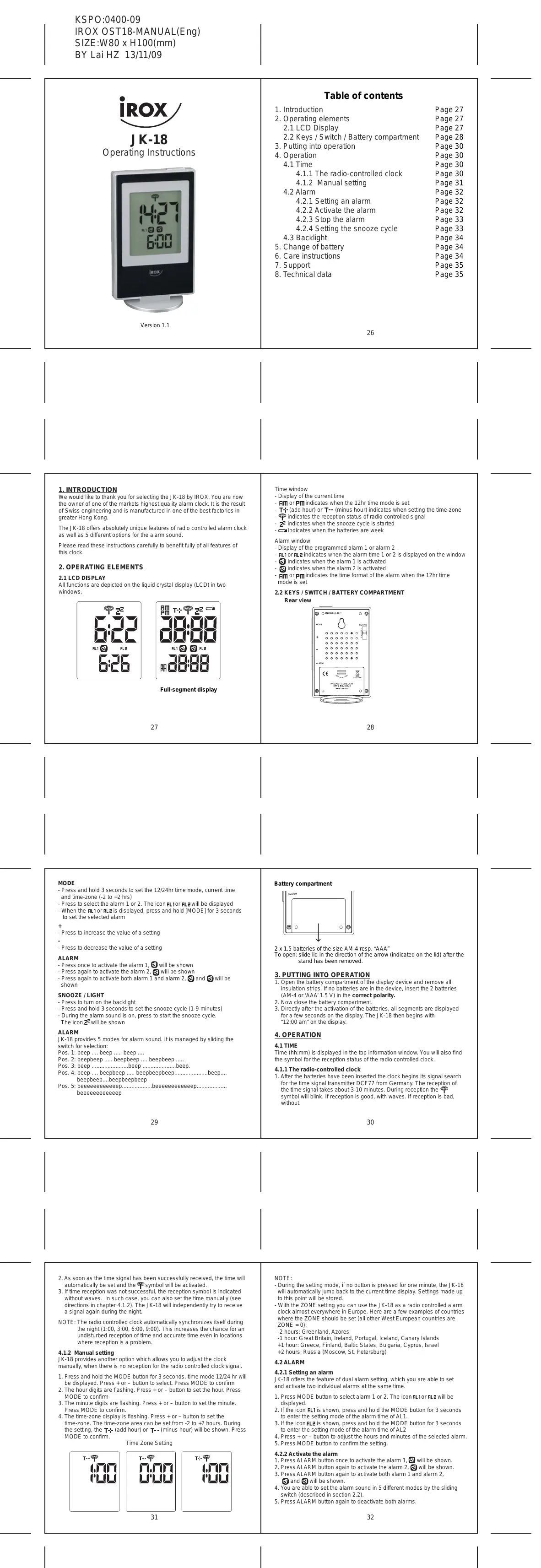
| Type d'appareil | Réveil numérique |
| Affichage | Écran LCD à segments |
| Dimensions | 80 x 100 mm (L x H) |
| Alimentation | 2 piles AA 1,5 V |
| Fonction radio-contrôlée | Oui |
| Réglage manuel de l'heure | Oui |
| Fuseaux horaires | Réglage manuel possible |
| Alarme | 2 alarmes programmables |
| Fonction snooze | Oui, cycle de répétition de 1 à 9 minutes |
| Mode 12/24 heures | Oui, sélectionnable |
| Indicateur de pile faible | Oui |
| Rétroéclairage | Oui, activable |
| Signal sonore alarme | 5 modes différents |
| Changement des piles | Compartiment à l'arrière |
| Matériau du boîtier | Non précisé |
| Poids | Non précisé |
| Garantie | Non précisé |
FOIRE AUX QUESTIONS - JK-18 IROX
Questions des utilisateurs sur JK-18 IROX
0 question sur cet appareil. Repondez a celles que vous connaissez ou posez la votre.
Poser une nouvelle question sur cet appareil
Téléchargez la notice de votre Réveil numérique au format PDF gratuitement ! Retrouvez votre notice JK-18 - IROX et reprennez votre appareil électronique en main. Sur cette page sont publiés tous les documents nécessaires à l'utilisation de votre appareil JK-18 de la marque IROX.
MODE D'EMPLOI JK-18 IROX

JK-18
Operating Instructions
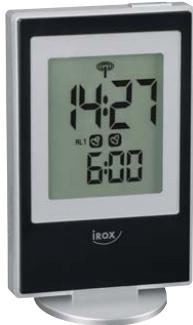
Version 1.1
Table of contents
- Introduction
- Operating elements
2.1 LCD Display
2.2 Keys / Switch / Battery compartment 3. Putting into operation - Operation 4. Operation
4.1 Time
4.1.1 The radio-controlled clock
4.1.2 Manual setting
Alarm
4.2.1 Setting an alarm
4.2.2 Activate the alarm 1.0.0.0 - True - False
4.2.3 Stop the alarm 4.2.4 Set the alarm
4.2.4 Setting the snooze cycle
Backlightrange of bo
- Change of battery
- Care instructions
- Support 8. Technical
- Technical data
Page 27
Page 27
Page 27
Page 28
Page 30
Page 30
Page 30
Page 30
Page 31
Page 32
Page 32
Page 32
Page 33
Page 33
Page 34
Page 34 Page 34
Page 34 Page 35
Page 35 Page 35
Page 35
1. INTRODUCTION
We would like to thank you for selecting the JK-18 by IROX. You are now the owner of one of the markets highest quality alarm clock. It is the result of Swiss engineering and is manufactured in one of the best factories in greater Hong Kong.
The JK-18 offers absolutely unique features of radio controlled alarm clock as well as 5 different options for the alarm sound.
Please read these instructions carefully to benefit fully of all features of this clock.
2. OPERATING ELEMENTS
2.1 LCD DISPLAY
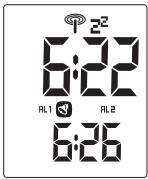
All functions are depicted on the liquid crystal display (LCD) in two windows.
26
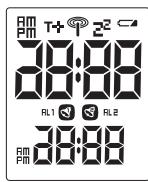
Full-segment display
27
Time window
- Display of the current time
- HMI or PM indicates when the 12hr time mode is set
- T+ (add hour) or T- (minus hour) indicates when s
FIG. 3. (a) The response of radio controlled signal to the CO2 concentration at 100mV . (b) The response of radio controlled signal to the CO2 concentration at 100mV .
2 indicates when the snooze cycle is stc 4 Indicates when the batteries are week
Alarm window
- Display of the programmed alarm 1 or alarm 2
- RL1 or RL2 indicates when the alarm time 1 or 2 is displayed on the window
- S indicates when the alarm 1 is activated
- S indicates when the alarm 2 is activated
- PM or PM indicates the time format of the alarm when the 12hr time
mode is set
2.2 KEYS / SWITCH / BATTERY COMPARTMENT
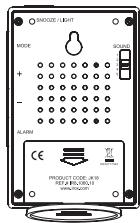
28
MODE
- Press and hold 3 seconds to set the 12/24hr time mode, current time and time-zone (-2 to +2 hrs).
- Press to select the alarm 1 or 2. The icon RL1 or RL2 will be displayed when the alarm is set.
- When the RL1 or RL2 is displayed, press and hold [MODE] for 3 seconds to set the selected alarm
+
- Press to increase the value of a setting
. - Press to decrease the value of a setting.
ALARM
Press once to activate the alarm 1, will be shown Press again to activate the alarm 2 will be shown
- Press again to activate the alarm 2, will be shown
- Press again to activate both alarm 1 and alarm 2, and will be
shown
SNOOZE / LIGHT
- Press to turn on the backlight
- Press and hold 3 seconds to set the snooze cycle (1-9 minutes)
- During the alarm sound is on, press to start the snooze cycle. The noise will be shown.
The icon E^2 will be shown.
ALARM
JK-18 provides 5 modes for alarm sound. It is managed by sliding the switch for selection:
switch for selection: Pos. 1: been, bee
Pos: 1: deep ... deep ... deep ... deep ... deep ... deep ... deep ... deep ... deep ... deep ... deep ... deep ... deep ... deep ... deep ... deep ... deep ... deep ... deep ... deep ... deep ... deep ... deep ... deep ... deep ... deep ... deep ... deep ... deep ... deep ... deep ... deep ... deep ... deep ... deep ... deep ... deep ... deep ... deep ... deep ... deep ... deep ... deep ... deep ... deep ... deep ... deep ... deep ... deep ... deep ... deep...
Pos.3:beep...beep...beep
Pos. 4: beep
beepbeep....beepbeepbeep
Pos. 5: beeeeeeeeeep. . . . . . . . . . . . . . . . . . . . . . . . . . . . . . . . . . . . .
29
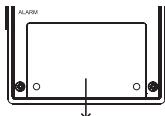
Battery compartment
2 x 1.5 batteries of the size AM-4 resp. "AAA"
To open: slide lid in the direction of the arrow (indicated on the lid) after the stand has been removed.
- PUTTING INTO OPERATION
- Open the battery compartment of the display device and remove all insulation strips. If no batteries are in the device, insert the 2 batteries
Insulation strips: In no batteries are in the devi (AM-4 or AAA'1.5 V) in the correct polarity. - Now close the battery compartment.
-
Directly after the activation of the batteries, all segments are displayed for a few seconds on the display. The JK-18 then begins with
for a few seconds on the c12:00 am" on the display. -
OPERATION
4.1 TIME
Time (hh:mm) is displayed in the top information window. You will also find
the symbol for the reception status of the radio controlled clock.
4.1.1 The radio-controlled clock
- After the batteries have been inserted the clock begins its signal search
for the time signal transmitter DCF 77 from Germany. The reception of the time signal takes about 3-10 minutes. During reception the
This time signal takes about 0-10 minutes. During reception the symbol will blink. If reception is good, with waves. If reception is bad,
without.
30
- As soon as the time signal has been successfully received, the time will automatically be set and the symbol will be activated.
If time reception was not successful, the reception symbol is indicated
without waves. In such case, you can also set the time manually (see
directions in chapter 4.1.2). The JK-18 will independently try to receive
a signal again during the night.
NOTE: The radio controlled clock automatically synchronizes itself during
the night (1:00, 3:00, 6:00, 9:00). This increases the chance for an
undisturbed reception of time where reception is a problem
where reception is a problem.
4.1.2 Manual setting
JK-18 provides another option which allows you to adjust the clock.
manually, when there is no reception for the radio controlled clock signal.
1. Press and hold the MODE button for 3 seconds, time mode 12/24 hr will
be displayed. Press + or - button to select. Press MODE to confirm 2. To limit the fixation in Press, use the 'Enter' button at the top of
2. The hour digits are flashing. Press + or - button to set the hour. Press MODE to confirm
3. The minute digits are flashing. Press + or - button to set the minute.
Press MODE to confirm
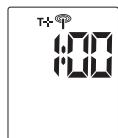
The time-zone display is flashing. Press + or - button to set the
time-zone. The time-zone area can be set from -2 to +2 hours. During the setting, the T1 (add hour) or T_m (minute hour) will be shown. Process
MODE to confirm.
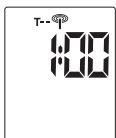
Time Zone Setting
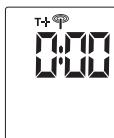
31
NOTE:
- During the setting mode, if no button is pressed for one minute, the JK-18
will automatically jump backto this point will be stored . - With the ZONE setting you can use the JK-18 as a radio controlled alarm
clock almost everywhere in Europe. Here are a few examples of countries
where the ZONE should be set (all other West European countries are ZONE = 0
-2 hours; Greenland, Azores
-1 hour: Great Britain, Ireland, Portugal, Iceland, Canary Islands
+1 hour: Greece, Finland, Baltic States, Bulgaria, Cyprus, Israel
+2 hours: Russia (Moscow, St. Petersburg)
4.2 ALARM
4.2.1 Setting an alarm
JK-18 offers the feature of dual alarm setting, which you are able to set.
and activate two individual alarms at the same time.
- Press MODE button to select alarm 1 or 2. The icon RL1 or RL2 will be
displayed.
- If the icon RL1 is shown, press and hold the MODE button for 3 seconds
to enter the setting mode of the alarm time of ALT. 3. If the icon FL7 is shown, press and hold the MODE - If the icon AL2 is shown, press and hold the MODE button for 5 seconds to enter the setting mode of the alarm time of AL2
-
Press + or - button to adjust the hours and minutes of the selected alarm. 5. Click OK/REFRESH for further editing.
-
Press MODE button to confirm the set
2.2.2 Activate the alarm
1. Press ALARM button once to activate the alarm 1. will be shown. 2. Press ALARM button again to activate the alarm 2. will be shown.
2. Press ALARM button again to activate the alarm 2, will be shown. 3. Press ALARM button again to activate both alarm 1 and alarm 2.
and will be shown
-
You are able to set the alarm sound in 5 different modes by the sliding
switch (described in section 2.2). -
Press ALARM button again to deactivate both alarms.
32
4.2.3 Stop the alarm
A sounding alarm can be interrupted in three ways:
- During the sounding of the alarm, press the SNOOZE / LIGHT button to start the snooze cycle (1-9 minutes).
After the snooze cycle, it will sound again. You can endlessly repeat the SNOOZE cycle. The symbol ^C will flash during the snooze cycle.
- Alarm will sound for 2 minutes. If the SNOOZE / LIGHT button is not pressed during the 2 minutes, the alarm sound will automatically switch off until the next morning (= 24hr OFF)
- During the alarm sounding or during the snooze cycle (=blinking ^空 ), press the ALARM button. After pressing once the alarm is interrupted until the next morning (=24hr OFF; ^空 stops blinking). If you press the button a second time, the alarm will be completely deactivated. This means it will not sound the following morning!
NOTE: If the snooze cycle of one alarm is active (e.g. AL1) and the other (e.g. AL2) starts within this cycle, then the first active alarm will go to 24hr OFF and the second alarm will be continued.
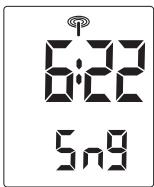
4.2.4 Setting the snooze cycle
Current Time
Snoopze Minute 1-9
Press and hold the SNOOZE / LIGHT button for 3 seconds, you can set the snooze minutes (1-9 minutes) by pressing the + or - button. Then press SNOOZE / LIGHT button to confirm.
33
4.3 BACKLIGHT
It is possible to use the background illumination when setting the alarm function. This can be very practical in dark bedrooms. Press the SNOOZE / LIGHT button to activate the background illumination before beginning. If you continue to press buttons within 8 seconds the light will remain on.
When the alarm sound is on, the backlight will be on for 8 seconds. After this, the backlight will blink for the duration of the alarm until it is shut off.
5. CHANGE OF BATTERY
BATTERY CHANGE DISPLAY
The batteries last for around 8-12 months. Depending on the usage of the appliance and the batteries used, this time can be slightly shorter or longer. In order to avoid a surprising and unpleasant interruption of operations, the battery symbol appears in the time window.
This means that batteries are becoming too weak and need to be replaced.
To change the batteries, please note Chapter 3 (Putting into operation).
Please only use new batteries and never mix old and new batteries. Please also remember that used batteries should not be thrown in the household rubbish bin but handed in at the designated collection points.
The environment will thank you for it!
6. CARE INSTRUCTIONS
- Do not expose the device to extreme temperatures or direct sunlight over longer periods.
- Avoid blows and shocks of any kind to the device.
- For cleaning use a dry soft cloth that you have moistened with water and a mild cleaning agent. Never use volatile substances such as benzene, thinner, cleansing agents in spray cans etc.
- When the device is not being used store it in a dry area and out of the reach of small children.