
SPIN - Montre connectée sportive IROX - Notice d'utilisation et mode d'emploi gratuit
Retrouvez gratuitement la notice de l'appareil SPIN IROX au format PDF.

| Type d'appareil | Montre connectée sportive |
| Mesure du rythme cardiaque | Oui, avec ou sans ceinture thoracique |
| Fonctions principales | Chronomètre, minuterie, alarme, affichage de l'heure |
| Affichage | Écran LCD avec rétroéclairage |
| Alarmes | Alarme audible |
| Fonctions de chronométrage | Chronomètre avec fonction tour et tour partiel |
| Durée de la batterie | Non précisé |
| Résistance à l'eau | Non précisé |
| Fonction de récupération | Oui |
| Fonction de fréquence cardiaque | Oui, avec calcul de la fréquence cardiaque maximale |
| Minuterie | Minuterie de compte à rebours de 99 minutes 59 secondes |
| Affichage de la date | Oui |
| Langues disponibles | Non précisé |
| Poids | Non précisé |
| Dimensions | Non précisé |
| Matériau du bracelet | Non précisé |
| Compatibilité | Non précisé |
FOIRE AUX QUESTIONS - SPIN IROX
Questions des utilisateurs sur SPIN IROX
0 question sur cet appareil. Repondez a celles que vous connaissez ou posez la votre.
Poser une nouvelle question sur cet appareil
Téléchargez la notice de votre Montre connectée sportive au format PDF gratuitement ! Retrouvez votre notice SPIN - IROX et reprennez votre appareil électronique en main. Sur cette page sont publiés tous les documents nécessaires à l'utilisation de votre appareil SPIN de la marque IROX.
MODE D'EMPLOI SPIN IROX
IROX
perfecttiming.
Phantom SPIN
Sport Watch with Heart rate meter (with or without chest belt)
Instruction for use
en ennnn
Content
1 Introduction Page 53
2 Features and functions Page 54
3 Key operation and display symbols
4 Overview of the various display modes Page 59
5 Time Function Page 60
6 Heart Rate Function Page 61
7 Stopwatch (STP, CDT, LAP) Page 63
8 Recovery Function Page 65
9 Maintenance Page 66
51
1- Introduction
Thank you for choosing the IROX PHANTOM SPIN. You have in your hands the first heart rate meter in your hands which can measure your pulse rate with and without belt. The watch measures the ECG signal of your heart and the reading is therefore of a high accuracy.
The many other functions of the watch will help you not only manage your training activities, it is also a complete and useful watch for daily use.
In order to define the ideal heart rate in your training, please follow the recommendation of the "American Heart Association". A healthy training should be within 50 - 75% of your maximum heart rate.
You may define this by using the following formula:
Max heart rate: 220 minus your age
Assuming your age is 40, you calculate your upper and lower pulse rate as follows:
lower limit: 0.5 x (220 - 40) = 90 bpm
upper limit: 0.75 × (220 - 40) = 135 bpm
Warning
The watch is a monitoring tool for training and fitness only. Your personal limits may be different from above general recommendation. We therefore strongly recommend to consult your doctor before beginning any exercise program. Your doctor will establish your individual upper and lower heart rate limits, exercise frequency, and workout duration appropriate for your age and current fitness level.
52
2-Features and functions
Battery Type: CR2032 (3V Button cell), 1 pc each in the watch and the belt Display: LCD with blue EL backlight
Operating temp.: 0^ C to 55^ C
Features:
Audible Alarm
Visual Alarm
- Beeping Alert Tone
Water resistant to 2 Bar (Swimming is possible, but no key press in the water!)
Functions:
Clock/Timer Functions:
Time of Day (12/24 hour option)
Day/Date Display with 50 years Calendar (2003-2052)
AlarmClock
- Settable to week day/HH:MM
100 Hours Stopwatch
Hourly Chime
- Interval Timer/Count Down Timer of 99h59m59s (settable to second)
16 Lap Timers with each timer of 99m59s
- Lap Memory
Average Time of all Lap
Total Time of all Lap
Time of each Lap
Average Heart Rate of all Lap
Average heart rate of each Lap
Heart Rate Functions:
Continuous Wireless Chest Strap Heart Rate Measurement
- Finger Sense Heart Rate Measurement
- 3 Minutes Recovery Timer / Recovery Timer for the time reaching Rest Heart Rate
Average Heart Rate during training
Maximum Heart Rate during training
Percentage of the estimated Maximum Heart Rate
100 hours High /Low /In Timer
- Calories Consumption
- Fat Burn
UV Functions:
10 level UV Indication
UV level Rising alert
- 6 skin type settings
Safe exposure time estimation
Overexposure warning
1 to 99 SPF Ratio Setting
55
Backlight Press and hold Option key for 2 second, the backlight will light up for 5 seconds. Once the backlight is active, it will stay on as long as you press a key.
Buzzer Press and hold Mode key for 2 seconds in High/ Low/ In Timer Mode, Kcal Mode, Fat Burn mode and Maximum Heart Rate Mode, the buzzer will toggle on and off. When the buzzer turns on, the buzzer icon displays on all modes except setting mode and hold mode.
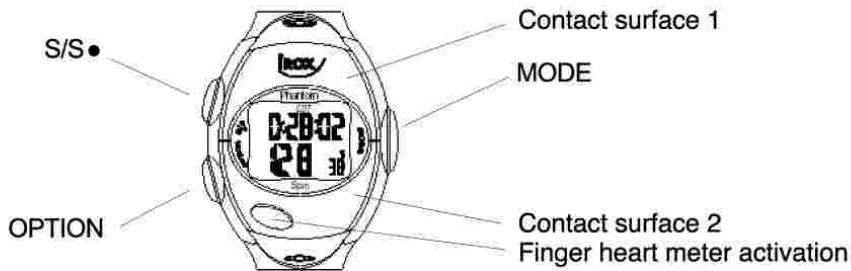
Finger heart meter When you press and hold this key, the watch starts to measure your pulse. It is important that the watch makes contact to your wrist and that you hold two fingers of your other hand on the two contact surfaces.
Abbreviations and symbols on the display
AL Wake-up time
All Wake-up call will sound all days (SU, MO, TU, WE, TH, FR, SA means, that the alarm will only sound on this day)
AVG Average plus reading
KCAL Kilocalories
STP Stopwatch
CDT Count Down Timer
LAP Lap Time
A wake-up call is set and active
Key tone and pulse alarm is active
57
3- Key Operation
MODE Mode Key is the main key to change between different modes for operation. Press Mode key momentarily in the Stopwatch Mode to get around to Clock Mode, Kilo-Calorie Mode, Stopwatch Mode/Recovery Mode and then return to Clock Mode.
S/S Set Key is used to adjust setting in the setting mode. It start/stop timer in Count Down Timer, Lap Timer and Stopwatch Timer Mode. You can view each Lap detail in Lap Memory Mode.
OPTION Option Key is the key to change between different optional modes in some of the main modes. Press Option key in the Stopwatch Mode to switch among stopwatch Mode, Count Down Timer Mode and Lap timer mode. Press Option key momentarily in the Clock Mode to get around to Alarm Clock Mode and then get back to the Clock Mode. Press Option key in the Average Heart Rate Mode to switch between Average Heart Rate Mode and Maximum Heart Rate Mode. Press Option key in the Kilo-Calorie Mode to switch between Kilo-Calorie Mode and Fat Burn Mode
56
Indicates the ratio of the preset target calories burned in the current training session :
1x=one third or more
2x=two thirds or more
3x=you have reached your calorie consumption

Blinks when the watch receives a heart signal

your pulse is below the preset training zone

your pulse is above the preset training zone.
ECO Mode
If no key is pressed for more than 5 minutes, then the watch will enter a battery saving mode. The watch can be reactivated by pressing any of the 3 side keys. Once active, a "%" symbol appears on the display above the seconds (in other modes at the same position)
4- Overview of the various display modes
The IROX PHANTOM SPIN has 5 main modes. In each, you can find selected "sub modes"
By pressing the MODE key, you can reach Mode 1-5, the "sub modes" can be reached by pressing the OPTION key.
Display Mode 6 is a separate function which appears with the hand pulse meter mode.
Display 1a - Time and calendar 1b - wake-up call
Display 2 - Pulse reading with belt and indication of the time spent inside, outside and within the training zone (the 3 times follow each other in sequence)
Display 3a - Pulse reading (belt) with average pulse 3b - Pulse reading (belt) with maximum pulse
Display 4 - Pulse reading (belt) with calorie consumption 4b - Pulse reading (belt) with burned fat in kg
Display 5a - Pulse reading (belt) with stopwatch (STP)
5b - Pulse reading (belt) with Count Down Timer (CDT)
5c - Pulse reading (belt) with lap counter (LAP)
Display 6 - Pulse reading without belt (also records Pulse MAX and AVG as well as the kcal consumption)
59
Press Mode key to select and advance to hour digit setting. Press Set key to adjust hour digit (hold key for fast advance). Press Mode key to select and advance to minute setting. Repeat the process for minute setting.
Alarm Operation
Alarm Mode display the current alarm in HH:MM and 24 hour format When the alarm is activated, the activated weekday display and the bell icon display in all modes except the setting mode and the hold mode.
6- Heart Rate Function
Finger Sense Heart Rate Detection Operation
Press two top buttons and the unit start detecting the user's heart rate. The "HR" displays in upper row and "_" displays in bottom row. When the heart rate detection is completed, the detected heart rate and its compared percentage with the estimated maximum heart rate (EMHR) also displays. When the finger pressing is released, the watch will return to the previous mode. The detected heart rate is set as a parameter to calculate the calories and the heart rate limit timer when the stopwatch is running.
Chest strap Heart Rate Detection Operation
Wear the chest strap in the correct position and the watch will display the current heart rate and its compared percentage with the estimated maximum heart rate in lower part of the LCD. The detected heart rate is set as a parameter to calculate the calories and the heart rate limit timer when the stopwatch is running.
If the chest strap heart rate and the finger sense heart rate input at the same time, the finger sense heart rate is displayed.
61
5-Time Function
Clock Setting
In Clock Mode, press and hold Set key for 2 seconds until ihold message disappears. Press Set key to change between 24 and 12 hour options. Press Mode key to select and advance to hour digit setting. Press Set key to adjust hour digit (hold key for fast advance). Press Mode key to select and advance to minute setting. Repeat the process for minute setting.
Note: - 12 hour clock selection will display American calendar format of month/date - 24 hour clock selection will display European calendar format of date/month
Press Mode key to select and advance to Date setting. Press Set key to change the year value from 2003 to 2052 (hold key for fast advance). Press Mode key to select and advance to month setting. Press Set key to adjust day from the first to the last day of the month (hold key for fast advance).
Clock Operation
In Clock Mode, the unit displays the current time in HH:MM and 12/24 hour format, second, date and weekday. It displays PM in 12 hour format after 11:59.
Alarm Clock Setting
In Alarm Clock Mode, press and hold Set key for 2 seconds until ihold message disappears. Press Set key to change between alarm on and off options. Press OPTION key to change to alarm clock mode. Press and hold SET key for 2 seconds. "off" will appear on the screen. This mode switches individual alarm On or Off. Weekday ON represents the alarm turn on an individual weekday. ALL represents the alarm turns on all weekdays. OFF represents the alarm turns off.
60
Heart Rate Training Zone Operation
To personalise a safe and effective workout, the watch allows you to set your own training zone limits. In Average Heart Rate Mode, press and hold Set key for 2 seconds until the upper limit value starts to flash. Press Set key to adjust the upper limit from 41 (or Low Limit + 1) to 239 (hold key for fast advance). Press Mode key to select and advance to lower limit setting. Repeat the process for setting the lower limit from 40 to 238 (or High Limit - 1). If one or both limits are already set and you do not want to adjust them, press Mode key to exit.
Training Zone Alert Tone Operation
You can view the Training Zone Memory for your workout. The watch will automatically advance between the Time over Upper Limit, Time below Lower Limit and Time in Range Zones in every 2 seconds. If the Beeper is activated, an alert tone is sounded in every 8 seconds if your heart rate exceeds the limit settings. The display will also flash to give you a visual alert. Using the Beeper function in combination with this function, you can react instantly and adjust the intensity of your workout to achieve maximum result.
Current Heart Rate Over Limit: Beep Twice
Current Heart Rate Below Limit: Beep Once
All Training Zone information reset when the stopwatch is reset.
Kilo-Calorie/Fat Burn
Simply program your personal information and the watch will calculate your approximate calorie and fat consumption of a workout. In Kilo-Calorie Mode, press and hold Set key for 2 seconds to select your gender. Press Set key to change between Male and Female. Press Mode key to select and advance to weight setting. Press Option key to change between Kg and Lb units. Press Set key to adjust weight value from 20 to 227 Kg or 44Lb to 499Lb (hold key for fast advance). Press Mode key to set your age from 10 to 99 (hold
62
key for fast advance). Press Mode key to select setting and advance to target calorie setting. Press Set key to adjust Target Calories consumption from 10 to 9990 (hold key for fast advance). When the accumulated Calories reach 1/3 of the Target Calories, One Bar displays. When the accumulated Calories reach 2/3 of the Target Calories, Two Bars display. When the accumulated Calories reach or exceed than Target Calories, three Bars display. Press Mode key and use Set key to set your estimate maximum Heart Rate from rest from 65 to 239. Press Mode key again to exit.
All Training Zone information reset when the stopwatch is reset.
When the finger sense heart rate detects heart rate in Fat Burn and KCAL Mode, the Rest Heart Rate will be set to that value.
7- Stopwatch
In stopwatch Mode, press Set key momentarily to start/stop the stopwatch. To reset the stopwatch to 0:00:00, press and hold Set key for 2 seconds. Press Mode key again to exit back to Clock Mode. When stopwatch is below 1 hour, it displays MM:SS.1/10S. When stopwatch is over 1 hour, it displays HH:MM:SS until it reset.
If the stopwatch reset, average heart rate, maximum heart rate, high/low/in timer and calories value will be reset.
Interval Timer/Count Down Timer
At the Stopwatch Mode, press Option key to get into the Interval Timer Mode. Press and hold Mode key for 2 seconds to hour digit setting from 0-99 (hold key for fast advance). Press Mode key to adjust minute digit setting from 0-59 (hold key for fast advance). Press Mode key to adjust second digit setting from 0-59 (hold key for fast advance). Press
63
8-Recovery Function
When the Stopwatch is stopped, the beeper will sound and the LCD will flash, the watch will enter to Recovery Mode when the recovery mode is enabled. LCD flashes for about 5 seconds, the Recovery mode will be automatically activated. The current heart rate will also be recorded when the recovery timer starts.
At the Recovery Mode, hold Mode key for 2 second will display the last stopwatch value.
At the Stopwatch Mode, hold Mode key for 2 seconds to set the Recovery Mode into Enable or Disable. Press and hold the Mode key for another 2 seconds to enable or disable the Advanced Recovery Mode. Release the key to exit back to Stopwatch Mode.
On the Recovery Mode, the 3-minute timer counts down to 0:00, the beeper will sound. The recorded heart rate reading is displayed.
On the Advanced Recovery Mode is enabled, the 100 minute Count Up Timer will start. The timer stops when the current Heart Rate is equal or lower than the Rest Heart Rate.
Press and hold Set key for 2 seconds to get back to Stopwatch Mode and reset all the timer values. This will also reset all the other heart rate memory and prepare the watch for the next workout.
Mode key to adjust second digit setting from 0-59 (hold key for fast advance). Press Mode key to return to Interval Timer Mode.
Press Set key to start or stop the Count Down Timer. When the Count Down finished or press and hold Set key for 2 seconds, it will automatically restore to the Set Time.
When the Interval Timer counts to zero, a beep will sound.
Lap Operation
The watch provides you with a Lap Timer for training up to 16 laps. Recalling the Lap Memory, you can view the training records for all the laps. At the Stopwatch Mode, press Option key twice to get into the LAP Mode. Press Set key to start the Lap Timer. Press Set key again to stop the current lap and automatically advance to the next lap. Each of the Lap Timer counts up to 99 min 59 sec then reset to 0 and counts up again. Press Set key again to start the next Lap after the last stopped lap for continuous training. It will flash for 5 seconds then will advance to next Lap. To stop the current lap but without lap automatic advance, press Mode key. Press and hold Set key for 2 seconds to return to start up Lap Mode.
Lap Memory Operation
To recall Lap Memory after training, press and hold Mode key for 2 seconds until the training records are displayed. In every 2 seconds, the information of Total Lap Time/Average Heart Rate of all Laps and Total number of Lap/Average time of all Lap/Average Heart Rate of all Laps are alternatively displayed. Press Set key momentarily in the Lap Memory Recall Mode to view the time and average heart rate values of each lap. Press Mode key to exit Lap Memory Recall Mode and back to Lap Mode. Press and hold Set key for 2 seconds in Lap Mode to reset all the Lap Memory and prepare for the next round of lap training.
64
9-Maintenance
Battery Installation
The Watches are technical instruments. To ensure proper operation and to maintain a waterproof seal, we recommend that you have your local jeweller or speciality retail shop to replace the watch and transmitter batteries. Improper replacement of the battery may damage the watch and will void the manufacturer's warranty.
Wearing the Transmitter Belt
To ensure a proper heart rate display, the chest transmitter must be properly moistened and adjusted. Moisten the rear surface of the conductive rubber pads with saliva or ECG conductive gel (do not use water or moisturising creams, these are insulators and will not conduct the heart rate signal).
Snap the key tabs on the elastic belt into the keyholes at the two ends of the rubber transmitter, and adjust the strap so that the transmitter fits snugly below the pectoral muscles. It may take a minute or two for the watch to display an accurate count. This is normal and may take longer on cool or dry days.
Troubleshooting:
No Heart Rate Display
Incorrect positioning of heart rate transmitter
Transmitter is too far away from watch
Transmitter conductive rubber is not moist
Too close to the power lines or sources of EMI
Dead Transmitter battery
No Heart Rate Display with the Finger Method
Do not move your arms and your body during the pulse measurement (stay as quiet as possible, the reading may take 5-10 seconds)
- Keep your arms free (do not touch any table, wall etc. with your arms)
Dehydration makes it impossible to measure the pulse with the finger method. Please make sure that you drink sufficient water during and after your training!
Slow Display Response
Ambient temperature is below operation limits (0-55 degrees Celsius)
67
Display is Black
Ambient temperature is above operating limit or display has been exposed to direct sunlight
Display Fades
Weak Battery, please replace it as soon as possible

68

Prrnnnne nnnnne
Gargnssiein
Cerrnne aenrnnnne ennnnne ennnnne ennnnne ennnnne ennnnne ennnnne ennnnne ennnnne ennnnne ennnnne ennnnne ennnnne ennnnne ennnnne ennnnne ennnnne ennnnne ennnnne ennnnne ennnnne ennnnne ennnnne ennnnne ennnnne ennnnne
Wannnnnne
rnnnne nnnnne nnnnne nnnnne nnnnne nnnnne nnnnne nnnnne nnnnne nnnnne nnnnne nnnnne nnnnne nnnnne nnnnne nnnnne nnnnne nnnnne nnnnne nnnnne nnnnne nnnnne nnnnne nnnnne nnnnne nnnnne
rnnnne nnnnne ennnnne ennnnne ennnnne ennnnne ennnnne ennnnne ennnnne ennnnne ennnnne ennnnne ennnnne ennnnne ennnnne ennnnne ennnnne ennnnne ennnnne ennnnne ennnnne ennnnne ennnnne ennnnne ennnnne ennnnne ennnnne
(essss)
aannnnnne aannnnnne aannnnnne
2 3 4 5 6 7
www.jrjx.com