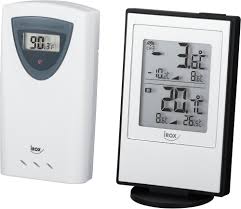
HTR219 - Thermomètre électronique IROX - Notice d'utilisation et mode d'emploi gratuit
Retrouvez gratuitement la notice de l'appareil HTR219 IROX au format PDF.

| Type de produit | Thermomètre électronique intérieur/extérieur avec capteur sans fil |
| Marque | IROX |
| Modèle | HTR219 |
| Affichage | 4 lignes avec rétroéclairage (selon modèle) |
| Unité principale - dimensions | 76 × 155 × 27 mm |
| Unité principale - poids | 164 g (sans piles) |
| Capteur extérieur - dimensions | 56 × 107 × 24 mm |
| Capteur extérieur - poids | 70 g (sans piles) |
| Alimentation unité principale | 2 piles UM-3 (AA) 1,5 V |
| Alimentation capteur extérieur | 2 piles UM-3 (AA) 1,5 V |
| Fréquence de transmission | 433 MHz |
| Portée de transmission | 20 à 30 mètres (selon obstacles) |
| Nombre de capteurs max. | 3 (via sélection de canal) |
| Plage de mesure température intérieure | -10 °C à +60 °C |
| Plage de mesure température extérieure | -20 °C à +60 °C |
| Fonctions horloge | Radio-pilotée (signal DCF/HBG), réglage manuel, 12/24 h, calendrier |
| Fonctions alarme | Alarme jour de semaine, alarme unique, pré-alarme gel (réglable 15-90 min) |
| Fonctions température | Affichage intérieur/extérieur, max/min, tendance (↑→↓), 3 canaux |
| Entretien | Nettoyer avec un chiffon doux et sec. Ne pas immerger dans l'eau. Ne pas utiliser de produits abrasifs ou corrosifs. |
| Sécurité | Ne pas ouvrir l'appareil (aucune pièce réparable par l'utilisateur). Utiliser des piles neuves, respecter les polarités. Ne pas exposer à des chocs, à la poussière ou à l'humidité excessive. |
FOIRE AUX QUESTIONS - HTR219 IROX
Questions des utilisateurs sur HTR219 IROX
0 question sur cet appareil. Repondez a celles que vous connaissez ou posez la votre.
Poser une nouvelle question sur cet appareil
Téléchargez la notice de votre Thermomètre électronique au format PDF gratuitement ! Retrouvez votre notice HTR219 - IROX et reprennez votre appareil électronique en main. Sur cette page sont publiés tous les documents nécessaires à l'utilisation de votre appareil HTR219 de la marque IROX.
MODE D'EMPLOI HTR219 IROX

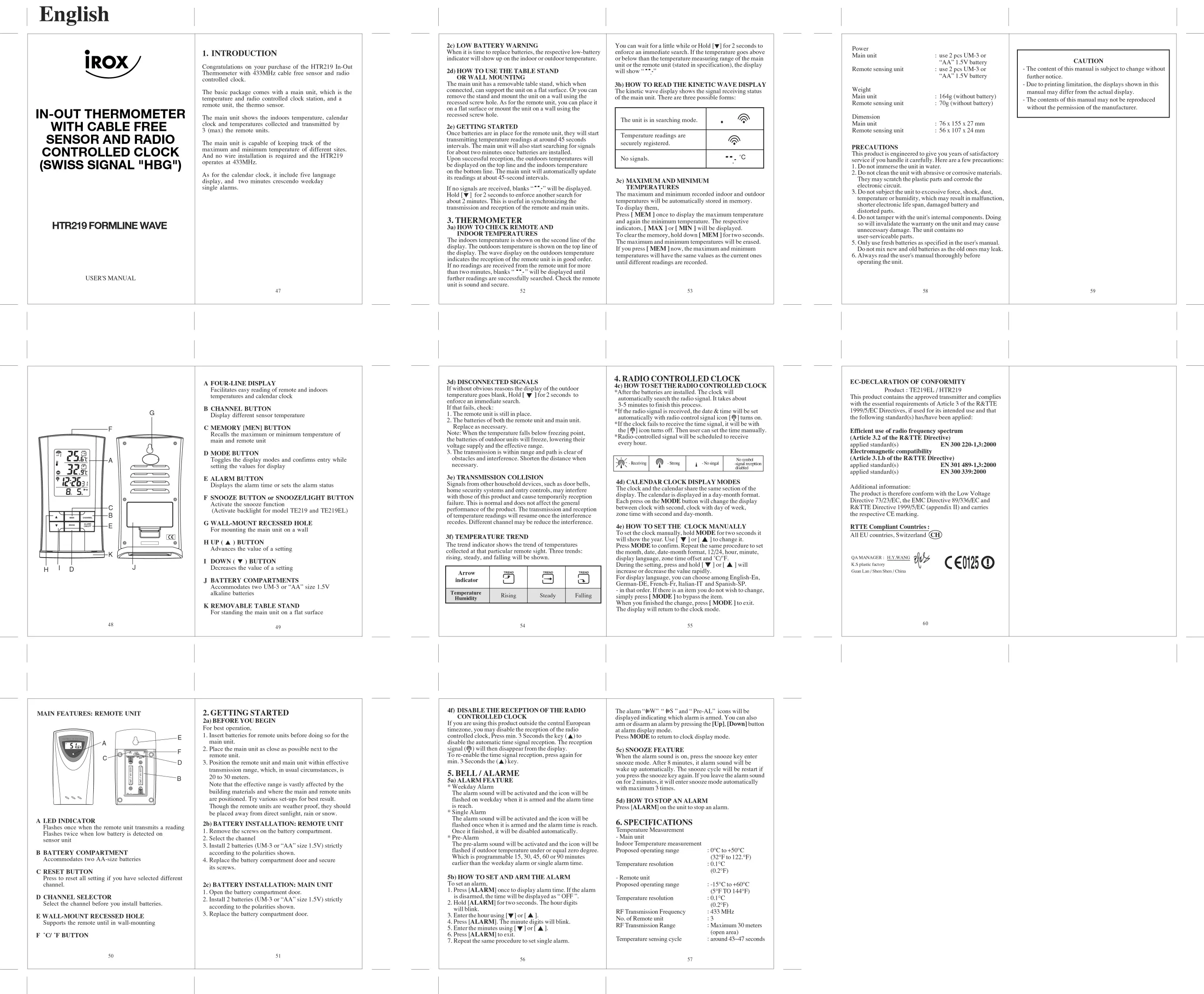
IN-OUT THERMOMETER WITH CABLE FREE SENSOR AND RADIO CONTROLLED CLOCK (SWISS SIGNAL "HBG")
HTR219 FORMLINE WAVE
USER'S MANUAL
1. INTRODUCTION
Congratulations on your purchase of the HTR219 In-Out Thermometer with 433MHz cable free sensor and radio controlled clock.
The basic package comes with a main unit, which is the temperature and radio controlled clock station, and a remote unit, the thermo sensor.
The main unit shows the indoors temperature, calendar clock and temperatures collected and transmitted by 3 (max) the remote units.
The main unit is capable of keeping track of the maximum and minimum temperature of different sites. And no wire installation is required and the HTR219 operates at 433MHz
As for the calendar clock, it include five language display, and two minutes crescendo weekday single alarms.
47
2c) LOW BATTERY WARNING
When it is time to replace batteries, the respective low-battery indicator will show up on the indoor or outdoor temperature.
2d) HOW TO USE THE TABLE STAND
The main unit has a removable table stand, which when connected, can support the unit on a flat surface. Or you can remove the stand and mount the unit on a wall using the recessed screw hole. As for the remote unit, you can place it on a flat surface or mount the unit on a wall using the recessed screw hole.
2e)GETTING STARTED
Once batteries are in place for the remote unit, they will start transmitting temperature readings at around 45 seconds intervals. The main unit will also start searching for signals for about two minutes once batteries are installed. Upon successful reception, the outdoors temperatures will be displayed on the top line and the indoors temperature on the bottom line. The main unit will automatically update its readings at about 45-second intervals.
If no signals are received, blanks “**” will be displayed. Hold [▼] for 2 seconds to enforce another search for about 2 minutes. This is useful in synchronizing the transmission and reception of the remote and main units.
3. THERMOMETER
3a) HOW TO CHECK REMOTE AND
INDOOR TEMPERATURES
The indoors temperature is shown on the second line of the display. The outdoors temperature is shown on the top line of the display. The wave display on the outdoors temperature indicates the reception of the remote unit is in good order. If no readings are received from the remote unit for more than two minutes, blanks "---" will be displayed until further readings are successfully searched. Check the remote unit is sound and secure.
You can wait for a little while or Hold [▼] for 2 seconds to enforce an immediate search. If the temperature goes above or below than the temperature measuring range of the main unit or the remote unit (stated in specification), the display will show “...”
3b) HOW TO READ THE KINETIC WAVE DISPLAY The kinetic wave display shows the signal receiving status of the main unit. There are three possible forms:
| The unit is in searching mode. | |
| Temperature readings are securely registered. | |
| No signals. | °C |
3c) MAXIMUM AND MINIMUM
TEMPERATURES
The maximum and minimum recorded indoor and outdoor temperatures will be automatically stored in memory. To display them,
Press [MEM] once to display the maximum temperature and again the minimum temperature. The respective indicators, [MAX] or [MIN] will be displayed. To clear the memory, hold down [MEM] for two seconds. The maximum and minimum temperatures will be erased. If you press [MEM] now, the maximum and minimum temperatures will have the same values as the current ones until different readings are recorded.
53
Power
Main uni
Weight
Main un:
Remote
CAUTION
Dimension
Main unit
Remote se
PRECAUTIONS
This product is engineered to give you years of satisfactory service if you handle it carefully. Here are a few precautions 1. Do not immerse the unit in water.
-
Do not immerse the unit in water. 2. Do not clear the grit with sharp grinding equipment or abrasive materials.
-
Do not clean the unit with abrasive or corrosive materials. They may scratch the plastic parts and corrode the
They may scratch the plastic parts and corrode the electronic circuit.
- Do not subject the unit to excessive force, shock, dust,
temperature or humidity, which may result in malfunction, shorter electronic life span, damaged battery and distorted parts.
- Do not tamper with the unit's internal components. Doing so will invalidate the warranty on the unit and may cause unnecessary damage. The unit contains no
user-serviceable parts.
- Only use fresh batteries as specified in the user's manual. Do not mix new and old batteries as the old ones may leak.
- Always read the user's manual thoroughly before operating the unit.
58
59
48
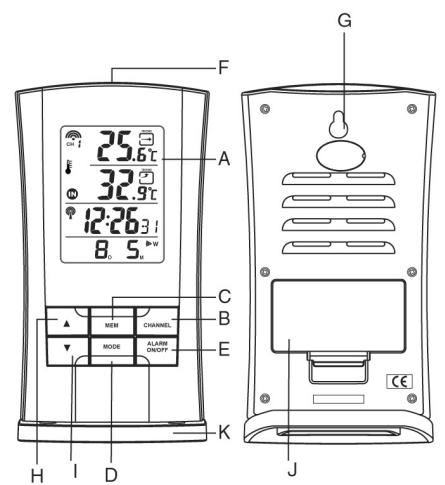
A FOUR-LINE DISPLAY
Facilitates easy reading of remote and indoors temperatures and calendar clock
B CHANNEL BUTTON
Display different sensor temperatures
C MEMORY [MEN] BUTTON
Recalls the maximum or minimum temperature of main and remote unit
D MODE BUTTON
Toggles the display modes and confirms entry while setting the values for display
E ALARM BUTTON
Displays the alarm time or sets the alarm status
F SNOOZE BUTTON or SNOOZE/LIGHT BUTTON Activate the snooze function (Activate backlight for model TE219 and TE219EL)
G WALL-MOUNT RECESSED HOLE For mounting the main unit on a wall
HUP(▲)BUTTON
Advances the value of a setting
I DOWN(▼)
Decreases the value of a setting
J BATTERY COMPARTMENTS Accommodates two UM-3 or "AA alkaline batteries.
K REMOVABLE TABLE STAND
For standing the main unit on a flat surface
49
3d) DISCONNECTED SIGNALS
If without obvious reasons the display of the outdoor temperature goes blank, Hold [▼] for 2 seconds to enforce an immediate search.
If that fails, check:
-
The remote unit is still in place.
-
The batteries of both the remote unit and main unit. Replace as necessary.
Note: When the temperature falls below freezing point, the batteries of outdoor units will freeze, lowering their voltage supply and the effective range.
- The transmission is within range and path is clear of obstacles and interference. Shorten the distance when necessary.
3e) TRANSMISSION COLLISION
Signals from other household devices, such as door bells, home security systems and entry controls, may interfere with those of this product and cause temporarily reception failure. This is normal and does not affect the general performance of the product. The transmission and reception of temperature readings will resume once the interference recedes. Different channel may be reduce the interference.
3f) TEMPERATURE TREND
The trend indicator shows the trend of temperatures collected at that particular remote sight. Three trends: rising, steady, and falling will be shown.
| Arrow indicator | TREND | TREND | TREND |
| Temperature Humidity | Rising | Steady | Falling |
54
4. RADIO CONTROLLED CLOCK
4c) HOW TO SET THE RADIO CONTROLLED CLOCK
*After the batteries are installed. The clock will automatically start and then停止. It takes about
automatically search the radio signal. It takes about 3-5 minutes to finish this process.
*If the radio signal is received, the date & time will be set.
automatically with radio control signal icon [ ] turns on.
*If the clock fails to receive the time signal, it will be with
the [] icon turns off. Then user can set the time manually.
- Radio-controlled signal will be scheduled to receive tomorrow.
every hour.
| - - - - - - - - - - - - - - - - - - - - - - - - - - - - - - - - - - - - - - - - - - - - - - - - - - - - - - - - - - - - - - - - - - - - - - - - - - - - - - - - - - - - - - - - - - - - - - - - - - - - - No symbol - signal reception disabled |
4d)CALENDAR CLOCK DISPLAY MODES
The clock and the calendar share the same section of the display. The calendar is displayed in a day-month format. Each press on the MODE button will change the display between clock with second, clock with day of week, zone time with second and day-month.
4e) HOW TO SET THE CLOCK MANUALLY
To set the clock manually, hold MODE for two seconds it will show the year. Use [▼] or [▲] to change it.
Press MODE to confirm. Repeat the same procedure to set the month, date, date-month format, 12/24, hour, minute, display language, zone time offset and ^ C / ^ F
During the setting, press and hold [] or [] will
increase or decrease the value rapidly. English:
For display language, you can choose among English-Eli, German-DE, French-Er, Italian-IT, and Spanish-SP.
- in that order. If there is an item you do not wish to change, simply press [MODE] to bypass the item. When you finished the change, press [MODE] to exit.
The display will return to the clock mode.
55
EC-DECLARATION OF CONFORMITY
Product: TE219EL / HTR219
This product contains the approved transmitter and complies with the essential requirements of Article 3 of the R&TTE 1999/5/EC Directives, if used for its intended use and that the following standard(s) has/have been applied:
Efficient use of radio frequency spectrum
(Article 3.2 of the R&TTE Directive)
applied standard(s)
Electromagnetic compatibility (Table 2.10 of the RoTTE guidelines).
(Article 3.1.b of the R&TE Directive)
applied standard(s) EN 301 489-1,3:2000
EN 500 359:2000
Additional information:
The product is therefore conform with the Low Voltage
Directive 73/23/EC, the EMC Directive 89/336/EC and
R&TTE Directive 1999/5/EC (appendix II) and carries
the res
RTTE Compliant Countries
erland (CH)
QAMANAGER:H.Y.WANG
K.S plastic factory
Guan Lan/Shen Shen / China
m = 311 ;


60
MAIN FEATURES: REMOTE UNIT
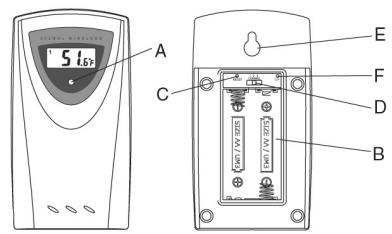
A LED INDICATOR
Flashes once when the remote unit transmits a reading Flashes twice when low battery is detected on sensor unit
B BATTERY COMPARTMENT
Accommodates two AA-size batteries
C RESET BUTTON
Press to reset all setting if you have selected different channel.
D CHANNEL SELECTOR
Select the channel before you install batteries.
E WALL-MOUNT RECESSED HOLE
Supports the remote until in wall-mounting
F°C/°F BUTTON
50
2. GETTING STARTED
2a) BEFORE YOU BEGIN
For best operation,
- Insert batteries for remote units before doing so for the
main unit.
- Place the main unit as close as possible next to the
remote unit.
- Position the remote unit and main unit within effective
transmission range, which, in
20 to 30 meters.
Note that the effective range is vastly affected by the
building materials and where the main and remote units
are positioned. Try various set-ups for best result.
Though the remote units are weather proof, they should
be placed away from direct sunlight, rain or snow.
2b) BATTERY INSTALLATION: REMOTE UNIT
-
Remove the screws on the battery compartment
-
Select the channel
-
Install 2 batteries (UM-3 or "AA" size 1.5V) strictly
according to the polarities shown
- Replace the battery compartment door and secure
its screws.
2c) BATTERY INSTALLATION: MAIN UNIT
-
Open the battery compartment door.
-
Install 2 batteries (UM-3 or "AA" size 1.5V) strictly
according to the polarities shown
- Replace the battery compartment door
51
4f DISABLE THE RECEPTION OF THE RADIO CONTROLLED CLOCK
If you are using this product outside the central European
timezone, you may disable the reception of the radio
controlled clock, Press min. 3 Seconds the key (▲) to
disable the automatic time signal reception. The
signal () will then disappear from the display.
To re-enable the time signal reception, press again for min. 3 Seconds the () here
5.BELL/ALARME
5a) ALARM FEATURE
- Weekday Alarm
The alarm sound will be activated and the icon will be
I flashed on weekday when it is armed and the alarm time was 1:30.
Is reach. * Single Alarm
The alarm sound will be activated and the icon will be
I flashed once when it is armed and the alarm time is reach.
Once it finished, it will be disabled automatically.
- Pre-Alarm
The pre-alarm sound will be activated and the icon will be
flashed if outdoor temperature under or equal zero degree.
Which is programmable 15, 30, 45, 60 or 90 minutes.
earlier than the weekday alarm of single alarm
5b) HOW TO SET AND ARM THE ALARM
To set an alarm,
- Press [ALARM] once to display alarm time. If the alarm
is disarmed, the time was
- Hold [ALARM] for two seconds. The hour digits
will blink 3. Evidently
-
Enter the hour using [] or [] .
-
Press [ALARM]. The minute digits will blink.
-
Enter the minutes using [] or [] .
-
Press [ALARM] to exit. 7. Press [OK] to exit.
-
Repeat the same procedure to set single alarm
The alarm "W" "S" and "Pre-AL" icons will be
displayed indicating which alarm is armed. You can also
arm or disarm an alarm by pressing the [Up], [Down] button
at alarm display mode.
Press MODE to return to clock display mode.
5c) SNOOZE FEATURE
When the alarm sound is on, press the snooze key enter
snooze mode. After 8 minutes, it alarm sound will be
wake up automatically. The snooze cycle will be restart if
you press the snooze key again. If you leave the alarm sound off for 2 minutes, you will be able to detect any
on for 2 minutes, it will enter snooze mode automatically with maximum 3 times.
5d) HOW TO STOP AN ALARM
Press [ALARM] on the unit to stop an alarm.
6. SPECIFICATIONS
Temperature Measurement
- Main unit
Indoor Temperature measurement
Proposed operating range
Temperature resolution
m = 311
- Remote unit
Proposed op
Temperature resolution
RF Transmissi
No. of Remote unit
RFTransmission Range
Temperature :
m - 1 0 ;
m = 311
m - 1 0 ;
will be
can also
ownl button.
1
key enter
will be
be restart if
alarm sound
matically.
m - 1 0 ;
。
0^ C
22.°F)
m = 311
m = 311
+60°C
(44^)
in 30 meters
a)
\~47 seconds
Power
Main uni
:
66
:
“
:1
:7
.7
:5
。
use 2 pcs UM-3 or
"AA" 1.5V battery
use 2 pcs UM-3 or
"AA" 1.5V battery
164g (without battery)
70g (without battery)
76 × 155 × 27 mm
56× 107× 24mm
we you years of satisfactory
1. Here are a few precautions
ater.
asive or corrosive materials.
parts and corrode the
.
lessive force, shock, dust, and other may result in malfunctions.
can may result in malfunction,
imaged battery and
inter
internal components: Doing so on the unit and may cause
y on the unit and may cut. It contains no.
1
specified in the user's manual.
cries as the old ones may leak.
I thoroughly before.
- The content of this manual is subject to change without
further notice. - Due to printing limitation, the displays shown in this
manual may differ from the actual display - The contents of this manual may not be reproduced.
without the permission of the manufacturer.
一
一
- The content of this manual is subject to change without
further notice.
- Due to printing limitation, the displays shown in this
manual may differ from the actual display
- The contents of this manual may not be reproduced.
without the permission of the manufacturer.