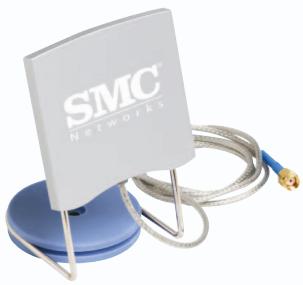
HMANT-6 - Antenne Wi-Fi SMC - Notice d'utilisation et mode d'emploi gratuit
Retrouvez gratuitement la notice de l'appareil HMANT-6 SMC au format PDF.


| Type d'appareil | Antenne réseau sans fil |
| Installation | Installation matérielle simple |
| Compatibilité | Routeurs et points d'accès compatibles |
| Fréquence | Non précisé |
| Gain | Non précisé |
| Polarisation | Non précisé |
| Connecteur | Non précisé |
| Dimensions | Non précisé |
| Poids | Non précisé |
| Matériau | Non précisé |
| Couleur | Blanc |
| Utilisation recommandée | Amélioration du signal Wi-Fi domestique |
| Instructions d'installation | Fixer l'antenne, brancher, orienter, vérifier la connexion |
| Garantie | Non précisé |
| Support technique | Disponible en ligne |
FOIRE AUX QUESTIONS - HMANT-6 SMC
Questions des utilisateurs sur HMANT-6 SMC
0 question sur cet appareil. Repondez a celles que vous connaissez ou posez la votre.
Poser une nouvelle question sur cet appareil
Téléchargez la notice de votre Antenne Wi-Fi au format PDF gratuitement ! Retrouvez votre notice HMANT-6 - SMC et reprennez votre appareil électronique en main. Sur cette page sont publiés tous les documents nécessaires à l'utilisation de votre appareil HMANT-6 de la marque SMC.
MODE D'EMPLOI HMANT-6 SMC
EZ Connect™ Home Antenna
Quick installation Guide
Hardware installation
Thank you for choosing the SMC EZ Connect™ Home Antenna. This EZ Quick Installation Guide provides simple install instructions.

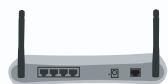
Take the wireless device.

Remove either antenna.
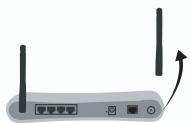
Note: Performance may depend on where you will attach the EZ Connect™ Home Antenna. For best results, test both antennas to compare the range and coverage area.
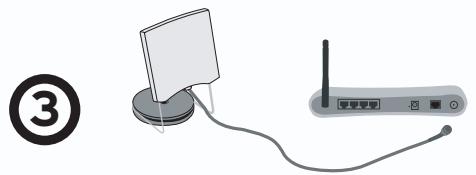
Connect the SMCHMANT-6.
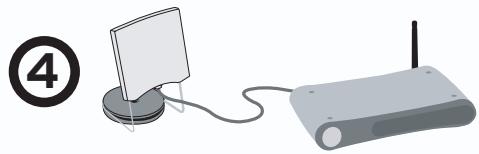
Installation is completed.
SMCHMANT-6
SMC
Networks
FOR TECHNICAL SUPPORT,CALL:
From U.S.A. and Canada
(24 hours a day, 7 days a week)
(800)SMC-4-YOU;
Phn: (949) 679-8000;
Fax: (949) 679-1481
From Europe: Contact details can be found on www.smc-europe.com or www.smc.com.
World Wide Web:
http://www.smc.com/
http://www.smc-europe.com/
If you are looking for further contact
information, please visit www.smc.com
or www.smc-europe.com.
Model Number: SMCHMANT-6
INTERNET
E-mail addresses:
techsupport@smc.com
european.techsupport@smc-europe.com
Driver updates:
http://www.smc.com/index.cfm?action tech_support_drivers_downloads
Information furnished by SMC Networks, Inc. (SMC) is believed to be accurate and reliable. However, no responsibility is assumed by SMC for its use, nor for any infringements of patents or other rights of third parties, which may result from its use. No license is granted by implication or otherwise under any patent or patent rights of SMC. SMC reserves the right to change specifications at any time without notice.
Copyright SMC Networks, Inc., 2004. All rights reserved.
SMC is a registered trademark; and EZ Connect™ is a trademark of SMC Networks, Inc. Other product and company names are trademarks or registered trademarks of their respective holders.
Package Contents
Verify you have the following items included in the EZ Connect™ Home Antenna package.
- 1 EZ Connect™ Home Antenna.
- 1 EZ Wall Mounting Kit.
- Quick Installation Guide.
Immediately inform your dealer in the event of any incorrect, missing or damaged parts. If possible, please retain the carton and original packing materials in case there is a need to return the product.
Please register this product and upgrade the product warranty at the SMC's Web site www.smc.com or www.smc-europe.com.
Antenna Mounting Options
The EZ Connect™ Home Antenna is mounted on a support for desktop use or it can be fixed to the wall if you use the EZ Wall Mounting Kit. With these two mounting options you can make sure the antenna is placed in an ideal location to maximize the performance.
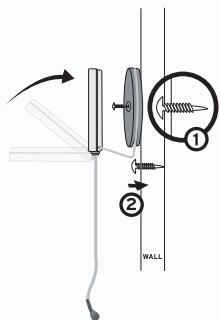
Using the wall-mount option:
- Locate a position on the wall where you want to place the antenna. Depending on the wall you may need to use the plastic anchor that is included in the wall mounting kit.
- Once you have drilled a hole for the mounting screw, hold the antenna against the wall, insert the screw in the base of the antenna and tighten the screw to the wall.
- Rotate the antenna panel upwards to direct the signal out from the wall.
Hardware Description
The EZ Connect™ Home Antenna line can be used with any 2.4GHz Wireless device with a SMA antenna connector, such as Barricade™ g Routers and EZ Connect™ Wireless PCI Adapters. By adding this antenna to your 2.4GHz wireless router or 2.4GHz wireless PCI adapter you can boost the wireless signal up to 50% and increase the range of your wireless network.
Disclaimer: Distance thresholds can be drastically reduced by environmental interference. For questions regarding likely-case wireless ranges, please visit us on the web at www.smc.com or www.smc-europe.com.
Technical Specifications
Frequency Range: 2400-2500 MHz
Gain: 6dBi
Voltage Standing Wave Ratio (VSWR): 2.0:1 Max
Polarization: Linear Vertical
Horizontal Plane: 80^
Vertical Plane: 80^
Impedance: 50 ohms
Connector: Reverse SMA Plug
Cable Type:ULA-316
Cable Length: 100 cm
Operating Temperature: -10^ to 55^
Humidity: 95% at 25^
Weight: 125 g
Dimensions: 75 × 72 × 12 ~mm