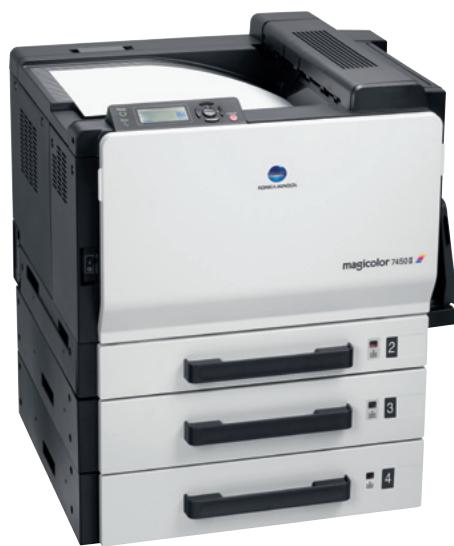
MAGICOLOR 7450II - Imprimante couleur laser KONICA - Notice d'utilisation et mode d'emploi gratuit
Retrouvez gratuitement la notice de l'appareil MAGICOLOR 7450II KONICA au format PDF.


| Intitulé | Description |
|---|---|
| Type de produit | Imprimante couleur laser multifonction |
| Résolution d'impression | 1200 x 600 dpi |
| Vitesse d'impression | Jusqu'à 30 pages par minute en noir et blanc, 20 pages par minute en couleur |
| Capacité de papier | 250 feuilles (bac principal), 100 feuilles (bac de sortie) |
| Formats de papier pris en charge | A4, A5, A6, B5, lettres, enveloppes |
| Connectivité | USB 2.0, Ethernet, Wi-Fi |
| Dimensions approximatives | 450 x 500 x 400 mm |
| Poids | Environ 25 kg |
| Consommation électrique | 350 W (impression), 50 W (veille) |
| Niveau sonore | 45 dB (impression), 30 dB (veille) |
| Entretien et nettoyage | Nettoyage régulier des rouleaux et des têtes d'impression, remplacement des toners |
| Pièces détachées et réparabilité | Accessibilité des toners, tambours et rouleaux pour un entretien facile |
| Garantie | 1 an sur les pièces et la main-d'œuvre |
| Compatibilités | Compatible avec Windows, Mac OS, Linux |
| Sécurité | Fonctionnalités de sécurité intégrées pour protéger les données d'impression |
| Fonctions principales | Impression, copie, numérisation, fax |
FOIRE AUX QUESTIONS - MAGICOLOR 7450II KONICA
Questions des utilisateurs sur MAGICOLOR 7450II KONICA
0 question sur cet appareil. Repondez a celles que vous connaissez ou posez la votre.
Poser une nouvelle question sur cet appareil
Téléchargez la notice de votre Imprimante couleur laser au format PDF gratuitement ! Retrouvez votre notice MAGICOLOR 7450II - KONICA et reprennez votre appareil électronique en main. Sur cette page sont publiés tous les documents nécessaires à l'utilisation de votre appareil MAGICOLOR 7450II de la marque KONICA.
MODE D'EMPLOI MAGICOLOR 7450II KONICA

KONICA MINOLTA





PANTONE CALIBRATED

Mac

Universal

Works with Windows
VistaTM

CLEAN PLANET PROGRAM
Konica Minolta printer supplies return program

Technical specifications
Print process
Print method
Desktop tandem full colour
A3 laser beam printer
Print speed A4
25 ppm colour
25 ppm monochrome
Print speed A3
13 ppm colour
13 ppm monochrome
First page out
11.5 seconds colour
9.5 seconds monochrome
(standard plain paper)
Warm-up time
99 seconds or less
Max. resolution
PhotoART 9600
(600 x 600 x 4 bit contone)
Duty cycle
120,000 pages per month
Hardware and software
capabilities
Processor
Freescale PowerPC 7447A
@733MH2
Memory
256 MB standard, 1,024 MB max
Hard disc 2 (optional)
40GB
CF card
CF card slot standard.
CF card optional
Printer emulations
PostScript 3 (3016), PCL 6 (XL3.0)
PCL 5e/c
Direct Print
PDF (Version 1.6), JPEG, TIFF
Printer Management
PageScope® Net Care
PageScope® Web Connection
(embedded web server)
Pagescope® Network Setup
PageScope® EMS Plug-in
PageScope Plug and Print
PageScope® NDPS Gateway
PageScope® Direct print
Colour simulations
SWOP, Commercial Press, Eurocolor,
DIC, TOYO Japan color, JMPA cc
SNAP, PANTONE® colour tables
ICC device profiles
Fonts
137 standard PostScript fonts
93 PCL scalable font
51 symbol sets
10 standard line printer fonts
Interface support
10-/100-/1000-Base-T Ethernet
supports TCP/IP, EtherTalk, IPX/SPX.
NetBFUL,IPP1.1,UDP,SNMP,HTTP
HTTPS (for PS Web Connection only)
USB 2.0 (High-Speed)
PictBridge (Digital camera via
USB host)
Operating system
compatibility
Windows®
2000, 2003, XP (32/64)
Vista (32/64)
Macintosh
OS X (10.2, 10.3, 10.4, 10.5)
Linux
Redhat v9.0, SuSE v8.2
Netware
Netware 4, 5, 6 or later
Paper handling
Standard paper input
Standard paper impact 250 sheet multipurpose
100 sheet multi manual feed tray
Standard paper output
350 sheet face down output tray
Optional paper handling
500-sheet lower paper feeder
(up to 3 units)
Printable area
4 mm right/left
4.2 mm top/bottom (A4)
2 mm from all edges (A3W)
Media sizes supported
A3,A3 Wide (311x457),A4,B5,
B5(ISO), A5, A6, B6, B4, D8K, Ledger
Legal, Letter, G-Letter, Statement
Executive, Folio, UK Quatro, Foolscap
G-Legal, 4^ × 6^ 12^ × 18^ ,custom
(90-311 x 140-1,200 mm)
Envelope sizes supported
Com10,C5,C6,DL.Monarch
Banner sizes supported
210 x 458 to 297 x 1,200 mr
Media weights supported
Plain paper (64-90 gsm)
Thick paper 1 (91-150 gsm)
Thick paper 2 (151-209 gsm)
Thick paper 3 (210-256 gsm
Duplexing support (optional)
A5-A3 Wide
64-256 gsm
Print media supported
Plain paper, thick paper, recycled
paper, trans
envelope, glossy paper, labels
Physical
Dimensions (D x W x H mm)
648 mm x 606 mm x 477 mm
Weight
51 kg without consumables
78 kg packaged to ship
Electrical
Input voltage range
220V~240V(±10%)
Frequency
50~60Hz(±3%)
Power consumption
Max. 1,450 W or less
Average during printing 750W or less
Standby 130 W or less
Enery saving 28 W or less
Environmental
Temperature
Tempera 10,35°
Humidih
15%+0.5%
15% to 65%
Noise levels
52 dB or less (A) (printing)
40 dB or less (A) (standby)
Regulatory/Safety
conformity
Doc. CE Marking GS EMG WEEE
EcoMark
Consumable
Pre-installed
Toner
CYMK - yield up 3,000 pages
Imaging Unit
CYM - yield up to 3
K-1
Replacements
Toner
CYM
K-
Im
CYM - yield u
K-v
M
V
hold up to
Maintenance parts
Transfer roller and Ozone filter
Yield up
Transfer belt
Yield
Fusor
Yield u
Dink cell
Pick ruler
Yield up to
Warranty period and
conditions
1 year on-site warranty
(within EU; local law applies)
1) CF card enables: direct print, storing of fonts/overlays/profiles/macro
2 Hard disc enables: secure print, print & hold, proof & print, job storing, collating, accounting in addition to all extra functions with CF card
All specifications relating to paper capacity refer to A4-size paper of 80 gsm quality.
All specifications relating to printing speeds refer to A4-size paper that is printed in multipage, simplex mode.
The support and availability of the listed specifications and functionalities varies depending on operating systems, applications, network protocols as well as network and system configurations.
The stated life expectancy of each consumable is based on specific operating conditions such as page coverage for a particular page size (5 % coverage of A4). The actual consumables life will
vary depending on the use and other printing variables including page coverage, page size, media type, continuous or intermittent printing, ambient temperature and humidity.
Some of the product illustrations contain optional accessories.
- Specifications and accessories are based on the information available at the time of printing, and are subject to change without notice.
Konica Minolta does not warrant that any prices or specifications mentioned will be error-free.
Microsoft, Windows and the Windows logo are trademarks, or registered trademarks, of Microsoft Corporation in the United States and/or other countries
All other brand and product names may be registered trademarks or trademarks of their respective holders and are hereby acknowledged.
For extra information, go to www.konicaminolta.eu
Your Konica Minolta Business Solutions Partner:
Konica Minolta
Business Solutions Europe GmbH
Europaaallee 17
30855 Langenhagen · Germany
Tel.: +49 (0) 511 74 04-0
Fax: +49 (0) 511 74 10 50
www.konicaminolta.eu

KONICA MINOLTA
The essentials of imaging

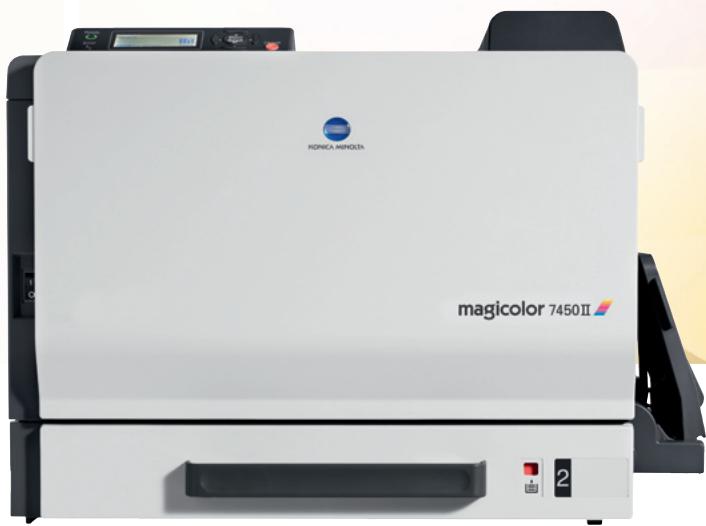
magicolor 7450II
Your creative power partner
Creativity and power: an effective combination
Take advantage of outstanding quality colour printouts with the magicolor 7450II, a top-performance A3+ printer designed for workgroups in the creative sector that frequently use colour for in-house printing while wanting to keep an eye on costs. Cutting edge technology produces superb images with minimum intervention and remarkable speed, while excellent performance and ease of use allow for unlimited creativity and bring new levels of efficiency to demanding network environments.
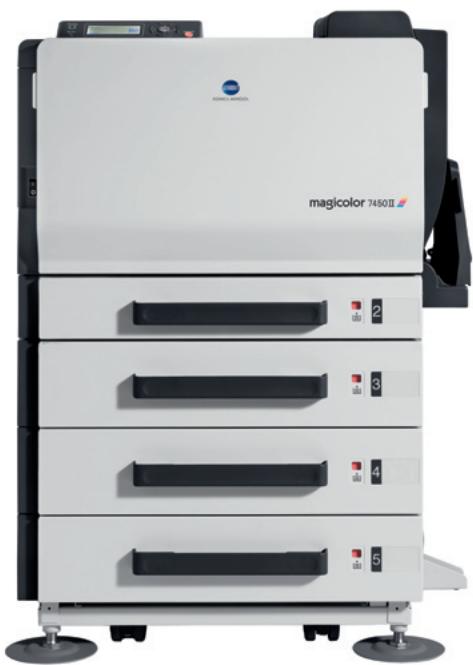

High-performance, low-cost solution for the creative market
Sticking to your budget without compromising on professional quality is what makes the magicolor 7450ll the ultimate printer for people in the creative industry. It allows you to produce in-house prints instantly, customize and reprint swiftly, when revisions are needed. Total document flexibility, increased print security as well as both time and printing costs savings are valuable business benefits.
Lower costs don't mean you need to compromise on quality with the magicolor 7450ll. Remarkable PhotoART 9600 (600 x 600 x 4-bit contone) technology delivers vibrant photo quality images for demanding colour prints, providing a close-to-professional look and feel. High-performance, incredible speed and total cost control bring you true value for money.
This clever device is a perfect solution for in-house printing as it handles media types of up to 256 gsm paper including banners up to 1200 ~mm . Its flexibility allows you to unleash your full creativity and choose the right colours, materials and formats for that custom and distinctive look. Not only does it impress with vivid colours, but also with the speed it delivers the goods. Thanks to the Emperor™ controller, the magicolor 7450II processes documents at an incredible speed, virtually eliminating the time between sending a job from your computer and waiting for it to print.

Handling the complete range of printing scenarios
Whether it's about printing simple stationery, colour A3+ printouts or complex banners up to 1.2 metres long, it's child's play with the magicolor 7450II. The first page will be ready in just 10 seconds and the unit will continue to produce 25 colour or monochrome A4 or 13 A3 pages. All the while, PhotoART 9600 (600 x 600 x 4-bit contour) resolution provides colours that are consistently vivid and true, with razor sharp graphics and text.
Flexibility is at the heart of the magicolor 7450II. With the ability to print on media up to 256 gsm and with up to 210 gsm duplex printing, professional standard in-house reports, leaflets, brochures as well as high-quality print-outs for proofing can all be easily produced. Keeping the quality at an outstanding level and pressing down the cost per page is a major benefit. High-yield consumables assure that you won't be replacing toner cartridges frequently.

Print quality and durability
Simitri® is Konica Minolta's unique polymerised toner. With an extremely fine and uniform particle shape and diameter, it allows high quality digital images to be printed economically and with great precision. Combined with the magicolor 7450II's unique colour management system, fine lines and small characters all reproduce beautifully, while photographs and illustrations are rendered more naturally thanks to Simitri®'s ability to improve half-tones. The size and shape of the toner particles allow for enlarged colour space and improved print sharpness. At the same time, Simitri® provides more efficient coverage, so cost per page is lower.

Rely on supreme compatibility and effortless processing
Enjoy the power of the magicolor 7450Ill's Emperor™ system architecture which offers you total control and print speed maximisation. Benefit from smooth compatibility with dominant printing languages (PostScript® 3™, PCL® 6), operating systems and business applications. Take advantage of effortless document processing from virtually any office, design or publishing application. Print photos straight from your digital camera. All of these combined bring new levels of efficiency to challenging networks.