MAGICOLOR 1690MF - Imprimante multifonction couleur KONICA - Notice d'utilisation et mode d'emploi gratuit
Retrouvez gratuitement la notice de l'appareil MAGICOLOR 1690MF KONICA au format PDF.


| Intitulé | Valeur / Description |
|---|---|
| Type de produit | Imprimante multifonction couleur laser |
| Fonctions principales | Impression, copie, numérisation, fax |
| Technologie d'impression | Laser couleur |
| Résolution d'impression | 600 x 600 dpi (optimisée jusqu'à 2400 x 600 dpi) |
| Vitesse d'impression | Jusqu'à 20 pages par minute en noir et couleur |
| Alimentation électrique | 220-240 V, 50/60 Hz |
| Dimensions approximatives | 420 x 490 x 450 mm |
| Poids | Environ 24 kg |
| Connectivité | USB 2.0, Ethernet, Wi-Fi (en option) |
| Compatibilités | Windows, Mac OS, Linux |
| Type de batterie | Non applicable |
| Entretien et nettoyage | Nettoyage régulier des rouleaux et de l'intérieur de l'imprimante, remplacement des toners |
| Pièces détachées et réparabilité | Disponibilité de toners, tambours et pièces de maintenance |
| Sécurité | Conforme aux normes de sécurité électrique, protection contre les surcharges |
| Informations générales | Idéale pour les petites et moyennes entreprises, impression de documents professionnels en couleur |
FOIRE AUX QUESTIONS - MAGICOLOR 1690MF KONICA
Questions des utilisateurs sur MAGICOLOR 1690MF KONICA
0 question sur cet appareil. Repondez a celles que vous connaissez ou posez la votre.
Poser une nouvelle question sur cet appareil
Téléchargez la notice de votre Imprimante multifonction couleur au format PDF gratuitement ! Retrouvez votre notice MAGICOLOR 1690MF - KONICA et reprennez votre appareil électronique en main. Sur cette page sont publiés tous les documents nécessaires à l'utilisation de votre appareil MAGICOLOR 1690MF de la marque KONICA.
MODE D'EMPLOI MAGICOLOR 1690MF KONICA
magicolor 1680MF magicolor 1690MF
Your smart colour all-in-one
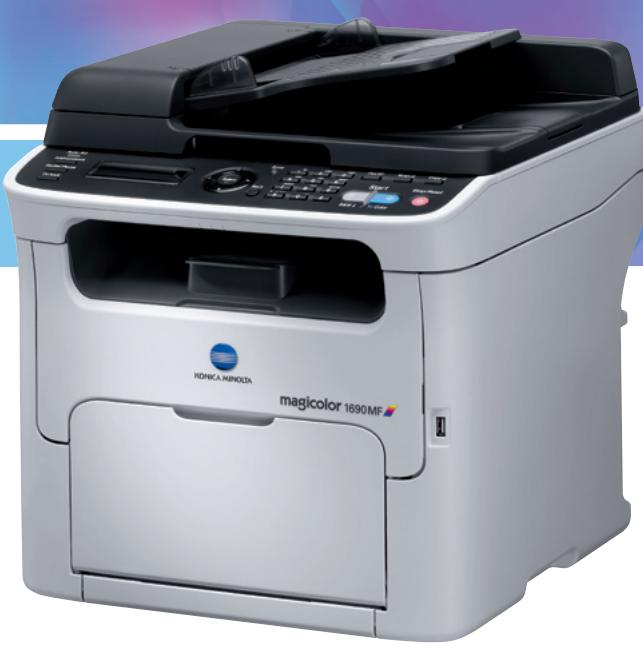
The magicolor 1680MF and magicolor 1690MF are Konica Minolta's compact colour all-in-ones and the perfect communication wizards for your home office or small business. Much more affordable than separate devices, each gives you everything you need in a single space-saving system. Both are Windows and Mac compatible, and thanks to their low operating noise are ideal desktop devices that you can comfortably work side by side with.
■ Versatile configurations - Select the system of your choice from four different configurations: The magicolor 1680MF provides printing, copying and scanning. The magicolor 1690MF combines network printing, copying, scanning, and fax capabilities and features a standard automatic document feeder. All this plus double-sided printing is available with the magicolor 1690MF-d. As a comprehensive network colour printer, copier, scanner and fax the magicolor 1690MF-dt also offers duplex plus an extended paper capacity for bigger jobs and higher volumes.
Powerful printing - With 5 colour and 20 b/w pages per minute, the magicolor 1680/1690MF capably handle all your office documents, including presentations as well as business cards, signs and sales support items. Simitri® HD polymerised toner and the resolution of 600 × 600 dpi x 1 bit ensure a consistently high print quality. Flexible media processing includes paper weights between 60 and 209 gsm as well as thick paper, labels, envelopes, and recycled paper. Double-sided printing helps you save paper and reduces filing space. If you need to produce bigger volumes, simply extend the standard 200 sheet paper capacity with the lower paper feeder to a generous 700 sheets.
■ Flexible copying and scanning - Different copy modes for text, photos and mixed originals always ensure optimal quality. Two separate start buttons provide an instant choice between colour and b/w copying. You can flexibly select up to 99 copies and reduce or enlarge pages in convenient 1 % steps from 50 % to 200 % . In addition to convenient scanning to PC, take advantage of the standard LinkMagic software to scan images and save them to any directory on the hard disk of your computer. With its full network compatibility the magicolor 1690MF also lets you can scan originals directly to e-mail or a shared folder on your PC.
Extended capabilities - For convenient fax communication, go for the magicolor 1690MF. It boasts a fast transmission speed of just 3 seconds per page, has 220 speed dials and lets you define up to 20 groups with max. 50 stations each. At the same time the magicolor 1690MF features Ethernet and is fully network compatible.
High user comfort - The magicolor 1680MF and magicolor 1690MF are experts in ease of use. With their compact design and small footprint, they easily integrate into any office setting, even where space is limited. Both feature a large, easy to read display and convenient access from the front for the straightforward exchange of consumables. The automatic document feeder on the magicolor 1690MF makes copying or faxing multi-page documents fast and smooth.

KONICA MINOLTA
Simitri HD
High Definition Polymerised Toner

Designed for Microsoft WindowsXP Windows2000


Works with Windows Vista™

CLEAN PLANET PROGRAM Konica Minolta printer supplies return program

ProtectPack

ENERGY STAR
Technical specifications
Print process
Print method
Desktop full colour, A4 laser beam
Print speed A4
Up to 20 ppm monochrome
Up to 5 ppm colour
First page out
14 seconds monochrome
23 seconds colour
Warm-up time
Average 30 seconds
Maxresolution
1,200 dpi x 600 dpi x 1 bit
Print volume
550 pages per month (average)
Print functions
Autozoom, N-up, poster mode,
booklet, watermark, quality
adjustment, overlay, collating
Copy process
Copy speed
Up to 20 cpm monochrome
Up to 5 cpm colour
First copy out
23 seconds monochrome
52 seconds colour
Copy resolution
600 dpi x 600 dpi x 1 bit
Copies
1-99
Zoom range
50-200% (by 1% step)
Copy functions
magicolor 1680MF: ID card copy
magicolor 1690MF: ID card copy,
2in1, collate, duplex copy
Scan process
Scan technology
CIS image sensor, flat bed
Scan speed
Up to 20 opm monochrome
Up to 3.3 opm colour
Resolution
600x600dpi
Scan size
Max.A4, custom formats
Scan Modes
magicolor 1680MF:
TWAIN scan
Windows WIA scan
magicolor 1690MF:
Scan-to-Email
Scan-to-FTP
Scan-to-USB
Scan-to-SMI
TWAIN scan
Windows WIA scan
File Formats
PDE TIEF JPEG
Fax process*
Send and receive with internal fax module
Modem speed
33.6 Kbps V.34
Transmit speed
3 sec/page (at V.34)
Fax compression
MH, MR, MMR, JBIG
Speed dial
220
Group dial
20 groups
(max. 50 stations for one group)
Fax functions
Receipt to e-mail, auto redial, broad
cast (maximal 236 destinations),
timer transmission, PC-Fax
Hardware and software
capabilities
Memory
magicolor 1680MF: 64 MB
magicolor 1690MF: 128 MB
Interface support
magicolor 1680ME:
USB 2.0 (high-speed)
magicolor 1690MF:
10-Base-T/100-Base-TX Ethernet,
USB 2.0 (high-speed)
Operating system
compatibility
Windows
2000, Server 2003 (32/64),
XP (32/64), Vista (32/64)
Macintosh
OSX 10.2 or later
Paper handling
Standard paper input magicolor
1680MF, 1690MF & 1690MF
200 sheet multi manual feed tray
Standard paper input magicolor
1690MF-dt
200 sheet multi manual feed tray
500 sheet lower paper feeder
Standard paper output
100 sheet face down output tray
Optional paper handling
500 sheet lower paper feeder
(only for magicolor 1690MF)
Media sizes supported
A4,A5,B5,letter,legal,envelope C6
envelope DL, custom size 92-216
mm x 184-356 mm
Duplexer sizes supported
A4
Printable area
Approx. 4mm from all edges
Paper weights
Plain paper (60-90 gsm)
Recycled paper (60-90 gsm)
Thick paper 1 (91-163 gsm)
Thick paper 2 (164-209 gsm)
Print media
Plain paper, recycled paper
envelope, labels, postcard,
thick paper, letterhead
Physical
Dimensions (W x D x H in mm)
magicolor 1680MF:
405 mm x 427 mm x 375 mm
magicolor 1690MF:
405 mm x 427 mm x 432 mm
magicolor 1690MF-d:
405 mm x 451 mm x 493 mm
magicolor 1690MF-dt:
405 mm x 565 mm x 548 mm
Weight
magicolor 1680MF:
19.2 kg with consumables
magicolor 1690MF:
20.8 kg with consumables
magicolor 1690MF-d:
24 kg with consumables
magicolor 1690MF-dt:
26.3 kg with consumables
Electrical
Input voltage range
220 240V(± 10%)
Frequency
50 60Hz (± 3%)
Power consumption
410 W or less
(average colour printing)
560 W or less
(average monochrome printing)
170 W or less
(stand by)
14 W or less
(energy save mode)
Environmental
Temperature
10 35^
Humidity
15\~85%RH
Noise levels
magicolor 1680MF:
50 dB or less printing/copying
38 dB or less standby
magicolor 1690ME:
49 dB or less printing
52 dB or less copying
38 dB or less standby
Regulatory/Safety
conformity
Doc, CE Marking, GS
EMC.WEEE.EnergyStar
(magicolor 1690MF)
Consumables
Pre-installed
Toner:
Cyan, magenta and yellow toner yield
up to 500 pages
Black toner yield up to 1,000 pages
Imaging unit
(waste toner bottle included):
Monochrome yield up to 45,000 pages
Colour yield up to 11,250 pages
Replacements
Toner:
Standard: Cyan, magenta and yellow
toner yield up to 1,500 pages
High capacity: Cyan, magenta, yellow
and black toner yield up to 2,500
pages
Imaging unit
(waste toner bottle included):
Monochrome yield up to 45,000 pages
Colour yield up to 11,250 pages
Maintenance parts
Fuser unit
Yield up to 50,000 sheets
2nd transfer unit
Yield up to 50,000 sheets
Warranty period and
conditions
1 year on-site warranty
(within EU; local law applies)
- For magicolor 1690MF
All specifications relating to paper capacity refer to A4-size paper of 80 gsm quality.
■ All specifications relating to printing speeds refer to A4-size paper that is printed in multipage, simplex mode.
The support and availability of the listed specifications and functionalities varies depending on operating systems, applications, network protocols as well as network and system configurations.
The stated life expectancy of each consumable is based on specific operating conditions such as page coverage for a particular page size (5% coverage of A4). The actual consumables life will
vary depending on the use and other printing variables including page coverage, page size, media type, continuous or intermittent printing, ambient temperature and humidity.
Some of the product illustrations contain optional accessories.
■ Specifications and accessories are based on the information available at the time of printing, and are subject to change without notice.
■ Konica Minolta does not warrant that any prices or specifications mentioned will be error-free.
Microsoft, Windows and the Windows logo are trademarks, or registered trademarks, of Microsoft Corporation in the United States and/or other countries.
All other brand and product names may be registered trademarks or trademarks of their respective holders and are hereby acknowledged.
For extra information, go to www.konicaminolta.eu
Konica Minolta
Business Solutions Europe GmbH
Europaallee 17
30855 Langenhagen · Germany
Tel.: +49 (0) 511 74 04-0
Fax: +49 (0) 511 74 10 50
www.konicaminolta.eu
Your Konica Minolta Business Solutions Partner: