
MM020 - Récepteur TV numérique SWEEX - Notice d'utilisation et mode d'emploi gratuit
Retrouvez gratuitement la notice de l'appareil MM020 SWEEX au format PDF.

| Type d'appareil | Récepteur TV numérique USB |
| Interface | USB |
| Contenu du paquet | Récepteur USB, antenne, support, télécommande, CD logiciel, manuel |
| Compatibilité OS | Windows XP, Windows Vista |
| Installation | Logiciel inclus sur CD, installation automatique |
| Fonction principale | Réception et enregistrement TV numérique |
| Alimentation | Alimentation via port USB |
| Température de fonctionnement | Éviter températures extrêmes |
| Conditions d'utilisation | Éviter exposition directe au soleil et environnements poussiéreux |
| Protection | Protégé contre chocs et chutes |
| Parties réparables | Aucune pièce réparable par l'utilisateur |
| Positionnement antenne | Haut, à l'extérieur ou près d'une fenêtre |
| Logiciel fourni | Total Media |
| Fonction télécommande | Contrôle à distance |
| Support | Support et clip inclus |
FOIRE AUX QUESTIONS - MM020 SWEEX
Questions des utilisateurs sur MM020 SWEEX
0 question sur cet appareil. Repondez a celles que vous connaissez ou posez la votre.
Poser une nouvelle question sur cet appareil
Téléchargez la notice de votre Récepteur TV numérique au format PDF gratuitement ! Retrouvez votre notice MM020 - SWEEX et reprennez votre appareil électronique en main. Sur cette page sont publiés tous les documents nécessaires à l'utilisation de votre appareil MM020 de la marque SWEEX.
MODE D'EMPLOI MM020 SWEEX
MM020 DVB-T Adapter USB
Important!
- Do not expose the DVB-T Adapter USB to extreme temperatures. Do not place the device in direct sunlight or in the direct vicinity of heating elements.
- Do not use the DVB-T Adapter USB in extremely moist or dusty surroundings.
- Protect the device against powerful shocks and falls - they may damage the internal electronics.
- Never attempt to open the device yourself, there are no serviceable parts inside. Opening the device will cause the warranty to lapse.
Package contents
In this package you will find:
DVB-T Adapter USB
Antenna
- Suction cup and clip
Remote control
- CD with drivers, software and this manual
If you find that any of the package contents are missing, please return the package to the sales point where it was bought.
Before you begin
Please note that for the best reception, position the antenna as high as possible and outside, or near a window. If you fail to see any channels during a channel scan, this is most likely due to poor reception.
Installation
To install the adapter, insert the CD, wait for the installation program to start automatically and choose the "Drivers and Software" option. Follow the instructions on screen.
Using the adapter
Windows XP / Windows Vista
Under Windows XP & Windows Vista, you need to use the bundled "Total Media" software to watch and record TV. Please refer to the Total Media manual included on the CD for more information.
Windows 7
Live TV Setup
Under Windows 7, you need to use Windows Media Center. To start Windows Media Center, go to Start > All Programs > Windows Media Center

You should see the following screen:
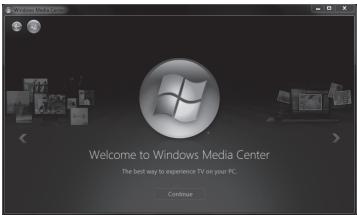
When Windows Media Center has started, click "Continue" and follow the instructions on screen. Next click "Live TV Setup" under the "TV" item and follow the instructions on screen.
Note: Setting up Live TV under requires an Internet connection. Watching TV does not require an Internet connection.
Note: If you change location, it may be necessary to setup Live TV again.
After the TV Channel scan is complete, you should see the following screen:
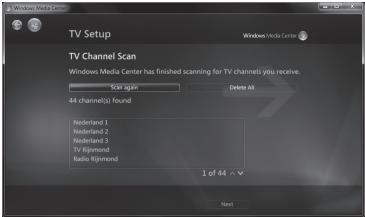
Click "Next" and "Finish".
Watching Live TV
To watch Live TV, start Window Media Center and "Watch Live TV" under the "TV" item. You will see the following screen:
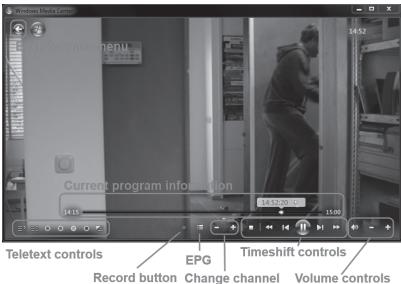
Note: The "Shuffle", "Power on/off" and "Snapshot" functions of the remote control do not work in Windows Media Center
Warranty
Thank you for purchasing this Sweeex product. Sweeex devotes ample attention and care to the quality, reliability, functionality, durability and user friendliness of all its products. In this way Sweeex distinguishes itself in the market and can we convince you as a buyer to continue purchasing products of the Sweeex brand. We wish you a lot of pleasure with your purchase.
An important extra advantage for you is the possibility of product registration.
After the registration of your product Sweex offers you a number of important yet equally useful advantages.
The biggest advantage is that by means of the online registration on www.sweex.com/12yearswarranty the warranty on the product is extended by a 10-year manufacturer's warranty (see the applicable conditions on this website). This in addition to the statutory 2-year warranty which is already available for the product. In total the warranty period will therefore amount to 12 years.
There are also other advantages:
For example, if you wish so, you are regularly informed by us of the latest developments in our assortment by means of a digital newsletter.
Where applicable, you also automatically receive the latest drivers and/or firmware from us for the product you purchased to preserve or improve the compatibility and the performance.
Moreover, our support desk can assist you faster in case of possible support questions about the product if you registered the product.
Sweex warranty conditions.
2-year standard warranty within the EU
- In a standard manner a warranty period of 2 years as from the purchase date is available for this Sweex product within the EU.
- Should you wish to invoke this warranty within the first 2 years after the purchase then you can directly apply to the point of sale where you purchased the product for the conditions and procedures.
10-year manufacturer's warranty
- However, in addition to the statutory 2-year standard warranty Sweex offers you an extended quality warranty of no less than 10 years, if you purchased your product within the EU.
- For more information, conditions and the registration form go to www.sweex.com/12yearswarranty and register within 30 days after the purchase of your product for the extended warranty period of in total 12 years.
Matters that are excluded from the warranty
- The warranty of Sweex only covers manufacturing defects. Excluded from the warranty are accessories like batteries, rechargeable batteries and also supplied software, where applicable.
- The liability of Sweex is limited to the costs of repair and/or replacement of the product covered by the warranty.
- Both warranty types (the 2-year standard warranty and the 10-year extended manufacturer's warranty) are null and void if the product has been opened, changes have been made, physical damage was caused to the product and if the product is used for another purpose than for which it is originally meant.
All brand names and associated rights mentioned in this manual are and remain the sole property of the rightful claimant.
Specifications
DVB-T Adapter USB specifications
CONNECTION
USB 2.0
Antenna: Aerial / PAL / CATV (Belling-Lee type, IEC 169-2)
STANDARDS SUPPORTED
DVB-T, Microsoft BDA
SUPPORTED FORMATS
MPEG-2, H.264 / MPEG-4 AVC
ADVANCED FEATURES
Antenna clip and suction cup
Works with Windows Media Player
No software installation required for Windows 7
Supports EPG and Teletext
Timeshift function
FREQUENCY RANGE
48.25\~863.25MHz(VHF,UHF)
ANTENNA TYPE
3 dBi twin
ADDITIONAL SPECIFICATIONS
Chipset: Realtek RTL2832U
Tuner:MaxLineMxL5007T
BUNDLED SOFTWARE
ArcSoft TotalMedia 3.0.7.127
SYSTEM REQUIREMENTS
Microsoft® Windows® XP, Windows Vista® or Windows® 7
CABLING
Antenna cable length: 190cm
WARRANTY
2 years + 10 years extended warranty after registration
Visit: sweex.com/12yearwarranty for more information, terms and the registration form