
TA008 - Tablette graphique SWEEX - Notice d'utilisation et mode d'emploi gratuit
Retrouvez gratuitement la notice de l'appareil TA008 SWEEX au format PDF.

| Type de produit | Tablette graphique |
| Marque | SWEEX |
| Modèle | TA008 |
| Connectivité | USB (câble inclus) |
| Alimentation du stylet | 1 pile AAA (incluse) |
| Type de stylet | Sans fil, avec batterie |
| Boutons du stylet | 2 boutons (clic droit, milieu) |
| Touches de raccourci | Oui (express keys et hot cells) |
| Indicateur LED | Oui (activité) |
| Zone active | Grand écran (widescreen) |
| Accessoires fournis | Stylet, support, 3 pointes de rechange, outil de retrait, pile AAA, CD |
| Logiciels inclus | Pilotes et logiciels sur CD |
| Systèmes d'exploitation compatibles | Windows, Mac (via CD) |
| Entretien | Remplacement de la pointe du stylet avec outil |
| Précautions d'usage | Éviter températures extrêmes, humidité, chocs |
| Réparabilité | Ne pas ouvrir, aucune pièce réparable par l'utilisateur |
| Garantie standard | 2 ans |
| Garantie étendue | 10 ans supplémentaires après enregistrement en ligne |
FOIRE AUX QUESTIONS - TA008 SWEEX
Questions des utilisateurs sur TA008 SWEEX
0 question sur cet appareil. Repondez a celles que vous connaissez ou posez la votre.
Poser une nouvelle question sur cet appareil
Téléchargez la notice de votre Tablette graphique au format PDF gratuitement ! Retrouvez votre notice TA008 - SWEEX et reprennez votre appareil électronique en main. Sur cette page sont publiés tous les documents nécessaires à l'utilisation de votre appareil TA008 de la marque SWEEX.
MODE D'EMPLOI TA008 SWEEX
Important!
- Do not expose the Graphics Tablet USB to extreme temperatures. Do not place the device in direct sunlight or in the direct vicinity of heating elements.
- Do not use the Graphics Tablet USB in extremely moist or dusty surroundings.
- Protect the device against powerful shocks and falls - they may damage the internal electronics.
- Never attempt to open the device yourself, there are no serviceable parts inside. Opening the device will cause the warranty to lapse.
Package contents
In this package you will find:
- Graphics tablet USB
Stylus - Desk stand for stylus
- AAA battery
- 3 × Extra tip for stylus & tip removal tool
- CD with software, drivers and manual
If you find that any of the package contents are missing, please return the package to the sales point where it was bought.
Product description
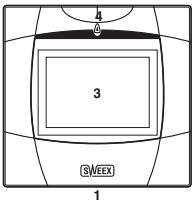
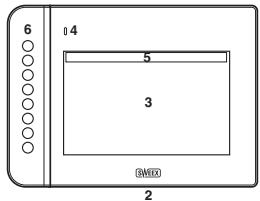
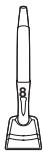
1- Graphics Tablet USB
2- Graphics Tablet Widescreen USB
3- Active working area
4-LED activity indicator
5-Hot cells
6- Express keys
7-Pent tip (left mouse button)
8-Pen barrel button 1 (middle mouse button)
9-Pen barrel button 2 (right mouse button)
Before you begin
Before you can use the graphics tablet, open the pen and insert the battery:

Note: The pen draws power from the battery whenever there is pressure on the tip. It is recommended to place the pen in the desk stand whenever it is not in use to avoid draining the battery unnecessarily.
Installation
To install the graphics tablet, insert the CD, wait for the installation program to start automatically and choose the "Drivers and Software" option. Follow the instructions on screen.
Using the graphics tablet
After the software is installed successfully and the graphics tablet is ready for use, you should see the following icon in your system tray, located at the bottom right of your screen:
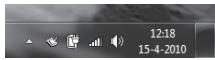
Double-click it to open the graphics tablet options panel, where you can adjust the tablet's settings:
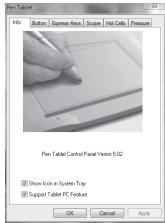
For detailed instructions on using the additional software bundled with the tablet, please refer to the separate software manual.
Maintenance
Changing the pen tip
When the pen tip has become worn, it is possible to replace the tip.
The tip removal tool is located in the bottom of the stylus desk stand, to remove the tip, insert it in the removal tool and gently draw back the pen, the tip will be drawn out of the pen, and a new tip can be inserted.
Warranty
Thank you for purchasing this Sweeex product. Sweeex devotes ample attention and care to the quality, reliability, functionality, durability and user friendliness of all its products. In this way Sweeex distinguishes itself in the market and can we convince you as a buyer to continue purchasing products of the Sweeex brand. We wish you a lot of pleasure with your purchase.
An important extra advantage for you is the possibility of product registration.
After the registration of your product Sweex offers you a number of important yet equally useful advantages.
The biggest advantage is that by means of the online registration on www.sweex.com/12yearswarranty the warranty on the product is extended by a 10-year manufacturer's warranty (see the applicable conditions on this website). This in addition to the statutory 2-year warranty which is already available for the product. In total the warranty period will therefore amount to 12 years.
There are also other advantages:
For example, if you wish so, you are regularly informed by us of the latest developments in our assortment by means of a digital newsletter.
Where applicable, you also automatically receive the latest drivers and/or firmware from us for the product you purchased to preserve or improve the compatibility and the performance.
Moreover, our support desk can assist you faster in case of possible support questions about the product if you registered the product.
Sweex warranty conditions.
2-year standard warranty within the EU
- In a standard manner a warranty period of 2 years as from the purchase date is available for this Sweex product within the EU.
- Should you wish to invoke this warranty within the first 2 years after the purchase then you can directly apply to the point of sale where you purchased the product for the conditions and procedures.
10-year manufacturer's warranty
- However, in addition to the statutory 2-year standard warranty Sweex offers you an extended quality warranty of no less than 10 years, if you purchased your product within the EU.
- For more information, conditions and the registration form go to www.sweex.com/12yearswarranty and register within 30 days after the purchase of your product for the extended warranty period of in total 12 years.
Matters that are excluded from the warranty
- The warranty of Sweex only covers manufacturing defects. Excluded from the warranty are accessories like batteries, rechargeable batteries and also supplied software, where applicable.
- The liability of Sweex is limited to the costs of repair and/or replacement of the product covered by the warranty.
- Both warranty types (the 2-year standard warranty and the 10-year extended manufacturer's warranty) are null and void if the product has been opened, changes have been made, physical damage was caused to the product and if the product is used for another purpose than for which it is originally meant.
All brand names and associated rights mentioned in this manual are and remain the sole property of the rightful claimant.