
MM009 - Cadre photo numérique SWEEX - Notice d'utilisation et mode d'emploi gratuit
Retrouvez gratuitement la notice de l'appareil MM009 SWEEX au format PDF.

| Marque | SWEEX |
| Modèle | MM009 |
| Type de produit | Cadre photo numérique |
| Taille de l'écran | 8 pouces (20,3 cm) |
| Dimensions (approx.) | 20 x 15 x 2 cm |
| Poids (approx.) | 300 g |
| Alimentation | Adaptateur secteur (inclus) – 5V, 1A |
| Mémoire interne | Oui, intégrée |
| Supports de stockage externes | Carte mémoire (SD/MMC) et clé USB |
| Formats d'image supportés | JPEG, BMP (standard) |
| Fonctions principales | Diaporama automatique, lecture depuis la mémoire interne/carte/clé USB, mode calendrier, navigation dans les menus |
| Boutons de commande | Lecture/Pause, Gauche/Droite, Retour (EXIT), Configuration (SETUP) |
| Affichage | Écran LCD couleur |
| Accessoires inclus | Support de bureau (pied), adaptateur secteur |
| Entretien et nettoyage | Essuyer avec un chiffon doux et sec. Ne pas utiliser de produits abrasifs ou de liquides. |
| Sécurité | Utiliser uniquement l'adaptateur fourni. Ne pas exposer à l'humidité ou à des températures extrêmes. |
| Pièces détachées et réparabilité | Les pièces détachées ne sont pas disponibles séparément. En cas de panne, contacter le service après-vente. |
| Garantie | Garantie légale de conformité (2 ans) |
| Origine | Importé |
FOIRE AUX QUESTIONS - MM009 SWEEX
Questions des utilisateurs sur MM009 SWEEX
0 question sur cet appareil. Repondez a celles que vous connaissez ou posez la votre.
Poser une nouvelle question sur cet appareil
Téléchargez la notice de votre Cadre photo numérique au format PDF gratuitement ! Retrouvez votre notice MM009 - SWEEX et reprennez votre appareil électronique en main. Sur cette page sont publiés tous les documents nécessaires à l'utilisation de votre appareil MM009 de la marque SWEEX.
MODE D'EMPLOI MM009 SWEEX
MM009 Digital Photo Frame 8"
Before installation
Before you can start using the photo frame, the following steps are required:
- Slide the included desk stand into the back of the frame
- Peel off the protective screen coating
- You can now plug in the power adapter and start using the photo frame!
Buttons
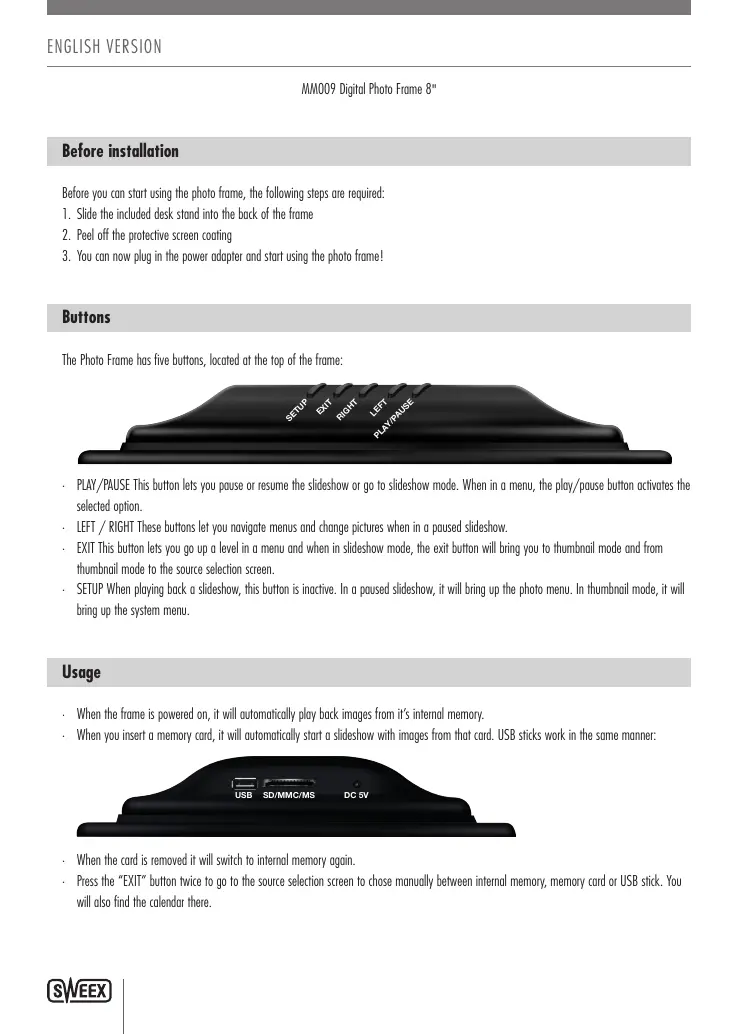
The Photo Frame has five buttons, located at the top of the frame:

- PLAY/PAUSE This button lets you pause or resume the slideshow or go to slideshow mode. When in a menu, the play/pause button activates the selected option.
- LEFT / RIGHT These buttons let you navigate menus and change pictures when in a paused slideshow.
- EXIT This button lets you go up a level in a menu and when in slideshow mode, the exit button will bring you to thumbnail mode and from thumbnail mode to the source selection screen.
- SETUP When playing back a slideshow, this button is inactive. In a paused slideshow, it will bring up the photo menu. In thumbnail mode, it will bring up the system menu.
Usage
- When the frame is powered on, it will automatically play back images from it's internal memory.
- When you insert a memory card, it will automatically start a slideshow with images from that card. USB sticks work in the same manner:

- When the card is removed it will switch to internal memory again.
- Press the "EXIT" button twice to go to the source selection screen to chose manually between internal memory, memory card or USB stick. You will also find the calendar there.