
CF234750 - Lave-linge CONSTRUCTA - Notice d'utilisation et mode d'emploi gratuit
Retrouvez gratuitement la notice de l'appareil CF234750 CONSTRUCTA au format PDF.

| Type de produit | Four encastrable |
| Marque | CONSTRUCTA |
| Modèle | CF234750 |
| Catégorie | Lave-linge |
| Modes de cuisson | Chaleur tournante, chaleur tournante intensive, chaleur voûte/sole, sole, gril voûte, gril radiant, décongélation, cuisson vapeur, pyrolyse |
| Plage de température | 50 °C à 275 °C selon le mode |
| Niveaux de grille | 5 niveaux |
| Accessoires fournis | Grille métallique, plaque à pâtisserie émaillée, lèchefrite émaillée |
| Fonctions de l'horloge | Minuterie, durée de fonctionnement, fin de fonctionnement, programmation différée, réglage de l'heure |
| Nettoyage | Pyrolyse avec 3 niveaux (léger, moyen, intensif) |
| Sécurité | Verrouillage enfant temporaire et permanent, arrêt automatique de sécurité |
| Éclairage du four | Ampoule halogène 40 W (référence pièce détachée) |
| Type d'installation | Encastrable |
| Porte du four | Amovible pour nettoyage, vitres démontables |
| Matériau de la cavité | Émail |
| Affichage | Numérique avec horloge et indicateurs |
| Indicateur de chaleur résiduelle | Oui (H pour élevée, h pour basse) |
| Consommation énergétique | Environ 2,5 à 4,7 kWh par cycle de pyrolyse |
| Nombre de pages de la notice | 56 pages |
| Langue de la notice | Français (téléchargeable) |
FOIRE AUX QUESTIONS - CF234750 CONSTRUCTA
Questions des utilisateurs sur CF234750 CONSTRUCTA
0 question sur cet appareil. Repondez a celles que vous connaissez ou posez la votre.
Poser une nouvelle question sur cet appareil
Téléchargez la notice de votre Lave-linge au format PDF gratuitement ! Retrouvez votre notice CF234750 - CONSTRUCTA et reprennez votre appareil électronique en main. Sur cette page sont publiés tous les documents nécessaires à l'utilisation de votre appareil CF234750 de la marque CONSTRUCTA.
MODE D'EMPLOI CF234750 CONSTRUCTA
Constructa
Making cooking as much fun as eating
Please read this instruction manual. This will ensure that you make use of all the technical benefits the cooker has to offer.
It will provide you with important safety information. You will then be familiarised with the individual components of your new cooker. And we will show you how to configure the settings step by step. It is quite simple.
The tables list the settings and shelf positions for numerous well-known dishes. All these dishes are tested in our cooking studio.
In the unlikely event of a malfunction, look here for information on how to rectify minor faults yourself.
A detailed table of contents will help you to find your way around quickly.
Enjoy your meal!
Instructions for use
CF 234750
en
9000364556
Table of contents
Safety information 5
Before installation 5
Information for your safety 5
Causes of damage 7
Energy and environment tips 9
Saving energy 9
Environmentallyfriendly disposal 9
Your new appliance 10
Control panel 10
Operating modes 11
Accessories 12
Before using the appliance for the first time 13
Setting the time 13
Cleaning the appliance 14
Using the appliance 15
Switching on the appliance 15
Switching off the appliance 17
Changing the basic settings 17
Automatic safety switch off 18
Electronic clock 18
Clock display 19
Minute minder 20
Operating duration 20
End of operation 21
Preselected operation 22
Setting the time 22
Table of contents
Rapid heating 23
Checking, correcting or cancelling settings 23
Childproof lock 24
Locking 24
Permanent lock 25
Baking 26
Baking table for basic doughs and baked products 26
Baking table for dishes and pre-prepared froze meals 29
Tips and tricks 30
Bread-baking setting 31
Roasting 32
Roasting without a lid 32
Roasting with a lid 33
Roasting table 33
Tips and tricks 34
Grilling 35
All-roundgrilling 35
Using the radiant grill 36
Defrosting 38
Defrosting with hot air 38
Defrost level 39
Steam cooking 39
Yoghurt 40
Preserving 40
Table of contents
Pyrolysis 43
Important notes 43
Before cleaning 44
Setting the cleaning level 44
After cleaning 45
Cleaning and care 46
Cleaning agents 46
Detaching and attaching the oven door 47
Removing and installing the door panels 49
Faults and repairs 52
Replacing the bulb in the oven ceiling light 54
Glass cover 54
After-sales service 55
Test dishes 55
Safety information
Read this instruction manual carefully. Please keep the instruction and installation manuals in a safe place. Please pass on these manuals to the new owner if you sell the appliance.
Before installation
Transport damage
Electrical connection
Check the appliance for damage after unpacking it.
Do not connect the appliance if it has been damaged in transport.
Only allow a licensed professional to connect the appliance. Damage caused by incorrect connection is not covered under warranty.
Information for your safety
This appliance is intended for domestic use only. This appliance must only be used for food preparation.
Adults and children must not operate the appliance without supervision,
if they are physically or mentally incapable of doing so or
if they lack the knowledge and experience.
Never let children play with the appliance.
Hot cooking compartment
There is a risk of burns.
Never touch the interior surfaces of the cooking compartment or the heating elements. Open the appliance door carefully. Hot steam may escape. Small children must be kept at a safe distance from the appliance.
There is a risk of fire.
Never store combustible items in the cooking compartment.
Never open the appliance door if there is smoke inside. Switch off the appliance. Pull out the mains plug or switch off the appliance by the fuse in the fuse box.
There is a risk of short-circuiting.
Never trap connecting cables of electrical appliances in the hot appliance door. The cable insulation could melt.
There is a risk of scalding
Never pour water into the hot cooking compartment. This will cause hot steam.
There is a risk of burns.
Never prepare food containing large quantities of drinks with a high alcohol content. Alcoholic vapours can catch fire in the cooking compartment. Only use small quantities of drinks with a high alcohol content and open the appliance door carefully.
Hot accessories and ovenware
There is a risk of burns.
Never remove ovenware and accessories from the cooking compartment without an oven cloth or oven gloves.
Incorrect repairs
There is a risk of electric shock.
Incorrect repairs are dangerous. Repairs may only be carried out by one of our experienced after-sales engineers.
If the appliance is defective, pull out the mains plug or switch off the appliance by the fuse in the fuse box. Call the after-sales service.
Pyrolytic cleaning
There is a risk of fire.
Loose food remains, grease and meat juices may catch fire during pyrolytic cleaning. Before starting any cleaning, remove the worst soiling from the cooking compartment.
Never hang flammable materials (e.g. tea towels) on the door handle.
During cleaning, the outside of the appliance will become very hot. Keep children at a safe distance.
There is a risk of serious damage to health Never use pyrolytic cleaning to clean non-stick baking trays and dishes. Extreme heat destroys the non-stick coating and generates noxious gases.
Causes of damage
Accessories, foil, greaseproof paper or ovenware on the cooking compartment floor
Water in the hot cooking compartment
Moist food
Fruit juice
Cooling with the oven door open
Very dirty oven seal
Do not place accessories on the cooking compartment floor. Do not cover the cooking compartment floor with any sort of foil or greaseproof paper. Do not place ovenware on the cooking compartment floor if a temperature of over 50^ is set.
This will cause heat accumulation. The baking and roasting times will no longer be correct and the enamel will be damaged.
Never pour water into the hot cooking compartment. This will cause steam. The temperature change can cause damage to the enamel.
Do not store moist food in the closed cooking compartment for long periods. This will damage the enamel.
When baking very moist fruit flan, do not put too much on the baking tray. Fruit juice dripping from the baking tray leaves stains that cannot be removed. If possible, use the deeper universal pan.
Only leave the cooking compartment to cool with the door closed. Even if you only leave the oven door open slightly, the fronts of adjacent units may become damaged over time.
If the oven seal is very dirty, the oven door will no longer close properly when the oven is in use. The fronts of adjacent units could be damaged. Always keep the oven seal clean.
Oven door as a seat or storage space
Transporting the appliance
Heavy accessories
Do not stand or sit on the open oven door. Do not place ovenware or accessories on the oven door.
Do not carry or hold the appliance by the door handle. The door handle cannot support the weight of the appliance and could break.
Do not pull heavy or heavily loaded accessories out too far without supporting the weight. Heavy accessories will tip slightly when pulled out. This causes pressure to be exerted on the ridges in the cooking compartment, which can damage the enamel.
Support the accessories when they are pulled out by raising them slightly with one hand. Caution: always use an oven cloth or oven gloves when handling hot accessories.
Energy and environment tips
Here you can find tips on how to save energy when baking and roasting and how to dispose of your appliance properly.
Saving energy
Only preheat the oven if this is specified in the recipe or in the operating instruction tables.
Use dark, black lacquered or enamelled baking tins. They absorb the heat particularly well.
Open the oven door as little as possible while you are cooking, baking or roasting.
It is best to bake several cakes one after the other. The oven is still warm. This reduces the baking time for the second cake. You can also place two loaf tins next to each other.
For longer cooking times, you can switch the oven off 10 minutes before the end of the cooking time and use the residual heat to finish cooking.
Environmentally-friendly disposal

Dispose of packaging in an environmentally-friendly manner.
This appliance is labelled in accordance with European Directive 2002/96/EC on Waste Electrical and Electronic Equipment - WEEE.
The directive gives a framework for the collection and recycling of old appliances, which is valid across the EU.
Your new appliance
In this section you will find information on the appliance, the operating modes and the accessories.
Control panel
Here, you will see an overview of the control panel. All of the symbols never appear in the display at the same time. Depending on the appliance model, individual details may differ.
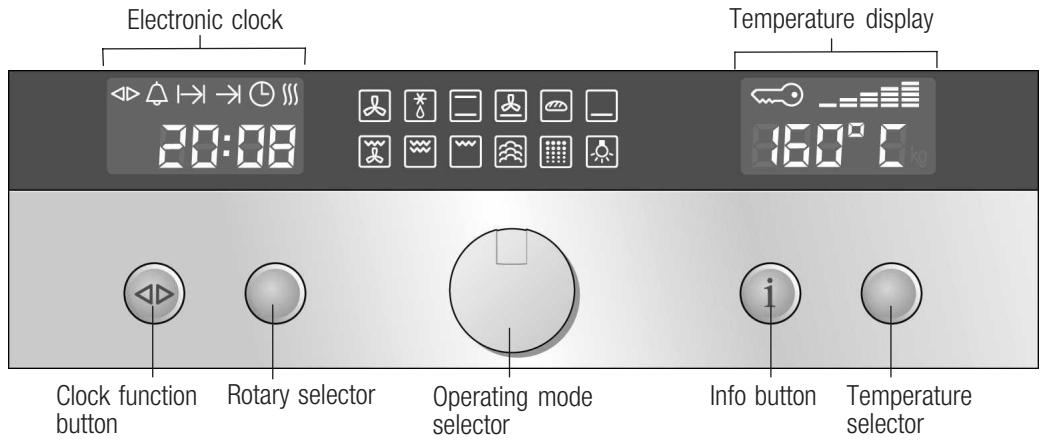
Retractable operating knob
The rotary, temperature and operating mode selectors are retractable. Press them towards the relevant operating knob to pop it in and out.
| Control element | Use |
| Clock function button | Select the required clock function or rapid heating (see section: Electronic clock) |
| Rotary selector | Make the settings in one of the clock functions or activate rapid heating (see section: Electronic clock) |
| Operating mode selector | Select the required operating mode (see section: Switching on the appliance) |
| Information button | When the appliance is switched on: shows current oven temperature during the heating up period (see section: Switching on the appliance) |
| When the appliance is switched off: calls up basic settings menu (see section: Changing the basic settings) | |
| Temperature selector | When the appliance is switched on: sets the temperature (see section: Switching on the appliance) |
| When the appliance is switched off: changes the settings in the basic settings menu (see section: Changing the basic settings) |
Operating modes
Here you can obtain an overview of your appliance's operating modes.
| Operating mode | Application |
| Hot air | For baking and roasting on one or more levels. |
| Defrost | For gently defrosting pieces of meat, bread and delicate pastries (e.g. cream cakes). |
| Top/bottom heat | Particularly suited for cakes with moist toppings (e.g. cheesecake). |
| Cirotherm intensive | Particularly suited for pre-prepared frozen meals and for dishes that require a lot of heat from underneath (see the Baking section). |
| Bread-baking | For items that need to be baked at a high temperature. |
| Bottom heat | For food and baked goods that require more browning or a crust on the underside. Only activate bottom heat for a short while at the end of the baking time. |
| All-round grilling | For poultry and larger pieces of meat. |
| Full-surface grill | For a large number of small, flat grill items (e.g. steaks, sausages). |
| Centre-area grill | For a small number of small, flat grill items (e.g. steaks, toast). |
| Steam cooking | For gentle preparation of vegetables, meat and fish. |
| Pyrolysis | Automatic cooking compartment cleaning. The oven heats up until the dirt is broken down. |
| Oven light | Helps with cleaning and care of the cooking compartment. |
Accessories
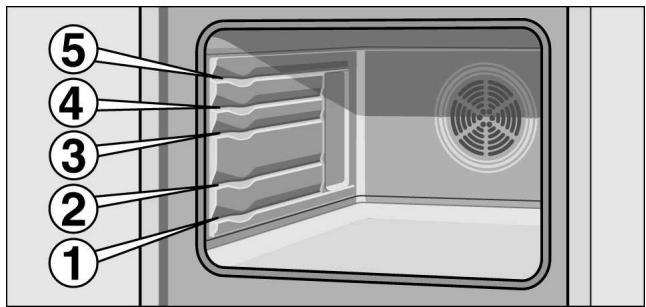
The accessories can be inserted into the oven at 5 different levels.
You can pull out the accessories two thirds of the way without them tipping. This allows meals to be removed easily.
The accessories can become deformed when they become hot. As soon as they have cooled down, the deformation disappears with no effect on the function.
You can buy accessories from the after-sales service, from specialist retailers or online.
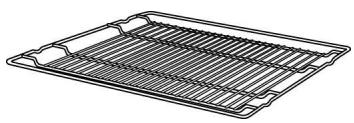
Wire shelf
For ovenware, cake tins, roasts, grilling and frozen meals. Insert the wire grill with the curved bars facing downwards
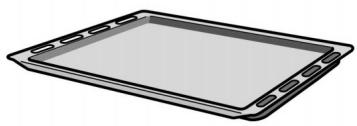
Enamel baking tray
For cakes and biscuits.
Push the baking tray into the oven with the sloping edge facing towards the oven door.
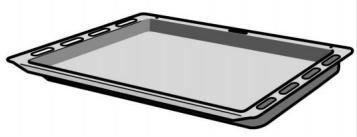
Universal pan
For moist cakes, pastries, frozen meals and large roasts. It can also be used to catch dripping fat when you are grilling directly on the wire rack.
Slide the universal pan into the oven with the tapered edge facing the oven door.
You can obtain further accessories from specialist retailers:
| Accessories | Order no. |
| Universal pan, enamelled | CZ1247X0 |
| Baking tray, enamelled | CZ1347X0 |
| Combination grill pan | CZ1427X0 |
Before using the appliance for the first time
This section contains information on
- how to set the time on your appliance after the power is connected
- how to clean your appliance before using it for the first time
Setting the time
0:00 flashes in the clock display.
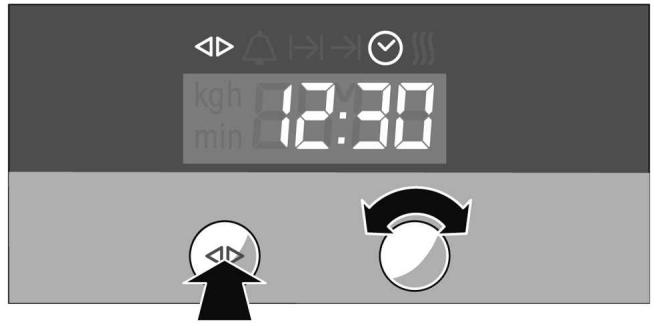
- Press the clock function button.
The and symbols are lit. The clock display shows 12:00.
- Set the current time using the rotary selector.
Your setting is automatically adopted after 3 seconds.
Changing the time
To subsequently change the time, press the clock function button repeatedly until the and symbols are lit. Change the current time using the rotary selector.
Cleaning the appliance
Clean your appliance before using it for the first time.
- Remove the accessories from the cooking compartment.
- Completely remove any residual packaging (e.g. chips of polystyrene) from the cooking compartment.
- Clean the accessories and cooking compartment with hot soapy water (see section: Cleaning and care).
- Heat with top/bottom heating at 240^ C for 30 minutes.
- Once the cooking compartment has cooled, wipe it over with hot, soapy water.
- Clean the outside of the appliance with a soft, damp cloth and soapy water.
Using the appliance
This section contains information on
how to switch your appliance on and off
how to select an operating mode and temperature
how you can change the basic settings
when your appliance switches off automatically
Switching on the appliance
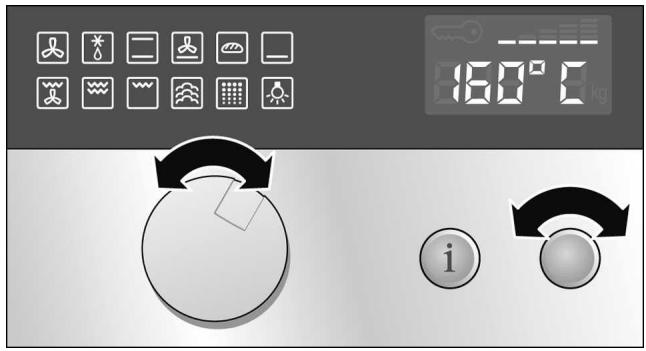
- Turn the operating mode selector until the symbol for the required operating mode lights up.
A default temperature appears in the temperature display.
- Turn the temperature selector to change the default temperature.
The appliance begins to heat up.
Note:
If no default temperature is displayed, the temperature for your selected operating mode is a fixed setting. You cannot change this temperature.
| Operating mode | Default temperature in °C | Temperature range in °C |
| Hot air | 160 | 40 - 200 |
| Defrost | Fixed setting | - |
| Top/bottom heat | 170 | 50 - 275 |
| Circotherm intensive | 220 | 50 - 275 |
| Bread-baking | 200 | 180 - 220 |
| Bottom heat | 200 | 50 - 225 |
| All-round grilling | 170 | 50 - 250 |
| Full-surface grill | 220 | 50 - 275 |
| Centre-area grill | 180 | 50 - 275 |
| Steam cooking | Fixed setting | - |
| Pyrolysis | Fixed setting | 1, 2 and 3 |
| Oven light | Fixed setting | - |
Current temperature
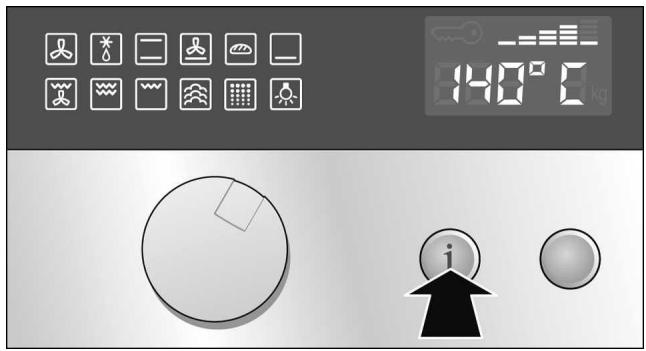
Preheating indicator
Press the info button. The current temperature is displayed for 3 seconds.
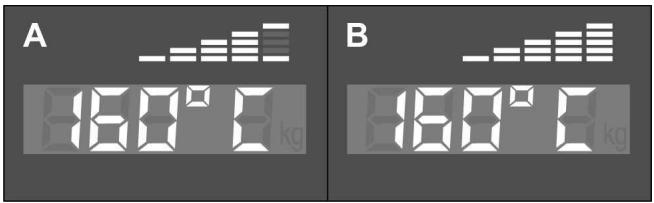
The preheating indicator shows the temperature rise in the cooking compartment.
Temperature reached (figure A)
Appliance heating up (figure B)
Switching off the appliance
Residual heat indicator
Turn the operating mode selector to the o position. The appliance is switched off.
The appliance has a cooling fan. After the appliance is switched off, the cooling fan may continue to run.
You can see in the temperature display whether there is a high or low residual heat in the cooking compartment.
| Temperature display | Meaning |
| H | Residual heat high (above 120 °C) |
| h | Residual heat low (between 60 °C and 120 °C) |
Changing the basic settings
Your appliance has various basic settings that have been pre-set by the manufacturer. However, you can change these basic settings as required.
The appliance must be switched off and controls not locked.
- Press and hold the info button for 3 seconds to reach the basic settings menu.
appears in the temperature display. - Press the info button briefly and repeatedly until the setting symbol for the current basic setting of a submenu is displayed in the temperature display (e.g. c ≥ 2 ).
- Using the temperature selector, set the required basic setting within a submenu (e.g. c 33).
- Press and hold the info button for 3 seconds. Your basic setting is saved.
Basic settings menu
| Submenu | Basic setting | Setting symbol (temperature display) |
| Childproof lock | Lock is not activated | c 10 |
| Lock is activated | c 11 | |
| Permanent lock is activated | c 21 | |
| Audible signal on/off | Audible signal off | c 30 |
| Audible signal duration 30 seconds | c 31 | |
| Audible signal duration 2 minutes | c 32 | |
| Audible signal duration 10 minutes | c 33 |
Automatic safety switch off
The automatic safety switch off is activated if your appliance is switched on and you have not made any settings for a long time.
You can adjust the period of time after which your appliance shuts off.
000 flashes in the temperature display. Appliance operation is interrupted.
Deactivating
Turn the operating mode selector back to the o position.
Electronic clock
This section contains information on
how to set the minute minder
- how to switch your appliance off automatically (operating time and end of operation)
how to switch your appliance on and off automatically (preselection operation)
how to set the time
how to activate rapid heating
Clock display
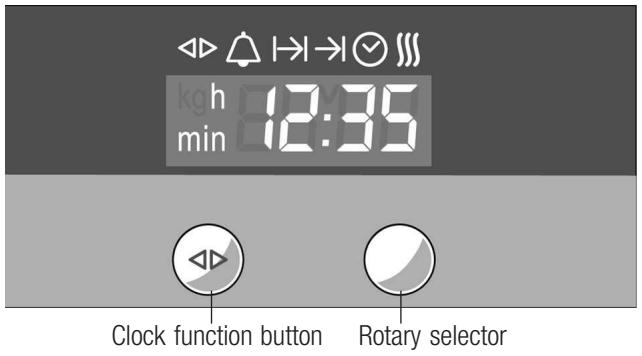
| Clock function | Use |
| Minute minder | You can use the minute minder as an egg timer or a kitchen timer. The appliance does not switch on or off automatically. |
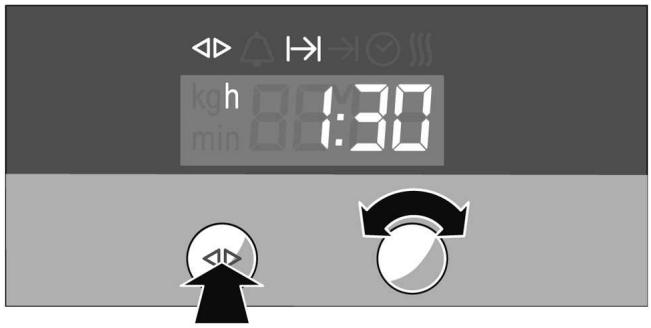
| I→I Operating duration | The appliance only switches off automatically after a set operating duration (e.g. 1:30 hours). |
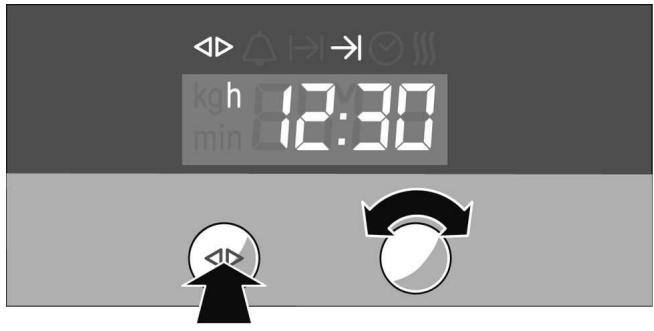
| →I End of operation | The appliance switches off automatically at a set time (e.g. 12:30). |
| Preselected operation | The appliance switches on and off automatically. Operating duration and end of operation are combined. |
| ⊗ Time | Setting the time. |
| Rapid heating | Shorten preheat time. |
Note:
- Between 22:00 and 5:59, the clock display is darkened.
- With the clock functions (except rapid heating), a signal sounds after the settings have ended and the corresponding symbol flashes. To end the audible signal early, press the clock function button.
Switch clock display on and off
- Press and hold the clock function button for 6 seconds.
The clock display switches off. If a clock function is active, the associated symbol remains illuminated.
- Press the clock function button briefly.
The clock display switches on.
Minute minder
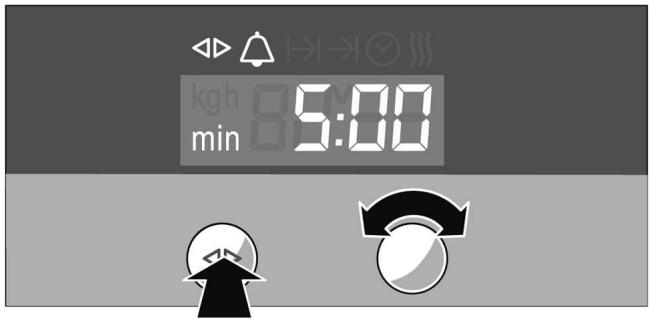
- Press the clock function button until the symbols and illuminate.
- Set the duration using the rotary selector (e.g. 5:00 minutes).
The setting is automatically applied. Then the time is displayed again and the minute minder starts running. A signal sounds.
Operating duration
Automatic switch off after a set duration.
- Set the operating mode and temperature. The appliance heats up.
- Press the clock function button until the symbols and I I illuminate.
- Set the operating duration with the rotary selector (e.g. 1:30 hours).
The setting is automatically applied. Then the time is displayed again and the set operating duration starts running. A signal sounds.
After expiry of the operating duration, the appliance automatically switches off.
- Reset the operating mode and temperature selectors to setting o.
- Press the clock function button to end the clock function.
End of operation
Automatic switch off at a set time.
- Set the operating mode and temperature. The appliance heats up.
- Press the clock function button until the symbols and illuminate.
- Set the end of operation using the rotary selector (e.g. 12:30).
The setting is automatically applied. Then the clock is displayed again.
At the set end of operation, the appliance switches off automatically. A signal sounds.
- Reset the operating mode and temperature selectors to setting o.
- Press the clock function button to end the clock function.
Preselected operation
The appliance switches on automatically and then off again at the preselected end of operation. To do this, combine the operating duration and end of operation clock functions.
Note that easily perishable foods should not be left in the cooking compartment for too long.
- Set the operating mode and temperature.
The appliance heats up.
- Press the clock function button until the symbols and I I illuminate.
- Set the operating duration with the rotary selector (e.g. 1:30 hours).
The setting is automatically applied.
- Press the clock function button until the symbols and illuminate.
- Set the end of operation using the rotary selector (e.g. 12:30).
The appliance switches off and waits until the right time to switch on (in the example at 11:00).
The appliance switches off automatically at the set end of operation (12:30). A signal sounds and the symbol flashes.
- Reset the operating mode and temperature selectors to setting o.
- Press the clock function button to end the preselected operation.
Setting the time
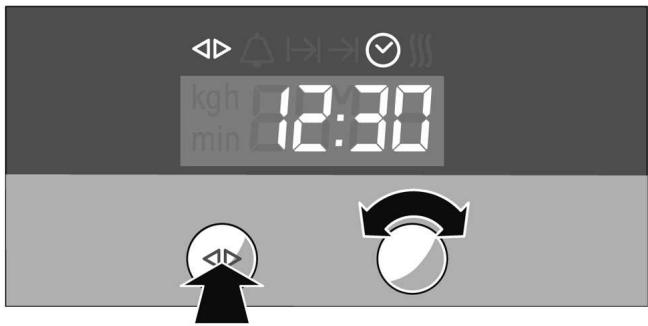
- Press the clock function button until the symbols and illuminate.
- Set the time using the rotary selector. The setting is automatically applied.
Rapid heating
For the hot air and bread baking settings, you can reduce the preheat time.
Note:
During rapid heating, do not place any food in the cooking compartment for as along as the symbol is illuminated.
- Set the operating mode and temperature. The appliance heats up.
- Press the clock function button until the and symbols light up and OFF appear in the clock display.
- Turn the rotary selector clockwise. _n is displayed in the clock display and the symbol illuminates. Rapid heating is activated.
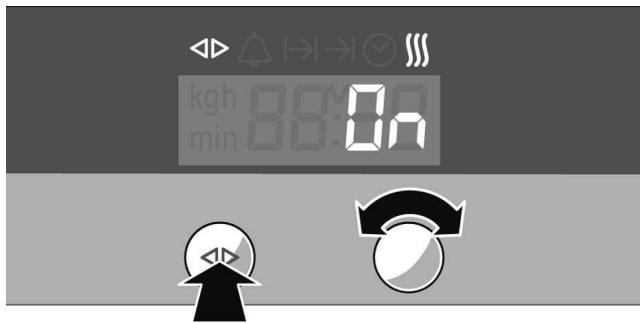
After reaching the set temperature, rapid heating switches off again. The III symbol goes out.
Checking, correcting or cancelling settings
- To check your settings, press the clock function button until the corresponding symbol illuminates.
-
If necessary, you can correct your setting using the rotary selector.
-
If you wish to cancel your setting, turn the rotary selector anti-clockwise to the original value.
Childproof lock
In this section you can learn
how to lock your appliance
how to lock your appliancepermanently
Locking
The locked appliance cannot be switched on accidentally or by unauthorised users (e.g. playing children).
Lock the appliance
To switch the appliance on again, you must unlock it. After appliance operation, the appliance is not automatically locked. Lock it again if necessary or activate the permanent lock.
- Switch off the appliance.
- Press and hold the info button until c appears in the temperature display.
- Turn the temperature selector until c appears in the temperature display.
- Press and hold the info button until the symbol appears in the temperature display.
Note:
If you try to switch the locked appliance on, -5 - appears in the temperature display.
Unlock the appliance
- Press and hold the info button until c appears in the temperature display.
- Turn the temperature selector until c appears in the temperature display.
- Press and hold the info button until the symbol goes out.
Permanent lock
The permanently locked appliance cannot be switched on accidentally or by unauthorised users (e.g. playing children).
To switch the appliance on, you must interrupt the permanent lock briefly. After you have switched your appliance off, it locks again automatically.
Lock appliance permanently
- Switch off the appliance.
- Press and hold the info button until c 0 appears in the temperature display.
- Turn the temperature selector until c ≥ 1 appears in the temperature display.
- Press the info button for 3 seconds. Your appliance will be locked after 30 seconds. The symbol appears in the temperature display.
Note:
If you try to switch the locked appliance on, -SP- appears in the temperature display.
Interrupt permanent lock
- Press and hold the info button until c appears in the temperature display.
- Turn the temperature selector until c ≥ 0 appears in the temperature display.
- Press and hold the info button until the symbol goes out. The permanent lock is interrupted.
- Switch the appliance on within 30 seconds.
After switching off, the permanent lock is activated again after 30 seconds.
Unlock the appliance permanently
- Press and hold the info button until c appears in the temperature display.
-
Turn the temperature selector until c ≥ 0 appears in the temperature display.
-
Press and hold the info button until the symbol goes out.
- Within 30 seconds, press and hold the info button again for 3 seconds.
- Turn the temperature selector until c appears in the temperature display.
- Press the info button for 3 seconds. The appliance is permanently unlocked.
Baking
Baking tins
Use dark metal baking tins. Tinplate and glass dishes increase the baking time required and the cake will not brown evenly.
Baking trays
We recommend that you only use original baking trays, as these have been optimally designed for the cooking compartment and the operating modes.
Baking on one level
Always carefully push the baking trays in as far as they will go. Make sure that the sloping edge of the baking tray is facing the appliance door.
Baking on two levels
When baking with hot air, note the following:
Cakes in tins, shelf position 2
Cakes on trays, shelf position 3.
Use hot air. Universal pan at shelf position 3 Baking tray at shelf position 1.
Baking trays that are placed in the oven at the same time will not necessarily be ready at the same time.
Baking table for basic doughs and baked products
The details given in the table are average values and apply to the use of enamelled baking trays and dark-coloured baking tins. The values may vary depending on the type and amount of dough/mixture and on the baking tin.
We recommend that you set the lower of the specified temperatures the first time. This will generally allow more even browning.
If you are baking according to your own recipe, use similar recipes in the table as a guide.
Observe the notes in the table about preheating.
| Basic mixture | Hot air | Top/bottom heating | |||
| Shelf position | Temperature in °C | Baking time in minutes | Shelf position | Temperature in °C | |
| Rich sponge mixture | |||||
| Cake on baking sheet with topping | |||||
| 1 level | 3 | 160-180 | 25-35 | 2 | 170-190 |
| 2 levels | 3+1 | 140-160 | 40-50 | - | - |
| Springform cake tin/loaf tin | 2 | 160-180 | 50-70 | 2 | 150-170 |
| Shortcrust pastry | |||||
| Tray bake with dry topping, e.g. crumble | |||||
| 1 level | 3 | 160-180 | 20-65 | 1 | 180-200 |
| 2 levels | 3+1 | 160-180 | 55-70 | - | - |
| Tray bake with moist topping, e.g. egg custard | |||||
| 1 tray | 3 | 150-170 | 60-80 | 2 | 160-180 |
| Springform cake tin, e.g. cheesecake | 2 | 160-180 | 50-90 | 1 | 160-180 |
| Flan tin | 2 | 160-180 | 25-35 | 1 | 180-200 |
| Sponge cake | |||||
| Swiss roll | 3 | 180-190* | 15-20 | 2 | 170-190* |
| Sponge (6 eggs) | 2 | 160-180 | 40-50 | 2 | 150-170* |
| Sponge (3 eggs) | 2 | 150-170 | 30-40 | 2 | 160-180* |
| Yeast dough | |||||
| Tray bake with dry topping, e.g. crumble | |||||
| 1 level | 3 | 160-180 | 25-35 | 3 | 170-180 |
| 2 levels | 3+1 | 150-170 | 35-45 | - | - |
| Tray bake with moist topping, e.g. egg custard | |||||
| 1 tray | 3 | 160-180 | 40-50 | 3 | 160-180 |
| Savarin/plaited loaf (500 g) | 3 | 140-160 | 25-55 | 2 | 170-190 |
| * Preheat oven | |||||
| Springform cake tin | 2 | 140-160 | 30-45 | 2 | 150-170 |
| Ring cake tin | 2 | 140-160 | 35-70 | 2 | 150-170 |
| * Preheat oven | |||||
| Small baked products | Hot air | Top/bottom heating | |||
| Shelf position | Temperature in °C | Baking time in minutes | Shelf position | Temperature in °C | |
| Yeast dough | |||||
| 1 level | 3 | 160-180 | 20-35 | 2 | 190-210 |
| 2 levels | 3+1 | 160-180 | 25-35 | - | - |
| Meringue mixture | |||||
| 1 level | 3 | 80-100 | 100-150 | 2 | 80-100 |
| 2 levels | 3+1 | 80-100 | - | - | |
| Puff pastry | |||||
| 1 level | 3 | 180-200 | 20-35 | 2 | 180-200 |
| 2 levels | 3+1 | 180-200 | 25-35 | - | - |
| Choux pastry | |||||
| 1 level | 3 | 190-200 | 25-40 | 2 | 210-230 |
| 2 levels | 3+1 | 190-200 | 30-40 | - | - |
| Rich sponge mixture, e.g. muffins | |||||
| 1 level | - | - | 20-25 | 3 | 180-200 |
| 2 levels | 3+1 | 160-180 | 25-30 | - | - |
| Shortcrust pastry, e.g. butter biscuits | |||||
| 1 level | 3 | 140-160 | 15-25 | 3 | 130-150 |
| 2 levels | 3+1 | 130-150 | 25-35 | - | - |
Baking table for dishes and pre-prepared froze meals
The Circotherm intensive setting is particularly suitable for freshly-prepared dishes that require a lot of heat from underneath, and for frozen ready meals.
Note the following points:
Line the baking tray with greaseproof paper
Spread chips out in a single layer
- Turn frozen potato products half way through the baking time
Only season frozen potato products after they have finished baking
Leave a little space between bread rolls when crisping them up. Do not place too many on one baking tray
Bear in mind the manufacturer's instructions
The information in the table is a guideline and applies to aluminium baking trays. The values may vary depending on the type and amount of dough/mixture and on the baking tin.
We recommend that you set the lower of the specified temperatures the first time. This will generally allow more even browning.
The information in the table applies to putting food in a cold oven.
With Circotherm intensive, you cannot bake on two levels.
| Dishes | Hot air | Pizza setting | |||
| Shelf position | Temperature in °C | Baking time in minutes | Shelf position | Temperature in °C | |
| Fresh meals | |||||
| Pizza, fresh | |||||
| 1 level | 3 | 190-200* | 15-30 | 1 | 180-200* |
| 2 levels | 3+1 | 180-200 | 40-50 | - | - |
| Tarte flambée | - | - | 8-12 | 1 | 275* |
| Quiche | 3 | 160-180 | 45-60 | 2 | 170-180 |
| * Preheat oven | |||||
| Tart | 2 | 180-200* | 50-60 | 1 | 170-190* |
| Swiss flan | 3 | 180-190 | 35-60 | 3 | 200-210 |
| Potato gratin using uncooked potatoes | 2 | 150-160 | 60-75 | 2 | 150-160 |
| Pizza, frozen | |||||
| ■ 1 level | 3 | 190-200 | 15-35 | 2 | 170-220 |
| ■ 2 levels | 3+1 | 170-200* | 20-35 | - | - |
| Potato products | |||||
| Chips | |||||
| ■ 1 level | - | - | 20-30 | 3 | 190-210 |
| ■ 2 levels | 3+1 | 180-200 | 30-40 | - | - |
| Croquettes/Rösti | 3 | 190-200 | 15-25 | 3 | 190-220 |
| Baked products | |||||
| Bread rolls, pre-baked, frozen | 3 | 180-200 | 10-25 | 3 | 180-200 |
| Bread rolls for heating, frozen | 3 | 160-180 | 10-25 | 3 | 180-200 |
| Bread rolls for heating, prebaked | 3 | 180-200 | 10-15 | 3 | 180-200 |
| Strudel, frozen | 3 | 190-200 | 30-40 | 3 | 190-210 |
| * Preheat oven | |||||
Tips and tricks
| The cake is too light in colour | Check the shelf height and the recommended bakeware. Place the baking tin on the wire rack and not on the baking tray. Increase the baking time or the temperature. |
| The cake is too dark | Check the shelf height. Reduce the baking time or temperature. |
| The cake is unevenly browned in the baking tin | Check the shelf height and temperature. Do not place the baking tin directly in front of the air outlets in the back wall of the cooking compartment. Check that the baking tin is in the correct position on the wire rack. |
| The cake is unevenly browned on the baking tray | Check the shelf height and temperature. When baking small items, make sure that they are the same size and thickness. |
| The cake is too dry | Reduce the baking time and increase the temperature slightly. |
| The cake is too moist in the centre | Reduce the temperature. Note: Higher temperatures do not mean shorter baking times (cooked on the outside, but not on the inside). Increase the baking time and allow the cake mixture to rise for longer. Put less liquid in the mixture. |
| The cake collapses when you take it out of the oven | Put less liquid in the mixture. Increase the baking time or reduce the temperature. |
| The specified baking time is not correct | For small baked goods, check the quantity on the baking tray. The items must not be touching each other. |
| Frozen products are not browned evenly after baking | If frozen products are unevenly browned when prebaked, then uneven browning is to be expected after baking. |
| Frozen products are not browned, not crispy or the specified time is not correct | Remove ice from frozen products before baking. Do not use heavily frosted frozen products. |
Bread-baking setting
The figures shown in the table are guide values. They may vary depending on the type and amount of dough.
For the first batch, use the lowest temperature specified. The lower temperature will give a more even browning.
Note the preheating instructions shown in the table.
| Bread type | Bread-baking setting | Top/bottom heating | |||
| Shelf position | Tempera-ture in °C | Baking time in minutes | Shelf position | Tempera-ture in °C | |
| White bread | |||||
| Without a tin | 3 | 220* | 25-35 | 2 | 240* |
| In loaf tin | 2 | 220* | 25-45 | 2 | 240* |
| Multigrain bread (without a tin) | |||||
| Partial bake | 2 | 220* | 5-15 | 2 | 300* |
| Full bake | 2 | 180* | 30-50 | 2 | 200* |
| * Preheat oven | |||||
| Multigrain bread (in loaf tin) | |||||
| ■ Partial bake | 2 | 220* | 5-10 | 2 | 240* |
| ■ Full bake | 2 | 180* | 20-40 | 2 | 200* |
| Bread rolls | 3 | 180* | 20-30 | 3 | 200* |
| Flatbread | 3 | 220* | 10-20 | 2 | 300* |
| Empanada, baked | 2 | 220* | 15-35 | 2 | 200** |
| * Preheat oven ** Preheat oven to 240 °C | |||||
Roasting

Risk of injury from non-heat-resistant ovenware. Only use ovenware that is specially designated for use with ovens.
Roasting without a lid
Roasting in the universal pan
When you are roasting with Top/bottom heating, you should turn the roast approximately half to two thirds of the way through the roasting time.
Meat juices will collect when roasting in the universal pan. These meat juices can be used as the basis for a delicious gravy.
When roasting in the universal pan you can also roast side dishes (e.g. vegetables) together with the meat.
For smaller joints you can use a small oven dish instead of the universal pan. Place this directly on the wire rack.
Roasting on the wire rack
If you are roasting directly on the wire rack, you should also insert the universal pan at level 1. The meat juices are collected here and the oven is kept clean.
Roasting with a lid
This method is particularly suitable for pot roasts.
Roasting table
The roasting time and temperature depend on the size, height, type and quality of the joint.
In general: the larger the joint, the lower the temperature and the longer the roasting time.
The figures in the table are for guidance and refer to roasting without a lid. The figures may vary depending on the type and size of joint and the ovenware used.
You should set the lower of the specified temperatures the first time. The lower temperature will give a more even browning.
At the end of the roasting time, switch the oven off and leave the roast to rest for approximately 10 minutes in the cooking compartment with the door closed. The specified roasting time does not include the recommended rest time.
The information in the table are for food placed in a cold oven and for meat taken directly from the refrigerator.
| Roast | Hot air | Top/bottom heating | |||
| Shelf position | Temperature in °C | Roasting time in minutes | Shelf position | Tempera-ture in °C | |
| Pork | |||||
| Fillet, medium (400 g) | 2 | 170-180 | 25-40 | 3 | 200-210 |
| Joint, with crackling (1.5 kg) | 2 | 170-180 | 130-180 | 2 | 200-220 |
| Joint, marbled without crackling, e.g. neck (1.5 kg) | 2 | 160-170 | 120-150 | 2 | 190-210 |
| Joint, lean (1 kg) | 2 | 180-190 | 80-110 | 2 | 180-200 |
| Smoked pork | - | - | 70-80 | 2 | 210-230 |
| Meat loaf made from 500 g meat | 2 | 170-180 | 60-70 | 2 | 200-210 |
| Beef | |||||
| Fillet, medium (1.0 g) | 2 | 180-190 | 45-65 | 2 | 210-230 |
| Sirloin, medium (1.5 g) | 2 | 190-200 | 35-45 | 2 | 210-230 |
| Pot roast (1.5 kg) | 2 | 180-190 | 120-150 | 2 | 190-210 |
| Veal | |||||
| Joint/breast (1.5 kg) | 2 | 170-180 | 100-130 | 2 | 180-200 |
| Knuckle | - | - | 100-130 | 2 | 210-230 |
| Poultry (not stuffed) | |||||
| Chicken, whole (1 kg) | - | - | 60-80 | 2 | 200-220 |
| Duck, whole (2-3 kg) | 2 | 180-190 | 100-120 | 2 | 190-210 |
| Goose, whole (3-4 kg) | - | - | 150-180 | 2 | 180-200 |
| Fish, whole | |||||
| 300 g | 2 | 170-180 | 30-40 | 2 | 190-210 |
| 700 g | 2 | 160-170 | 40-60 | 2 | 180-200 |
Tips and tricks
| Crust too thick and/or roast too dry | Reduce the temperature or shorten the roasting time. Check the shelf height. |
| Crust too thin | Increase the temperature or turn on the grill for a short time once roasting is complete. |
| The meat is not cooked right through | Remove unnecessary accessories from the cooking compartment. Extend the roasting time. Check the core temperature of the joint using a meat thermometer. |
| Steam in the cooking compartment is condensing on the appliance door | The steam dries during the course of the cooking. If there is an excessive volume of steam, you can carefully open the door briefly to dissipate the steam more quickly. |
Grilling
Caution:
There is a risk of damage to kitchen units if you grill with the appliance door open. The adjacent units may be damaged by the extreme heat. Keep the appliance door closed when using the grill.
If you are grilling directly on the wire rack, you should also insert the universal pan at level 1. The meat juices are collected here and the oven is kept clean.
Always place the food for grilling in the centre of the wire rack.
If you are grilling more than one piece of meat, make sure that they are the same sort of meat and that they are of similar thickness and weight.
All-round grilling
All-round grilling is especially suited to poultry or meat (e.g. pork joint with crackling) which is to be grilled so it is crispy on all sides.
Turn the food over after half to two thirds of the specified time has elapsed.
When cooking duck or goose, pierce the skin on the underside of the wings and legs to allow the fat to escape.
When all-round grilling on the wire rack, the oven may get dirtier than usual, depending on the food being grilled. You should therefore clean the cooking compartment after every use, so that the residues do not burn on.
All-round grilling table
The figures in the table are for guidance and refer to the enamelled universal pan with wire rack. The values may vary depending on the type and quantity of grilled items.
You should set the lower of the specified temperatures the first time. The lower temperature will give a more even browning.
At the end of the grilling time, switch the oven off and leave the food to rest for approximately 10 minutes in the cooking compartment with the door closed.
The specified grilling time does not include the recommended rest time.
The values are for food placed in a cold oven and for meat taken directly from the refrigerator.
| Products for grilling | Shelf position | Temperature in °C | Grilling time in minutes |
| Pork | |||
| Joint with rind | 2 | 180-200 | 150-170 |
| Shank | 2 | 180-200 | 120-150 |
| Sirloin, medium | 2 | 220-240 | 50-60 |
| Boned leg of lamb, medium | 2 | 160-180 | 110-120 |
| Poultry (not stuffed) | |||
| Chicken halves, 1 - 2 pieces | 2 | 220-240 | 40-50 |
| Chicken, whole, 1 - 2 pieces | 2 | 220-240 | 60-70 |
| Duck, whole, 2 - 3 kg | 2 | 190-210 | 100-110 |
| Goose, whole, 3 - 4 kg | 2 | 170-190 | 120-140 |
Using the radiant grill
For grilling large quantities on the radiant grill use the full-surface grill.
For grilling small quantities on the radiant grill use the centre-area grill. Place the food for grilling in the centre of the wire rack. Using the centre-area radiant grill saves energy.
Lightly glaze the food for grilling with oil to taste.
Turn the food over after half to two thirds of the specified time has elapsed.
Radiant grill table
The figures shown in the table are guide values. The values may vary depending on the type and quantity of grilled items. They are for food placed in a cold oven and for meat taken directly from the refrigerator.
| Products for grilling | Shelf position | Tempera-ture in °C | Grilling time in minutes | Notes |
| Pork | ||||
| Fillet steaks, medium (3 cm thick) | 5 | 275* | 10 | |
| Steak, cooked through (2 cm thick) | 5 | 275* | 15 | |
| Beef | ||||
| Fillet steaks (3 - 4 cm thick) | 5 | 275* | 15 | Grilling times may be shortened or extended depending on how well done the meat should be |
| Tournedos | 5 | 275* | 10 | |
| Lamb | ||||
| Filletts | 5 | 275* | 8-12 | Grilling times may be shortened or extended depending on how well done the meat should be |
| Chops | 5 | 275* | 10-15 | |
| Sausages | 4 | 275* | 15 | Gently prick |
| Poultry | ||||
| Chicken drumsticks | 3 | 250 | 30-40 | Pricking the skin can prevent blistering during grilling |
| Small chicken portions | 3 | 250 | 25-35 | |
| Fish | ||||
| Steaks | 3 | 230 | 20-25 | Pieces should be of equal thickness |
| Chops | 3 | 230 | 20-25 | |
| Whole fish | 2 | 230 | 20-25 | |
| Vegetables | 5 | 275 | 10-15 | |
| Toast with topping | 4 | 275 | 5-8 | The shelf position depends on the height of the topping |
- Preheat the oven for 3 minutes
Defrosting
In this chapter you will learn how to defrost using Hot air or Defrost.
Defrosting with hot air
Use Hot air to defrost and cook frozen foods.
Observe the following:
Defrosted frozen foods (especially meat) need shorter cooking times than fresh foods
The cooking time for frozen meat is extended by the defrosting time
Always defrost frozen poultry before cooking, so that you can remove the giblets
Cook frozen fish at the same temperatures as fresh fish
- You can put large quantities of frozen vegetable dishes in aluminium trays into the cooking compartment at the same time
Use shelf position 1 for defrosting
- Observe the manufacturer's instructions when using frozen foods
| Frozen meal | Temperature in °C | Defrosting time in minutes |
| Uncooked frozen products/ Frozen food | 50 | 30 - 90 |
| Bread/bread rolls (750 - 1500 g) | 50 | 30 - 60 |
| Dry frozen tray bakes | 60 | 45 - 60 |
| Moist frozen tray bakes | 50 | 50 - 70 |
Defrost level
The Defrost setting is especially good for defrosting delicate cakes (e.g. cream gateaux).
- Switch on Defrost.
- Depending on type and size, leave frozen food to defrost for 25-45 minutes.
- Remove frozen food from cooking compartment and leave defrost for a further 30-45 minutes.
With small quantities (small pieces), the defrosting time is reduced to 15-20 minutes and the further defrost time to 10-15 minutes.
Steam cooking
The steam cooking setting can only be used in conjunction with the system steam cooker (available as an accessory from specialist retailers).
Switch on Steam cooking only once the cooking compartment has cooled down completely (room temperature). If H flashing alternately with h and 0 on the temperature display, the cooking compartment has not cooled fully. Wait until the cooking compartment has cooled down completely and switch on steam cooking again. The steam cooking process is controlled automatically.
Notes:
For steam cooking, use only the steam cooking setting with the system steam cooker
- Do not use the steam cooking setting with the clock function preselection mode
- You will find further useful information in the instruction manual included with the system steam cooker
Yoghurt
You can also use your appliance to make your own yoghurt, using the heat from the oven light.
- Heat 1 litre UHT milk (3.5% fat) or pasteurised fresh milk to 40^
or
bring 1 litre of fresh milk to the boil and leave it to cool to 40^ C .
- Add 300g set yoghurt to the heated milk, stir in and place in glasses or pots. Do not put more than 200ml in a container.
- Cover the filled containers with a suitable lid or cling film.
- Place the containers, evenly spaced, on the wire rack at level 1.
- Close the appliance door and switch on the oven light.
- After 6-7 hours, switch off the oven light and place the containers in the refrigerator for at least 18 hours.
Preserving

Risk of injury
Jars containing food that has been preserved incorrectly may crack. Bear in mind the following notes:
Fruit and vegetables must be fresh and unblemished.
Use only clean and undamaged preserving jars.
Preserving jars must not touch one another in the cooking compartment during the preserving process.
In the cooking compartment, you can preserve the contents of a maximum of six 12 , 1 or 112 litre preserving jars at the same time using the hot air. Bear in mind the following points:
During the preserving process, only use jars of the same size containing the same food.
- When preparing and closing the preserving jars, make sure that they are clean.
Use only heat-resistant rubber rings.
The following foods cannot be preserved using your appliance: contents of tin cans, meat, fish or pastry.
Preparing fruit
- Wash fruit and, depending on its type, peel, pit and chop them.
- Fill the preserving jars with fruit up to approximately 2 cm below the rim.
- Fill up the preserving jars with hot, skimmed sugar solution (approximately 13 litre for one litre jar).
For one litre water:
Approximately 250 g sugar for sweet fruits
Approximately 500 g sugar for sour fruits
Preparing vegetables
- Wash vegetables and, depending on their type, clean and chop them.
- Fill the preserving jars with vegetables up to approximately 2 cm below the rim.
- Fill up the preserving jars immediately with hot, boiled water.
Closing the preserving jars
- Wipe of the rim of the preserving jars with a clean, damp cloth.
-
Place the rubber ring and lid on wet and close the jars with a clip.
-
Slide in the universal pan at shelf height 1.
- Set up the preserving jars in a triangle so that they do not touch one another.
- Pour 1 12 litre hot water (approximately 80^ C ) in the universal pan.
- Set hot air to 160^ .
Preserving jars of 1 / 2 or 1 litre volume start to bubble after approximately 50 minutes, and 1 / 2 litre jars after approximately 60 minutes.
Fruit, gherkins and tomato purée
- Switch off the appliance once all preserving jars are bubbling.
- Leave the preserving jars in the closed cooking compartment for a few minutes longer.
Raspberries, strawberries, cherries or gherkins: approx. 5 - 10 minutes
Other fruit: approx. 10 - 15 minutes
Tomato puree or apple sauce: approx. 15 - 20 minutes
Vegetables
- Reduce the temperature to 100^ C once all preserving jars are bubbling. Allow the preserving jars to bubble for approximately 60 minutes longer in the closed cooking compartment.
- Switch off the appliance.
- Leave the preserving jars in the closed cooking compartment for approximately 15 - 30 minutes longer.
Remove the preserving jars
- Place the preserving jars on a clean cloth, cover and protect from draughts.
- Only remove the clips once the jars are cold.
Pyrolysis
In the pyrolysis mode, the oven heats up to approx. 500^ . This burns off residues from roasting, grilling or baking and you only need to wipe the ashes from the cooking compartment.
Cleaning levels
You can choose from three cleaning levels.
| Level | Degree of cleaning | Duration |
| 1 | light | approx. 1 hour, 15 minutes |
| 2 | medium | approx. 1 hour 30 minutes |
| 3 | intensive | approx. 2 hours |
The heavier and older the dirt, the higher the cleaning level should be. It is sufficient to clean the cooking compartment every two to three months. Cleaning only requires approx. 2.5 - 4.7 kilowatt-hours.
Important notes
For safety reasons, the oven door locks automatically. You can only open the oven door again once the cooking compartment has cooled down slightly. Do not attempt to push in the latch by hand.

Risk of fire
The outside of the oven becomes very hot. Make sure that nothing is placed against the front of the oven.
Never hang flammable objects, e.g. tea towels, on the door handle. Keep children at a safe distance.
Do not attempt to open the oven door while the cleaning programme is in operation. The cleaning process may be cancelled.
The lamp is not lit in the cooking compartment during cleaning.
Before cleaning
Remove ovenware and unsuitable accessories from the cooking compartment.

Risk of fire.
Loose food residues, grease and meat juices may catch fire. Wipe out the cooking compartment and the accessories which you are cleaning at the same time with a damp cloth.
Clean the oven door and the along the edges of the cooking compartment in the area around the seal. Do not clean the seal.
Cleaning accessories at the same time
You can clean the universal pan or the enamel baking tray at the same time inserted at level 2.
The wire rack and the rotary spit are not suitable for pyrolytic cleaning.

Risk of serious damage to health.
Never use pyrolytic cleaning for cleaning non-stick baking trays and baking dishes. High temperatures cause damage to the non-stick coating and poisonous gases to be released.
Setting the cleaning level
- Set the operating mode selector to 0 appears in the temperature display.
- Use the temperature selector to set the cleaning level.
Pyrolytic cleaning starts after a few seconds.
The clock display shows the cleaning duration. The oven will start up after a few seconds. You will see the duration counting down.
After the programme starts, the oven door locks.
Once the cleaning is finished
0:00 appears in the clock display and I flashes. Set the operating mode selector to o and press the button once. You can only open the oven door once the oven has cooled down.
Cancelling cleaning
Turn the operating mode selector back to o. You can only open the oven door once the oven has cooled down.
Changing the cleaning level
Once the programme has started, you can no longer change the cleaning level.
The cleaning programme is to run at night
So that you can use the oven during the day, move the end of cleaning to during the night. Set as described in steps 1 and 2.
- Press the clock function button repeatedly until the symbol appears.
- Set a later end time by turning the rotary selector.
The oven is in the maintenance position. The display shows the clock.
When the oven starts, you can see the duration counting down.
After cleaning
When the cooking compartment has cooled down, wipe the remaining ash out of the cooking compartment with a damp cloth.
Cleaning and care
In this section, you will find information on
cleaning and care of your appliance
cleaning agents and aids
pyrolytic cleaning
Cleaning agents
Damage to various surfaces caused by using the wrong cleaning agent can be avoided by observing the information in the table below.
Do not use
sharp or abrasive cleaning agents,
detergents with high concentrations of alcohol,
hard scouring pads or sponges,
high-pressure cleaners or steam cleaners.
Wash new sponge cloths thoroughly before use.
Area
Cleaning agents
Oven front
Stainless steel
Use hot soapy water:
Clean with a dish cloth and dry with a soft cloth.
Do not use any glass cleaners or glass scrapers.
Use hot soapy water:
Clean with a dish cloth and dry with a soft cloth. Remove spots caused by limescale, fat, starch and egg white immediately.
Corrosion can form under such flecks.
Special stainless steel cleaning products suitable for warm surfaces are available from our after-sales service or from specialist retailers. Apply a thin layer of the cleaning product with a soft cloth.
Door panels
Glass cleaner:
Clean with a soft cloth.
Do not use a glass scraper.
| Area | Cleaning agents |
| Door cover | Stainless steel cleaning agents (available from our after-sales service or from specialist retailers): Please observe the manufacturer's instructions. |
| Cooking compartment | Hot soapy water or a vinegar solution: Clean with a dish cloth. If there are heavy deposits of dirt, use a stainless steel scouring pad or oven cleaner. Only use when the cooking compartment is cold. It is best to use self-cleaning. Observe the Self-cleaning section when doing so. |
| Glass cover for the oven light | Use hot soapy water: Clean with a dish cloth. |
| Accessories | Use hot soapy water: Soak and clean with a dish cloth or brush. |
Detaching and attaching the oven door
For cleaning purposes and to remove the door panels, you can detach the oven door.
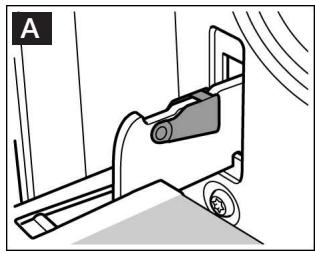
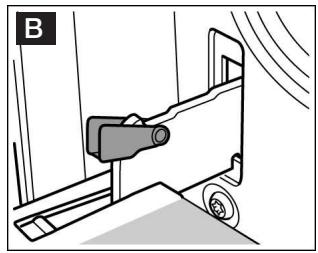
The oven door hinges each have a locking lever. When the locking levers are closed (Fig. A), the oven door is secured in place. It cannot be detached. When the locking levers are open in order to detach the oven door (Fig. B), the hinges are locked. They cannot snap shut.

There is a risk of injury. Whenever the hinges are not locked, they snap shut with great force.
Ensure that the locking levers are always fully closed or, when detaching the oven door, fully open.
Detaching the door
- Open the oven door fully.
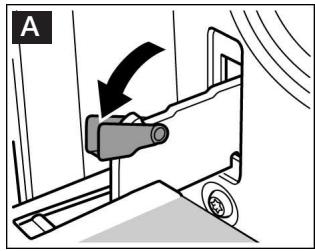
- Open the locking levers on the left and right-hand sides. (Fig. A)
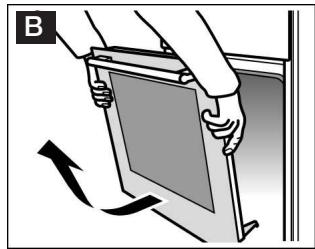
- Close the oven door up to the limit stop. (Fig. B) Grip the door on the left and right-hand sides with both hands. Close the door a little more and pull it out.
Attaching the door
Reattach the oven door in the reverse sequence to removal.
- When attaching the oven door, ensure that both hinges are inserted straight into the opening. (Fig. A)
- The notch on the hinge must engage on both sides. (Fig. B)
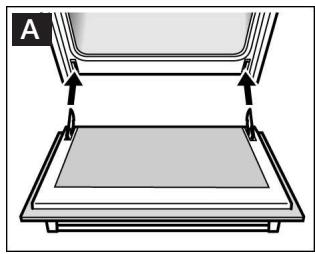
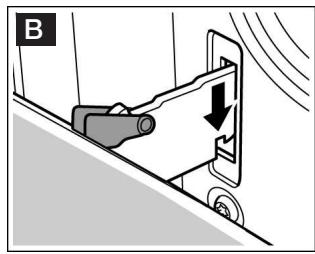
- Close both locking levers again. (Fig. C) Close the oven door.
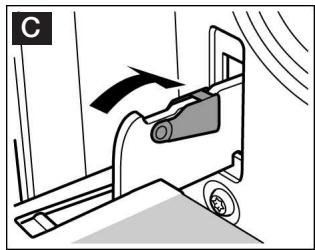

There is a risk of injury. If the oven door falls out accidentally or a hinge snaps shut, do not reach into the hinge.
Call the after-sales service.
Removing and installing the door panels
Removal
To facilitate cleaning, you can remove the glass panels from the oven door.
- Detach the oven door and lay on a cloth with the handle facing down. (Fig. A)
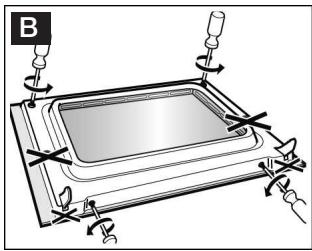
- First undo the two bottom screws and then the two top screws. (Fig. B)
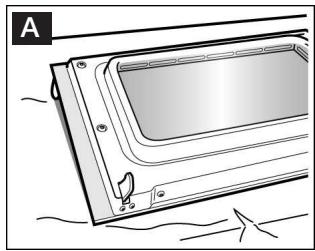
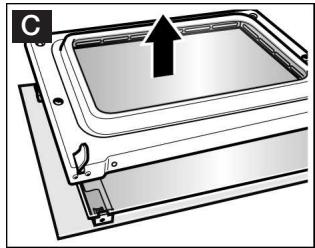
- Remove the entire door lining. (Fig. C)
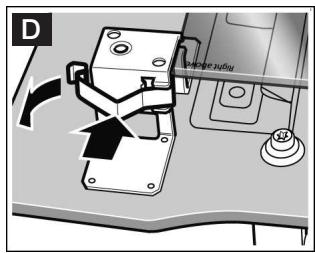
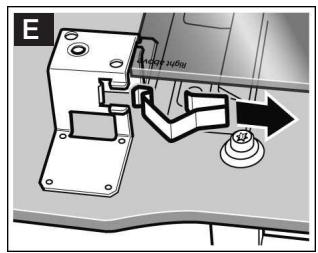
- Remove the two clips from the panel. (Fig. D). To do this, push the clip downwards slightly with your thumb and pull the tab outwards with your index finger. (Fig. E).
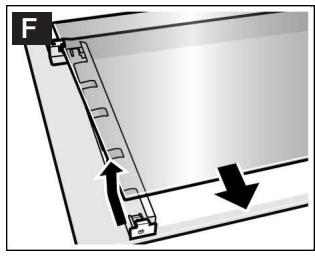
- Raise the inner glass panel, push it towards the top slightly and then remove towards the bottom. (Fig. F).
Installation
Clean the panels with glass cleaner and a soft cloth.
Do not use sharp or abrasive materials or a glass scraper. The glass could be damaged.
During installation, make sure that the lettering "right above" is at the top right.
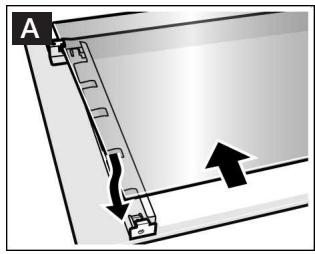
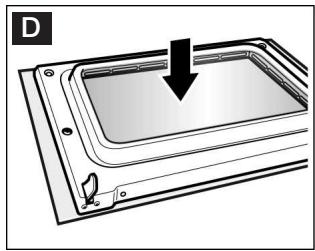
- Insert the inner glass panel upwards at an angle and then lower into place at the bottom. (Fig. A).
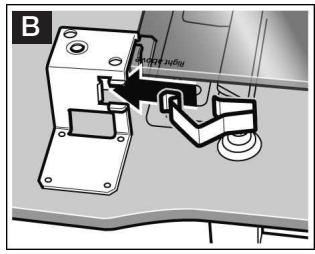
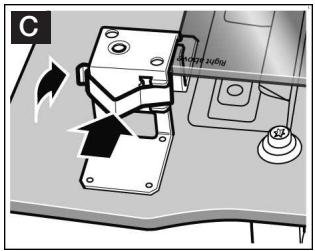
- Re-insert the clips at the top left and right. (Fig. B). To do so, hook the clip into the top of the bracket and press firmly until it engages. (Fig. C).
- Refit the entire door lining. (Fig. D).
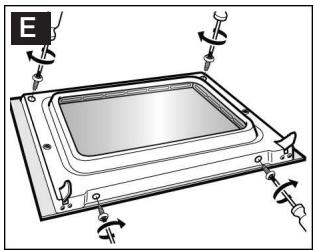
- First screw in the two screws at the bottom and then the two screws at the top. (Fig. E).
- Hook the oven door in place.
Do not use the oven again until the panels have been correctly fitted.
Faults and repairs
It is not always necessary to call the after-sales service. In some cases, you can take remedial action yourself. You will find some tips for troubleshooting in the following table.

Risk of electric shock.
Work on the appliance electronics must only be carried out by an expert
During work on the appliance electronics, the power supply to the appliance must be disconnected. Switch off the circuit breaker or take out the fuse in your household fuse box
| Problem | Possible cause | Remedial action |
| Electrical operation is malfunctioning (e.g. indicator lamps do not light up) | Blown fuse | Check the fuses in the fuse box and replace if necessary |
| Liquid or thin dough runs to one side | Appliance not installed level | Check the appliance installation (see Installation instructions) |
| The appliance no longer functions, 0:00 flashes in the clock display | There was a power cut | Reset the clock (see section: Electronic clock) |
| 0:00 flashes in the clock display, “rrr” appears in the temperature display | Power supply was interrupted while the appliance was in operation | Press the clock function button, Reset the clock (see section: Electronic clock) |
| It is not possible to operate the appliance, ≈ and -5- appear in the temperature display | The appliance has been locked | Deactivate the lock (see section: Childproof lock) |
| It is not possible to operate the appliance, ≈ and -5P appear in the temperature display | The appliance has been locked permanently | Deactivate the permanent lock (see section: Childproof lock) |
| The appliance does not heat up, the colon flashes in the clock display, 1600 appears in the temperature display, for example | A key combination was activated | Switch off the appliance, press and hold the info button for 3 seconds, then press and hold the clock function button for 4 seconds before pressing the info button again and holding it for a further 3 seconds |
| Electronically controlled functions are malfunctioning | Energy surges (e.g. lightening strike) | Reset the function concerned |
| When an operating mode is activated, H or h appears in the temperature display | The appliance has not cooled down fully | Wait until the appliance has cooled down, then switch on the operating mode again |
| The appliance has switched itself off automatically, 000 flashes in the temperature display | The appliance has switched off to protect itself from overheating | Turn the operating mode selector back to the o position |
| Smoke is generated during roasting or grilling | Fat is burning on the grill element | Continue grilling or roasting until the fat on the grill element is burnt away |
| Wire rack or universal pan inserted incorrectly | Place the wire rack in the universal pan and insert them together at a low shelf height | |
| High levels of condensation are generated in the cooking compartment | Normal occurrence (e.g. with cakes with very moist toppings or a large roasting joint) | Open the appliance door occasionally during operation |
| Enamelled accessories have light, matt stains | Normal occurrence caused by dripping meat or fruit juices | Not possible |
| Door panels are misted up | Normal occurrence caused by temperature differences | Heat the appliance up to 100 °C and then switch off again after 5 minutes |
Error messages with
If an error message appears in the display with E , press the button. This clears the error message. You may then have to reset the clock. If the error is shown again, call the after-sales service.
You can provide a remedy yourself for the following error messages.
| Error message | Possible cause | Notes/remedial action |
| EOI | A button was pressed for too long or has jammed. | Press all buttons separately. Check that the buttons are clean. If the error message remains, please contact the after-sales service. |
| E15 | The temperature in the cooking compartment is too high. | The oven door is locked. Wait until the cooking compartment has cooled down. Clear the error message with the ⊙ button. |
Replacing the bulb in the oven ceiling light
If the bulb in the oven light fails, it must be replaced. 40 watt heat-resistant spare bulbs can be obtained from our after-sales service or your local specialist. Only use these bulbs.

- There is a risk of electric shock. Switch off the circuit breaker in the fuse box.
- Place a tea towel in the cold oven to prevent damage.
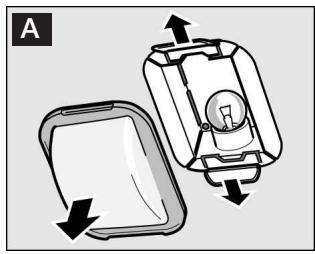
- Remove the glass cover. To do this, press back the metal tabs with your thumb. (Fig. A).
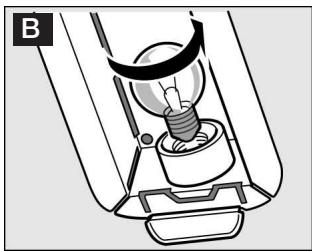
- Unscrew the bulb and replace it with one of the same type. (Fig. B).
- Reinstall the glass cover. When doing this, insert it on one side and press firmly on the other side. The glass cover will now click into place.
- Remove the tea towel and switch on the fuse.
Glass cover
You must replace a damaged glass cover.
Suitable glass covers may be obtained from the after-sales service. Please specify the E number and FD number of your appliance.
After-sales service
In the event of faults and repairs that you cannot solve yourself, please use our after-sales service.
You can find the addresses in the after-sales service directory.
Note:
You will be charged for calling the after-sales service regarding an operating fault.
E number and FD number
For after-sales service cases, please specify the E-number and FD number.
You can find these on the rating plate behind the appliance door on the left-hand bottom edge.
E-Nr.
FD
Test dishes
Dishes tested in accordance with standards DIN 44547 and EN 60350. Bear in mind the notes on preheating in the tables.
| Baking | Shelf height | Mode of operation | Tempera-ture in °C | Baking time in minutes |
| Viennese whirls | 3 | □ | 140 - 150* | 25 - 35 |
| 1 | □ | 140 - 160* | 20 - 40 | |
| 1 + 3 | □ | 140 - 150* | 25 - 35 | |
| 1 + 3 + 4 | □ | 130 - 150* | 35 - 55 | |
| Small cakes (20 pieces per tray) | 3 | □ | 160 - 170** | 20 - 30 |
| 1 | □ | 160 - 170** | 20 - 30 | |
| 1 + 3 | □ | 160 - 170** | 25 - 35 | |
| 1 + 3 + 4 | □ | 160 - 170** | 25 - 35 | |
| Hot water sponge cake | 2 | □ | 160 - 170* | 25 - 35 |
| 1 | □ | 160 - 170* | 25 - 35 |
- Preheat oven
** Preheat for 10 minutes
| Baking | Shelf height | Mode of operation | Tempera-ture in °C | Baking time in minutes |
| Yeast cakes on a baking tray | 3 | □ | 170 - 180 | 45 - 55 |
| 1 | □ | 160 - 170 | 50 - 60 | |
| 1 + 3 | □ | 160 - 170 | 60 - 70 | |
| Apple pie (tins next to one another, Figure A) | 1 | □ | 170 - 180* | 65 - 75 |
| Apple pie (tins diagonally across from one another, Figure B) | 1 + 3 | □ | 170 - 180* | 60 - 75 |
- Preheat oven
** Preheat for 10 minutes
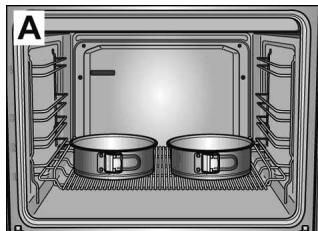
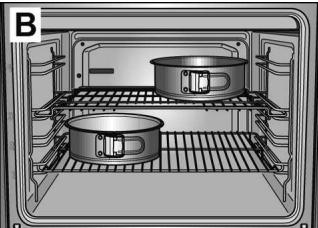
| Grilling | Shelf height | Mode of operation | Temperature in °C | Grilling time in minutes |
| Toast (universal pan + flat wire rack) | 4 | ⓷ | 275* | 0.5 - 1.0 |
| Beef steaks, 12 pieces (universal pan + flat wire rack) | 4 | ⓹ | 250 | 20 - 25** |
| * Preheat for 10 minutes ** Turn after ½ of the time. |


- Constructa
- Making cooking as much fun as eating
- Table of contents
- Safety information 5
- Energy and environment tips 9
- Your new appliance 10
- Before using the appliance for the first time 13
- Using the appliance 15
- Electronic clock 18
- Pyrolysis 43
- Cleaning and care 46
- Faults and repairs 52
- Test dishes 55
- Safety information
- Before installation
- Information for your safety
- Hot accessories and ovenware
- Incorrect repairs
- Pyrolytic cleaning
- Causes of damage
- Transporting the appliance
- Heavy accessories
- Energy and environment tips
- Saving energy
- Environmentally-friendly disposal
- Your new appliance
- Control panel
- Retractable operating knob
- Operating modes
- Accessories
- Wire shelf
- Enamel baking tray
- Universal pan
- Before using the appliance for the first time
- Setting the time
- Changing the time
- Cleaning the appliance
- Using the appliance
- Switching on the appliance
- Note:
- Current temperature
- Preheating indicator
- Switching off the appliance
- Residual heat indicator
- Changing the basic settings
- Automatic safety switch off
- Deactivating
- Electronic clock
- Clock display
- Switch clock display on and off
- Minute minder
- Operating duration
- End of operation
- Preselected operation
- Rapid heating
- Checking, correcting or cancelling settings
- Childproof lock
- Locking
- Lock the appliance
- Unlock the appliance
- Permanent lock
- Lock appliance permanently
- Interrupt permanent lock
- Unlock the appliance permanently
- Baking
- Baking table for dishes and pre-prepared froze meals
- Bread-baking setting
- Roasting
- Roasting without a lid
- Roasting in the universal pan
- Roasting on the wire rack
- Roasting with a lid
- Roasting table
- Tips and tricks
- Grilling
- Caution:
- All-round grilling
- All-round grilling table
- Using the radiant grill
- Radiant grill table
- Defrosting
- Defrosting with hot air
- Defrost level
- Steam cooking
- Notes:
- Yoghurt
- Preserving
- Risk of injury
- Preparing fruit
- Preparing vegetables
- Closing the preserving jars
- Fruit, gherkins and tomato purée
- Vegetables
- Pyrolysis
- Cleaning levels
- Important notes
- Before cleaning
- Cleaning accessories at the same time
- Setting the cleaning level
- Once the cleaning is finished
- Cancelling cleaning
- Changing the cleaning level
- The cleaning programme is to run at night
- After cleaning
- Cleaning and care
- Cleaning agents
- Area
- Detaching and attaching the oven door
- Detaching the door
- Attaching the door
- Removing and installing the door panels
- Faults and repairs
- Error messages with E
- Replacing the bulb in the oven ceiling light
- Glass cover
- After-sales service
- E number and FD number
- Test dishes
Marque : CONSTRUCTA
Modèle : CF234750
Catégorie : Lave-linge