
USB NET-N 23428 - Routeur Wi-Fi VIVANCO - Notice d'utilisation et mode d'emploi gratuit
Retrouvez gratuitement la notice de l'appareil USB NET-N 23428 VIVANCO au format PDF.


| Type de produit | Adaptateur Wi-Fi USB |
| Marque | Vivanco |
| Modèle | USB NET-N 23428 |
| Connectivité | USB 2.0 |
| Norme Wi-Fi | 802.11b/g |
| Débit maximal | 54 Mbps |
| Alimentation | Via port USB (5V) |
| Dimensions | Environ 5 x 2 x 1 cm |
| Poids | Environ 20 g |
| Systèmes d'exploitation supportés | Windows 98SE, ME, 2000, XP, Vista |
| Installation | Plug-and-Play, pilotes sur CD-ROM fournis |
| Fonctions principales | Connexion d'un ordinateur à un réseau Wi-Fi |
| Sécurité réseau | WEP, WPA (selon configuration du réseau) |
| Entretien et nettoyage | Nettoyer avec un chiffon doux et sec |
| Température de fonctionnement | 0°C à 40°C |
| Humidité de fonctionnement | 10% à 90% (sans condensation) |
| Contenu de l'emballage | Adaptateur USB, CD-ROM de pilotes, notice |
| Service client | Hotline Vivanco (voir notice) |
FOIRE AUX QUESTIONS - USB NET-N 23428 VIVANCO
Questions des utilisateurs sur USB NET-N 23428 VIVANCO
0 question sur cet appareil. Repondez a celles que vous connaissez ou posez la votre.
Poser une nouvelle question sur cet appareil
Téléchargez la notice de votre Routeur Wi-Fi au format PDF gratuitement ! Retrouvez votre notice USB NET-N 23428 - VIVANCO et reprennez votre appareil électronique en main. Sur cette page sont publiés tous les documents nécessaires à l'utilisation de votre appareil USB NET-N 23428 de la marque VIVANCO.
MODE D'EMPLOI USB NET-N 23428 VIVANCO
Gebrauchsanleitung – User's Manual – Notice d'emploi – Instrucciones de uso – Istruzioni per l'uso–Gebruiksaanwijzing– Instruções de uso – Instrukcja obsługi – Brugermanualer – Bruksanvisning
CD-ROM
1
2
3.
4.
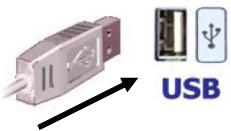
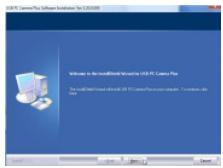
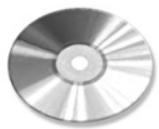
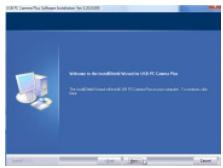
| GB – 1st step: Connect the adapter to the USB port on the computer (fig. 1) | 2nd step: Follow the instructions on the screen. (fig. 2)3rd step: If required, insert the driver CD in the CD-ROM drive (fig. 3) | 4th step: Follow the instructions on the screen (fig. 4)5th step: Connect the USB adapter to the network and set it up to your requirements. | Windows 98SE:System will ask you to insert Win98SE CD-ROM, and copy the necessary files.Windows ME, 2000, XP, VistaThe hardware will be detected and installed by the systemt |
| D – 1. Schritt: Verbinden Sie die Adapter dem USB-Anschluss des Computers (Abb. 1) | 2. Schritt: Folgen Sie den Anweisungen auf dem Bildschirm. (Abb. 2)3. Schritt: Legen Sie ggf. wenn benötigt die Treiber-CD in das CD-ROM Laufwerk ein (Abb. 3) | 4. Schritt: Folgen Sie den Anweisungen auf dem Bildschirm.5. Schritt: Verbinden Sie den USB-Adapter mit dem Netzwerk und richten Sie dieses entsprechend Ihren Anforderungen ein. | Windows 98SE:Halten Sie die Windows 98 Installations-CD bereit, um benötigte Treiber zu Installieren.Windows ME, 2000, XP, VistaDie Hardware wird vom System erkannt und installiert |
| F – Étape 1 :Reliez l'adaptateur à la prise USB de votre ordinateur. (fig. 1) | Etape 2 : Suivez les instructions qui apparaissent à l'écran (fig. 2)Etape 3 : Insérez si nécessaire le CD pilote dans le lecteur (fig. 3) | Etape 4 : Suivez les instructions qui apparaissent à l'écran (fig. 4)Etape 5 Reliez l'adaptateur USB au réseau et installez-le selon vos exigences. | Windows 98SE:Ayez à portée de main le CD d'installation du Windows 98 afin d'installer le pilote nécessaire.Windows ME, 2000, XP, VistaLe matériel est reconnu par le système et installé. |
| E – 1o paso: Conecte el adaptador al puerto USB de su ordenador. (fig. 1) | 2o paso: Siga las instrucciones de la pantalla. (fig. 2)3o paso: Si es necesario, introduzca el CD de los controladores en la unidad de lectura de CD-ROM. (fig. 3) | 4o paso: Siga las instrucciones de la pantalla. (fig. 4)5o paso: Conecte el adaptador USB a la red e instale esta última según sus preferencias. | Windows 98SE:Tenga el CD de instalación de Windows 98 a mano, para instalar los controladores necesarios.Windows ME, 2000, XP, VistaEl sistema reconocerá e instalará el hardware. |
| I – Passaggio 1: Collegare l'adattatore alla porta USB del computer. (Fig. 1). | Passaggio 2: Seguire le istruzioni visualizzate sullo schermo (Fig. 2).Passaggio 3: Se necessario inserire il CD dei driver nel lettore CD-ROM (Fig. 3). | Passaggio 4: Seguire le istruzioni visualizzate sullo schermo (Fig. 4).Passaggio 5: Collegare l'adattatore USB alla rete e configurare quest'ultima in base alle specifiche esigenze. | Windows 98SE:mantenere a disposizione il CD di installazione di Windows 98 per installare eventuali driver necessari.Windows ME, 2000, XP, Vista:L'hardware viene riconosciuto ed installato dal sistema. |
Gebrauchsanleitung – User's Manual – Notice d'emploi – Instrucciones de uso – Istruzioni per l'uso–Gebruiksaanwijzing– Instruções de uso – Instrukcja obsługi – Brugermanualer – Bruksanvisning
| NL – Stap 1:Sluit de adapter aan op de USB-aansluiting van de computer. (afb. 1) | Stap 2: Volg de aanwijzingen in het scherm op. (Afb. 2)Stap 3: Plaats zo nodig de CD met de stuurprogramma's in het CD-ROM station van uw computer.(Afb. 3) | Stap 4: Volg de aanwijzingen in het scherm op. (Afb. 4)Stap 5: Sluit de USB-adapter aan op uw netwerk en richt dit in overeenstemming met uw wensen in. | Windows 98SE:Houd de Windows 98 installatie-CD bij de hand om de benodigde stuurprogramma's te installeren.Windows ME, 2000, XP, VistaDe hardware wordt door het systeem herkend en geïnstalleerd. |
| PL* - Krok 1:Podłącz adapter do złącza USB komputera. (rys. 1). | Krok 2: Wykonuj polecenia wyświetlane na ekranie (rys. 2).Krok 3: W razie konieczności włóż płytę CD ze sterownikami do napędu CD. (rys. 3). | Krok 4: Wykonuj polecenia wyświetlane na ekranie (rys. 4).Krok 5: Podłącz adapter USB do sieci i odpowiednio zdefiniuj ustawienia. | Window 98SE:System poprosi o włożenie płyty CD Win98SEi skopiowanie plików wymaganych w celu obsługi kamery internetowej USB.Windows ME, 2000, XP, VistaSprzęt zostanie rozpoznany przez system i zainstalowany. |
| P – 1° passo:Ligue o adaptador à entrada USB do seu computador. (fig. 1) | 2° passo: Siga as instruções do ecrã. (fig. 2)3° passo: Se necessário, insira o CD do controlador na drive de CD-ROM. (fig. 3) | 4° passo: Siga as instruções do ecrã. (fig. 4)5° passo: Conecte o adaptador USB à rede e configure-a de acordo com as suas necessidades. | Windows 98SE:Mantenha o CD de instalação do Windows 98 à mão para instalar os controladores que forem necessários.Windows ME, 2000, XP, VistaO hardware é reconhecido pelo sistema e depois instalado. |
| DK – 1. skridt: Forbind adapteren med USB-tilslutningen på computeren. (fig. 1) | 2. skridt: Følg anvisningerne på skærmen. (fig. 2)3. skridt: Læg i givet fald om nødvendigt driver-CDen i CD-ROM-drevet. (fig. 3) | 4. skridt: Følg anvisningerne på skærmen. (fig. 4)5. skridt: Forbind USB-adapteren med netværket, og indstil dette svarende til dine krav. | Windows 98SE:Systemet beder dig sætte Win98SE CD-ROM'en i og kopiere de nødvendige filer for at understøtte dit USB Web kamera.Windows ME, 2000, XP, VistaSystemet registrerer og installerer hardwaren. |
| SE – Steg 1: Anslut adapterntill datorns USB-kontakt. (bild 1) | Steg2: Följ anvisningarna på bildskärmen. (bild 2)Steg 3: Lägg vid behov in in drivrutins-CD:n i CD ROM-enheten. (bild 3) | Steg 4: Följ anvisningarna på bildskärmen. (bild 4).Steg 5: Anslut USB-adaptern till nätverket och ställ in detta i enlighet med dina behov. | Windows 98SE:Ha Windows 98 installations-CD i beredskap för att installera nödvändiga drivrutiner.WindowsME, 2000, XP, VistaHårdvaran identifieras och installeras av systemet. |
*Dystrybutor *VIVANCO POLAND Sp.z.o.o. UI Sosnkowskiego 1 02 495 Warszawa
Vivanco GmbH Vivanco Gruppe AG
Ewige Weide 15
D-22926 Ahrensburg / Germany
Phone +49 (0) 4102 / 231 - 0
Fax +49 (0) 4102 / 231–160 Internet: www.vivanco.de
Product support
D 01805 / 404910 (12 Cent/Min)
hotline@vivanco.de
G consumer@vivanco.co.uk
F hotline@vivanco-france.fr
E vivanco@vivanco.es
I support@vivanco.it
NL info@vivanco.nl
Marque : VIVANCO
Modèle : USB NET-N 23428
Catégorie : Routeur Wi-Fi