
F250 - Dispositif médical OMRON - Notice d'utilisation et mode d'emploi gratuit
Retrouvez gratuitement la notice de l'appareil F250 OMRON au format PDF.


| Type de produit | Capteur de vision haute performance (dispositif médical) |
| Marque | OMRON |
| Modèle | F250 |
| Catégorie | Dispositif médical |
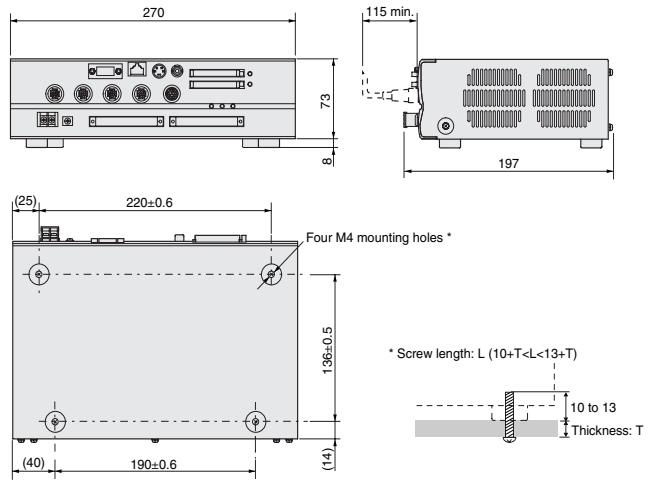
| Dimensions du contrôleur | 270 x 81 x 197 mm (L x H x P) |
| Poids du contrôleur | Environ 3,1 kg |
| Dimensions de la caméra (F160-S1/S2) | 31 x 40 x 54,5 mm |
| Poids de la caméra | Environ 85 g |
| Tension d'alimentation | 20,4 à 26,4 VDC |
| Consommation électrique | Environ 3,7 A (avec 4 caméras F160-SLC50) |
| Nombre de caméras connectables | Jusqu'à 4 |
| Résolution de traitement | 512 x 484 pixels |
| Nombre de scènes | 32 scènes (extensible par carte mémoire) |
| Fonctions principales | Inspection de défauts (EC defect), positionnement EC, reconnaissance de caractères QUEST, correspondance fine (Fine matching), recherche en temps réel avec rotation 360° |
| Mémoire image | Jusqu'à 35 images enregistrables |
| Interfaces | Composite vidéo, S-Vidéo, Ethernet (10Base-T), RS-232C/422, parallèle (21 entrées, 46 sorties) |
| Température de fonctionnement | 0 à +50°C |
| Humidité de fonctionnement | 35 à 85% HR (sans condensation) |
| Accessoires inclus | Manuel d'instructions, supports de montage (pour moniteur) |
| Pièces détachées disponibles | Contrôleur, caméras, console, moniteur, câbles (voir liste de commande) |
| Langue du menu | Japonais / Anglais (modifiable) |
| Fonction de réglage sans arrêt | Oui (non-stop adjustment) |
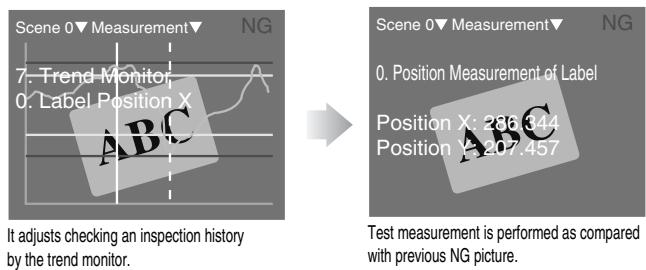
| Fonction de moniteur de tendance | Oui (Trend Monitor) |
FOIRE AUX QUESTIONS - F250 OMRON
Questions des utilisateurs sur F250 OMRON
0 question sur cet appareil. Repondez a celles que vous connaissez ou posez la votre.
Poser une nouvelle question sur cet appareil
Téléchargez la notice de votre Dispositif médical au format PDF gratuitement ! Retrouvez votre notice F250 - OMRON et reprennez votre appareil électronique en main. Sur cette page sont publiés tous les documents nécessaires à l'utilisation de votre appareil F250 de la marque OMRON.
MODE D'EMPLOI F250 OMRON
High-performance Vision Sensor
F250
Advanced algorithm enables ultra high speed and maximum flexibility
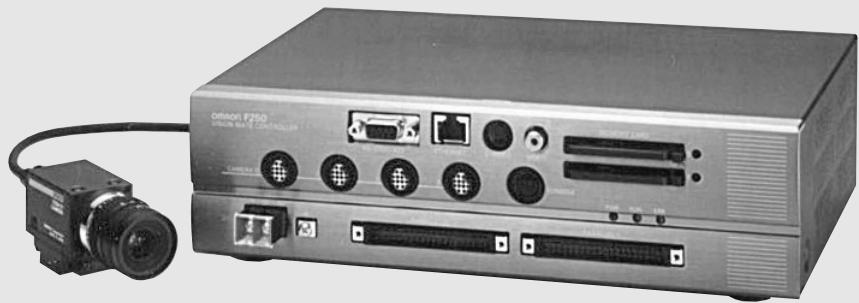
natural_image
Front view of a Sony F250 audio recording device with ports, cables, and connectors (no visible text or symbols on main body)CE
Features
Inspection and positioning that was difficult with previous vision sensors is now surprisingly easy!
ED defect inspection
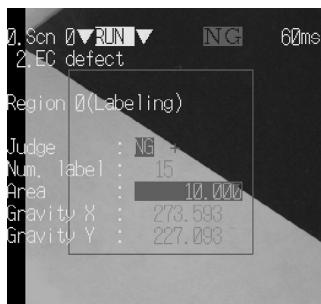
High-precision detection of minute defects that could not be detected previously.
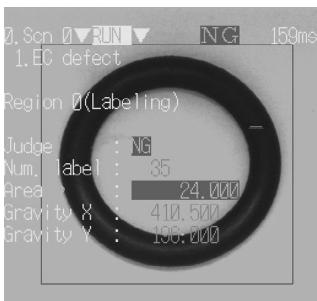
Certain detection of rubber packing deformities.
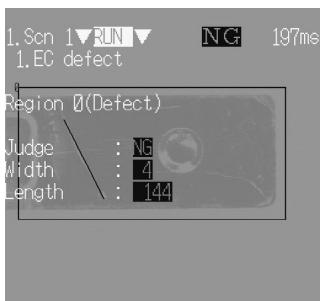
Detection of low-contrast defects on metal surfaces
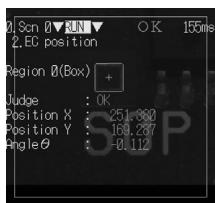
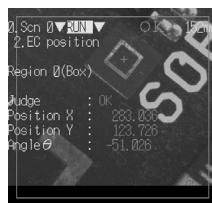
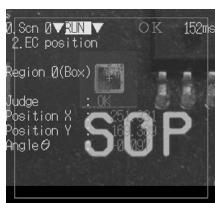
EC positioning
High-precision position measurement even if the inside of the work changes or the view changes.
- Positioning of PWB fiducial marks
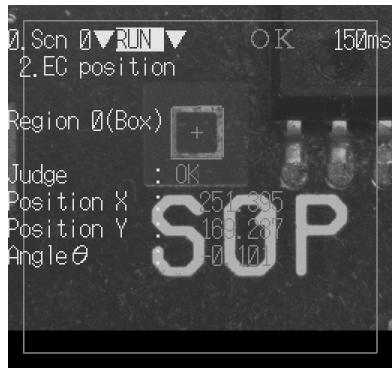

Low contrast
Revolution

Internal dirt
Features
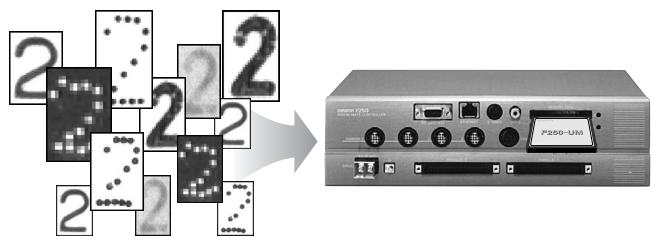
QUEST character checking
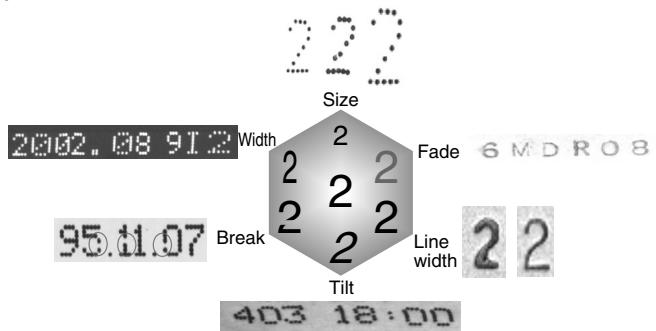
Even if the shape or size of a character varies, "QUEST Logic" finds printed characters with certainty. The built-in dictionary makes "simple settings" possible.
● No need to store a character dictionary
Various character fonts for factory automation have been pre-stored. This eliminates the need to store a dictionary or model names, and allows a dramatic reduction in man-hours for initial setup.
- The "six character variations" can also be recognized with certitude.
Checks characters printed on the production line such as "Best before" dates and lot numbers. Even if there are deviations in shape, size, or line width, the characters are accurately checked.
Fine matching
Detects differences from the stored "good" image quickly and with high accuracy. Dramatic improvement in ability to inspect characters and patterns with minute border defects.
Example of application to soft drink cap inspection
Registration image
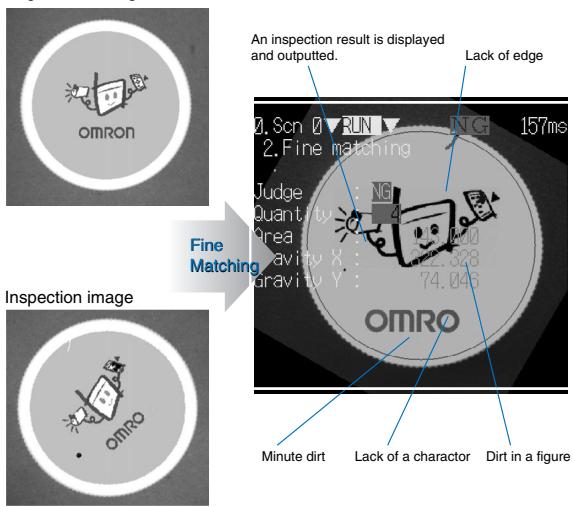
For fast increasing line speeds and ever stricter quality demands.
● Real time Revolution Search is amazing
Executes a real time search of 72 models. Even with works that rotate 360^ , positioning corrections are completed at the same time as image read-in.
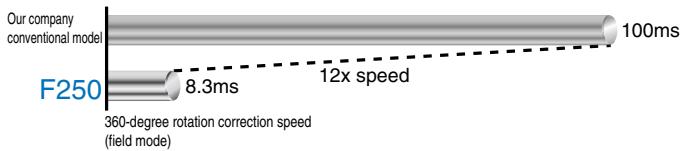
bar_line
| Model | Time (ms) | Speed (x) | |-------|-----------|-----------| | Our company conventional model | 100 | - | | F250 | 8.3 | - | | 360-degree rotation correction speed (field mode) | - | - |- Fast image processing
Inspection functions following camera image read-in are also up to 10 times faster thanks to a newly developed parallel processing technology.

- Fast image read-in
The F160-S1 double-speed camera achieves a maximum image read-in speed of 8.3 ms.
"Non-stop" adjustment without stopping the line
All settings can be adjusted and reset while inspection continues. There is no need to stop the line for adjustments, subsequently, no capacity drops.
● Easy and flexible settings by means of software application
- Functions needed for inspection are selected and installed from the software application.
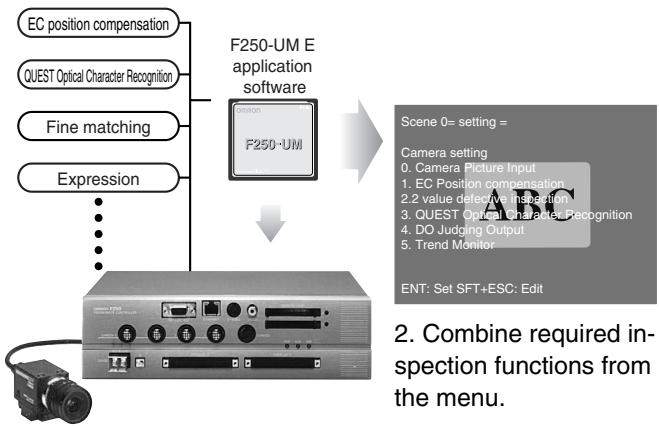
flowchart
graph TD
    A["EC position compensation"] --> D["F250-UM E application software"]
    B["QUEST Optical Character Recognition"] --> D
    C["Fine matching"] --> D
    E["Expression"] --> D
    D --> F["Camera setting"]
    F --> G["0. Camera Picture Input"]
    F --> H["1. EC Position compensation"]
    F --> I["2. 2 value defensive inspection"]
    F --> J["3. QUEST Optical Character Recognition"]
    F --> K["4. DO Judging Output"]
    F --> L["5. Trend Monitor"]
    M["EN: Set SFT+ESC: Edit"] --> N["2. Combine required inspection functions from the menu."]
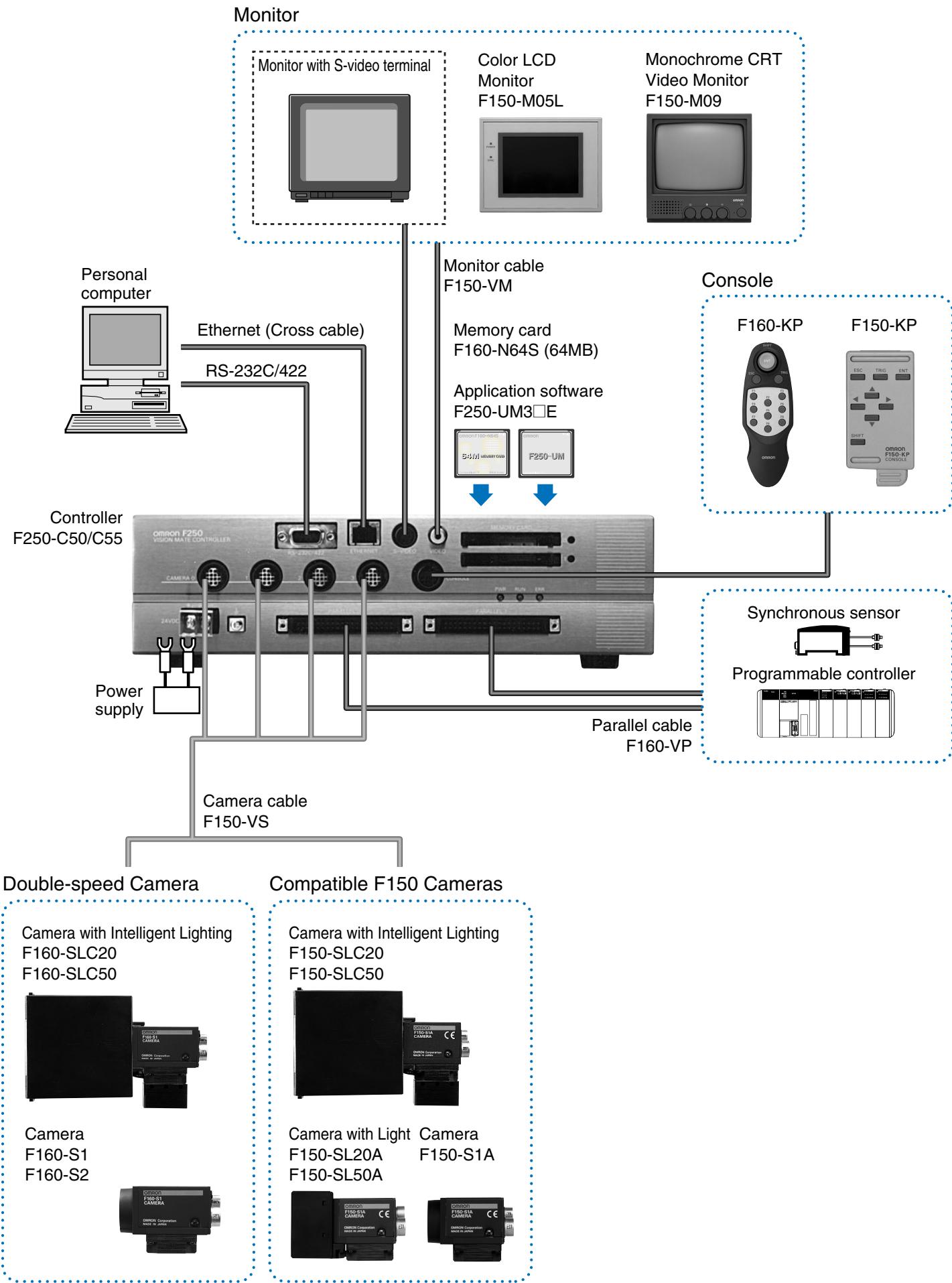
flowchart
graph TD
    A["Monitor"] --> B["Monitor with S-video terminal"]
    A --> C["Personal computer"]
    A --> D["Ethernet (Cross cable)"]
    A --> E["Controller F250-C50/C55"]
    A --> F["Power supply"]
    A --> G["Camera cable F150-VS"]
    A --> H["Double-speed Camera"]
    A --> I["Compatible F150 Cameras"]

    B --> J["Color LCD Monitor F150-M05L"]
    B --> K["Monochrome CRT Video Monitor F150-M09"]

    C --> L["Monitor cable F150-VM"]
    C --> M["Memory card F160-N64S (64MB)"]
    C --> N["Application software F250-UM3□E"]

    D --> O["Parallel cable F160-VP"]

    E --> P["Synchronous sensor Programmable controller"]

    G --> Q["Camera with Intelligent Lighting F160-SLC20 F160-SLC50"]
    G --> R["Camera with Intelligent Lighting F150-SLC20 F150-SLC50"]
    G --> S["Camera with Light F150-SL20A F150-SL20A"]
    G --> T["Camera with Light F150-SL20A F150-SL50A"]
Ordering Information
| Name | Model | Remarks | |
| Controller | F250-C50 | NPN Input/Output | |
| F250-C55 | PNP Input/Output | ||
| Double-speed camera | Camera with intelligent lighting | F160-SLC20 | |
| F160-SLC50 | |||
| Camera only | F160-S1 | ||
| F160-S2 | Includes Partial Scan functionality | ||
| F150 Compatible cameras | Camera with intelligent lighting | F150-SLC20 | |
| F150-SLC50 | |||
| Camera with lighting | F150-SL20A | ||
| F150-SL50A | |||
| Camera only | F150-S1A | ||
| Console | F160-KP | ||
| F150-KP | |||
| LCD monitor | F150-M05L | ||
| Video monitor | F150-M09 | ||
| Memory card | F160-N64S(S) | Memory capacity 64 MB | |
| Application software | F250-UM3ME | with Macro function | |
| F250-UM3FE | without Macro function | ||
| Camera cable | F150-VS | Length of cable for double-speed camera and F150 common camera: 3 m | |
| Monitor cable | F150-VM | Cable length: 2 m | |
| Parallel cable | F160-VP | Length of pigtail cable for parallel input/output connector: 2 m | |
Controller: F250-C50/C55
| Connected camera | F150-S1A/SL20A/SL50A/SLC20/SLC50, F160-S1/S2/SLC20/SLC50 |
| Number of connectable cameras | 4 |
| Processing resolution | 512(H) x 484(V) |
| Number of scenes | 32 scenes (expansion possible using memory card) |
| Image storage function | Maximum 35 images |
| Image pre-processing | Smoothing (strong/weak), edge enhancement, edge extraction (horizontal, vertical, both), erosion, dilation, median, background deletion |
| Operation and Settings | Install measurement routines from a software application, combine and establish settings for measurement routines from menus. |
| Menu language | Japanese/English (changeable) |
| Operation customization function | Password function, short-cut key function |
| Screen customization function | Display items: Character strings (measured values, decisions, time, any character string, measurement area names), graphics (straight lines, rectangles, circles, cross-hair cursors)Parameters specified: display color, postion, size |
| Non-stop adjustment function | Yes |
| Trend monitor function | Yes |
| Memory card slot | 2 slots |
| Monitor | Composite video output: 1 CH, S-video output: 1 CH |
| Ethernet | 10Base-T 1CH |
| Serial communication | RS-232C/422A 1CH |
| Parallel input/output | Inputs: 21 points, outputs: 46 points |
| Strobe | 4 CH (included in parallel outputs) |
| Power supply voltage | 20.4 to 26.4 VDC |
| Current consumption | Approximately 3.7 A (when four F160-SLC50 units are connected) |
| Ambient temperature | Operating: 0 to +50°C, storage: -25 to +65°C (no ice formation or condensation) |
| Ambient humidity | Operating/storage: 35 to 85% RH (with no condensation) |
| Dimensions | 270(W) x 81(H) x 197(D) |
| Weight | Approximately 3.1kg (unit only) |
Double-speed camera: F160-S1/S2
| Picture element | 1/3" Interline CCD |
| Effective pixels | 659 x 44 (H x V) |
| Scanning method | 1/60-s non-interlace (frame) mode, 1/120-s 2:1 interlace (field) mode |
| Shutter | Electronic shutter; select from 8 shutter-speed settings (1/120 to 1/20,000 s) using menu |
| Camera with Intelligent Lighting | F160-SLC20 (field of vision: 20 mm), F160-SLC50 (field of vision: 50 mm) |
| Ambient temperature | Operating: 0 to +50°CStorage: -25 to +60°C(with no icing or condensation) |
| Ambient humidity | Operating and Storage: 35 to 85% RH (with no condensation) |
| External Dimensions | 31 x 40 x 54.5 (W x H x D) mm (not including connectors and other protruding parts) |
| Weight | Approx. 85 g (Camera only) |
Monitor
| Model numberItem Name | F150-M05LColor LCD monitor | F150-M09Monochrome CRT Video Monitor |
| Size | 5.5 inches | 9 inches |
| Type | Liquid crystal color TFT | CRT monochrome |
| Resolution | 320 x 240 dots | 800TV or min. (at center) |
| Input signal | NTSC composite video (1.0 V / 75 ) | |
| Power supply voltage | 20.4 to 26.4 VDC | 100 to 240 VAC (-15%, +10%) |
| Current consumption | Approx. 700 mA | Approx. 400 mA |
| Ambient temperature | Operating: 0 to +50°CStorage: -25 to +65°C(with no icing or condensation) | Operating: -10 to +50°CStorage: -20 to +65°C(with no icing or condensation) |
| Ambient humidity | Operating or storage: 35% to 85%(with no condensation) | Operating or Storage: 10% to 90%(with no condensation) |
| Weight (Monitor only) | Approx. 610 g | Approx. 4.5 kg |
| Accessories | Instruction manual and 4 mounting brackets | Instruction manual |
Controller: F250-C50/C55
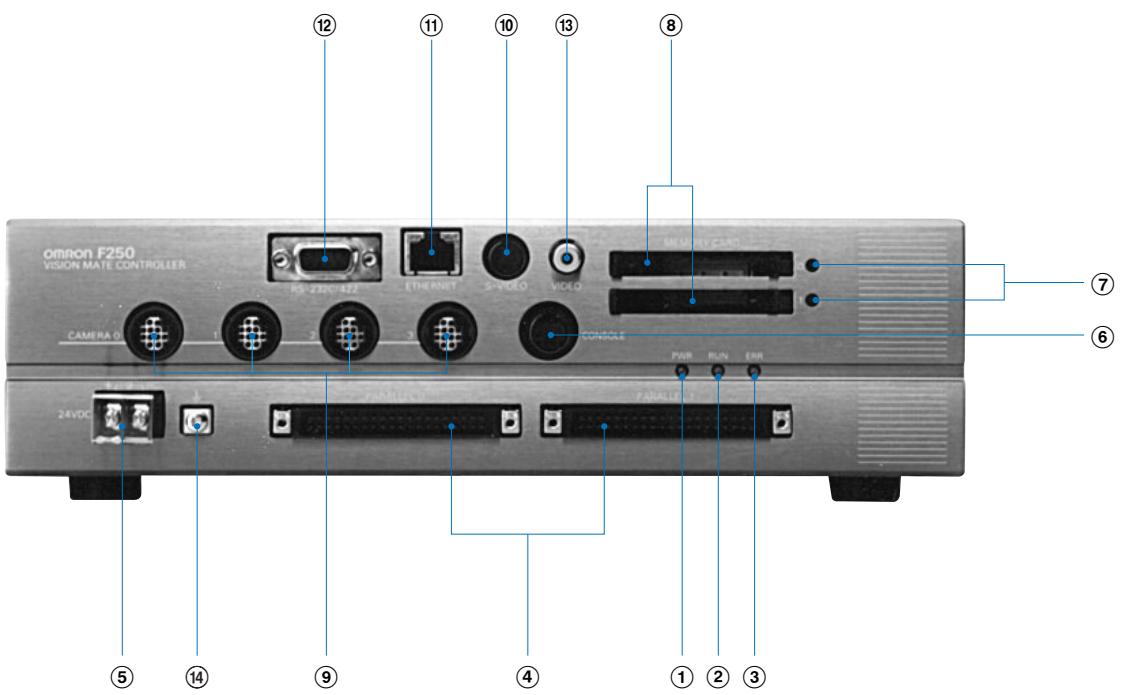
① POWER LED (green)
Illuminates while the power is on.
② RUN LED (orange)
Illuminates while the system is in measurement mode.
③ ERROR LED (red)
Illuminates when a problem occurs.
④ Input connectors 0, 1
Connects to a synchronous sensor or programmable controller.
⑤ Power terminal
Connects to a DC power supply.
⑥ Console connector
Connects to the console.
⑦ Memory card LEDs 0, 1
Illuminates while power is supplied to the memory card.
⑧ Memory card slots 0, 1
A memory card or software application is inserted here.
⑨ CAMERA 0 - 3 connectors
Connects to a camera.
⑩ Monitor connector (S-Video output)
Connects to a monitor with an S-Video input
⑪ Ethernet connector
Connects to a computer.
⑫ RS-232C/422 connector
Connects to a computer or programmable controller.
⑬ Monitor connector (composite video output)
Connects to a monitor.
⑭ Ground terminal
Connect the ground wire to this terminal.
Processing routine list
The F250-UME application software contains approximately 50 processing routines.
Image input related
Camera image input
Camera switch
Pre-processing change
Repeat preprocessing
Position compensation related
Binary position correction
Model position correction
Circular work position correction
Edge position correction
EC position correction
Scroll return
Scroll
General measurement related
QUEST character
checking
Binary defect
inspection
Density defect
inspection
Fine matching
Pattern inspection
Sorting
EC defect inspection
EC circular piece
count inspection
Rotation
positioning
Dark-light edge
position
ECM search
EC positioning
Lot number
checking 1
Dark-light edge
number
Density average/
deviation
Labeling
Label data
Measurement supplement related
Computing
Acquire processing unit data
Set processing unit data
Wait
Elapsed time
Trend monitor
Branch control related
Condition branch
DI branch
End
Result output related
Memory card data output
DO data output
Significant link data output
Non-protocol data output
DO decision output
Result display related
Any character display
Measured value display
Decision character display
Processing task name display
Measurement time display
Fixed graphic display
Straight line result display
Rectangle result display
Circle result display
Cross-hair cursor result display
Controller
F250-C50/C55
- High-performance Vision Sensor
- F250
- Features
- EC positioning
- QUEST character checking
- ● No need to store a character dictionary
- - The "six character variations" can also be recognized with certitude.
- Fine matching
- Example of application to soft drink cap inspection
- For fast increasing line speeds and ever stricter quality demands.
- ● Real time Revolution Search is amazing
- - Fast image processing
- - Fast image read-in
- "Non-stop" adjustment without stopping the line
- ● Easy and flexible settings by means of software application
- Processing routine list
- Image input related
- Position compensation related
- General measurement related
- Measurement supplement related
- Branch control related
- Result output related
- Result display related
Marque : OMRON
Modèle : F250
Catégorie : Dispositif médical