
TX 700 M - Vélo de montagne SCOTT - Notice d'utilisation et mode d'emploi gratuit
Retrouvez gratuitement la notice de l'appareil TX 700 M SCOTT au format PDF.

| Type de produit | Écran LCD portable |
| Marque | SCOTT |
| Modèle | TX 700 M |
| Taille d'écran | 7 pouces |
| Résolution d'affichage | 480 × 234 pixels |
| Système vidéo | PAL / NTSC |
| Luminosité | 180 cd/m² |
| Contraste | 300:1 |
| Angle de vue | 90° vertical, 120° horizontal |
| Réponse en fréquence audio | 20 Hz - 20 kHz |
| Rapport signal/bruit audio | Meilleur que 80 dB |
| Alimentation | DC 9-12 V (adaptateur secteur ou allume-cigare) |
| Consommation | Moins de 8 W |
| Poids | 0,42 kg |
| Dimensions (L × P × H) | 255 × 26 × 146 mm |
| Température de fonctionnement | 5 °C à 40 °C |
| Accessoires fournis | Adaptateur secteur, adaptateur allume-cigare, câble AV, câble DC/AV, écouteurs, housse de transport |
| Fonctions principales | Affichage vidéo, réglage luminosité, réglage volume, prise casque, entrée AV |
| Sécurité | Ne pas ouvrir le boîtier, utiliser uniquement avec les accessoires recommandés, débrancher en cas de non-utilisation prolongée |
| Entretien | Nettoyer avec un chiffon doux et sec, éviter l'humidité et les températures extrêmes |
| Pièces détachées et réparabilité | Aucune pièce réparable par l'utilisateur, contacter un technicien qualifié |
FOIRE AUX QUESTIONS - TX 700 M SCOTT
Questions des utilisateurs sur TX 700 M SCOTT
0 question sur cet appareil. Repondez a celles que vous connaissez ou posez la votre.
Poser une nouvelle question sur cet appareil
Téléchargez la notice de votre Vélo de montagne au format PDF gratuitement ! Retrouvez votre notice TX 700 M - SCOTT et reprennez votre appareil électronique en main. Sur cette page sont publiés tous les documents nécessaires à l'utilisation de votre appareil TX 700 M de la marque SCOTT.
MODE D'EMPLOI TX 700 M SCOTT
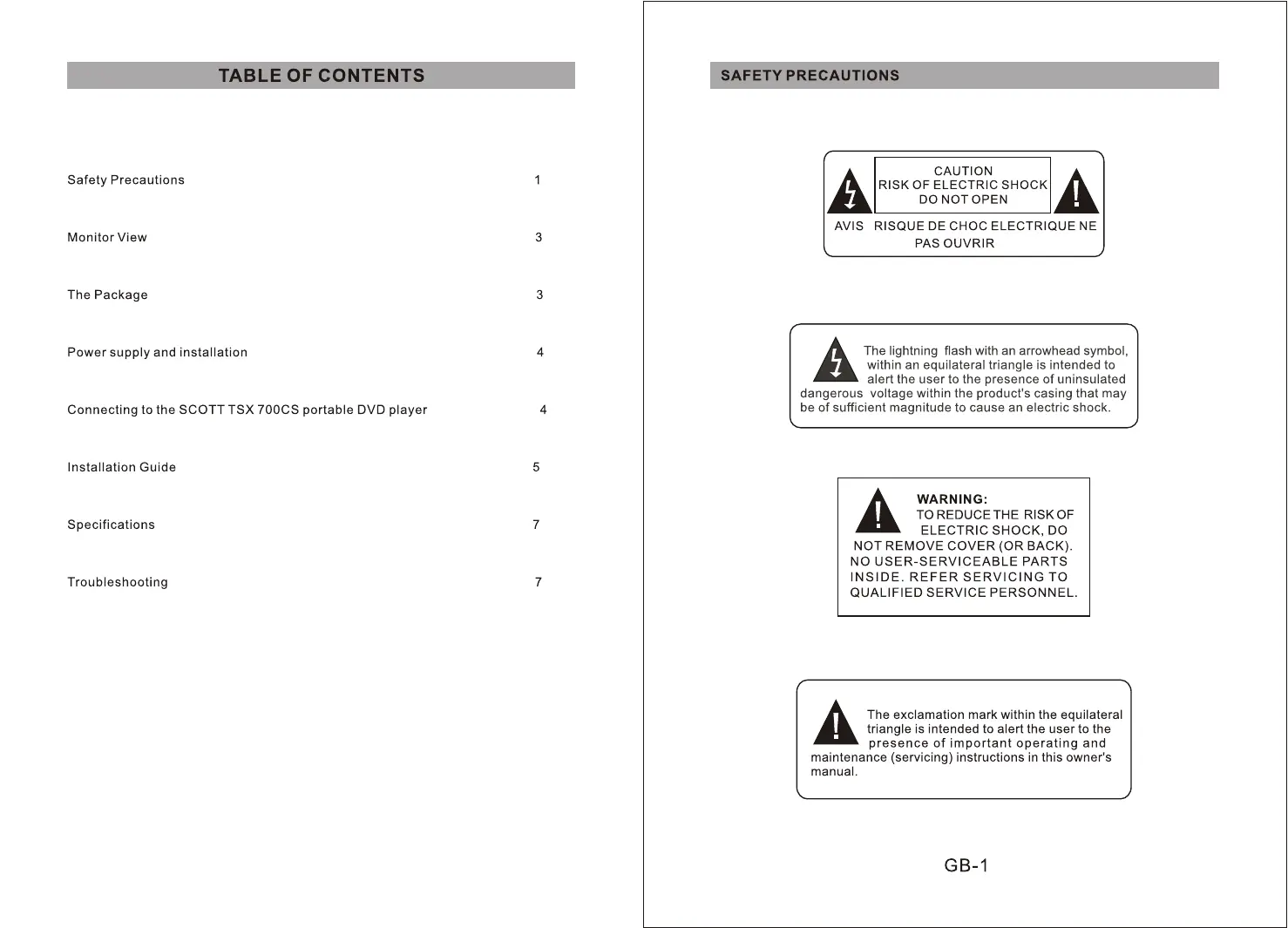
TABLE OF CONTENTS
Safety Precautions 1
Monitor View 3
The Package 3
Power supply and installation 4
4 Connecting to the SCOTT TSX 700CS portable DVD player
Installation Guide 5
Specifications 7
Troubleshooting 7
SAFETY PRECAUTIONS

CAUTION RISK OF ELECTRIC SHOCK DO NOT OPEN

AVIS RISQUE DE CHOC ELECTRIQUE NE PAS OUVRIR

The lightning flash with an arrowhead symbol, within an equilateral triangle is intended to alert the user to the presence of uninsulated
dangerous voltage within the product's casing that may be of sufficient magnitude to cause an electric shock.

WARNING: TO REDUCE THE RISK OF ELECTRIC SHOCK, DO
NOT REMOVE COVER (OR BACK), NO USER-SERVICEABLE PARTS INSIDE. REFER SERVICING TO QUALIFIED SERVICE PERSONNEL

The exclamation mark within the equilateral triangle is intended to alert the user to the presence of important operating and maintenance (servicing) instructions in this owner's
SAFETY PRECAUTIONS
On Placement
Do not use the unit in places which are extremely hot, cold, dusty, or humid. Do not restrict the air flow of the unit by placing it in a place with poor air flow, by covering it with a cloth, or by placing it on carpeting.
On Safety
When connecting or disconnecting the power adapter, grip the plug and not the cord itself. Pulling the cord may damage it and create a hazard. When you are not going to use the unit for a long period of time, disconnect the power adapter.
On Condensation
When left in a heated room where it is warm and damp, water droplets or condensation may form inside the unit. When there is condensation inside the unit, the unit may not function normally. Let the unit stand for 1 to 2 hours before turning the power on, or gradually heat the room up and dry the unit before use.
Rating Plate Location
The rating plate location is on the back of unit.

WARNING:
Should any trouble occur, disconnect the AC power cord and refer servicing to a qualified technician.
No objects filled with liquids, such as vases, shall be placed on the apparatus.
The mains plug is used as the disconnect device and it shall remain readily operable.
MONITOR VIEW
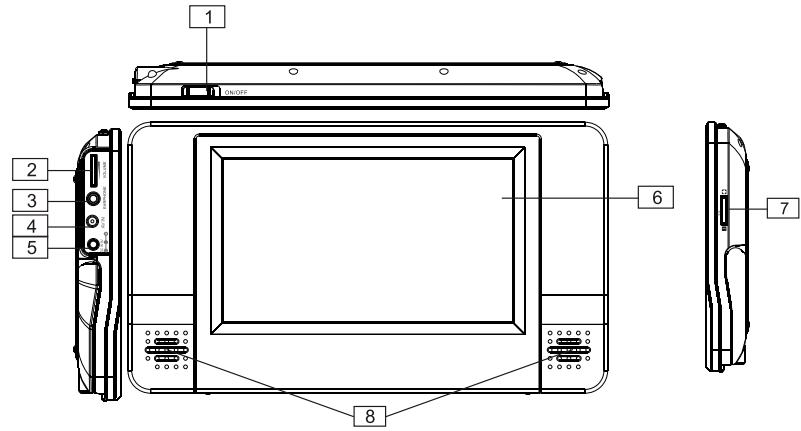
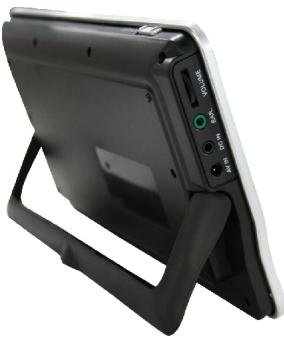
- Power ON/OFF
Slide the switch to turn the unit on and off
- Volume knob
Adjust the volume level
- Earphone jack
Plug in the earphones for private listening. Speaker output will be shut off.
4.AVIN
-
DC IN (12V DC input)
-
LCD monitor
-
Brightness knob
Adjust the brightness of the LCD monitor
- Speakers
THE PACKAGE
The unit include the following accessories:
- 1 × 7 " LCD Monitor
- 1 x Audio/Video Adapter Cable (AV)
- 1 x DC/AV Cable
- 1 x AC/DC Power Adapter
- 1 x Cigarette Lighter Adapter
- 1 x Instruction Manual
- 1 x Earphones
- 1 x Car bag
POWER SUPPLY AND INSTALLATION
Plug one end of the AC/DC power adapter into a wall outlet and connect the plug to the DC 9-12V input (DC IN) located on the left hand side of the unit. In the car, the cigarette lighter adapter can be used to connect to the power. Please refer to the following illustration:
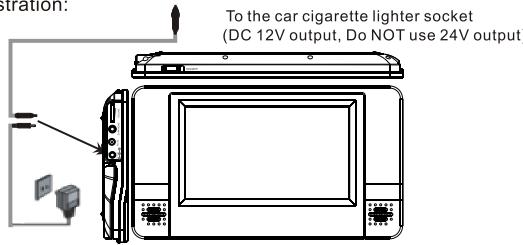
Connecting the TX700M monitor to an audio/video appliance equipped with a composite video output.
Then you can connect the AV input (AV IN) on your screen to the AV output of an external audio/video device using the supplied AV cable and a male-male AV Cinch/RAC cable (not supplied). After connection is complete, slide the power ON/OFF switch to the ON position to turn on the unit.
Connecting to SCOTT TSX 700CS
You can also connect the screen to the SCOTT TSX 700CS to enjoy a high quality picture and stereo sound. Please refer to the following illustration:
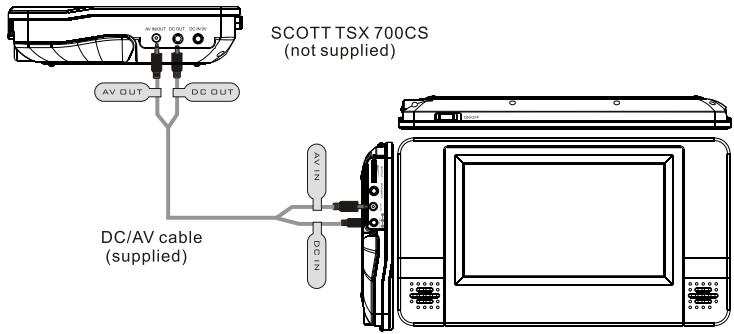
Unplug the AC/DC power adapter or cigarette lighter adapter. Connect the unit DC IN 9-12V jack to the DC OUT jack on the SCOTT TSX 700CS using the DC/AV power cable supplied. Then connect the AV IN on the screen to the AV OUT on the SCOTT TSX 700CS using the same DC/AV cable (supplied).
Note: In order to make the connections correctly, please follow the "DC IN", "AV IN", "DC OUT" and "AV OUT" indications located on the DC/AV cable.
It is better to have independent power sources for the two appliances.
INSTALLATION GUIDE
SCOTT TSX 700CS (not supplied)
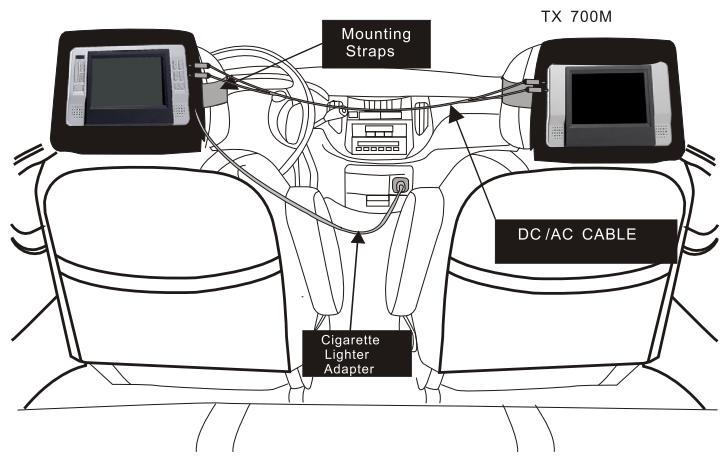
INSTALL THE UNIT IN CAR
Use the supplied carrying bag mounting straps to install the screen onto the back of a headrest in your car.
- Loop the carrying bag safety bands around the headrest.
- Tightly wrap the mounting straps around the headrest.
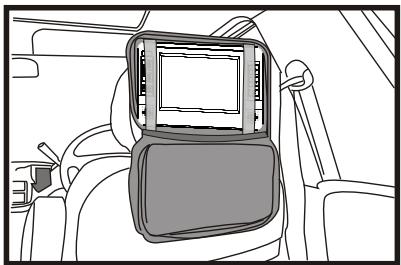

SAFETYWARNING!
This unit should never be used by the vehicle driver or left unsecured in the vehicle while driving.
If this unit is being used in your vehicle, be sure that it is secured or held safely, and does not obstruct any safety device, including air bags or seat belts.
All passengers should wear seat belts when using this unit in a moving vehicle.
If in doubt, please contact your vehicle manufacturer for further advice.
USING THE STAND
Stand for home use
SPECIFICATIONS
Signal systems: PAL/NTSC
Panel size: 7"
Picture resolution: 480x234(RGB)
View Angle: 90° vertically, 120° horizontally
Brightness: 180 cd / m2
Contrast: 300:1
Frequency response: 20Hz to 20kHz
Audio S/N: Better than 80 dB
Dynamic range: Better than 85 dB
Power source: DC 9-12V
Power consumption: < 8 W
Operating temperature: 5 40°C
Weight: 0.42kg
Dimensions (W× D× H) .. 255× 26× 146mm
TROUBLESHOOTING
| PROBLEM | SOLUTION |
| No picture/sound or distorted picture/sound | Make sure the unit is connected properly, that the adapter plug is properly inserted into the AV IN and that the ON/OFF switch is in the “ON” position. |
| The unit does not switch on | Refer to the operation in “Power supply and installation”. Make sure that the car cigarette lighter output is 12V, NOT 24V. Check the fuse of the cigarette lighter socket. |

If at any time in the future you should need to dispose of this product, please note that waste electrical products should not be disposed of with household waste. Please recycle where facilities exist. Check with your local authority or retailer for recycling advice (Waste Electrical and Electronic equipment Directive).
Marque : SCOTT
Modèle : TX 700 M
Catégorie : Vélo de montagne