
X-700 - Appareil photo reflex 35 mm MINOLTA - Notice d'utilisation et mode d'emploi gratuit
Retrouvez gratuitement la notice de l'appareil X-700 MINOLTA au format PDF.


| Type de produit | Appareil photo reflex 35 mm |
| Marque | Minolta |
| Modèle | X-700 |
| Dimensions (sans objectif) | 51,5 × 89 × 137 mm |
| Poids (sans objectif ni piles) | 505 g |
| Alimentation | 2 piles 1,5 V alcalines (LR44) ou 2 piles 1,55 V argent-oxyde (SR44) ou 1 pile 3 V lithium (CR-1/3N) |
| Modes d'exposition | Programmé (P), Priorité ouverture (A), Manuel (M) |
| Obturateur | Plan focal à défilement horizontal, vitesses de 4 s à 1/1000 s, pose B |
| Cellule de mesure | Cellule au silicium (SPC) pour mesure TTL à pondération centrale, cellule supplémentaire pour flash TTL |
| Monture d'objectif | Minolta SLR baïonnette en acier inoxydable |
| Sensibilité film | ISO 25/15° à 1600/33° |
| Correction d'exposition | ± 2 IL par incréments continus |
| Flash | Griffe porte-accessoires et prise synchro, synchronisation X à 1/60 s, flash TTL avec les flashes Minolta PX |
| Viseur | Pentaprisme fixe à hauteur d'œil, grossissement 0,9× avec 50 mm, champ 95% |
| Avancement du film | Manuel par levier (course 130° après 30° de jeu), possibilité moteur optionnel |
| Retardateur | Électronique, délai de 10 s, indication LED et sonore |
| Entretien et nettoyage | Nettoyer le corps avec un chiffon doux imprégné de silicone, utiliser une soufflette pour les lentilles, ne jamais toucher le miroir ni le rideau d'obturateur |
| Sécurité | Ne pas utiliser de piles au mercure, retirer les piles si inutilisé plus de 2 semaines, éviter les chocs et fortes températures |
| Pièces détachées et réparabilité | Piles standard disponibles, objectifs interchangeables Minolta MD/MC, accessoires dédiés (flash, moteur, dos multifonction) |
| Informations générales | Appareil reflex 35 mm avec trois modes d'exposition, mesure TTL, flash TTL, viseur lumineux, idéal pour débutants et amateurs avertis |
FOIRE AUX QUESTIONS - X-700 MINOLTA
Questions des utilisateurs sur X-700 MINOLTA
0 question sur cet appareil. Repondez a celles que vous connaissez ou posez la votre.
Poser une nouvelle question sur cet appareil
Téléchargez la notice de votre Appareil photo reflex 35 mm au format PDF gratuitement ! Retrouvez votre notice X-700 - MINOLTA et reprennez votre appareil électronique en main. Sur cette page sont publiés tous les documents nécessaires à l'utilisation de votre appareil X-700 de la marque MINOLTA.
MODE D'EMPLOI X-700 MINOLTA

MINOLTA
X-700
INSTRUCTION MANUAL

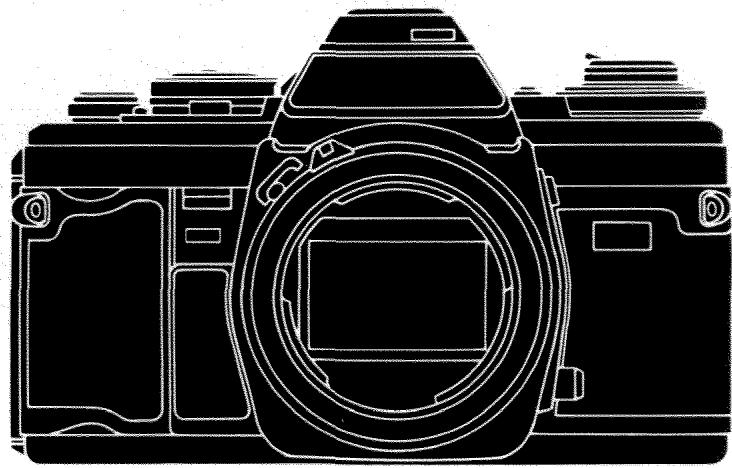
Before using your camera for the first time, study this manual carefully all the way through - or at least all the sections covering your photographic needs. As you read, attach a lens, load batteries, turn the main switch on, and handle your X-700 to acquaint yourself with its parts and features. Then load it with film and proceed to actual picture taking. In this way you can take good photos and begin to realize the broad potential of your X-700 right from the start.
To obtain many years of service from your X-700, be sure to read and follow the precautions given on page 8 and elsewhere. Keep this manual for reference later as necessary.
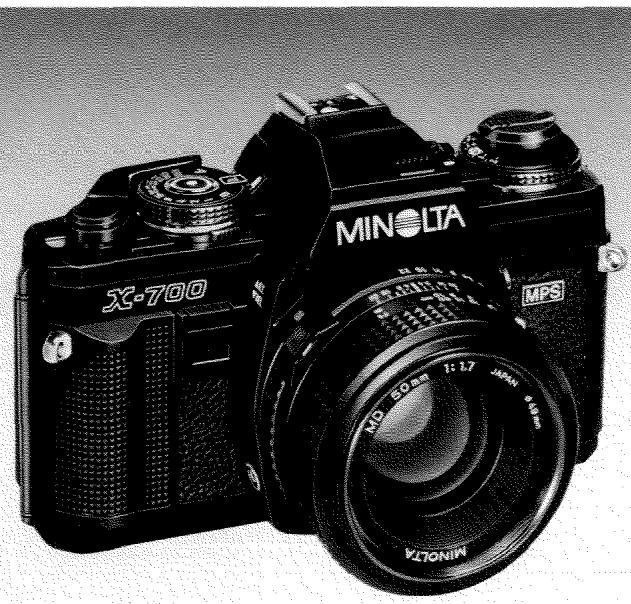
Your Minolta X-700, the state-of-the-art SLR camera at the center of the Minolta Program System, offers you the focus-and-shoot simplicity of programmed auto-exposure (AE) control: Both aperture and shutter speed are automatically set over a wide range by the camera, with continuous viewfinder LED readout of speeds being set. The program is designed to maintain fastest practicable speeds as light dims, then give audible beeps, if desired, to guard against blur from subject/camera-movement, making the X-700 ideal if you're starting out in photography or if you want full program automation for ease of use or fast-breaking action.
The X-700's aperture-priority AE mode lets you control the depth of field but still maintain AE control of stepless shutter speeds fine-tuned for proper exposure with light metered up to the instant of exposure. This mode is excellent for AE photography with the wide range of Minolta SLR system lenses and accessories available, including mirror lenses and close-up bellows - not possible with shutter-priority AE systems. For full creative flexibility, aperture and shutter can be set independently in any combination in the X-700's metered/full-manual mode.
Other handy features of your X-700 include: touch-switch metering that keeps the LEDs on for 15 seconds after you first touch the operating button; AE lock for holding adjusted-framing meter readings; + / - 2EV stops' exposure adjustment with LED indicator in finder; self-timer with triple-rate visual/audible indications; flash-ready and Flash Distance Checker (FDC) indications in finder; split-image microprism spot and Acute Matte focusing screen; integral front and back grips for surer holding; Safe Load Signal; and a new easy-load take-up spool.
A programmed autofocus, multi-function back, and quartz data back (see pages 53 to 55) complete the Minolta Program System; also available are a new wireless controller, a motor drive and auto winder, and a broad range of other SLR system accessories.
CONTENTS
NAMES OF PARTS/MAIN FEATURES .4
TAKING CARE OF YOUR X-700 .8
Strap and case 9
PREPARING TO TAKE PICTURES 10
MOUNTING AND CARE OF LENSES 10
Body and lens caps. 10
Attaching and removing lenses. 11
Care of glass surfaces 11
BATTERIES AND POWER. 12
Batteries 12
Main switch 13
Operating button 14
Automatic battery check and shutter lock . . . .14
Battery holder 15
Cold-weather operation 15
FILM AND FILM SPEED 16
LOADING AND ADVANCING FILM 17
Loading film 17
Film-advance lever 20
Safe Load Signal/Frame counter 20
REWINDING AND UNLOADING FILM 21
TAKING PICTURES WITH YOUR
X-700 23
Pre-shooting check 23
EXPOSURE CONTROL WITH THE X-700 24
Summary of modes 24
Mode/shutter-speed selector and P/A-lock release 25
Minimum-aperture lock 25
Eyepiece cap 25
PROGRAMMED AUTO-EXPOSURE MODE (P mode) 26
□FUNDAMENTALS OF EXPOSURE 28
COUPLED RANGES AND PROGRAM GRAPH. 30
LENS AND MODE COMBINATIONS 31
APERTURE-PRIORITY AUTO-EXPOSURE MODE (A mode) 32
METERING WITH THE X-700 34
AE LOCK 34
EXPOSURE-ADJUSTMENT CONTROL. .35
WHEN TO USE AE LOCK AND EXPOSURE-ADJUSTMENT CONTROL . . .36
METERED/FULL-MANUAL EXPOSURE
MODE (M mode) 38
Long exposures ("B" setting) 39
FOCUSing. 40
Focusing aid 40
Distance scale 41
Film-plane index 41
Infrared index 41
□DEPTHOFFIELD. 42
Preview button. 43
Depth-of-field scale 43
BLUR FROM CAMERA/SUBJECT
MOVEMENT 44
SUPPORTING THE CAMERA AND
RELEASING THE SHUTTER 45
Slow-shutter-speed warning 46
Mounting camera on tripod 46
Self-timer 47
Other ways of releasing shutter. 47
□CREATIVE CONTROL OF APERTURE
AND SHUTTER SPEED 48
FLASHPHOTOGRAPHY 50
ACCESSORIES (Minolta Program
System) 53
TECHNICAL DETAILS 58
STORAGE 61
Supplemental information on fundamentals of photography given in boxes
NAMES OF PARTS/MAIN FEATURES
Exposure-adjustment control 2 EV stops continuous adjustment over or under normal exposure, with LED indicator in viewfinder
Mode/shutter-speed selector
P: Programmed AE
A: Aperture-priority AE
1-1000: Stepped shutter speeds for metered/full manual
B: Long (''bulb'') exposures
Back-cover release knob
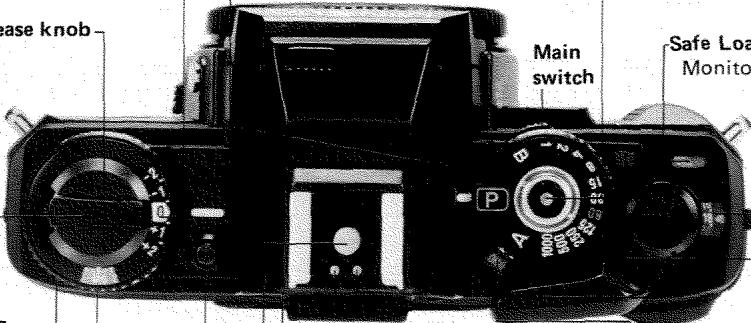
Operating button
"Soft touch" electromagnetic release; locks when battery power too low "Touch switch" metering with 15-sec. hold of LED display
Safe Load Signal
Monitors correct film advance
Rewind crank.
Frame counter
P/A-lock release
Film-speed ring
Film-speed window
Exposure-adjustment control release
Flash/camera-control contacts
For dedicated programmed autoflash and X-series autoflashes
Sync contact
Film-advance lever
Smooth 130^ advance stroke after 30^ unengaged movement
Main-switch position indicator
OFF, ON, ON (audible slow-shutter-speed warning and self-timerbeeps)
AE lock/self-timer switch
- AE lock for holding close-up or adjusted-viewing meter readings
Electronic self-timer with triple-rate blinking LED and optional audible beeps
Front grip
Integral front and back grips giving camera surer hold
Sync terminal
Bayonet lens mount
New integrally lubricated stainless-steel mount offers greater durability and smoother lens changing; accepts virtually all Minolta SLR interchangeable lenses and accessories
MD coupler
MC coupler
MINOLA
Lens-mounting index
Lens-release button
Mirror
Specially coated to make viewfinder 11% brighter
Strap eyelet
Shutter-release socket
Diaphragm-control lever
Preview button
Easy-to-use spring-loaded button for previewing depth of field
Not visible:
Silicon photocell atop penta- prism for full-aperture metering for viewfinder LED display, and for "final check" stop-down metering
Second silicon photocell in mirror compartment for Direct Autoflash Metering with PXseries Auto Electroflashes
Mode indicators
M: Metered manual
A: Aperture-priority AE
P: Programmed AE (blinks if lens not set at minimum aperture or non-MD lens in use)
Over-range LED
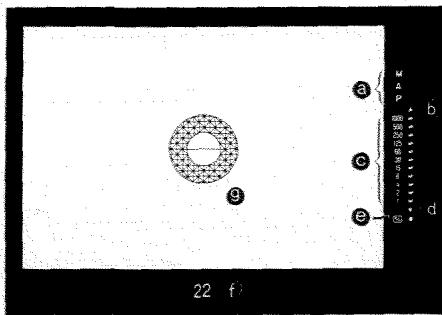
Shutter-speed scale/LEDs
- LED indicates stepless speed set by camera in P and A modes
- LED indicates stepped speed recommended in M mode
- "60" LED blinks at 2Hz as flash-ready indicator with PX- and X-series Auto Electroflashes
- "60" LED blinks at 8Hz as flash-distance checker (FDC) with PX-series Auto Electroflashes
Under-range LED
Exposure-adjustment LED
Aperture setting
Focusing screen Split-image spot, microprism band, and Acute Matte field; exchangeable with eight other screens at authorized Minolta service facilities
Focusing grip
Distance scale
Depth-of-field scale
6 Aperture ring/scale
Mounting index
Minimum-aperture lock Prevents accidental movement of aperture ring in P mode
Diaphragm-control pin
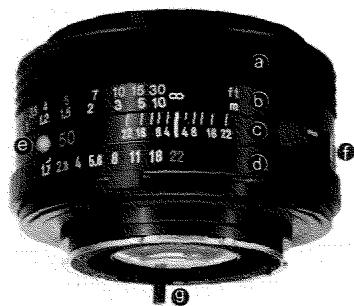
Lens shown: 50mm f/1.7 MD
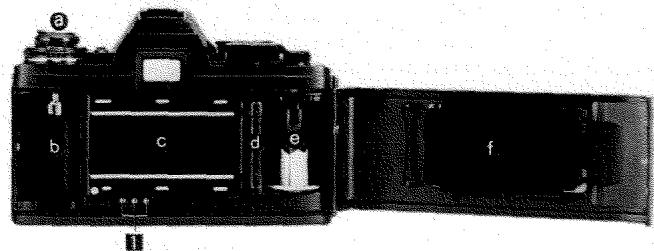
Back-cover release knob
Film-cartridge chamber
Shutter curtain Horizontal-traverse focal-plane type
Sprocket
Take-up spool
Pressure plate
Eyepiece frame/eyepiece
Memo holder
ISO (DIN-ASA) table
Back grip
Battery-chamber cover
Tripod socket
Rewind release
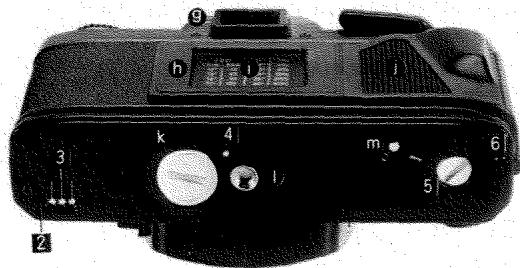
Accessory connections:
1 Contact terminals for camera control by Multi-Function Back and data-imprint control with Multi-Function Back or Quartz Data Back 1
2 Motor-drive guide socket
Motor-drive contacts
Winder contact
Winder/motor-drive coupler
Winder/motor-drive guide socket
TAKING CARE OF YOUR X-700
Your Minolta X-700 is a high-precision instrument designed to give many years of trouble-free picture taking if used and cared for properly. The precautions you should follow for keeping the camera in good operating condition are given below and at various places throughout the text.
Always keep your camera in its case with the lens capped when not in use, or with a body cap on when a lens is not attached.
- No part of the X-700 should be forced at any time. If operation is not as you think it should be, carefully restudy the applicable instructions or consult an authorized Minolta service facility.
- Never subject your camera to shock, high heat and/or humidity, water, or harmful chemicals. Be particularly careful not to leave it in the glove compartment or other places in motor vehicles where it may be subject to high temperatures.
- Never lubricate any part of the body or lens.
- Never touch the shutter curtains or the front inside part of the body with fingers or other objects or blow against them, as doing so might damage the alignment and movement of either the curtains or mirror.
- External camera and lens barrel - but not glass surfaces should be wiped with a soft, silicone-treated cloth now and then, especially after using the camera near salt water.
It is recommended to have your camera cleaned once per year at an authorized Minolta service facility.
Lens-care instructions are given on pages 10 and 11. If you will not be using your camera for an extended period, see the storage instructions at the back of the manual.
If you have questions concerning operation of your camera or about photography, feel free to contact your local Minolta agent or distributor by writing one of the offices listed inside the back cover.
CAUTION
- Before using lenses, flashes, or other accessories made by companies other than Minolta, attach them to the camera to make sure they function properly and take test photographs if necessary.
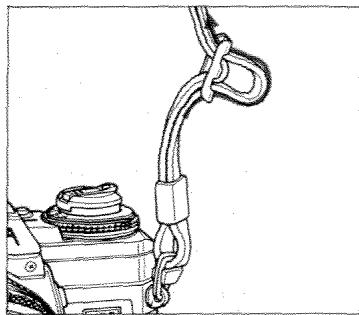
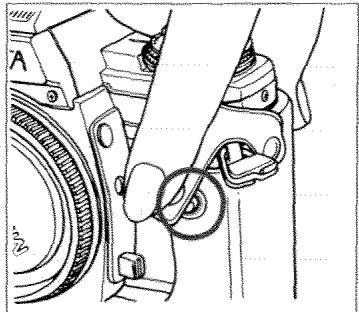
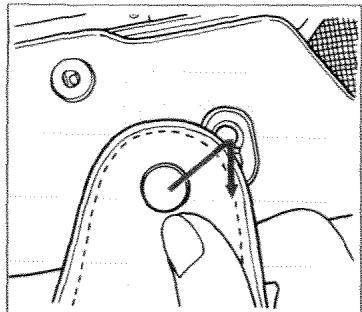
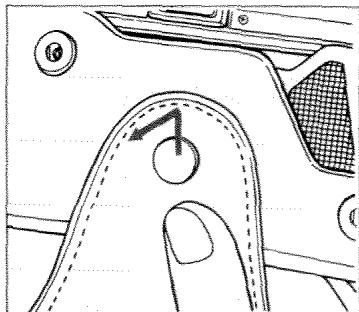
Strap and case
The strap (provided with camera) and case (sold separately) should be attached as shown to keep your camera handy for use and to protect it from being dropped or bumped.
NOTE
- The protective plastic film on the camera's base can be removed if desired.
PREPARING TO TAKE PICTURES
The next four sections cover things you must do to prepare your camera for taking pictures:
- Attach lens (at right).
- Insert batteries and turn main switch on (pp. 12 and 13).
- Set film speed (p. 16).
- Load camera with film (pp. 17 to 20).
You must always install batteries properly and turn on the main switch before loading film; the order of other steps may vary.
Instructions for rewinding and unloading film are also given in this part. We recommend reading them before starting to use your camera, so that you will be sure what to do when you come to the end of the film.
MOUNTING AND CARE OF LENSES
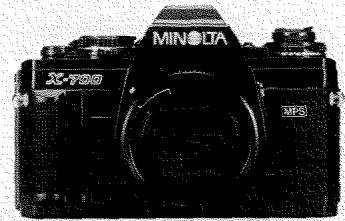
Body and lens caps
Remove body and lens caps as shown above.
CAUTIONS
- Always cap the rear end of the lens and the lens mount of the camera when the lens is not attached, and the front of the lens when the camera is not in use.
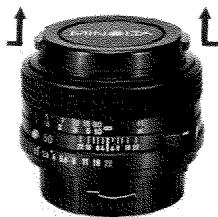
- To prevent damage to the control pins, never set a lens with its rear end down unless a rear lens cap is on.
- If it is necessary to set an uncapped lens with its front end down, do so on a smooth surface. Fisheye lenses should always be capped before being placed front end down.
- Keep lenses, properly capped front and rear, in their cases when not in use.
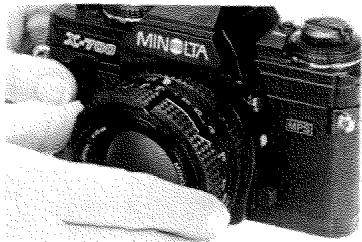
To attach lenses
After removing the body cap and rear lens cap, align the red mounting index on the lens barrel with the red index on the camera's lens mount, insert the lens bayonet into the socket, then turn the lens clockwise until it locks into place with a click.
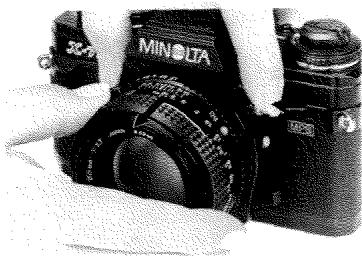
To remove lenses
While pushing the lens-release button, turn the lens counterclockwise as far as it will go, then lift it out of the mount.
CAUTION
- Be careful not to touch anything inside the camera when attaching or removing lenses.
Care of glass surfaces
-
Never touch lens or eyepiece surfaces with fingers or other objects. If necessary, remove loose matter with a blower brush. Use special photographic lens tissue or a soft, clean cloth to remove smudges or fingerprints with a gentle circular motion. Only if absolutely necessary, the tissue may be moistened very slightly with not more than one drop of a satisfactory quick-evaporating fluid cleaner specially compounded for photographic lenses. Such fluids must never be dropped directly on the glass surface.
-
Never lift the mirror or touch its surface, as doing so might damage the alignment. Small smudges or fingerprints on the mirror will not affect the meter reading or image quality; if they are very annoying, have the camera cleaned at an authorized Minolta service facility.
BATTERIES AND POWER
Batteries
For operation of the X-700's circuitry and shutter, use one of the following types of batteries:
- Two 1.55v silver-oxide (SR44: Eveready S-76, EPX-76, or equiv.)
- Two 1.5v alkaline-manganese (LR44: Eveready A-76 or equiv.)
One 3v lithium (CR-1/3N)-See note on p. 15.
CAUTIONS
- Never use 1.35v mercury batteries (MR44: Eveready EPX-675 or equiv.), which have a similar shape and size.
- To avoid battery leakage or bursting, do not mix batteries of different types, brands, or ages.
Used batteries should not be disposed of in fire.
WARNING: Keep batteries away from young children.
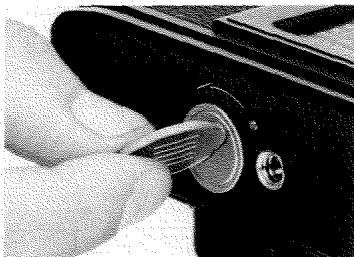
- Unscrew counterclockwise and remove the battery-chamber cover on the camera bottom.
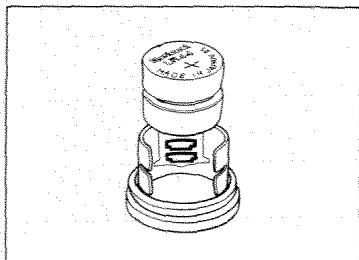
- After wiping the terminals with a clean, dry cloth, hold the batteries by their edges and insert them plus (+) side out into the sleeve on the inside of the cover.
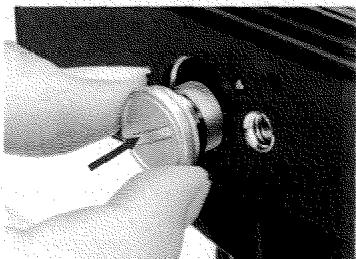
3. Replace the cover and screw it in clockwise as far as it will go.
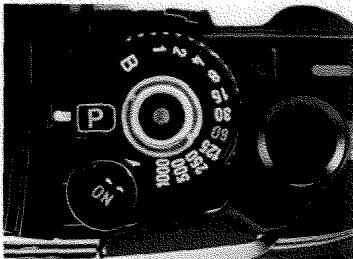
Main switch
For the camera's circuitry and shutter to operate, the main switch must be set at either "ON" or "ON". The latter position should be used when you want audible beeps during self-timer operation or an audible warning whenever the shutter speed set or recommended by the camera is 1/30 sec. or slower. (For the slow-shutter-speed warning to function, the operating button must be touched or slightly pressed.)
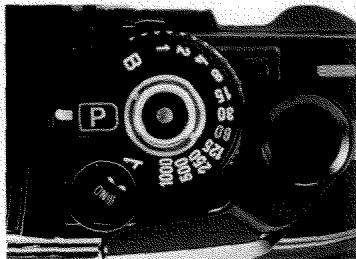
To prevent accidental exposures and battery drain, move the main switch to "OFF" when you are done taking pictures. (When the switch is left on, however, battery drain occurs only if the operating button is touched, so you may want to leave it on to avoid missing unexpected shots.)
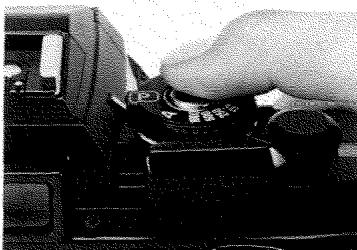
Operating button
Touching the operating button in the center of the mode/shutterspeed selector activates the camera's meter, viewfinder LED display, and exposure-control system. If proper contact is not possible (e.g., in cold weather, when fingers are excessively dry, or when wearing gloves), press the button slightly. The shutter is released when the operating button is pressed all the way down.
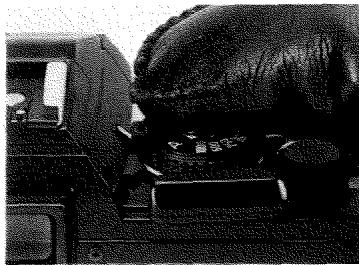
For easier operation of other controls while viewing through the finder, the circuits will remain on for 15 sec. after you first touch the button.
NOTE
- If the operating button becomes dirty or greasy, turn off the main switch and wipe the button with a clean, dry cloth.
Automatic battery check and shutter lock
If any LED in the viewfinder lights up when the main switch is on and the operating button is touched or slightly pressed, the batteries are inserted correctly and have sufficient power for operation of the camera.
When battery power decreases to a point almost insufficient for camera operation, the LED display will no longer light up, serving as a warning to insert fresh batteries as soon as possible. When battery capacity is no longer sufficient, the shutter will not operate.
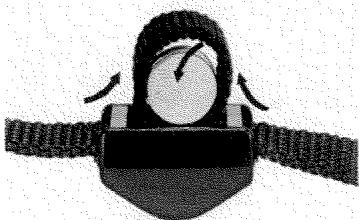
Battery holder
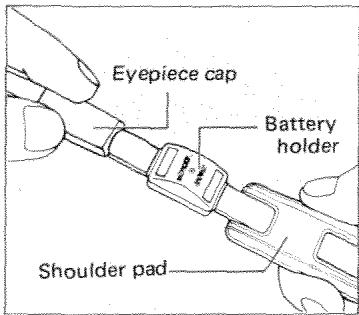
Fresh spare batteries can be stored in the battery holder threaded on the camera strap (p.9). To insert batteries, form a loop as shown above then drop them in. Slide the holder off the strap to remove batteries.
NOTE
If the camera is not to be used for more than two weeks, it is advisable to remove the batteries (especially old ones).
Cold-weather operation
Since batteries tend to lose power as they become colder, always use fresh batteries and keep a spare set with you when using your camera in cold weather. For prolonged cold-weather use (approx. 0^ or lower), silver-oxide batteries are recommended. Battery capacity will be restored as temperatures rise.
NOTE
- If a lithium battery is used below 0^ C , the camera may not operate.
- Never transfer the camera directly from low to high temperatures as condensation may form inside and prevent normal operation.
FILM AND FILM SPEED
The X-700 uses standard 35mm cartridge film. If you are not already familiar with the many types available, you may want to experiment to find one or more that give pleasing results for subjects you like to photograph or for special situations.
The ISO film speed (incorporating ASA and DIN numbers) indicates the film's sensitivity to light. The first part of the ISO number (equivalent to ASA number) is marked on the X-700's film-speed ring. Each time this number doubles (e.g., from 25 to 50, 50 to 100), the required exposure is halved. Such a change is called one "stop".
Though selecting a high-speed film will allow you to take pictures when there is less light, such films in general may produce a grainier image.
Setting film speed
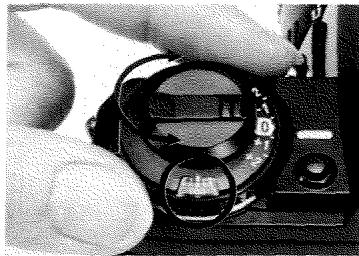
Lift up on the film-speed ring and turn it until the proper ASA number appears centered in the film-speed window and locks in that position when the ring is released. Marks between numbered graduations indicate speeds shown in the table at right.
| ASA | DIN | |
| 25 | ● | 15 |
| 32 | ● | 16 |
| 40 | ● | 17 |
| 50 | ● | 18 |
| 64 | ● | 19 |
| 80 | ● | 20 |
| 100 | ● | 21 |
| 125 | ● | 22 |
| 160 | ● | 23 |
| 200 | ● | 24 |
| ASA | DIN | |
| 250 | 25 | |
| 320 | 26 | |
| 400 | 27 | |
| 500 | 28 | |
| 640 | 29 | |
| 800 | 30 | |
| 1000 | 31 | |
| 1250 | 32 | |
| 1600 | 33 | |
CAUTION
- Film should be stored in a cool, dry, dark place before use and exposed before the expiration date printed on the box.
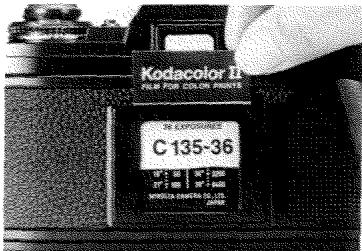
A handy ISO (DIN-ASA) table, with a surrounding memo holder for keeping the film-box end as a reminder of the film type and number of exposures, is located on the camera back.
LOADING AND ADVANCING
Loading film
Before opening the camera back, confirm that there is no film inside that could be damaged by light if the back is opened, by checking that:
- No red is visible in the Safe Load Signal (see p. 20).
- Rewind crank can be freely rotated clockwise many times without pushing rewind button. Since the frame counter advances each time the shutter is cocked even if no film is inside, the camera may be empty even when the index does not point to "S".
FILM
Prior to loading film, set the film speed (see previous page) and turn the main switch on (p. 13).
CAUTIONS
- Film should be handled and loaded in subdued light - at least shaded from direct sunlight by your body.
- Do not touch any parts or areas shown in blue below.
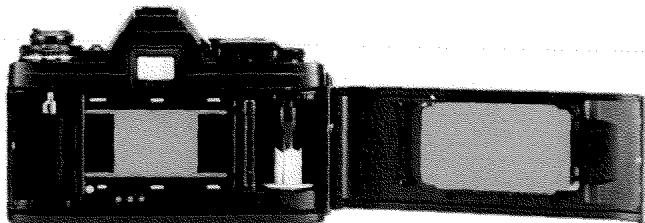
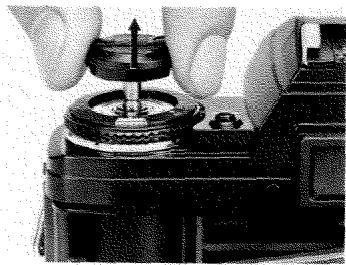
- With the case off, pull up on the back-cover release knob until the camera back springs open. Gently blow away any dust or other particles inside with a blower brush.
NOTE
- When loading film in a dark place or with the lens cap on, loading will be easier if the mode selector is not set at "P" or "A".
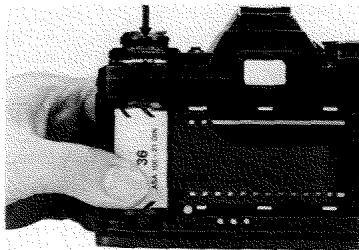
- Leaving the knob pulled out, position a 35mm film cartridge as shown with the projecting spool down. Then push the knob all the way in, rotating it slightly if necessary.
NOTE
- If the film-advance lever stops at the end of a full stroke during the following steps, release the shutter and continue (main switch must be on).
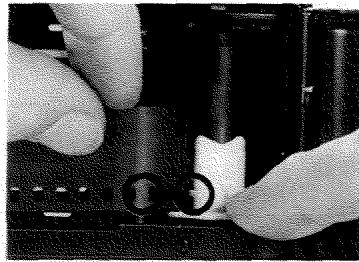
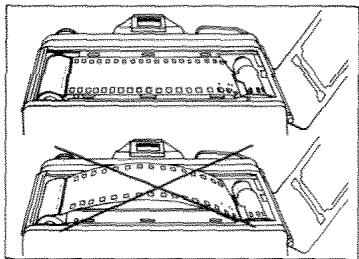
- Pull out enough film leader to just reach the take-up spool, then insert the end into a slot on the left (as shown above), making sure it does not protrude from another slot. A hole in the film should be lined up with the tooth on the take-up spool, and the sprocket teeth should be engaged with holes at the bottom of the film.
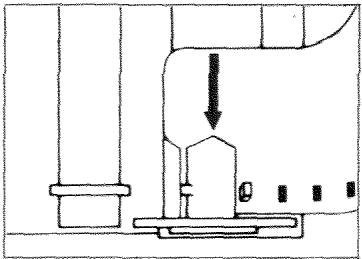
If you find it easier to hold the film leader in your right hand, insert the film as shown in the diagram above, making sure the take-up spool tooth is properly engaged with a hole.
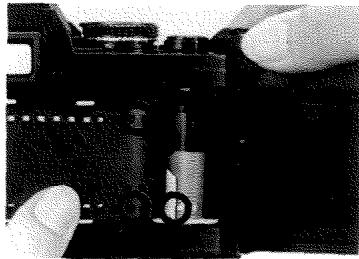
- With the film held against the sprocket by your left hand, slowly operate the film-advance lever until the film is wound firmly around the take-up spool, the sprocket teeth are engaged with holes on both edges of the film, and the slack in the film is taken up.
- After making sure the film is taut, close the camera back by pushing in on it until it clicks shut. A red "S" should now appear opposite the index in the frame counter.
CAUTION
- Slack should be taken up by advancing, not rewinding, the film. If you rewind the slack into the cartridge then later advance the film to "1", the first frame may have already been exposed to light.
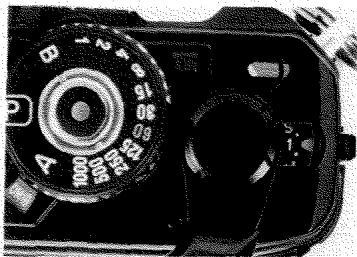
- Advance film, release shutter, and advance film - until the index points to "1". A red bar should now appear at far left in the Safe Load Signal, indicating film is loaded and advancing properly. (If it does not appear or swings far to the right, repeat steps 3 to 6.) The camera is now ready for taking the first picture, provided film speed is set.
Film-advance lever
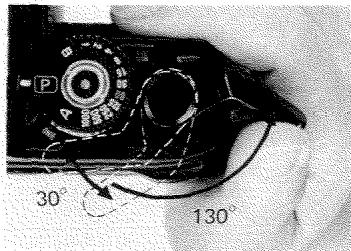
To allow swinging the film-advance lever out from the camera body so the right thumb will fit comfortably behind it, the lever has 30^ of unengaged movement. As the lever is moved an additional 130^ , the film and frame counter advance. When it stops at the end of the full 160^ stroke, the shutter is cocked for the next exposure.
Safe Load Signal/Frame counter
As you continue taking pictures and advancing film, the red bar in the Safe Load Signal gradually moves to the right and the rewind crank rotates counterclockwise, indicating proper film advance.
Never force the lever when it resists further movement at the end of the film, which may be somewhat before or after the common film lengths (12, 20, 24, 36 exposures) shown in red in the frame counter. The frame counter stops advancing after 36 exposures.
REWINDING AND UNLOADING FILM
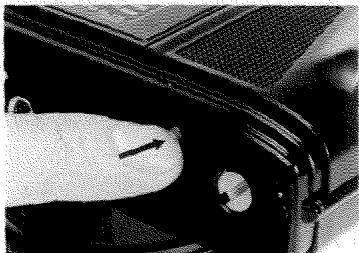
- To rewind the film, remove the camera's case if on, then press the rewind release on the camera bottom.
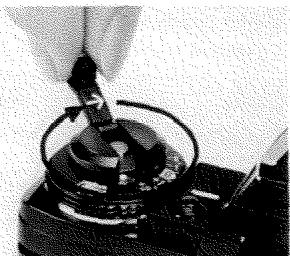
- Unfold the rewind crank and turn it in the direction of the arrow until the red bar in the Safe Load Signal moves out of the window to the left. Near the end you will feel tension on the film increase then completely disappear, and the crank will then turn freely.
CAUTION
- Never open the camera back when there is any red still visible in the Safe Load Signal.
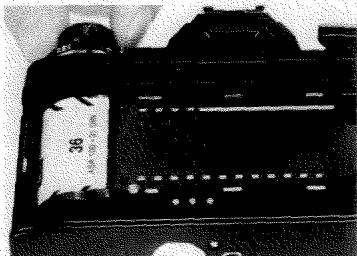
- When you are certain that the exposed film is completely re-wound into the cartridge, pull up on the back-cover release knob to open the back, then remove the cartridge.
CAUTION
- Exposed film should be kept in a cool, dry, dark place and developed as soon as possible.

TAKING PICTURES WITH YOUR X-700
Pages 23 to 51 explain how to use your camera to take pictures. The sections in boxes give additional information on some of the fundamentals of photography.
Pre-shooting check
To make sure your camera is ready for picture taking, it is a good habit to check the items shown here.
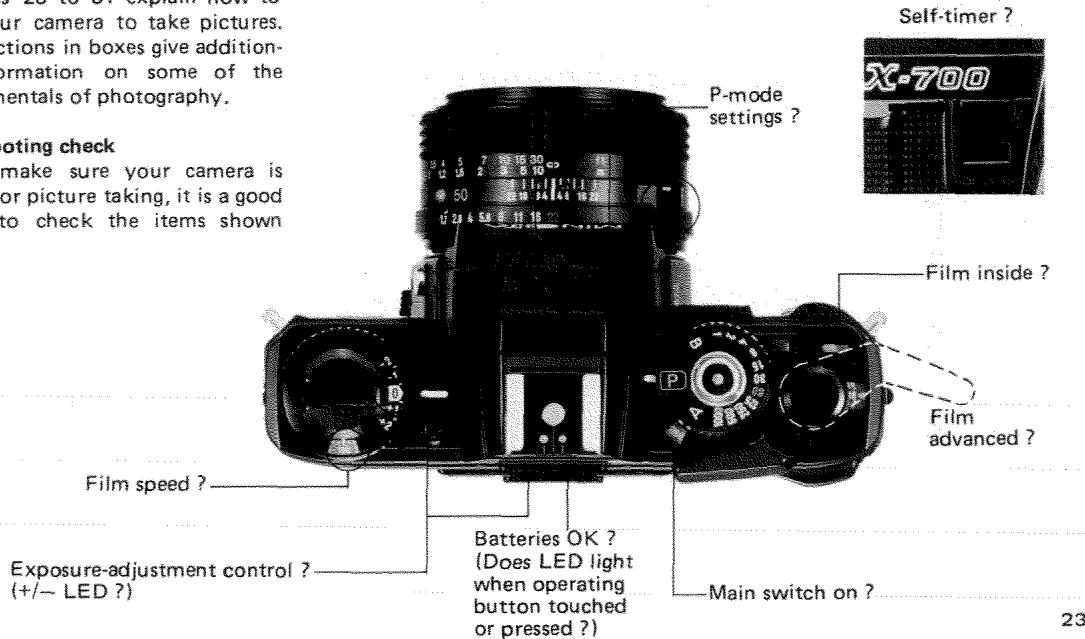
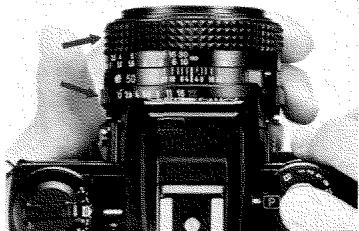
If you hold the camera as shown, you can easily operate most controls without removing it from your eye.
LEFTHAND
Thumb: focusing grip, aperture ring, or preview button
Index: focusing grip
Middle: aperture ring
RIGHTHAND
Thumb: film-advance lever
Index: main switch, mode/shutterspeed selector (and P/A-lock release), or operating button
24 Middle: AE lock or minimum-aper
EXPOSURE CONTROL WITH THE X-700
Your X-700 can be used in any of three exposure-control modes, as summarized below and explained in more detail in the following sections.
Programmed auto-exposure (AE) mode
The X-700's P mode is ideal for general picture taking when all you want to do is compose, focus, and shoot. With the camera set at "P" and an MD lens at its minimum aperture, the X-700's program selects the aperture and fastest practicable shutter speed as light dims, giving audible beeps (if desired) to guard against blur from subject/camera movement.
Aperture-priority AE mode
When you want to control the depth of field by setting a certain aperture, or for auto-exposure control with virtually any Minolta SLR lens or accessory, use the X-700 in A mode. The camera will automatically set the stepless shutter speed to yield proper exposure for the aperture you set.
Metered/full-manual mode
The X-700's M mode can be used when a special photographic effect requires a fixed speed, or in situations where the brightness difference between the subject area and the rest of the frame exceeds the available range of exposure adjustment in P or A mode or where the AE lock cannot be readily used.
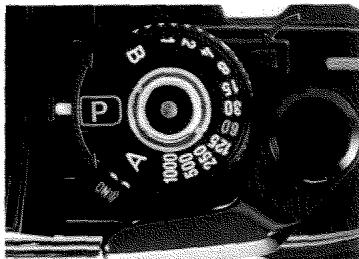
Mode/shutter-speed selector and P/A-lock release
The mode/shutter-speed selector can be rotated continuously in either direction but locks at "P" and "A" to prevent accidental movement. Release the selector by pressing the P/A-lock release, then turn it until it clicks or locks into place at the desired position.
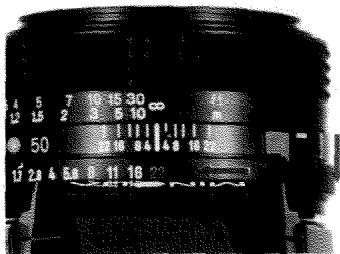
Minimum-aperture lock
In P mode, it is recommended to lock the lens at its minimum aperture to prevent accidental movement. To do so, line up the green f-number (f/16, f/22, or f/32, depending on lens) with the index, then pull the slider toward the camera. To release the lock for A mode or M mode, push the slider away from the camera body.
NOTE
- Only new-type MD lenses have the lock.

Eyepiece cap
If the shutter is released without the eyepiece being shielded by your head (such as in remote or self-timer operation, etc.) when the camera is used in P or A mode or at "B", slide the eyepiece cap onto the frame around the eyepiece to prevent unwanted light from affecting the meter reading and exposure.
The eyepiece cap can be threaded on the camera strap to keep it handy for use.
PROGRAMMED AUTO-EXPOSURE MODE (P mode)
Basic settings
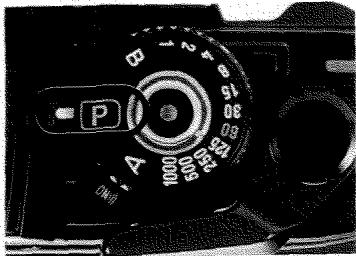
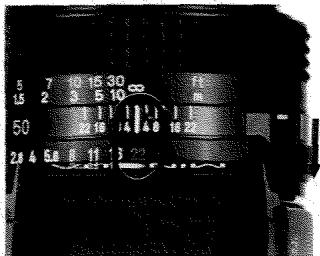
Set mode selector at "P".
Set and lock lens at minimum aperture (green figure).
Taking pictures in P mode
After you have set the camera as shown at left, it will automatically set the shutter speed and aperture for you (see program graph on p.30). All you need do before releasing the shutter is compose, focus, and check the viewfinder as follows:
Is the over-range LED blinking? If so, use a neutral-density (ND) filter or reduce the light level if possible.
Is an LED on in the danger zone for hand-holding (usually 1/30 sec. or slower - see p.44)? Or does the slow-shutter-speed warning beep when the main switch is at "ON" and you touch the operating button? If so, use a suitable camera-support method (p.46) or a flash (p.50).
- Is an LED on or blinking outside the applicable range in the table on page 31? If so, exposure may be incorrect.
NOTES
-
If the lens is not set at minimum aperture, the "P" will blink as a warning. Although exposure will still be correct unless an over- or under-range LED blinks, the program's range will be limited so that it cannot accommodate brighter subjects.
-
In some situations you may want to use the AE-lock or exposure-adjustment control (pp. 34 and 35).
- If your head is not shielding the eyepiece from light when the picture is taken, use the eyepiece cap (p.25).
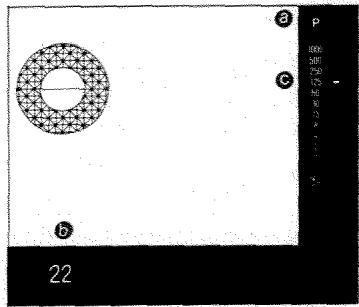
Viewfinder shows:
Green "P" = Programmed AE mode in use
(Blinks if lens is not set at minimum aperture)
Minimum aperture (green)
NOT THE TAKING APERTURE
Stepless shutter speed set by camera
(If two LEDs light, speed is in between.)
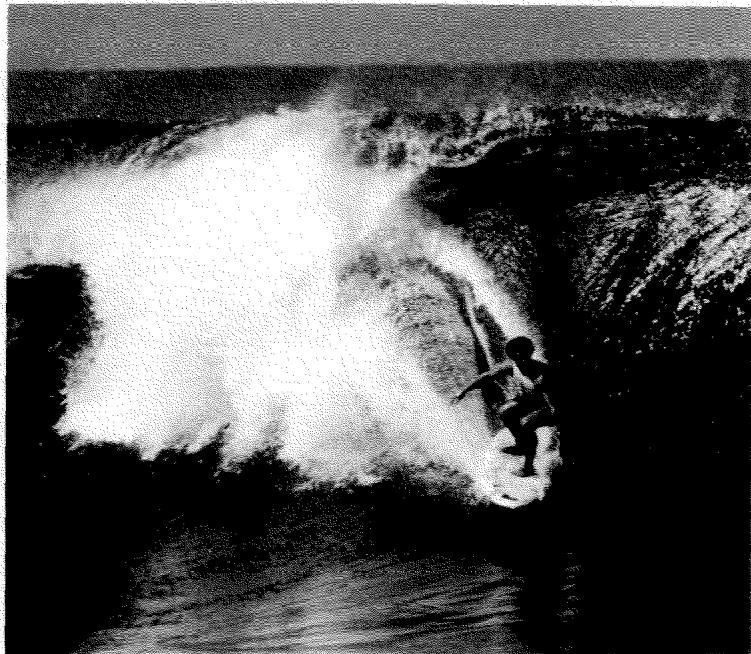
FUNDAMENTALS OF EXPOSURE
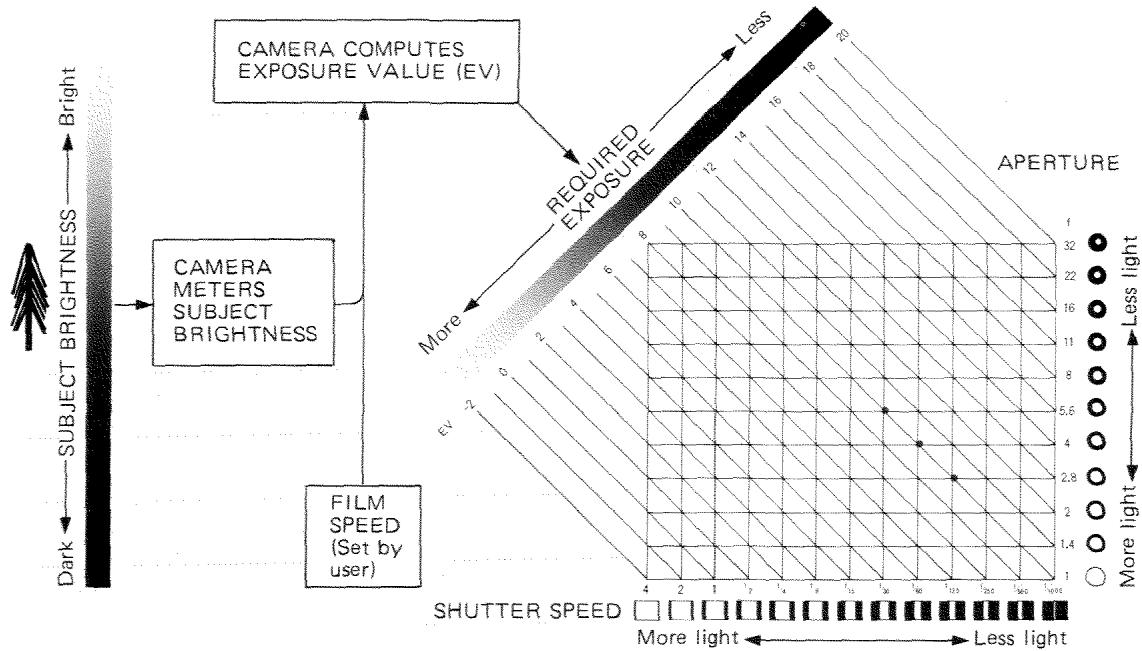
When you take a picture, light from the subject passes through the lens and open shutter, striking the film to form an image. To obtain correct exposure for the subject's brightness and film being used, the aperture (size of the diaphragm opening) and shutter speed (length of time the shutter curtain is kept open) must be controlled.
As indicated by the aperture diagram next to each f-number in the figure, large f-numbers (e.g., f/16 and f/8) represent small apertures, and small f-numbers (e.g., f/2 and f/1.4) represent large apertures. Each standard f-number setting (e.g., f/8) lets in twice as much light as the next numerically larger one (f/11) and half as much as the next smaller one (f/5.6). This difference in exposure between standard f-numbers is called one "stop".
Shutter speeds are expressed in fractions of a second (generally the reciprocals of numbers shown on shutter-speed scales) and in seconds. Each standard shutter speed (e.g., 1/60 sec.) allows light to strike the film twice as long as the next faster one (1/125) and half as long as the next slower one (1/30). This difference between standard shutter speeds is also called one "stop".
Total exposure on the film is determined by the combination of aperture and speed. Using the next smaller f-number (i.e., giving one stop more exposure) will balance using the next faster shutter speed (i.e., giving one stop less exposure), and so on. A great range of combinations (e.g., f/5.6 at 1/30, f/4 at 1/60, f/2.8 at 1/125, etc., all of which fall on the same diagonal line) will thus yield the same total exposure.
The diagonal lines correspond to exposure values (EV); all of the aperture/shutter-speed combinations indicated by a given line will produce the same exposure. At any specific film speed, the EV increases by one each time the subject brightness doubles, and thus the required exposure will decrease by one stop. On the other hand, when the EV is one unit lower (i.e., when the subject is only half as bright), the exposure must be increased one stop.
The film-speed-coupled metering system of the camera measures the brightness of the subject and computes the EV needed for proper exposure, which is then used for setting the combination of aperture and shutter speed.
COUPLED RANGES AND PROGRAM GRAPH
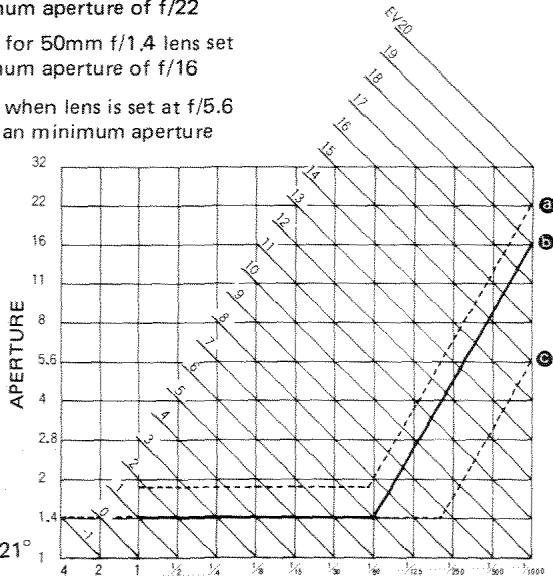
As shown in the graph at right, the X-700's program is designed to maintain the fastest practicable shutter speed as light dims. The graph gives you a general idea of which aperture is being set for a given LED-indicated shutter speed. For example, if the "125" LED lights, the aperture will be approximately f/2.8 (for a 50mm f/1.4 lens, at ISO 100 / 21^ ).
The accurate working range of shutter-speed and aperture combinations at ISO 100 / 21^ with an f/1.4 lens is EV 1 (f/1.4, 1 sec.) to EV 18 (f/16, 1/1000 sec.). At ISO 25 / 15^ , the range is EV -1 to 16; at ISO 400 / 27^ it is EV 3 to 18.
The maximum EV depends on the minimum aperture of the lens: for f/16 it is EV 18; for f/22, EV 19; for f/32, EV 20.
Program for 50mm f/1.7 lens set at minimum aperture of f/22
5 Program for 50mm f/1.4 lens set at minimum aperture of f/16
Program when lens is set at f/5.6 rather than minimum aperture
SHUTTER SPEED
LENS AND MODE COMBINATIONS
| ISO | Shutter speed |
| 25/15° | 4 to 1/1000 sec. |
| 50/18° | 2 to 1/1000 sec. |
| 100/21° | 1 to 1/1000 sec. |
| 200/24° | 1/2 to 1/1000 sec. |
| 400/27° | 1/4 to 1/1000 sec. |
The accurate working range of shutter speeds of the X-700 depends on the film speed, as shown in the table. If you release the shutter when the LEDs indicate a speed outside the applicable range, exposure may be incorrect.
The table at right shows the usable modes for various types of lenses and accessories. Because the X-700 meters while the diaphragm is closing to obtain correct exposure in auto modes, operation may be somewhat different than stated in the lens or accessory manual. Special instructions for specific lenses and accessories are as follows:
- Only MD lenses should be used in P mode. If a non-MD lens is used, the "P" will blink as a warning that exposure may be incorrect.
- When using an Auto Rokkor lens, Auto Bellows 1, or Auto Bellows III with the X-700, you need to press the preview button only when you want to check the shutter speed that will be used in A mode or the recommended shutter speed in M mode, not when you actually release the shutter. For Auto Bellows III, press the preview button on the bellows itself.
| Lens or accessory | Mode |
| MD | P A M |
| MD plus MD 2X Tele Converter | P A M |
| MC | - A M |
| Auto Rokkor | - A M |
| Manual preset | - A M |
| RF (mirror) | (P) A M |
| CA Shift | - - M |
| Varisoft | - A M |
| MD or MC plus: MC 2X Tele Converter Close-up accessories | - A M |
- Though RF lenses (which have a fixed aperture) can be used with the mode selector at "P", they will function in the same way as when it is at "A".
APERTURE-PRIORITY AUTO-EXPOSURE MODE (A mode)
Basic settings
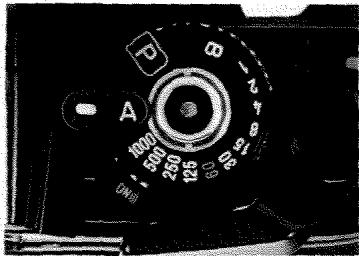
Set mode selector at "A".
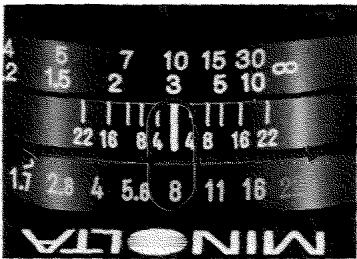
Set lens at desired aperture.
Taking pictures in A mode
After you have set the mode selector and desired aperture as shown at left, the camera will automatically select the stepless shutter speed needed for proper exposure. All you need do before releasing the shutter is compose, focus, and check the viewfinder as follows:
Is the over-range LED blinking? If so, turn the aperture ring towards f/22 until the LED stops blinking. If it does not stop, use a neutral-density (ND) filter or reduce the light level if possible.
Is an LED on in the danger zone for hand-holding (usually 1/30 sec. or slower - see p. 44)? Or does the slow-shutter-speed warning beep when the main switch is at "ON" and you touch the operating button? If so, turn the aperture ring towards f/1.7 until an LED outside the danger zone lights. If impossible, use a suitable
camera-support method (p. 46) or a flash (p. 50).
Is an LED on or blinking outside the applicable range from the table on page 31? If so, exposure may be incorrect.
NOTES
- In some situations you may want to use the AE lock or exposure-adjustment control (pp. 34 and 35).
- If your head is not shielding the eyepiece from light when the picture is taken, use the eyepiece cap (p. 25).
- Almost all Minolta lenses and close-up accessories can be used in aperture-priority AE mode. See page 31 for special instructions for some of them.
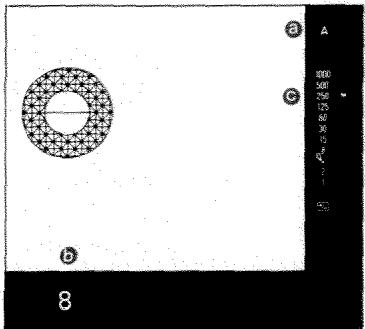
Viewfinder shows:
Red "A" = Aperture-priority AE mode in use
Aperture you selected (equalstaking aperture)
Stepless shutter speed set by camera for that aperture (If two LEDs light, speed is in between.)
Selecting an aperture
In aperture-priority AE mode, your X-700 will set the precise shutter speed for proper exposure automatically. Even so, you have considerable control over results and can adjust aperture and shutter speed over considerable ranges to suit the conditions and yourself.
For good pictures with a minimum of care where no particular effect is desired, simply set the aperture as indicated in the table. These guide settings will provide as much depth of field (see p. 42) as possible while producing a shutter speed fast enough to stop the motion of most subjects and guard against blur from camera movement (see p. 44).
| ISO | Sunny | Hazy Sun | Heavy Overcast | Indoors |
| 25/15° | f/8 | f/4 | f/2 | f/1.4 |
| 64/19° | f/8 | f/4 | f/2.8 | f/1.4 |
| 100/21° | f/11 | f/5.6 | f/4 | f/1.4 |
| 160/23° | f/11 | f/8 | f/5.6 | f/2 |
| 200/24° | f/11 | f/8 | f/5.6 | f/2 |
| 400/27° | f/16 | f/11 | f/8 | f/2.8 |
These are only guidelines for typical picture-taking situations. For additional information see p.48).
METERING WITH THE X-700
Your X-700's center-weighted averaging meter system is designed so that light from all parts of the viewfield (picture area) is measured by the silicon photocell but influence from a broad central area is greatest. Thus the reading should give satisfactory exposure without adjustment as long as the main subject area occupies a major part of the center of the frame. When it does not, you may want to use the AE lock to take a close-up reading or the exposure-adjustment control to increase or decrease exposure by up to two stops (see the two sections at right and box on pages 36 and 37).
As with most metering systems, strong sources of direct light or other very bright areas may adversely influence the reading if allowed to dominate the frame.
Though the X-700's viewfinder is designed to minimize the effect on the meter of light entering through the eyepiece under usual conditions, you should be careful to shield the eyepiece - especially if you wear glasses - in the following situations:
- When the subject is in shade and the camera is in sunlight
- When bright sidelight falls between eye and eyepiece
- When stop-down metering is used (p. 31)
To shield the eyepiece, use a rubber eyecup or place your thumb so that it blocks sidelight. When viewing is unnecessary, the eyepiece cap (p.25) can be used to completely eliminate the problem.
AE LOCK
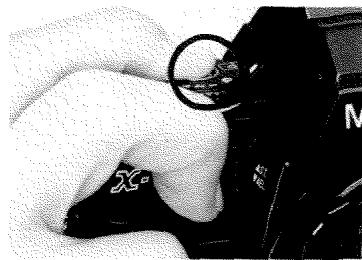
To obtain proper exposure in high-contrast lighting situations where your subject is on the edge of the frame or occupies only a small portion in the center, use the AE lock as follows:
- Shift the camera's position so the subject fills most of the frame. For small subjects, you may need to move closer.
- With the viewfinder LED display on, press the AE lock all the way down and hold it there; you may
then remove your finger from the operating button if desired.
- Recompose your picture as desired.
- Release the shutter while still holding the AE lock down.
NOTES
Suggestions on when to use the AE lock are given on pages 36 and 37.
The AE lock cannot be used in M mode or together with the self-timer.
- If you wish to change the settings of film speed, exposure adjustment, mode/shutter-speed, or aperture, do so before pressing the AE lock.
The AE lock does not operate if pressed while the motor drive is used at "Hi".
EXPOSURE-ADJUSTMENT CONTROL
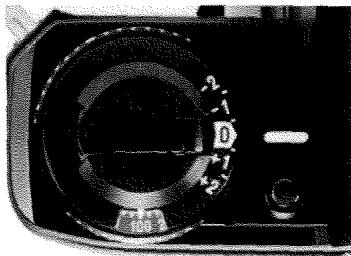
To deliberately increase or decrease exposure from the normal metered value, turn the exposure-adjustment control while pressing the lock release until the desired position is aligned with the index. Set minus (-) numbers to darken exposure and plus (+) numbers to lighten exposure, as indicated in the table.
NOTES
- The control will lock at "0" and each half-stop setting, though settings between half stops can also be used.
| -2 | two stops less = one-quarter normal exposure |
| -1 | one stop less = one-half normal exposure |
| 0 | normal exposure |
| +1 | one stop more = double normal exposure |
| +2 | two stops more = four times normal exposure |
- When the control is not at "0", the +/-- LED in the viewfinder will blink to let you know exposure is being adjusted.
- Be sure to return the control to "0" after using exposure-adjustment settings.
- Both aperture and shutter speed are changed by exposure adjustment in P mode; in A mode, only shutter speed is adjusted.
WHEN TO USE AE LOCK AND EXPOSURE-ADJUSTMENT CONTROL
The following suggestions on when to use the AE lock or exposure-adjustment control can serve as starting points for trial; individual conditions and taste will, of course, determine what exposure you choose.
-
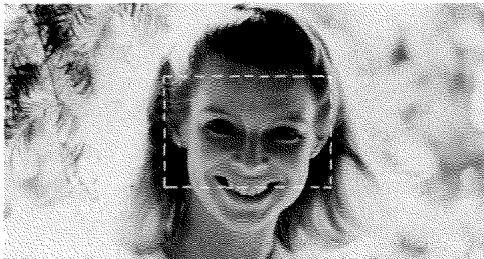
In situations where there is a great brightness difference between the subject and background and the most important area is considerably darker than the area surrounding it, use the AE lock to lock the meter reading with the camera positioned so the subject fills most of the finder, or set the exposure-adjustment control at +1/2 to +2 stops. Examples are pictures with strong backlighting and no fill-in illumination (such as photos A and B), or subjects against a background of snow or light-colored sand, unless the bright area occupies a very small part of the frame.
-
If the most important subject area is much brighter than the rest of the picture, use the AE lock as above or set the exposure-adjustment control at -1/2 to -2 stops. Examples are subjects in a spotlight or shaft of sunlight or against a very dark background (such as photos C and D), unless the background occupies only a small area in the frame.
-
When copying documents printed on white stock or on other predominantly light-colored materials, an adjustment of +1/2 to +2 stops may be necessary. Similarly, you will probably want to make an adjustment of -1/2 to -2 stops for predominantly dark copy material, or that on a dark background.
-
When using an R60 (red) filter, adjust exposure +1 stop.
A. Without AE lock or adjustment
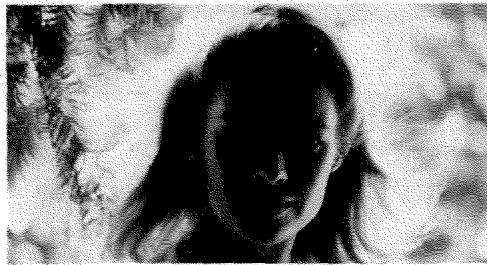
C. Without AE lock or adjustment
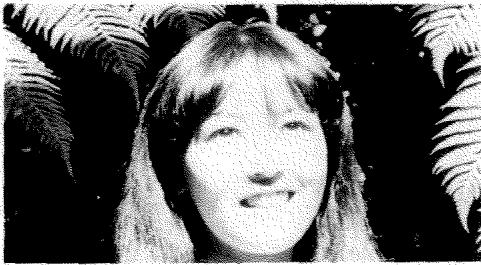
B. Exposure increased
D. Exposure decreased
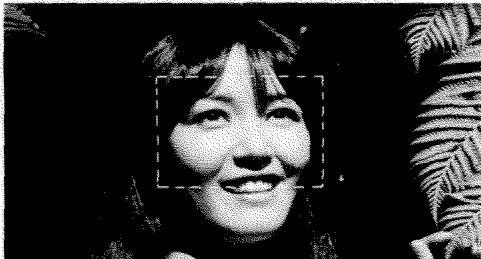
The same results can be obtained by using the AE lock while framing the face within the rectangle, then recomposing before releasing the shutter.
METERED/FULL-MANUAL EXPOSURE MODE (M mode)
Basic setting
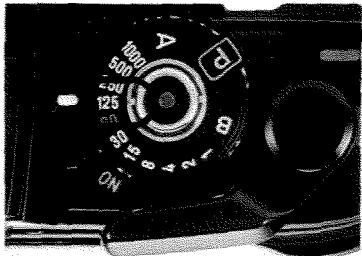
Set mode/shutter-speed selector at any position from "1" to "1000".
Taking a picture in M mode
To use the X-700 in metered- or full-manual mode, first release the mode/shutter-speed selector from "P" or "A" and check to see that the lens is not locked at minimum aperture.
There are two ways to use metered-manual mode:
-
When you wish to use a certain shutter speed, first set the selector at any click-stop setting from 1 sec. to 1/1000 sec., then turn the aperture ring until the LED next to that speed lights up.
-
When you wish to use a certain aperture, first set the aperture ring, then set the stepped shutter speed according to the value recommended by the LED. If two LEDs light up, adjust the aperture ring somewhat until only one lights. Do not set the shutter-speed selector between click stops.
Number agreement can, of course, be disregarded and any shutter-speed and lens-aperture combination set for full manual operation (see p. 29).
NOTE
- In M mode, the slow-shutterspeed warning indicates that the camera-recommended setting - NOT the actual setting - is 1/30 sec. or slower.
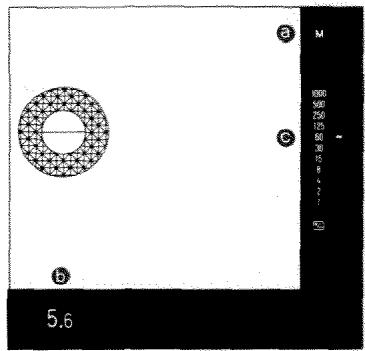
Viewfinder shows:
Red "M" = Manual mode in use
Aperture you selected (equalstaking aperture)
Shutter speed recommended by camera for that aperture NOT ACTUAL SPEED SET
Long exposures ("B' setting)
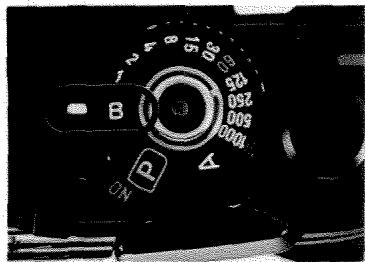
When the mode/shutter-speed selector is set at "B", the shutter will open when you press the operating button and remain open until you release it, making exposures longer than one second possible. A tripod (p.46) or other firm support should generally be used. To avoid jarring the camera when pressing or releasing the operating button, use a standard cable release (preferably a lockable type for longer expo
sures) or a Minolta electronic remote cord (p.47). The eyepiece cap (p.25) should be used to prevent stray light from affecting the exposure.
NOTES
- The self-timer does not operate at the "B" setting.
- With fresh batteries at moderate temperatures, the maximum long exposure is approx. 3 hours. At lower temperatures, exposure time may be shorter. Exposures up to 6 hours long are possible by using a fresh lithium battery.
For automatically timed long exposures, use the accessory Multi-Function Back (p.55).
FOCUSING
Focusing aid
The X-700's standard focusing screen has a split-image spot surrounded by a band of microprisms in the center of an Acute Matte field.
To focus the camera visually with usual lenses, look through the viewfinder and turn the focusing ring of the lens until:
- Upper and lower subject images in the spot are exactly aligned with no broken lines between them,
- Subject image in the band does not shimmer or appear broken up, and
- Subject image within the focusing aid appears clearest and seems to blend with that on the matte field surrounding it.
Though the most satisfactory focusing aid and method depend upon the conditions and your personal preference, the above method may provide the best results with medi
um wideangle to medium telephoto lenses.
Generally speaking, however, you will probably find that focusing is easiest if:
- Split-image spot is used for subjects having vertical lines.
- Microprism band is used for lenses from medium wide-angle through medium telephoto, especially with subjects not having vertical lines.
- Matte field is used for longer-focal-length lenses or for macro or other work involving considerable lens extension.
NOTE
- The X-700's standard focusing screen can be replaced at any authorized Minolta service facility by any of eight optional focusing screens (see p. 57).
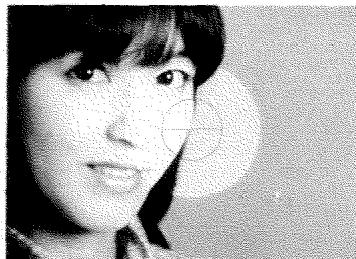
In focus
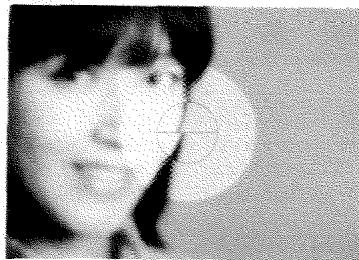
Out of focus
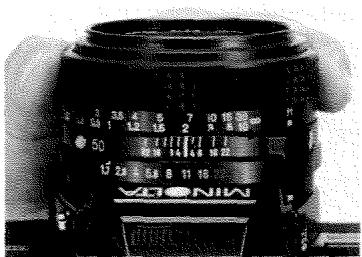
Distance scale
You may find that in the following situations it is easier to focus by estimating the distance to your subject, then aligning the corresponding figure on the distance scale with the index:
If you are taking long exposures or flash pictures when it is too dark to focus through the lens
- If you want to prefocus on your subject, such as in quickly shot candid photos
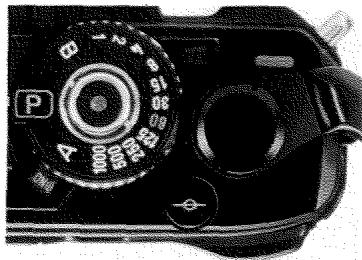
Film-plane index
The symbol beneath the film-advance lever indicates the position occupied by the film in the camera. It can be used for measuring the distance from subject to film when taking close-ups, photomacrographs, and photomicrographs, where the exact distance is sometimes important.
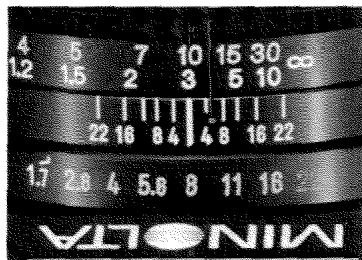
Infrared index
For proper focus when using infrared film, first focus your subject as usual with visible light, then attach a red filter and turn the focusing ring to the right to align the point of proper focus on the distance scale with the small red dot (or red "R" on MC and old-type MD lenses) on the depth-of-field scale. Set exposure according to the film manufacturer's recommendations.
DEPTH OF FIELD

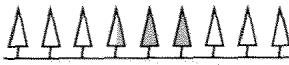
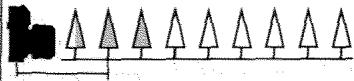

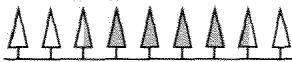
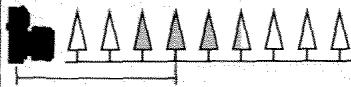

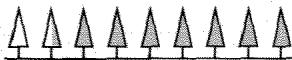
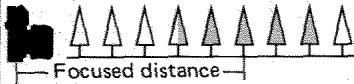
Focused distance
APERTURE
FOCUSED DISTANCE



FOCAL LENGTH
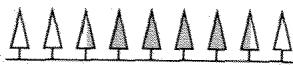
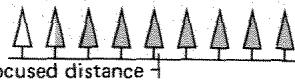
The range behind and in front of the focused distance within which the image appears acceptably sharp is called the depth of field.
It extends a greater distance behind the focused distance (usually about 1/3 in front, 2/3 behind) and is determined by three factors: the aperture, the distance at which the lens is focused, and the focal length of the lens. As illustrated by shaded trees above, depth of field increases as the lens is stopped down (e.g., f/1.7 to f/22) and becomes greater the farther from the camera the lens is
focused. It decreases as the lens is opened up (e.g., f/22 to f/1.7) and the closer the lens is focused. Depth of field is greater for short-focal-length lenses than for telephotos at the same focused distance and aperture. It is at its least for any given lens in normal mounting when the lens is at maximum aperture (as when metering and focusing normally with Minolta MD or MC lenses) and at minimum focusing distance.
Preview button
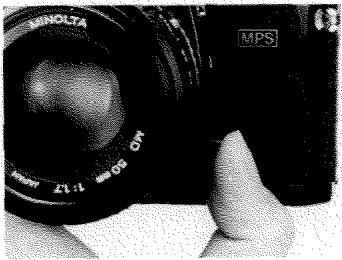
In A and M mode, depth of field at any focused distance and aperture can be checked visually by pushing the preview button all the way in. This will stop the diaphragm down to the aperture corresponding to the f-number set on the aperture ring, allowing you to see through the viewfinder how much of the subject is acceptably sharp.
NOTE
- The shutter speed indicated by LED while the preview button is pressed is NOT the actual shutter
Depth-of-field scale
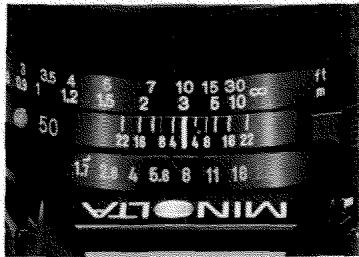
When the lens is focused at a given point, the image will be in satisfactory focus from the nearer value to the farther value on the distance scale indicated by the depth-of-field marks for the aperture in use. For example, if a 50mm f/1.7 lens is focused at 3m (about 10 ft.) and the aperture is f/8, the corresponding graduations to left and right of the index indicate acceptable sharpness from about 2.4 to 4.2m (approx. 8 to 14 ft.).
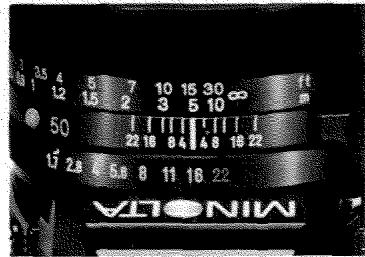
The depth-of-field scale can also be used to zone focus, i.e., set the focusing ring so that some anticipated action will take place within the limits of the depth of field. For example, if you want any subject within a range of 2.6m (approx. 8-1/2 ft.) to infinity to be reasonably sharp and the lighting conditions allow you to set an aperture of f/16 in A or M mode with a 50mm f/1.7 lens, set the lens so the infinity mark is opposite the "16" on the right end of the scale.
BLUR FROM CAMERA/SUBJECT MOVEMENT
A blurred photograph results when movement of the subject or camera during exposure causes a shift in the position of the image on film.
The shutter speed required to "freeze" an object's action normally increases as the object's speed increases; however, no matter what the speed, an object moving across the viewfinder field requires a faster shutter speed than one moving at the same speed directly toward or away from the camera. Similarly, a moving object near the camera (or one appearing nearer due to use of a longer-focal-length lens or a close-up accessory) requires a faster shutter speed than one farther away.
Blur from camera motion depends on such factors as the lens being used, the apparent closeness of the subject when viewed through the lens, the shutter speed, and the camera-support method. Since longer-focal-length lenses and close-up accessories increase the relative size of the subject, even a slight movement of the camera will be magnified on film; the greater weight and size of such lenses and accessories may also make it difficult to hold them steady. A good rule to
follow is that the slowest shutter speed that can be safely used by most people when hand-holding a lens is the reciprocal of the focal length. For example, for a 125mm lens, the speed would be 1/125 sec.; for a 300mm lens, it would be 1/500 (1/300 raised to the next faster speed to be on the safe side).
Use of a sufficiently fast shutter speed is also important when taking pictures from a moving, vibrating vehicle such as a boat, car, train, or plane (especially to prevent blurring the foreground, if any) or from a vibrating object such as a bridge. To reduce transmission of the vibrations through your body to the camera, relax your body and avoid direct contact with the object as far as possible.
SUPPORTING THE CAMERA AND RELEASING THE SHUTTER
In order to obtain sharp, blur-free photos, it is important to release the shutter gently while keeping the camera as still as possible. Always, regardless of shutter speed, release the shutter with a slow, steady squeeze - never a quick jab - preferably while holding your breath.
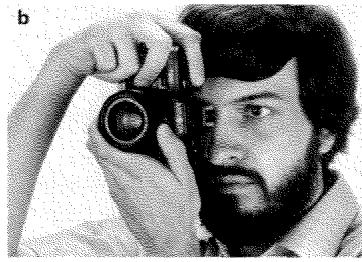
Shown at right are some ways of holding the camera to provide adequate support at normal and fast shutter speeds. If you grasp the camera firmly with your right hand on its front and back grips, you can easily shift it back and forth for horizontal (a) and vertical (b) pictures without removing your hand from its controls. Also, by cradling the camera in your left hand to support it, you can readily focus and set the aperture, if necessary, then shoot; another way is to use
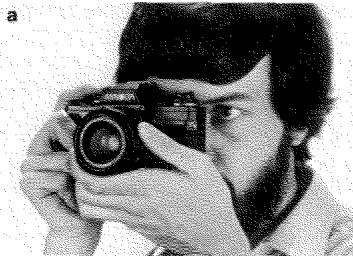
your left hand to focus, then grasp the left part of the body for support. Photo (c) shows an alternative for holding the camera vertically. You should, of course, experiment to find the way that suits you best.

Slow-shutter-speed warning
When the main switch is set at "ON" and the operating button is touched or slightly pressed, a slow-shutter-speed warning will beep if the camera sets (in P or A mode) or recommends (in M mode) a shutter speed of 1/30 second or slower. Though the actual danger of blur from camera or subject movement depends on many factors (p.44), including your own ability to hold the camera steady, you may wish to use the figure "30" as a reference point to gauge the chance of blur.
When a slow shutter speed is unavoidable, use one of the following methods (given in order of increasing steadiness) to prevent blur from camera movement:
- Hold the camera firmly against your face (in horizontal position, place your thumb between camera and face for support), brace your arm(s) against your body, and spread your feet slightly or lean against a tree, etc. Another way is to kneel on one knee and rest your elbow on the other.
- Steady the camera against a post or other firm, non-vibrating support.
- Use a minipod or similar device to prop the camera on a table, ledge, etc.
- Mount the camera on a sturdy tripod.
Mounting camera on tripod
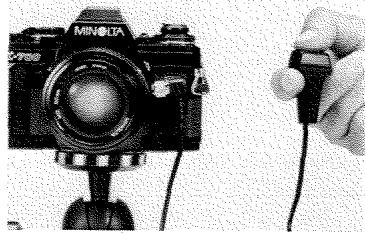
For maximum sharpness when making exposures too long to permit hand-holding the camera, as well as for self-timer pictures, mount it on a tripod using the socket on the camera bottom. Release the shutter in one of the ways explained on the next page.
CAUTION
- Do not use excessive force when attaching the camera to a tripod with a screw that extends more than 5.4mm (1/5 in.).
Self-timer
The X-700's electronic self-timer can be used to delay release of the shutter for 10 seconds. To operate it:
- Mount the camera on a sturdy support, compose your picture, and focus.
- Set the mode/shutter-speed selector at any setting other than "B", and make sure the film is advanced.
- Pull the self-timer switch up.
- To start the timer, press the operating button.
A visual signal and (if main switch is at "ON") audible beeps indicate how much time is left before the self-timer releases the shutter. The self-timer LED blinks and the camera beeps as follows:
NOTES
- If you wish to cancel the self-timer after it has been started, push the self-timer switch down or turn the main switch off.
- Be sure to turn the self-timer off after the picture has been taken. If you do not, the next picture will also be taken after a 10-sec. delay.
- When taking self-timer pictures in P or A mode, use the eyepiece cap (p. 25).
Other ways of releasing shutter
The shutter can also be released by using one of the following:
- Minolta Remote Cord S (50cm, 20 in.) or Remote Cord L (5m, 16-1/2 ft.)
·Minolta Wireless Controller IR-1 Set (p.56)
·Minolta Multi-Function Back (p. 55)
The remote cords and cable release should be screwed into the shutter-release socket on the side of the lens mount.
First 8 sec. twice per sec.
Next sec. eight times
Last sec. continuously
CREATIVE CONTROL OF APERTURE AND SHUTTER SPEED

A
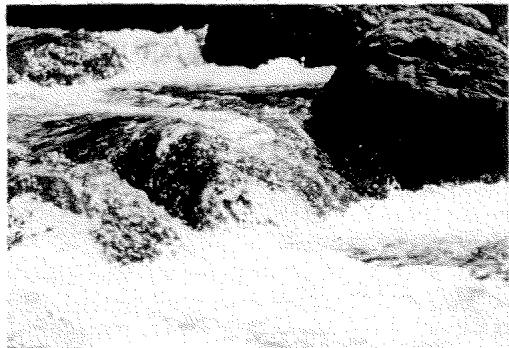
Sometimes you may want to select an aperture so as to obtain a particular effect, such as rendering a certain range in sharp focus or emphasizing a subject against an out-of-focus background. In either case, use the X-700 in A or M mode, setting

B
the lens at the desired aperture. Small f-numbers yield a shallow field of sharp focus, as in photo A above, while large f-numbers give greater depth of field, as in photo B.
C
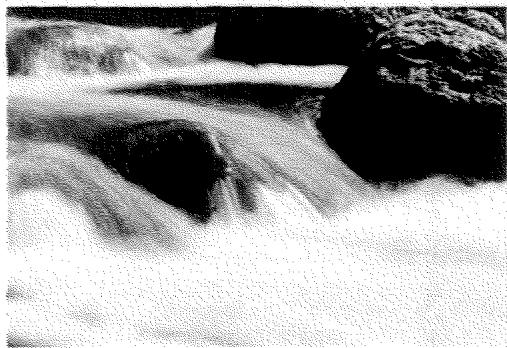
At other times, the subject or effect you want may make the shutter speed more important. In A mode turn the aperture ring until the LED next to the desired shutter speed lights, or use M mode to set the speed. Fast shutter speeds such as 1/500 to
D
1/1000 sec. can "freeze" action, as in photo C above. Slow shutter speeds such as 1/2 to 1 sec. can be used to emphasize subject flow or motion (photo D).
FLASH PHOTOGRAPHY
Besides its pentaprism-mounted silicon photocell for ambient light metering, the X-700 has a second cell located in its mirror compartment to measure through-the-lens (TTL) light reflected from the film during flash exposures with PX-series Auto Electroflashes. Used in program TTL autofocus mode with the X-700 and an MD lens set for P mode, this Minolta Direct Autoflash Metering system allows you to simply compose, focus on a subject in flash range, and shoot. The aperture will be automatically set for you by the camera's flash program.
In any-aperture TTL autofocus mode with the X-700 set at "A", you can open the aperture fully up to obtain maximum flash range, or close it down for greater depth of field. Since light is metered through the lens at the taking aperture during exposure, this mode is ideal for autofocus close-ups, bounce flash,
50 and other creative flash techniques.
In both modes, an LED will blink in the viewfinder to indicate if exposure was sufficient, and flash exposures can be lightened or darkened over a wide range by using the camera's exposure-adjustment control.
The table at right summarizes how to use PX and other flash units with the X-700. For specific instructions, see the applicable owner's manual.
Connecting flash units
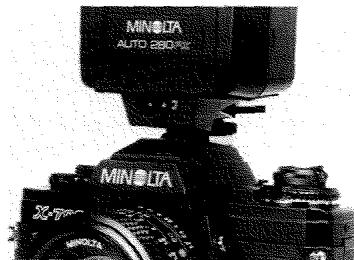
Cordless clip-on flash units are attached and electrically connected by simply sliding them into the camera's hot shoe. Sync cords of clip-on or bracket-type units must be plugged into the camera's sync terminal.
Bracket-type flash units attach to the camera's tripod socket.
| PX-series Auto Electroflash | X-series Auto Electroflash | Other | |
| Camera connection | Hot shoe (or off-camera cables) | Hot shoe | Hot shoe or sync cord |
| Flash mode and aperture setting | Controllable by camera's selector: P: program TTL (camera selects aperture by flash program) A: any-aperture TTL (user selects aperture to control flash range and depth of field) 1-1000, B: manual flash (aperture determined by distance) | Selected on flash: Auto: by on-flash sensor at designated aperture(s) Manual: aperture determined by distance | |
| X-sync shutter speed | Shutter automatically releases at 1/60 if flash charged (except when camera set at "B") | Electronic flash: 1 to 1/60, B M, MF, or FP bulb: 1 to 1/15, B | |
| Flash-ready signal | LED next to "60" blinks at 2Hz (and "A" or "M" LED goes out in A or M mode); monitor lamp on flash | Monitor lamp on flash | |
| If shutter released before flash charged: | Photo taken without flash at existing settings | Flash may or may not fire | |
| Flash-distance check (FDC) signaling | "60" LED blinks at 8Hz (in TTL); FDC lamp on flash | FDC lamp on models 320X, 132X only | FDC lamp on models 320, 128 only |
| Exposure-adjustment control | Usable in P and A modes (view-finder +/- LED goes out even when in use) | Not usable | Not usable |
Auto Electroflash 360PX also has on-flash sensor for auto control at any of 3 apertures depending on film speed.
Auto Electroflash CLE is usable for any-aperture TTL flash in A mode or for manual flash.
ACCESSORIES (Minolta Program System)

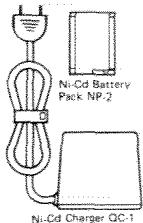
Battery Cartridge PG

Ni-Cd Charger NC-2
Triple Connector

WidangeAdapers

Multi-Function Back
Wireless Controller 1R-1 Set
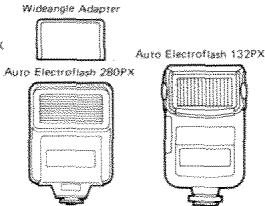
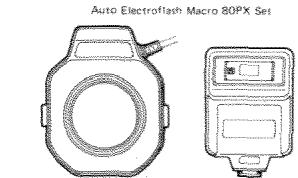
AUTO ELECTROFLASH 280PX, 132PX, 360PX, MACRO 80PX SET
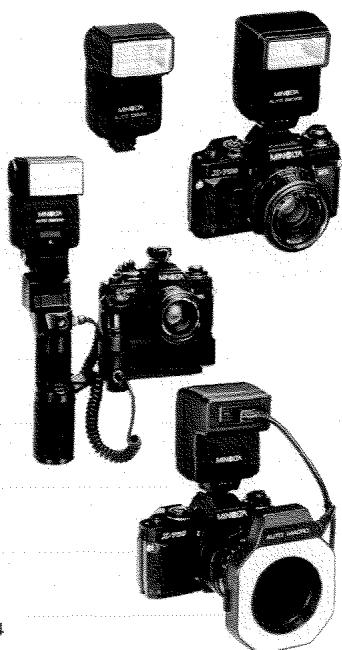
With one of these flash units attached, the X-700's Direct Autoflash Metering system provides through-the-lens (TTL) off-film flash control in program (P) mode or any-aperture (A) mode. Viewfinder flash-ready signaling, auto sync-speed setting, and sufficient-exposure confirmation are other features that make them extremely simple to use.
The compact, lightweight 280PX has energy-saving thyristor circuitry and a power-level selector enabling 2fps winder/motor-drive sync.
The inexpensive yet versatile 132PX gives you the option of vertical bounce and automatically turns itself off when disconnected.
Among the many handy features of the top-of-the-line 360PX are: horizontal/vertical bounce, variable GN/power control (enabling sync at up to 2fps), auto power switchoff, terminals for off-camera cables and direct auto charge control by the Multi-Function Back in time-lapse photography, and a built-in auto sensor for use with other cameras.
The lens-mounted Macro 80PX Set (used in A mode) has four flashtubes that can be independently switched on or off to control lighting of close-up and macro subjects.
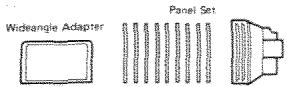
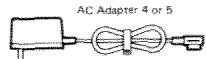
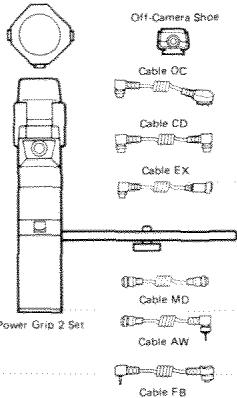
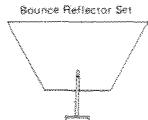
A wide range of accessories for PX flash units expands their usefulness for creative flash photography. Designed for the 280PX and 360PX, Power Grip 2 features well-balanced handling, sync at up to 3.5fps, auto power switchoff, auto charge control (with Multi-Function Back), and bounce flash at a great range of angles. Filter panel sets and a bounce reflector are available for the 360PX and 132PX, and an AC adapter for the 360PX and Macro 80PX Set. Cables and connectors enable simple, accurate TTL autofocus operation for close-up, directional, and multi-flash techniques.
MULTI-FUNCTION BACK
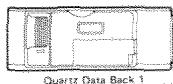
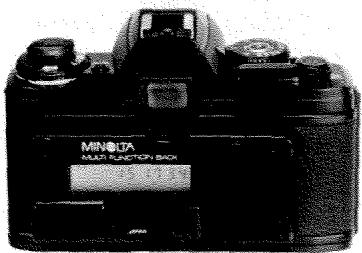
The quartz/microcomputer-controlled Multi-Function Back connects cordlessly to the X-700 in place of its regular back to perform a variety of camera-control and data-imprinting functions. By simply pressing keys while viewing its liquid-crystal display, you can set it for time-lapse photographs at a huge range of intervals, automatically timed long exposures, and/or multi-frame sequences. The quartz timer and auto calendar enable recording the time accurate to the second, or the year/month/day in any of three orders. Or you can set the imprimer to record any six-digit code number, to consecutively number each frame, or for no imprinting. Manually controlled imprinting before or after taking the picture is also possible, and data exposure can be selected at any of six levels to match the sensitivity of the film in use.
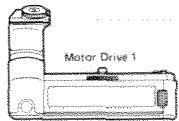
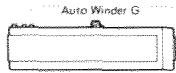
MOTOR DRIVE 1 and AUTO WINDER G
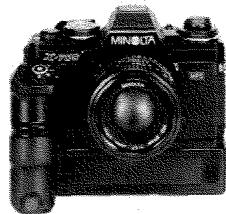
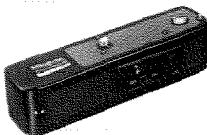
With Motor Drive 1 attached, you can capture the action with single-frame or continuous operation at either 2 or 3.5 frames per second. The comfortable handgrip has two operating buttons, each with a Minolta "touch switch", enabling full viewfinder readout for either horizontal or vertical framing.
Auto Winder G lets you focus full attention on the creative aspects of photography by freeing you from winding the film after each picture. Continuous sequences up to 2fps are also possible by holding the camera's operating button down.
Both units are designed to attach quickly and easily without access caps to remove or store. Their film-advance mechanisms stop automatically at the end of the roll, and film can be easily loaded and unloaded without removing the units.
WIRELESS CONTROLLER IR-1 SET
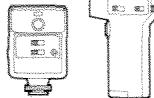
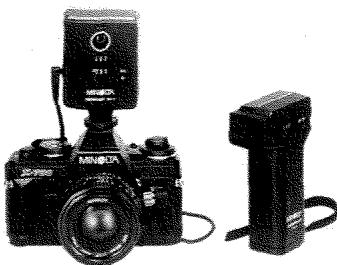
The IR-1 infrared transmitter/receiver set lets you trigger the X-700 from up to 60m (about 200 ft.) away for remote-controlled single-frame exposures, continuous sequences, or time exposures. When used with extra receivers, the three-channel transmitter enables independent operation of up to three cameras or groups of cameras, or simultaneous operation of an unlimited number of cameras.
P1
P2
Pd
M
G
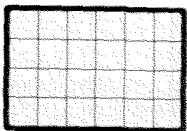
L
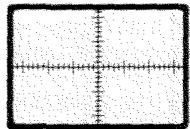
S
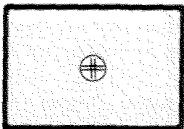
H
OPTIONAL FOCUSING SCREENS
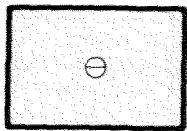
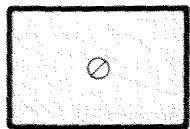
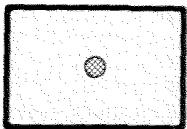
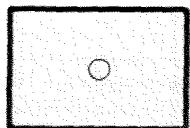
The X-700's standard focusing screen can be replaced by any of eight optional Acute Matte screens at authorized Minolta service facilities. Types and usages are as follows:
PM: horizontal split/microprism band; standard type (not shown); general photography
P_i : horizontal split; general photography
P_2 : horizontal split; general photography with f/2.8 or larger max. aperture lenses
Pd: diagonal split; general photography
M: microprism spot; general photography
G: matte field only; general, close-up, and telephoto photography
L: matte field with grid; general photography
S: horizontal and vertical measuring scales; general, macro-, micro-, and astrophotography
H: clear spot with engraved double cross; macro-, micro-, and astrophotography
Interchangeable lenses and other SLR system accessories are shown in the system guidebook included in the camera box.
TECHNICAL DETAILS
Type: Electronically governed 35mm single-lens reflex AE camera
Exposure-control modes: Fully programmed ("P"), aperture-priority automatic ("A"), and metered manual ("M")
Lens mount: Minolta SLR bayonet of integrally lubricated stainless steel (54° rotating angle); coupling for full-aperture metering, finder display input, and automatic diaphragm control, providing programmed or aperture-priority auto operation with Minolta MD lenses, aperture-priority auto operation with MC and other Minolta SLR interchangeable lenses/accessories; spring-return button for depth-of-field preview or stop-down meter readings with other than MD or MC lenses (standard lenses: MD 50mm f/1.2, f/1.4, f/1.7)
Exposure control and functions: Low-voltage, low-current computer circuit incorporating quartz crystal for sequential control to 1/30,000-sec. accuracy, large-scale ICs, samarium-cobalt impulse-release magnets, and linear-resistance inputs) varies both aperture and shutter speed stepplessly according to special "faster-speed" program (see p. 30) in P mode, or varies shutter speed stepplessly according to aperture set in A mode, to yield proper exposure for the film
speed and exposure adjustment set; auto-exposure range: EV 1 to EV 18 (e.g., 1 sec. at f/1.4 to 1/1000 at f/16) at ISO 100 / 21^ with f/1.4 lens; AE-lock device holds meter reading for exposure at that value regardless of subject-brightness changes
Shutter: Horizontal-traverse focal-plane type; electronically controlled stepless speeds 1/1000 to 4 sec. set automatically with endlessly rotatable selector dial locked at "P" or "A" setting or fixed speeds 1 to 1/1000 sec. or "B" (bulb) set manually at detented dial indications; electromagnetic shutter release locks when voltage too low for proper operation
Metering: TTL center-weighted averaging type, by silicon photocell mounted at rear of pentaprism for available light, measured full aperture for normal finder display, then at taking aperture for programmed/automatic-exposure setting/determination or stop-down display; by another SPC mounted with optic in side of mirror compartment for TTL off-film Direct Autoflash Metering at taking aperture during exposure to control burst duration of PX-series flash units
Film-speed range: ISO 25 / 15^ to 1600 / 33^ set by ASA dial that locks at 1/3-EV increments
Exposure-adjustment control: Up to ± 2 EV continuous adjustment of P, A, or M exposure by dial that locks at zero position and each 1/2-EV setting
Mirror: Triple-coated oversize instant-return slide-up type
Viewfinder: Eye-level fixed pentaprism type showing 95% of 24× 36mm film-frame area; magnification: 0.9X with 50mm standard lens focused at infinity; power: -1D , adjustable with accessory snap-on eyepiece lenses; Fresnel-field focusing screen having artificially regular-patterned matte field plus central split-image horizontally oriented focusing aid surrounded by microprism band, interchangeable with Type P1, P2, Pd, M, G, L, S, or H screens at authorized Minolta service stations; visible around frame: mode indication (P, A, or M), shutter-speed scale (1, 2, 4, 8, 15, 30, 60, 125, 250, 500, and 1000) with LED setting indication, triangular over-/under-range LED indicators blinking at 4Hz , flash-ready signal (LED next to "60" blinking at 2Hz ), FDC signal ("60" LED blinking at 8Hz for 1 sec. after correct flash exposure), mis-set lens warning (mode indication blinking at 4Hz ) in P mode, battery check (by glowing of any LED when operating button touched or pressed slightly), f-number set with MD or MC lenses, and exposure-adjustment engaged indic
tion (LED blinking at 4Hz); display and metering activated by normal finger contact or slight pressing of operating button and continue for 15 sec., except go out after shutter release
Flash sync and control: Hot shoe and PC terminal for X sync; camera-control contact on hot shoe for flash-ready signaling and automatic setting of shutter at 1/60 sec. (except when mode/shutter-speed selector set for sync at "B") with PX and X flash units; other electronic units synchronize at 1/60 sec. and slower manual speeds or "B" setting; Class MF, M, and FP flashbulbs, at 1/15 sec. or slower settings; second contact on hot shoe for burst control by Direct Autoflash Metering with PX units
Film advance: Manual: by lever with single 130^ stroke after 30^ unengaged movement; motorized through built-in coupler key with accessory Motor Drive 1 or Auto Winder G; release button for rewind on camera bottom; advancing-type frame counter; Safe Load Signal indicates film loading and advancing condition
Power: Two 1.5v alkaline-manganese (LR44: Eveready A-76 or equiv.), two 1.55v silver-oxide (SR44: Eveready S-76, EPX-76, or equiv.), or one 3v lithium (CR-1/3N) cell(s) contained in camera base power both programmed/auto exposure control and manual operation; three-position main switch with indication for off, on, or on with audible piezoelectric slow-speed warning and self-timer operating indication; battery check by touching or slightly pressing operating button (LEDs do not light when cells approach exhaustion); shutter will not release when voltage too low for proper operation
Self-timer: Electronic for 10-sec. delay, with operation indicated by camera-front LED that blinks at 2Hz for 8 sec., then 8Hz for 1 sec., then remains on until shutter releases, plus simultaneous audible indication when main switch in appropriate position; engaged by switch on body, cycle started by pushing operating button, cancelable anytime before release
Other: Audible 4Hz piezoelectric warning when finder speed indication is 1/30 sec. or slower whenever finger contacts "touch switch" normally or presses operating button slightly with main switch appropriately set; integral front handgrip; detachable back with integral handgrip, memo holder, and ISO (DIN-ASA) table; positive 4-slot take-up spool; remote shutter-release socket
Size and weight: 51.5 × 89 × 137mm ( 2 × 3 - 1 / 2 × 5 - 3 / 8 in.), 505g (17-13/16 oz.) without lens and/or power cells
Standard accessories: Carrying strap with slide-on spare battery holder and eyepiece cap
Optional accessories: Auto Electroflash 360PX, 280PX, 132PX, Macro 80PX Set, off-camera cables and connectors, Power Grip 2, sec.; Multi-Function Back; Motor Drive 1, Auto Winder G; Wireless Controller IR-1 Set; MD, MC, and other Minolta interchangeable lenses and applicable Minolta SLR system accessories
Specifications subject to change without notice
STORAGE
-
If the camera is not to be used for more than two weeks, the batteries should be removed.
It is advisable to operate the film-advance lever and release the shutter once or twice from time to time during extended storage. -
If the camera is to be stored for a long period of time, the body and lens should be returned to their original packing and kept in a cool, dry place away from dust or chemicals, preferably in an airtight container with a drying agent such as silica gel.
Minolta Co., Ltd.
Minolta GmbH
Minolta France S.A.
Minolta (UK) Limited
MinoitAustria Ges.m.b.H.
Minolta Camera Benelux B.V.
Belgium Branch
Minolta (Schweiz) AG
Minolta Svenska AB
Finland Branch
Minolta Portugal Limitada
Minolta Corporation
Head Office
Los Angeles Branch
Minolta Canada Inc.
Head Office
Vancouver Branch
Minolta Hong Kong Limited
Minolta Singapore (Pte) Ltd.
Shanghai Minolta Optical
Products Co., Ltd.
3-13, 2-Chome, Azuchi-Machi, Chuo-Ku, Osaka 541-8556, Japan
Kurt-Fischer-Strasse 50, D-22923 Ahrensburg, Germany
365 Route de Saint-Germain, F-78420 Carrierses-Sur-Seine, France
7 Tanners Drive, Blakelands, Milton Keynes, MK14 5BU, England
Amalienstrasse 59-61, A-1131 Wien, Austria
Zonnebaan 39, P.O. Box 6000, NL-3600 HA Maarssen, The Netherlands
Kontichsesteenweg 38, B-2630 Aartselaar, Belgium
Riedstrasse 6, CH-8953 Dietikon, Switzerland
Albygatan 114, S-171 54 Solna, Sweden
Nittykatu 6 PL 37, SF-02201 Espoo, Finland
Av. do Brasil 33-A, P-1700 Lisboa, Portugal
101 Williams Drive, Ramsey, New Jersey 07446, U.S.A.
11150 Hope Street Cypress, CA 90630, U.S.A.
369 Britannia Road East, Mississauga, Ontario L4Z 2H5, Canada
230-3771 Jacombs Road, Richmond, B.C. V6V 2L9, Canada
Room 208, 2/F, Eastern Center, 1065 King's Road, Quarry Bay, Hong Kong
10, Teban Gardens Crescent, Singapore 608923
368 Minolta Road, Songjiang, Shanghai, China

MINOLTA
- X-700
- CONTENTS
- NAMES OF PARTS/MAIN FEATURES .4
- TAKING CARE OF YOUR X-700 .8
- PREPARING TO TAKE PICTURES 10
- MOUNTING AND CARE OF LENSES 10
- BATTERIES AND POWER. 12
- FILM AND FILM SPEED 16
- LOADING AND ADVANCING FILM 17
- REWINDING AND UNLOADING FILM 21
- TAKING PICTURES WITH YOUR
- EXPOSURE CONTROL WITH THE X-700 24
- METERED/FULL-MANUAL EXPOSURE
- FOCUSing. 40
- BLUR FROM CAMERA/SUBJECT
- SUPPORTING THE CAMERA AND
- □CREATIVE CONTROL OF APERTURE
- ACCESSORIES (Minolta Program
- NAMES OF PARTS/MAIN FEATURES
- AE lock/self-timer switch
- Front grip
- Bayonet lens mount
- Mirror
- Preview button
- Not visible:
- Mode indicators
- Over-range LED
- Shutter-speed scale/LEDs
- TAKING CARE OF YOUR X-700
- CAUTION
- Strap and case
- NOTE
- PREPARING TO TAKE PICTURES
- MOUNTING AND CARE OF LENSES
- Body and lens caps
- CAUTIONS
- To attach lenses
- To remove lenses
- Care of glass surfaces
- BATTERIES AND POWER
- Batteries
- Main switch
- Operating button
- Automatic battery check and shutter lock
- Battery holder
- Cold-weather operation
- FILM AND FILM SPEED
- Setting film speed
- LOADING AND ADVANCING
- Loading film
- FILM
- Film-advance lever
- Safe Load Signal/Frame counter
- REWINDING AND UNLOADING FILM
- TAKING PICTURES WITH YOUR X-700
- Pre-shooting check
- LEFTHAND
- RIGHTHAND
- EXPOSURE CONTROL WITH THE X-700
- Programmed auto-exposure (AE) mode
- Aperture-priority AE mode
- Metered/full-manual mode
- Eyepiece cap
- PROGRAMMED AUTO-EXPOSURE MODE (P mode)
- Basic settings
- Taking pictures in P mode
- NOTES
- Viewfinder shows:
- COUPLED RANGES AND PROGRAM GRAPH
- LENS AND MODE COMBINATIONS
- APERTURE-PRIORITY AUTO-EXPOSURE MODE (A mode)
- Taking pictures in A mode
- Selecting an aperture
- METERING WITH THE X-700
- AE LOCK
- EXPOSURE-ADJUSTMENT CONTROL
- WHEN TO USE AE LOCK AND EXPOSURE-ADJUSTMENT CONTROL
- METERED/FULL-MANUAL EXPOSURE MODE (M mode)
- Basic setting
- Taking a picture in M mode
- Long exposures ("B' setting)
- FOCUSING
- Focusing aid
- Distance scale
- Film-plane index
- Infrared index
- DEPTH OF FIELD
- Depth-of-field scale
- BLUR FROM CAMERA/SUBJECT MOVEMENT
- SUPPORTING THE CAMERA AND RELEASING THE SHUTTER
- Slow-shutter-speed warning
- Mounting camera on tripod
- Self-timer
- Other ways of releasing shutter
- CREATIVE CONTROL OF APERTURE AND SHUTTER SPEED
- FLASH PHOTOGRAPHY
- Connecting flash units
- ACCESSORIES (Minolta Program System)
- AUTO ELECTROFLASH 280PX, 132PX, 360PX, MACRO 80PX SET
- MULTI-FUNCTION BACK
- MOTOR DRIVE 1 and AUTO WINDER G
- WIRELESS CONTROLLER IR-1 SET
- OPTIONAL FOCUSING SCREENS
- TECHNICAL DETAILS
- STORAGE
Marque : MINOLTA
Modèle : X-700
Catégorie : Appareil photo reflex 35 mm