
VIDEO CAPTURE - Matériel de capture vidéo PINNACLE - Notice d'utilisation et mode d'emploi gratuit
Retrouvez gratuitement la notice de l'appareil VIDEO CAPTURE PINNACLE au format PDF.


| Type de produit | Matériel de capture vidéo analogique vers numérique |
| Marque | PINNACLE |
| Modèle | VIDEO CAPTURE (pour Mac) |
| Système d'exploitation requis | Mac OS X version 10.4 ou ultérieure |
| Connectivité | USB (alimentation et transfert de données) |
| Entrées vidéo | Analogique (via câble S-Video non inclus) |
| Format de sortie | MPEG-4 optimisé pour iPod Video |
| Fonctions principales | Capturer, convertir et importer des vidéos analogiques dans iTunes |
| Dimensions approximatives | 8 x 2 x 1 cm |
| Poids approximatif | 50 g |
| Alimentation | Par port USB (5V, 500 mA) |
| Contenu de l'emballage | Matériel de capture, guide de démarrage rapide, CD-ROM (logiciel et documentation) |
| Entretien et nettoyage | Nettoyer avec un chiffon sec et doux ; éviter l'humidité et les températures extrêmes |
| Sécurité | Utiliser uniquement avec des ordinateurs aux normes électriques en vigueur ; ne pas exposer à l'eau |
| Pièces détachées et réparabilité | Aucune pièce réparable par l'utilisateur ; contacter le support technique en cas de problème |
| Informations générales | Permet de numériser des sources analogiques (caméscope, magnétoscope) pour les lire sur iPod et Mac |
FOIRE AUX QUESTIONS - VIDEO CAPTURE PINNACLE
Questions des utilisateurs sur VIDEO CAPTURE PINNACLE
0 question sur cet appareil. Repondez a celles que vous connaissez ou posez la votre.
Poser une nouvelle question sur cet appareil
Téléchargez la notice de votre Matériel de capture vidéo au format PDF gratuitement ! Retrouvez votre notice VIDEO CAPTURE - PINNACLE et reprennez votre appareil électronique en main. Sur cette page sont publiés tous les documents nécessaires à l'utilisation de votre appareil VIDEO CAPTURE de la marque PINNACLE.
MODE D'EMPLOI VIDEO CAPTURE PINNACLE
With Pinnacle Video Capture for Mac you can capture from any analog video source to your Mac computer in MPEG-4 format. The captured videos will be entered into your iTunes® Library without any need of transcoding when moving them to your iPod® Video, since our MPEG-4 settings exactly match the iPod® needs.
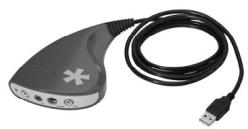
Here's what you should have
Hardware
Quick Start Guide
CD-ROM with all necessary Software and documentation

You will also need...
S-Video Cable
Not included!
Pinnacle Systems reserves the right to change the package contents at any time, therefore the actual package contents may be different from the package contents listed herein. Specifications are subject to change without notice or obligation. If any parts are missing, please contact your retailer.
The Pinnacle Video Capture for Mac System is compatible with the operation system Mac OS X (version 10.4 or higher).
To access technical support, go to: http://www.pinnaclesys.com/support/

1 - Installing your software
- Please insert the installation CD-ROM into the appropriate drive.
- Drag the Pinnacle Video Capture application manually to the Applications folder on your hard disk.
If you want to uninstall the Pinnacle Video Capture application, just delete it from the hard disk.
2 - Installing your hardware
Connect the hardware to the Mac computer's USB port.
3 - Connecting analog video devices
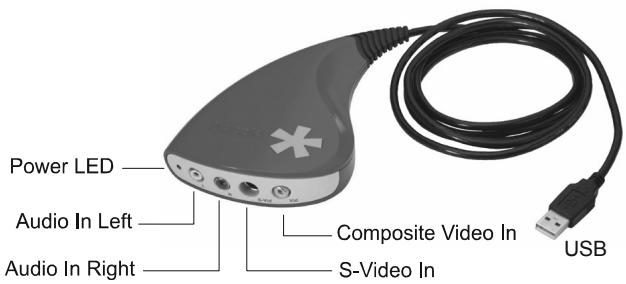
Connect the outputs of your analog video device to the inputs of the hardware.
4 - Now, you are ready to...
- record analog audio and video onto the hard disc of your computer,
- playback the recorded videos via your player,
- import your recorded videos into your iTunes® Library.

Marque : PINNACLE
Modèle : VIDEO CAPTURE
Catégorie : Matériel de capture vidéo