
DB-30 - Pédale d'effet BOSS - Notice d'utilisation et mode d'emploi gratuit
Retrouvez gratuitement la notice de l'appareil DB-30 BOSS au format PDF.


| Type de produit | Métronome électronique |
| Marque | BOSS |
| Modèle | DB-30 |
| Dimensions | 61 x 90 x 20 mm |
| Poids | 70 g (avec piles) |
| Alimentation | 1 pile lithium CR2032 |
| Autonomie des piles | Environ 20 heures en utilisation continue |
| Plage de tempo | ♩ = 30 à 250 (précision ±0,1 %) |
| Types de battements | 24 (0-9, combinaisons comme 2+3, 3+4, etc.) |
| Types de rythmes | 9 (noire, croche, triolet, etc.) |
| Fonction de tonalité de référence | Gamme C4-B4, pas de 1 Hz |
| Fréquence de référence | A4 = 438 à 445 Hz (par pas de 1 Hz) |
| Arrêt automatique | Après 60 minutes d'inactivité |
| Mémoire des réglages | Oui (sauf statut Mute) |
| Connectique | Prise casque stéréo mini-jack |
| Indicateurs | Écran LCD, 2 LED de tempo |
| Accessoires inclus | Pile CR2032, manuel d'utilisation |
| Entretien et nettoyage | Nettoyer avec un chiffon sec et doux |
| Sécurité | Utiliser uniquement la pile spécifiée, éviter l'humidité |
| Réparabilité | Aucune pièce réparable par l'utilisateur (sauf pile) |
FOIRE AUX QUESTIONS - DB-30 BOSS
Questions des utilisateurs sur DB-30 BOSS
0 question sur cet appareil. Repondez a celles que vous connaissez ou posez la votre.
Poser une nouvelle question sur cet appareil
Téléchargez la notice de votre Pédale d'effet au format PDF gratuitement ! Retrouvez votre notice DB-30 - BOSS et reprennez votre appareil électronique en main. Sur cette page sont publiés tous les documents nécessaires à l'utilisation de votre appareil DB-30 de la marque BOSS.
MODE D'EMPLOI DB-30 BOSS
Thank you, and congratulations on your choice of the BOSS DB-30 Dr. Beat METRONOME.
Before using this unit, carefully read the sections entitled: "USING THE UNIT SAFELY" and "IMPORTANT NOTES." These sections provide important information concerning
the proper operation of the unit. Additionally, in order to feel assured that you have gained a good grasp of every feature provided by your new unit, this manual should be read
in its entirety. The manual should be saved and kept on hand as a convenient reference.
Main Features
Comes not only with basic Styles (the way the metronome sound is played) pre-programmed, but also Styles with compound beats.
O You can set the tempo by pressing the TAP button in time with the song tempo (tap input of the tempo).
- You can specify the reference tone in semitone increments over a range of one octave. This is convenient for use in practicing with wind instruments and for tuning (Reference Tone function).
Features an Auto Power Off function, which automatically turns off the power when the DB-30 is not used for approximately 60 minutes.
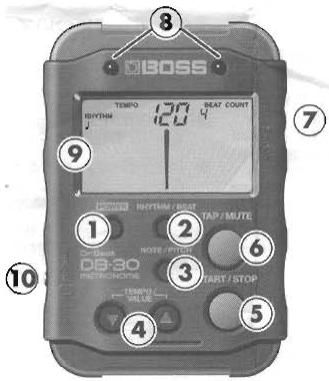
Panel Descriptions
- POWER button
Turns the power on and off.
-
Always make sure to have the volume level turned down before switching on power. Even with the volume all the way down, you may still hear some sound when the power is switched on, but this is normal, and does not indicate a malfunction.
-
RHYTHM/BEAT button
Switches the unit to Metronome mode. Switches the TEMPO/RHYTHM/BEAT display.
- NOTE/PITCH button
Switches the unit to Reference Tone mode.
- TEMPO/VALUE button
Changes the metronome tempo and the values indicated in the display.
- START/STOP button
Starts and stops the metronome and reference tone.
- TAP/MUTE button
Sets the metronome tempo (Tap function, when the metronome is stopped), and temporarily mutes the sound (Mute function, when the metronome is playing).
- VOLUME dial
Adjusts the overall volume.
- Tempo indicators
Lights in time with the tempo.
- Display
Information in the display is changed depending on the modes.
- Never strike or apply strong pressure to the display.
10.PONES jack
Connect headphones here.
To avoid disturbing your neighbors, try to keep the unit's volume at reasonable levels. You may prefer to use headphones, so you do not need to be concerned about those around you (especially when it is late at night).
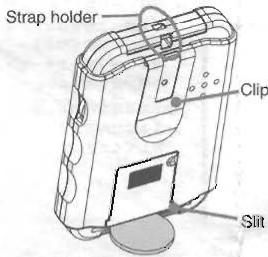
- You can insert a coin in the slit on the bottom of the unit and use the coin as a stand.
The strap can be passed through the hole shown in the figure.
- You can use the clip on the back to set the unit on a music stand.
Operation
Using the DB-30 as a Metronome
- With the power turned on, press the RHYTHM/BEAT button to switch the DB-30 to Metronome mode. When the DB-30 is in Metronome mode, "RHYTHM," "TEMPO," and "BEAT" appear in the display.
- If "RHYTHM," "TEMPO," and "BEAT" are displayed, press the TEMPO/VALUE / buttons to set the tempo.
Holding down the TEMPO/VALUE or button when setting the metronome tempo causes the values to change more rapidly.
You can set the tempo within the range of = 30 - 250 .
- Press the START/STOP button to start the metronome. To stop the metronome, press the START/ STOP button once more.
- You cannot change the tempo with the TEMPO/VALUE or buttons while "RHYTHM" or "BEAT" is flashing in the display. If you want to change the tempo, press the RHYTHM/BEAT button so "RHYTHM" and "BEAT" stop flashing and remain lit in the display.
Setting the Tempo with Tap Input
While in Metronome mode, with the metronome stopped, you can tap the TAP/MUTE button two or more times to set the tempo so it matches the timing you've used in tapping the button.
* You cannot change the tempo with the TAP/MUTE button while the metronome is playing.
Setting the Way the Metronome Plays
- Press the RHYTHM/BEAT button in Metronome mode so that "RHYTHM" or "BEAT" flashes in the display.
- Select a Rhythm or a Beat with the TEMPO/VALUE
or buttons.
If "RHYTHM" is flashing in the display, you can select from 9 different Rhythms. If "BEAT" is flashing in the display, you can select from 24 different Beats. Holding down the TEMPO/VALUE or button when setting the beat causes the values to change continuously.
Playing the Reference Tone
- With the power turned on, press the NOTE/PITCH button to switch to Reference Tone mode. When the DB-30 is in Reference Tone mode, "PITCH" or "NOTE" appears in the display.
-
While "NOTE" is lit in the display, set the note name with the TEMPO/VALUE or buttons. You can set the note name in semitone increments over an octave range from C to B.
-
You cannot change the note name with the TEMPO/ VALUE▼ or ▲ buttons while "PITCH" is lit in the display. If you want to change the note name, press the NOTE/PITCH button so "NOTE" is lit in the display.
- Press the START/STOP button to play the reference tone. Press the START/STOP button again to stop the sound.
Setting the Reference Pitch
- Press the NOTE/PITCH button in Reference Tone mode so that "PITCH" is lit in the display.
- Set the reference pitch with the TEMPO/VALUE or buttons.
The reference pitch is set in terms of the value of A4, which can be any frequency from 438 to 445Hz
* If you want to change the note name, press the NOTE/ PITCH button so "NOTE" is lit in the display.
What is the reference pitch?
The frequency for A4 (the middle A on a piano) of a note played by an instrument (a piano, for example) as the pitch to which all other performers tune their instruments for performances is called the "reference pitch."
Other Functions
Auto Power Off
The Auto Power Off function works to help prevent unnecessary battery drainage by automatically turning off the DB-30's power if no operation or adjustment is made within 60 minutes after any button is pressed.
- Disabling the Auto Power Off Function
To disable the Auto Power Off function, first turn off the DB30's power, then hold down the TAP/MUTE button as you press the POWER button to turn the power back on again.
The Auto Power Off function is disabled. "BF" is indicated in the display while the TAP/MUTE button is held down. The Auto Power Off function is enabled again the next time the DB-30 is turned on again.
Changing the Battery
The display and indicators get dimmer and the volume starts to drop when the battery starts running down. Replace the battery as soon as possible.
-
The settings stored in the memory are reset to the default factory settings if the battery is removed from the DB-30, or if the battery get completely depleted.
-
When turning the unit upside-down, handle with care to avoid dropping it, or damaging the buttons and controls.
-
Removed the screw from the battery cover.
- Slide off the cover.
- Remove the old batteries from the compartment.
- Insert the same type of fresh lithium battery.
Make sure the "+" and "-" ends of the battery are oriented correctly. - Securely close the battery cover, and fasten the screw
Restoring the Factory Settings
This returns all settings on the DB-30 to the values they had when the unit shipped from the factory.
1. Hold down the START/STOP button as you press the POWER button to turn the power on.
"EF" is indicated in the display while the START/ STOP button is held down.
All of the settings are restored to their original factory status.
Factory Settings
Tempo: 120 Beat: 4
Rhythm: Reference Tone: A
Reference Pitch: 440Hz Mute: Off
Troubleshooting
The power doesn't come on, the power shuts off right after the unit is turned on, or the power shuts off or operation becomes unstable during use.
Is the battery low or dead?
When the battery run down, the unit may fail to run normally. Replace with a new battery.
- The battery included with the unit are intended to be used only for verifying operation.
- Using headphones when the battery is low may cause the unit to fail to run normally.
Main Specifications
-
Metronome
-
Tempo: J = 30 - 250 (Accuracy: ± 0.1%
- BEAT: 0 - 9,2 + 3,3 + 2,3 + 4,4 + 3,4 + 5,5 + 4,5 + 6,6 + 5,6 + 7, 7 + 6,7 + 8,8 + 7,8 + 9,9 + 8 (24 kinds)
- RHYTHM: Quarter note (J), Eighth note (J), Eighth rest and eighth note (_h) , Triple (32) , Triple with center rest (32) , Sixteenth note () , Sixteenth note with sixteenth rest () , CLAVE 1 () , CLAVE 2 () (9 kinds)
Reference Tone
- Reference Pitch: A4 = 438Hz - 445Hz (1 Hz steps)
-
Reference Tone Range: C4-B4 (Accuracy: ± 1 cent)
-
Auto Power Off function: Turns unit off after 60 min.
-
Memory function: Stores the settings when the power
is turned off. (The Mute status is not stored in memory.)
-
Indicators: LCD Display, Tempo Indicator LED x 2
-
Connector: PHONES Jack (Stereo miniature phone type)
Power Supply: CR2032 lithium battery x 1
Power Consumption: 10mA or less (with reference tone sounding)
- Expected battery life under continuous use:
Approximately 20 hours
- These figures will vary depending on the actual conditions of use.
Dimensions: 61 (W) x 90 (D) x 20 (H) mm /
2-7/16 (W) x 3-9/16 (D) x 13/16 (H) inches
Weight: 70g / 3 oz (including batteries)
- Accessories: CR2032 lithium battery, Owner's Manual
- In the interest of product improvement, the specifications and/or appearance of this unit are subject to change without prior notice.
Copyright © 2004 BOSS CORPORATION
All rights reserved. No part of this publication may be reproduced in any form without the written permission of BOSS CORPORATION.
3SX
- Main Features
- Operation
- Using the DB-30 as a Metronome
- Setting the Tempo with Tap Input
- Setting the Way the Metronome Plays
- Playing the Reference Tone
- Setting the Reference Pitch
- What is the reference pitch?
- Other Functions
- Auto Power Off
- - Disabling the Auto Power Off Function
- Changing the Battery
- Restoring the Factory Settings
- Troubleshooting
- Main Specifications
- Copyright © 2004 BOSS CORPORATION
Marque : BOSS
Modèle : DB-30
Catégorie : Pédale d'effet