
K7600 - Caméra KODAK - Notice d'utilisation et mode d'emploi gratuit
Retrouvez gratuitement la notice de l'appareil K7600 KODAK au format PDF.


| Type de produit | Chargeur de batterie Li-Ion universel |
| Marque | KODAK |
| Modèle | K7600 |
| Tension d'entrée | 100-240 V ~ 50/60 Hz, 280 mA |
| Tension de sortie | 12 V DC, 700 mA, 8,4 VA |
| Types de batteries compatibles | Batteries Li-Ion rechargeables KODAK |
| Détection de polarité | Automatique |
| Indicateurs LED | Témoin de charge, témoin de défaut |
| Protection contre les surcharges | Oui |
| Protection par temporisateur | Oui |
| Détection de batterie défectueuse | Oui, arrêt de la charge |
| Entretien et nettoyage | Débrancher avant nettoyage ; nettoyer les contacts avec un chiffon sec |
| Sécurité | Utiliser uniquement en intérieur sec ; ne pas insérer d'objets métalliques |
| Accessoires inclus | Adaptateur secteur, plaque de charge, adaptateur pour voiture |
| Température de charge recommandée | 0°C à 35°C |
| Température de décharge recommandée | 0°C à 50°C |
| Température de stockage | -20°C à 30°C |
| Conformité réglementaire | FCC Partie 15, classe B |
FOIRE AUX QUESTIONS - K7600 KODAK
Questions des utilisateurs sur K7600 KODAK
0 question sur cet appareil. Repondez a celles que vous connaissez ou posez la votre.
Poser une nouvelle question sur cet appareil
Téléchargez la notice de votre Caméra au format PDF gratuitement ! Retrouvez votre notice K7600 - KODAK et reprennez votre appareil électronique en main. Sur cette page sont publiés tous les documents nécessaires à l'utilisation de votre appareil K7600 de la marque KODAK.
MODE D'EMPLOI K7600 KODAK
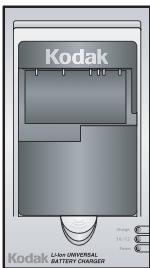
KODAK Li-Ion Universal Battery Charger
Operating Instructions
2F6782
Use the KODAK Universal Li-Ion Battery Charger to charge KODAK Li-Ion Rechargeable Digital Camera Batteries.
Features
Automatic polarity detection
- Top-off charging for a full charge
- LED indicator displays charging mode
- Timer protection
Overcharge protection
- Abnormal battery detection indicates faulty battery and halls charging
Operating Instructions
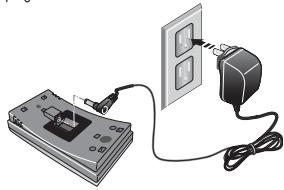
- Snap the charging plate into the charger base.
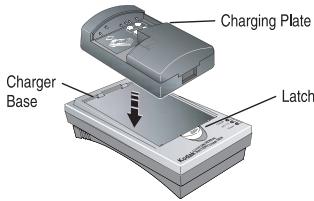
- Insert a plug appropriate for your region.
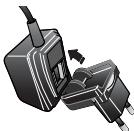
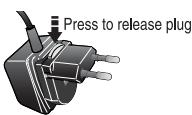
- Connect the AC adapter to the bottom of the charger base, then plug into a wall outlet.
- Pull down and hold the battery support, then insert the battery so it rests against the stop at the right side of the charging plate. The 2 pins on the charging plate must touch the 2 outer contacts on the battery.
NOTE: The charger automatically determines the correct polarity (+/-).
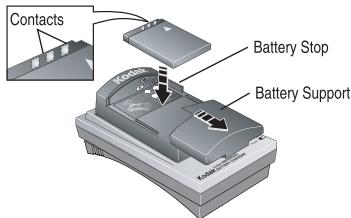
- Gently release the battery support to hold the battery securely in place during charging.
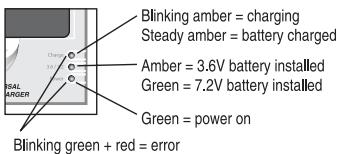
LED Indicators
Using the Car Adapter Plug
Connect the car adapter plug to the bottom of the charger base, then plug the other end into your car's 12V socket.
NOTE: Unplug the charger from the 12V socket when the car is not running, as the charger may draw current and drain the car battery.
Troubleshooting
- No indicator lights
Confirm that the AC adapter or car adapter plug is firmly connected to the charger and either the wall outlet or 12V socket.
If using the car adapter plug, confirm whether the ignition needs to be on.
- Power light only
Battery is already fully charged.
Battery is inserted incorrectly. Remove and insert battery correctly.
Dirt on contacts. Clean battery and charger contacts.
- Power and Charge Status indicators both blink
Battery is defective. Replace battery.
- Hissing noise in charge mode
Normal operation due to advanced switching circuitry.
Technical Specifications
Input voltage: 100-240V-50/60 Hz 280mA
Output voltage: DC 12V=700mA 8.4VA
IMPORTANT SAFETY INSTRUCTIONS—Save These Instructions
- DANGER—TO REDUCE THE RISK OF FIRE OR ELECTRIC SHOCK, CAREFULLY FOLLOW THESE INSTRUCTIONS.
- For connection to a supply not in the U.S.A., use an attachment plug adapter of the proper configuration for the power outlet. This battery charger is intended to be correctly oriented in a vertical or floor mount position.
CAUTION:
- Charge only compatible Li-Ion rechargeable batteries. Other types of batteries may burst causing personal injury and damage.
- Risk of electric shock. Use only in dry locations.
- Do not operate charger if it has been damaged.
- To reduce the risk of electric shock, unplug charger from outlet before attempting any maintenance or cleaning.
- Be sure to use charger with correct voltage: AC 100-240V.
- Do not insert any objects (such as a screwdriver or metal wires) into the charger.
- Do not modify or disassemble.
- If something appears wrong with the charger and/or batteries, disconnect from the electric outlet immediately.
- Keep out of reach of infants. Children may use only under strict parental supervision.
- Store in a dry, cool place.
Recommended temperature ranges for use:
| Li-Hon | |
| To use (discharge) the batteries | 32°-122° F (0°-50°C) |
| To charge the batteries | 32°-95° F (0°-35°C) |
| To store the batteries | -4°-86° F (-20°-30°C) |
Regulatory Information
FCC compliance and advisory
This equipment has been tested and found to comply with the limits for a Class B digital device, pursuant to Part 15 of the FCC Rules. These limits are designed to provide reasonable protection against harmful interference in a residential installation.
This equipment generates, uses, and can radiate radio frequency energy and, if not installed or used in accordance with the instructions, may cause harmful interference to radio communications. However, there is no guarantee that interference will not occur in a particular installation.
If this equipment does cause harmful interference to radio or television reception, which can be determined by turning the equipment off and on, the user is encouraged to try to correct the interference by one or more of the following measures:
1) reorient or relocate the receiving antenna; 2) increase the separation between the equipment and the receiver; 3) connect the equipment to an outlet on a circuit different from that to which the receiver is connected; 4) consult the dealer or an experienced radio/TV technician for additional suggestions.
Any changes or modifications not expressly approved by the party responsible for compliance could void the user's authority to operate the equipment, Where shielded interface cables have been provided with the product or specified additional components or accessories elsewhere defined to be used with the installation of the product, they must be used in order to ensure compliance with FCC regulation.
Marque : KODAK
Modèle : K7600
Catégorie : Caméra