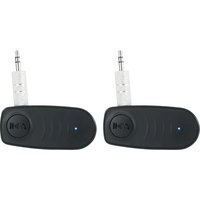
BT-LINK - Accessoire audio Bluetooth Rockville - Notice d'utilisation et mode d'emploi gratuit
Retrouvez gratuitement la notice de l'appareil BT-LINK Rockville au format PDF.


| Type de produit | Adaptateur Bluetooth |
| Marque | Rockville |
| Modèle | BT-LINK |
| Dimensions (L x l x H) | 5 x 2.5 x 1 cm |
| Poids | 15 g |
| Alimentation | USB 5V / Batterie rechargeable 200 mAh |
| Version Bluetooth | 5.0 |
| Portée Bluetooth | 10 mètres |
| Fonctions principales | Réception et transmission audio sans fil, compatibilité avec tous les appareils Bluetooth |
| Entretien et nettoyage | Essuyer avec un chiffon doux et sec. Ne pas utiliser de produits chimiques. |
| Sécurité | Ne pas exposer à l'eau ou à une chaleur excessive. Arrêter l'appareil lors du nettoyage. |
| Pièces détachées et réparabilité | Non réparable par l'utilisateur. Aucune pièce détachée disponible. |
| Informations générales | Utilisation intérieure et extérieure à l'abri des intempéries. |
FOIRE AUX QUESTIONS - BT-LINK Rockville
Questions des utilisateurs sur BT-LINK Rockville
0 question sur cet appareil. Repondez a celles que vous connaissez ou posez la votre.
Poser une nouvelle question sur cet appareil
Téléchargez la notice de votre Accessoire audio Bluetooth au format PDF gratuitement ! Retrouvez votre notice BT-LINK - Rockville et reprennez votre appareil électronique en main. Sur cette page sont publiés tous les documents nécessaires à l'utilisation de votre appareil BT-LINK de la marque Rockville.
MODE D'EMPLOI BT-LINK Rockville
ROCKVILLE
BT-LINK
PAIR OF AUX TO BLUETOOTH ADAPTERS TO LINK 2 SPEAKERS TOGETHER
OWNER'S MANUAL
WATCH THIS VIDEO BEFORE FIRST USE!
Scan the QR code or go to rockvillesupport.com/bt-link for essential information, guides (video and/or written), and tips to make the most out of your purchase.
If you prefer written instructions, please read ahead!
With Rockville you get many options.

Missing items? If you ordered a bundle that includes more than one product and you are missing part of your bundle, then it just means your order shipped from two different warehouses. You will receive the remaining items very soon. If you have any concerns or inquiries, feel free to call our customer support center at 1-646-758-0144, 24 hours a day/7 days a week.
Thank you for purchasing these Rockville BT-LINK AUX to Bluetooth adapters. Please read this owner's manual carefully for proper use of your BT-LINK adapters. Should you need assistance, please call our technical help line at 1-646-758-0144, 24 hours a day/7 days a week.
Includes
- Two AUX to Bluetooth adapters
- Two USB Type C charging cables
- Two 3.5mm to 3.5mm cables (23.6in)
- Two Detachable 3.5mm jacks
- Two 1/4'' Stereo adapters
- Owner's manual
- Warranty card
Functions
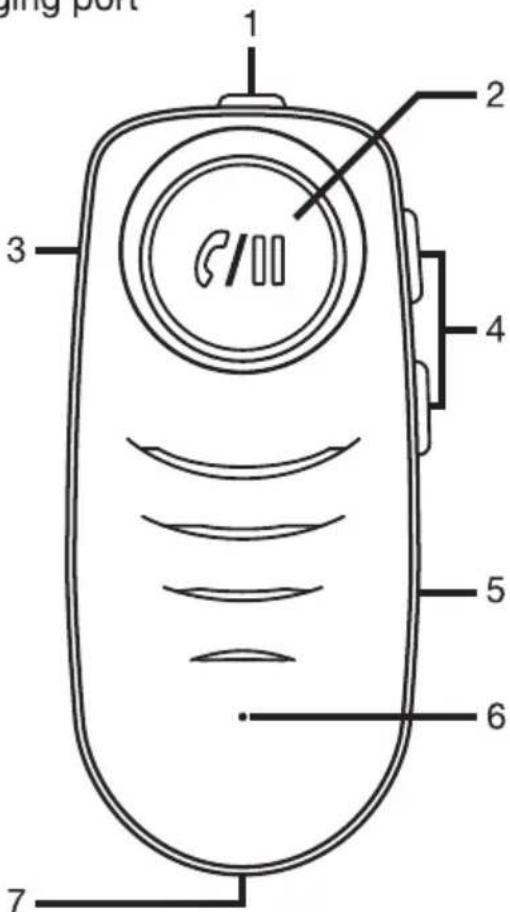
- Power switch: Slide to the ON position to power the unit. Slide to the OFF position to turn it off.
- Multifunction (MFB) button: Press the MFB once to begin or pause playback, answer an incoming call or end the call. Long press the MFB to reject a call. Press the MFB twice to redial the last number.
- AUX port
- Previous/Next buttons: Long press to raise or lower the volume. Short press for the previous or next track.
- Microphone
- Bluetooth/Charging LED indicator
- USB Type C (DC 5V) charging port
Operation
TWS Pairing
- Power on the first (master) unit, the LED indicator will flash blue and red indicating it is in pairing mode.
- Turn on your device's Bluetooth function and make sure it is discoverable. Search for BT-LINK in the list of available devices and connect to it. Once connected, the LED indicator will be solid blue.
- Connect the BT-LINK to your device's 3.5mm AUX input using the included 3.5mm cable or either one of the included adapters (3.5mm or 1/4 ) if necessary.
- Power on the second (slave) unit, the LED indicator will flash blue and red indicating it is in pairing mode. It will search for and automatically connect to the master unit. Once connected, the LED indicator will flash blue.
- The BT-LINK master unit will automatically connect with the last paired device. Please note, for the auto-connect function to work, your device's Bluetooth function must be on prior to turning on the master unit.
- You can use the BT-LINK units to control playback and answer calls. You can also use your paired device to control playback or, if using a phone, answer calls.
Please note: When making a call, both the master and slave units will be able to playback the voice, but only the master unit's microphone will be functional.
Fully charge the unit before using for the first time. If the unit will not be in use for a prolonged period of time, charge it at least every three months.
Features:
- Add Bluetooth to any system that has a 3.5mm or 1/4 TRS input
• The adapters will sync together wirelessly via Bluetooth - Take any 2 playback devices with aux or 1/4 " TRS input and play Bluetooth on both systems synced together
- Works with car stereos, home audio systems, and pro audio systems
- Works for pro audio PA speakers with the use of a 3.5mm to dual RCA (Rockville RNRMR10) or a 3.5mm to XLR cable (Rockville RXLR-AUX) (these cables are not included)
- Bluetooth 5.0 chipset
• 35 Foot Bluetooth range
• Automatically pairs with your phone when turned on
• Built-in Digital Signal Processor (DSP) increases the sound quality - Battery Life: around 10 Hours per charge
• Charge time: around 2 Hours
• Built-in microphone and multi function button to answer/redial/hang up/reject calls (Do not use for phone calls when the adapters are synched together)
• 110 mAh rechargeable battery
Troubleshooting
| Problem | Solution |
| No power | 1. Make sure the power switch is in the ON position.2. Make sure the units are fully charged. |
| No sound | 1. Make sure both units are powered on and that they are fully charged.2. Check all connections. |
| Bluetooth/TWS | 1. Check to see that all devices are turned on and that your source device is discoverable.2. Turn all devices off and then on again.3. Make sure you've selected the proper source (BT-LINK).4. Make sure that the Bluetooth device is within 5 feet of the unit.5. Move both devices away from other Bluetooth devices, microwaves, wireless routers, and other electronics.6. The BT signal can be affected by walls or other barriers. Make sure there is a clear line of sight between the BT-LINK and your device. |
Federal Communications Commission Compliance Information
Responsible party name: Rockville
Address: 600 Bayview Ave.
Entrance A
Inwood, NY 11096
Hereby declares that the product BT-LINK complies with FCC rules as mentioned in the following paragraph:
These devices comply with Part 15 of the FCC rules. Operation is subject to the following two conditions: (1) these devices may not cause harmful interference, and (2) these devices must accept any interference received, including interference that may cause undesired operation.
Note: This equipment has been tested and found to comply with the limits for a Class B digital device, pursuant to Part 15 of the FCC rules. These limits are designed to provide reasonable protection against harmful interference in a residential installation. This equipment generates, uses, and can radiate radio frequency energy and, if not installed and used in accordance with the instructions, may cause harmful interference to radio communications. However, there is no guarantee that interference will not occur in a particular installation. If this equipment does cause harmful interference to radio or television reception, which can be determined by turning the equipment off and on, the user is encouraged to try to correct the interference by one or more of the following measures:
- Reorient or relocate the receiving antenna.
- Increase the separation between the equipment and receiver.
- Connect the equipment to an outlet on a circuit different from that to which the receiver is connected.
- Consult the dealer or an experienced radio/TV technician for help.
Marque : Rockville
Modèle : BT-LINK
Catégorie : Accessoire audio Bluetooth