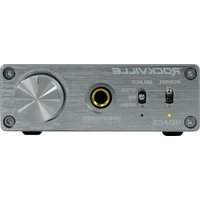
RDAC5S - Amplificateur casque Rockville - Notice d'utilisation et mode d'emploi gratuit
Retrouvez gratuitement la notice de l'appareil RDAC5S Rockville au format PDF.


| Type de produit | Amplificateur casque |
| Marque | Rockville |
| Modèle | RDAC5S |
| Dimensions (L x P x H) | Environ 4,5 x 3,5 x 1,2 pouces (11,4 x 8,9 x 3 cm) |
| Poids | Environ 0,5 lb (225 g) |
| Alimentation | Adaptateur secteur 12V DC (inclus) ou USB 5V (via câble micro-USB) |
| Puissance de sortie | Jusqu'à 200 mW par canal sous 32 ohms |
| Impédance casque compatible | 16 à 600 ohms |
| Connectique d'entrée | 1 x entrée stéréo RCA, 1 x entrée mini-jack 3,5 mm |
| Connectique de sortie | 1 x sortie casque mini-jack 3,5 mm, 1 x sortie ligne RCA |
| Fonctions principales | Amplification haute fidélité, réglage de volume, commutateur d'impédance, sortie préampli |
| Rapport signal/bruit | > 100 dB |
| Distorsion harmonique totale (THD) | < 0,01 % |
| Matériau du boîtier | Aluminium brossé |
| Entretien et nettoyage | Nettoyer avec un chiffon doux et sec. Ne pas utiliser de produits chimiques. |
| Sécurité | Ne pas exposer à l'humidité. Débrancher en cas d'orage ou de non-utilisation prolongée. |
| Pièces détachées et réparabilité | Contactez le service après-vente Rockville pour les pièces de rechange. |
| Informations générales | Amplificateur casque compact idéal pour studio, home cinéma ou utilisation mobile. |
FOIRE AUX QUESTIONS - RDAC5S Rockville
Questions des utilisateurs sur RDAC5S Rockville
0 question sur cet appareil. Repondez a celles que vous connaissez ou posez la votre.
Poser une nouvelle question sur cet appareil
Téléchargez la notice de votre Amplificateur casque au format PDF gratuitement ! Retrouvez votre notice RDAC5S - Rockville et reprennez votre appareil électronique en main. Sur cette page sont publiés tous les documents nécessaires à l'utilisation de votre appareil RDAC5S de la marque Rockville.
MODE D'EMPLOI RDAC5S Rockville
ROCKVILLE
RDAC5
DIGITAL TO ANALOG CONVERTER w/USB, OPTICAL, RCA, and HEADPHONE AMP
OWNER'S MANUAL
Please read this guide carefully for proper use of your RDAC5 Digital to Analog Converter. Scan the QR codes or visit URLs below to access how-to videos, the owner's manual and other important information you may need to get the most out of your item. Should you need assistance please call our technical help line at 1-646-758-0144, 24 hours a day/7 days a week.
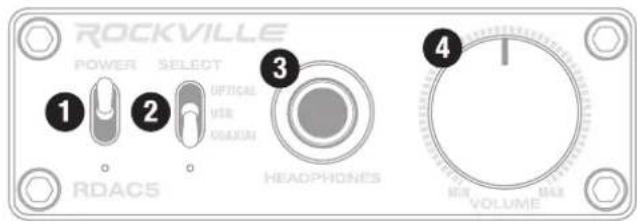
FUNCTIONS
- Power ON/OFF switch
- Input selector switch: optical/USB/coaxial
- ¼" headphone jack
- Volume control
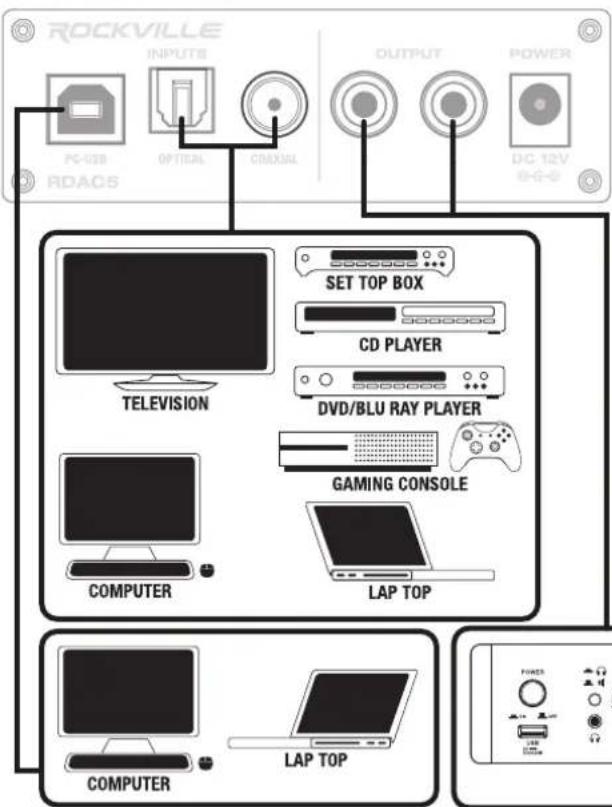
-
USB input
-
Optical input
- Coaxial input
- RCA outputs
- 12V power input: Connect the included power supply to power on the unit.

rockvillesupport.com/rdac5b

rockvillesupport.com/rdac5s

CONNECTIONS
SETTING SAMPLE RATE/BIT DEPTH
PC
- Connect the RDAC5 to your PC via USB.
- Click on the Windows icon on the lower right corner of your screen, then click on SOUND SETTINGS.
- In the SOUND SETTINGS menu click on SOUND CONTROL PANEL.
- Find RDAC5 in the SOUND CONTROL PANEL, click on it and select PROPERTIES from the drop down menu.
- Click on the ADVANCED tab. There you will find a drop down menu with all the available sample rate and bit depth settings.
MAC
- Connect the RDAC5 to your Mac via USB.
- Go to your APPLICATIONS folder, the find and open the UTILITIES folder.
- Find and open the AUDIO MIDI SETUP app.
- Select RDAC 5 form the panel on the left.
- Click the OUTPUT tab on the right side panel. There you will find a drop down menu with all the available sample rate and bit depth settings.
RockvilleAudio.com
©2022 ROCKVILLE // The information presented is subject to change and/or improvement without notice.
