Rolling Bag 88 - Sac de transport Rockville - Notice d'utilisation et mode d'emploi gratuit
Retrouvez gratuitement la notice de l'appareil Rolling Bag 88 Rockville au format PDF.


| Type de produit | Sac à roulettes |
| Dimensions (H x L x P) | 55 x 35 x 20 cm |
| Poids | 2 kg |
| Capacité | 40 litres |
| Matière | Polyester résistant |
| Type de roues | Roues doubles pivotantes |
| Poignée télescopique | Oui, réglable |
| Fermeture | Fermeture à glissière avec cadenas intégré |
| Compartiments | Compartiment principal, poche avant, poches latérales |
| Doublure intérieure | Doublure en nylon |
| Poignées supplémentaires | Poignée supérieure et latérale |
| Garantie | 1 an |
| Entretien et nettoyage | Nettoyer avec un chiffon humide et du savon doux |
| Sécurité | Fermeture à glissière verrouillable |
| Pièces détachées et réparabilité | Roues de rechange disponibles, réparation simple |
FOIRE AUX QUESTIONS - Rolling Bag 88 Rockville
Questions des utilisateurs sur Rolling Bag 88 Rockville
0 question sur cet appareil. Repondez a celles que vous connaissez ou posez la votre.
Poser une nouvelle question sur cet appareil
Téléchargez la notice de votre Sac de transport au format PDF gratuitement ! Retrouvez votre notice Rolling Bag 88 - Rockville et reprennez votre appareil électronique en main. Sur cette page sont publiés tous les documents nécessaires à l'utilisation de votre appareil Rolling Bag 88 de la marque Rockville.
MODE D'EMPLOI Rolling Bag 88 Rockville
Rolling Bag Series KEYBOARD CASES
Thank you for purchasing this Rolling Bag Series Keyboard Case. Please read these instructions carefully for proper use of your keyboard case. If you have any questions or need assistance, Please contact our technical help line at 1-646-758-0144, Monday through Friday, 9am to 5pm EST. Also, you can check out our informational video on Vimeo: https://vimeo.com/371432095
STEP 1
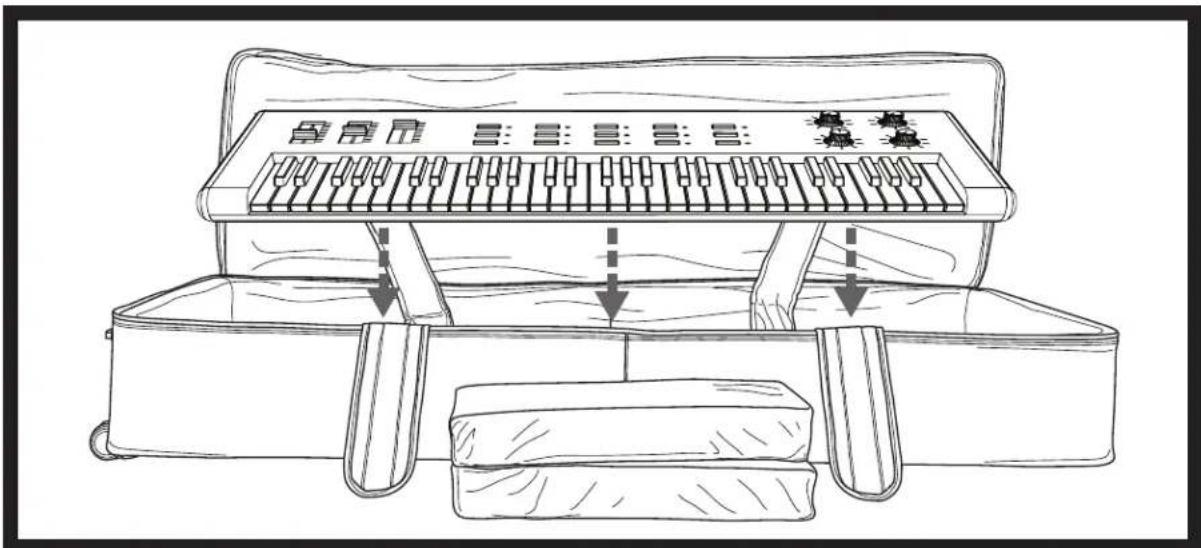
Remove the padded inserts and set them aside. Depending on whether you have a slim or normal size keyboard, you may need these later to ensure it is properly secured.

STEP 2
Place your keyboard into the case and center it. Make sure it is properly seated.
STEP 3
Pull the left rear strap forward over the keyboard (fig. a). While holding it in place, pull the front strap towards the back of the bag and velcro it onto the rear strap (fig. b). Make sure you've pulled the straps as tightly as possible to ensure that the keyboard is safely secured in place. Repeat these steps for other straps.


STEP 4
As mentioned in step 1, the size of the keyboard will determine if you will need to use the padded inserts. Place one into each end of the bag, ensuring that they fit snugly against the sides of the keyboard. If the keyboard fits perfectly, you can place the foam inserts on top of it as an additional layer of protection.

Marque : Rockville
Modèle : Rolling Bag 88
Catégorie : Sac de transport