KH 4104 ELECTRIC OFFICE-STAPLER - Agrafeuse électrique LERVIA - Notice d'utilisation et mode d'emploi gratuit
Retrouvez gratuitement la notice de l'appareil KH 4104 ELECTRIC OFFICE-STAPLER LERVIA au format PDF.


| Type d'appareil | Fer à repasser |
| Puissance | Non précisé |
| Type de semelle | Non précisé |
| Fonction vapeur | Non précisé |
| Réglage de température | Non précisé |
| Capacité du réservoir | Non applicable |
| Poids | Non précisé |
| Longueur du cordon | Non précisé |
| Protection anti-calcaire | Non précisé |
| Arrêt automatique | Non précisé |
| Couleur | Gris et noir |
| Alimentation | Électrique |
| Utilisation | Repassage |
| Marque | Non précisé |
| Modèle | Non précisé |
FOIRE AUX QUESTIONS - KH 4104 ELECTRIC OFFICE-STAPLER LERVIA
Questions des utilisateurs sur KH 4104 ELECTRIC OFFICE-STAPLER LERVIA
0 question sur cet appareil. Repondez a celles que vous connaissez ou posez la votre.
Poser une nouvelle question sur cet appareil
Téléchargez la notice de votre Agrafeuse électrique au format PDF gratuitement ! Retrouvez votre notice KH 4104 ELECTRIC OFFICE-STAPLER - LERVIA et reprennez votre appareil électronique en main. Sur cette page sont publiés tous les documents nécessaires à l'utilisation de votre appareil KH 4104 ELECTRIC OFFICE-STAPLER de la marque LERVIA.
MODE D'EMPLOI KH 4104 ELECTRIC OFFICE-STAPLER LERVIA
Operating instructions
Operating instructions
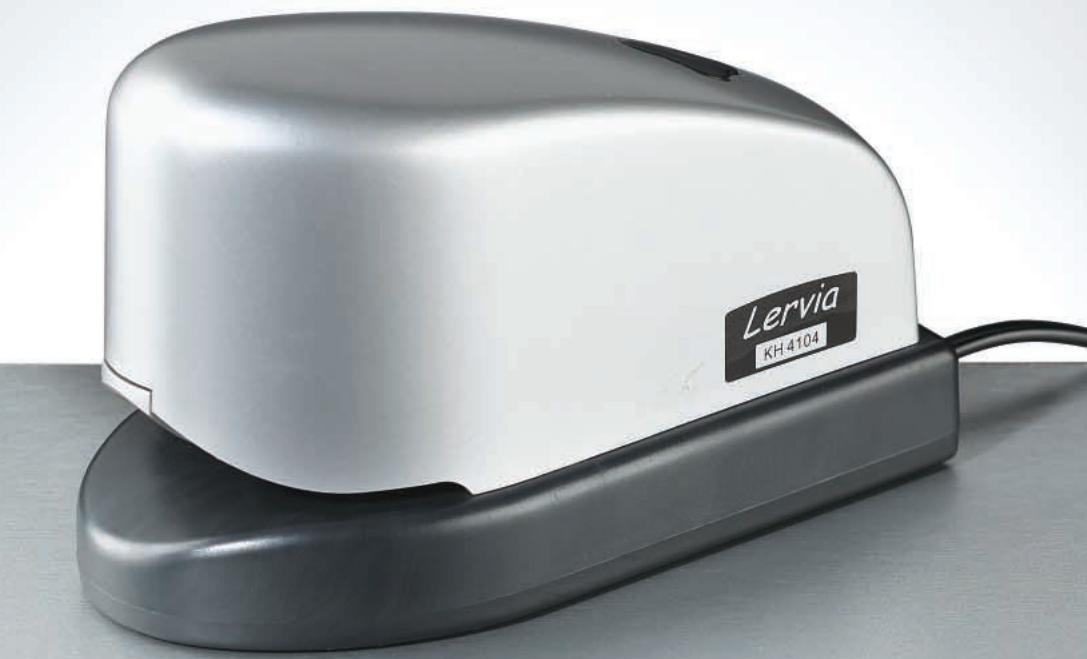
Your new Lervia KH 4104 electric stapler is a high performance device. Due to its magnet technology, up to 20 sheets of paper (80g / m^2) can be stapled in one operation. Commercially available staples can be used.
Carefully read the following operating and safety instructions prior to using the device.
Technical data:
- Model - No.
- Stapling type
Staple capacity - Dimensions (mm)
Staplestorage - Power supply
KH 4104
Inner stapling
max. 20 sheets (80g / m^2) per stapling
190 × 90 × 110
105 (standard staples)
230 V/50 Hz
Operation:
- Plug the electrical stapler into the power supply socket. The device is ready to run.
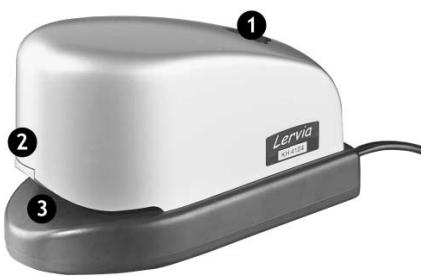
- After smoothing out and aligning the sheets of paper, press the stack of paper at the point where it should be stapled into the stapling slot (3). The device automatically staples the sheets of paper together.
- If all the staples have been used, press the knob on top of the device (1), in order to open the staple storage (2). When the new staples have been loaded close the staple storage until you can distinctly hear the device clicking shut (3) and carry on stapling.
Safety information:
- Pull the device's plug from the socket prior to cleaning. The housing can be cleaned with a cloth, mild soap and water-soluble detergent. Do not use any scrubbing material, benzine, petroleum or thinner.
- Pull the device's plug from the socket when it is not being used.
- Do not place the device near water or an air conditioning unit, as this can damage the insulation. Electric shocks can occur!
- Do not place anything on top of the device.
- Do not use an extension cable. Do not hang anything else on the power supply cable.
- The device should only be operated using a power supply as defined on the data plate on the underside of the electrical stapler. Please contact your local representative or power supply company if you are unsure of the required power supply.
- If the power supply cable or plug is damaged or worn then pull the plug out of the power supply socket and have the device repaired by a specialist.
-
Remove any hard materials (e.g. staples etc.) from the paper to be stapled prior to putting into the stapler because these might cause damage to the device.
-
Take special care that children do not put their fingers inside the stapling slot; this can result in very serious injuries!
- Your electrical stapler has a stapling capacity of 20 sheets of paper (80g / m^2) per stapling operation. Exceeding this capacity can lead to staple jamming and damage to the device.
- If staple jamming occurs, press the knob (1), to open the staple storage. Remove the blocked staples in order to continue working.
Declaration of conformance
We, Kompernaß Handelsgesellschaft mbH, Burgstr. 21, D-44867 Bochum, Germany, declare this appliance to be in conformance with all applicable international standards, safety requirements and the EC Directives.
No. of appliance/Type: KH 4104
Bochum, 30.11.2002
Hans Kompernaß
- Manager -