
DN-9007-S - Câble réseau Digitus - Notice d'utilisation et mode d'emploi gratuit
Retrouvez gratuitement la notice de l'appareil DN-9007-S Digitus au format PDF.


| Type de produit | Hub USB |
| Dimensions | 150 x 50 x 20 mm |
| Poids | 100 g |
| Alimentation | Bus USB ou adaptateur secteur optionnel |
| Fonctions principales | Extension de ports USB, compatible USB 2.0 |
| Entretien et nettoyage | Nettoyer avec un chiffon doux et sec |
| Sécurité | Ne pas exposer à l'eau ou à l'humidité |
| Pièces détachées et réparabilité | Adaptateur secteur disponible en option |
| Informations générales | Marque Digitus, modèle DN-9007-S |
FOIRE AUX QUESTIONS - DN-9007-S Digitus
Questions des utilisateurs sur DN-9007-S Digitus
0 question sur cet appareil. Repondez a celles que vous connaissez ou posez la votre.
Poser une nouvelle question sur cet appareil
Téléchargez la notice de votre Câble réseau au format PDF gratuitement ! Retrouvez votre notice DN-9007-S - Digitus et reprennez votre appareil électronique en main. Sur cette page sont publiés tous les documents nécessaires à l'utilisation de votre appareil DN-9007-S de la marque Digitus.
MODE D'EMPLOI DN-9007-S Digitus
INSTALLATIONSANLEITUNG
DATENDOSE (GESCHIRMT)
INSTALLATION GUIDE
NETWORK OUTLET (SHIELDED)


Schritt 1:
KABELMANTEL ENTFERNEN
Kabelmantel nach 45 mm einritzen. Entfernen Sie den eingeritzten Kabelmantel. Schirmge- fl echt auf 10 mm kürzen und über Kabelmantel zurückschieben. Schirmfolie kürzen.
Step 1:
REMOVE THE CABLE SHEATH
Carve the cable jacket by 45 mm. Remove the carved cable jacket. Cut braided shield at 10 mm and push back over cable jacket. Shorten the foil shielding.

1:1 Maßstab (Angaben in mm)
1:1 scale (Figures in mm)

Schritt 2: ANSCHLUSS (T568A / T568B)
Fixieren Sie das Datenkabel mittels Kabelschelle und ziehen Sie die Schraube an. Es werden gleichzeitig beide Datenkabel fi xiert.
Legen Sie die Adern gemäß vorgegebener Kodierung in der Schneidklemme. Die Aderverdrillung muss bis zur Schneidklemme aufrechterhalten bleiben!
Step 2: CONNECTION (T568A / T568B)
Fix the data cable with a cable clamp and tighten the screw. Both data cables are fixed at the same time.
Lay the wires in the insulation displacement clamp according to the specified coding. The twisting must be maintained up to the insulation displacement terminal!
T568A
Belegung nach T568A
Configuration according to T568A
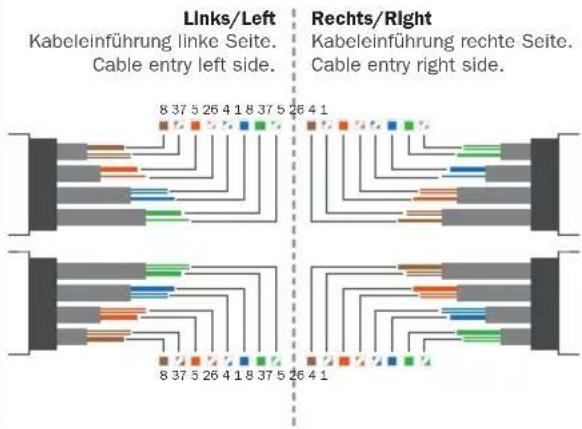
T568B
Belegung nach T568B
Configuration according to T568B

Pressen Sie die Adern mithilfe eines Anlegewerkzeugs (DN-LSA-PT) in die Schneidklemme und schneiden Sie die überschüssigen Kabelenden ab.
Press the wires into the insulation displacement clamp with the help of a punch tool (DN-LSA-PT) and cut off the excess wire ends.
Marque : Digitus
Modèle : DN-9007-S
Catégorie : Câble réseau