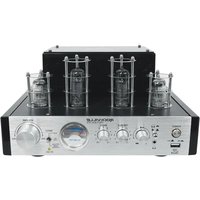
BluTube SG - Recepteur Rockville - Notice d'utilisation et mode d'emploi gratuit
Retrouvez gratuitement la notice de l'appareil BluTube SG Rockville au format PDF.


| Type de produit | Récepteur audio avec amplificateur à tube |
| Marque | Rockville |
| Modèle | BluTube SG |
| Dimensions (L x P x H) | 430 x 250 x 100 mm |
| Poids | 5,2 kg |
| Alimentation | 230 V / 50 Hz, consommation 80 W |
| Puissance de sortie | 2 x 50 W RMS sous 8 ohms |
| Connectivité sans fil | Bluetooth 5.0 avec codec aptX |
| Entrées audio | 2x RCA, 1x optique, 1x coaxial, 1x USB |
| Sorties audio | Borniers haut-parleurs, sortie ligne RCA |
| Technologie d'amplification | Hybride : tube (préampli) + transistors (puissance) |
| Fonctions principales | Bluetooth, radio FM, USB, télécommande |
| Entretien et nettoyage | Dépoussiérer avec un chiffon doux et sec. Ne pas utiliser de produits chimiques. |
| Sécurité | Débrancher avant nettoyage. Ne pas exposer à l'humidité. Utiliser sur surface stable. |
| Pièces détachées et réparabilité | Tubes de rechange disponibles. Réparation par un technicien qualifié recommandée. |
| Accessoires inclus | Télécommande, câble d'alimentation, antenne FM |
| Température de fonctionnement | 0 °C à 40 °C |
| Couleur | Noir avec panneau argenté |
FOIRE AUX QUESTIONS - BluTube SG Rockville
Questions des utilisateurs sur BluTube SG Rockville
0 question sur cet appareil. Repondez a celles que vous connaissez ou posez la votre.
Poser une nouvelle question sur cet appareil
Téléchargez la notice de votre Recepteur au format PDF gratuitement ! Retrouvez votre notice BluTube SG - Rockville et reprennez votre appareil électronique en main. Sur cette page sont publiés tous les documents nécessaires à l'utilisation de votre appareil BluTube SG de la marque Rockville.
MODE D'EMPLOI BluTube SG Rockville
ROCKVILLE
BluTube Series
70W TUBE AMPLIFIER/HOME STEREO
RECEIVER w/WIRELESS STREAMING
OWNER'S MANUAL
ATTENTION:
WATCH THIS VIDEO BEFORE FIRST USE!
Scan the QR codes or go to the URLs for essential information, guides (video and/or written), and tips to make the most out of your purchase.
If you prefer written instructions, please read ahead! With
Rockville you get many options.


rockvillesupport.com/blutube-ledrock

rockvillesupport.com/blutube-dk


rockvillesupport.com/blutube-wd
rockvillesupport.com/blutube-sg
Missing items? If you ordered a bundle that includes more than one product and you are missing part of your bundle then it just means your order shipped from two different warehouses. You will receive the remaining items very soon. If you have any concerns or inquiries, feel free to call our customer support center at 1-646-758-0144, 24 hours a day/7 days a week.
Thank you for purchasing this Rockville BluTube Series 70W Tube Amplifier. Please read this owner's manual carefully for proper use of your Rockville BluTube. Should you need assistance, please call our technical help line at 1-646-758-0144, 24 hours a day/7 days a week.
Includes
- Tube Amplifier/Receiver
- 5 ft RCA to 3.5mm cable
- Owner's manual

PLEASE NOTE: You may hear a humming noise when the BluTube unit is first powered on. This is normal and is due to the tubes warming up. The humming noise will go away after approximately 1 minute.
IMPORTANT SAFETY INSTRUCTIONS

- To reduce risk of electric shock, never open the unit. There are no user serviceable parts, refer service to the Rockville service center.
- Do not expose this unit to any kind of moisture. No objects filled with liquids, such as vases or cups, should be placed on or near this appliance.
- Please ensure that the unit is situated in a properly ventilated area.
- Avoid direct sunlight or heat radiating appliances.
- Avoid placing on surfaces that are subject to constant vibration.
- Make sure the unit is placed on a level and stable surface.
- No open flames, such as a lit candles, should be placed on or near the unit.
- Before turning on the power for the first time, make sure the power cord is properly plugged in and fully uncoiled.
Functions
BluTube SG, BluTube WD, BluTube DK, and BluTube LED
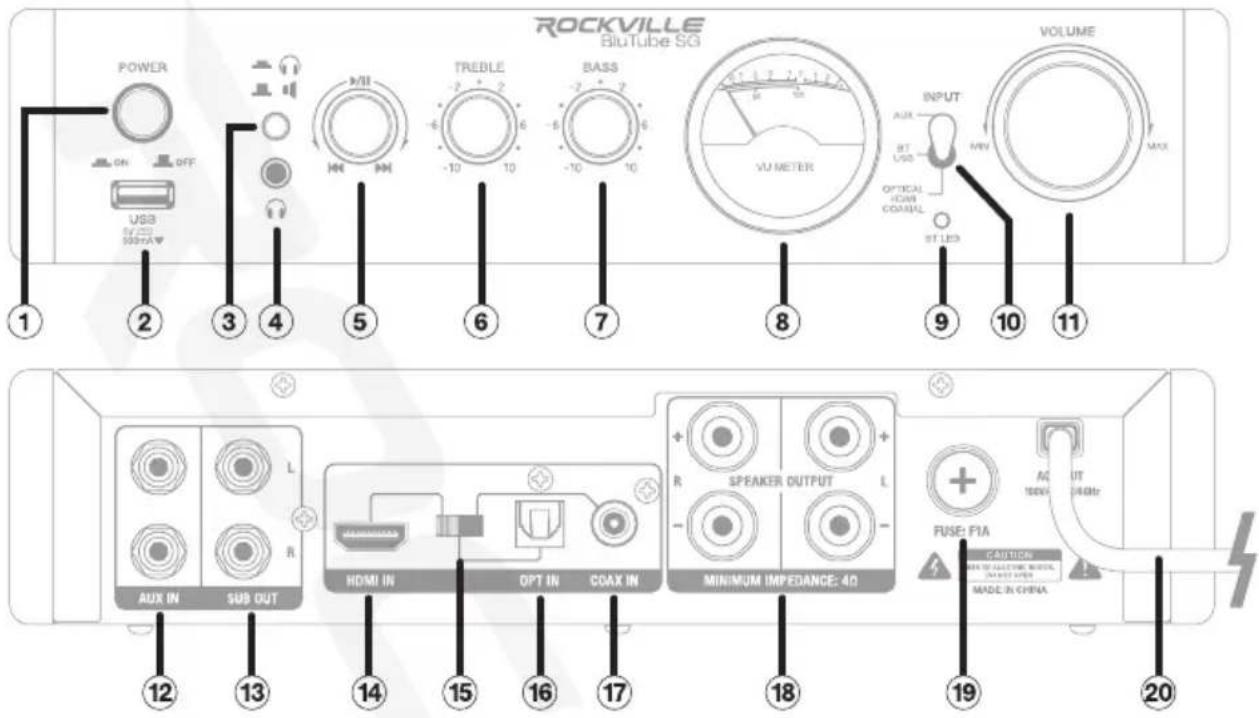
- Power switch
PLEASE NOTE: You may hear a humming noise when the BluTube unit is first powered on. This is normal and is due to the tubes warming up. The humming noise will go away after approximately 1 minute.
- USB port (supports charging)
- Speaker output/3.5mm headphone output selector button
- 3.5mm headphone output
- Play/pause - Previous/next control knob while in BT/USB mode.
- Treble adjustment knob
- Bass adjustment knob
- VU meter: displays input signal level
- Wireless streaming LED indicator
- Input selector switch
- Volume knob
- Auxiliary Input Tiffany RCA jacks
- Subwoofer Output Tiffany RCA jacks
- HDMI input
- HDMI/Optical/Coaxial input selector switch
- Optical input
- Coaxial input
- Left and Right banana plug/binding post speaker terminals
- Fuse
- Power cord
Functions (continued) BluTube

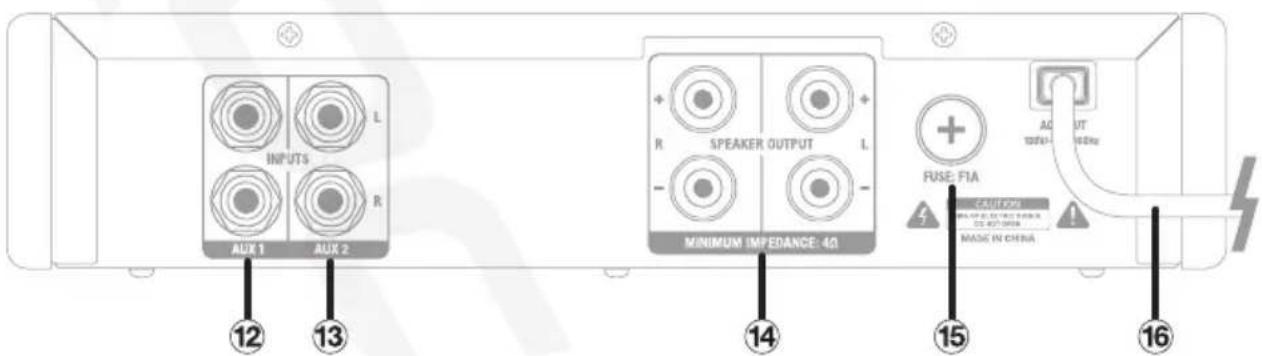
- Power switch
PLEASE NOTE: You may hear a humming noise when the BluTube unit is first powered on. This is normal and is due to the tubes warming up. The humming noise will go away after approximately 1 minute.
- USB port (supports charging)
- Speaker output/3.5mm headphone output selector button
- 3.5mm headphone output
- Play/pause - Previous/next control knob while in BT/USB mode.
- Treble adjustment knob
- Bass adjustment knob
- VU meter: displays input signal level
- Wireless streaming LED indicator
-
Input selector switch
-
Volume knob
-
AUX 1 Input Tiffany RCA jacks
-
AUX 2 Input Tiffay RCA jacks
-
Left and Right banana plug/binding post speaker terminals
-
Fuse
-
Power cord
Setup
Front Panel: BluTube SG, BluTube WD, BluTube DK, and BluTube LED
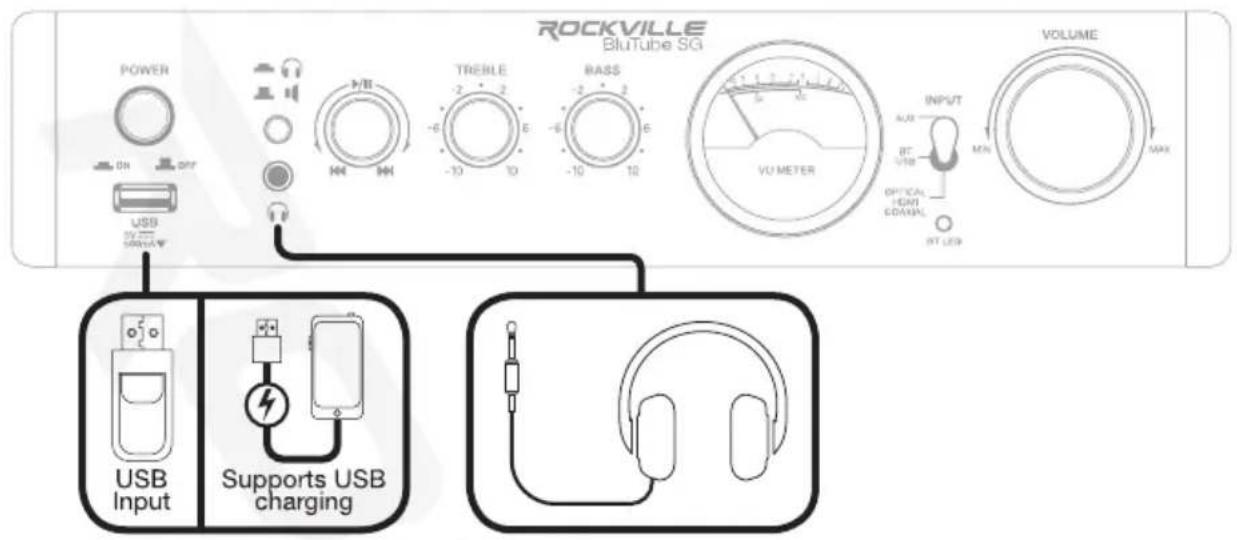
Rear Panel: BluTube SG, BluTube WD, BluTube DK, and BluTube LED
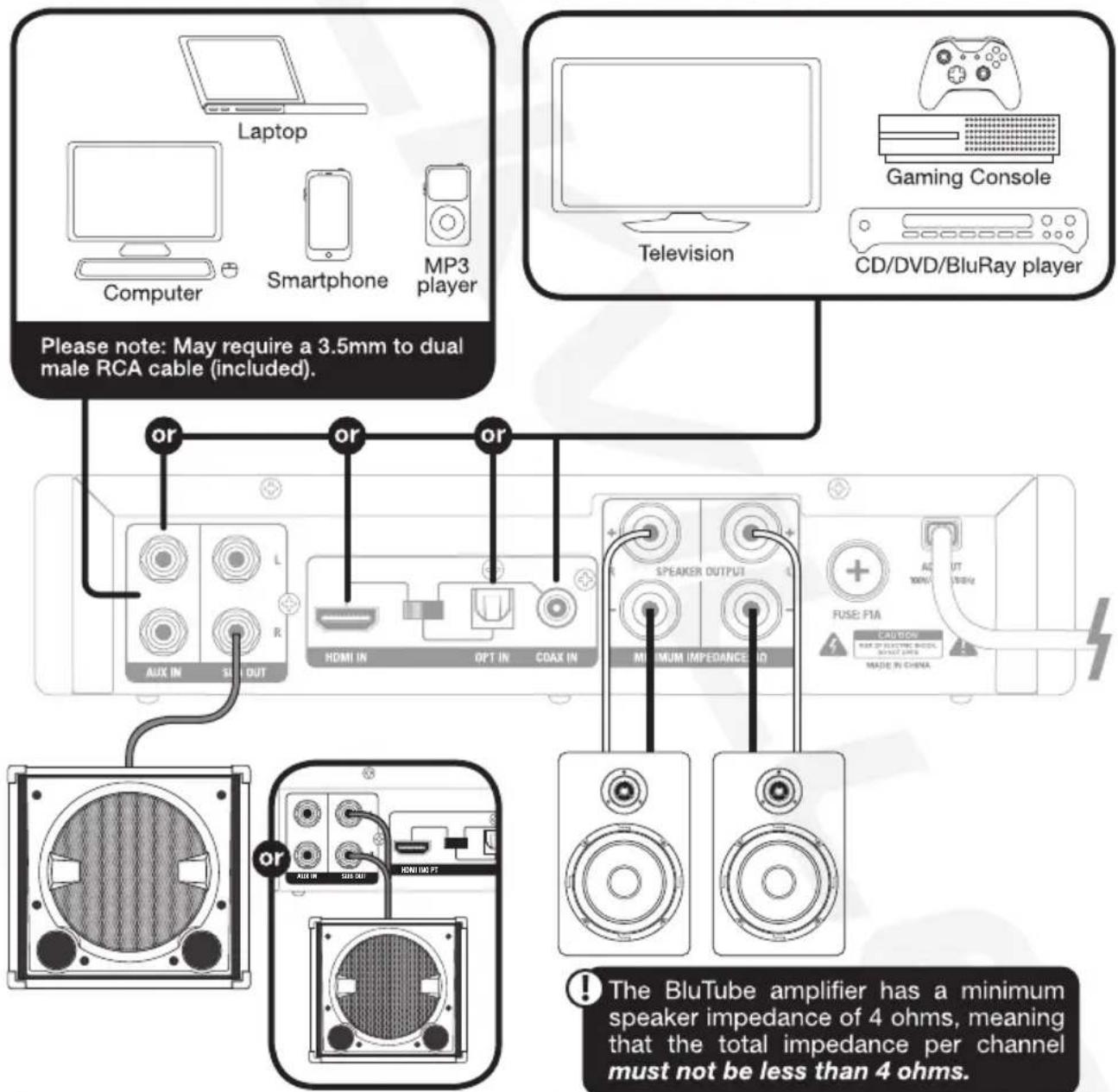
ATTENTION: If your sub has one RCA input, use a male to dual male Y cable.
Setup (continued)
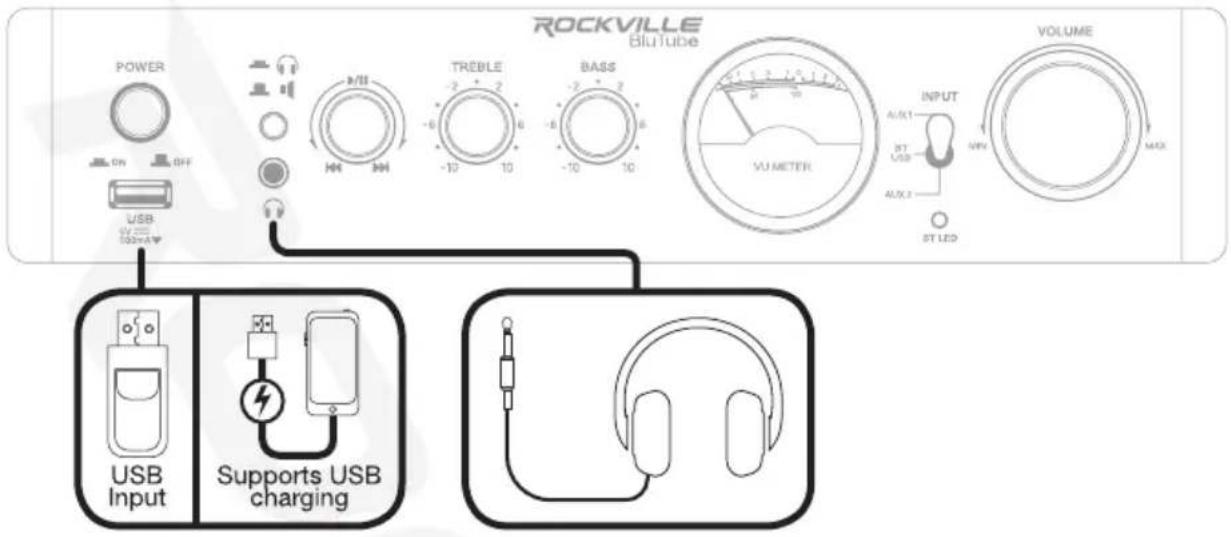
Front Panel: BluTube
Rear Panel: BluTube

Inputs
Wireless Streaming
All models
- Turn on the unit and place the input selector switch to BT/USB (middle position). Please note: if there is a USB drive inserted, be sure to remove it as this will override wireless streaming mode.
- Turn on the wireless streaming feature on your device and ensure that it is in "discoverable" mode.
- Find and select (depending on your model) BluTube, BluTube SG, BluTube LED, BluTube WD, or BluTube DK in the list of discoverable devices.
- If you are prompted for a paring code, please enter: 0000.
- Play/pause: press the knob to play or pause playback. Previous/next control knob: turn the knob to the left for previous tracks, turn the knob to the right for next tracks.
- Playback may also be controlled from your Bluetooth device.
- Adjust the source device's volume, then use the BluTube's volume knob to control volume. Please note: The amplifier will remember and automatically connect to the last paired device.
USB
All models
- Place the input selector switch to BT/USB (middle position).
- Insert a USB drive into the USB port on the front panel.
- The unit will automatically begin to play music stored on the external device.
- Play/pause: press the knob to play or pause playback
Previous/next control knob: turn the knob to the left for previous tracks, turn the knob to the right for next tracks.
Please note: Inserting a USB drive will override wireless streaming mode.
Auxiliary
BluTube
You can use either of the RCA inputs when you wish to hook up an external stereo signal source such as a CD player, MP3 player, computer, TV, gaming console, etc.
- Place the input selector switch to AUX 1 (up position) or AUX 2 (down position).
- Connect the your source device to the RCA input labeled AUX 1 or AUX 2. Please note, for some devices you may need a 3.5mm to dual male RCA cable.
- Adjust the source device's volume, then use the BluTube's volume knob to control volume.
BluTube SG, BluTube WD, BluTube DK, and BluTube LED
You can use the RCA input labeled AUX IN when you wish to hook up an external stereo signal source such as CD player, MP3 player, computer, etc.
- Place the input selector switch to AUX (up position).
- Connect the your source device to the RCA input labled AUX IN. Please note, for some devices you may need a 3.5mm to dual male RCA cable.
- Adjust the source device's volume, then use the BluTube's volume knob to control volume.
HDMI/Optical/Coaxial
BluTube SG, BluTube WD, BluTube DK, and BluTube LED only
Many TVs, Digital set-top boxes, game consoles, and DVD/BluRay players have HDMI, optical (fiber optic), or coaxial outputs. To connect via HDMI, optical, or coaxial input, follow the steps listed on the next page.
Inputs (continued)
- Place the input selector switch on the front of the unit to HDMI/Optical/Coaxial.
- Set the HDMI/Optical/Coaxial input selector switch on the back of the unit to the desired mode.
- Use an HDMI cabe, a digital optical audio cable, or a coaxial cable to connect the source to the appropriate input port on the amplifier.
- Use the BluTube's volume knob to control volume.
Outputs
Speakers
The amplifier features left and right banana plug/binding post terminals to connect two speakers. When connecting your speakers, be sure to observe correct polarity. The total impedance of your speakers must not be less than 4 ohms.
Subwoofer
BluTube SG, BluTube WD, BluTube DK, and BluTube LED only
There are two RCA subwoofer outputs. You can use either one to feed the signal to a powered subwoofer. Please refer to the two preferred configurations detailed below.
- Use standard L/R RCA jacks to feed the signal from both outputs to any powered sub with L/R RCA inputs. Please note: since both outputs are putting out an identical mono signal, it doesn't matter which one you hook the left and right RCA jacks to.
- Use a monoaural RCA cable to feed the signal from either jack to any powered subwoofer with an LFE (Low Frequency Effect) RCA input or a single RCA sub input.
3.5mm Headphone Output
All models
The 3.5mm headphone output is a direct plug and play connection. Simply connect your headphones, make sure the headphone/speaker output selector button is in the down position, and you are ready to listen.
Please note, when the 3.5mm jack is in use, all other output will be cut off. To switch back to speaker/sub output, simply depress the headphone/speaker output selector button.
Features and Specifications
BluTube
• 25 watts RMS x 2 @ 8 ohms
• 35 watts RMS x 2 @ 4 ohms
• Built-in Preamplifier
- 2 sets of Tiffany Auxiliary RCA (AUX 1 and AUX 2) inputs to connect devices like a TV, DVD player, Laptop, MP3 player, Smart phone etc.
- VU meter
- Adjustable bass and treble (2-band equalizer)
• Built-in wireless streaming with 33-foot range
- Bluetooth: 2.1 +EDR
• USB: Supports WAV/MP3/WMA/APE/FLAC
- USB input for music files from USB thumb drive. Can also charge your USB device.
- Rear Speaker Terminals: Banana plug/binding post outputs for 2 speakers
• Headphone output
• Frequency Response (±3dB): 25Hz – 20kHz
• Input Impedance: 47kΩ
- Input Sensitivity: 300mV
• Output Impedance: 4 – 8 ohms
• Total Harmonic Distortion(THD): ≤0.02%
• Signal-to-Noise Ratio(S/N): ≥86dB
• 100/120V Auto-switching power supply
• Unit weight: 6.6 lbs
- Unit dimension: 10.6'' × 10.2'' × 5.1''
BluTube SG, BluTube WD, BluTube DK, and BluTube LED
• 25 watts RMS x 2 @ 8 ohms
• 35 watts RMS x 2 @ 4 ohms
• Built-in Preamplifier
- 2 Tiffany RCA (AUX) inputs to connect devices like a TV, DVD player, Laptop, MP3 player, Smartphone etc.
- HDMI input
- Optical input
- Coaxial input
- VU meter
- Tubes and knobs feature blue LED illumination (BluTube LED model only)
- Adjustable bass and treble (2-band equalizer)
• Built-in wireless streaming with 33-foot range
- Bluetooth: 2.1 +EDR
• USB: Supports WAV/MP3/WMA/APE/FLAC
- USB input for music files from USB thumb drive. Can also charge your USB device.
• USB can charge your phone or other USB device
- Rear Speaker Terminals: Banana plug/binding post outputs for 2 speakers
- Subwoofer output
• Headphone output
• Frequency Response (±3dB): 25Hz – 20kHz
- Input Impedance: 47kΩ
• Input Sensitivity: 300mV
• Output Impedance: 4 – 8 ohms
• Total Harmonic Distortion(THD): ≤0.02%
• Signal-to-Noise Ratio(S/N): ≥86dB
• 100/120V Auto-switching power supply
- Unit weight: 6.6 lbs
- Unit dimension: 10.6'' × 10.2'' × 5.1''
Troubleshooting
| PROBLEM | SOLUTION |
| No power | 1. Make sure the unit is plugged in and the power switch is in the ON position.2. Check and replace the fuse if necessary. |
| Humming noise when powered on | The humming noise is due to the tubes warming up and is completely normal. They take approximately 1 minute to warm up and the hum will go away at that point. |
| No sound/distorted sound | 1. Check that all cables are plugged in correctly.2. Check the amplifier and input source volume settings.3. Check the input switch to ensure the proper source is selected.4. Check the headphone/speaker output selector button to ensure the proper output is selected.5. Check that the HDMI/Optical/Coaxial selector switch at the rear of the unit is set to the proper input mode (BluTube SG, WD, and LED).6. Check and adjust (if necessary) the Volume, Bass, and Treble settings which boost the signal which, in turn, can cause clipping and/or distortion. |
| Wireless Streaming | 1. Check to see that both devices are turned on and that your Bluetooth device is discoverable.2. Turn both devices off and then on again.3. Make sure you've selected the proper source.4. Make sure that the wireless streaming device is within 5 feet of the unit.5. Move both devices away from other wireless streaming devices, microwaves, wireless routers, and other electronics.6. Make sure that the unit is not paired to another device.7. Make sure there are no USB devices plugged in. |
| No USB playback | 1. Make sure you've selected the proper source.2. Make sure that the audio files are in the specified formats.3. Check the USB drive for damage. |
FEDERAL COMMUNICATIONS COMMISSION COMPLIANCE INFORMATION
Responsible party name: Rockville
Address: 600 Bayview Ave.
Entrance A
Inwood, NY 11096
Hereby declares that the product(s) BluTube, BluTube SG, BluTube WD, BluTube DK, and BluTube LED Tube Amplifiers comply with FCC rules as mentioned in the following paragraph:
These devices comply with Part 15 of the FCC rules. Operation is subject to the following two conditions: (1) these devices may not cause harmful interference, and (2) these devices must accept any interference received, including interference that may cause undesired operation.
Note: This equipment has been tested and found to comply with the limits for a Class B digital device, pursuant to Part 15 of the FCC rules. These limits are designed to provide reasonable protection against harmful interference in a residential installation. This equipment generates, uses, and can radiate radio frequency energy and, if not installed and used in accordance with the instructions, may cause harmful interference to radio communications. However, there is no guarantee that interference will not occur in a particular installation. If this equipment does cause harmful interference to radio or television reception, which can be determined by turning the equipment off and on, the user is encouraged to try to correct the interference by one or more of the following measures:
- Reorient or relocate the receiving antenna.
- Increase the separation between the equipment and receiver.
- Connect the equipment to an outlet on a circuit different from that to which the receiver is connected.
- Consult the dealer or an experienced radio/TV technician for help.
ROCKVILLE

- ROCKVILLE
- BLUTUBE SERIES
- ATTENTION
- WATCH THIS VIDEO BEFORE FIRST USE
- INCLUDES
- IMPORTANT SAFETY INSTRUCTIONS
- FUNCTIONS
- FUNCTIONS (CONTINUED) BLUTUBE
- SETUP
- SETUP (CONTINUED)
- FRONT PANEL: BLUTUBE
- INPUTS
- WIRELESS STREAMING
- ALL MODELS
- USB
- AUXILIARY
- BLUTUBE
- BLUTUBE SG, BLUTUBE WD, BLUTUBE DK, AND BLUTUBE LED
- HDMI/OPTICAL/COAXIAL
- BLUTUBE SG, BLUTUBE WD, BLUTUBE DK, AND BLUTUBE LED ONLY
- INPUTS (CONTINUED)
- OUTPUTS
- SPEAKERS
- SUBWOOFER
- 3.5MM HEADPHONE OUTPUT
- FEATURES AND SPECIFICATIONS
- FEDERAL COMMUNICATIONS COMMISSION COMPLIANCE INFORMATION
Marque : Rockville
Modèle : BluTube SG
Catégorie : Recepteur