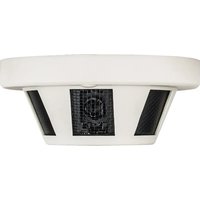
VTC-SMKC4 - Appareil photo Vitek - Notice d'utilisation et mode d'emploi gratuit
Retrouvez gratuitement la notice de l'appareil VTC-SMKC4 Vitek au format PDF.


| Type de produit | Appareil photo numérique compact |
| Marque | Vitek |
| Modèle | VTC-SMKC4 |
| Capteur | 20 mégapixels |
| Zoom optique | 8x |
| Écran | LCD 2,7 pouces |
| Résolution vidéo | Full HD 1080p |
| Stockage | Carte SD/SDHC (non incluse) |
| Alimentation | 2 piles AA ou batterie rechargeable lithium-ion |
| Dimensions (L x H x P) | 100 x 60 x 25 mm |
| Poids | 150 g (sans piles) |
| Fonctions principales | Prise de photos, enregistrement vidéo, stabilisation d'image, détection de visage, modes scène |
| Entretien et nettoyage | Nettoyer avec un chiffon doux et sec. Éviter l'humidité et les produits abrasifs. |
| Sécurité | Ne pas exposer à des températures extrêmes, à l'eau ou aux chocs. Tenir hors de portée des enfants. |
| Pièces détachées et réparabilité | Batterie, chargeur, câble USB disponibles. Contacter le service après-vente Vitek. |
| Informations générales | Notice disponible en téléchargement PDF. Garantie 2 ans. |
FOIRE AUX QUESTIONS - VTC-SMKC4 Vitek
Questions des utilisateurs sur VTC-SMKC4 Vitek
0 question sur cet appareil. Repondez a celles que vous connaissez ou posez la votre.
Poser une nouvelle question sur cet appareil
Téléchargez la notice de votre Appareil photo au format PDF gratuitement ! Retrouvez votre notice VTC-SMKC4 - Vitek et reprennez votre appareil électronique en main. Sur cette page sont publiés tous les documents nécessaires à l'utilisation de votre appareil VTC-SMKC4 de la marque Vitek.
MODE D'EMPLOI VTC-SMKC4 Vitek
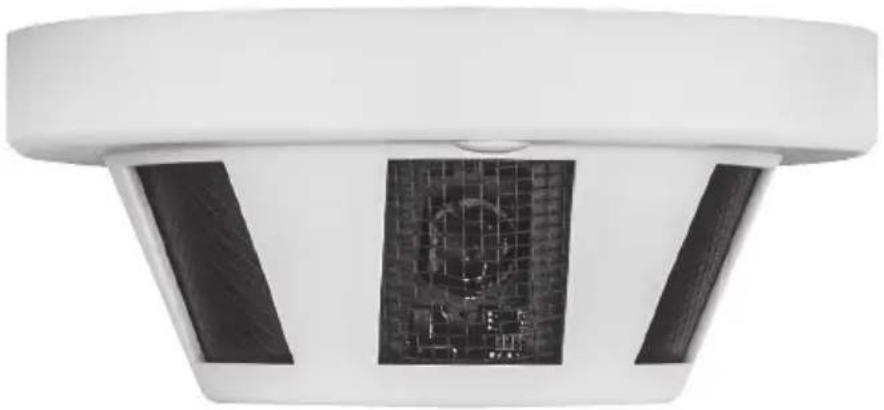
FEATURES:
• 1/3" 2.1 MegaPixel Progressive Scan CMOS
• 2.1 MegaPixel (1080p / 720p)
• HD-TVI / AHD / CVI / CVBS (Selectable) Video Output
• 1 Lux at F1.2 / 0.1 Lux (B/W)
• 3.7mm Fixed lens Included
• Over 1500' HD Video Transmission (Depending on cable characteristics and integrity)
• 12VDC Operation
Safety Precaution
• To prevent fire or shock hazard, do not expose the unit to rain or moisture.
- To prevent electric shocks and risk of fire hazards, do NOT use other than specific power source.

The symbol is intended to alert the user to the presence of uninsulated "dangerous voltage" within the product's enclosure that may be of sufficient magnitude to constitute a risk of electric shock to persons.

The symbol is intended to alert the user to the presence of important operating and maintenance(servicing) instructions in the literature accompanying the unit.

- Warning :
This equipment has been tested and found to comply with the limits for a Class A digital device, pursuant to part 15 of the FCC Rules. These limits are designed to provide reasonable protection against harmful interference when the equipment is operated in a commercial environment. This equipment generates, uses, and can radiate radio frequency energy and, if not installed and used in accordance with the instruction manual, may cause harmful interference to radio communications. Operation of this equipment in a residential area is likely to cause harmful interference in which case the user will be required to correct the interference at his own expense.
- Caution :
Any changes or modifications in construction of this device which are not expressly approved by the party responsible for compliance could void the user's authority to operate the equipment.
Mains power quality should be that of a typical commercial environment. If the user of the model requires continued operation during power mains interruptions, it is recommended that the model be powered from an uninterruptible power supply (UPS) or a battery.
LIMITED PRODUCT WARRANTY
VITEK products carry a three (3) year limited warranty. VITEK warrants to the purchaser that products manufactured by VITEK are free of any rightful claim of infringement or the like, and when used in the manner intended, will be free of defects in materials and workmanship for a period of three (3) years, or as otherwise stated above, from the date of purchase by the end user. This warranty is nontransferable and extends only to the original buyer or end user customer of a VITEK Authorized Reseller.
The product must have been used only for its intended purpose, and not been subjected to damage by misuse, willful or accidental damage, caused by excessive voltage or lightning.
The product must not have been tampered with in any way or the guarantee will be considered null and void.
This guarantee does not affect your statutory rights.
Contact your local VITEK Reseller should servicing become necessary.
VITEK makes no warranty or guarantee whatsoever with respect to products sold or purchased through unauthorized sales channels.
Warranty support is available only if product is purchased through a VITEK Authorized Reseller.
Connections
- Connect the camera's BNC video input to the video input on a digital video recorder
- Connect the camera's 12VDC power output to a power supply appropriate for installation
Installation
1) Disconnect power before installation.
2) Confirm proper 12VDC power supply is used to prevent damage to the camera.
3) Do not use in an environment beyond the boundaries of the specifications.
Power & Video Connections
Connect the HD-TVI Video or AHD/CVBS video connector to a BNC patch cable, then to a DVR. Next connect the power connector to a 12VDC power adaptor.

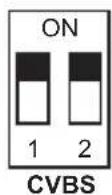
Video Output Mode Switch:
Select the desired video mode using the dip switches contained within the on-cable Output Mode Switch as follows:



Main Menu
![graph TD A["AE"] --> B["Exposure"] C["WB"] --> B D["Day - Night"] --> B E["Video Setting"] --> B F["Language"] --> B G["Reset"] --> H["WB"] I["Save - Exit"] --> J["Day / Night"] K["Exit"] --> L["Video Setting"] M["Advertisement"] --> N["Contrast"] O["Image Size"] --> P["Transfer Mode"] Q["Format"] -…](/content/2026/07/1471374/images/e44b4f2c002a4d62ec9b0653be1a6637a3917bdc97148d9a5136cffb161741d4.jpg)
snoitacificepS
| Image Device | 1/3" 2.1 MegaPixel Progressive Scan CMOS |
| Resolution | HD-TVI / AHD / CVI: 2.1 MegaPixel / CVBS: 960H |
| Effective Pixels | 1920x1080 |
| S/N Ratio | 48dB or more |
| Built-In Lens | Pinhole 3.7mm Fixed |
| Minimum Illumination | 1 Lux at F1.2 / 0.1 Lux (B/W) |
| Electronic Shutter | Auto (1/30sec ~ 1/60,000sec) |
| DNR | 3D-DNR |
| Gain Control | Auto |
| White Balance | ATW |
| HD Transmission Range | Over 1500° (Depending on cable characteristics and integrity) |
| Power Source | 12VDC |
| Power Consumption | 100mA |
| Operation Temperature | -10° ~ 50°C (14° ~ 122°F) Less Than 80% RH |
| Dimensions | 5.12" x 2.29" (130 x 58mm) |


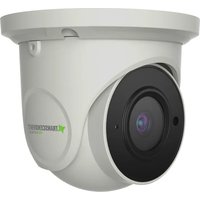
Marque : Vitek
Modèle : VTC-SMKC4
Catégorie : Appareil photo